
windows 安装mysql 非常之详细
安装
1.下载安装包
2.解压包
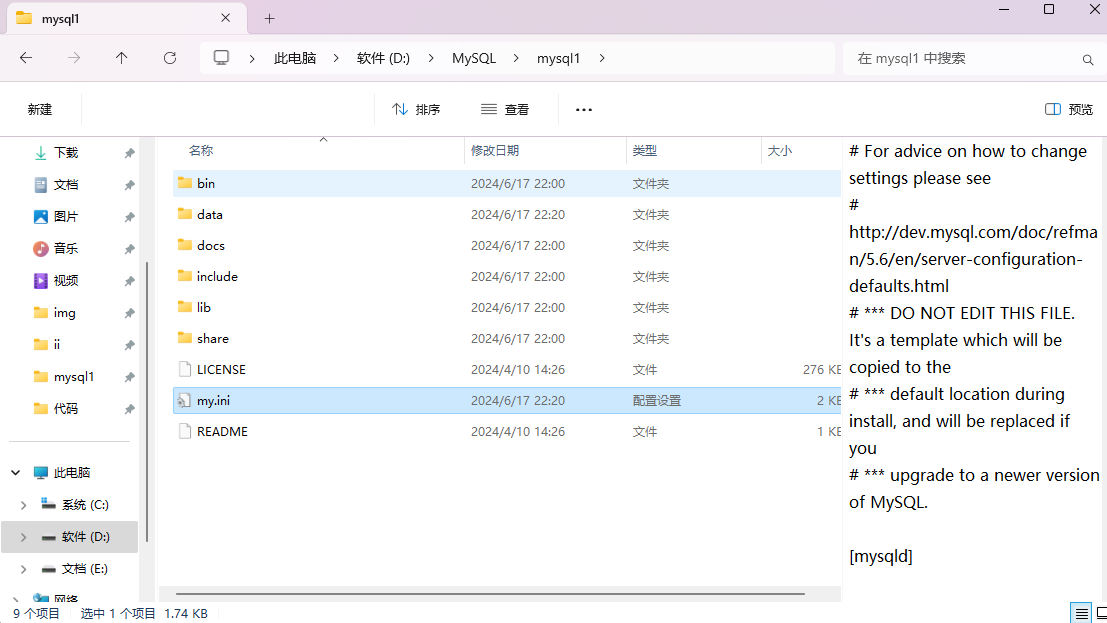
3.文件夹内创建my.ini配置文件,并添加内容
# For advice on how to change settings please see

# http://dev.mysql.com/doc/refman/5.6/en/server-configuration-defaults.html

# *** DO NOT EDIT THIS FILE. It's a template which will be copied to the

# *** default location during install, and will be replaced if you

# *** upgrade to a newer version of MySQL.

[mysqld]

# Remove leading # and set to the amount of RAM for the most important data

# cache in MySQL. Start at 70% of total RAM for dedicated server, else 10%.

# innodb_buffer_pool_size = 128M

# Remove leading # to turn on a very important data integrity option: logging

# changes to the binary log between backups.

# log_bin

# These are commonly set, remove the # and set as required.

# 设置mysql的安装目录

basedir = D:\\MySQL\\mysql1

# 设置mysql数据库的数据的存放目录

datadir = D:\\MySQL\\mysql1\\data

# 设置3306端口

port = 3306

# server_id = .....

# Remove leading # to set options mainly useful for reporting servers.

# The server defaults are faster for transactions and fast SELECTs.

# Adjust sizes as needed, experiment to find the optimal values.

# join_buffer_size = 128M

# sort_buffer_size = 2M

# read_rnd_buffer_size = 2M

sql_mode = NO_ENGINE_SUBSTITUTION,STRICT_TRANS_TABLES

# 允许最大连接数

max_connections = 200

# 允许连接失败的次数。这是为了防止有人从该主机试图攻击数据库系统

max_connect_errors = 10

# 服务端使用的字符集默认为UTF8

character-set-server = utf8mb4

# 创建新表时将使用的默认存储引擎

default-storage-engine = INNODB

[mysql]

# 设置mysql客户端默认字符集

default-character-set = utf8mb4

[client]

# 设置mysql客户端连接服务端时默认使用的端口

port=3306

default-character-set = utf8mb4
4.使用cmd管理员模式进入mysql的bin目录下
cd D:\MySQL\mysql1\bin
5.执行数据库初始化
mysqld --initialize --console

@localhost:密码
这个密码一定要记住
6.运行安装服务
mysqld.exe -install
如果需要改服务名的话
mysqld.exe -install MySQL2

7.运行
net start mysql
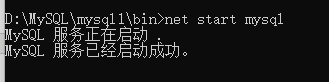
但是目前只能通过localhost也就是本机登录
继续cmd管理员模式进入安装目录的bin文件下
登录mysql
mysql -u root -p
输入刚刚保存的密码(这里只能手打不能粘贴)
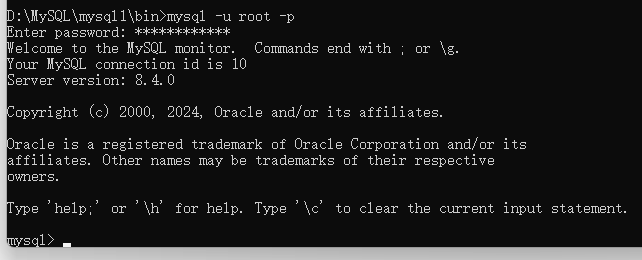
此时已进入到mysql里面
选择数据库
use mysql
更改user表中的host,把localhost改为%
update user set host='%' where user='root';
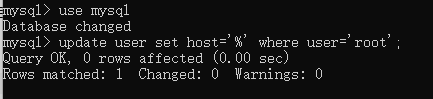
刷新权限
flush privileges;

修改mysql登录密码(需要先登录)
alter user'root'@'localhost' identified with mysql_native_password by '你的密码';
mysql -u root -p
windows 安装mysql 非常之详细的更多相关文章
- windows 安装mysql 步骤
Windows 安装mysql 5.7.12教程 1.在官网下载mysql5.7.12.zip并解压 复制默认配置文件my-default.ini,并命名为my.ini 使用记事本打开,修改如下配置 ...
- windows 安装 MySQL
windows 安装 MySQL MySQL 目录结构 成功完成 MySQL 数据库的安装和配置!
- windows安装mysql示例
1. 下载mysql安装包,如: mysql-5.6.34-winx64.zip2. 解压安装包到指定目录,如:D盘,即:D:\mysql-5.6.34-winx643. 配置 cd D:\mysql ...
- windows 安装MySql
转载:http://blog.csdn.net/longyuhome/article/details/7913375 Win7系统安装MySQL5.5.21图解 大家都知道MySQL是一款中.小型关系 ...
- windows10上安装mysql(详细步骤)
2016年09月06日 08:09:34 阅读数:46198 环境:windwos 10(1511) 64bit.mysql 5.7.14 时间:2016年9月5日 一.下载mysql 1. 在浏览器 ...
- 阿里云服务器上安装mysql的详细步骤
阿里云安装mysql (1)下载mysql安装包,去mysql官网下载对应的包 mysql数据库官方下载网址: https://downloads.mysql.com/archives/commu ...
- Windows安装MySQL免安装版
安装环境: win7 64位 IP地址:192.168.2.37 防火墙已经关闭 一.安装MySQL5.7.14免安装版 1.解压文件 2.新建my.ini文件 data文件夹自动生成 my.ini里 ...
- Windows安装MySQL解压版
1:解压 2:设置环境变量 3:修改my.ini [mysqld] basedir = D:\MySQL\Server\mysql--win32 datadir = D:\MySQL\Server\d ...
- windows安装mysql教程2017最新
1.首先在mysql官网下载最新版mysql, 附上链接点击打开链接,根据你的系统型号选择对应的包下载,大约300多兆,版本号为5.7.19 下载完之后,解压缩,是一个标准的mysql文件 2.第二步 ...
- centOS下安装mysql workbench详细步骤
step0:安装mysql 在按照workbench之前,先安装mysql.指令是 yum install mysql mysql-server mysql-libs mysql-server 关于m ...
随机推荐
- [SVG] JS 动态加载 svg 修改 svg 属性
svg 概念一览: https://javascript.ruanyifeng.com/htmlapi/svg.html加载 svg: // for example: $('body').load(' ...
- [FE] uni-app Card 卡片组件 uni-card 用法
使用 uni-card 和其它组件没有什么区别,关注支持的属性和事件即可. 对于属性,需要特别注意值的类型,比如不要把非字符串的当做字符串处理. 举例,如下 is-full 需要 Boolean 类型 ...
- 2018-11-19-win10-uwp-使用-Azure-DevOps-自动构建
title author date CreateTime categories win10 uwp 使用 Azure DevOps 自动构建 lindexi 2018-11-19 15:26:4 +0 ...
- 2019-10-28-dotnet-代码调试方法
title author date CreateTime categories dotnet 代码调试方法 lindexi 2019-10-28 08:50:11 +0800 2019-6-5 9:4 ...
- 2019-10-7-WPF-will-break-when-an-exception-be-throw-in-the-StylusPlugIn
title author date CreateTime categories WPF will break when an exception be throw in the StylusPlugI ...
- 2024-04-27:用go语言,在一个下标从 1 开始的 8 x 8 棋盘上,有三个棋子,分别是白色车、白色象和黑色皇后。 给定这三个棋子的位置,请计算出要捕获黑色皇后所需的最少移动次数。 需要注意
2024-04-27:用go语言,在一个下标从 1 开始的 8 x 8 棋盘上,有三个棋子,分别是白色车.白色象和黑色皇后. 给定这三个棋子的位置,请计算出要捕获黑色皇后所需的最少移动次数. 需要注意 ...
- [Python急救站]基于Transformer Models模型完成GPT2的学生AIGC学习训练模型
为了AIGC的学习,我做了一个基于Transformer Models模型完成GPT2的学生AIGC学习训练模型,指在训练模型中学习编程AI. 在编程之前需要准备一些文件: 首先,先win+R打开运行 ...
- idea在商店无法搜索到插件
背景:我使用的版本是IDEA ultimate 2019.2 版本印象中,最初安装的时候,商店还是可以用的,突然有一天,就无法使用了.下边直入正题: 解决办法:1.首先浏览器登陆下:https://p ...
- ansible系列(31)--ansible实战之部署WEB集群架构(1)
目录 1. WEB集群环境说明 2. ansible部署WEB集群实现思路 3. ansible基础环境部署 1. WEB集群环境说明 WEB集群环境说明如下: 客户端:模拟外网主机,地址:192.1 ...
- 80x86汇编—指令系统
文章目录 MOV 非法传送 XCHG XLAT 堆栈指令 push 和 pop 标志寄存器指令 重点理解CF与OF与SF实际应用中的关系 运算指令 控制转移类指令(重点) 条件转移指令 顺序是按照我们 ...