
【PostgreSQL】下载安装PgSQL
官网下载地址:
https://www.enterprisedb.com/downloads/postgres-postgresql-downloads
Windows平台
官网直接提供exe安装包,没有手动安装的压缩包
postgresql-14.4-1-windows-x64.exe
几个重要的安装选项
- 安装界面会指定服务程序和库两个路径,可以自己手动选择
- 指定默认账户的密码
- 选择额外的安装项(这里我选了一个JDBC驱动包,方便DBeaver访问)
上述安装完成之后,使用navicat进行连接访问,发现乱码失败:
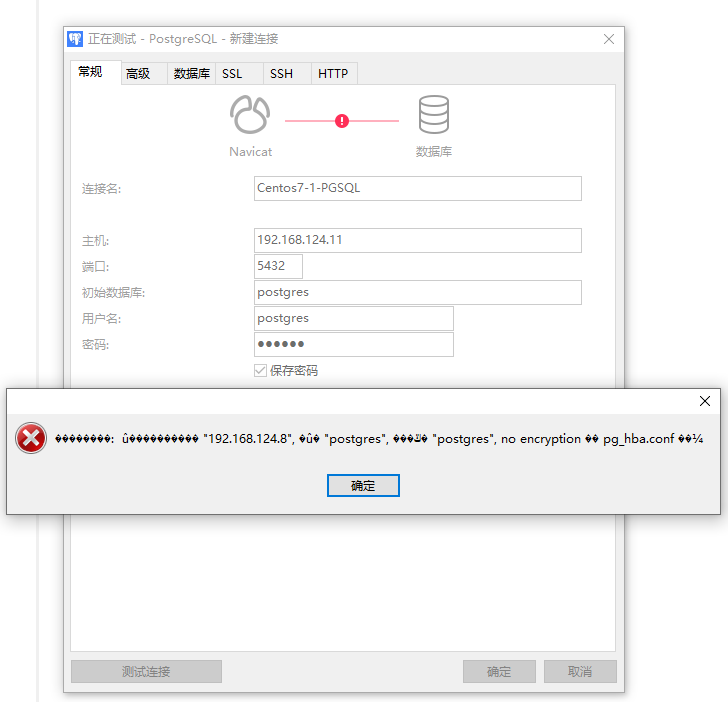
参考这篇文章,发现是配置在DB目录的配置
https://blog.csdn.net/m0_59322443/article/details/122967482
配置文件位置:
D:\pgsql-14\pg_hba.conf
更改IPV4的连接的参数
# IPv4 local connections:

# host    all             all             127.0.0.1/32            scram-sha-256

host    all             all             0.0.0.0/0          scram-sha-256
另外,关闭Windows的防火墙
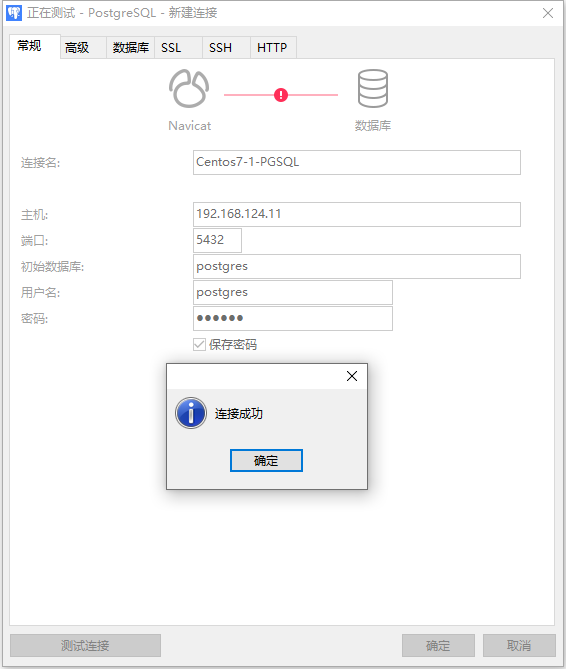
再次连接时访问成功
Centos7平台安装:
Linux在红帽和Centos平台有直接对接的RPM资源,只需要执行官网上的yum命令
https://www.postgresql.org/download/linux/redhat/
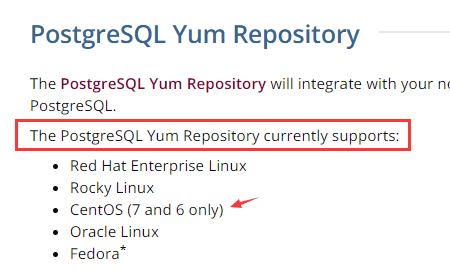
但是目前官方提供的yum源仅支持Centos6,7两个版本,没有8版本
这是我以Centos7为例安装的过程:
[root@centos7-1 ~]# sudo yum install -y https://download.postgresql.org/pub/repos/yum/reporpms/EL-7-x86_64/pgdg-redhat-repo-latest.noarch.rpm
已加载插件:fastestmirror, langpacks
Repository base is listed more than once in the configuration
Repository updates is listed more than once in the configuration
Repository extras is listed more than once in the configuration
Repository centosplus is listed more than once in the configuration pgdg-redhat-repo-latest.noarch.rpm | 8.1 kB 00:00:00
正在检查 /var/tmp/yum-root-bnVr0J/pgdg-redhat-repo-latest.noarch.rpm: pgdg-redhat-repo-42.0-24.noarch
/var/tmp/yum-root-bnVr0J/pgdg-redhat-repo-latest.noarch.rpm 将被安装
正在解决依赖关系
--> 正在检查事务
---> 软件包 pgdg-redhat-repo.noarch.0.42.0-24 将被 安装
--> 解决依赖关系完成
base/7/x86_64 | 3.6 kB 00:00:00
epel/x86_64/metalink | 8.0 kB 00:00:00
epel/x86_64 | 4.7 kB 00:00:00
epel/x86_64/updateinfo | 1.1 MB 00:00:00
epel/x86_64/primary_db | 7.0 MB 00:00:02
extras/7/x86_64 | 2.9 kB 00:00:00
updates/7/x86_64 | 2.9 kB 00:00:00
updates/7/x86_64/primary_db | 16 MB 00:00:02 依赖关系解决 ============================================================================================================================================================================================================================================================================================================================================
Package 架构 版本 源 大小
============================================================================================================================================================================================================================================================================================================================================
正在安装:
pgdg-redhat-repo noarch 42.0-24 /pgdg-redhat-repo-latest.noarch 11 k 事务概要
============================================================================================================================================================================================================================================================================================================================================
安装 1 软件包 总计:11 k
安装大小:11 k
Downloading packages:
Running transaction check
Running transaction test
Transaction test succeeded
Running transaction
正在安装 : pgdg-redhat-repo-42.0-24.noarch 1/1
验证中 : pgdg-redhat-repo-42.0-24.noarch 1/1 已安装:
pgdg-redhat-repo.noarch 0:42.0-24 完毕!
[root@centos7-1 ~]#
[root@centos7-1 ~]# sudo yum install -y postgresql14-server
已加载插件:fastestmirror, langpacks
Repository base is listed more than once in the configuration
Repository updates is listed more than once in the configuration
Repository extras is listed more than once in the configuration
Repository centosplus is listed more than once in the configuration
Determining fastest mirrors
* base: mirrors.aliyun.com
* epel: mirror.sjtu.edu.cn
* extras: mirrors.aliyun.com
* updates: mirrors.aliyun.com
pgdg-common/7/x86_64/signature | 198 B 00:00:00
从 file:///etc/pki/rpm-gpg/RPM-GPG-KEY-PGDG 检索密钥
导入 GPG key 0x442DF0F8:
用户ID : "PostgreSQL RPM Building Project <pgsql-pkg-yum@postgresql.org>"
指纹 : 68c9 e2b9 1a37 d136 fe74 d176 1f16 d2e1 442d f0f8
软件包 : pgdg-redhat-repo-42.0-24.noarch (@/pgdg-redhat-repo-latest.noarch)
来自 : /etc/pki/rpm-gpg/RPM-GPG-KEY-PGDG
pgdg-common/7/x86_64/signature | 2.9 kB 00:00:00 !!!
pgdg10/7/x86_64/signature | 198 B 00:00:00
从 file:///etc/pki/rpm-gpg/RPM-GPG-KEY-PGDG 检索密钥
导入 GPG key 0x442DF0F8:
用户ID : "PostgreSQL RPM Building Project <pgsql-pkg-yum@postgresql.org>"
指纹 : 68c9 e2b9 1a37 d136 fe74 d176 1f16 d2e1 442d f0f8
软件包 : pgdg-redhat-repo-42.0-24.noarch (@/pgdg-redhat-repo-latest.noarch)
来自 : /etc/pki/rpm-gpg/RPM-GPG-KEY-PGDG
pgdg10/7/x86_64/signature | 3.6 kB 00:00:00 !!!
pgdg11/7/x86_64/signature | 198 B 00:00:00
从 file:///etc/pki/rpm-gpg/RPM-GPG-KEY-PGDG 检索密钥
导入 GPG key 0x442DF0F8:
用户ID : "PostgreSQL RPM Building Project <pgsql-pkg-yum@postgresql.org>"
指纹 : 68c9 e2b9 1a37 d136 fe74 d176 1f16 d2e1 442d f0f8
软件包 : pgdg-redhat-repo-42.0-24.noarch (@/pgdg-redhat-repo-latest.noarch)
来自 : /etc/pki/rpm-gpg/RPM-GPG-KEY-PGDG
pgdg11/7/x86_64/signature | 3.6 kB 00:00:00 !!!
pgdg12/7/x86_64/signature | 198 B 00:00:00
从 file:///etc/pki/rpm-gpg/RPM-GPG-KEY-PGDG 检索密钥
导入 GPG key 0x442DF0F8:
用户ID : "PostgreSQL RPM Building Project <pgsql-pkg-yum@postgresql.org>"
指纹 : 68c9 e2b9 1a37 d136 fe74 d176 1f16 d2e1 442d f0f8
软件包 : pgdg-redhat-repo-42.0-24.noarch (@/pgdg-redhat-repo-latest.noarch)
来自 : /etc/pki/rpm-gpg/RPM-GPG-KEY-PGDG
pgdg12/7/x86_64/signature | 3.6 kB 00:00:00 !!!
pgdg13/7/x86_64/signature | 198 B 00:00:00
从 file:///etc/pki/rpm-gpg/RPM-GPG-KEY-PGDG 检索密钥
导入 GPG key 0x442DF0F8:
用户ID : "PostgreSQL RPM Building Project <pgsql-pkg-yum@postgresql.org>"
指纹 : 68c9 e2b9 1a37 d136 fe74 d176 1f16 d2e1 442d f0f8
软件包 : pgdg-redhat-repo-42.0-24.noarch (@/pgdg-redhat-repo-latest.noarch)
来自 : /etc/pki/rpm-gpg/RPM-GPG-KEY-PGDG
pgdg13/7/x86_64/signature | 3.6 kB 00:00:00 !!!
pgdg14/7/x86_64/signature | 198 B 00:00:00
从 file:///etc/pki/rpm-gpg/RPM-GPG-KEY-PGDG 检索密钥
导入 GPG key 0x442DF0F8:
用户ID : "PostgreSQL RPM Building Project <pgsql-pkg-yum@postgresql.org>"
指纹 : 68c9 e2b9 1a37 d136 fe74 d176 1f16 d2e1 442d f0f8
软件包 : pgdg-redhat-repo-42.0-24.noarch (@/pgdg-redhat-repo-latest.noarch)
来自 : /etc/pki/rpm-gpg/RPM-GPG-KEY-PGDG
pgdg14/7/x86_64/signature | 3.6 kB 00:00:00 !!!
(1/11): pgdg11/7/x86_64/group_gz | 245 B 00:00:01
(2/11): pgdg10/7/x86_64/group_gz | 245 B 00:00:01
(3/11): pgdg12/7/x86_64/group_gz | 245 B 00:00:00
(4/11): pgdg13/7/x86_64/group_gz | 246 B 00:00:00
(5/11): pgdg-common/7/x86_64/primary_db | 163 kB 00:00:01
(6/11): pgdg14/7/x86_64/group_gz | 244 B 00:00:00
(7/11): pgdg14/7/x86_64/primary_db | 115 kB 00:00:00
(8/11): pgdg11/7/x86_64/primary_db | 411 kB 00:00:02
(9/11): pgdg12/7/x86_64/primary_db | 290 kB 00:00:01
(10/11): pgdg13/7/x86_64/primary_db | 194 kB 00:00:01
(11/11): pgdg10/7/x86_64/primary_db | 381 kB 00:00:07
正在解决依赖关系
--> 正在检查事务
---> 软件包 postgresql14-server.x86_64.0.14.4-1PGDG.rhel7 将被 安装
--> 正在处理依赖关系 postgresql14-libs(x86-64) = 14.4-1PGDG.rhel7,它被软件包 postgresql14-server-14.4-1PGDG.rhel7.x86_64 需要
--> 正在处理依赖关系 postgresql14(x86-64) = 14.4-1PGDG.rhel7,它被软件包 postgresql14-server-14.4-1PGDG.rhel7.x86_64 需要
--> 正在处理依赖关系 libpq.so.5()(64bit),它被软件包 postgresql14-server-14.4-1PGDG.rhel7.x86_64 需要
--> 正在处理依赖关系 libicuuc.so.50()(64bit),它被软件包 postgresql14-server-14.4-1PGDG.rhel7.x86_64 需要
--> 正在处理依赖关系 libicui18n.so.50()(64bit),它被软件包 postgresql14-server-14.4-1PGDG.rhel7.x86_64 需要
--> 正在检查事务
---> 软件包 libicu.x86_64.0.50.2-4.el7_7 将被 安装
---> 软件包 postgresql14.x86_64.0.14.4-1PGDG.rhel7 将被 安装
---> 软件包 postgresql14-libs.x86_64.0.14.4-1PGDG.rhel7 将被 安装
--> 解决依赖关系完成 依赖关系解决 ============================================================================================================================================================================================================================================================================================================================================
Package 架构 版本 源 大小
============================================================================================================================================================================================================================================================================================================================================
正在安装:
postgresql14-server x86_64 14.4-1PGDG.rhel7 pgdg14 5.5 M
为依赖而安装:
libicu x86_64 50.2-4.el7_7 base 6.9 M
postgresql14 x86_64 14.4-1PGDG.rhel7 pgdg14 1.5 M
postgresql14-libs x86_64 14.4-1PGDG.rhel7 pgdg14 268 k 事务概要
============================================================================================================================================================================================================================================================================================================================================
安装 1 软件包 (+3 依赖软件包) 总下载量:14 M
安装大小:55 M
Downloading packages:
(1/4): libicu-50.2-4.el7_7.x86_64.rpm | 6.9 MB 00:00:01
warning: /var/cache/yum/x86_64/7/pgdg14/packages/postgresql14-libs-14.4-1PGDG.rhel7.x86_64.rpm: Header V4 DSA/SHA1 Signature, key ID 442df0f8: NOKEY 50% [======================================================================= ] 2.1 MB/s | 7.1 MB 00:00:03 ETA
postgresql14-libs-14.4-1PGDG.rhel7.x86_64.rpm 的公钥尚未安装
(2/4): postgresql14-libs-14.4-1PGDG.rhel7.x86_64.rpm | 268 kB 00:00:03
(3/4): postgresql14-server-14.4-1PGDG.rhel7.x86_64.rpm | 5.5 MB 00:00:23
(4/4): postgresql14-14.4-1PGDG.rhel7.x86_64.rpm | 1.5 MB 00:02:05
--------------------------------------------------------------------------------------------------------------------------------------------------------------------------------------------------------------------------------------------------------------------------------------------------------------------------------------------
总计 115 kB/s | 14 MB 00:02:05
从 file:///etc/pki/rpm-gpg/RPM-GPG-KEY-PGDG 检索密钥
导入 GPG key 0x442DF0F8:
用户ID : "PostgreSQL RPM Building Project <pgsql-pkg-yum@postgresql.org>"
指纹 : 68c9 e2b9 1a37 d136 fe74 d176 1f16 d2e1 442d f0f8
软件包 : pgdg-redhat-repo-42.0-24.noarch (@/pgdg-redhat-repo-latest.noarch)
来自 : /etc/pki/rpm-gpg/RPM-GPG-KEY-PGDG
Running transaction check
Running transaction test
Transaction test succeeded
Running transaction
正在安装 : libicu-50.2-4.el7_7.x86_64 1/4
正在安装 : postgresql14-libs-14.4-1PGDG.rhel7.x86_64 2/4
正在安装 : postgresql14-14.4-1PGDG.rhel7.x86_64 3/4
正在安装 : postgresql14-server-14.4-1PGDG.rhel7.x86_64 4/4
验证中 : postgresql14-server-14.4-1PGDG.rhel7.x86_64 1/4
验证中 : postgresql14-14.4-1PGDG.rhel7.x86_64 2/4
验证中 : postgresql14-libs-14.4-1PGDG.rhel7.x86_64 3/4
验证中 : libicu-50.2-4.el7_7.x86_64 4/4 已安装:
postgresql14-server.x86_64 0:14.4-1PGDG.rhel7 作为依赖被安装:
libicu.x86_64 0:50.2-4.el7_7 postgresql14.x86_64 0:14.4-1PGDG.rhel7 postgresql14-libs.x86_64 0:14.4-1PGDG.rhel7 完毕!
[root@centos7-1 ~]# sudo /usr/pgsql-14/bin/postgresql-14-setup initdb
Initializing database ... OK [root@centos7-1 ~]# sudo systemctl enable postgresql-14
Created symlink from /etc/systemd/system/multi-user.target.wants/postgresql-14.service to /usr/lib/systemd/system/postgresql-14.service.
[root@centos7-1 ~]# sudo systemctl start postgresql-14
[root@centos7-1 ~]#
在访问Centos平台的PGSQL也会出现此问题:
[root@centos7-1 ~]# psql -p 5432 -U postgres

psql: 错误: 连接到套接字"/var/run/postgresql/.s.PGSQL.5432"上的服务器失败:致命错误:  对用户"postgres"的对等认证失败
同样,找到PGSQL的hba配置文件:
[root@centos7-1 ~]# find / -name pg_hba.conf

/var/lib/pgsql/14/data/pg_hba.conf
编辑配置文件:
设置了Local本地访问PGSQL时直接进入(trust)
# "local" is for Unix domain socket connections only

#local   all             all                                     peer

local   all             all                                     trust

# IPv4 local connections:

#host    all             all             127.0.0.1/32            scram-sha-256

host    all             all             0.0.0.0/0            scram-sha-256
修改Postgres默认账号的密码
# 之前已经设置了trust模式

psql -U postgres

# 进入后执行密码更改

ALTER USER postgres WITH PASSWORD '123456';

# 然后退出

quit
需要重启生效,但是发现 连接不支持授权方法
Autentication method 10 not supported
需要更改成全部trust方式
# TYPE  DATABASE        USER            ADDRESS                 METHOD

# "local" is for Unix domain socket connections only

local   all             all                                     trust

# IPv4 local connections:

host    all             all             0.0.0.0/0               trust

# IPv6 local connections:

host    all             all             ::1/128                 trust

# Allow replication connections from localhost, by a user with the

# replication privilege.

local   replication     all                                     trust

host    replication     all             127.0.0.1/32            trust

host    replication     all             ::1/128                 trust
另外在pg配置文件中:
/var/lib/pgsql/14/data/postgresql.conf
监听主机改成任意可访问:
listen_addresses = '*'
【PostgreSQL】下载安装PgSQL的更多相关文章
- PostgreSQL的下载安装
下载地址:http://www.postgres.cn/download 下载地址:http://www.filehorse.com/download-postgresql-64/ 下载地址2:htt ...
- postgresql+slony-i安装配置主从
slon软件下载地址:slony1-1.2.6 http://slony.info/downloads/1.2/source/ postgresql下载地址: http://www.postgresq ...
- Linux下的PostgreSQL简单安装手册
1. 安装环境 linux版本: CentOS release 6.2 (Final) pg版本 : postgresql-9.5.0 2. pg数据库下载地址 --http ...
- centos 安装PGSQL
centos 安装PGSQLCentOS下yum安装PostgreSQL目录 1 Configure YUM repository2 Install PGDG RPM file3 Install Po ...
- CentOS 6.3下PostgreSQL 的安装与配置
一.简介 PostgreSQL 是一种非常复杂的对象-关系型数据库管理系统(ORDBMS),也是目前功能最强大,特性最丰富和最复杂的自由软件数据库系统.有些特性甚至连商业数据库都不具备.这个起源于伯克 ...
- 最新版postgresql+pgboucer安装
安装postgresql: wget https://pgbouncer.github.io/downloads/files/1.7.2/pgbouncer-1.7.2.tar.gz wget htt ...
- Linux——CentOS 6.3下PostgreSQL 的安装与配置
一.简介 PostgreSQL 是一种非常复杂的对象-关系型数据库管理系统(ORDBMS),也是目前功能最强大,特性最丰富和最复杂的自由软件数据库系统.有些特性甚至连商业数据库 都不具备.这个起源于伯 ...
- PostgreSQL数据库安装
PostgreSQL数据库安装 postgresqllinux9.6.0 2018年01月31日 10时53分13秒 编译以及安装 源码编译 程序安装 数据库的启动和停止 启动数据库 关闭数据库 数据 ...
- PostgreSQL数据库安装Version10.5
PostgreSQL数据库安装,基于版本10.5安装, 在Linux系统上使用*.gz二进制压缩包手动安装. 操作系统:Red Hat Enterprise Linux Server release ...
- postgresql编译安装与调试(二)
接前文postgresql编译安装与调试(一),继续说说postgresql的编译安装与调试. 上一篇已经详细说明了如何在Linux系统上编译安装postgresql,这次我们在此基础上简单讲讲如何在 ...
随机推荐
- 一个或多个C文件编译KO
参考文档:.c文件如何编译为ko的MAKEFILE文件编写 - young525 - 博客园 (cnblogs.com) 文档组织结构 header目录:存放头文件 source目录:存放源文件 单个 ...
- 运行报错:找不到或无法加载主类 com.xxx.Application
springboot 项目下载到本地,用 idea 运行报错找不到或无法加载主类. 原因 项目内还没有编译,所以找不到主类文件,需要先编译项目. 解决方案 执行 mvn 编译命令: mvn compi ...
- CF437E The Child and Polygon
The Child and Polygon 题解 这世界这么大,遇到了这个奇奇怪怪的题. 这道题其实可以很自然的联想到卡特兰数. 在卡特兰数的计数中,有这么一个意义:\(C_n\) 表示把有 \(n+ ...
- 23201826-熊锋-第二次blog
一.前言 这三次pta作业第一次为答题判断程序-4,这是答题判断程序的第三次迭代,相较于答题判断三,新增了各种题型及其不同种类的答案,并且出现多选题,使得这次题目相当棘手,具有很大的挑战性.第二次为家 ...
- (编程语言界的丐帮 C#).NET Framework 读取Excel到DataTable
(编程语言界的丐帮 C#).NET Framework 读取Excel到DataTable 生成DataTable到Excel,支持 2007 .xlsx,2003 .xls. nuget 引用 NP ...
- 记一次 .NET某游戏币自助机后端 内存暴涨分析
一:背景 1. 讲故事 前些天有位朋友找到我,说他们的程序内存会偶发性暴涨,自己分析了下是非托管内存问题,让我帮忙看下怎么回事?哈哈,看到这个dump我还是非常有兴趣的,居然还有这种游戏币自助机类型的 ...
- work13
任务要求: 1.建立一个企鹅类,企鹅有名字(可以自由添加属性)2.把多个企鹅的信息添加到集合中3.查看企鹅的数量4.遍历输出所有企鹅的信息5.删除集合中索引值是2的企鹅的元素 任务描述: 定义一个老鼠 ...
- Java中的ThreadLocal和 InheritableThreadLocal
Java中的ThreadLocal和 InheritableThreadLocal package com.example.core.mydemo.java; /** * output * Threa ...
- mysql case when使用
## mysql case when使用 SELECT order_no,case is_test when 0 then '否'when 1 then '是'end as '是否测试' from ` ...
- windows 安装mysql 非常之详细
安装 1.下载安装包 2.解压包 3.文件夹内创建my.ini配置文件,并添加内容 # For advice on how to change settings please see # http: ...