
Electron 的 安装
背景
因为搞嵌入式开发的时候,每次烧写不同版本的固件的时候,经常需要重命名,有时候烧错版本我也不知道;
因此我认为对固件的管理比较麻烦,所以我希望能够有一个比较好的工具来做管理,找了一圈没有发现合适的,因此我决定自己搞。
找了一些界面设计的框架,QT 和 Electron 都不错。但是因为 搞嵌入式不能总是只会 C/C++,还是要懂点其他语言(哪怕是脚本)。
因此,我决定勇敢地迈出web的第一步。
介绍
总结:Electron是用于跨平台的桌面开发的框架,能够以web的形式设计界面。
大家感话:
Electron 是一个使用 JavaScript, HTML 和 CSS 等 Web 技术创建原生程序的框架,它负责比较难搞的部分,你只需把精力放在你的应用的核心上即可。
Electron相当于一个浏览器的外壳,可以把网页程序嵌入到壳里面,可以运行在桌面上的一个程序,可以把网页打包成一个在桌面运行的程序(软件)。
安装
nodejs
环境要求 v10.0 以上
首先进入node.js官网[https://nodejs.org/en/]下载node.js,并安装。
因为等待的时间会有点久,因此可以先将官方提供的例程给先clone下来,或者下载:
git clone https://github.com/electron/electron-api-demos
安装时的路径最好不要带有中文或者是空格,node验证安装情况:
node -v

v14.15.1
Electron
输入以下命令安装:
npm config set registry https://registry.npm.taobao.org/  # 设置npm镜像源为淘宝镜像

npm install -g electron # 进行全局安装

npm install -g electron-packager
输出结果:
C:\Users\Schips\AppData\Roaming\npm\electron -> C:\Users\Schips\AppData\Roaming\npm\node_modules\electron\cli.js

> core-js@3.7.0 postinstall C:\Users\Schips\AppData\Roaming\npm\node_modules\electron\node_modules\core-js

> node -e "try{require('./postinstall')}catch(e){}"

Thank you for using core-js ( https://github.com/zloirock/core-js ) for polyfilling JavaScript standard library!

The project needs your help! Please consider supporting of core-js on Open Collective or Patreon:

> https://opencollective.com/core-js

> https://www.patreon.com/zloirock

Also, the author of core-js ( https://github.com/zloirock ) is looking for a good job -)

> electron@11.0.2 postinstall C:\Users\Schips\AppData\Roaming\npm\node_modules\electron

> node install.js

Downloading electron-v11.0.2-win32-x64.zip: [==================================================] 100% ETA: 0.0 seconds

+ electron@11.0.2

added 87 packages from 98 contributors in 291.206s

 ╭────────────────────────────────────────────────────────────────╮

 │                                                                │

 │      New patch version of npm available! 6.14.8 -> 6.14.9      │

 │   Changelog: https://github.com/npm/cli/releases/tag/v6.14.9   │

 │               Run npm install -g npm to update!                │

 │                                                                │

 ╰────────────────────────────────────────────────────────────────╯
查看electron是否安装成功可通过命令electron -v查看。
可选的权限配置
reference:https://blog.csdn.net/weixin_38883338/article/details/100054550
注意,因为权限的问题,运行Electron可能会出现以下结果:
electron : 无法加载文件 C:\Users\Schips\AppData\Roaming\npm\electron.ps1,因为在此系统上禁止运行脚本。有关详细信息,请

参阅 https:/go.microsoft.com/fwlink/?LinkID=135170 中的 about_Execution_Policies。

所在位置 行:1 字符: 1

+ electron -v

+ ~~~~~~~~

    + CategoryInfo          : SecurityError: (:) [],PSSecurityException

    + FullyQualifiedErrorId : UnauthorizedAccess
解决方法:以管理员权限运行cmd或powershell,输入set-ExecutionPolicy RemoteSigned,按y回车
set-ExecutionPolicy RemoteSigned

执行策略更改

执行策略可帮助你防止执行不信任的脚本。更改执行策略可能会产生安全风险,如 https:/go.microsoft.com/fwlink/?LinkID=135170

中的 about_Execution_Policies 帮助主题所述。是否要更改执行策略?

[Y] 是(Y)  [A] 全是(A)  [N] 否(N)  [L] 全否(L)  [S] 暂停(S)  [?] 帮助 (默认值为“N”): y

PS C:\WINDOWS\system32> get-ExecutionPolicy

RemoteSigned
运行Electron例程
通过运行Electron例程来验证效果(上文已经提到提前下载):
git clone https://github.com/electron/electron-api-demos
根据例程提供的文档,输入下列的命令:
cd electron-api-demos

npm install

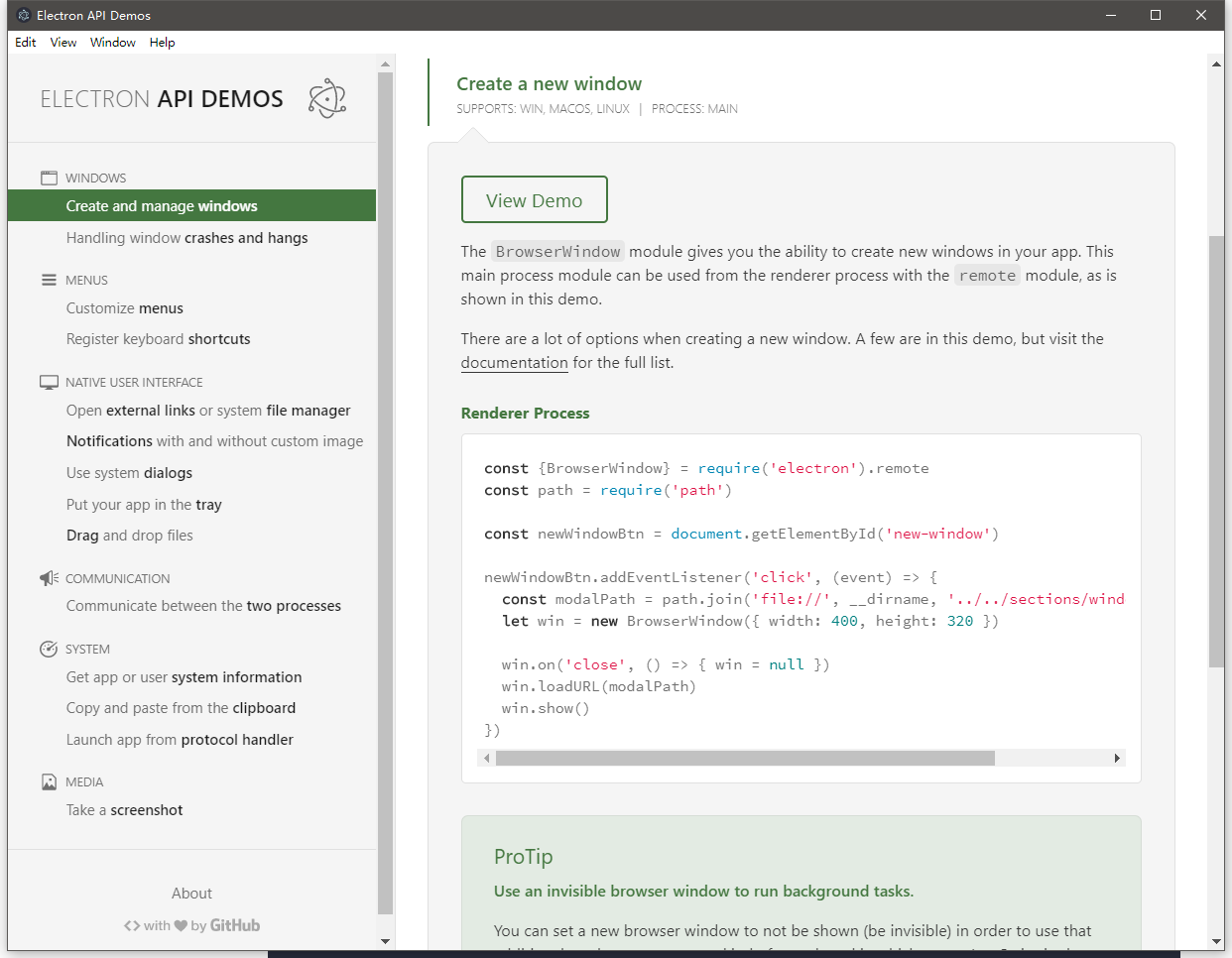
npm start
运行结果如下:
PS C:\cygwin64\home\Schips\electron-api-demos> npm install

> electron-chromedriver@3.0.0 install C:\cygwin64\home\Schips\electron-api-demos\node_modules\electron-chromedriver

> node ./download-chromedriver.js

> husky@0.14.3 install C:\cygwin64\home\Schips\electron-api-demos\node_modules\husky

> node ./bin/install.js

husky

setting up Git hooks

done

> core-js@3.6.5 postinstall C:\cygwin64\home\Schips\electron-api-demos\node_modules\global-agent\node_modules\core-js

> node -e "try{require('./postinstall')}catch(e){}"

Thank you for using core-js ( https://github.com/zloirock/core-js ) for polyfilling JavaScript standard library!

The project needs your help! Please consider supporting of core-js on Open Collective or Patreon:

> https://opencollective.com/core-js

> https://www.patreon.com/zloirock

Also, the author of core-js ( https://github.com/zloirock ) is looking for a good job -)

> electron@7.2.4 postinstall C:\cygwin64\home\Schips\electron-api-demos\node_modules\electron

> node install.js

Downloading electron-v7.2.4-win32-x64.zip: [===================================================] 100% ETA: 0.0 seconds

npm WARN optional SKIPPING OPTIONAL DEPENDENCY: fsevents@2.1.2 (node_modules\fsevents):

npm WARN notsup SKIPPING OPTIONAL DEPENDENCY: Unsupported platform for fsevents@2.1.2: wanted {"os":"darwin","arch":"any"} (current: {"os":"win32","arch":"x64"})

added 952 packages from 1237 contributors in 438.485s

13 packages are looking for funding

  run `npm fund` for details

PS C:\cygwin64\home\Schips\electron-api-demos> npm start

> electron-api-demos@2.0.2 start C:\cygwin64\home\Schips\electron-api-demos

> electron .

 (electron) 'getName function' is deprecated and will be removed. Please use 'name property' instead.

[08:53:08.854] [info] update-electron-app config looks good; aborting updates since app is in development mode

libpng warning: iCCP: cHRM chunk does not match sRGB
打包
进入你所在的Electron工程,将electron-package包安装到在项目下面:
npm install --save-dev electron-packager

npm WARN optional SKIPPING OPTIONAL DEPENDENCY: fsevents@2.1.2 (node_modules\fsevents):

npm WARN notsup SKIPPING OPTIONAL DEPENDENCY: Unsupported platform for fsevents@2.1.2: wanted {"os":"darwin","arch":"any"} (current: {"os":"win32","arch":"x64"})

+ electron-packager@12.2.0

added 3 packages from 5 contributors and updated 14 packages in 7.765s

13 packages are looking for funding

  run `npm fund` for details
安装完成之后,项目根目录下面的package.json文件里,会多出一条electron-package的版本号配置信息 :
  "devDependencies": {

    "@octokit/rest": "^16.3.2",

    "chai": "^3.4.1",

    "chai-as-promised": "^6.0.0",

    "check-for-leaks": "^1.2.1",

    "devtron": "^1.3.0",

    "electron-packager": "^12.2.0",

    "electron-winstaller": "^2.2.0",

    "husky": "^0.14.3",

    "mocha": "^5.2.0",

    "npm-run-all": "^4.0.2",

    "request": "^2.70.0",

    "rimraf": "^2.5.2",

    "signcode": "^0.5.0",

    "spectron": "^5.0.0",

    "standard": "^8.2.0",

    "tap": "^14.10.6"

  },
使用electron-builder打包
使用之前需要先安装yarn:
拓展阅读:
yarn是什么?简单来说是和npm一样的包管理工具,并对npm的一些弊端提供了优化和解决方案
yarn和npm的区别?安装速度更快,缓存了每个下载过的包,再次使用时无需重复下载。 同时利用并行下载以最大化资源利用率,
运行代码前会校验每个安装包的完整性和统一性,使其在不同系统上也能无差别的工作
官方推荐使用yarn的原因:
1、它可以更好地处理依赖关系。
2、可以使用 yarn clean 帮助减少最后构建文件的大小。
npm install -g yarn

> yarn@1.22.10 preinstall C:\Users\schips.huang\AppData\Roaming\npm\node_modules\yarn

> :; (node ./preinstall.js > /dev/null 2>&1 || true)

C:\Users\schips.huang\AppData\Roaming\npm\yarnpkg -> C:\Users\schips.huang\AppData\Roaming\npm\node_modules\yarn\bin\yarn.js

C:\Users\schips.huang\AppData\Roaming\npm\yarn -> C:\Users\schips.huang\AppData\Roaming\npm\node_modules\yarn\bin\yarn.js

+ yarn@1.22.10

added 1 package in 2.041s

yarn config set registry https://registry.npm.taobao.org/  # 设置yarn镜像源为淘宝镜像
配置打包工具,来到项目所在目录:
yarn add electron-builder --save-dev

PS E:\electron-api-demos-master> yarn add electron-builder --save-dev

yarn add v1.22.10

info No lockfile found.

warning package-lock.json found. Your project contains lock files generated by tools other than Yarn. It is advised not to mix package managers in order to avoid resolution inconsistencies caused by unsynchronized lock files. To clear this warning, remove package-lock.json.

[1/4] Resolving packages...

info There appears to be trouble with your network connection. Retrying...

warning highlight.js@9.18.5: Support has ended for 9.x series. Upgrade to @latest

warning devtron > highlight.js@9.18.5: Support has ended for 9.x series. Upgrade to @latest

warning electron-packager > electron-download > nugget > request@2.88.2: request has been deprecated, see https://github.com/request/request/issues/3142

warning electron-packager > asar > mksnapshot > request@2.88.2: request has been deprecated, see https://github.com/request/request/issues/3142

warning electron-packager > electron-download > nugget > request > har-validator@5.1.5: this library is no longer supported

info There appears to be trouble with your network connection. Retrying...

info There appears to be trouble with your network connection. Retrying...

info There appears to be trouble with your network connection. Retrying...

warning mocha > mkdirp@0.5.1: Legacy versions of mkdirp are no longer supported. Please update to mkdirp 1.x. (Note that the API surface has changed to use Promises in 1.x.)

warning request@2.88.2: request has been deprecated, see https://github.com/request/request/issues/3142

warning spectron > request@2.88.2: request has been deprecated, see https://github.com/request/request/issues/3142

warning spectron > webdriverio@4.14.4: outdated version, please use @next

warning spectron > webdriverio > request@2.88.2: request has been deprecated, see https://github.com/request/request/issues/3142

warning spectron > webdriverio > babel-runtime > core-js@2.6.11: core-js@<3 is no longer maintained and not recommended for usage due to the number of issues. Please, upgrade your dependencies to the actual version of core-js@3.

warning spectron > webdriverio > css-parse > css > urix@0.1.0: Please see https://github.com/lydell/urix#deprecated

warning spectron > webdriverio > css-parse > css > source-map-resolve > urix@0.1.0: Please see https://github.com/lydell/urix#deprecated

warning spectron > webdriverio > css-parse > css > source-map-resolve > resolve-url@0.2.1: https://github.com/lydell/resolve-url#deprecated

info There appears to be trouble with your network connection. Retrying...

warning standard > eslint > file-entry-cache > flat-cache > circular-json@0.3.3: CircularJSON is in maintenance only, flatted is its successor.

warning tap > coveralls > request@2.88.2: request has been deprecated, see https://github.com/request/request/issues/3142

info There appears to be trouble with your network connection. Retrying...

[2/4] Fetching packages...

info There appears to be trouble with your network connection. Retrying...

info fsevents@2.1.3: The platform "win32" is incompatible with this module.

info "fsevents@2.1.3" is an optional dependency and failed compatibility check. Excluding it from installation.

[3/4] Linking dependencies...

warning "@octokit/rest > @octokit/plugin-request-log@1.0.2" has unmet peer dependency "@octokit/core@>=3".

success Saved lockfile.

success Saved 562 new dependencies.

info Direct dependencies

├─ @octokit/rest@16.43.2

├─ chai-as-promised@6.0.0

├─ chai@3.5.0

├─ check-for-leaks@1.2.1

├─ devtron@1.4.0

├─ electron-builder@22.9.1

├─ electron-log@2.2.17

├─ electron-packager@12.2.0

...

└─ zip-stream@1.2.0

Done in 1897.57s.
在命令行中执行npm run dist ,执行结果如下:
附录:打包时遇到的问题
npm run dist

> electron-api-demos@2.0.2 dist E:\electron-api-demos-master

> electron-builder --win --x64

  • electron-builder  version=22.9.1 os=10.0.18363

  • loaded configuration  file=package.json ("build" field)

  ⨯ Package "electron" is only allowed in "devDependencies". Please remove it from the "dependencies" section in your package.json.

npm ERR! code ELIFECYCLE

npm ERR! errno 1

npm ERR! electron-api-demos@2.0.2 dist: `electron-builder --win --x64`

npm ERR! Exit status 1

npm ERR!

npm ERR! Failed at the electron-api-demos@2.0.2 dist script.

npm ERR! This is probably not a problem with npm. There is likely additional logging output above.

npm ERR! A complete log of this run can be found in:
Electron 的 安装的更多相关文章
- Electron学习(一)——— electron的安装
前言 本人是做java开发的(菜鸟),做web项目的朋友们基本上都会遇到同样一个,永远不知道客户会怎么样使用,或者说永远不知道客户会用什么浏览器打开我们做出来的应用,就算你跟他说明了一定得用某某某浏览 ...
- electron教程(一): electron的安装和项目的创建
我的electron教程系列 electron教程(一): electron的安装和项目的创建 electron教程(二): http服务器, ws服务器, 进程管理 electron教程(三): 使 ...
- 从源码解析Electron的安装为什么这么慢
前言 Electron作为一款跨平台的桌面应用端解决方案已经风靡全球.作为开发者,我们几乎不用关心与操作系统的交互,直接通过Web前端技术与Electron提供的API就可以完成桌面应用端的开发. 然 ...
- electron的安装
1.安装 node.js https://nodejs.org/en/ 2.安装asar npm install -g asar 3.安装atom https://atom.io/ 4.安装elect ...
- yarn安装Electron提示安装正常却实际没有安装的解决
起因 使用Quasar框架开发Electron软件,配置好后发现electron没有正常安装,但是yarn却一本正经的胡说八道:不不不,electron已经在那里了.打开模块安装目录一看还真有elec ...
- 难搞的electron之安装
做了几个electron项目,感觉最难搞的地方竟然是安装!这怎么能忍!经过几天试错,把自己能够顺利安装的流程记录下来,仅供参考. 使用框架为quasar+vue+quasar_electron qua ...
- electron 安装使用
1.安装 node.js 链接:http://pan.baidu.com/s/1o7W7BIy 密码:y6od 一路next 我安装在F:\Program Files\node.js下 2.检查nod ...
- electron 安装
1.从网上下载的是nodejs的v0.10.42版本的安装文件,安装node-v0.10.42-x86.msi都使用默认安装,安装完成后会安装在C:\Program Files\nodejs\目录下, ...
- 安装使用electron辛路历程
安装使用electron辛路历程 成功安装electron以及成功使用第一个应用,整整花费了我一整天的时间,各种百度,各种尝试.最终,终于总结了一个亲测可行的终极可执行方案: electron 简单介 ...
- npm 安装 electron 出现的奇葩错误
起因 使用yarn安装electron有时稳定,在搭配别的框架时有时又出现无解的错误了,于是打开electron官网,发现: emm,似乎官方对npm情有独钟.于是我遵从官方旨意使用npm安装elec ...
随机推荐
- 他又来了,.net开源智能家居之小米米家的c#原生sdk【MiHome.Net】1.0.0发布,快来打造你的私人智能家居吧
背景介绍 hi 大家好,我是三合,作为一个非著名懒人,智能家居简直刚需,在上一篇文章他来了他来了,.net开源智能家居之苹果HomeKit的c#原生sdk[Homekit.Net]1.0.0发布,快来 ...
- 三、Prophecis 一站式云原生机器学习平台
Prophecis 是微众银行自研大数据平台套件 WeDataSphere 的核心应用工具之一,为用户提供了全栈的机器学习应用开发与部署解决方案.作为WeDataSphere 功能工具应用系统,Pro ...
- 【GUI界面软件】抖音评论采集:自动采集10000多条,含二级评论、展开评论!
目录 一.背景说明 1.1 效果演示 1.2 演示视频 1.3 软件说明 二.代码讲解 2.1 爬虫采集模块 2.2 软件界面模块 2.3 日志模块 三.获取源码及软件 一.背景说明 1.1 效果演示 ...
- docker-compose 安装LNMP
安装DNMP https://github.com/yeszao/dnmp.git https://blog.csdn.net/weixin_34038293/article/details/9427 ...
- ansible(19)--ansible的playbook
目录 1. playbook简介 2. playbook编写规范 2.1 YAML语法规范 2.2 YAML语法要素 2.3 Playbook核心元素 2.4 Playbook的基础组件 3 Play ...
- ES6常用知识点笔记
ECMAScript 6(以下简称ES6)是JavaScript语言的下一代标准. 因为当前版本的ES6是在2015年发布的,所以又称ECMAScript 2015(简称ES2015).虽然浏览器在不 ...
- 前端使用 Konva 实现可视化设计器(10)- 对齐线
请大家动动小手,给我一个免费的 Star 吧~ 大家如果发现了 Bug,欢迎来提 Issue 哟~ github源码 gitee源码 示例地址 不知不觉来到第 10 章了,感觉接近尾声了... 对齐线 ...
- JDK源码阅读-------自学笔记(十五)(java.lang.Math数学类)
Math类简介 用于常见的数学方法 如果需要更加强大的数学运算能力,计算高等数学中的相关内容,可以使用apache commons下面的Math类库 常用方法及实战 abs 绝对值 实例: 1 //绝 ...
- Vue 3.3 发布
本文为翻译 原文地址:宣布推出 Vue 3.3 |The Vue Point (vuejs.org) 今天我们很高兴地宣布 Vue 3.3 "Rurouni Kenshin" 的发 ...
- 行列式求值,从 $n!$ 优化到 $n^3$
前置知识 \(\sum\) 为累加符号,\(\prod\) 为累乘符号. 上三角矩阵指只有对角线及其右上方有数值其余都是 \(0\) 的矩阵. 如果一个矩阵的对角线全部为 \(1\) 那么这个矩阵为单 ...