
prometheus使用4
安装pushgateway
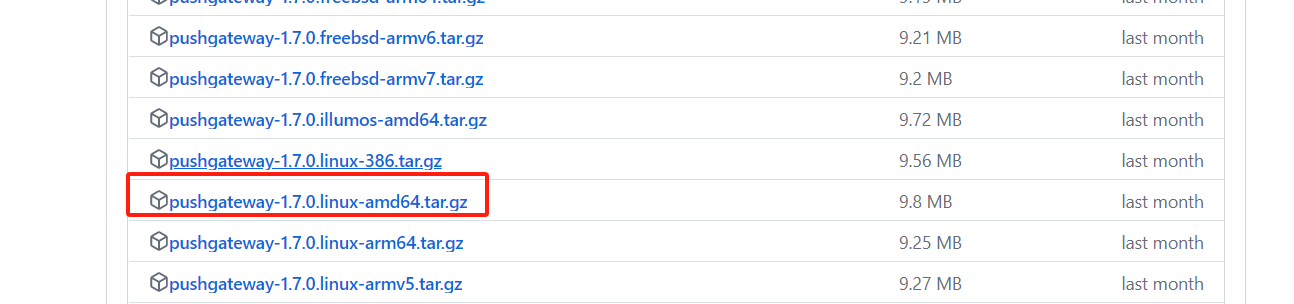
下载地址: https://github.com/prometheus/pushgateway/releases
下载这个
[root@mcw04 ~]# tar xf pushgateway-1.7.0.linux-amd64.tar.gz

[root@mcw04 ~]# ls

\                 apache-tomcat-8.5.88              hadoop-2.8.5.tar.gz                      nohup.out                             usr

1.py              apache-tomcat-8.5.88.tar.gz       ip_forward~                              original-ks.cfg                       zabbix-release-4.0-1.el7.noarch.rpm

a                 filebeat-6.5.2-x86_64.rpm         jdk-8u191-linux-x64.tar.gz               pushgateway-1.7.0.linux-amd64

alertmanager.yml  grafana-9.2.3                     mcw.txt                                  pushgateway-1.7.0.linux-amd64.tar.gz

anaconda-ks.cfg   grafana-9.2.3.linux-amd64.tar.gz  node_exporter-0.16.0.linux-amd64.tar.gz  python3yizhuang.tar.gz

[root@mcw04 ~]# cd pushgateway-1.7.0.linux-amd64/

[root@mcw04 pushgateway-1.7.0.linux-amd64]# ls

LICENSE  NOTICE  pushgateway

[root@mcw04 pushgateway-1.7.0.linux-amd64]# echo $PATH

/usr/local/jdk/bin:/opt/hadoop/bin:/opt/hadoop/sbin:/usr/local/sbin:/usr/local/bin:/usr/sbin:/usr/bin:/root/bin

[root@mcw04 pushgateway-1.7.0.linux-amd64]# cp pushgateway /usr/local/bin/

[root@mcw04 pushgateway-1.7.0.linux-amd64]# pushgateway --version

pushgateway, version 1.7.0 (branch: HEAD, revision: 109280c17d29059623c6f5dbf1d6babab34166cf)

  build user:       root@c05cb3457dcb

  build date:       20240119-13:28:37

  go version:       go1.21.6

  platform:         linux/amd64

  tags:             unknown

[root@mcw04 pushgateway-1.7.0.linux-amd64]#
配置和运行
监听地址默认就是--web.listen-address="0.0.0.0:9091" 这个
[root@mcw04 pushgateway-1.7.0.linux-amd64]# cd

[root@mcw04 ~]# pushgateway --web.listen-address="0.0.0.0:9091"

ts=2024-02-13T04:31:47.165Z caller=main.go:86 level=info msg="starting pushgateway" version="(version=1.7.0, branch=HEAD, revision=109280c17d29059623c6f5dbf1d6babab34166cf)"

ts=2024-02-13T04:31:47.165Z caller=main.go:87 level=info build_context="(go=go1.21.6, platform=linux/amd64, user=root@c05cb3457dcb, date=20240119-13:28:37, tags=unknown)"

ts=2024-02-13T04:31:47.213Z caller=tls_config.go:313 level=info msg="Listening on" address=[::]:9091

ts=2024-02-13T04:31:47.213Z caller=tls_config.go:316 level=info msg="TLS is disabled." http2=false address=[::]:9091
访问:http://10.0.0.14:9091/

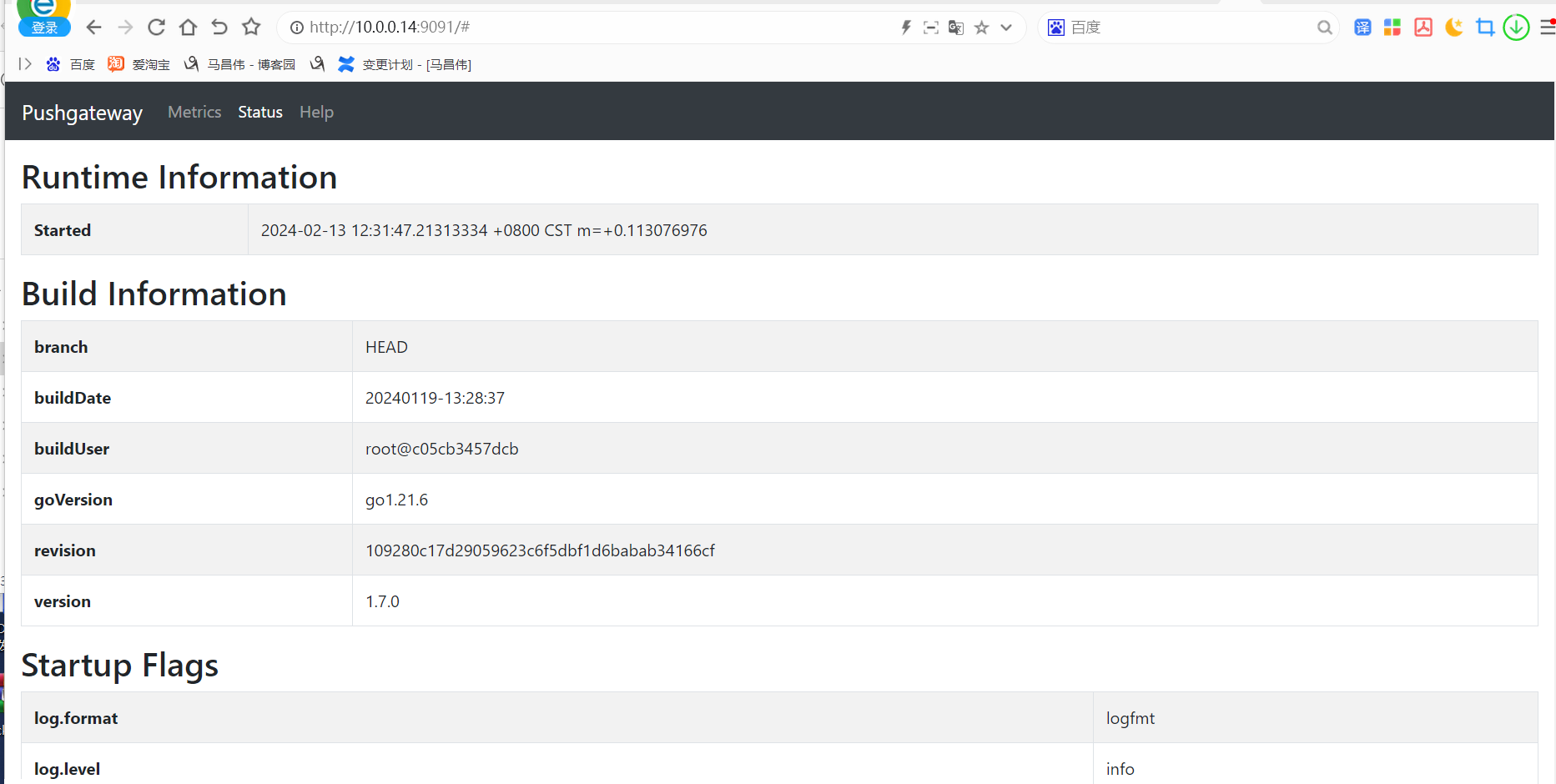
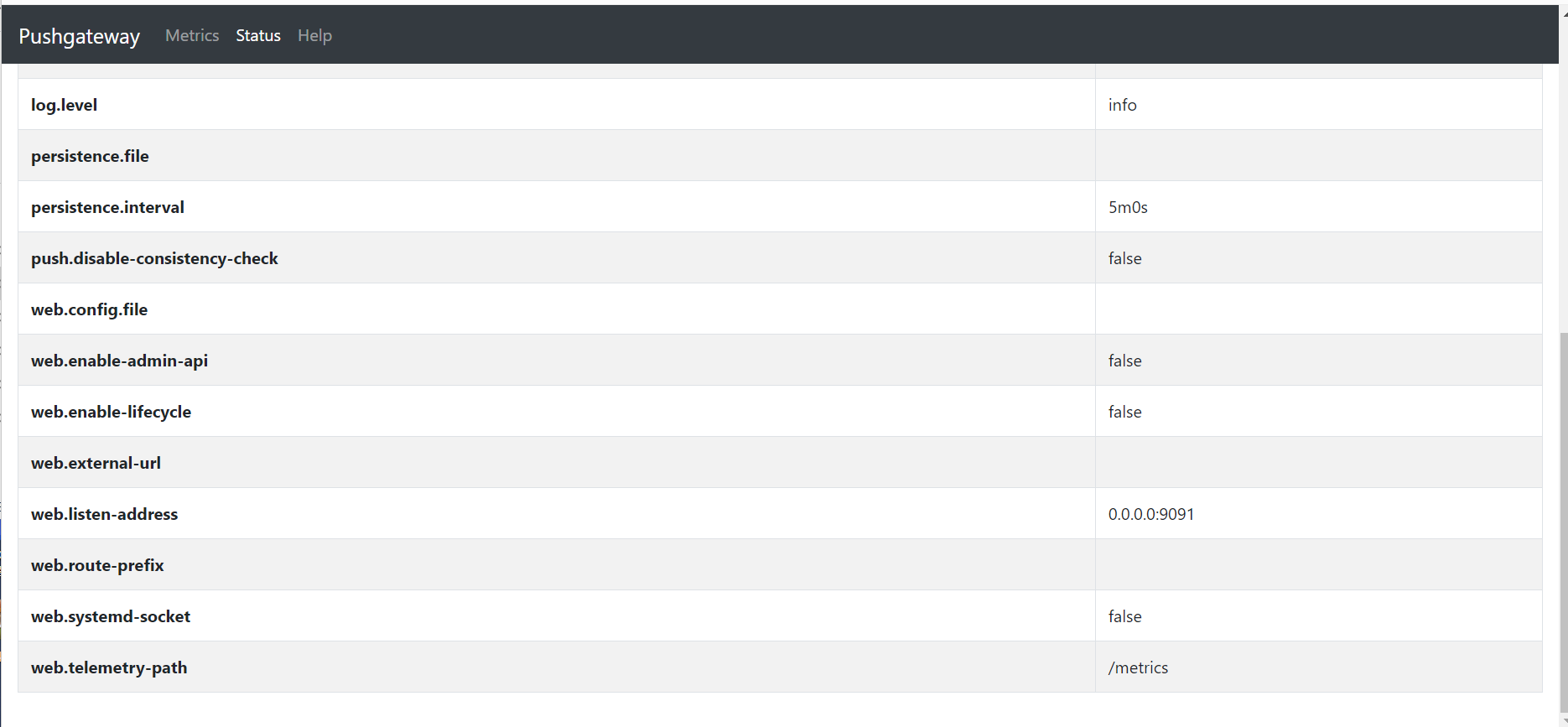
指标默认存储在内存,持久化存储指标需要加下面参数,指定持久化文件
[root@mcw04 ~]# pushgateway --persistence.file="/tmp/pushgateway_persist"

ts=2024-02-13T04:37:54.994Z caller=main.go:86 level=info msg="starting pushgateway" version="(version=1.7.0, branch=HEAD, revision=109280c17d29059623c6f5dbf1d6babab34166cf)"

ts=2024-02-13T04:37:54.995Z caller=main.go:87 level=info build_context="(go=go1.21.6, platform=linux/amd64, user=root@c05cb3457dcb, date=20240119-13:28:37, tags=unknown)"

ts=2024-02-13T04:37:54.998Z caller=tls_config.go:313 level=info msg="Listening on" address=[::]:9091

ts=2024-02-13T04:37:54.998Z caller=tls_config.go:316 level=info msg="TLS is disabled." http2=false address=[::]:9091
默认5分钟写入一次,可以用--persistence.interval参数覆盖掉
使用systemd管理服务
[root@mcw04 ~]# vim /usr/lib/systemd/system/pushgateway.service

[root@mcw04 ~]# cat /usr/lib/systemd/system/pushgateway.service

[Unit]

Description=pushgateway

Documentation=https://prometheus.io/docs/introduction/overview

After=network-online.target remote-fs.target nss-lookup.target

Wants=network-online.target

[Service]

Type=simple

PIDFile==/var/run/pushgateway.pid

ExecStart=/usr/local/pushgateway \

     --persistence.file="/usr/local/mcwpushgateway/pushgateway_persist_file" \

     --persistence.interval=5m \

     --web.listen-address=:9091

ExecReload=/bin/kill -s HUP $MAINPID

ExecStop=/bin/kill -s TERM $MAINPID

[Install]

WantedBy=multi-user.target

[root@mcw04 ~]# systemctl daemon-reload

[root@mcw04 ~]# systemctl start pushgateway

[root@mcw04 ~]# systemctl status pushgateway

● pushgateway.service - pushgateway

   Loaded: loaded (/usr/lib/systemd/system/pushgateway.service; disabled; vendor preset: disabled)

   Active: active (running) since Tue 2024-02-13 20:36:16 CST; 6s ago

     Docs: https://prometheus.io/docs/introduction/overview

 Main PID: 45252 (pushgateway)

   CGroup: /system.slice/pushgateway.service

           └─45252 /usr/local/pushgateway --persistence.file="/usr/local/mcwpushgateway/pushgateway_persist_file" --persistence.interval=5m --web.listen-address=:9091

Feb 13 20:36:16 mcw04 systemd[1]: Started pushgateway.

Feb 13 20:36:16 mcw04 systemd[1]: Starting pushgateway...

Feb 13 20:36:17 mcw04 pushgateway[45252]: ts=2024-02-13T12:36:17.022Z caller=main.go:86 level=info msg="starting pushgateway" version="(version=1.7.0, branch=HEAD, re...ab34166cf)"

Feb 13 20:36:17 mcw04 pushgateway[45252]: ts=2024-02-13T12:36:17.022Z caller=main.go:87 level=info build_context="(go=go1.21.6, platform=linux/amd64, user=root@c05cb3...s=unknown)"

Feb 13 20:36:17 mcw04 pushgateway[45252]: ts=2024-02-13T12:36:17.085Z caller=tls_config.go:313 level=info msg="Listening on" address=[::]:9091

Feb 13 20:36:17 mcw04 pushgateway[45252]: ts=2024-02-13T12:36:17.085Z caller=tls_config.go:316 level=info msg="TLS is disabled." http2=false address=[::]:9091

Hint: Some lines were ellipsized, use -l to show in full.

[root@mcw04 ~]#

向pushgateway发送指标(一个地址就是一个指标组,可以放多个指标)
发送指标之前
推送指标
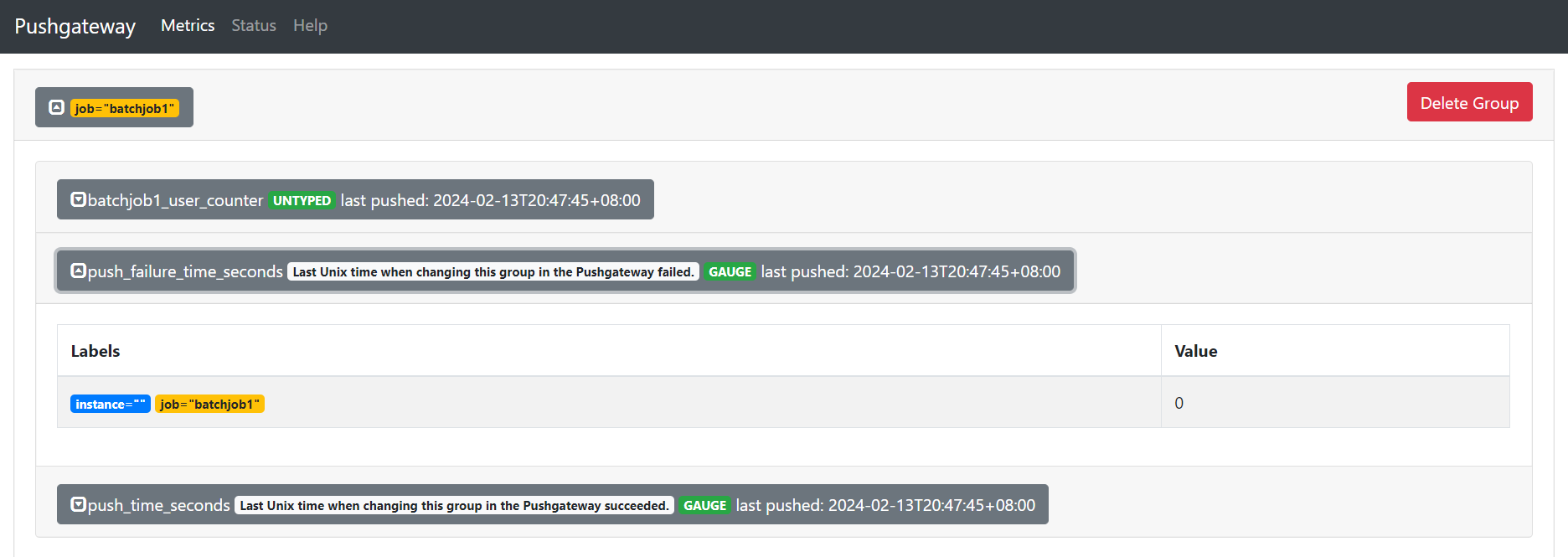
[root@mcw04 ~]# echo 'batchjob1_user_counter 2' | curl --data-binary @- http://localhost:9091/metrics/job/batchjob1

[root@mcw04 ~]#
刷新一下,pushgateway页面

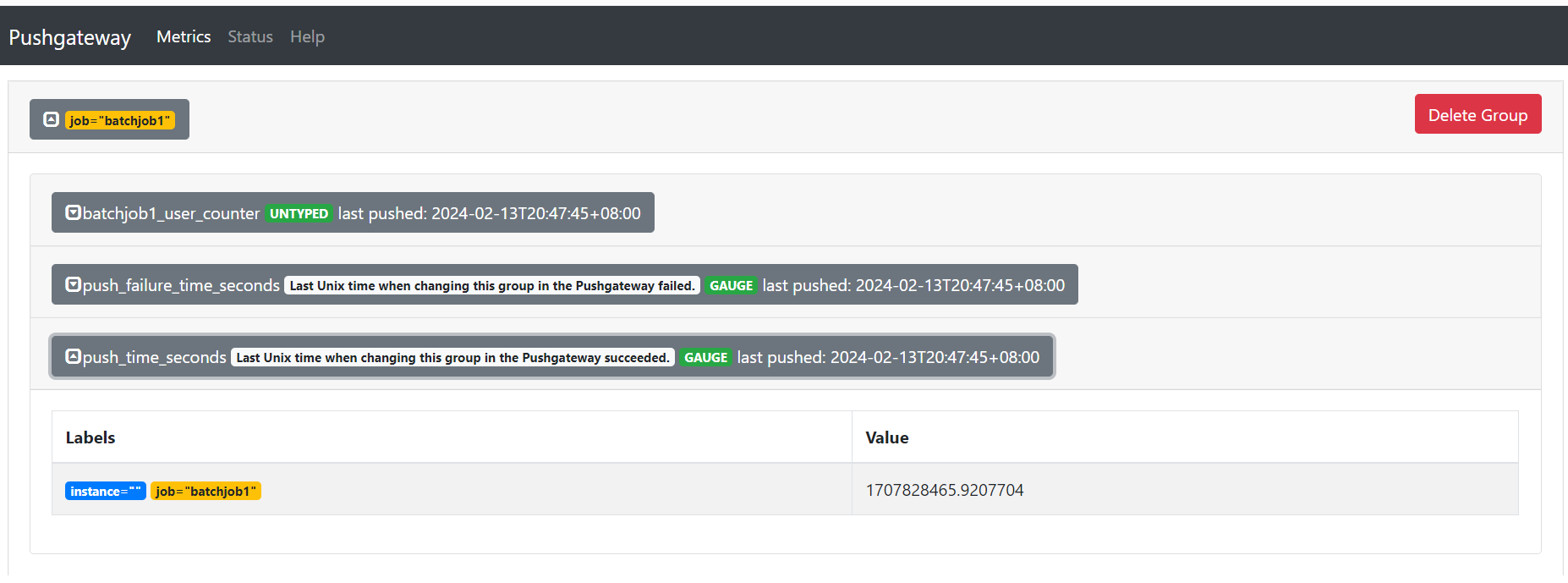

再次执行
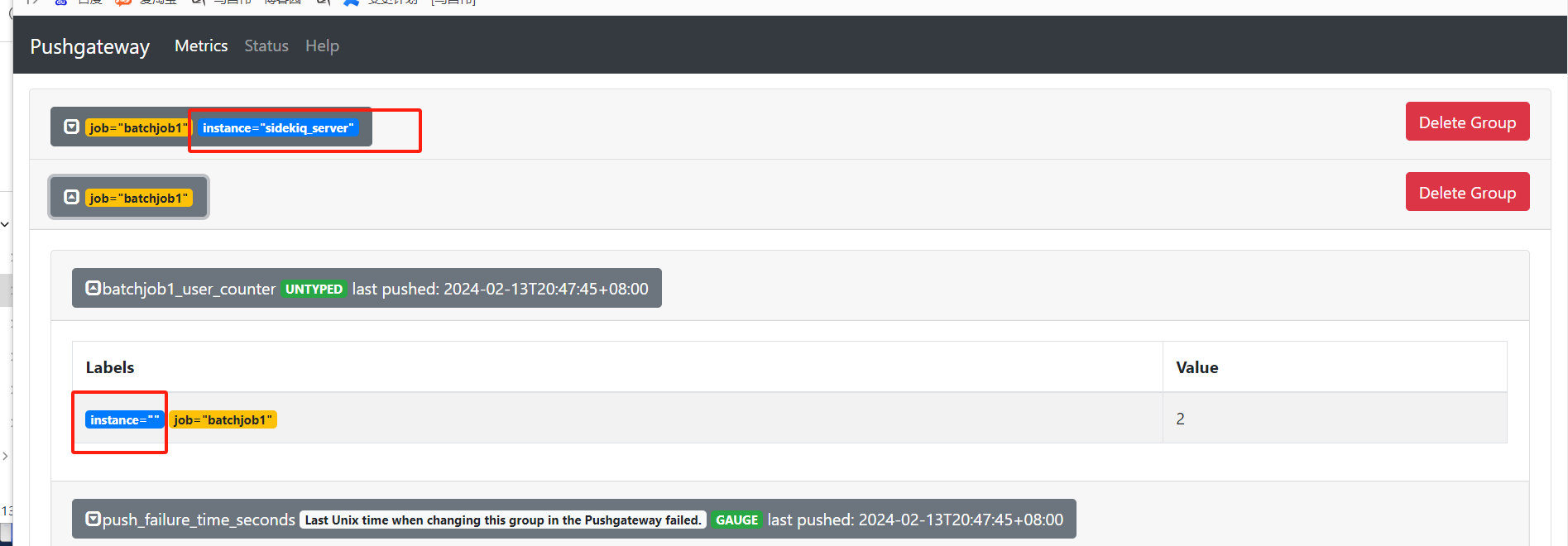
[root@mcw04 ~]# echo 'batchjob1_user_counter 2' | curl --data-binary @- http://localhost:9091/metrics/job/batchjob1/instance/sidekiq_server

[root@mcw04 ~]#
新增一个,虽然job一样,但是instance不一样
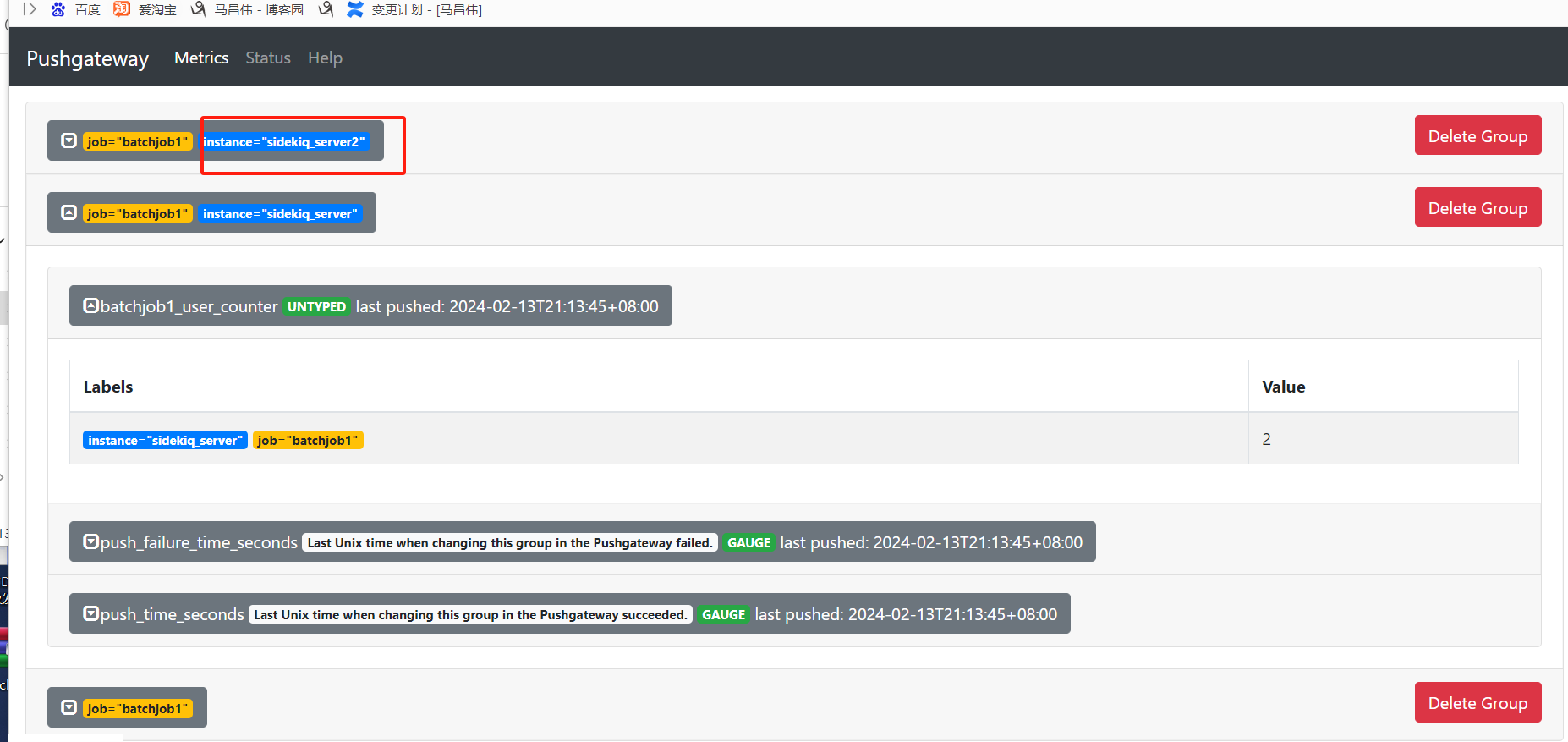
修改一下instance的值,又多一个
[root@mcw04 ~]# echo 'batchjob1_user_counter 2' | curl --data-binary @- http://localhost:9091/metrics/job/batchjob1/instance/sidekiq_server2

[root@mcw04 ~]#
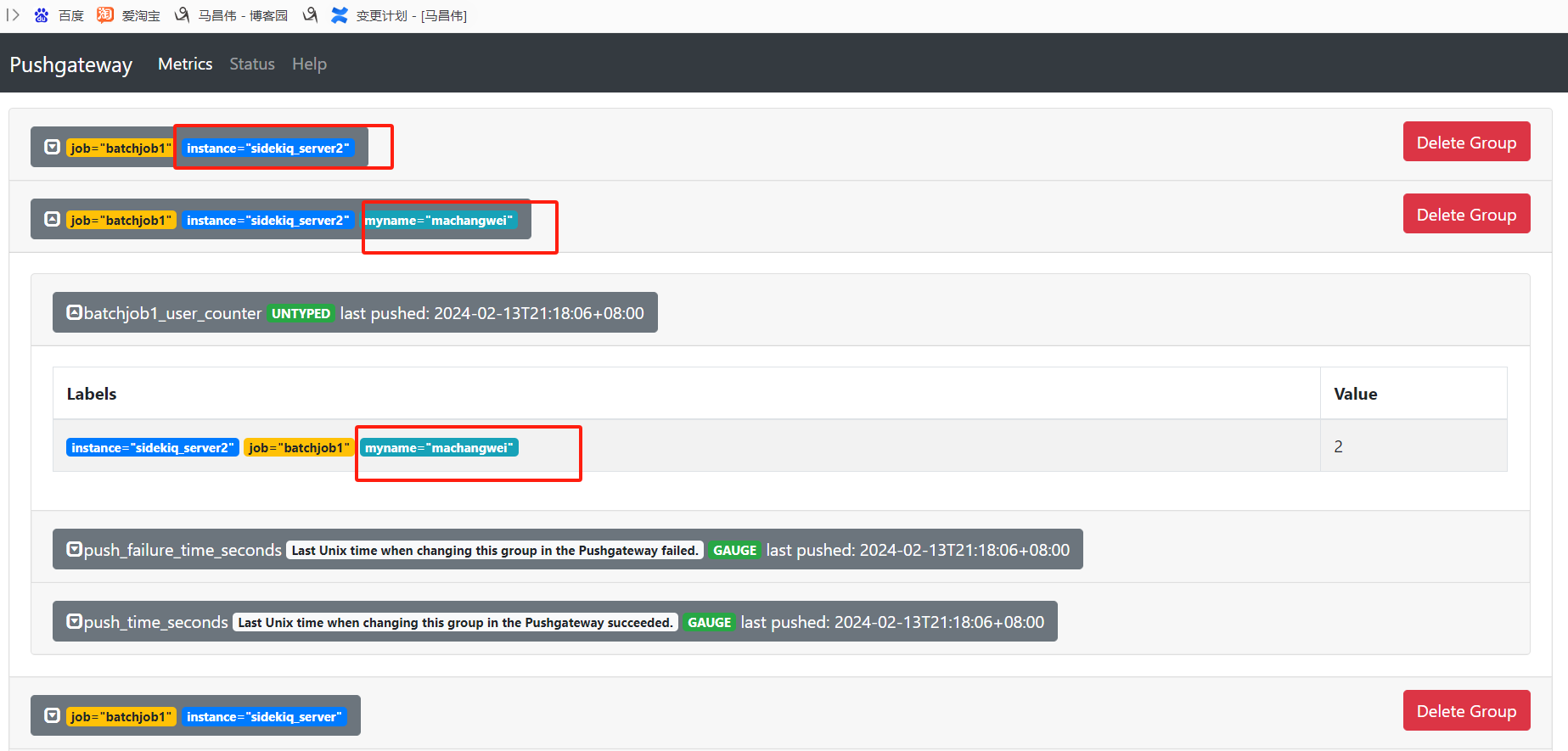
其它的不变,就新增一个键值对,用斜线分开,就多了一个标签
[root@mcw04 ~]# echo 'batchjob1_user_counter 2' | curl --data-binary @- http://localhost:9091/metrics/job/batchjob1/instance/sidekiq_server2/myname/machangwei

[root@mcw04 ~]#
新增标签或者修改标签,都是新增一条记录
[root@mcw04 ~]# echo 'batchjob1_user_counter 2' | curl --data-binary @- http://localhost:9091/metrics/job/batchjob1/instance/sidekiq_server2/myname/machangwei2

[root@mcw04 ~]#
即使只是修改指标的值为4,执行命令,不会新增一条记录.为指标添加标签
[root@mcw04 ~]# echo 'batchjob1_user_counter 4' | curl --data-binary @- http://localhost:9091/metrics/job/batchjob1/instance/sidekiq_server2/myname/machangwei2

[root@mcw04 ~]#

可以把其他的都删除掉
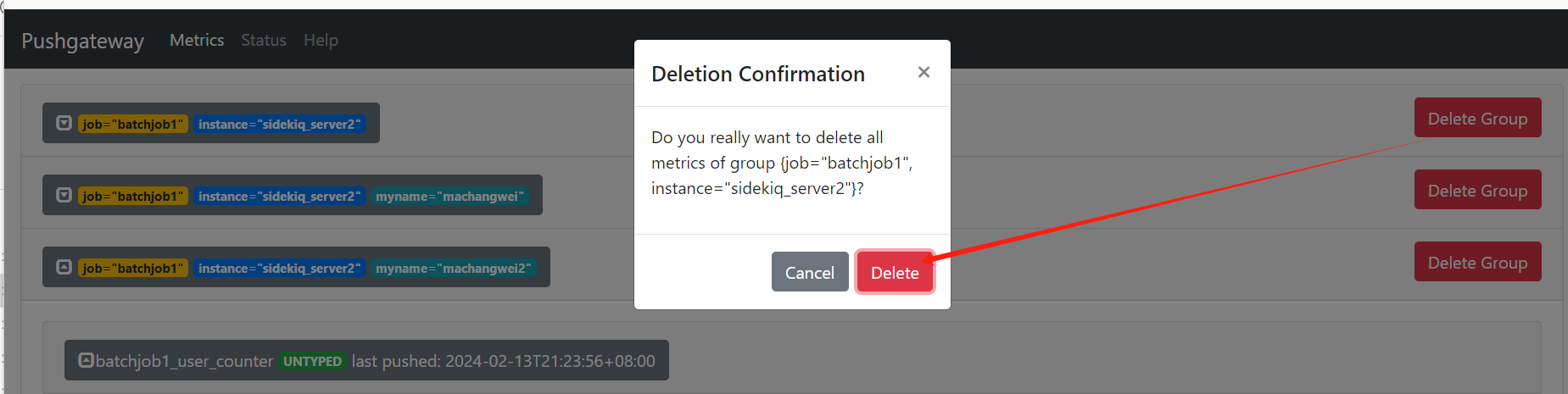
只留下一条
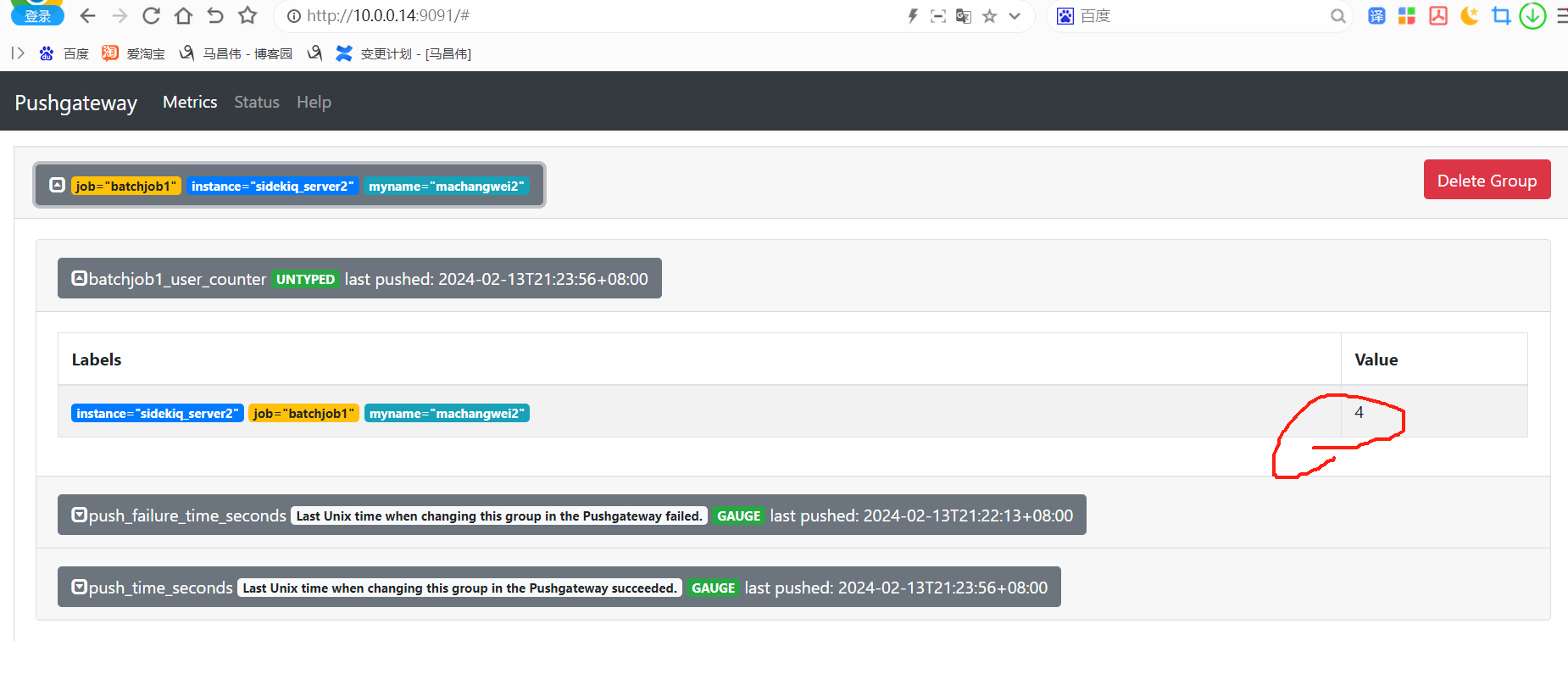
其它的不变,
[root@mcw04 ~]# echo 'batchjob1_user_counter 8' | curl --data-binary @- http://localhost:9091/metrics/job/batchjob1/instance/sidekiq_server2/myname/machangwei2

[root@mcw04 ~]#
刷新一下,指标值变了,并没有生成新的记录

没有job就会报错
[root@mcw04 ~]# echo 'batchjob1_user_counter 8' | curl --data-binary @- http://localhost:9091/metrics/instance/sidekiq_server2/myname/machangwei2

404 page not found

[root@mcw04 ~]# echo 'batchjob1_user_counter 8' | curl --data-binary @- http://localhost:9091/metrics/instance/sidekiq_server2/myname/machangwei2/job/xxx

404 page not found

[root@mcw04 ~]# echo 'batchjob1_user_counter 8' | curl --data-binary @- http://localhost:9091/metrics/job/xxxx/instance/sidekiq_server2/myname/machangwei2/

odd number of components in label string "/instance/sidekiq_server2/myname/machangwei2/"

[root@mcw04 ~]# echo 'batchjob1_user_counter 8' | curl --data-binary @- http://localhost:9091/metrics/job/xxxxx/instance/sidekiq_server2/myname/machangwei2

[root@mcw04 ~]#
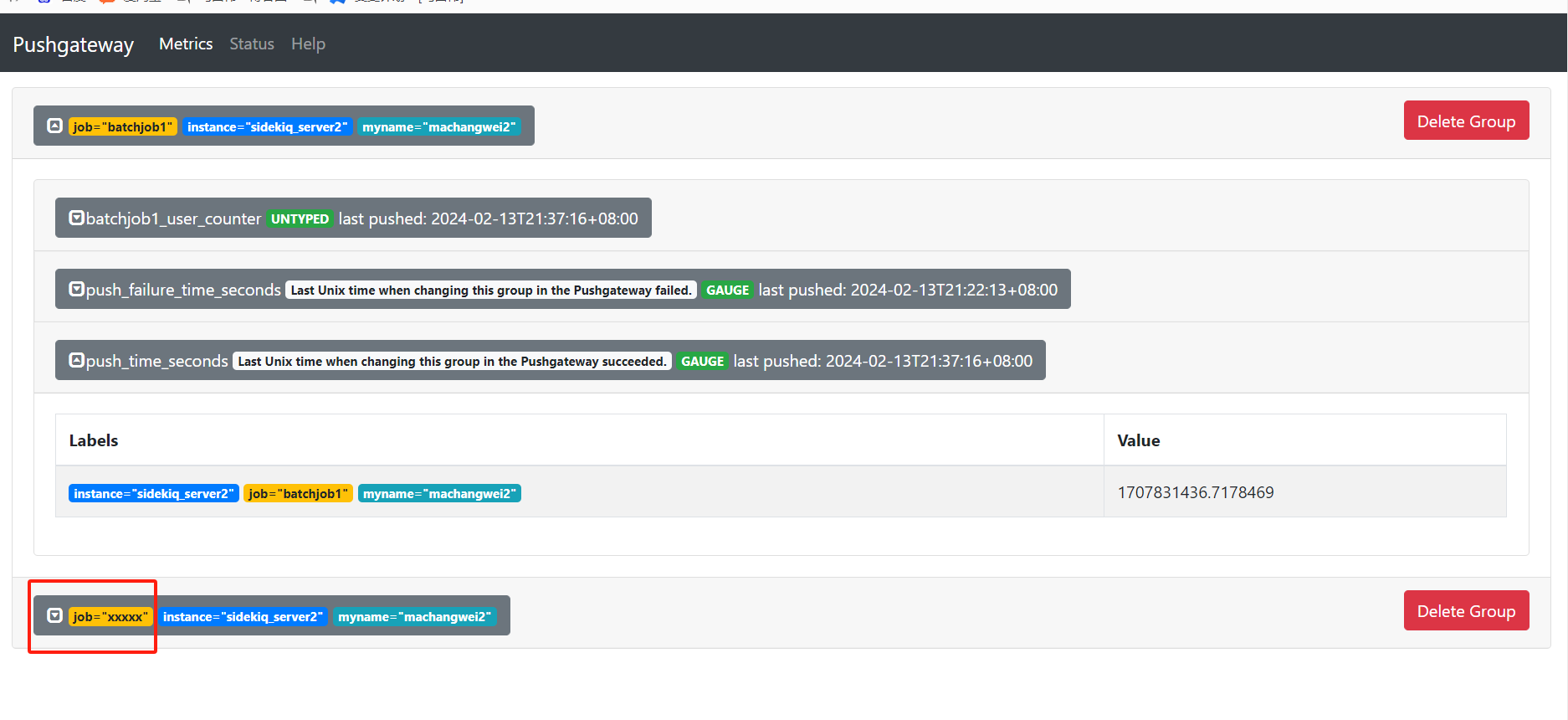
综上: echo 'batchjob1_user_counter 8' | curl --data-binary @- http://localhost:9091/metrics/job/<jobname>/{/<label>/<label>/}
在推送中传递TYPE和HELP标明指标类型。注意EOF 40 这些后面不要加空格,不然容易没法结束输入信息
[root@mcw04 ~]# cat <<EOF | curl --data-binary @- http://localhost:9091/metrics/job/batchjob1/instance/sidekiq_server2/myname/machangwei2

> # TYPE batchjob1_user_counter counter

> # HELP batchjob1_user_coounter A metric from BatchJob1.

> batchjob1_sales_counter{job_id="123ABC"} 1

> mycpu  20

> mymem 40

> EOF

[root@mcw04 ~]#
这是新增加的指标



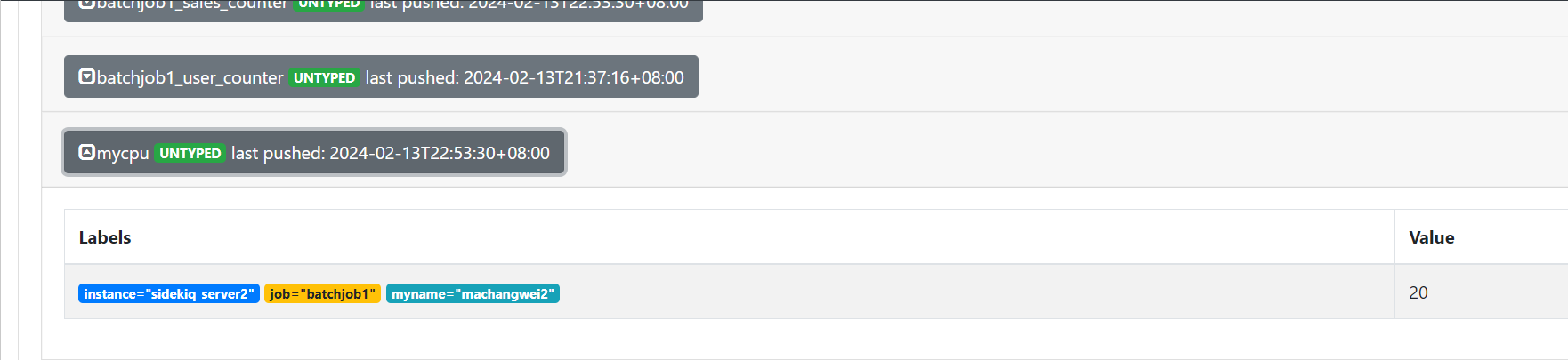



查看这里,目前只有这一个指标
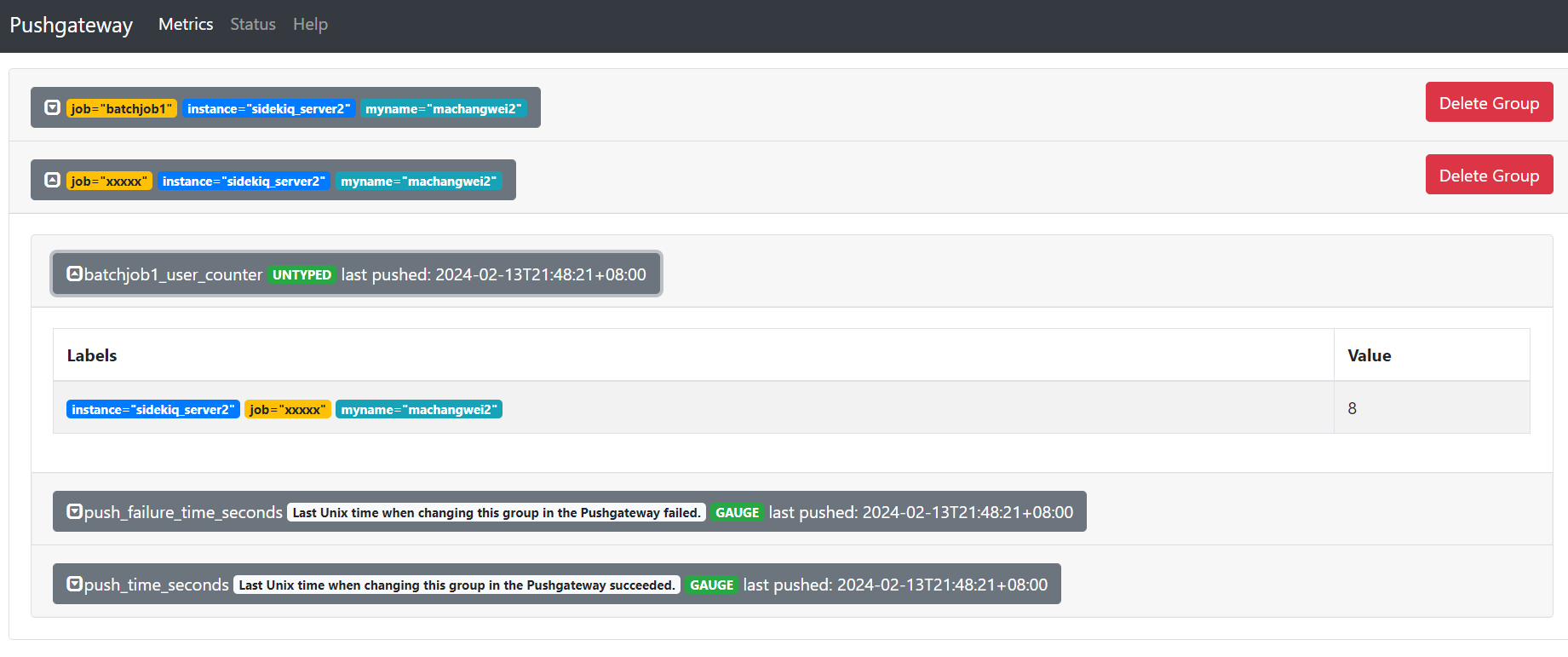
推送地址一样,指标值改成3
[root@mcw04 ~]# echo 'batchjob1_user_counter 3' | curl --data-binary @- http://localhost:9091/metrics/job/xxxxx/instance/sidekiq_server2/myname/machangwei2

[root@mcw04 ~]#
对应的值也改了

推送地址不变,指标名称不同
[root@mcw04 ~]# echo 'xiaomazhibiao1  666' | curl --data-binary @- http://localhost:9091/metrics/job/xxxxx/instance/sidekiq_server2/myname/machangwei2

[root@mcw04 ~]#
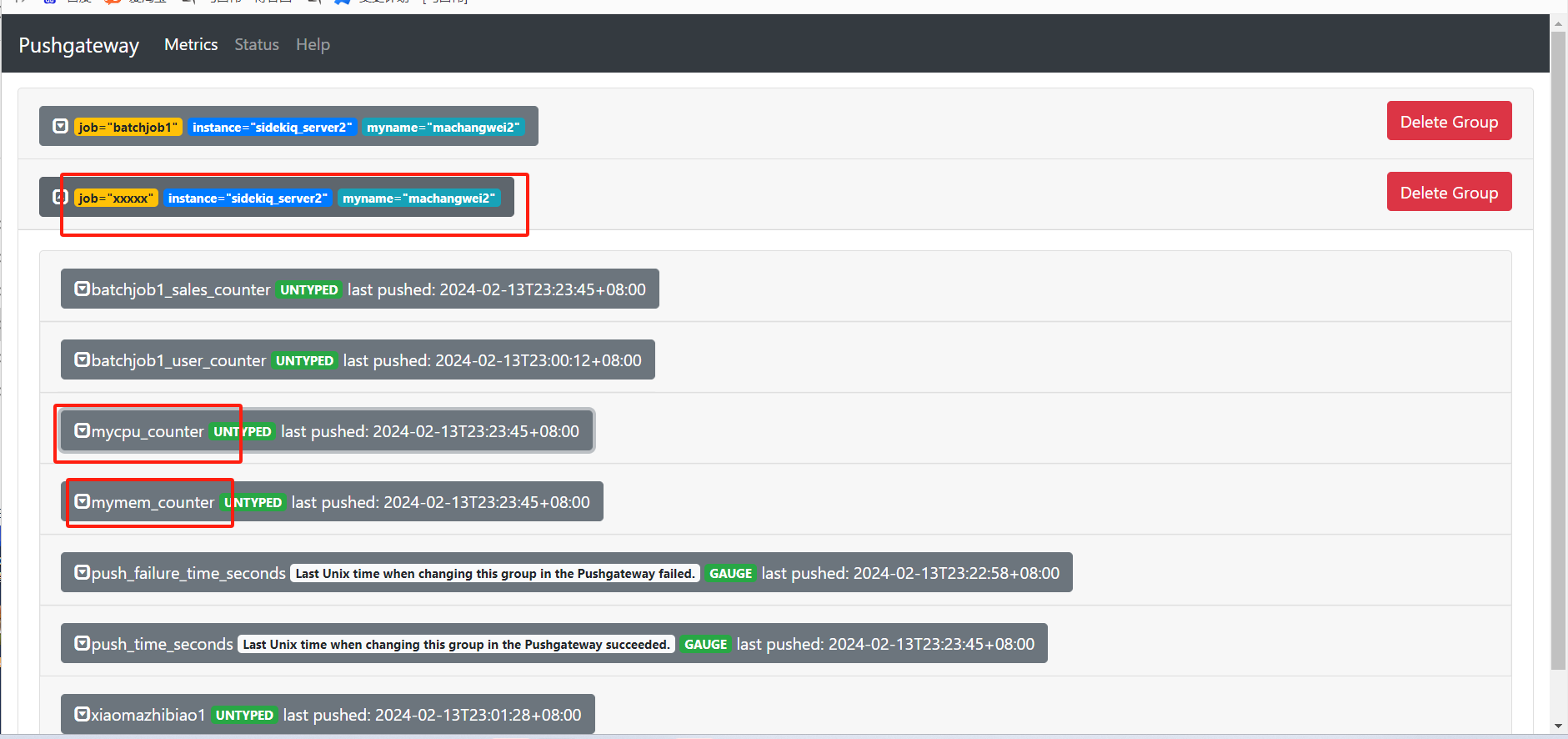
同一个下面会多个指标。也就是说推送地址是一样的,可以推送多个指标;一个地址就是多个指标的组合,是一组指标的集合,因此后面删除按钮写着删除组,也就解释的通了。
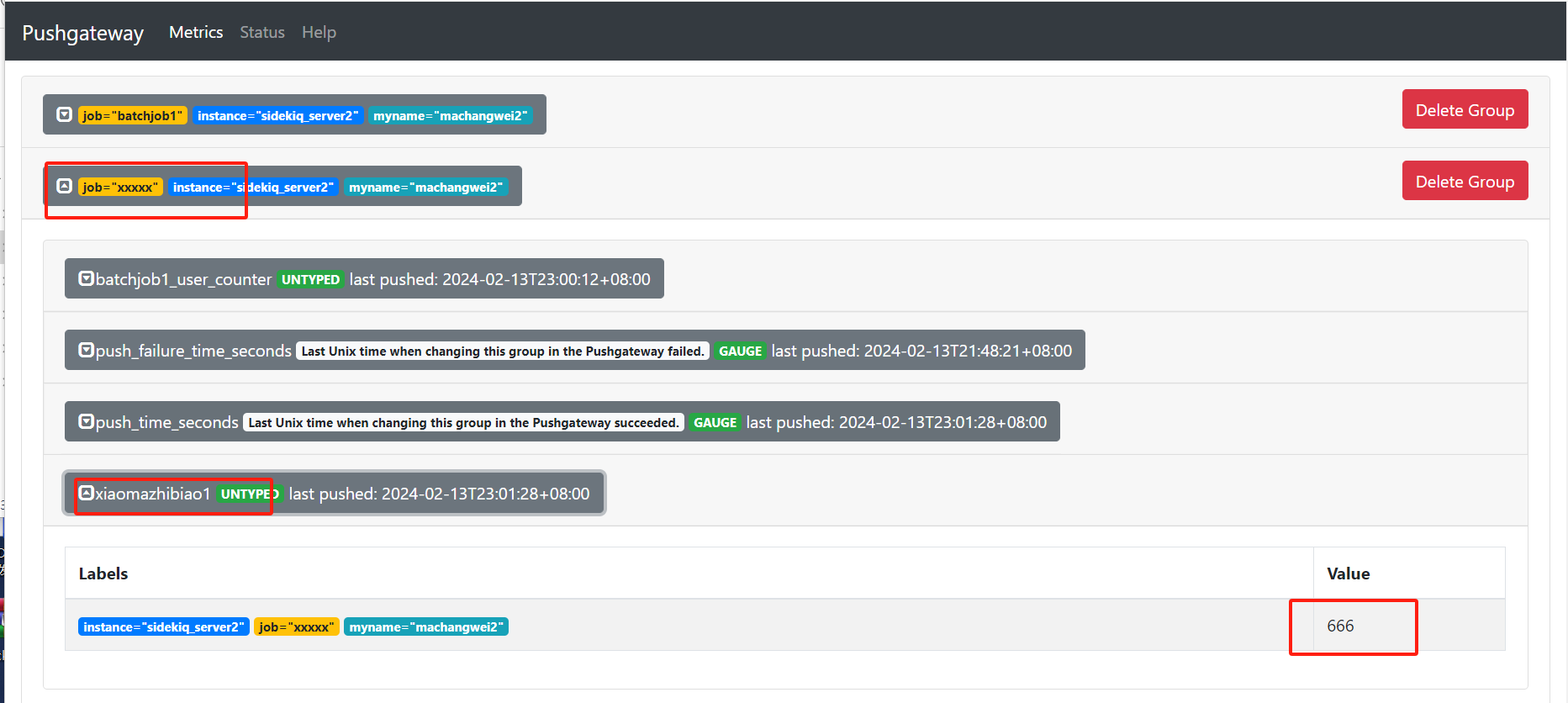
上面是推送一个指标,下面是推送多个指标,不过推送失败了。我们也可以看到,这里标签,值都给变成下面那种形式的来显示一下了
[root@mcw04 ~]# cat <<EOF | curl --data-binary @- http://localhost:9091/metrics/job/xxxxx/instance/sidekiq_server2/myname/machangwei2

> # TYPE batchjob1_user_counter counter

> # HELP batchjob1_user_coounter A metric from BatchJob1.

> batchjob1_sales_counter{job_id="123ABC"} 1

> # TYPE mycpu counter

> # HELP mycpu A metric from BatchJob1.

> mycpu  20

> # TYPE mymem counter

> # HELP mymem A metric from BatchJob1.

> mymem 40

> EOF

pushed metrics are invalid or inconsistent with existing metrics: 2 error(s) occurred:

* collected metric "mycpu" { label:{name:"instance" value:"sidekiq_server2"} label:{name:"job" value:"batchjob1"} label:{name:"myname" value:"machangwei2"} untyped:{value:20}} is not a COUNTER

* collected metric "mymem" { label:{name:"instance" value:"sidekiq_server2"} label:{name:"job" value:"batchjob1"} label:{name:"myname" value:"machangwei2"} untyped:{value:40}} is not a COUNTER

[root@mcw04 ~]#
上面报错,不是counter类型的指标,下面页面中,也显示上次推送失败了,
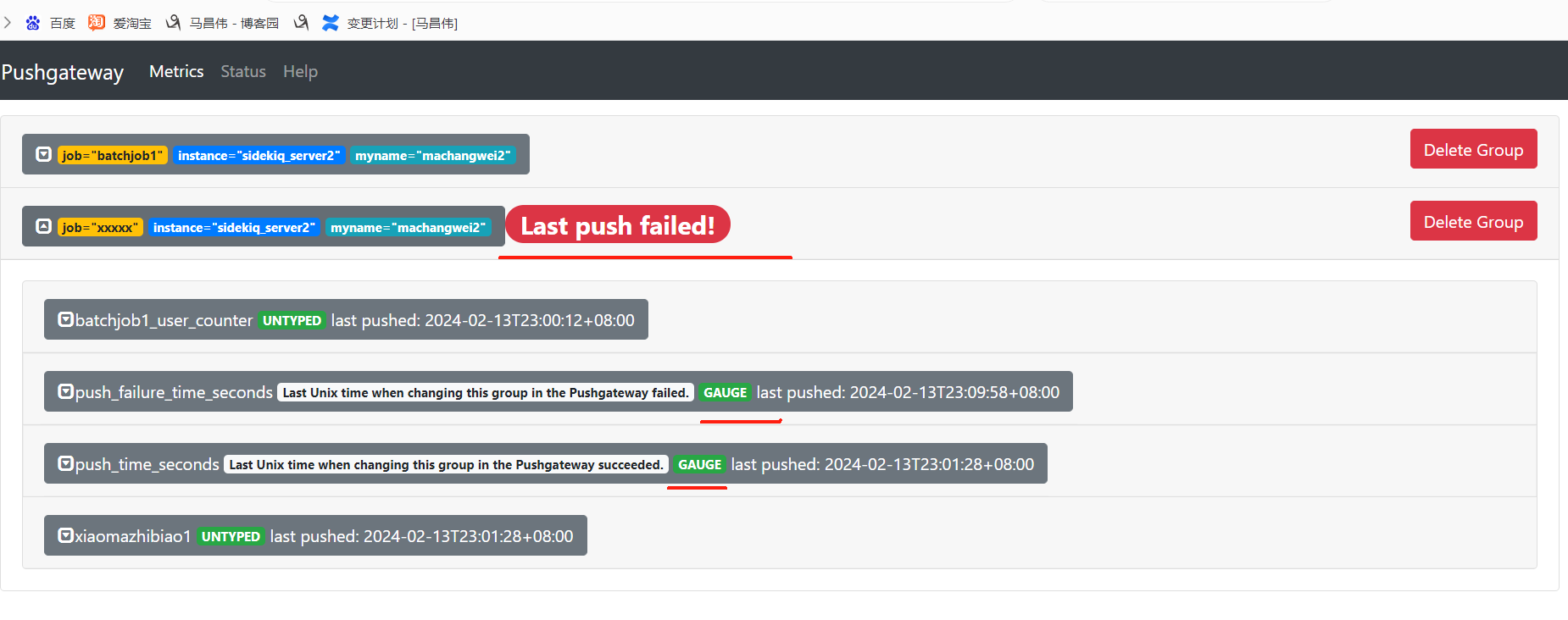
多次试验,才知道,多个指标发送成功,指标是counter的话,需要用_counter结尾来命名才可以成功推送成功
[root@mcw04 ~]# cat <<EOF | curl --data-binary @- http://localhost:9091/metrics/job/xxxxx/instance/sidekiq_server2/myname/machangwei2

> # TYPE batchjob1_user_counter counter

> # HELP batchjob1_user_coounter A metric from xxxxx.

> batchjob1_sales_counter{job_id="123ABC"} 1

> # TYPE mycpu counter

> # HELP mycpu A metric from xxxxx.

> mycpu_counter{job_id="123ABC"}  20

> # TYPE mymem counter

> # HELP mymem A metric from xxxxx.

> mymem_counter{job_id="123ABC"} 40

> EOF

[root@mcw04 ~]#
在pushgateway上查看指标
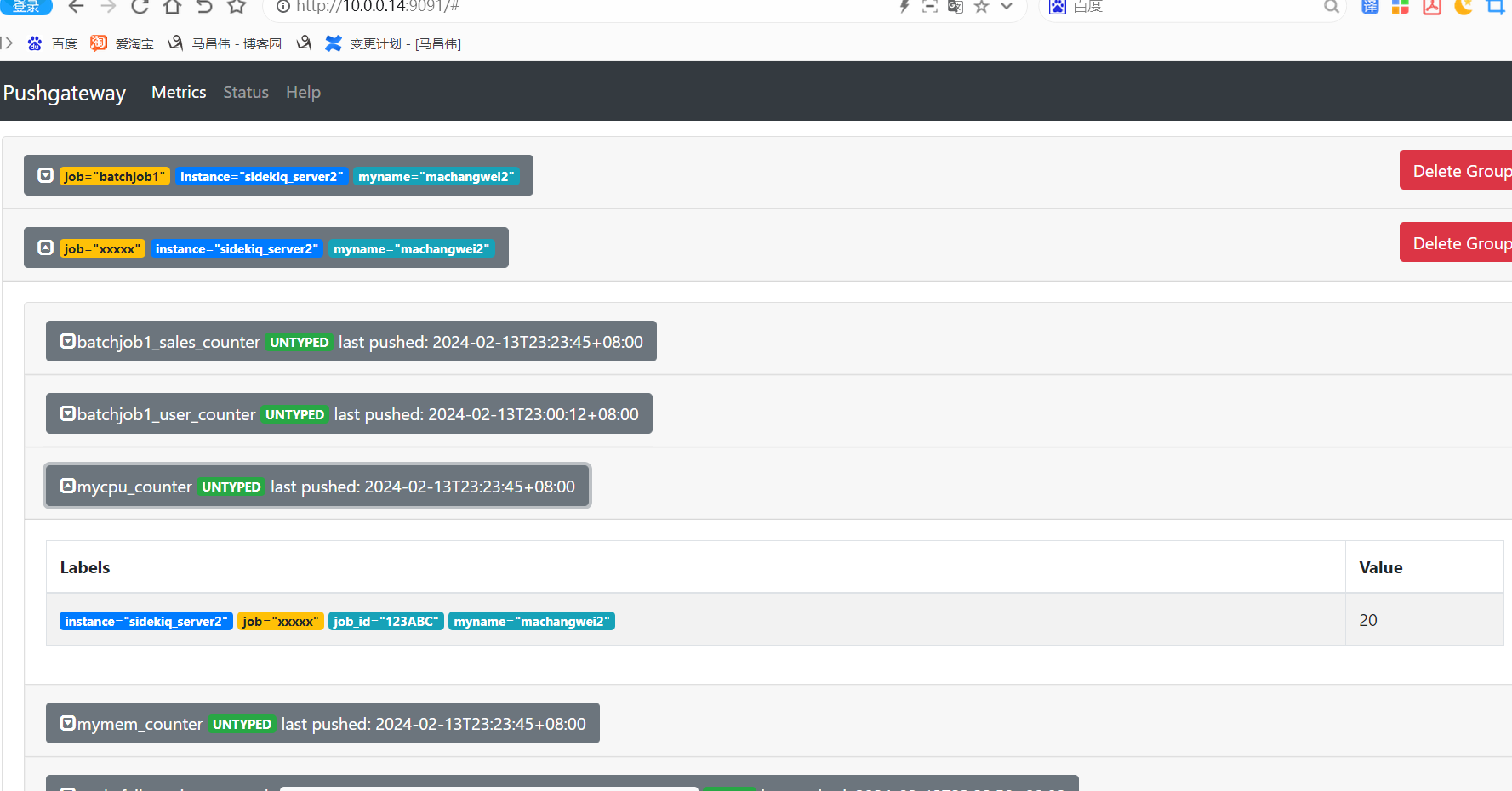
[root@mcw04 ~]# curl http://localhost:9091/metrics

# TYPE batchjob1_sales_counter untyped

batchjob1_sales_counter{instance="sidekiq_server2",job="batchjob1",job_id="123ABC",myname="machangwei2"} 1

batchjob1_sales_counter{instance="sidekiq_server2",job="xxxxx",job_id="123ABC",myname="machangwei2"} 1

# TYPE batchjob1_user_counter untyped

batchjob1_user_counter{instance="sidekiq_server2",job="batchjob1",myname="machangwei2"} 8

batchjob1_user_counter{instance="sidekiq_server2",job="xxxxx",myname="machangwei2"} 3

# HELP go_gc_duration_seconds A summary of the pause duration of garbage collection cycles.

# TYPE go_gc_duration_seconds summary

go_gc_duration_seconds{quantile="0"} 2.7942e-05

go_gc_duration_seconds{quantile="0.25"} 3.4098e-05

go_gc_duration_seconds{quantile="0.5"} 4.0877e-05

go_gc_duration_seconds{quantile="0.75"} 6.1473e-05

go_gc_duration_seconds{quantile="1"} 0.000781573

go_gc_duration_seconds_sum 0.006027564

go_gc_duration_seconds_count 106

# HELP go_goroutines Number of goroutines that currently exist.

# TYPE go_goroutines gauge

go_goroutines 12

# HELP go_info Information about the Go environment.

# TYPE go_info gauge

go_info{version="go1.21.6"} 1

# HELP go_memstats_alloc_bytes Number of bytes allocated and still in use.

# TYPE go_memstats_alloc_bytes gauge

go_memstats_alloc_bytes 3.003712e+06

# HELP go_memstats_alloc_bytes_total Total number of bytes allocated, even if freed.

# TYPE go_memstats_alloc_bytes_total counter

go_memstats_alloc_bytes_total 1.6962048e+07

# HELP go_memstats_buck_hash_sys_bytes Number of bytes used by the profiling bucket hash table.

# TYPE go_memstats_buck_hash_sys_bytes gauge

go_memstats_buck_hash_sys_bytes 1.455808e+06

# HELP go_memstats_frees_total Total number of frees.

# TYPE go_memstats_frees_total counter

go_memstats_frees_total 142363

# HELP go_memstats_gc_sys_bytes Number of bytes used for garbage collection system metadata.

# TYPE go_memstats_gc_sys_bytes gauge

go_memstats_gc_sys_bytes 4.031136e+06

# HELP go_memstats_heap_alloc_bytes Number of heap bytes allocated and still in use.

# TYPE go_memstats_heap_alloc_bytes gauge

go_memstats_heap_alloc_bytes 3.003712e+06

# HELP go_memstats_heap_idle_bytes Number of heap bytes waiting to be used.

# TYPE go_memstats_heap_idle_bytes gauge

go_memstats_heap_idle_bytes 3.047424e+06

# HELP go_memstats_heap_inuse_bytes Number of heap bytes that are in use.

# TYPE go_memstats_heap_inuse_bytes gauge

go_memstats_heap_inuse_bytes 4.75136e+06

# HELP go_memstats_heap_objects Number of allocated objects.

# TYPE go_memstats_heap_objects gauge

go_memstats_heap_objects 9947

# HELP go_memstats_heap_released_bytes Number of heap bytes released to OS.

# TYPE go_memstats_heap_released_bytes gauge

go_memstats_heap_released_bytes 2.981888e+06

# HELP go_memstats_heap_sys_bytes Number of heap bytes obtained from system.

# TYPE go_memstats_heap_sys_bytes gauge

go_memstats_heap_sys_bytes 7.798784e+06

# HELP go_memstats_last_gc_time_seconds Number of seconds since 1970 of last garbage collection.

# TYPE go_memstats_last_gc_time_seconds gauge

go_memstats_last_gc_time_seconds 1.7078412542246678e+09

# HELP go_memstats_lookups_total Total number of pointer lookups.

# TYPE go_memstats_lookups_total counter

go_memstats_lookups_total 0

# HELP go_memstats_mallocs_total Total number of mallocs.

# TYPE go_memstats_mallocs_total counter

go_memstats_mallocs_total 152310

# HELP go_memstats_mcache_inuse_bytes Number of bytes in use by mcache structures.

# TYPE go_memstats_mcache_inuse_bytes gauge

go_memstats_mcache_inuse_bytes 2400

# HELP go_memstats_mcache_sys_bytes Number of bytes used for mcache structures obtained from system.

# TYPE go_memstats_mcache_sys_bytes gauge

go_memstats_mcache_sys_bytes 15600

# HELP go_memstats_mspan_inuse_bytes Number of bytes in use by mspan structures.

# TYPE go_memstats_mspan_inuse_bytes gauge

go_memstats_mspan_inuse_bytes 77448

# HELP go_memstats_mspan_sys_bytes Number of bytes used for mspan structures obtained from system.

# TYPE go_memstats_mspan_sys_bytes gauge

go_memstats_mspan_sys_bytes 81480

# HELP go_memstats_next_gc_bytes Number of heap bytes when next garbage collection will take place.

# TYPE go_memstats_next_gc_bytes gauge

go_memstats_next_gc_bytes 5.691992e+06

# HELP go_memstats_other_sys_bytes Number of bytes used for other system allocations.

# TYPE go_memstats_other_sys_bytes gauge

go_memstats_other_sys_bytes 548976

# HELP go_memstats_stack_inuse_bytes Number of bytes in use by the stack allocator.

# TYPE go_memstats_stack_inuse_bytes gauge

go_memstats_stack_inuse_bytes 589824

# HELP go_memstats_stack_sys_bytes Number of bytes obtained from system for stack allocator.

# TYPE go_memstats_stack_sys_bytes gauge

go_memstats_stack_sys_bytes 589824

# HELP go_memstats_sys_bytes Number of bytes obtained from system.

# TYPE go_memstats_sys_bytes gauge

go_memstats_sys_bytes 1.4521608e+07

# HELP go_threads Number of OS threads created.

# TYPE go_threads gauge

go_threads 7

# TYPE mycpu untyped

mycpu{instance="sidekiq_server2",job="batchjob1",myname="machangwei2"} 20

# TYPE mycpu_counter untyped

mycpu_counter{instance="sidekiq_server2",job="xxxxx",job_id="123ABC",myname="machangwei2"} 20

# TYPE mymem untyped

mymem{instance="sidekiq_server2",job="batchjob1",myname="machangwei2"} 40

# TYPE mymem_counter untyped

mymem_counter{instance="sidekiq_server2",job="xxxxx",job_id="123ABC",myname="machangwei2"} 40

# HELP process_cpu_seconds_total Total user and system CPU time spent in seconds.

# TYPE process_cpu_seconds_total counter

process_cpu_seconds_total 0.25

# HELP process_max_fds Maximum number of open file descriptors.

# TYPE process_max_fds gauge

process_max_fds 4096

# HELP process_open_fds Number of open file descriptors.

# TYPE process_open_fds gauge

process_open_fds 11

# HELP process_resident_memory_bytes Resident memory size in bytes.

# TYPE process_resident_memory_bytes gauge

process_resident_memory_bytes 1.7883136e+07

# HELP process_start_time_seconds Start time of the process since unix epoch in seconds.

# TYPE process_start_time_seconds gauge

process_start_time_seconds 1.70782788203e+09

# HELP process_virtual_memory_bytes Virtual memory size in bytes.

# TYPE process_virtual_memory_bytes gauge

process_virtual_memory_bytes 1.27039488e+09

# HELP process_virtual_memory_max_bytes Maximum amount of virtual memory available in bytes.

# TYPE process_virtual_memory_max_bytes gauge

process_virtual_memory_max_bytes 1.8446744073709552e+19

# HELP push_failure_time_seconds Last Unix time when changing this group in the Pushgateway failed.

# TYPE push_failure_time_seconds gauge

push_failure_time_seconds{instance="sidekiq_server2",job="batchjob1",myname="machangwei2"} 0

push_failure_time_seconds{instance="sidekiq_server2",job="xxxxx",myname="machangwei2"} 1.707837778691478e+09

# HELP push_time_seconds Last Unix time when changing this group in the Pushgateway succeeded.

# TYPE push_time_seconds gauge

push_time_seconds{instance="sidekiq_server2",job="batchjob1",myname="machangwei2"} 1.7078360100219057e+09

push_time_seconds{instance="sidekiq_server2",job="xxxxx",myname="machangwei2"} 1.7078378257050233e+09

# HELP pushgateway_build_info A metric with a constant '1' value labeled by version, revision, branch, goversion from which pushgateway was built, and the goos and goarch for the build.

# TYPE pushgateway_build_info gauge

pushgateway_build_info{branch="HEAD",goarch="amd64",goos="linux",goversion="go1.21.6",revision="109280c17d29059623c6f5dbf1d6babab34166cf",tags="unknown",version="1.7.0"} 1

# HELP pushgateway_http_push_duration_seconds HTTP request duration for pushes to the Pushgateway.

# TYPE pushgateway_http_push_duration_seconds summary

pushgateway_http_push_duration_seconds{method="post",quantile="0.1"} NaN

pushgateway_http_push_duration_seconds{method="post",quantile="0.5"} NaN

pushgateway_http_push_duration_seconds{method="post",quantile="0.9"} NaN

pushgateway_http_push_duration_seconds_sum{method="post"} 0.012381439999999999

pushgateway_http_push_duration_seconds_count{method="post"} 20

# HELP pushgateway_http_push_size_bytes HTTP request size for pushes to the Pushgateway.

# TYPE pushgateway_http_push_size_bytes summary

pushgateway_http_push_size_bytes{method="post",quantile="0.1"} NaN

pushgateway_http_push_size_bytes{method="post",quantile="0.5"} NaN

pushgateway_http_push_size_bytes{method="post",quantile="0.9"} NaN

pushgateway_http_push_size_bytes_sum{method="post"} 6156

pushgateway_http_push_size_bytes_count{method="post"} 20

# HELP pushgateway_http_requests_total Total HTTP requests processed by the Pushgateway, excluding scrapes.

# TYPE pushgateway_http_requests_total counter

pushgateway_http_requests_total{code="200",handler="push",method="post"} 12

pushgateway_http_requests_total{code="200",handler="static",method="get"} 22

pushgateway_http_requests_total{code="200",handler="status",method="get"} 21

pushgateway_http_requests_total{code="202",handler="delete",method="delete"} 4

pushgateway_http_requests_total{code="400",handler="push",method="post"} 8

# TYPE xiaomazhibiao1 untyped

xiaomazhibiao1{instance="sidekiq_server2",job="xxxxx",myname="machangwei2"} 666

[root@mcw04 ~]#
每个指标组都有 push_time_seconds,最后一次推送时间
[root@mcw04 ~]# curl http://localhost:9091/metrics|grep push_time

  % Total    % Received % Xferd  Average Speed   Time    Time     Time  Current

                                 Dload  Upload   Total   Spent    Left  Speed

100  9062    0  9062    0     0  1517k      0 --:--:-- --:--:-- --:--:-- 1769k

# HELP push_time_seconds Last Unix time when changing this group in the Pushgateway succeeded.

# TYPE push_time_seconds gauge

push_time_seconds{instance="sidekiq_server2",job="batchjob1",myname="machangwei2"} 1.7078360100219057e+09

push_time_seconds{instance="sidekiq_server2",job="xxxxx",myname="machangwei2"} 1.7078378257050233e+09

[root@mcw04 ~]#
[root@mcw04 ~]# echo 'batchjob1_user_counter 3' | curl --data-binary @- http://localhost:9091/metrics/job/xxxxx/instance/sidekiq_server2/myname/machangwei3

[root@mcw04 ~]# curl http://localhost:9091/metrics|grep push_time

  % Total    % Received % Xferd  Average Speed   Time    Time     Time  Current

                                 Dload  Upload   Total   Spent    Left  Speed

100  9370    0  9370    0     0  1481k      0 --:--:-- --:--:-- --:--:-- 1525k

# HELP push_time_seconds Last Unix time when changing this group in the Pushgateway succeeded.

# TYPE push_time_seconds gauge

push_time_seconds{instance="sidekiq_server2",job="batchjob1",myname="machangwei2"} 1.7078360100219057e+09

push_time_seconds{instance="sidekiq_server2",job="xxxxx",myname="machangwei2"} 1.7078378257050233e+09

push_time_seconds{instance="sidekiq_server2",job="xxxxx",myname="machangwei3"} 1.7078416958989272e+09

[root@mcw04 ~]#
删除pushgateway中的指标
报错了
[root@mcw04 ~]# curl -X delete http://localhost:9091/metrics/job/xxxxx/instance/

Method Not Allowed

[root@mcw04 ~]#
大写才行
[root@mcw04 ~]# curl -X DELETE http://localhost:9091/metrics/job/xxxxx/instance/

[root@mcw04 ~]#
查看,缺少一个持久化保存的文件,创建重启
[root@mcw04 ~]# less /var/log/messages

[root@mcw04 ~]# systemctl status pushgateway.service

● pushgateway.service - pushgateway

   Loaded: loaded (/usr/lib/systemd/system/pushgateway.service; disabled; vendor preset: disabled)

   Active: active (running) since Tue 2024-02-13 20:38:02 CST; 4h 4min ago

     Docs: https://prometheus.io/docs/introduction/overview

  Process: 45314 ExecStop=/bin/kill -s TERM $MAINPID (code=exited, status=0/SUCCESS)

 Main PID: 45317 (pushgateway)

   CGroup: /system.slice/pushgateway.service

           └─45317 /usr/local/pushgateway --persistence.file="/usr/local/mcwpushgateway/pushgateway_persist_file" --persistence.interval=5m --web.listen-address=:9091

Feb 13 23:16:53 mcw04 pushgateway[45317]: ts=2024-02-13T15:16:53.754Z caller=diskmetricstore.go:219 level=error msg="error persisting metrics" err="open \"/usr/local/... directory"

Feb 13 23:16:53 mcw04 pushgateway[45317]: ts=2024-02-13T15:16:53.754Z caller=push.go:141 level=error msg="pushed metrics are invalid or inconsistent with existing met...:\"job\" va

Feb 13 23:20:09 mcw04 pushgateway[45317]: ts=2024-02-13T15:20:09.321Z caller=push.go:141 level=error msg="pushed metrics are invalid or inconsistent with existing met...:\"job\" va

Feb 13 23:20:37 mcw04 pushgateway[45317]: ts=2024-02-13T15:20:37.483Z caller=push.go:141 level=error msg="pushed metrics are invalid or inconsistent with existing met...:\"job\" va

Feb 13 23:20:53 mcw04 pushgateway[45317]: ts=2024-02-13T15:20:53.527Z caller=push.go:141 level=error msg="pushed metrics are invalid or inconsistent with existing met...:\"job\" va

Feb 13 23:21:53 mcw04 pushgateway[45317]: ts=2024-02-13T15:21:53.756Z caller=diskmetricstore.go:219 level=error msg="error persisting metrics" err="open \"/usr/local/... directory"

Feb 13 23:22:58 mcw04 pushgateway[45317]: ts=2024-02-13T15:22:58.692Z caller=push.go:141 level=error msg="pushed metrics are invalid or inconsistent with existing met...:\"job\" va

Feb 13 23:26:53 mcw04 pushgateway[45317]: ts=2024-02-13T15:26:53.758Z caller=diskmetricstore.go:219 level=error msg="error persisting metrics" err="open \"/usr/local/... directory"

Feb 14 00:28:15 mcw04 pushgateway[45317]: ts=2024-02-13T16:28:15.899Z caller=diskmetricstore.go:219 level=error msg="error persisting metrics" err="open \"/usr/local/... directory"

Feb 14 00:37:45 mcw04 pushgateway[45317]: ts=2024-02-13T16:37:45.769Z caller=diskmetricstore.go:219 level=error msg="error persisting metrics" err="open \"/usr/local/... directory"

Hint: Some lines were ellipsized, use -l to show in full.

[root@mcw04 ~]# ls /usr/local/mcwpushgateway/pushgateway_persist_file

ls: cannot access /usr/local/mcwpushgateway/pushgateway_persist_file: No such file or directory

[root@mcw04 ~]# touch /usr/local/mcwpushgateway/pushgateway_persist_file

[root@mcw04 ~]# systemctl restart pushgateway

[root@mcw04 ~]# systemctl status pushgateway.service

● pushgateway.service - pushgateway

   Loaded: loaded (/usr/lib/systemd/system/pushgateway.service; disabled; vendor preset: disabled)

   Active: active (running) since Wed 2024-02-14 00:43:26 CST; 2s ago

     Docs: https://prometheus.io/docs/introduction/overview

  Process: 48123 ExecStop=/bin/kill -s TERM $MAINPID (code=exited, status=0/SUCCESS)

 Main PID: 48126 (pushgateway)

   CGroup: /system.slice/pushgateway.service

           └─48126 /usr/local/pushgateway --persistence.file="/usr/local/mcwpushgateway/pushgateway_persist_file" --persistence.interval=5m --web.listen-address=:9091

Feb 14 00:43:26 mcw04 systemd[1]: Started pushgateway.

Feb 14 00:43:26 mcw04 systemd[1]: Starting pushgateway...

Feb 14 00:43:26 mcw04 pushgateway[48126]: ts=2024-02-13T16:43:26.980Z caller=main.go:86 level=info msg="starting pushgateway" version="(version=1.7.0, branch=HEAD, re...ab34166cf)"

Feb 14 00:43:26 mcw04 pushgateway[48126]: ts=2024-02-13T16:43:26.980Z caller=main.go:87 level=info build_context="(go=go1.21.6, platform=linux/amd64, user=root@c05cb3...s=unknown)"

Feb 14 00:43:26 mcw04 pushgateway[48126]: ts=2024-02-13T16:43:26.982Z caller=tls_config.go:313 level=info msg="Listening on" address=[::]:9091

Feb 14 00:43:26 mcw04 pushgateway[48126]: ts=2024-02-13T16:43:26.982Z caller=tls_config.go:316 level=info msg="TLS is disabled." http2=false address=[::]:9091

Hint: Some lines were ellipsized, use -l to show in full.

[root@mcw04 ~]#
重启之后,因为没有持久化,都没了
创建一个,重启之后还是没有了
[root@mcw04 ~]# echo 'batchjob1_user_counter 3' | curl --data-binary @- http://localhost:9091/metrics/job/xxxxx/instance/sidekiq_server2/myname/machangwei3

[root@mcw04 ~]#

修改了持久化的间隔,但是没有持久化 成功,重启之后还是没有了。上面删除命令也没有生效
[root@mcw04 ~]# vim /usr/lib/systemd/system/pushgateway.service

[root@mcw04 ~]# cat /usr/lib/systemd/system/pushgateway.service

[Unit]

Description=pushgateway

Documentation=https://prometheus.io/docs/introduction/overview

After=network-online.target remote-fs.target nss-lookup.target

Wants=network-online.target

[Service]

Type=simple

PIDFile==/var/run/pushgateway.pid

ExecStart=/usr/local/pushgateway \

     --persistence.file="/usr/local/mcwpushgateway/pushgateway_persist_file" \

     --persistence.interval=10s \

     --web.listen-address=:9091

ExecReload=/bin/kill -s HUP $MAINPID

ExecStop=/bin/kill -s TERM $MAINPID

[Install]

WantedBy=multi-user.target

[root@mcw04 ~]# systemctl daemon-reload

[root@mcw04 ~]# systemctl restart pushgateway

[root@mcw04 ~]# cat /usr/local/mcwpushgateway/pushgateway_persist_file

[root@mcw04 ~]# echo 'batchjob1_user_counter 3' | curl --data-binary @- http://localhost:9091/metrics/job/xxxxx/instance/sidekiq_server2/myname/machangwei3

[root@mcw04 ~]# cat /usr/local/mcwpushgateway/pushgateway_persist_file

[root@mcw04 ~]# cat /usr/local/mcwpushgateway/pushgateway_persist_file

[root@mcw04 ~]#

[root@mcw04 ~]#

[root@mcw04 ~]# cat /usr/local/mcwpushgateway/pushgateway_persist_file

[root@mcw04 ~]# systemctl restart pushgateway

[root@mcw04 ~]#
从客户端发送指标到pushgateway (python案例)
修改一下pushgateway所在ip,然后执行脚本
[root@mcw04 ~]# python3 pythonpush.py

[root@mcw04 ~]# cat pythonpush.py

#!/usr/bin/env /usr/bin/python3

# -*- coding:utf-8 -*-

from prometheus_client import CollectorRegistry, Gauge, push_to_gateway

if __name__ == '__main__':

    registry = CollectorRegistry()

    labels = ['req_status', 'req_method', 'req_url']

    g_one = Gauge('requests_total', 'url请求次数', labels, registry=registry)

    g_two = Gauge('avg_response_time_seconds', '1分钟内的URL平均响应时间', labels, registry=registry)

    g_one.labels('200','GET', '/test/url').set(1) #set设定值

    g_two.labels('200','GET', '/test/api/url/').set(10) #set设定值

    push_to_gateway('http://10.0.0.14:9091', job='SampleURLMetrics', registry=registry)

[root@mcw04 ~]#
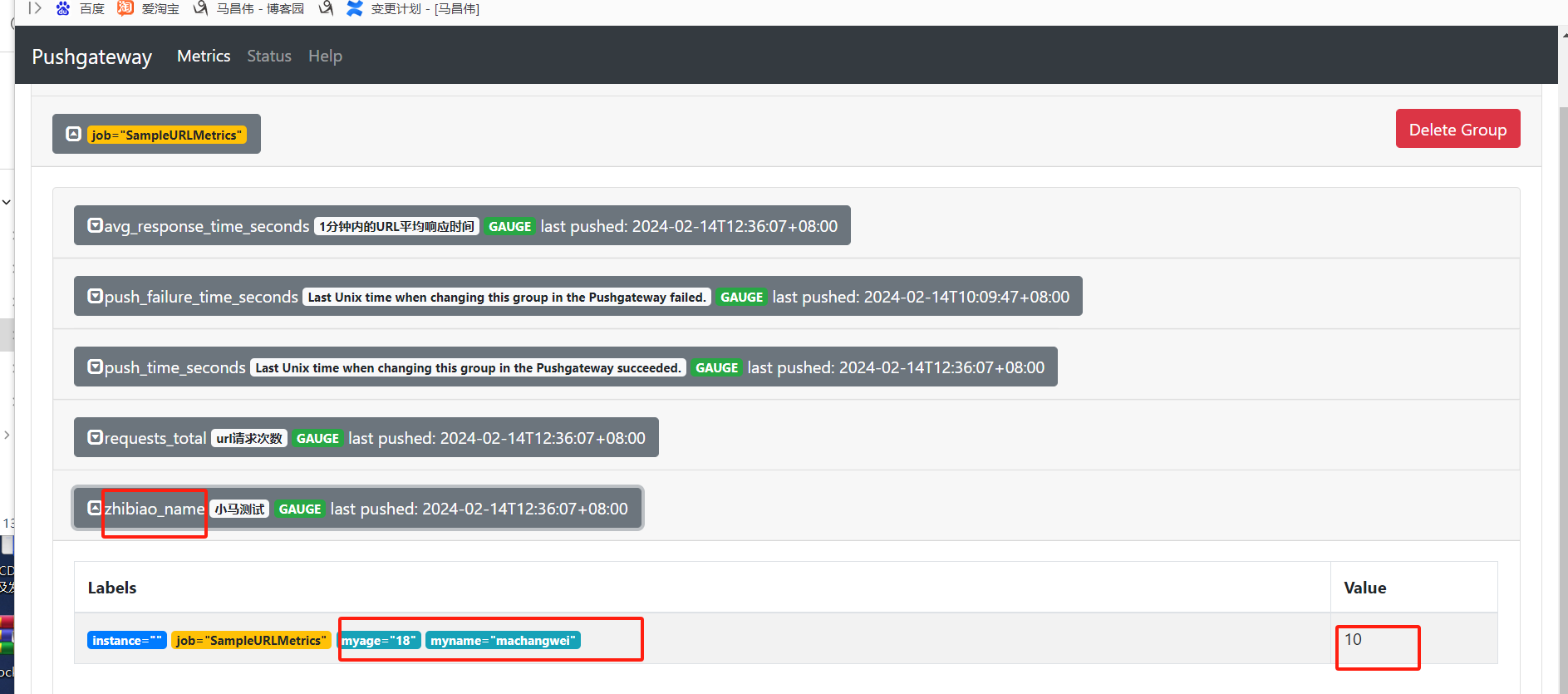
可以看到,多了这个job这个指标组
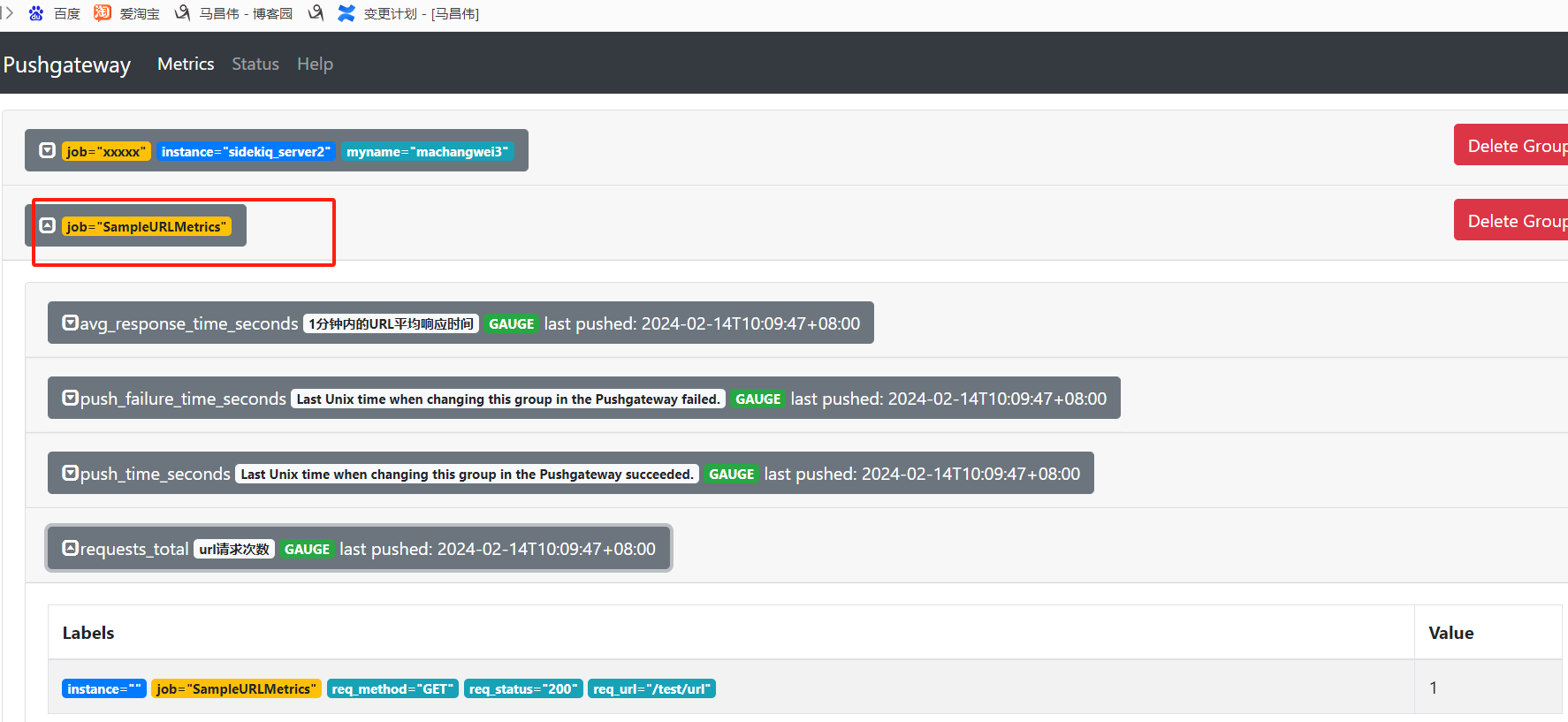
添加一个指标
[root@mcw04 ~]# cat pythonpush.py

#!/usr/bin/env /usr/bin/python3

# -*- coding:utf-8 -*-

from prometheus_client import CollectorRegistry, Gauge, push_to_gateway

if __name__ == '__main__':

    registry = CollectorRegistry()

    labels = ['req_status', 'req_method', 'req_url']

    g_one = Gauge('requests_total', 'url请求次数', labels, registry=registry)

    g_two = Gauge('avg_response_time_seconds', '1分钟内的URL平均响应时间', labels, registry=registry)

    g_one.labels('200','GET', '/test/url').set(1) #set设定值

    g_two.labels('200','GET', '/test/api/url/').set(10) #set设定值

    push_to_gateway('http://10.0.0.14:9091', job='SampleURLMetrics', registry=registry)

[root@mcw04 ~]# vim pythonpush.py

[root@mcw04 ~]# cat pythonpush.py

#!/usr/bin/env /usr/bin/python3

# -*- coding:utf-8 -*-

from prometheus_client import CollectorRegistry, Gauge, push_to_gateway

if __name__ == '__main__':

    registry = CollectorRegistry()

    labels = ['req_status', 'req_method', 'req_url']

    g_one = Gauge('requests_total', 'url请求次数', labels, registry=registry)

    g_two = Gauge('avg_response_time_seconds', '1分钟内的URL平均响应时间', labels, registry=registry)

    g_three=Gauge('zhibiao_name', '小马测试', ['myname','myage'], registry=registry)

    g_one.labels('200','GET', '/test/url').set(1) #set设定值

    g_two.labels('200','GET', '/test/api/url/').set(10) #set设定值

    g_three.labels('machangwei','18', ).set(10) #set设定值

    push_to_gateway('http://10.0.0.14:9091', job='SampleURLMetrics', registry=registry)

[root@mcw04 ~]#

[root@mcw04 ~]# python3 pythonpush.py

[root@mcw04 ~]#
指标名称,指标备注描述信息,指标标签。
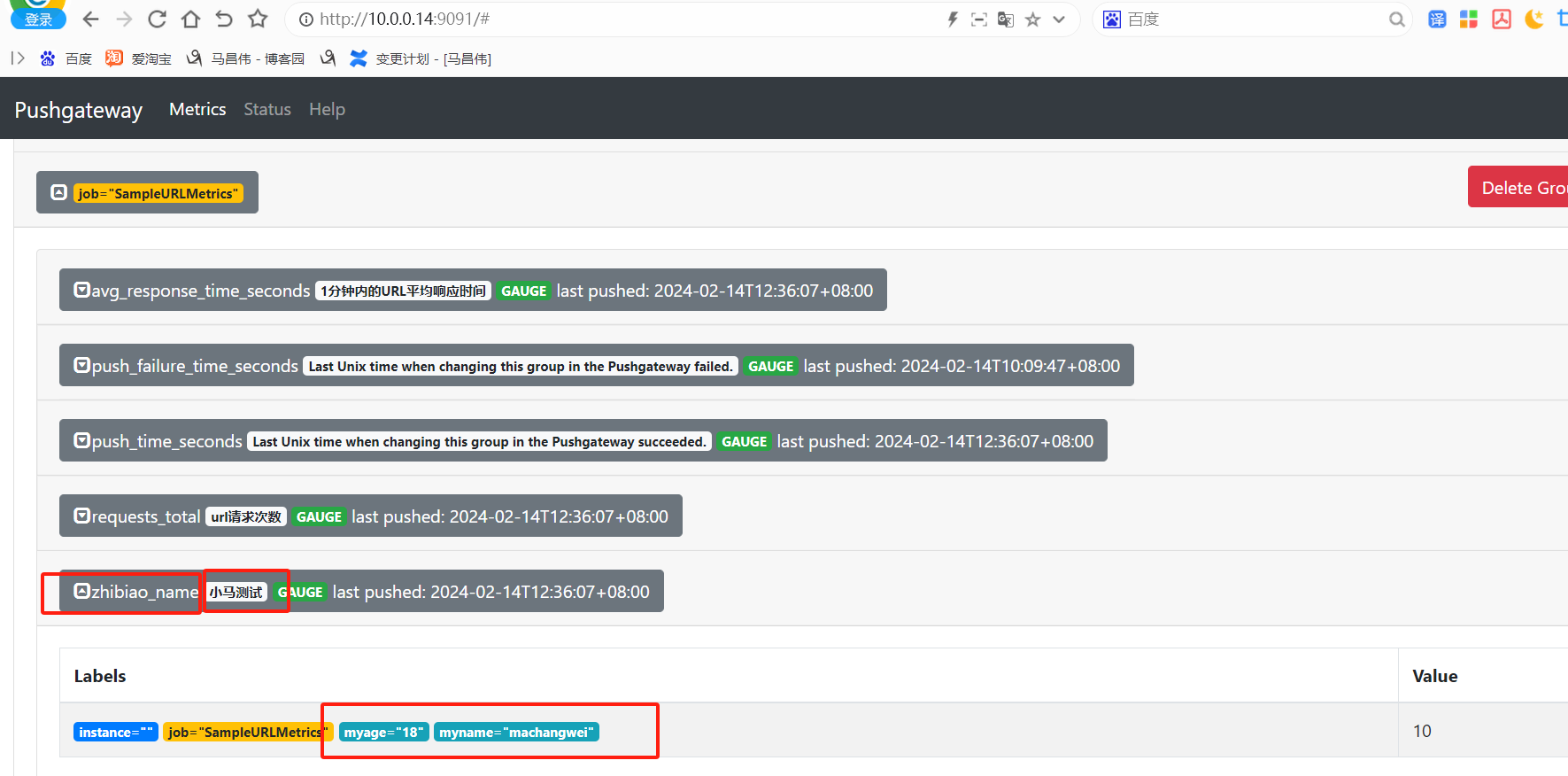
抓取pushgateway
[root@mcw03 ~]# tail -7 /etc/prometheus.yml

   #   action: labeldrop

  - job_name: pushgateway

    honor_labels: true

    file_sd_configs:

      - files:

        - targets/pushgateway/*.json

        refresh_interval: 5m

[root@mcw03 ~]# mkdir /etc/targets/pushgateway

[root@mcw03 ~]#

[root@mcw03 ~]#

[root@mcw03 ~]#

[root@mcw03 ~]#

[root@mcw03 ~]# vim /etc/targets/pushgateway/mcw04.json

[root@mcw03 ~]# cat /etc/targets/pushgateway/mcw04.json

[{

  "targets": ["10.0.0.14:9091"]

}]

[root@mcw03 ~]# curl -X POST http://localhost:9090/-/reload

[root@mcw03 ~]#
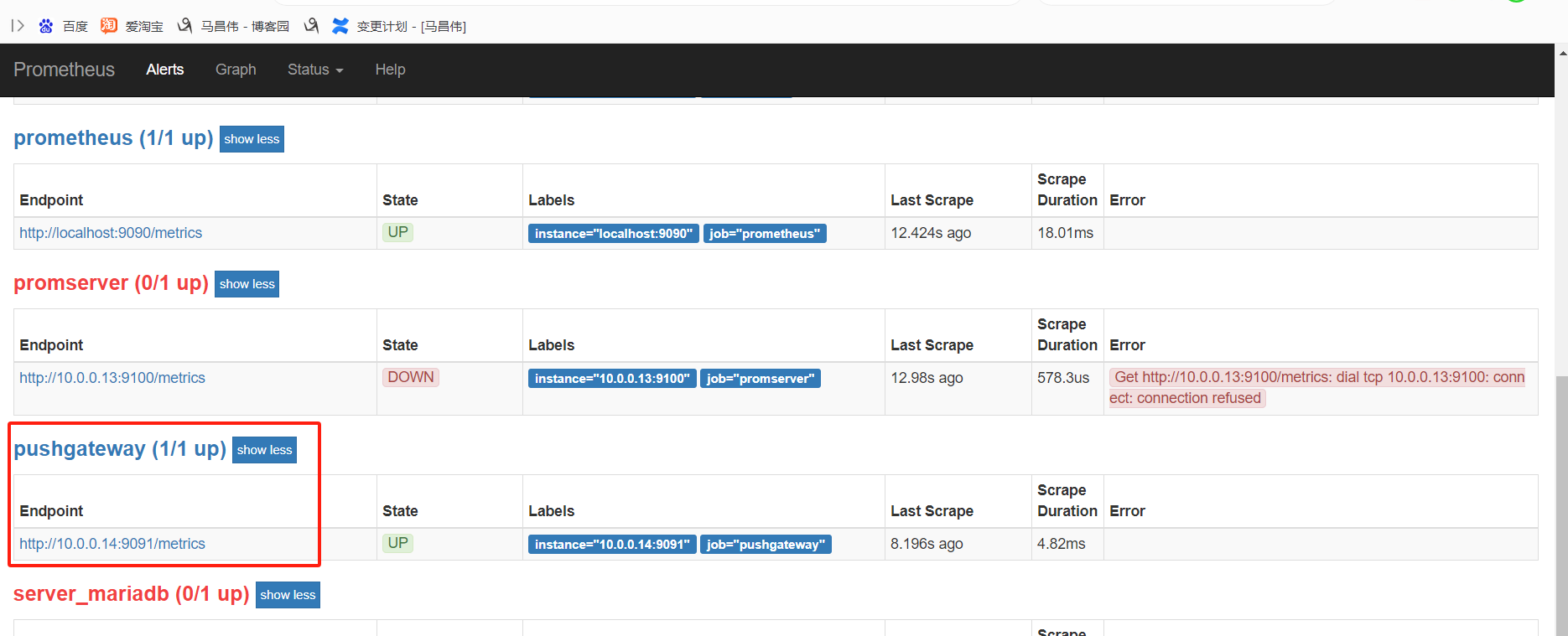
如上配置,添加基于文件的抓取目标,文件里的目标是pushgateway的访问地址
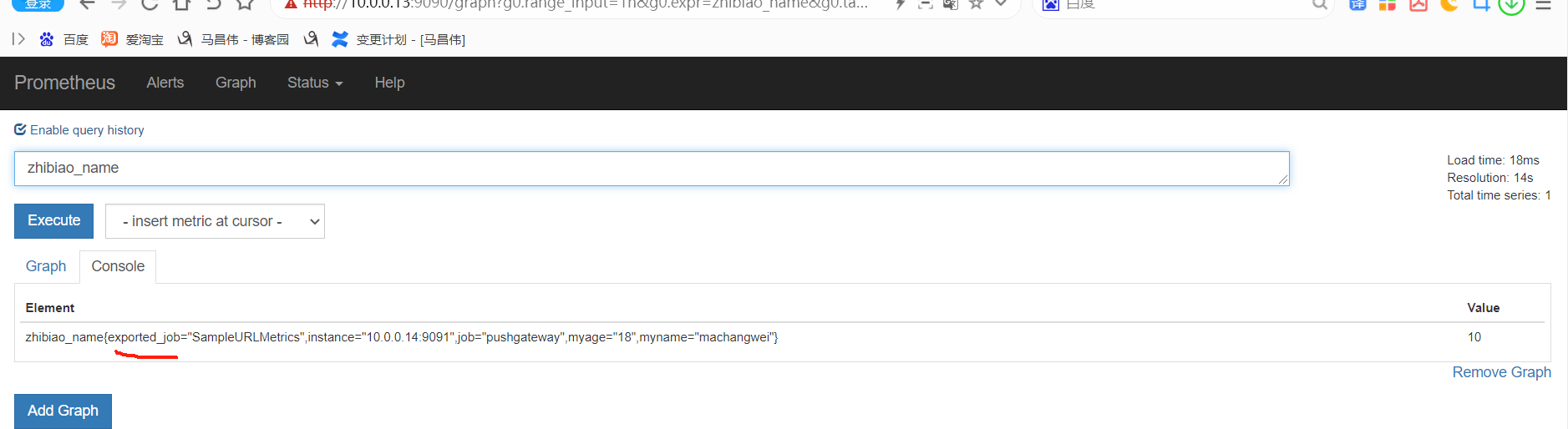
然后在浏览器表达式中,可以看到我们推送到pushgateway的指标
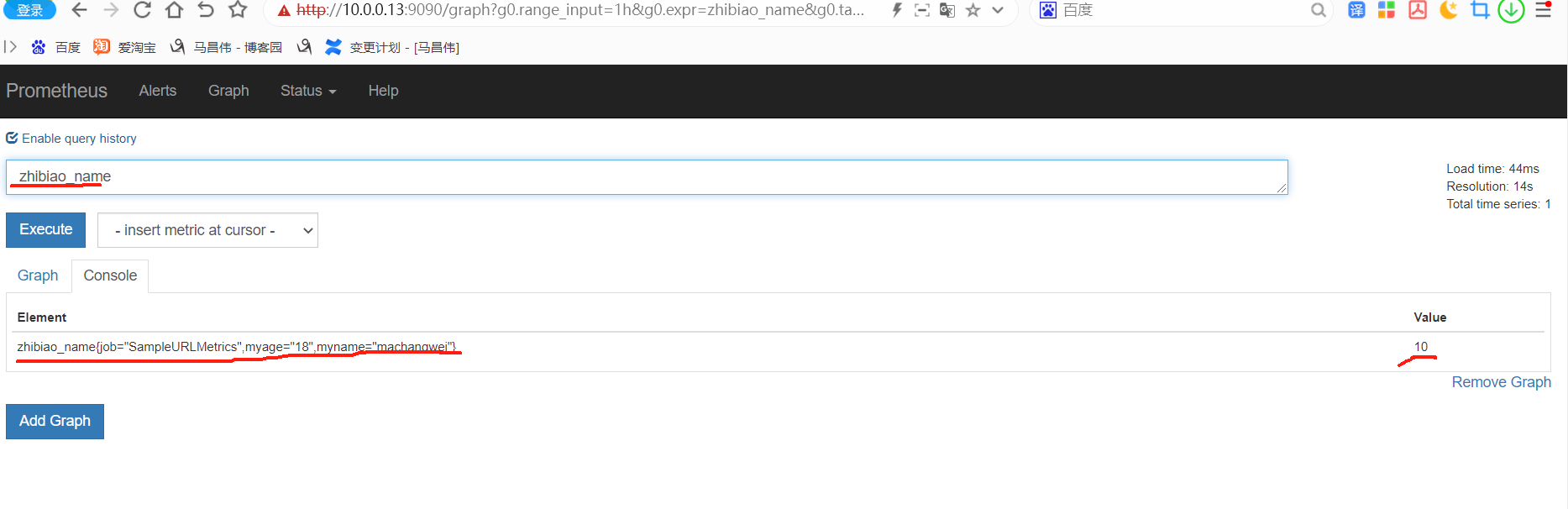
而下面的指标,是上面章节中用python脚本推送到pushgateway的
在这里,也能看到这个pushgateway

修改honer_labels为false
[root@mcw03 ~]# tail -7 /etc/prometheus.yml

   #   action: labeldrop

  - job_name: pushgateway

    honor_labels: false

    file_sd_configs:

      - files:

        - targets/pushgateway/*.json

        refresh_interval: 5m

[root@mcw03 ~]# curl -X POST http://localhost:9090/-/reload
然后再推送一个指标到pushgateway
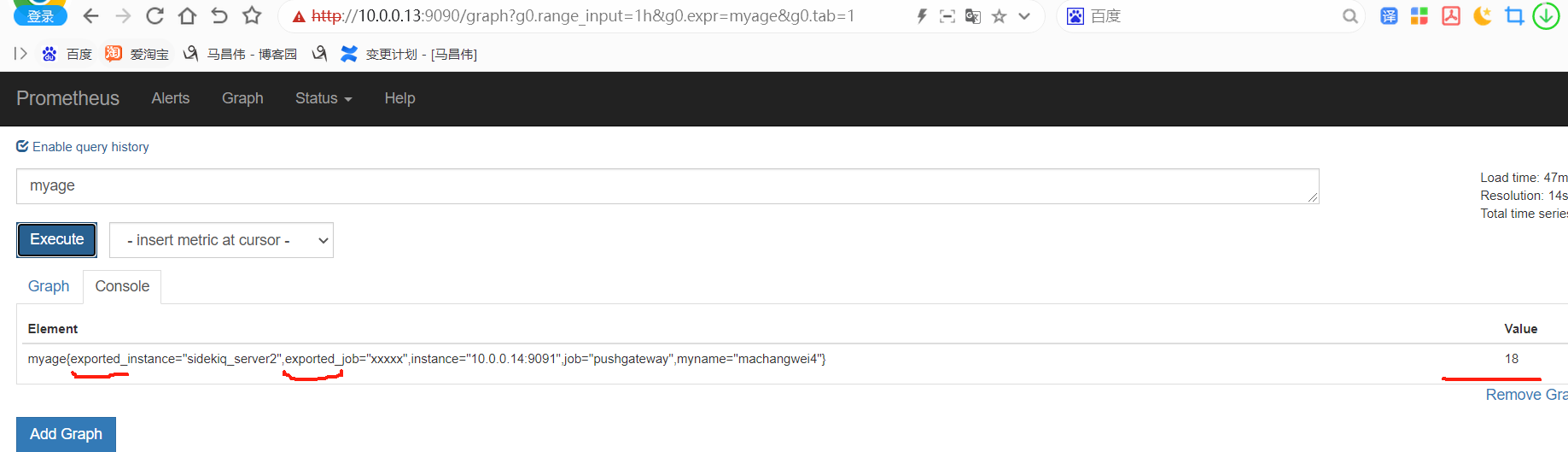
[root@mcw04 ~]# echo 'myname xiaoma' | curl --data-binary @- http://localhost:9091/metrics/job/xxxxx/instance/sidekiq_server2/myname/machangwei4

text format parsing error in line 1: expected float as value, got "xiaoma"

[root@mcw04 ~]# echo 'myage 18' | curl --data-binary @- http://localhost:9091/metrics/job/xxxxx/instance/sidekiq_server2/myname/machangwei4

[root@mcw04 ~]#
指标已经存在了
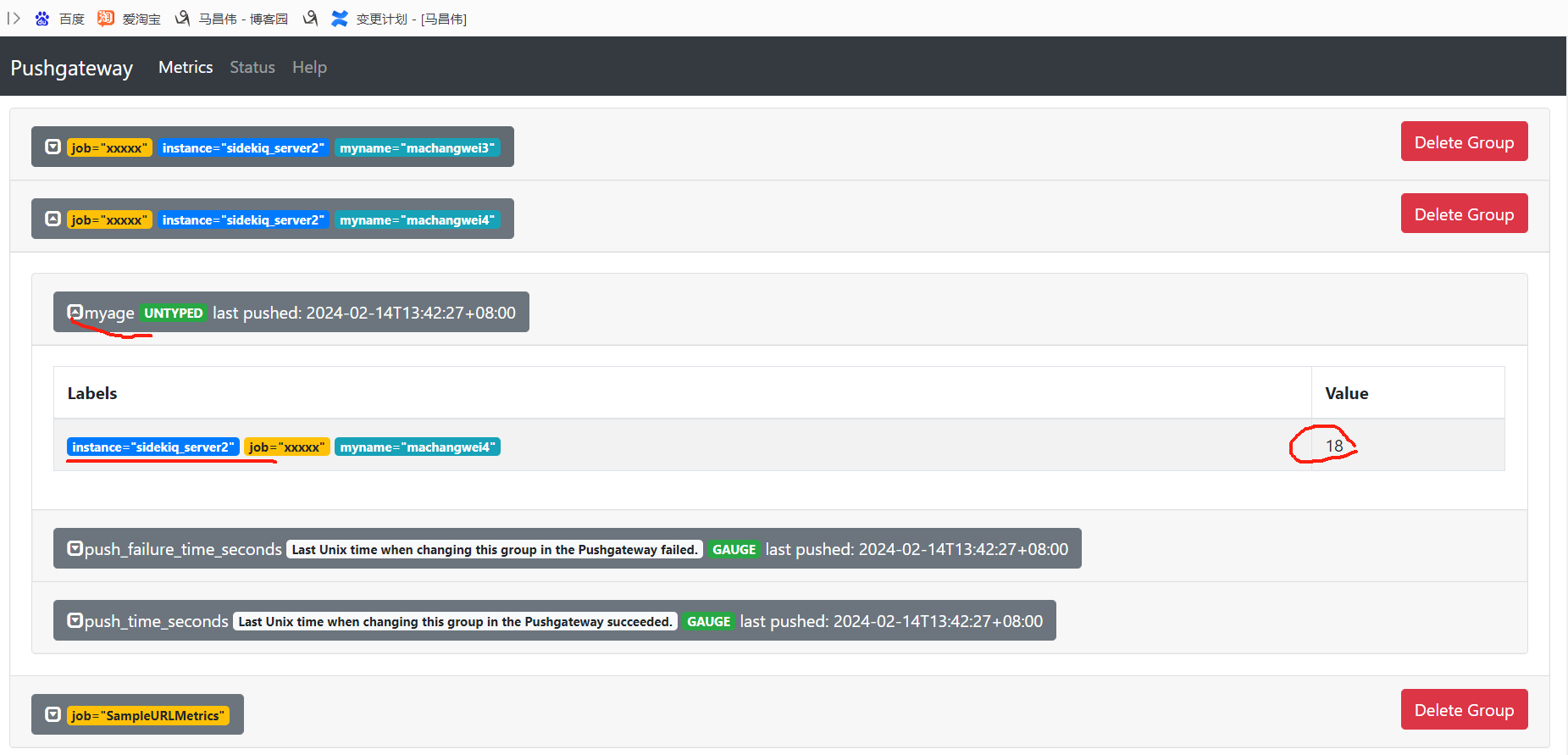
重载Prometheus,让它立即抓取新指标
pushgateway上它本身带的下面两个标签,都被重写改名了,加了exported_前缀,
prometheus使用4的更多相关文章
- prometheus监控系统
关于Prometheus Prometheus是一套开源的监控系统,它将所有信息都存储为时间序列数据:因此实现一种Profiling监控方式,实时分析系统运行的状态.执行时间.调用次数等,以找到系统的 ...
- Prometheus 系统监控方案 一
最近一直在折腾时序类型的数据库,经过一段时间项目应用,觉得十分不错.而Prometheus又是刚刚推出不久的开源方案,中文资料较少,所以打算写一系列应用的实践过程分享一下. Prometheus 是什 ...
- Prometheus 系统监控方案 二 安装与配置
下载Prometheus 下载最新安装包,本文说的都是在Linux x64下面内容,其它平台没尝试过,请选择合适的下载. Prometheus 主程序,主要是负责存储.抓取.聚合.查询方面. Aler ...
- [系统集成] 部署 mesos-exporter 和 prometheus 监控 mesos task
前几天我在mesos平台上基于 cadvisor部署了 influxdb 和 grafana,用于监控 mesos 以及 docker app 运行信息,发现这套监控系统不太适合 mesos + do ...
- Docker 监控- Prometheus VS Cloud Insight
如今,越来越多的公司开始使用 Docker 了,2 / 3 的公司在尝试了 Docker 后最终使用了它.为了能够更精确的分配每个容器能使用的资源,我们想要实时获取容器运行时使用资源的情况,怎样对 D ...
- 安装prometheus+grafana监控mysql redis kubernetes等
1.prometheus安装 wget https://github.com/prometheus/prometheus/releases/download/v1.5.2/prometheus-1.5 ...
- Prometheus : 入门
Prometheus 是一个开源的监控系统.支持灵活的查询语言(PromQL),采用 http 协议的 pull 模式拉取数据等特点使 Prometheus 即简单易懂又功能强大. Prometheu ...
- Prometheus 架构 - 每天5分钟玩转 Docker 容器技术(83)
Prometheus 是一个非常优秀的监控工具.准确的说,应该是监控方案.Prometheus 提供了监控数据搜集.存储.处理.可视化和告警一套完整的解决方案. 让我们先来看看 Prometheus ...
- 剖析Prometheus的内部存储机制
Prometheus有着非常高效的时间序列数据存储方法,每个采样数据仅仅占用3.5byte左右空间,上百万条时间序列,30秒间隔,保留60天,大概花了200多G(引用官方PPT). 接下来让我们看看他 ...
- Prometheus 到底 NB 在哪里?- 每天5分钟玩转 Docker 容器技术(84)
本节讨论 Prometheus 的核心,多维数据模型.我们先来看一个例子. 比如要监控容器 webapp1 的内存使用情况,最传统和典型的方法是定义一个指标 container_memory_usag ...
随机推荐
- docker笔记之安装
本文于2017年上半年完成,发布在个人博客网站上. 考虑个人博客因某种原因无法修复,于是在博客园安家,之前发布的文章逐步搬迁过来. 最近由于工作关系,接触到了docker技术.为了对docker有更多 ...
- Git 12 IDEA上传本地项目到远程
这里以上传 Spring 开源项目到 Gitee 为例: 1.点击 Create Git Repository 2.选择项目目录 3.添加到缓存库 4.提交到本地库 5.复制远程库地址 6.推送到远程 ...
- opengauss数据库-主从搭建
opengauss 数据库-主从搭建 环境说明 软件下载 opengauss 下载地址:https://opengauss.org/zh/download/ 环境准备 关闭 SELINUX 修改 /e ...
- .Net 代码分析工具对比 visual studio 2022 current
目录 原因 背景知识 名词解释 分析器 分析器在IDE里 目标 查找思路及过程 CodeMaid Roslyn StyleCop.Analyzer StyleCop? StyleCop.Analyze ...
- win7自带屏幕录像工具
win7自带屏幕录像工具 2012-03-28 09:23:05 我来说两句 收藏 我要投稿 相信win7自带的屏幕录像工具很多朋友都没用过甚至没有听说过, 但是这款实 ...
- How Python Handles Big Files
The Python programming language has become more and more popular in handling data analysis and proc ...
- ionic 4 app 自动版本更新
前言 介绍一下ionic4 app的自动更新.ionic 不多介绍了,后面一个后系列,背负着骂名的ionic其实还是可以的,如果刚入门ionic可能觉得很坑,但是呢,往后你就发现另外一件事,那就是其他 ...
- CSP 考前集训 10/15
\({\color{Green} \mathrm{A\ -\ 染色}}\) 观察此题,我们可以发现正序维护不好求,会有红点被覆盖等情况. 考虑倒着求,每一次如果操作是红那么久看区间内有多少已经染色的点 ...
- 【ASPLOS 2022】机器学习访存密集计算编译优化框架AStitch,大幅提升任务执行效率
简介: 近日,关于机器学习访存密集计算编译优化框架的论文<AStitch: Enabling A New Multi-Dimensional Optimization Space for Mem ...
- 基于 Serverless 打造如 Windows 体验的个人专属家庭网盘
简介:虽然现在市面上有些网盘产品, 如果免费试用,或多或少都存在一些问题, 可以参考文章<2020 国内还能用的网盘推荐>.本文旨在使用较低成本打造一个 "个人专享的.无任何限 ...