
CXP2.0的相机是否可以使用CXP1.1的Grabber
可以
答案是肯定的。
目前CXP共有2个发布版本:
2011年发布CXP1.1
2021年发布CXP2.1,向后兼容,新标准增加了同步功能、数据率放大了一倍。
只要是符合CXP标准、接插件匹配,那么CXP2.1是向前兼容CXP1.1的;
借用别人的总结,详细说明参考 https://www.qualitymag.com/articles/95138-what-should-i-know-about-coaxpress-20? :
- All cameras and frame grabbers will start up in CXP1.1, only switching to CXP2.0 when both the frame grabber and the camera support CXP2.0.
- The CXP2.0 can reach up to 12.5 Gbit/s. This 12.5 Gbit/s mode is referred to as CXP12.
- The CXP2.0 standard will support the new micro BNC connector.
- CXP2.0 supports configurations where one camera is used with multiple frame grabbers in multiple computers such that the calculations can be performed in parallel.
- GenICam features such as heartbeat (allows synchronization between cameras), events and timestamps (actively pushed from the camera to the frame grabber) will now be supported by CXP2.0.
- CXP2.0 will allow a higher upstream data rate when operating at CXP10 and CXP12.
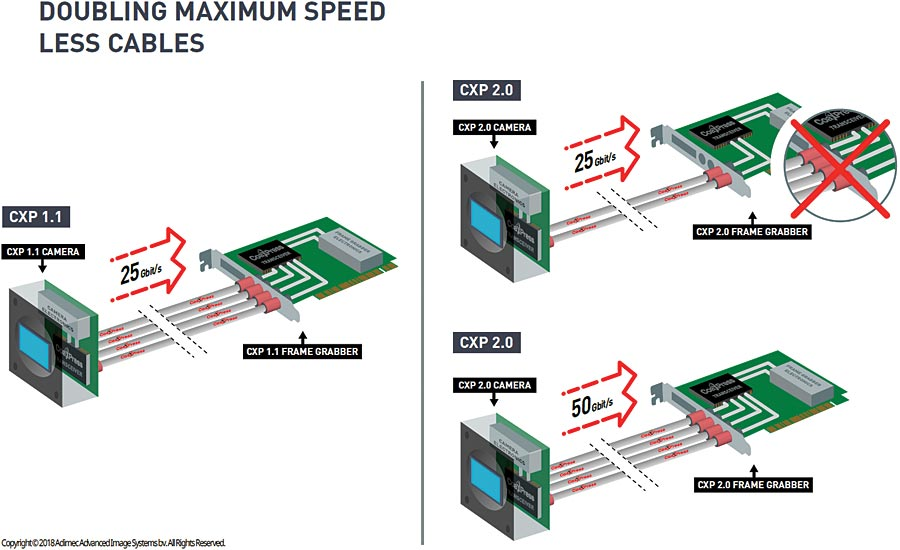
1. CoaXPress 2.0 is compatible with CoaXPress 1.1
All cameras and frame grabbers will start up in CXP1.1, only switching to CXP2.0 when both the frame grabber and the camera support CXP2.0.
This means that a CXP1.1 camera works on both the CXP1.1 and CXP2.0 frame grabber. This also means that a CXP2.0 camera works on a CXP1.1 frame grabber, although you will not be able to benefit from the advantages CXP2.0 has to offer.
2. Doubling of the maximum speed
The most obvious improvement is the increased data rate. As previously mentioned the CXP2.0 can reach up to 12.5 Gbit/s. This 12.5 Gbit/s mode is referred to as CXP12. Due to overhead the actual effective bandwidth is approximately 9.6 Gbit/s.
Just to give an example of what would become possible, let’s consider a sensor resolution of 5120x5120 and a bit depth of 10 bit. With four CXP2.0 channels at CXP12 the theoretically possible frame rate could be about 146 FPS. CXP1.1 with 4 channels at CXP6 would only achieve up to 73 FPS in this case.
One thing that needs attention from a system engineer’s point of view would be that while for CXP1.1 PCIe gen2 x8 or gen3 x4 is sufficient for most cases, for CXP2.0 PCIe gen3 x8 will become a minimum common requirement.
3. New connector type
The CXP2.0 standard will support the new micro BNC connector. CoaXPress started with the normal BNC connector, being a big connector, than the smaller DIN 1.0/2.3 connector became more commonly used. Unfortunately the DIN 1.0/2.3 connector resulted in some complaints from the market and it does not support the CXP12 high frequency signals.
Switching to the micro BNC connector does solve these issues. The micro BNC is in size comparable to the DIN connector, while retaining the robustness of the normal BNC connector. The micro BNC supports the required high frequency signals for CXP12 and even can achieve a smaller pitch if needed when placed next to each other. Furthermore the micro BNC connector is a well-established industry standard in the broadcast industry. Although being slightly more expensive compared to the DIN connector, it will give you a very reliable connector being able to do CXP12 speeds.
4. Stream to multiple hosts
Sometimes the computer is the limiting factor in processing speed. This can be the case if a lot of calculations have to be performed on the images. For these situations CXP2.0 supports configurations where one camera is used with multiple frame grabbers in multiple computers such that the calculations can be performed in parallel. This is an optional part of the standard, so ask the camera/frame grabber manufacturer which configurations they support.
The main supported configurations are:
Duplicate one image to multiple frame grabbers/PCs
Example: camera has four CXP connectors; each connector is connected to a different frame grabber in a different PC. One image is recorded by the camera and the complete image is sent to all four PCs.
Divide one image in parts and send to multiple frame grabbers/PCs
Example: camera has four CXP channels, each channel is connected to a different frame grabber in a different PC. The image can be divided in four horizontal or vertical stripes such that each stripe can be sent to a single PC for further processing.
5. Heartbeat, events and timestamps
Missing from CXP1.1, but being part of GenICam for many years is the heartbeat, events and timestamp. These GenICam features will now be supported by CXP2.0.
Heartbeat
The heartbeat allows for synchronization between cameras. Each camera has its own clock and timing. With the heartbeat message, the frame grabber can compute the exact actual time of the camera and link this to its own time clock. Often, the frame grabber clock can be synchronized with the Precision Time Protocol (PTP) IEEE 1588. When multiple cameras are connected to the frame grabber, the frame grabber can use the heartbeat to calculate the relative timing between the cameras and when synchronized with the PTP IEEE 1588, timing between cameras connected to different frame grabbers can be calculated as well. The heartbeat is required to allow for determining the exact moment an event occurred with respect to an event in another camera.
Events and timestamps
Events allow the camera to inform the frame grabber about the occurrence of certain events at a certain time. The time the event occurred is indicated by a timestamp as made possible by the heartbeat. Example events are start or end of exposure or reaching a too high temperature. Events are actively pushed from the camera to the frame grabber. No requests have to be sent to the camera (no polling is required) to monitor for the occurrence of events.
6. Faster Trigger
CXP2.0 will allow for a higher upstream data rate when operating at CXP10 and CXP12. CXP6 and lower use the CXP1.1 upstream data rate. This higher upstream data rate directly reduces the minimum trigger latency by half compared to CXP1.1. From a latency of 3.4 µs it goes to a latency of 1.7µs.
Here the latency is defined as the delay between the moment a trigger is being send and the actual moment the camera has received the trigger and can start the exposure.
CXP2.0的相机是否可以使用CXP1.1的Grabber的更多相关文章
- iOS 判断相机权限是否被限制,判断相机是否可以使用
判断相机权限是否被限制 需要导入 AVFoundation 类 [objc] view plain copy #import <AVFoundation/AVFoundation.h> ...
- swift3.0自定义相机界面
这是公司上上上一个项目的自定义相机界面,原来是swift2.0写的,今天改为swift3.0,记录一下. 效果图如下: ...
- Android 7.0 之后相机/文件读写等权限获取方式改变,导致开启相机闪退
在 Android 7.0 之前 Google 提供的动态申请权限的 API,可以调用相机拍照,访问SDcard等操作都只需要申请对应的权限,如下: <uses-permission andro ...
- [转]opencv3.0 鱼眼相机标定
[原文转自]:http://blog.csdn.net/qq_15947787/article/details/51441031 前两天发表的时候没注意,代码出了点错误,所以修改了一下,重新发上来. ...
- 【温故知新】——BABYLON.js学习之路·前辈经验(二)
前言:在上一篇随笔BABYLON.js学习之路·前辈经验(一)中回顾了组内同事们长时间在Babylon开发实践中的总结出的学习之路和经验,这一篇主要对开发中常见的一些功能点做一个梳理,这里只作为温故知 ...
- 与众不同 windows phone (41) - 8.0 相机和照片: 通过 AudioVideoCaptureDevice 捕获视频和音频
[源码下载] 与众不同 windows phone (41) - 8.0 相机和照片: 通过 AudioVideoCaptureDevice 捕获视频和音频 作者:webabcd 介绍与众不同 win ...
- 与众不同 windows phone (42) - 8.0 相机和照片: 通过 PhotoCaptureDevice 捕获照片
[源码下载] 与众不同 windows phone (42) - 8.0 相机和照片: 通过 PhotoCaptureDevice 捕获照片 作者:webabcd 介绍与众不同 windows pho ...
- 与众不同 windows phone (43) - 8.0 相机和照片: 镜头的可扩展性, 图片的可扩展性, 图片的自动上传扩展
[源码下载] 与众不同 windows phone (43) - 8.0 相机和照片: 镜头的可扩展性, 图片的可扩展性, 图片的自动上传扩展 作者:webabcd 介绍与众不同 windows ph ...
- Android7.0调用系统相机拍照、读取系统相册照片+CropImageView剪裁照片
Android手机拍照.剪裁,并非那么简单 简书地址:[我的简书–T9的第三个三角] 前言 项目中,基本都有用户自定义头像或自定义背景的功能,实现方法一般都是调用系统相机–拍照,或者系统相册–选择照片 ...
- Android Camera 相机程序编写
Android Camera 相机程序编写 要自己写一个相机应用直接使用相机硬件,首先应用需要一个权限设置,在AndroidManifest.xml中加上使用设备相机的权限: <uses-per ...
随机推荐
- [转帖]Redis如何绑定CPU
文章系转载,便于分类和归纳,源文地址:https://www.yisu.com/zixun/672271.html 绑定 CPU Redis 6.0 开始支持绑定 CPU,可以有效减少线程上下文切换. ...
- SingleNode HDFS 搭建过程
背景 1. 纯粹测试 2. 未考虑安全和授权以及数据处理. 3. 单节点最简单的部署, 验证功能连接的可能性 资料获取以及环境变量的设置 获取最新的安装文件 https://downloads.apa ...
- MySQL批量执行SQL修改视图属主的办法
前人挖坑 后人填坑 Study From https://blog.csdn.net/carefree2005/article/details/109812943 第一步: 形成SQL select ...
- linux服务器cup100%问题排查
一.出现问题在发现公司门禁服务无法开门的第一时间,去线上服务器上查看了一下进程的运行情况,具体运行如下: 第一次在查看的时候发现并没有我需要的服务entranceguard进程(图片是后续截图的) 二 ...
- Prompt实战优化
1.概述 在深度学习领域,Prompt(提示语)被广泛应用于自然语言处理任务中,如文本生成.机器翻译和问答系统等.Prompt的设计对模型的性能和生成结果有着重要的影响,因此在实际应用中合理而有效地利 ...
- x86 x64 arm64的区别
我们常说的高通 865,麒麟990 不是 CPU 是 SoC(System On Chip),SoC 除了 CPU 外,还有 GPU,还有可选的浮点数加速器,专用于深度模型的加速器,等等.除此以外,S ...
- 【Jmeter】Request1输出作为Request2输入-后置处理器
[Jmeter]基础介绍-详细 接上文,继续介绍Jmeter,本文关注点为如何解决上文中提到的第一个问题,即: 需要实现Request1的返回作为Request2的RequestBody或Header ...
- SpringCloud-01-Eureka Ribbon
1.微服务技术 2.SpringCloud SpringCloud是目前国内使用最广泛的微服务框架.官网地址:https://spring.io/projects/spring-cloud. Spri ...
- CF1853
你谷的加题速度实在太慢了 被 CF 的题目薄纱 A 可以选任意次 \(i\in [1,n]\),使 \(a[1\sim i]++,a[i+1\sim n]--\).求最少操作次数使得原数列变成非从小到 ...
- HASHTEAM香山杯2023WP
目录 前言 misc 签到题 web PHP_unserialize_pro Re URL从哪儿来 hello python pwn Move pwthon 附上c-python调试方法 crypto ...