
WPF 通过 InputManager 模拟调度触摸事件
在 WPF 中,框架可以分为两个部分,一个是渲染,另一个是交互。交互的入口是在 InputManager 里面,而实际的交互实现需要通过渲染布局和交互的路由事件才能完成。在输入管理提供了调度事件的方法,这个方法可以被传入路由事件,传入的路由事件将会被调度到路由事件指定的元素上进行触发。本文告诉大家如何模拟调度一个触摸事件
本文的内容属于没有任何官方文档的支持的内容,以下是我看 WPF 源代码了解到的用法
在输入管理里面可以通过 System.Windows.Input.InputManager.Current 拿到当前的输入管理,这个属性默认和 Dispatcher.CurrentDispatcher.InputManager 是相同的对象,只有在初始化的时候 Dispatcher.CurrentDispatcher.InputManager 会是空拿不到值,而通过 System.Windows.Input.InputManager.Current 将会自动创建
此时就可以回答这个 InputManager.Current 是针对进程还是线程的问题了,请问 CurrentDispatcher 是针对进程还是线程呢
在拿到输入管理,就可以调用 ProcessInput 方法传入一个 InputEventArgs 了,可以传入一个路由事件,此时路由事件将会加入触发队列,在调度方法的核心是通过 Stack _stagingArea 字段做到栈的方式的调度
        /// <summary>

        ///     Synchronously processes the specified input.

        /// </summary>

        /// <remarks>

        ///     The specified input is processed by all of the filters and

        ///     monitors, and is finally dispatched to the appropriate

        ///     element as an input event.

        /// </remarks>

        /// <returns>

        ///     Whether or not any event generated as a consequence of this

        ///     event was handled.

        /// </returns>

        public bool ProcessInput(InputEventArgs input)

        {

//             VerifyAccess();

            if(input == null)

            {

                throw new ArgumentNullException("input");

            }

            // Push a marker indicating the portion of the staging area

            // that needs to be processed.

            PushMarker();

            // Push the input to be processed onto the staging area.

            PushInput(input, null);

            // Post a work item to continue processing the staging area

            // in case someone pushes a dispatcher frame in the middle

            // of input processing.

            RequestContinueProcessingStagingArea();

            // Now drain the staging area up to the marker we pushed.

            bool handled = ProcessStagingArea();

            return handled;

        }
上面代码核心的逻辑是 ProcessStagingArea 方法
简化的代码应该和下面差不多
 while((item = PopInput()) != null)

 {

    // 忽略 Pre-Process 逻辑

    // Raise the input event being processed.

    InputEventArgs input = item.Input;

    // Some input events are explicitly associated with an element.  Those that are not are associated with the target of the input device for this event.

    // 有些输入的元素是和输入事件关联的,此时和输入设备没有关系

    // 上面的注释说的是先通过 input.Source 获取和输入事件关联的元素,如果不能获取到,那么也许输入元素是和输入设备关联的,尝试从输入设备获取

    DependencyObject eventSource = input.Source as DependencyObject;

    if (eventSource == null)

    {

        eventSource = input.Device.Target as DependencyObject;

    }

    if (InputElement.IsUIElement(eventSource))

    {

        UIElement e = (UIElement)eventSource;

        e.RaiseEvent(input, true); // Call the "trusted" flavor of RaiseEvent.

    }

    else if (InputElement.IsContentElement(eventSource))

    {

        ContentElement ce = (ContentElement)eventSource;

        ce.RaiseEvent(input, true);// Call the "trusted" flavor of RaiseEvent.

    }

    else if (InputElement.IsUIElement3D(eventSource))

    {

        UIElement3D e3D = (UIElement3D)eventSource;

        e3D.RaiseEvent(input, true); // Call the "trusted" flavor of RaiseEvent

    }

 }
上面的 PopInput 方法如下
        internal StagingAreaInputItem PopInput()

        {

            object input = null;

            if(_stagingArea.Count > 0)

            {

                input = _stagingArea.Pop();

            }

            return input as StagingAreaInputItem;

        }
也就是本质上都是调用了元素的 RaiseEvent 方法,里面没有什么判断逻辑
按照上面的逻辑,咱可以尝试自己模拟触发触摸事件。不过创建一个 TouchEventArgs 还是比较复杂的逻辑,需要用 WPF 模拟触摸设备
但是简单的测试是可以通过触摸一下屏幕,保存触摸事件的参数
        private void OnTouchDown(object sender, TouchEventArgs e)

        {

            _lastEventArgs = e;

        }

        private TouchEventArgs _lastEventArgs;
下面尝试在鼠标按下的时候触发这个事件
        private void OnMouseDown(object sender, MouseButtonEventArgs e)

        {

            if (e.StylusDevice != null)

            {

            }

            else

            {

                System.Windows.Input.InputManager.Current.ProcessInput(_lastEventArgs);

            }

        }
在触摸之后点击鼠标,可以看到鼠标点击的时候同样触发了触摸按下事件
那如果想要模拟触发触摸移动的事件呢?可以尝试修改 RoutedEvent 属性
_lastEventArgs.RoutedEvent = PreviewTouchDownEvent;

System.Windows.Input.InputManager.Current.ProcessInput(_lastEventArgs);

_lastEventArgs.RoutedEvent = PreviewTouchMoveEvent;

System.Windows.Input.InputManager.Current.ProcessInput(_lastEventArgs);

_lastEventArgs.RoutedEvent = PreviewTouchUpEvent;

System.Windows.Input.InputManager.Current.ProcessInput(_lastEventArgs);
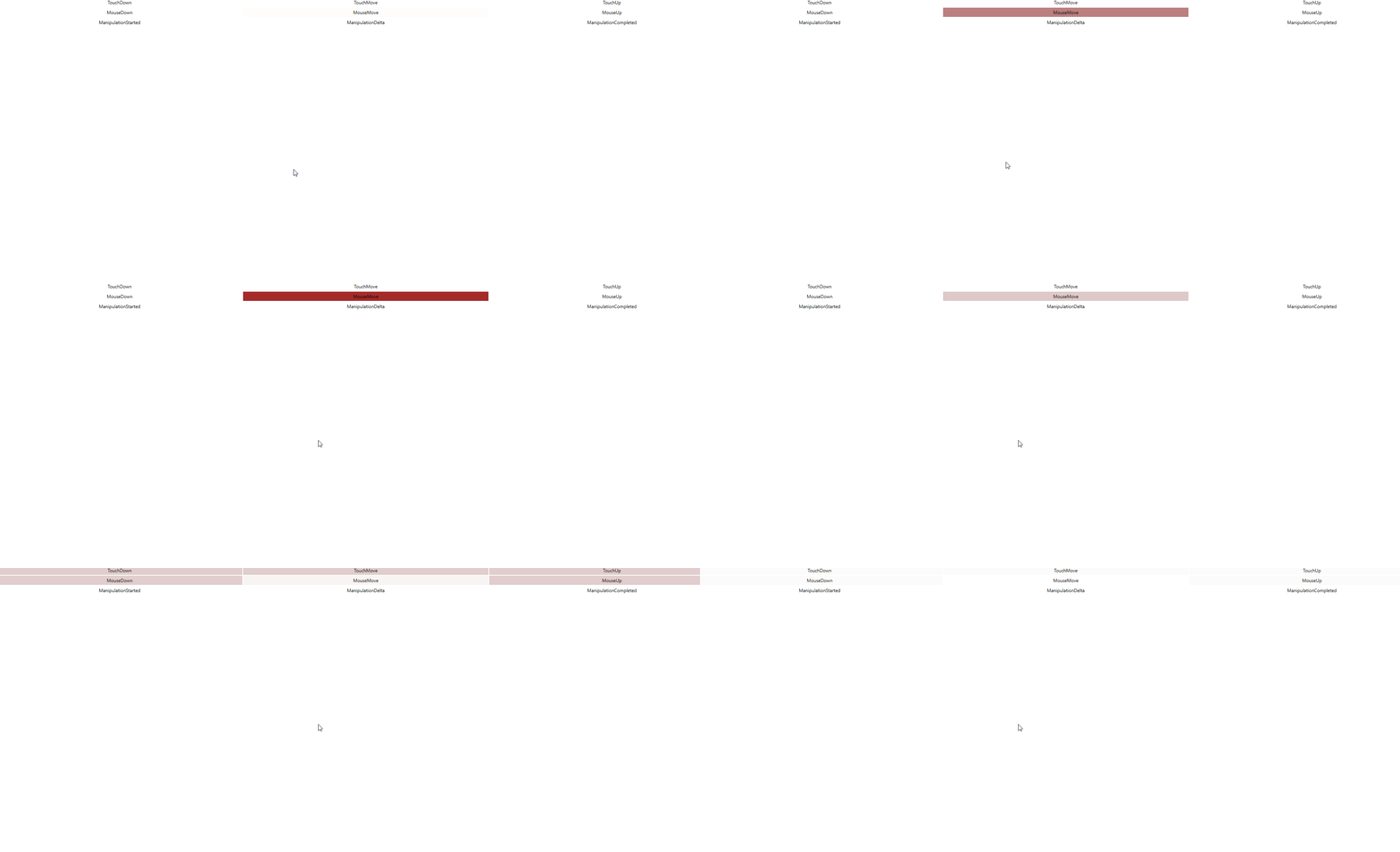
上面图片是测试工具 ManipulationDemo 的显示,这个工具会在事件触发的时候修改对应事件颜色,也就是在鼠标点击的时候触发了触摸的按下和移动和抬起
用这个方法就可以从路由事件这一层调度事件
上面的代码放在 GitHub 上,小伙伴打开代码需要关注的是 OnMouseDown 方法的代码
根据上面的源代码可以知道框架里面其实也是调用了 RaiseEvent 方法,也就是不使用交互框架的调度自己触发是否可以?实际上也是可以的
只需要将 System.Windows.Input.InputManager.Current.ProcessInput(_lastEventArgs) 替换为 ((UIElement)_lastEventArgs.Source).RaiseEvent(_lastEventArgs) 请看代码
_lastEventArgs.RoutedEvent = PreviewTouchDownEvent;

((UIElement)_lastEventArgs.Source).RaiseEvent(_lastEventArgs);

//System.Windows.Input.InputManager.Current.ProcessInput(_lastEventArgs);

_lastEventArgs.RoutedEvent = PreviewTouchMoveEvent;

((UIElement)_lastEventArgs.Source).RaiseEvent(_lastEventArgs);

//System.Windows.Input.InputManager.Current.ProcessInput(_lastEventArgs);

_lastEventArgs.RoutedEvent = PreviewTouchUpEvent;

((UIElement)_lastEventArgs.Source).RaiseEvent(_lastEventArgs);

//System.Windows.Input.InputManager.Current.ProcessInput(_lastEventArgs);
此时运行测试项目也可以看到和 ProcessInput 一样的效果
本文其实是补充 WPF 触摸到事件 的后半部分,从 WPF 触摸到路由事件,是如何从触摸事件让对应的元素触发
本文的方法仅是模拟事件的触发,如果想要修改触摸的点的坐标等,需要自己实现 TouchDevice 类,请看 WPF 模拟触摸设备
WPF 通过 InputManager 模拟调度触摸事件的更多相关文章
- 移动端-js触摸事件
开发者工具 在移动开发中,一种较为容易的做法是,先在桌面上开始原型设计,然后再在打算要支持的设备上处理移动特有的部分.多点触摸正是难以在PC上进行测试的那些功能之一,因为大部分的PC都没有触摸输入. ...
- javascript触摸事件touch使用
详细内容请点击 Apple在iOS 2.0中引入了触摸事件API,Android正迎头赶上这一事实标准,缩小差距.最近一个W3C工作组正合力制定这一触摸事件规范. 在本文深入研究iOS和 ...
- Google Chrome开发者工具-移动仿真:触摸事件仿真
如果你在开发PAD/手机所用WEB版应用,需要在桌面审查页面元素.调试脚本,模拟移动设备尺寸.事件.位置等信息, 那么可以使用Chrome开发者工具(DevTools)提供的强大的移动仿真功能,支持主 ...
- WPF中的多点触摸事件
UIElement在WPF4下添加了很多支持多点触摸的事件,通过它们可以在硬件支持的情况下处理多点触摸,以下通过代码来说明通过处理这些事件,我们可以做些什么: 一.触摸相关的多种事件,跟鼠标事件是对应 ...
- WPF 后台模拟界面触摸点击
win32Api提供一种方法,模拟用户触摸点击 InjectTouchInput function InitializeTouchInjection InjectTouchInput 在模拟添加触摸输 ...
- 2019-11-29-WPF-从触摸消息转触摸事件
原文:2019-11-29-WPF-从触摸消息转触摸事件 title author date CreateTime categories WPF 从触摸消息转触摸事件 lindexi 2019-11- ...
- 2019-5-13-WPF-从触摸消息转触摸事件
title author date CreateTime categories WPF 从触摸消息转触摸事件 lindexi 2019-05-13 09:43:48 +0800 2019-05-12 ...
- iOS开发系列--触摸事件、手势识别、摇晃事件、耳机线控
-- iOS事件全面解析 概览 iPhone的成功很大一部分得益于它多点触摸的强大功能,乔布斯让人们认识到手机其实是可以不用按键和手写笔直接操作的,这不愧为一项伟大的设计.今天我们就针对iOS的触摸事 ...
- [转]starling教程-触摸事件(Touch Events)(四)
在前面提到过,Starling是Sparrow的姊妹篇,正因为这样,Starling里的touch事件的机制其实是为移动设备的触摸交互设计的,所以当你使用它进行使用鼠标交互的桌面应用开发时,第一眼会感 ...
- iOS开发——UI进阶篇(十二)事件处理,触摸事件,UITouch,UIEvent,响应者链条,手势识别
触摸事件 在用户使用app过程中,会产生各种各样的事件 一.iOS中的事件可以分为3大类型 触摸事件加速计事件远程控制事件 响应者对象在iOS中不是任何对象都能处理事件,只有继承了UIResponde ...
随机推荐
- 「AntV」景点轨迹数据获取与L7可视化
1. 引言 L7 地理空间数据可视分析引擎是一种基于 WebGL 技术的地理空间数据可视化引擎,可以用于实现各种地理空间数据可视化应用.L7 引擎支持多种数据源和数据格式,包括 GeoJSON.CSV ...
- 记录--try...catch知识补全
这里给大家分享我在网上总结出来的一些知识,希望对大家有所帮助 说到try...catch都觉得非常熟悉了,不就是用来捕捉代码块中的错误嘛,平时也用得比较多的.然而因为了解不够多,我的面试却栽在了一个简 ...
- 作用域&变量提升&闭包题目及内容解答
这里给大家分享我在网上总结出来的一些知识,希望对大家有所帮助 1. 代码输出结果 (function(){ var x = y = 1; })(); var z; console.log(y); // ...
- ConnectionResetError: [WinError 10054] 远程主机强迫关闭了一个现有的连接
ConnectionResetError: [WinError 10054] 远程主机强迫关闭了一个现有的连接 是因为使用urlopen方法太过频繁,引起远程主机的怀疑,被网站认定为是攻击行为.导致u ...
- Go | 浅谈包管理模式
任何一门编程语言都离不开对各种工具包的使用,工具包的管理就显得异常重要了.Go 的包管理方式是逐渐演进的,本文介绍Go语言的两种包管理模式. GOPATH模式引包(不推荐) 在 1.5 版本之前,所有 ...
- html+css实现指针时钟
周末时间,突然想用html+css实现一个简单的指针时钟的功能,以下是具体代码实现,文末附有线上链接地址. 效果图: 1.代码 1.1.clock.html <!DOCTYPE html> ...
- FFmpeg开发笔记(十)Linux环境给FFmpeg集成vorbis和amr
FFmpeg内置了aac音频格式,在<FFmpeg开发实战:从零基础到短视频上线>一书的"5.2.2 Linux环境集成mp3lame"又介绍了如何给FFmpeg集 ...
- 06 PSP成熟度模型【软件过程与管理】
PSP成熟度模型(Personal Software Process) 个体度量过程 PSP3 周期开发 个体计划过程 PSP2 代码评审 设计评审 PSP2.1 设计模板 个体质量管理过程 PSP1 ...
- Scala 惰性加载
1 package com.atguigu.chapter04 2 3 object Test_Lazy { 4 def main(args: Array[String]): Unit = { 5 l ...
- #启发式合并,链表#洛谷 3201 [HNOI2009] 梦幻布丁
题目 \(n\)个布丁摆成一行,进行\(m\)次操作. 每次将某个颜色的布丁全部变成另一种颜色的, 然后再询问当前一共有多少段颜色. (\(n,m\leq 10^5,col\leq 10^6\)) 分 ...