
html+css实现指针时钟
周末时间,突然想用html+css实现一个简单的指针时钟的功能,以下是具体代码实现,文末附有线上链接地址。
效果图:
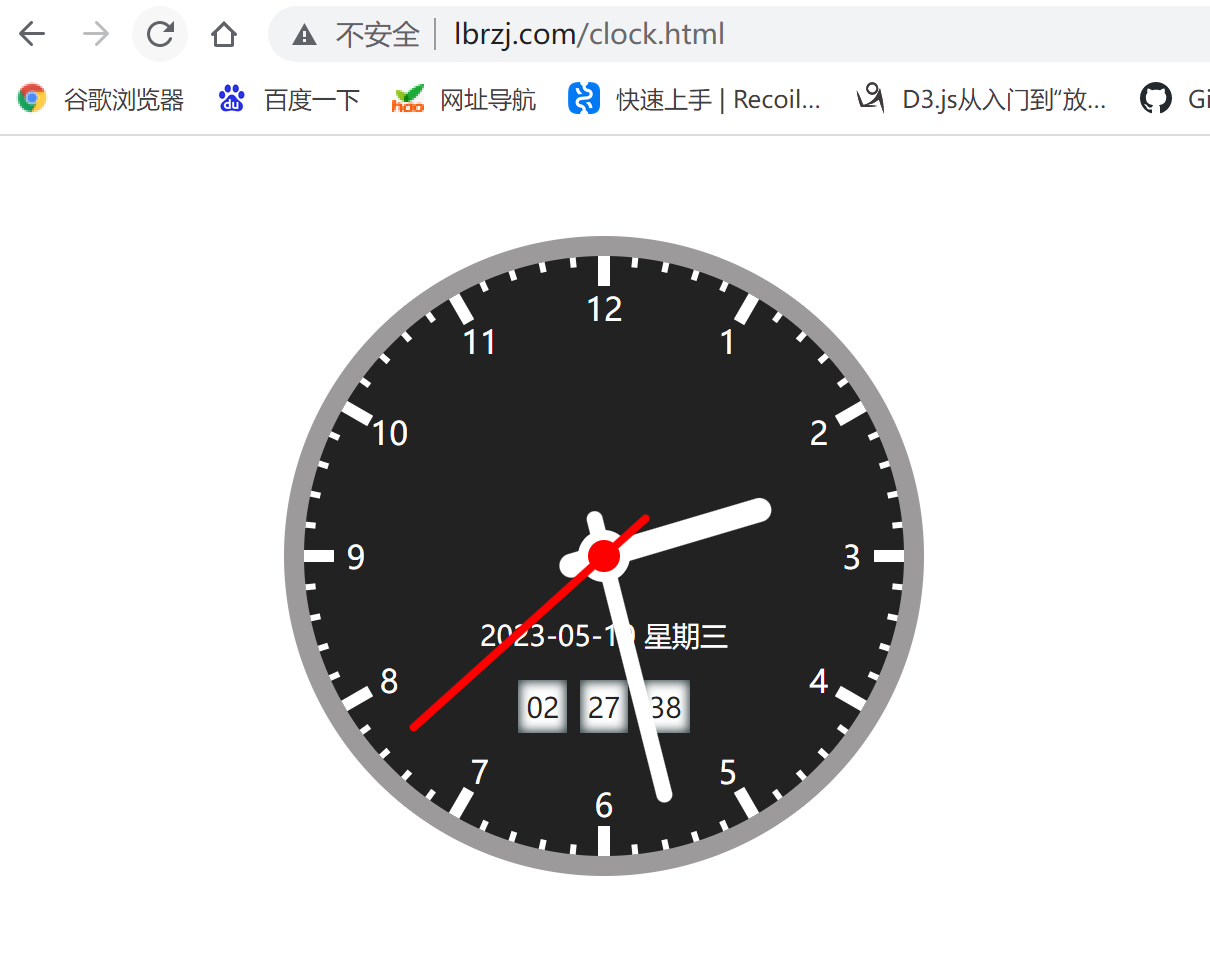
1、代码
1.1、clock.html
<!DOCTYPE html>

<html lang="en">

<head>

  <meta charset="UTF-8">

  <meta http-equiv="X-UA-Compatible" content="IE=edge">

  <meta name="viewport" content="width=device-width, initial-scale=1.0">

  <title>时钟</title>

  <script src="./js/utils.js"></script>

  <link rel="stylesheet" href="./css/clock.css">

</head>

<body>

  <div class="clock">

    <!-- 12个小时的点位 -->

    <div class="dotH dotH1"><div></div></div>

    <div class="dotH dotH2"><div></div></div>

    <div class="dotH dotH3"><div></div></div>

    <div class="dotH dotH4"><div></div></div>

    <div class="dotH dotH5"><div></div></div>

    <div class="dotH dotH6"><div></div></div>

    <!-- 60个分的点 -->

    <div class="dotM dotM1"><div></div></div>

    <div class="dotM dotM2"><div></div></div>

    <div class="dotM dotM3"><div></div></div>

    <div class="dotM dotM4"><div></div></div>

    <div class="dotM dotM5"><div></div></div>

    <div class="dotM dotM6"><div></div></div>

    <div class="dotM dotM7"><div></div></div>

    <div class="dotM dotM8"><div></div></div>

    <div class="dotM dotM9"><div></div></div>

    <div class="dotM dotM10"><div></div></div>

    <div class="dotM dotM11"><div></div></div>

    <div class="dotM dotM12"><div></div></div>

    <div class="dotM dotM13"><div></div></div>

    <div class="dotM dotM14"><div></div></div>

    <div class="dotM dotM15"><div></div></div>

    <div class="dotM dotM16"><div></div></div>

    <div class="dotM dotM17"><div></div></div>

    <div class="dotM dotM18"><div></div></div>

    <div class="dotM dotM19"><div></div></div>

    <div class="dotM dotM20"><div></div></div>

    <div class="dotM dotM21"><div></div></div>

    <div class="dotM dotM22"><div></div></div>

    <div class="dotM dotM23"><div></div></div>

    <div class="dotM dotM24"><div></div></div>

    <!-- 数字 -->

    <div class="num num1_7">

      <div>1</div>

      <div>7</div>

    </div>

    <div class="num num2_8">

      <div>2</div>

      <div>8</div>

    </div>

    <div class="num num3_9">

      <div>3</div>

      <div>9</div>

    </div>

    <div class="num num4_10">

      <div>4</div>

      <div>10</div>

    </div>

    <div class="num num5_11">

      <div>5</div>

      <div>11</div>

    </div>

    <div class="num num6_12">

      <div>6</div>

      <div>12</div>

    </div>

    <!-- 表盘圆心 -->

    <div class="circle"><div></div></div>

    <!-- 数字年月日 周 -->

    <div class="num-date" id="numDate"></div>

    <!-- 数字时间(时:分:秒) -->

    <div class="num-time">

      <span id="numHH">17</span>

      <span id="numMM">45</span>

      <span id="numSS">27</span>

    </div>

    <!-- 时针、分针、秒针 -->

    <div class="line line-h" id="lineH">

      <div></div>

    </div>

    <div class="line line-m" id="lineM">

      <div></div>

    </div>

    <div class="line line-s" id="lineS">

      <div></div>

    </div>

  </div>

  <script>

    let hDeg = 0;

    let mDeg = 0;

    let sDeg = 0;

    let lineH = document.getElementById('lineH');

    let lineM = document.getElementById('lineM');

    let lineS = document.getElementById('lineS');

    let numDate = document.getElementById('numDate');

    let numHH = document.getElementById('numHH');

    let numMM = document.getElementById('numMM');

    let numSS = document.getElementById('numSS');

    setInterval(() => {

      let time = getHms();

      hDeg = (time.h * 30 + time.m / 60 * 30 + time.s / 60 * 0.008333333333333333) - 90;

      mDeg = (time.m * 6 + time.s/60 * 6) - 90;

      sDeg = time.s * 6 - 90;

      lineH.style.transform = `rotate(${hDeg}deg)`;

      lineM.style.transform = `rotate(${mDeg}deg)`;

      lineS.style.transform = `rotate(${sDeg}deg)`;

      lineH.style.display = 'block';

      lineM.style.display = 'block';

      lineS.style.display = 'block';

      numDate.innerText = `${time.year}-${time.month}-${time.date} 星期${time.day}`

      numHH.innerText = `${time.hh}`;

      numMM.innerText = `${time.mm}`;

      numSS.innerText = `${time.ss}`;

    }, 1000)

  </script>

</body>

</html>
1.2、utils.js
function getHms() {

  let dayList = [

    { day: 0, text: '日' },

    { day: 1, text: '一' },

    { day: 2, text: '二' },

    { day: 3, text: '三' },

    { day: 4, text: '四' },

    { day: 5, text: '五' },

    { day: 6, text: '六' },

  ];

  let year = 0, month = 0, date = 0, day = 0, h = 0, m = 0, s = 0;

  let d = new Date();

  year = d.getFullYear();

  month = d.getMonth() + 1;

  date = d.getDate();

  day = d.getDay();

  h = d.getHours();

  m = d.getMinutes();

  s = d.getSeconds();

  h = h >= 12 ? h - 12 : h;

  return {

    year: year+'',

    month: month < 10 ? '0' + month : month+'',

    date: date < 10 ? '0' + date : date+'',

    day:  dayList.find(item => item.day == day).text,

    h: h,

    hh: h < 10 ? '0' + h : h+'',

    m: m,

    mm: m < 10 ? '0' + m : m+'',

    s: s,

    ss: s < 10 ? '0' + s : s+'',

  };

}
1.3、clock.css
.clock {

  position: relative;

  background-color: #222;

  display: flex;

  width: 300px;

  height: 300px;

  border-radius: 50%;

  border: 10px solid rgb(156, 154, 154);

  align-items: center;

  justify-content: center;

  margin: 50px auto;

}

.circle {

  position: absolute;

  width: 26px;

  height: 26px;

  border-radius: 50%;

  background-color: #fff;

  z-index: 2;

  display: flex;

  align-items: center;

}

.circle > div {

  width: 16px;

  height: 16px;

  border-radius: 50%;

  background-color: red;

  margin: 0 auto;

  z-index: 2;

}

/* 时针 */

.line-h {

  display: none;

  position: absolute;

  width: 46px;

  height: 12px;

  border-radius: 6px;

  background-color: transparent;

}

.line-h div {

  width: 110px;

  background: #fff;

  height: 12px;

  border-radius: 6px;

}

/* 分针 */

.line-m {

  display: none;

  position: absolute;

  width: 46px;

  height: 8px;

  border-radius: 4px;

  background-color: transparent;

}

.line-m div {

  width: 150px;

  background: #fff;

  height: 8px;

  border-radius: 4px;

}

/* 秒针 */

.line-s {

  display: none;

  position: absolute;

  width: 60px;

  height: 4px;

  border-radius: 2px;

  background-color: transparent;

  z-index: 2;

}

.line-s div {

  width: 160px;

  background: red;

  height: 4px;

  border-radius: 2px;

}

/* 12个小时的点位 */

.dotH {

  position: absolute;

  height: 6px;

  width: 300px;

  background: #fff;

}

.dotH div {

  position: absolute;

  height: 8px;

  top: -1px;

  left: 15px;

  width: 270px;

  background-color: #222;

}

.dotH1 {

  transform: rotate(0deg);

}

.dotH2 {

  transform: rotate(30deg);

}

.dotH3 {

  transform: rotate(60deg);

}

.dotH4 {

  transform: rotate(90deg);

}

.dotH5 {

  transform: rotate(120deg);

}

.dotH6 {

  transform: rotate(150deg);

}

.num-date {

  position: absolute;

  top: 60%;

  color: #fff;

  font-size: 14px;

}

.num-time {

  position: absolute;

  top: 72%;

  color: #222;

  font-size: 14px;

  direction: flex;

}

.num-time > span {

  flex: 1;

  background-color: #fff;

  margin: 0 1px;

  padding: 4px;

  box-shadow: inset 0 0 5px 1px #2c3b3e;

}

/* 60个分的点 */

.dotM {

  position: absolute;

  height: 3px;

  width: 300px;

  background: #fff;

}

.dotM div {

  position: absolute;

  height: 5px;

  top: -1px;

  left: 5px;

  width: 290px;

  background-color: #222;

}

.dotM1 {

  transform: rotate(6deg);

}

.dotM2 {

  transform: rotate(12deg);

}

.dotM3 {

  transform: rotate(18deg);

}

.dotM4 {

  transform: rotate(24deg);

}

.dotM5 {

  transform: rotate(36deg);

}

.dotM6 {

  transform: rotate(42deg);

}

.dotM7 {

  transform: rotate(48deg);

}

.dotM8 {

  transform: rotate(54deg);

}

.dotM9 {

  transform: rotate(66deg);

}

.dotM10 {

  transform: rotate(72deg);

}

.dotM11 {

  transform: rotate(78deg);

}

.dotM12 {

  transform: rotate(84deg);

}

.dotM13 {

  transform: rotate(96deg);

}

.dotM14 {

  transform: rotate(102deg);

}

.dotM15 {

  transform: rotate(108deg);

}

.dotM16 {

  transform: rotate(114deg);

}

.dotM17 {

  transform: rotate(126deg);

}

.dotM18 {

  transform: rotate(132deg);

}

.dotM19 {

  transform: rotate(138deg);

}

.dotM20 {

  transform: rotate(144deg);

}

.dotM21 {

  transform: rotate(156deg);

}

.dotM22 {

  transform: rotate(162deg);

}

.dotM23 {

  transform: rotate(168deg);

}

.dotM24 {

  transform: rotate(174deg);

}

/* 数字 */

.num {

  position: absolute;

  width:274px;

  height: 26px;

}

.num div {

  position: absolute;

  color: #fff;

  width: 26px;

  height: 26px;

  line-height: 26px;

  text-align: center;

}

.num div:first-child {

  top: 0;

  left: 0;

}

.num div:last-child {

  top: 0;

  right: 0;

}

.num1_7 {

  transform: rotate(120deg);

}

.num1_7 div {

  transform: rotate(-120deg);

}

.num2_8 {

  transform: rotate(150deg);

}

.num2_8 div {

  transform: rotate(-150deg);

}

.num3_9 {

  transform: rotate(180deg);

}

.num3_9 div {

  transform: rotate(-180deg);

}

.num4_10 {

  transform: rotate(210deg);

}

.num4_10 div {

  transform: rotate(-210deg);

}

.num5_11 {

  transform: rotate(240deg);

}

.num5_11 div {

  transform: rotate(-240deg);

}

.num6_12 {

  transform: rotate(270deg);

}

.num6_12 div {

  transform: rotate(-270deg);

}
PS:
1、写完后发现,其实对于时针的12个点位和分针的48个点位(其中有12个和时针点位重合)可以用js生成html,这样就可以减少html代码和css代码
2、线上链接地址:http://lbrzj.com/clock.html
html+css实现指针时钟的更多相关文章
- CSS3使用Animation steps属性实现指针时钟效果
本篇文章由:http://xinpure.com/css3-animation-steps-properties-for-analogue-effects/ animation 默认以 ease 方式 ...
- CSS鼠标指针cursor样式
参考来源:W3SCHOOL 有时我们需要在CSS布局时设定特定的鼠标指针样式,这时可以通过设定cursor来实现: url: 需使用的自定义光标的 URL. 注释:请在此列表的末端始终定义一种普通的光 ...
- 纯js+html+css实现模拟时钟
前几天没事写的个模拟时钟,代码仅供小白参考,大神请自动绕过. <!DOCTYPE html> <html lang="en"> <head> & ...
- HTML5 canvas 指针时钟
<!doctype html> <html> <head></head> <body> <canvas id="> 您 ...
- CSS/HTML 改变鼠标指针形状
改变鼠标指针形状的方法有两种:第一种:用的来改变鼠标指针形状.另一种是:利用第三方控件的方法,而我自己最常用的是第一种:用css样式表来改变鼠标指针形状 我们先来看第一种:用来改变鼠标指针形状. 有些 ...
- JavaScript+svg绘制的一个动态时钟
结果图: 代码如下: <!DOCTYPE html> <html> <head> <title>动态时钟</title> </head ...
- JavaScript之“创意时钟”项目
“时钟展示项目”说明文档(文档尾部附有相应代码) 一.最终效果展示: 二.项目亮点 1.代码结构清晰明了 2.可以实时动态显示当前时间与当前日期 3.界面简洁.美观.大方 4.提高浏览器兼容性 三.知 ...
- css3 简易时钟
<!DOCTYPE html> <html lang="en"> <head> <meta charset="UTF-8&quo ...
- 圆盘时钟效果 原生JS
圆盘时钟 旋转时钟 数字时钟 写在前面 仿荣耀手机时钟,设计的同款时钟效果 实现效果 实现原理 数字时钟 利用Date内置对象获取当下的时间,通过处理呈现在页面上 这一步获取时间是非常简单的,通过Da ...
- css学习(2)-- 常见的CSS属性和值
1.CSS中修饰字体的属性 属 性 描 述 属 性 值 font-family 字体族科 任意字体族科名称都可以使用例如Times.serif等,而且多个族科的赋值是可以使用的,中间用 ...
随机推荐
- MySQL 幻象行
当同一个查询在不同的时间产生不同的行集时,就会出现所谓的幻像问题.例如,如果执行了两次SELECT,但是第二次返回了第一次没有返回的行,那么该行就是一个"幻象"行. 假设在表chi ...
- jupyterlab安装和优化
说明 JupyterLab(官网https://jupyter.org)是一个交互式的代码编辑器,打开它会打开一个网页,可以在其中编写代码,即时执行,快速得到结果(包括代码返回值.统计图和界面交互图) ...
- Simulink模型指标分析与模型重构的最佳实践 - 软件模型质量保证不可忽视的一环
在基于模型的开发中,优质的模型架构是生成优质代码的必要前提.静态模型分析对于模型的质量保证有着至关重要的作用,同时建模规范已在业内有着广泛而成熟的应用.然而建模规范并非模型设计原则合规性的唯一考量标准 ...
- Java纯手打web服务器(二)
概要:这里对上一篇中的访问资源进行改进,将访问servlet和静态资源进行区分. 主要不同的地方是加入了两种分析器 servlet分析器 if (request.getUri().startsWith ...
- 【Azure 存储服务】关于Storage Account Queue使用的几个问题
1) 在消费Storage Queue中的数据的时候,如何只过滤出 Subject 为"message/{messageid}"这种,去掉subject为"informa ...
- Tomcat8.5简介
1. Tomcat简介[1] Apache Tomcat是Servlet/JSP的容器.Tomcat8.5 实现了由 JCP 组织 (Java Community Process) 制定的Servle ...
- Java abstract 关键字使用
1 package com.bytezreo.abstractTest; 2 3 /** 4 * 5 * @Description Abstract 关键字使用 6 * @author Bytezer ...
- 深入解析ASP.NET Core MVC的模块化设计[下篇]
ASP.NET Core MVC的"模块化"设计使我们可以构成应用的基本单元Controller定义在任意的模块(程序集)中,并在运行时动态加载和卸载.<设计篇>介绍了 ...
- netcat 命令介绍及使用示例
netcat 命令介绍及使用示例 nc(netcat)是一个强大的网络工具,它可以用于读取和写入数据流,支持 TCP 和 UDP 协议.它常被用于网络调试和网络服务的创建. 一.安装方法 centos ...
- CSAPP:lab7 shell
实验网站 课程网站:CSAPP 源码下载 源码下载 实验文档下载 我的实验环境:Ubuntu 20.04 lab7文档解读 查看 tsh.c (tiny shell) 文件,您会看到它包含一个简单 ...