
flutter控件之ListView滚动布局
ListView即滚动列表控件,能将子控件组成可滚动的列表。当你需要排列的子控件超出容器大小,就需要用到滚动块。
import 'package:flutter/material.dart';

class ListDemo extends StatelessWidget{

  @override

  Widget build(BuildContext context) {

   return new Scaffold(

     appBar: new AppBar(

       title: new Text("滚动布局"),

     ),

     body: new ListView(

       children: <Widget>[

         new Center(

           child: new Text(

             "Sweat",

             style: new TextStyle(

               fontFamily: "serif",

               fontSize: 26.0

             ),

           ),

         ),

         new Center(

           child: new Text(

             "huoyac honeybaby",

             style: new TextStyle(

               fontFamily: "serif",

               fontSize: 12.0

             ),

           ),

         ),

         new Center(

           child: new Text(

             '''

From fairest creatures we desire increase,

That thereby beauty's rose might never die,

But as the riper should by time decease,

His tender heir might bear his memory;

But thou, contracted to thine own bright eyes,

Feed'st thy light's flame with self-substantial fuel,

Making a famine where abundance lies,

Thyself thy foe, to thy sweet self too cruel.

Thout that are now the world's fresh ornament

And only herald to the gaudy spring,

Within thine own bud buriest thy content

And, tender churl, mak'st waste in niggarding.

Pity the world, or else this glutton be,

To eat the world's due, by the grave and thee.

WHEN forty winters shall besiege thy brow

And dig deep trenches in thy beauty's field,

Thy youth's proud livery, so gazed on now,

Will be a tottered weed of small worth held:

Then being asked where all thy beauty lies,

Where all the treasure of thy lusty days,

To say within thine own deep-sunken eyes

Were an all-eating shame and thriftless praise.

How much more prasie deserved thy beauty's use

If thou couldst answer, 'This fair child of mine

Shall sum my count and make my old excuse,'

Proving his beauty by succession thine.

This were to be new made when thou art old

And see thy blood warm when thou feel'st cold.

LOOK in thy glass, and tell the face thou viewest

Now is the time that face should form another,

Whose fresh repair if now thou renewest,

Thou dost beguile the world, unbless some mother.

For where is she so fair whose uneared womb

Disdains the tillage of thy husbandry?

Or who is he so fond will be the tomb

Of his self-love, to stop posterity?

Thou art thy mother's glass, and she in thee

Calls back the lovely April of her prime;

So thou through windows of thine age shalt see,

Despite of wrinkles, this thy golden time.

But if thou live rememb'red not to be,

Die single, and thine image dies with thee.

             ''',

             style: new TextStyle(

               fontFamily: "serif",

               fontSize: 14.0,

             ),

           ),

         )

       ],

     ),

   );

  }

}

void main(){

  runApp(new MaterialApp(

    title: "滚动布局",

    home: new ListDemo(),

  ));

}
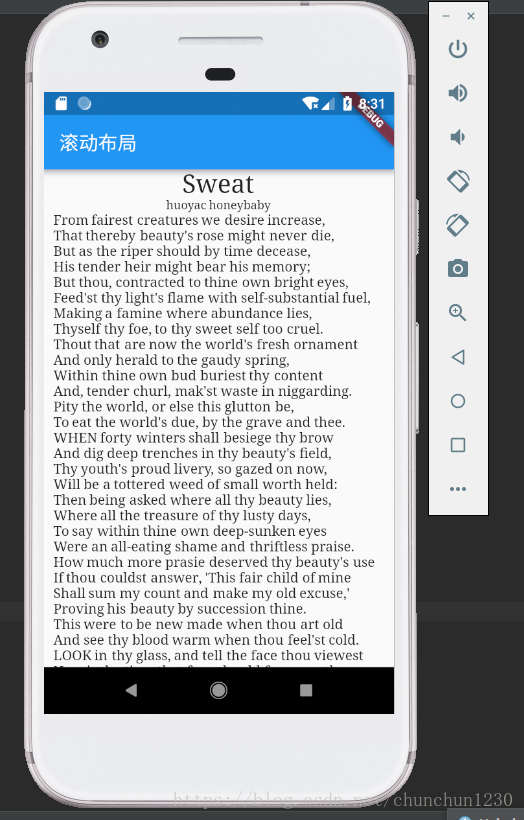
效果:
flutter控件之ListView滚动布局的更多相关文章
- 重新想象 Windows 8 Store Apps (11) - 控件之 ListView 和 GridView
原文:重新想象 Windows 8 Store Apps (11) - 控件之 ListView 和 GridView [源码下载] 重新想象 Windows 8 Store Apps (11) - ...
- 【Android】15.0 UI开发(六)——列表控件RecyclerView的网格布局排列实现
1.0 列表控件RecyclerView的网格布局排列实现,关键词GridLayoutManager. LinearLayoutManager 实现顺序布局 GridLayoutManager 实现网 ...
- 【Android】14.0 UI开发(五)——列表控件RecyclerView的瀑布布局排列实现
1.0 列表控件RecyclerView的瀑布布局排列实现,关键词StaggeredGridLayoutManager LinearLayoutManager 实现顺序布局 GridLayoutMan ...
- Qt列表等控件实现平滑滚动&deepin启动器存在的问题
Qt列表等控件实现平滑滚动 Qt自带的的列表控件是不能平滑滚动的,但如果滚动速度快的话很容易引起视线丢失,体验效果很差.本篇主要讲述如何在Qt中对列表控件加入平滑滚动.文中以QScrollArea控件 ...
- 与众不同 windows phone (52) - 8.1 新增控件: AutoSuggestBox, ListView, GridView, SemanticZoom
[源码下载] 与众不同 windows phone (52) - 8.1 新增控件: AutoSuggestBox, ListView, GridView, SemanticZoom 作者:webab ...
- DevExpress控件GridControl中的布局详解 【转】
DevExpress控件GridControl中的布局详解 [转] 2012-10-24 13:27:28| 分类: devexpress | 标签:devexpress |举报|字号 订阅 ...
- winform利用ImageList控件和ListView控件组合制作图片文件浏览器
winform利用ImageList控件和ListView控件组合制作图片文件浏览器,见图,比较简单,实现LISTVIEW显示文件夹图片功能. 1.选择文件夹功能代码: folderBrowserDi ...
- 嵌套在ScrollView中的TextView控件可以自由滚动
//设置TextView控件可以自由滚动,由于这个TextView嵌套在ScrollView中,所以在OnTouch事件中通知父控件ScrollView不要干扰. mContractDesc.setO ...
- Android基本控件之listView(三)<用ListView实现分页加载>
我们之前讨论了ListView的基本使用方法和ListView的优化 今天我们再来讨论一个关于ListView的一个新的东西~就是分页加载.那么什么是分页加载呢?简单点说,就是"下拉刷新&q ...
随机推荐
- 【JXOI2018】排序问题 贪心
我们令$sum_i$表示数字i在加完数字的数列中出现的次数,那么答案显然为$\dfrac{(n+m)!}{\sum_{i=0}^{\infty}sum_i!}$ 不难发现,当每次添加的数为$[l,r] ...
- python 查找字符串中字母的个数
2017.6.17 更新:好像知道错在哪里了.以第一个为例,输入应该是“AHHaaBBa”,因为直接输入AHHaaBBa时,系统不知到这是一个变量还是字符串,所以必须输入的时候申明定义.既然这样的话, ...
- python——利用selenium模仿键盘输入跳转
这是我以前遇到的一个网站:人卫临床助手,这个网站比较奇怪,不能点击右键查看源码,但是大家可以使用ctrl+U,打开开发者选项,点击network,然后点击第2页和第3页: 可以看到上面的URL是一模一 ...
- JS - 解决鼠标单击、双击事件冲突问题(原生js实现)
由于鼠标双击时每一次触发双击事件都会引起两次单击事件和一次单击事件,原生的js不提供专门的双击事件. 因为业务原因,双击和单机都绑定了不同的业务,在双击的时候又触发了单机,影响了页面的正常显示 出现问 ...
- jquery插件开发的demo
(function ($) { $.fn.extend({ "highLight": function (options) { //检测用户传进来的参数是否合法 if (!isVa ...
- golang的并行快速排序
.nums[]作为core,将nums中大于core的元素放入greater,将不大于core的元素放入less 当nums长度为1时往ch中写入此元素 .分别对less和greater进行1操作(并 ...
- OpenStack-Queens版 实践
OpenStack简介 OpenStack是一个由NASA(美国国家航空航天局)和Rackspace合作研发并发起的,以Apache许可证授权的自由软件和开放源代码项目. OpenStack是一个开源 ...
- freeSWITCH之多平台测试通信
开始测试使用 强烈建议在统一的局域网下进行配置,通信 本机IP:192.168.1.155 架构 freeSWITCH搭建在以Windows平台作为通信服务器.fs_cli为服务器上测试客户端. X- ...
- java面试③Web部分
2.2.1 讲一下http get和post请求的区别 get和post请求都是http的请求方式,用户通过不同的http请求方式完成对资源(url)的不同操作,具体点来讲get一般用于获取/查询资源 ...
- 如何学习JavaEE,项目又该如何做?
本文主要分为三个部分: 如何学习java基础 如何学习javaEE 你关心的项目问题 01 java基础学习 建议初学者看视频学习,不推荐看书.入门视频选择非常重要,最好是通俗易懂.深入浅出的教学视频 ...