
.NET中如何自定义配置节点
.NET Framework在web.config或app.config中默认提供了很多种设置,以便能够改变应用程序内嵌组件的行为,例如<connectionStrings>、<httpHandlers>、<sessionState>等等,这对于常规情况下的一般程序员而言是足够用的,也是非常方便的。但是我们越来越多地发现需要自己来控制一系列设置的集合 - 有时是面向组件的(自定义的或第三方提供的),有时是应用程序中使用的一系列值的集合。
.config虽然默认提供了自定义设置(在<appSettings/>节点下),但是它太弱了,仅仅只支持键值对(key/value)
<add key="myKey" value="myValue"/>
虽然键值对在大多数情况下也是很有帮助的,但是它对于健壮的组件、复杂的设置而言是不够灵活的,甚至显得过于简单。幸运的是,微软为我们提供了一种以编程的方式来访问自定义的配置/设置。
一、The Configuration Section
先看如下的配置设置,含义很明确:定义一些rss,有名字、地址、以及是否缓存
  <feedRetriever>

    <feeds>

      <add name="cnblogs" url="http://www.cnblogs.com/rss/" />

      <add name="CoolShell" url="http://coolshell.cn/rss/" cache="false" />

    </feeds>

  </feedRetriever>
接下来我们就以代码来展示如何调用
二、Writing the Configuration Handler
1. Representing the <add/> Element
每一个ConfigurationElement对象都是作为其内部属性(properties)集合的索引器而存在,再通过.NET提供了另一个属性(Attribute)-- 从而使得<add/>(.config中的自定义节点,取名add完全是基于微软是如此命名故为保持一致而为之)节点的attributes与FeedElement的properties进行关联(map),具体代码如下
using System;

using System.Collections.Generic;

using System.Configuration;

using System.Linq;

using System.Web;

namespace WebAppCustomConfiguration

{

    public class FeedElement : ConfigurationElement

    {

        [ConfigurationProperty("name", IsKey = true, IsRequired = true)]

        public string Name

        {

            get { return (string)this["name"]; }

            set { }

        }

        [ConfigurationProperty("url", IsRequired = true, DefaultValue = "http://localhost")]

        [RegexStringValidator(@"http?\://\S+")]

        public string Url

        {

            get { return (string)this["url"]; }

            set { }

        }

        [ConfigurationProperty("cache", IsRequired = false, DefaultValue = true)]

        public bool Cache

        {

            get { return (bool)this["cache"]; }

            set { }

        }

    }

}
The following list is a complete list of possible parameters:
- DefaultValue – Gets or sets the default value for the decorated property. This parameter is not required.
- IsDefaultCollection – Gets or a sets a Boolean value indicating whether the property is the default property collection for the decorated property. This parameter is not required, and the default is false.
- IsKey – Gets or sets a Boolean value indicating whether this property is a key property for the decorated element property. This parameter is not required, and its default value is false.
- IsRequired – Gets or sets a Boolean value indicating whether the decorated element property is required. This parameter is not required, and its default value is false.
2. Writing an Element Collection Class
类ConfigurationElementCollection包含有好几个成员,但是只有两个标记为abstract,所以最简单的ConfigurationElementCollection只需实现这两个方法
- CreateNewElement() – 创建一个新的ConfigurationElement对象(本例而言就是FeedElement);
- GetElementKey() – 获得指定配置节点的key (本例而言就是FeedElement的Name属性(property).
using System;

using System.Collections.Generic;

using System.Configuration;

using System.Linq;

using System.Web;

namespace WebAppCustomConfiguration

{

    [ConfigurationCollection(typeof(FeedElement))]

    public class FeedElementCollection : ConfigurationElementCollection

    {

        protected override ConfigurationElement CreateNewElement()

        {

            return new FeedElement();

        }

        protected override object GetElementKey(ConfigurationElement element)

        {

            return ((FeedElement)element).Name;

        }

    }

}
3. Writing the FeedRetreiverSection Class
此Class较为简单,只需编程实现能够访问<feeds />节点即可,具体而言就是一属性(Property)
using System;

using System.Collections.Generic;

using System.Configuration;

using System.Linq;

using System.Web;

namespace WebAppCustomConfiguration

{

    public class FeedRetrieverSection : ConfigurationSection

    {

        [ConfigurationProperty("feeds", IsDefaultCollection = true)]

        public FeedElementCollection Feeds

        {

            get { return (FeedElementCollection)this["feeds"]; }

            set { }

        }

    }

}
4. Modifying web.config
下面的配置就不说了
<section name="feedRetriever" type="WebAppCustomConfiguration.FeedRetrieverSection"/>
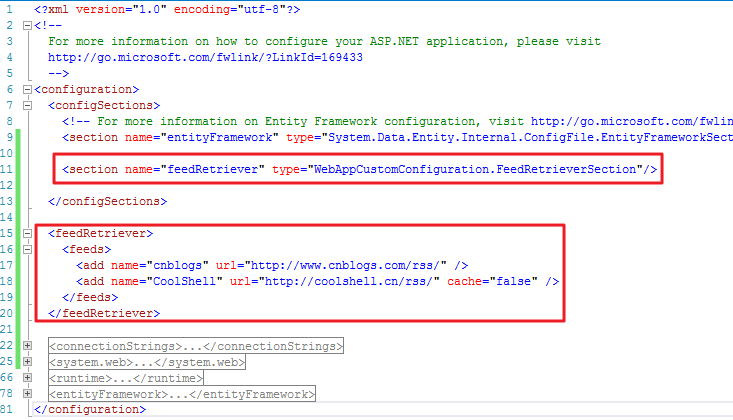
5. Accessing Configuration Data from Code
调用的代码如下,简单不解释
using System;

using System.Collections.Generic;

using System.Configuration;

using System.IO;

using System.Linq;

using System.Net;

using System.Web;

namespace WebAppCustomConfiguration

{

    public class FeedRetriever

    {

        public static FeedRetrieverSection _Config = ConfigurationManager.GetSection("feedRetriever") as FeedRetrieverSection;

        public static void GetFeeds()

        {

            foreach (FeedElement feedElement in _Config.Feeds)

            {

                // make request

                HttpWebRequest request = (HttpWebRequest)WebRequest.Create(feedElement.Url);

                WebProxy proxy = new WebProxy("ip address:port", true);

                proxy.Credentials = new NetworkCredential("username", "password", "domain");

                request.Proxy = proxy;

                HttpWebResponse response = (HttpWebResponse)request.GetResponse();

                if (response.StatusCode == HttpStatusCode.OK)

                {

                    string feedData = String.Empty;

                    using (StreamReader reader = new StreamReader(response.GetResponseStream()))

                    {

                        feedData = reader.ReadToEnd();

                    }

                    if (feedElement.Cache)

                    {

                        // filename of cache file

                        string filename = String.Format("{0}_{1}.xml", feedElement.Name, DateTime.Now.Ticks);

                        // cache file

                        using (StreamWriter writer = new StreamWriter(@"D:\Deployment\Result\" + filename))

                        {

                            writer.Write(feedData);

                        }

                    }

                }

            }

        }

    }

}
.NET中如何自定义配置节点的更多相关文章
- [转]通过继承ConfigurationSection,在web.config中增加自定义配置
本文转自:http://www.blue1000.com/bkhtml/2008-02/55810.htm 前几天写了一篇使用IConfigurationSectionHandler在web.conf ...
- VS2012 常用web.config配置解析之自定义配置节点
在web.config文件中拥有一个用户自定义配置节点configSections,这个节点可以方便用户在web.config中随意的添加配置节点,让程序更加灵活(主要用于第三方插件的配置使用) 自定 ...
- App.config和Web.config配置文件的自定义配置节点
前言 昨天修改代码发现了一个问题,由于自己要在WCF服务接口中添加了一个方法,那么在相应调用的地方进行更新服务就可以了,不料意外发生了,竟然无法更新.左查右查终于发现了问题.App.config配置文 ...
- ASP.NET系列:自定义配置节点的复用
appSettings太简单,为每个程序自定义配置节点太复杂,因此要解决app.config&web.config自定义配置的复用问题. 1.读取不依赖SectionName,根节点可以定义为 ...
- 自定义配置节点configSections的使用
//App.config <?xml version="1.0" encoding="utf-8" ?><configuration> ...
- asp.net中web.config配置节点大全详解
最近网上找了一些关于Web.config配置节点的文章,发现很多都写的都比较零散,而且很少有说明各个配置节点的作用和用法.搜索了一下发现有一篇写的不错,这里引用一下 原文地址 http://www.c ...
- .Net 配置文件--继承ConfigurationSection实现自定义处理类处理自定义配置节点
除了使用继承IConfigurationSectionHandler的方法定义处理自定义节点的类,还可以通过继承ConfigurationSection类实现同样效果. 首先说下.Net配置文件中一个 ...
- .Net 配置文件——继承ConfigurationSection实现自定义处理类处理自定义配置节点
除了使用继承IConfigurationSectionHandler的方法定义处理自定义节点的类,还可以通过继承ConfigurationSection类实现同样效果. 首先说下.Net配置文件中一个 ...
- asp.net中web.config配置节点大全详解【转】
web.config 文件查找规则: (1)如果在当前页面所在目录下存在web.config文件,查看是否存在所要查找的结点名称,如果存在返回结果并停止查找. (2)如果当前页面所在目录下不存在web ...
随机推荐
- Scalable IO in Java【java高效IO】
第一次翻译,如有错误,请指正 1.Outline 大纲Scalable network services 高效网络服务 Event-driven processing 事件驱动处理 Reactor ...
- ACdream1093
给你三种正多面体,正四面体,正六面体,正八面体.求从某一种正多面体中的某一点走到另一个点,且步数不超过k(1018)的方案数. 首先说明一下我交题的时候遇到的问题,起点和终点为同一点的时候,算不算走了 ...
- php 关于文件的一些封装好的函数
<?php //Bytes/Kb/MB/GB/TB/EB /** * 转换字节大小 * @param number $size * @return number */ function tran ...
- easyui布局隐藏伸缩按钮
1. 在html中加入 <script> /** * layout方法扩展 * @param {Object} jq * @param {Object} region */ $.exten ...
- P2219 [HAOI2007]修筑绿化带
我是题面 这道题跟理想的正方形很像,不大明白蛤OI是怎么想的,一年出两道这么相近的题 这道题有两个矩形,所以就有了两种做法(说是两种做法,其实只是维护的矩形不同) 一种是维护大矩形,一种是维护小矩形, ...
- oracle 月份中日的值必须介于 1 和当月最后一日之间
解决方法: 1.用时间字段去关联字符串字段导致此错误.. 如果1.解决不了就看 2.把date'2017-01-01' 换成 to_date('2017-01-01','yyyy-mm-dd')
- variant conversion error for variable v23
excel数据导入到oracle数据库出现的问题 V23指的是excel列.,这列的数据长度超出或者类型与数据库表不一致导致的 解决方法,1.清空该列,再建个新列 2.用access SQL查出长度 ...
- MyBatis.3.CRUD
<?xml version="1.0" encoding="UTF-8"?> <!DOCTYPE mapper PUBLIC "-/ ...
- golang interface 类型变量当作某个具体类型使用
比如,我们定义了一个 struct type person struct { Name string `json:"name"` Age int `json:"age&q ...
- django 线上教育平台开发记录
1.环境搭建 2.新建项目 1).首先通过 django-admin 新建一个项目,(例如项目名为mxonline) django-admin startproject mxonline 运行后会出现 ...