
Xcode 5.1 编译模拟器以及真机都能使用的静态库

Xcode 5.1.dmg 下载地址
http://pan.baidu.com/s/1jGJpKm6
1.新建 Framework & Library 工程

我起名叫ShowInfo,下面为其源码

showInfo.h
=========================
#import <Foundation/Foundation.h>
@interface ShowInfo : NSObject
+ (void)showInfo;
@end
=========================
showInfo.m
=========================
#import "ShowInfo.h"
@implementation ShowInfo
+ (void)showInfo
{
NSLog(@"hello Y.X.");
}
@end
=========================
2.分别制作真机以及模拟器使用的静态库
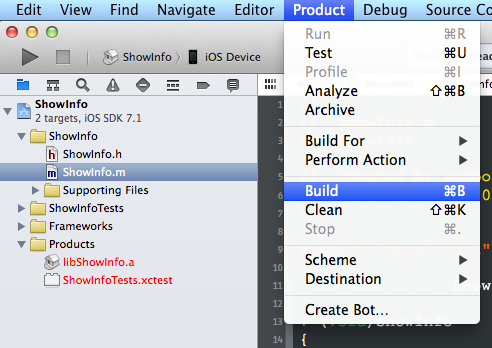
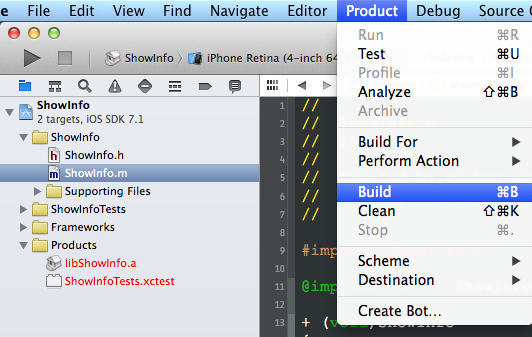

如上图所示,Debug-iphoneos以及Debug-iphonesimulator都有一个静态库文件
3.合并静态库
合并静态库的格式如下所示
lipo -create /绝对路径/libShowInfo.a /绝对路径/libShowInfo.a -output /绝对路径/libShowInfo.a

大功告成!
以下为 Xcode 5.1 测试结果

无意间发现 Xcode 5.1 中的静态库 Search Paths 中的路径为 $(PROJECT_DIR) ,以后再也不会出现换台电脑后重新设置库搜索路径的问题了.
以下为 Xcode 5.0 测试结果

问:如果有很多文件,如何编译成一个静态库文件?
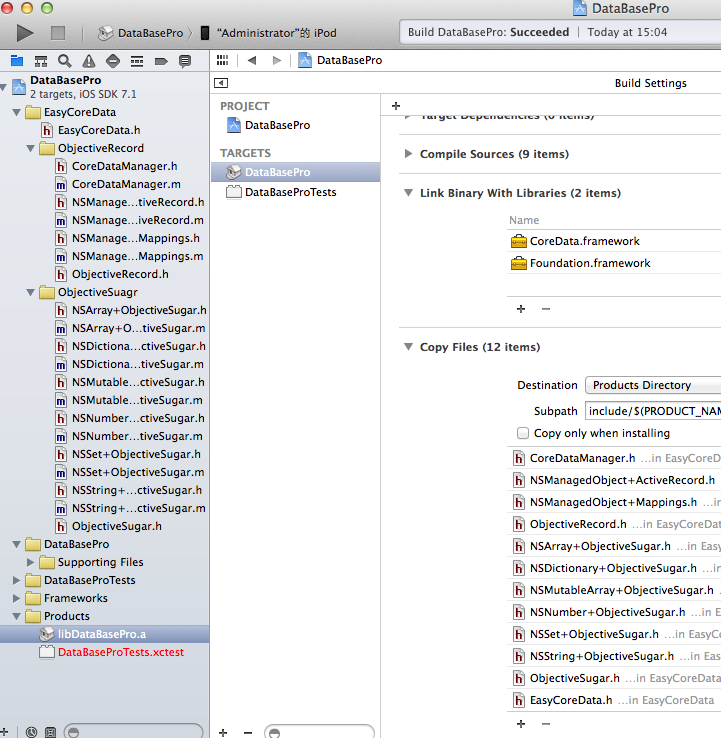
如上例中,我将一个操作CoreData的很多文件打包成一个静态库,编译时把需要导出的头文件导出来即可(图片右下部分).
问:为什么在使用静态库时报错呢?
极有可能你的静态库文件中含有类目文件,就以上图中为例,有很多的类目文件,解决方法在 Other Linker Flags 是添加 -ObjC 标签,如下图所示

原理解析如下 http://stackoverflow.com/questions/2567498/objective-c-categories-in-static-library/2615407#2615407
Solution: As of Xcode 4.2, you only need to go to the application that is linking against the library (not the library itself) and click the project in the Project Navigator, click your app's target, then build settings, then search for "Other Linker Flags", click the + button, and add '-ObjC'. '-all_load' and '-force_load' are no longer needed.
Details: I found some answers on various forums, blogs and apple docs. Now I try make short summary of my searches and experiments.
Problem was caused by (citation from apple Technical Q&A QA1490 http://developer.apple.com/mac/library/qa/qa2006/qa1490.html):
Objective-C does not define linker symbols for each function (or method, in Objective-C) - instead, linker symbols are only generated for each class. If you extend a pre-existing class with categories, the linker does not know to associate the object code of the core class implementation and the category implementation. This prevents objects created in the resulting application from responding to a selector that is defined in the category.
And their solution:
To resolve this issue, the static library should pass the -ObjC option to the linker. This flag causes the linker to load every object file in the library that defines an Objective-C class or category. While this option will typically result in a larger executable (due to additional object code loaded into the application), it will allow the successful creation of effective Objective-C static libraries that contain categories on existing classes.
and there is also recommendation in iPhone Development FAQ:
How do I link all the Objective-C classes in a static library? Set the Other Linker Flags build setting to -ObjC.
and flags descriptions:
-all_load Loads all members of static archive libraries.
-ObjC Loads all members of static archive libraries that implement an Objective-C class or category.
-force_load (path_to_archive) Loads all members of the specified static archive library. Note: -all_load forces all members of all archives to be loaded. This option allows you to target a specific archive.
*we can use force_load to reduce app binary size and to avoid conflicts wich all_load can cause in some cases.
Yes, it works with *.a files added to the project. Yet I had troubles with lib project added as direct dependency. But later I found that it was my fault - direct dependency projecct possibly was not added properly. When I remove it and add again with steps:
- Drag&drop lib project file in app project (or add it with Project->Add to project…).
- Click on arrow at lib project icon - mylib.a file name shown, drag this mylib.a file and drop it into Target -> Link Binary With Library group.
- Open target info in fist page (General) and add my lib to dependencies list
after that all works OK. "-ObjC" flag was enough in my case.
I also was interested with idea from http://iphonedevelopmentexperiences.blogspot.com/2010/03/categories-in-static-library.html blog. Author say he can use category from lib without setting -all_load or -ObjC flag. He just add to category h/m files empty dummy class interface/implementation to force linker use this file. And yes, this trick do the job.
But author also said he even not instantiated dummy object. Mm… As I've found we should explicitly call some "real" code from category file. So at least class function should be called. And we even need not dummy class. Single c function do the same.
So if we write lib files as:
// mylib.hvoid useMyLib();@interfaceNSObject(Logger)-(void)logSelf;@end// mylib.mvoid useMyLib(){NSLog(@"do nothing, just for make mylib linked");}@implementationNSObject(Logger)-(void)logSelf{NSLog(@"self is:%@",[self description]);}@endand if we call useMyLib(); anywhere in App project then in any class we can use logSelf category method;
[self logSelf];And more blogs on theme:
http://t-machine.org/index.php/2009/10/13/how-to-make-an-iphone-static-library-part-1/
http://blog.costan.us/2009/12/fat-iphone-static-libraries-device-and.html
问:合并静态库时为什么会报错?
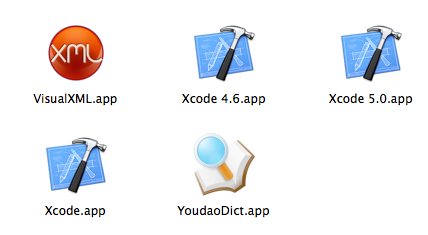
请将你正在使用的 Xcode 的 APP 文件名字修改成Xcode.app,否则在终端合并库文件时会报错.
Xcode 5.1 编译模拟器以及真机都能使用的静态库的更多相关文章
- Android 如何添加一个apk使模拟器和真机都编译进去 m
添加一个apk都需要将LOCAL_PACKAGE_NAME的值添加到PRODUCT_PACKAGES才行.而PRODUCT_PACKAGES一般在build/target/product/目录下的文件 ...
- iOS 静态库中使用宏定义区分iPhone模拟器与真机---备用
问题描述 一般项目中,可以使用宏定义来判断模拟器还是真机,这无疑是有效的. #if TARGET_IPHONE_SIMULATOR #define SIMULATOR 1 #elif TARGET_O ...
- Appium移动端自动化测试--搭建模拟器和真机测试环境
详细介绍安装Android Studio及Android SDK.安装Appium Server. 文章目录如下 目录 文章目录如下 模拟器--安装Android Studio及Android SDK ...
- android应用程序monkey压力测试(模拟器或真机)
首先需要安装一个模拟器: 前置条件: 1.jdk环境配置 2.eclipse下载安装(直接解压即可) 3.网站上下载ADT: 由于国内禁止google的浏览,所以需要自己上网找资源,下面这个网站有比较 ...
- 利用lipo编译合并iPhone模拟器和真机通用的静态类
利用lipo编译合并iPhone模拟器和真机通用的静态类 如何编译静态类库,而且现在网上也有很多的教程,现在问题时我们编译好了的静态类库会时两个版本的.a文件,分别用于模拟器和iPhone真迹,因此M ...
- 判断IOS静态库(.a文件)是否支持模拟器和真机运行
判断IOS静态库(.a文件)是否支持模拟器和真机运行 在mac终端下,进入到.a文件目录下,然后输入: lipo -info libMyAlertView.a Architectures in the ...
- 合并模拟器和真机的静态库动态库aggregate
创建Aggregate的target 在Build Phases 添加Run Script,内容为 scriptFile=${SRCROOT}/universalA.shsh ${scriptFile ...
- ios framework 分离与合并多种CPU架构,分离与合并模拟器与真机
ios framework 分离与合并多种CPU架构,分离与合并模拟器与真机 如果你所用的framework支持真机和模拟器多种CPU架构,而你需要的是其中的一种或几种,那么可以可以从framewo ...
- [转] iOS开发之使用lipo命令制作模拟器与真机通用静态库
转自 http://blog.csdn.net/jinglijun/article/details/8276089 通常在项目中使用静态库的时候都会有两个版本,一个用于模拟器,一个用于真机,因为Mac ...
随机推荐
- 06-python中的装饰器
java类中, 有一系列的装饰器, 尤其对文件的操作, python的装饰器比较简单, 直接上代码 #!/usr/bin/env python3 #coding:utf- ''' python的装饰器 ...
- The number of object passed must be even but was [1]
1.失败,使用TransportClient public static void bulkInsert(TransportClient client) throws IOException { Li ...
- 数据库初识--从MySQL 出发
要学Web 开发,也得先对数据库有所了解呀.数据库分门别类,多种多样,目前我选择了 MySQL . 看了 MySQL,觉得数据库处理也不是很难,主要就是一些对数据的处理,MySQL 主要就是一些命令的 ...
- Prim算法和Kruskal算法求最小生成树
Prim算法 连通分量是指图的一个子图,子图中任意两个顶点之间都是可达的.最小生成树是连通图的一个连通分量,且所有边的权值和最小. 最小生成树中,一个顶点最多与两个顶点邻接:若连通图有n个顶点,则最小 ...
- 阿里云Maven仓库
<mirror> <id>nexus-aliyun</id> <mirrorOf>*</mirrorOf> <name>Nexu ...
- Android - Builder模式
https://github.com/simple-android-framework-exchange/android_design_patterns_analysis/tree/master/bu ...
- JSON.stringify时间的问题
使用Element UI控件el-date-picker后台传值用到JSON.stringify转换字符串传后台发现输出国际标准时间(ISO),减少了8个小时, 解决方式: 由于JSON.string ...
- BZOJ2663 [Beijing wc2012]灵魂宝石
Description 平面中有\(n\)个黑点和\(n\)个白点.这些点组成\(n\)对,但是你不知道它们的对应关系.若某队中黑点白点距离\(<R\),则它是好的:\(>R\)则不是好的 ...
- css-css和html的结合方式(四种结合方式)
(1)在每个HTML标签上面都有一个属性 style,把css和HTML结合在一起 <div style="background-color:red;color:blue;&quo ...
- Django中间件解析
一,中间件的概念 django 中的中间件(middleware),在django中,中间件其实就是一个类,在请求到来和结束后,django会根据自己的规则在合适的时机执行中间件中相应的方法.在dja ...