
ASP.NET Core 2 学习笔记(二)生命周期
要了解程序的运行原理,就要先知道程序的进入点及生命周期。以往ASP.NET MVC的启动方式,是继承 HttpApplication 作为网站开始的进入点,而ASP.NET Core 改变了网站的启动方式,变得比较像是 Console Application。
本篇将介绍ASP.NET Core 的程序生命周期 (Application Lifetime) 及捕捉 Application 停止启动事件。
程序进入点
.NET Core 把 Web 及 Console 项目都处理成一样的启动方式,默认以 Program.cs 的 Program.Main 作为程序入口,再从程序入口把 ASP.NET Core 网站实例化。个人觉得比ASP.NET MVC 继承 HttpApplication 的方式简洁许多。
通过 .NET Core CLI 创建的 Program.cs 內容大致如下:
Program.cs
using System;

using System.Collections.Generic;

using System.IO;

using System.Linq;

using System.Threading.Tasks;

using Microsoft.AspNetCore;

using Microsoft.AspNetCore.Hosting;

using Microsoft.Extensions.Configuration;

using Microsoft.Extensions.Logging;

namespace MyWebsite

{

    public class Program

    {

        public static void Main(string[] args)

        {

            BuildWebHost(args).Run();

        }

        public static IWebHost BuildWebHost(string[] args) =>

            WebHost.CreateDefaultBuilder(args)

                .UseStartup<Startup>()

                .Build();

    }

}
Program.Main 通过 BuildWebHost 方法取得 WebHost 后,再运行 WebHost;WebHost 就是 ASP.NET Core 的网站实例。
- WebHost.CreateDefaultBuilder
通过此方法建立 WebHost Builder。WebHost Builder 是用來生成 WebHost 的对象。
可以在 WebHost 生成之前设置一些前置动作,当 WebHost 建立完成时,就可以使用已准备好的物件等。 - UseStartup
设置该 Builder 生成的 WebHost 启动后,要执行的类。 - Build
当前置准备都设置完成后,就可以调用 WebHost Builder 方法实例化 WebHost,并得到该实例。 - Run
启动 WebHost。
Startup.cs
当网站启动后,WebHost会实例化 UseStartup 设置的Startup类,并且调用以下两个方法:
- ConfigureServices
- Configure
通过 .NET Core CLI生成的Startup.cs 内容大致如下:
Startup.cs
using System;

using System.Collections.Generic;

using System.Linq;

using System.Threading.Tasks;

using Microsoft.AspNetCore.Builder;

using Microsoft.AspNetCore.Hosting;

using Microsoft.AspNetCore.Http;

using Microsoft.Extensions.DependencyInjection;

namespace MyWebsite

{

    public class Startup

    {

        // This method gets called by the runtime. Use this method to add services to the container.

        // For more information on how to configure your application, visit https://go.microsoft.com/fwlink/?LinkID=398940

        public void ConfigureServices(IServiceCollection services)

        {

        }

        // This method gets called by the runtime. Use this method to configure the HTTP request pipeline.

        public void Configure(IApplicationBuilder app, IHostingEnvironment env)

        {

            if (env.IsDevelopment())

            {

                app.UseDeveloperExceptionPage();

            }

            app.Run(async (context) =>

            {

                await context.Response.WriteAsync("Hello World!");

            });

        }

    }

}
- ConfigureServices
ConfigureServices 是用来将服务注册到 DI 容器用的。这个方法可不实现,并不是必要的方法。 - Configure
这个是必要的方法,一定要实现。但Configure方法的参数并不固定,参数的实例都是从 WebHost 注入进来,可依需求增减需要的参数。 - IApplicationBuilder 是最重要的参数也是必要的参数,Request 进出的 Pipeline 都是通过 ApplicationBuilder 来设置。
对 WebHost 来说 Startup.cs 并不是必要存在的功能。
可以试着把 Startup.cs 中的两个方法,都改成在 WebHost Builder 设置,变成启动的前置准备。如下:
Program.cs
using System;

using System.Collections.Generic;

using System.IO;

using System.Linq;

using System.Threading.Tasks;

using Microsoft.AspNetCore;

using Microsoft.AspNetCore.Hosting;

using Microsoft.Extensions.Configuration;

using Microsoft.Extensions.Logging;

using Microsoft.AspNetCore.Builder;

using Microsoft.AspNetCore.Http;

using Microsoft.Extensions.DependencyInjection;

namespace MyWebsite

{

    public class Program

    {

        public static void Main(string[] args)

        {

            BuildWebHost(args).Run();

        }

        public static IWebHost BuildWebHost(string[] args) =>

            WebHost.CreateDefaultBuilder(args)

                .ConfigureServices(services =>

                {

                    // ...

                })

                .Configure(app =>

                {

                    app.Run(async (context) =>

                    {

                        await context.Response.WriteAsync("Hello World!");

                    });

                })

                .Build();

    }

}
把 ConfigureServices 及 Configure 都改到 WebHost Builder 注册,网站的执行结果是一样的。
两者之间最大的不同就是调用的时间点不同。
- 在 WebHost Builder 注册,是在 WebHost 实例化之前就调用。
- 在 Startup.cs 注册,是在 WebHost 实例化之后调用。
但
Configure无法使用除了IApplicationBuilder以外的参数。
因为在 WebHost 实例化前,自己都还没被实例化,怎么可能会有有对象能注入给Configure。
Application Lifetime
除了程序进入点外,WebHost的启动和停止也是网站事件很重要一环,ASP.NET Core不像ASP.NET MVC用继承的方式捕捉启动及停止事件,而是透过Startup.Configure注入IApplicationLifetime来补捉Application启动停止事件。
IApplicationLifetime有三个注册监听事件及终止网站事件可以触发。如下:
public interface IApplicationLifetime

{

  CancellationToken ApplicationStarted { get; }

  CancellationToken ApplicationStopping { get; }

  CancellationToken ApplicationStopped { get; }

  void StopApplication();

}
- ApplicationStarted
当WebHost启动完成后,会执行的启动完成事件。 - ApplicationStopping
当WebHost触发停止时,会执行的准备停止事件。 - ApplicationStopped
当WebHost停止事件完成时,会执行的停止完成事件。 - StopApplication
可以通过此方法主动触发终止网站。
示例
通过Console输出执行的过程,示例如下:
Program.cs
using System;

using System.Collections.Generic;

using System.IO;

using System.Linq;

using System.Threading.Tasks;

using Microsoft.AspNetCore;

using Microsoft.AspNetCore.Hosting;

using Microsoft.Extensions.Configuration;

using Microsoft.Extensions.Logging;

using Microsoft.AspNetCore.Builder;

using Microsoft.AspNetCore.Http;

using Microsoft.Extensions.DependencyInjection;

namespace MyWebsite

{

    public class Program

    {

        public static void Main(string[] args)

        {

            Output("Application - Start");

            var webHost = BuildWebHost(args);

            Output("Run WebHost");

            webHost.Run();

            Output("Application - End");

        }

        public static IWebHost BuildWebHost(string[] args)

        {

            Output("Create WebHost Builder");

            var webHostBuilder = WebHost.CreateDefaultBuilder(args)

                .ConfigureServices(services =>

                {

                    Output("webHostBuilder.ConfigureServices - Called");

                })

                .Configure(app =>

                {

                    Output("webHostBuilder.Configure - Called");

                })

                .UseStartup<Startup>();

            Output("Build WebHost");

            var webHost = webHostBuilder.Build();

            return webHost;

        }

        public static void Output(string message)

        {

            Console.WriteLine($"[{DateTime.Now.ToString("yyyy/MM/dd HH:mm:ss")}] {message}");

        }

    }

}
Startup.cs
using System;

using System.Collections.Generic;

using System.Linq;

using System.Threading;

using System.Threading.Tasks;

using Microsoft.AspNetCore.Builder;

using Microsoft.AspNetCore.Hosting;

using Microsoft.AspNetCore.Http;

using Microsoft.Extensions.DependencyInjection;

namespace MyWebsite

{

    public class Startup

    {

        public Startup()

        {

            Program.Output("Startup Constructor - Called");

        }

        // This method gets called by the runtime. Use this method to add services to the container.

        // For more information on how to configure your application, visit https://go.microsoft.com/fwlink/?LinkID=398940

        public void ConfigureServices(IServiceCollection services)

        {

            Program.Output("Startup.ConfigureServices - Called");

        }

        // This method gets called by the runtime. Use this method to configure the HTTP request pipeline.

        public void Configure(IApplicationBuilder app, IApplicationLifetime appLifetime)

        {

            appLifetime.ApplicationStarted.Register(() =>

            {

                Program.Output("ApplicationLifetime - Started");

            });

            appLifetime.ApplicationStopping.Register(() =>

            {

                Program.Output("ApplicationLifetime - Stopping");

            });

            appLifetime.ApplicationStopped.Register(() =>

            {

                Thread.Sleep(5 * 1000);

                Program.Output("ApplicationLifetime - Stopped");

            });

            app.Run(async (context) =>

            {

                await context.Response.WriteAsync("Hello World!");

            });

            // For trigger stop WebHost

            var thread = new Thread(new ThreadStart(() =>

            {

                Thread.Sleep(5 * 1000);

                Program.Output("Trigger stop WebHost");

                appLifetime.StopApplication();

            }));

            thread.Start();

            Program.Output("Startup.Configure - Called");

        }

    }

}
执行结果
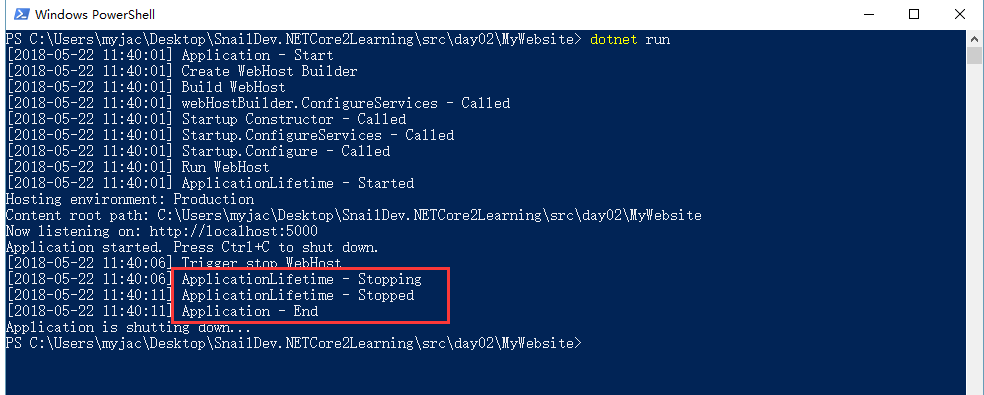
输出内容少了webHostBuilder.Configure - Called,因为Configure只能有一个,后注册的Configure会把之前注册的覆盖掉。
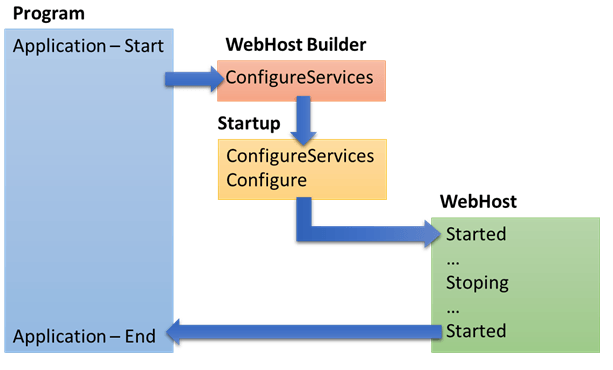
程序执行流程如下:
参考
Application startup in ASP.NET Core
Hosting in ASP.NET Core
老司机发车啦:https://github.com/SnailDev/SnailDev.NETCore2Learning
ASP.NET Core 2 学习笔记(二)生命周期的更多相关文章
- VUE 学习笔记 二 生命周期
1.除了数据属性,Vue 实例还暴露了一些有用的实例属性与方法.它们都有前缀 $,以便与用户定义的属性区分开来 var data = { a: 1 } var vm = new Vue({ el: ' ...
- ASP.NET Core 2 学习笔记(十二)REST-Like API
Restful几乎已算是API设计的标准,通过HTTP Method区分新增(Create).查询(Read).修改(Update)和删除(Delete),简称CRUD四种数据存取方式,简约又直接的风 ...
- Asp.Net Core WebApi学习笔记(四)-- Middleware
Asp.Net Core WebApi学习笔记(四)-- Middleware 本文记录了Asp.Net管道模型和Asp.Net Core的Middleware模型的对比,并在上一篇的基础上增加Mid ...
- ASP.NET Core 2 学习笔记(十三)Swagger
Swagger也算是行之有年的API文件生成器,只要在API上使用C#的<summary />文件注解标签,就可以产生精美的线上文件,并且对RESTful API有良好的支持.不仅支持生成 ...
- sql server 关于表中只增标识问题 C# 实现自动化打开和关闭可执行文件(或 关闭停止与系统交互的可执行文件) ajaxfileupload插件上传图片功能,用MVC和aspx做后台各写了一个案例 将小写阿拉伯数字转换成大写的汉字, C# WinForm 中英文实现, 国际化实现的简单方法 ASP.NET Core 2 学习笔记(六)ASP.NET Core 2 学习笔记(三)
sql server 关于表中只增标识问题 由于我们系统时间用的过长,数据量大,设计是采用自增ID 我们插入数据的时候把ID也写进去,我们可以采用 关闭和开启自增标识 没有关闭的时候 ,提示一下错 ...
- ASP.NET Core 2 学习笔记(七)路由
ASP.NET Core通过路由(Routing)设定,将定义的URL规则找到相对应行为:当使用者Request的URL满足特定规则条件时,则自动对应到相符合的行为处理.从ASP.NET就已经存在的架 ...
- ASP.NET Core 2 学习笔记(十)视图
ASP.NET Core MVC中的Views是负责网页显示,将数据一并渲染至UI包含HTML.CSS等.并能痛过Razor语法在*.cshtml中写渲染画面的程序逻辑.本篇将介绍ASP.NET Co ...
- ASP.NET Core 2 学习笔记(一)开始
原文:ASP.NET Core 2 学习笔记(一)开始 来势汹汹的.NET Core似乎要取代.NET Framework,ASP.NET也随之发布.NET Core版本.虽然名称沿用ASP.NET, ...
- Angular 5.x 学习笔记(2) - 生命周期钩子 - 暂时搁浅
Angular 5.x Lifecycle Hooks Learn Note Angular 5.x 生命周期钩子学习笔记 标签(空格分隔): Angular Note on cnblogs.com ...
- MVC学习笔记---MVC生命周期
Asp.net应用程序管道处理用户请求时特别强调"时机",对Asp.net生命周期的了解多少直接影响我们写页面和控件的效率.因此在2007年和2008年我在这个话题上各写了一篇文章 ...
随机推荐
- 【校招面试 之 剑指offer】第11题 旋转数组中的最小数字
题目:把一个数组最开始的若干个元素搬到数组的末尾,我们称之为数组的旋转.输入一个递增排序的数组的一个旋转,输出旋转数组的最小元素.例如: 数组{3,4,5,1,2}为{1,2,3,4,5}的一个旋转, ...
- django的数据库操作回顾
补充一个filter中大于小于的用法 models.course_info.objects.filter(id__gte=30).delete() _exact 精确等于 like 'aaa' __i ...
- Django开发问题及解决方法汇总
1. manage.py@MxOnline > makemigrations users manage.py@MxOnline > migrate users 2. 操作django的ad ...
- NABCD模型--软件工程
1.N (Need 需求) 我们通过网络调查问卷的方式,收集样本数据,并对其进行分析和总结. 1.你是否为在校学生? 7.如果用过,你觉得还应该需要添加什么功能 通过调查发现,大多数学生并不是特别了解 ...
- PAT 1079 延迟的回文数(代码+思路)
1079 延迟的回文数(20 分) 给定一个 k+1 位的正整数 N,写成 ak⋯a1a0 的形式,其中对所有 i 有 0≤ai<10 且 ak>0.N 被称 ...
- PAT 1077 互评成绩计算(20)(代码+思路)
1077 互评成绩计算(20 分) 在浙大的计算机专业课中,经常有互评分组报告这个环节.一个组上台介绍自己的工作,其他组在台下为其表现评分.最后这个组的互评成绩是这样计算的:所有其他组的评分中,去掉一 ...
- mysql 1045 access denied for user********
另一个方法Windows: 1. 管理员登陆系统,停止mysql服务或者结束mysqld-nt进程2. 进入命令行,来到mysql的安装目录.假设安装目录为 d:/mysql/ , CMD进入命令行3 ...
- linux下集成开发环境之ECLIPSE--在线调试、编译程序
裸机开发流程 1.编写裸机程序:2.调试裸机程序:3.生成2进制映象(编译.链接.格式转换):4.烧写/运行2进制映象. 注意:我们自己开发的程序等等需要下载到开发板的Nandflash(类似于硬盘功 ...
- Oracle SQL 硬解析和子游标
Oracle SQL 硬解析和子游标 What reasons will be happening sql hard parse and generating new child cursors 在一 ...
- tp5自动生成目录
1.// 定义应用目录 define('APP_PATH', __DIR__ . '/../application/'); // 加载框架引导文件 require __DIR__ . '/../thi ...