
Allure测试框架 python
关于Allure
Allure是一个report框架,可以基于一些测试框架生成测试报告,比较常用的一般是Junit/Testng框架;
Allure 生成的报告样式简洁美观,同时又支持中文;
Allure还支持使用Jenkins工具持续集成,整套环境搭建下来以后,使用起来非常方便。
分析测试的整体趋势
实现自动化测试用例与手动测试用例关联
下载allure
https://dl.bintray.com/qameta/generic/io/qameta/allure/allure/2.7.0/allure-2.7.0.zip
并配置环境变量
官网:
下载:pip install allure-pytest
使用
pytest --alluredir=/tmp/my_allure_results
pytest test_baidu.py --alluredir ./result1
生成报告:allure serve /tmp/my_allure_results
Allure特性
pytest test_baidu.py --alluredir ./result1 --allure-features "搜索类"
import allure

@allure.feature("搜索类")

class TestSearchDemo:

    @allure.story("搜索 英文")

    def test_search(self):

        print("这是一个搜索测试 英文")

    @allure.story("搜索 中文")

    def test_search1(self):

        print("这是一个搜索测试1 中文")

    @allure.story("搜索 特殊字符")

    def test_search2(self):

        print("这是一个搜索测试2 特殊字符")
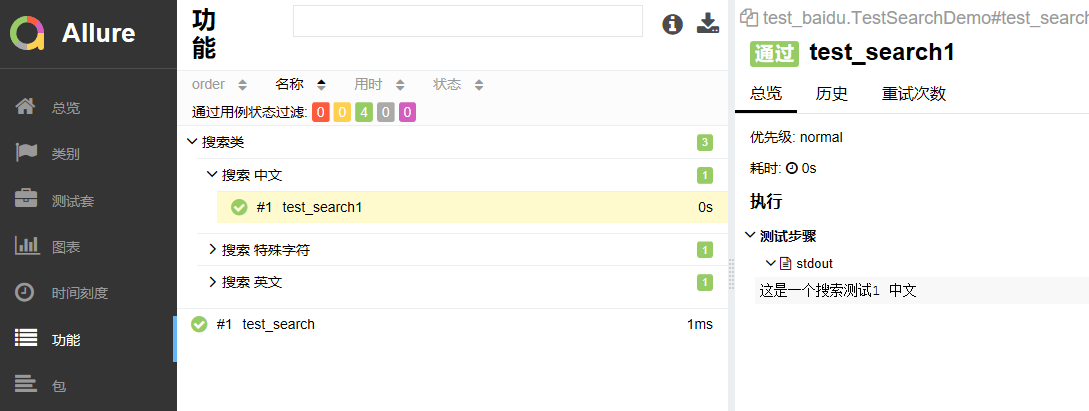
清除之前的记录: --clean-alluredir
添加图片,html代码块,视频
import allure

import pytest

@allure.feature("搜索类")

class TestSearchDemo:

    @allure.story("搜索 英文")

    #关键字驱动

    @pytest.mark.parametrize("searchkey",[

        "android","连衣裙","$#2!"

    ])

    def test_search(self,searchkey):

        with allure.step("第1步"):

            print("第一步:打开搜索页面")

        with allure.step("第2步"):

            print("第二步:点击搜索框")

        with allure.step("第3步"):

            print(f"第三步:输入搜索词:{searchkey}")

    @allure.story("搜索 中文")

    def test_search1(self):

        print("这是一个搜索测试1 中文")

    @allure.story("搜索 特殊字符")

    def test_search2(self):

        print("这是一个搜索测试2 特殊字符")

@allure.feature("登录类")

class TestLoginDemo:

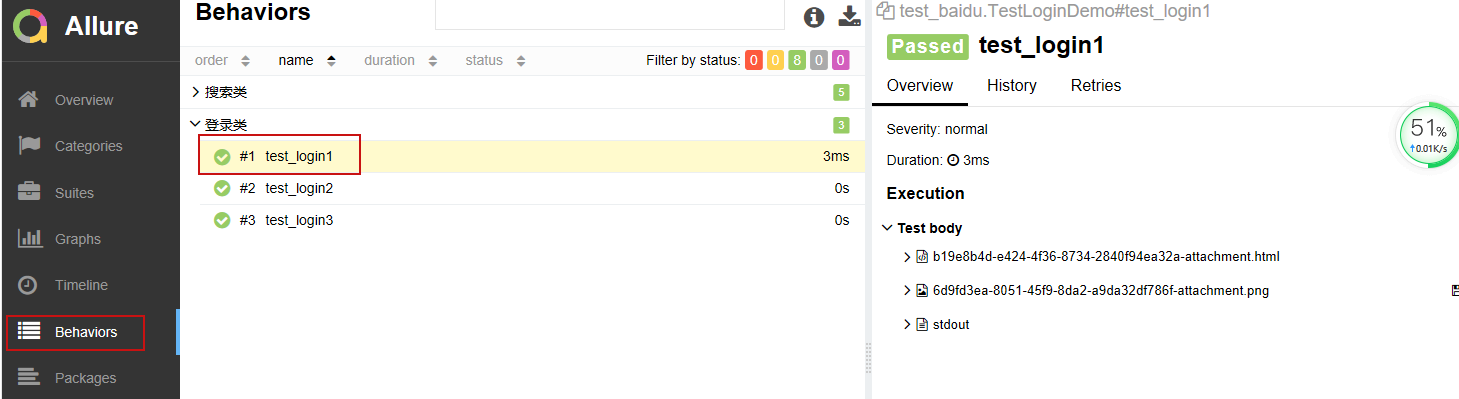
    def test_login1(self):

        #插入图片

        allure.attach('<img class="s_lg_img_gold_show" src="//www.baidu.com/img/flexible/logo/pc/result.png" alt="到百度首页" title="到百度首页">',

                      attachment_type=allure.attachment_type.HTML)

        #插入本地图片

        allure.attach.file('/Users/ADMIN/Desktop/a8d5a467242709a8c3a49a336abae8cd_1.PNG',

            attachment_type=allure.attachment_type.PNG)

        # 插入本地视频  allure.attach.file   allure.attachment_type.MP4

        print("login1")

    def test_login2(self):

        print("login2")

    def test_login3(self):

        print("login3")

Allure测试框架 python的更多相关文章
- XUnit测试框架-Python unittest
选择 语言选择 本次个人作业我选择的语言是Python,了解学习Python有一段时间了但是一直没有练习,所以这次玩蛇,使用的版本是Python3.6. 开发工具选择 我选择的IDE是Pycharm, ...
- pytest+allure测试框架搭建
https://blog.csdn.net/wust_lh/article/details/86685912 https://www.jianshu.com/p/9673b2aeb0d3 定制化展示数 ...
- Python接口测试实战3(下)- unittest测试框架
如有任何学习问题,可以添加作者微信:lockingfree 课程目录 Python接口测试实战1(上)- 接口测试理论 Python接口测试实战1(下)- 接口测试工具的使用 Python接口测试实战 ...
- 全功能Python测试框架:pytest
python通用测试框架大多数人用的是unittest+HTMLTestRunner,这段时间看到了pytest文档,发现这个框架和丰富的plugins很好用,所以来学习下pytest. imag ...
- [转]Python测试框架对比----unittest, pytest, nose, robot framework对比
测试框架 什么是框架? 框架(Framework)是整个或部分系统的可重用设计,框架是用来解决代码的组织及运行控制问题的. 在我们编写自动化脚本的时候,经常需要读取配置文件,读取数据文件,发送请求 ...
- Python测试框架对比
如有任何学习问题,可以添加作者微信:lockingfree 更多学习资料请加QQ群: 822601020获取 unittest, pytest, nose, robot framework对比 什么是 ...
- Pytest测试框架(五):pytest + allure生成测试报告
Allure 是一款轻量级.支持多语言的开源自动化测试报告生成框架,由Java语言开发,可以集成到 Jenkins. pytest 测试框架支持Allure 报告生成. pytest也可以生成juni ...
- 某互联网后台自动化组合测试框架RF+Sikuli+Python脚本
某互联网后台自动化组合测试框架RF+Sikuli+Python脚本 http://www.jianshu.com/p/b3e204c8651a 字数949 阅读323 评论1 喜欢0 一.**Robo ...
- Python几种常用的测试框架
一.测试的常用规则 一个测试单元必须关注一个很小的功能函数,证明它是正确的: 每个测试单元必须是完全独立的,必须能单独运行.这样意味着每一个测试方法必须重新加载数据,执行完毕后做一些清理工作.通常通过 ...
随机推荐
- Web打印插件实现思路(C#/Winform)
最近,客户有个需求过来,Web端无预览打印,美其名曰:快捷打印. 当时第一反应就是找插件,拿来主义永远不过时.找了一圈发现,免费的有限制,没限制的需要收费(LODOP真的好用).说来就是一个简单的无预 ...
- 用Python爬取分析【某东618】畅销商品销量数据,带你看看大家都喜欢买什么!
618购物节,辰哥准备分析一波购物节大家都喜欢买什么?本文以某东为例,Python爬取618活动的畅销商品数据,并进行数据清洗,最后以可视化的方式从不同角度去了解畅销商品中,名列前茅的商品是哪些?销售 ...
- C#《大话设计模式》之原型模式学习日记
class Program { static void Main(string[] args) { Resume a = new Resume("大鸟"); a.SetPerson ...
- CMD批处理(3)——批处理选择语句结构
if 的用法详解 命令格式1:if [NOT] ERRORLEVEL number command 命令格式2:if [NOT] string1==string2 command 命令格式3:if [ ...
- 测试开发之网络篇-IP地址
IP地址是IP协议提供的一种统一的地址格式,它为互联网上的每一个网络和每一台主机分配一个逻辑地址,以此来屏蔽物理地址的差异.这里介绍一下目前广泛使用的IPv4版本. IP地址使用一种统一的格式,为互联 ...
- 剖析虚幻渲染体系(06)- UE5特辑Part 1(特性和Nanite)
目录 6.1 本篇概述 6.1.1 本篇内容 6.1.2 基础概念 6.2 UE5新特性 6.2.1 UE5编辑器 6.2.1.1 下载编辑器及资源 6.2.1.2 启动示例工程 6.2.1.3 编辑 ...
- 【redis前传】自己手写一个LRU策略 | redis淘汰策略
title: 自己手写一个LRU策略 date: 2021-06-18 12:00:30 tags: - [redis] - [lru] categories: - [redis] permalink ...
- 基于xtrabackup的主从同步
基于xtrabackup的主从同步 作者 刘畅 时间 2020-9-21 服务器版本:CentOS Linux release 7.5.1804 主机名 ip地址 服务器配置 安装软件 密码 mysq ...
- Linux从头学02:x86中内存【段寻址】方式的来龙去脉
作 者:道哥,10+年的嵌入式开发老兵. 公众号:[IOT物联网小镇],专注于:C/C++.Linux操作系统.应用程序设计.物联网.单片机和嵌入式开发等领域. 公众号回复[书籍],获取 Linux. ...
- Docker:docker国内镜像加速
创建或修改 /etc/docker/daemon.json 文件,修改为如下形式 { "registry-mirrors": [ "https://registry.do ...