
如何将EDI报文转换为CSV格式文件?
如果您对EDI项目实施有一定的了解,想必您一定知道,在正式开始EDI项目实施之前,都会有EDI顾问与您接洽,沟通EDI项目需求。其中,会包含EDI通信双方使用哪种传输协议,传输的报文是符合什么标准的,传输的业务报文都包含哪些种类,标准的EDI报文转换成什么格式,是否与企业现有业务系统集成。以上问题,在项目需求沟通初期都务必要确认清楚。
以上,我们提到标准的EDI报文转换成什么格式,这一问题其实也是很多客户在项目实施中比较纠结的一点。实际上,这主要取决于您企业的信息化情况。通常,企业如已有业务系统,为了实现数据自动化处理,都会选择与现有的业务系统集成,支持的方式有很多,比如金蝶、用友可以通过数据库表方式与EDI系统集成,某客户的物流管理系统选择API方式与EDI系统集成,诸如此类。当然,也存在部分客户没有业务系统的情况,那EDI数据转换成什么格式才方便业务人员读取、操作呢?
本文以X12 830报文转换为CSV格式文件为例,从收到X12 830报文开始,依次按照系统处理顺序,介绍如何使用知行EDI系统将X12 830报文转换为CSV格式。实际上,CSV这种方案不只是适用于没有业务系统的企业,有的业务系统也是支持直接导入CSV格式文件的,同样也适用CSV方案。
以下,是一个完整的X12 830报文转换为CSV格式的工作流。其中,经由3个端口处理,最终解析得到CSV格式的830文件。
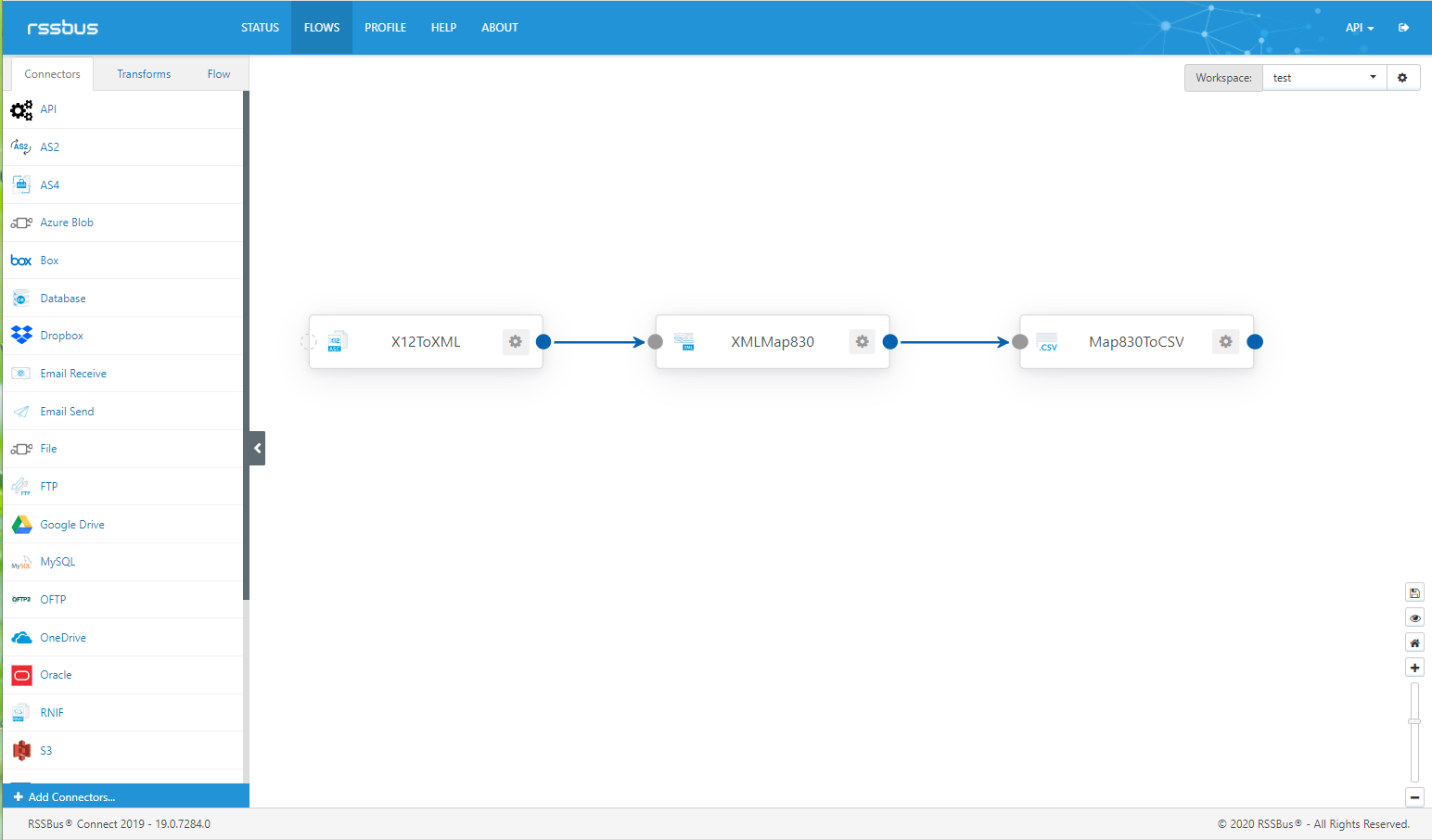
X12ToXML端口
首先,配置X12端口转换类型(Translation Type)为X12 to XML,用于将X12标准报文转换为XML格式。此外,还要配置Sender Id Qualifier及Sender Identifier等信息。
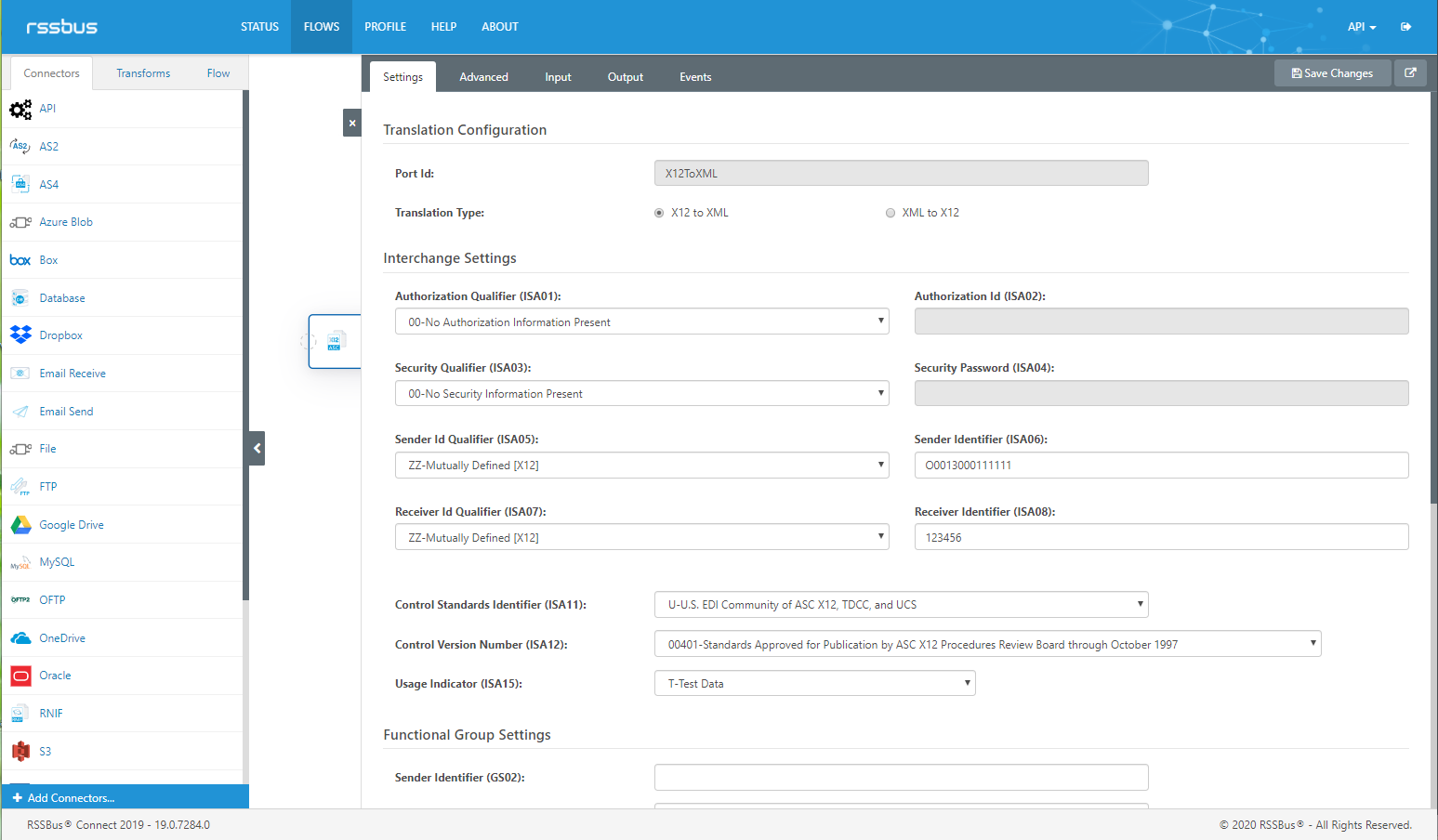
配置完后,在Input界面上传需要转换为CSV格式的X12 830报文。
|
1
2
3
4
5
6
7
8
9
10
11
12
13
14
15
16
17
18
19
|
ISA*00* *00* *ZZ*O0013000111111 *ZZ*123456 *200227*0700*U*00200*000000045*0*P*>
GS*PS*O00130001111*123456*20200227*0700*000000045*X*004010
ST*830*450001
BFR*05**21*DL*A*20200217**20200227
N1*MI
PER*SC**TE*123456788
N1*ST*ABC*92*1100
N1*SU*CAB Automotive
LIN*00020*BP*12AB4356*PO*1234546543
UIT*PC
PID*F****HOUSING-TEST
FST*4032*C*D*20200217*20200217
FST*6048*C*D*20200224*20200224
SHP*01*6048*050*20200210
SHP*02*75456*050*20200210
CTT*1
SE*15*450001
GE*1*000000045
IEA*1*000000045
|
系统默认已开启自动处理,当前X12ToXML端口会自动将X12 830报文转换为XML格式。在Output页面中可以下载并查看。
|
1
2
3
4
5
6
7
8
9
10
11
12
13
14
15
16
17
18
19
20
21
22
23
24
25
26
27
28
29
30
31
32
33
34
35
36
37
38
39
40
41
42
43
44
45
46
47
48
49
50
51
52
53
54
55
56
57
58
59
60
61
62
63
64
65
66
67
68
69
70
71
72
73
74
75
76
77
78
79
80
81
82
83
84
85
86
87
88
89
90
91
92
93
94
95
96
97
98
99
100
101
102
103
104
105
106
107
108
109
110
111
112
113
114
115
116
117
118
119
120
121
122
123
124
125
126
127
128
129
130
131
132
133
134
135
136
137
|
<Interchange Delimiters=":*. ^~" xmlns="http://www.rssbus.com" xmlns:xsi="http://www.w3.org/2001/XMLSchema-instance">
<Meta />
<ISA01>00</ISA01>
<ISA02> </ISA02>
<ISA03>00</ISA03>
<ISA04> </ISA04>
<ISA05>ZZ</ISA05>
<ISA06>O0013000111111 </ISA06>
<ISA07>ZZ</ISA07>
<ISA08>123456 </ISA08>
<ISA09>200227</ISA09>
<ISA10>0700</ISA10>
<ISA11>U</ISA11>
<ISA12>00200</ISA12>
<ISA13>000000045</ISA13>
<ISA14>0</ISA14>
<ISA15>P</ISA15>
<ISA16>></ISA16>
</Meta>
<FunctionalGroup>
<Meta />
<GS01>PS</GS01>
<GS02>O00130001111</GS02>
<GS03>123456</GS03>
<GS04>20200227</GS04>
<GS05>0700</GS05>
<GS06>000000045</GS06>
<GS07>X</GS07>
<GS08>004010</GS08>
</Meta>
<TransactionSet>
<TX-00401-830 type="TransactionSet">
<Meta />
<ST01>830</ST01>
<ST02>450001</ST02>
</Meta>
<BFR type="Segment">
<BFR01>05</BFR01>
<BFR02 xsi:nil="true"/>
<BFR03>21</BFR03>
<BFR04>DL</BFR04>
<BFR05>A</BFR05>
<BFR06>20200217</BFR06>
<BFR07 xsi:nil="true"/>
<BFR08>20200227</BFR08>
</BFR>
<N1Loop1 type="Loop">
<N1 type="Segment">
<N101>MI</N101>
</N1>
<PER type="Segment">
<PER01>SC</PER01>
<PER02 xsi:nil="true"/>
<PER03>TE</PER03>
<PER04>123456788</PER04>
</PER>
</N1Loop1>
<N1Loop1 type="Loop">
<N1 type="Segment">
<N101>ST</N101>
<N102>ABC</N102>
<N103>92</N103>
<N104>1100</N104>
</N1>
</N1Loop1>
<N1Loop1 type="Loop">
<N1 type="Segment">
<N101>SU</N101>
<N102>CAB Automotive</N102>
</N1>
</N1Loop1>
<LINLoop1 type="Loop">
<LIN type="Segment">
<LIN01>00020</LIN01>
<LIN02>BP</LIN02>
<LIN03>12AB4356</LIN03>
<LIN04>PO</LIN04>
<LIN05>1234546543</LIN05>
</LIN>
<UIT type="Segment">
<UIT01 type="Composite">
<UIT0101>PC</UIT0101>
</UIT01>
</UIT>
<PID type="Segment">
<PID01>F</PID01>
<PID02/>
<PID03/>
<PID04 xsi:nil="true"/>
<PID05>HOUSING-TEST</PID05>
</PID>
<FSTLoop1 type="Loop">
<FST type="Segment">
<FST01>4032</FST01>
<FST02>C</FST02>
<FST03>D</FST03>
<FST04>20200217</FST04>
<FST05>20200217</FST05>
</FST>
</FSTLoop1>
<FSTLoop1 type="Loop">
<FST type="Segment">
<FST01>6048</FST01>
<FST02>C</FST02>
<FST03>D</FST03>
<FST04>20200224</FST04>
<FST05>20200224</FST05>
</FST>
</FSTLoop1>
<SHPLoop1 type="Loop">
<SHP type="Segment">
<SHP01>01</SHP01>
<SHP02>6048</SHP02>
<SHP03>050</SHP03>
<SHP04>20200210</SHP04>
</SHP>
</SHPLoop1>
<SHPLoop1 type="Loop">
<SHP type="Segment">
<SHP01>02</SHP01>
<SHP02>75456</SHP02>
<SHP03>050</SHP03>
<SHP04>20200210</SHP04>
</SHP>
</SHPLoop1>
</LINLoop1>
<CTT type="Segment">
<CTT01>1</CTT01>
</CTT>
</TX-00401-830>
</TransactionSet>
</FunctionalGroup>
</Interchange>
|
XMlMap830端口
经由X12ToXML端口端口处理后,得到以上XML格式文件。接下来,通过XMlMap830端口处理可以将原本多层复杂结构的知行EDI系统默认XML格式文件转换为单层结构的XML文件。与上一步X12转换为XML不同的是,XMlMap830端口是需要通过界面操作拖拽完成数据关系映射来完成。
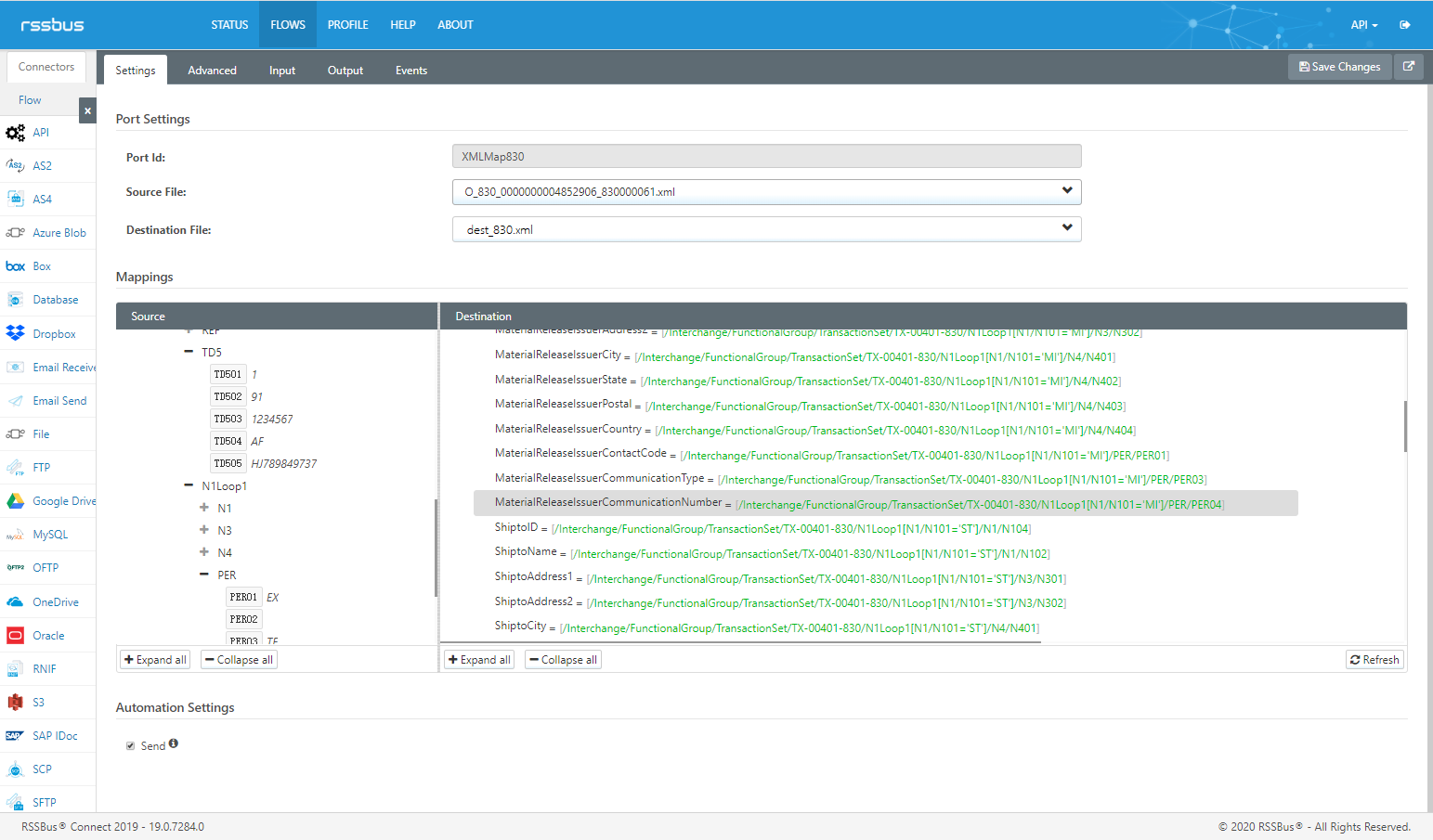
转化后,得到以下单层结构的XML格式文件,以便后续CSV端口处理。
|
1
2
3
4
5
6
7
8
9
10
11
12
13
14
15
16
17
18
19
20
21
22
23
24
25
26
27
28
29
30
31
32
33
34
35
36
37
38
39
40
41
42
43
44
45
46
47
48
49
50
51
52
53
54
55
56
57
58
59
60
61
62
63
64
65
66
67
68
69
70
71
72
73
74
75
76
77
78
79
80
81
82
83
84
85
86
87
88
89
90
91
92
93
94
95
96
97
98
99
100
101
102
103
104
105
106
107
108
109
110
111
112
113
114
115
116
117
118
119
120
121
122
123
124
125
126
127
128
129
130
131
132
133
134
135
136
137
138
139
140
141
142
143
144
145
146
147
148
149
150
151
152
153
154
155
|
<?xml version="1.0" encoding="UTF-8"?>
<Items>
<_830>
<ForecastNo></ForecastNo>
<ReleaseNo>21</ReleaseNo>
<ScheduleType>DL</ScheduleType>
<ScheduleQtyType>A</ScheduleQtyType>
<StartDate>20200217</StartDate>
<ForecastCreateDate>20200227</ForecastCreateDate>
<NotesID></NotesID>
<Notes></Notes>
<RoutingSequenceCode></RoutingSequenceCode>
<CarrierCode></CarrierCode>
<TransportMethodCode></TransportMethodCode>
<RoutingInformation></RoutingInformation>
<MaterialReleaseIssuerID></MaterialReleaseIssuerID>
<MaterialReleaseIssuerName></MaterialReleaseIssuerName>
<MaterialReleaseIssuerAddress1></MaterialReleaseIssuerAddress1>
<MaterialReleaseIssuerAddress2></MaterialReleaseIssuerAddress2>
<MaterialReleaseIssuerCity></MaterialReleaseIssuerCity>
<MaterialReleaseIssuerState></MaterialReleaseIssuerState>
<MaterialReleaseIssuerPostal></MaterialReleaseIssuerPostal>
<MaterialReleaseIssuerCountry></MaterialReleaseIssuerCountry>
<MaterialReleaseIssuerContactCode>SC</MaterialReleaseIssuerContactCode>
<MaterialReleaseIssuerCommunicationType>TE</MaterialReleaseIssuerCommunicationType>
<MaterialReleaseIssuerCommunicationNumber>123456788</MaterialReleaseIssuerCommunicationNumber>
<ShiptoID>1100</ShiptoID>
<ShiptoName>ABC</ShiptoName>
<ShiptoAddress1></ShiptoAddress1>
<ShiptoAddress2></ShiptoAddress2>
<ShiptoCity></ShiptoCity>
<ShiptoState></ShiptoState>
<ShiptoPostal></ShiptoPostal>
<ShiptoCountry></ShiptoCountry>
<ShiptoContactCode></ShiptoContactCode>
<ShiptoCommunicationType></ShiptoCommunicationType>
<ShiptoCommunicationNumber></ShiptoCommunicationNumber>
<SupplierID></SupplierID>
<SupplierName>CAB Automotive</SupplierName>
<SupplierAddress1></SupplierAddress1>
<SupplierAddress2></SupplierAddress2>
<SupplierCity></SupplierCity>
<SupplierState></SupplierState>
<SupplierPostal></SupplierPostal>
<SupplierCountry></SupplierCountry>
<SupplierContactCode></SupplierContactCode>
<SupplierCommunicationType></SupplierCommunicationType>
<SupplierCommunicationNumber></SupplierCommunicationNumber>
<POLineNumber>00020</POLineNumber>
<BuyerPartNumber>12AB4356</BuyerPartNumber>
<PartDescription>HOUSING-TEST</PartDescription>
<PartRevisionLevel></PartRevisionLevel>
<PONumber>1234546543</PONumber>
<Unit>PC</Unit>
<UnitPrice></UnitPrice>
<ExpeditorName></ExpeditorName>
<ExpeditorTel></ExpeditorTel>
<MaterialSchedulerName></MaterialSchedulerName>
<MaterialSchedulerTel></MaterialSchedulerTel>
<ResourceAuthorizationCode></ResourceAuthorizationCode>
<AuthorizationThroughDate></AuthorizationThroughDate>
<AuthorizationCumulatedQuantity></AuthorizationCumulatedQuantity>
<CumulativeStartDate></CumulativeStartDate>
<Quantity>4032</Quantity>
<ForecastCode>C</ForecastCode>
<ForecastTime>D</ForecastTime>
<ScheduleStartDate>20200217</ScheduleStartDate>
<ScheduleEndDate>20200217</ScheduleEndDate>
<ForecastReferenceNumber></ForecastReferenceNumber>
<LastReceivedQty>6048</LastReceivedQty>
<CumulativeQtyReceived></CumulativeQtyReceived>
<CumulativeScrapQtyReceived></CumulativeScrapQtyReceived>
<LastReceivedDate>20200210</LastReceivedDate>
<CumulativeQtyReceivedStartDate></CumulativeQtyReceivedStartDate>
<CumulativeQtyReceivedEndDate></CumulativeQtyReceivedEndDate>
<CumulativeScrapQtyReceivedStartDate></CumulativeScrapQtyReceivedStartDate>
<CumulativeScrapQtyReceivedEndDate></CumulativeScrapQtyReceivedEndDate>
</_830>
<_830>
<ForecastNo></ForecastNo>
<ReleaseNo>21</ReleaseNo>
<ScheduleType>DL</ScheduleType>
<ScheduleQtyType>A</ScheduleQtyType>
<StartDate>20200217</StartDate>
<ForecastCreateDate>20200227</ForecastCreateDate>
<NotesID></NotesID>
<Notes></Notes>
<RoutingSequenceCode></RoutingSequenceCode>
<CarrierCode></CarrierCode>
<TransportMethodCode></TransportMethodCode>
<RoutingInformation></RoutingInformation>
<MaterialReleaseIssuerID></MaterialReleaseIssuerID>
<MaterialReleaseIssuerName></MaterialReleaseIssuerName>
<MaterialReleaseIssuerAddress1></MaterialReleaseIssuerAddress1>
<MaterialReleaseIssuerAddress2></MaterialReleaseIssuerAddress2>
<MaterialReleaseIssuerCity></MaterialReleaseIssuerCity>
<MaterialReleaseIssuerState></MaterialReleaseIssuerState>
<MaterialReleaseIssuerPostal></MaterialReleaseIssuerPostal>
<MaterialReleaseIssuerCountry></MaterialReleaseIssuerCountry>
<MaterialReleaseIssuerContactCode>SC</MaterialReleaseIssuerContactCode>
<MaterialReleaseIssuerCommunicationType>TE</MaterialReleaseIssuerCommunicationType>
<MaterialReleaseIssuerCommunicationNumber>123456788</MaterialReleaseIssuerCommunicationNumber>
<ShiptoID>1100</ShiptoID>
<ShiptoName>ABC</ShiptoName>
<ShiptoAddress1></ShiptoAddress1>
<ShiptoAddress2></ShiptoAddress2>
<ShiptoCity></ShiptoCity>
<ShiptoState></ShiptoState>
<ShiptoPostal></ShiptoPostal>
<ShiptoCountry></ShiptoCountry>
<ShiptoContactCode></ShiptoContactCode>
<ShiptoCommunicationType></ShiptoCommunicationType>
<ShiptoCommunicationNumber></ShiptoCommunicationNumber>
<SupplierID></SupplierID>
<SupplierName>CAB Automotive</SupplierName>
<SupplierAddress1></SupplierAddress1>
<SupplierAddress2></SupplierAddress2>
<SupplierCity></SupplierCity>
<SupplierState></SupplierState>
<SupplierPostal></SupplierPostal>
<SupplierCountry></SupplierCountry>
<SupplierContactCode></SupplierContactCode>
<SupplierCommunicationType></SupplierCommunicationType>
<SupplierCommunicationNumber></SupplierCommunicationNumber>
<POLineNumber>00020</POLineNumber>
<BuyerPartNumber>12AB4356</BuyerPartNumber>
<PartDescription>HOUSING-TEST</PartDescription>
<PartRevisionLevel></PartRevisionLevel>
<PONumber>1234546543</PONumber>
<Unit>PC</Unit>
<UnitPrice></UnitPrice>
<ExpeditorName></ExpeditorName>
<ExpeditorTel></ExpeditorTel>
<MaterialSchedulerName></MaterialSchedulerName>
<MaterialSchedulerTel></MaterialSchedulerTel>
<ResourceAuthorizationCode></ResourceAuthorizationCode>
<AuthorizationThroughDate></AuthorizationThroughDate>
<AuthorizationCumulatedQuantity></AuthorizationCumulatedQuantity>
<CumulativeStartDate></CumulativeStartDate>
<Quantity>6048</Quantity>
<ForecastCode>C</ForecastCode>
<ForecastTime>D</ForecastTime>
<ScheduleStartDate>20200224</ScheduleStartDate>
<ScheduleEndDate>20200224</ScheduleEndDate>
<ForecastReferenceNumber></ForecastReferenceNumber>
<LastReceivedQty>6048</LastReceivedQty>
<CumulativeQtyReceived></CumulativeQtyReceived>
<CumulativeScrapQtyReceived></CumulativeScrapQtyReceived>
<LastReceivedDate>20200210</LastReceivedDate>
<CumulativeQtyReceivedStartDate></CumulativeQtyReceivedStartDate>
<CumulativeQtyReceivedEndDate></CumulativeQtyReceivedEndDate>
<CumulativeScrapQtyReceivedStartDate></CumulativeScrapQtyReceivedStartDate>
<CumulativeScrapQtyReceivedEndDate></CumulativeScrapQtyReceivedEndDate>
</_830>
</Items>
|
XMlMap830端口
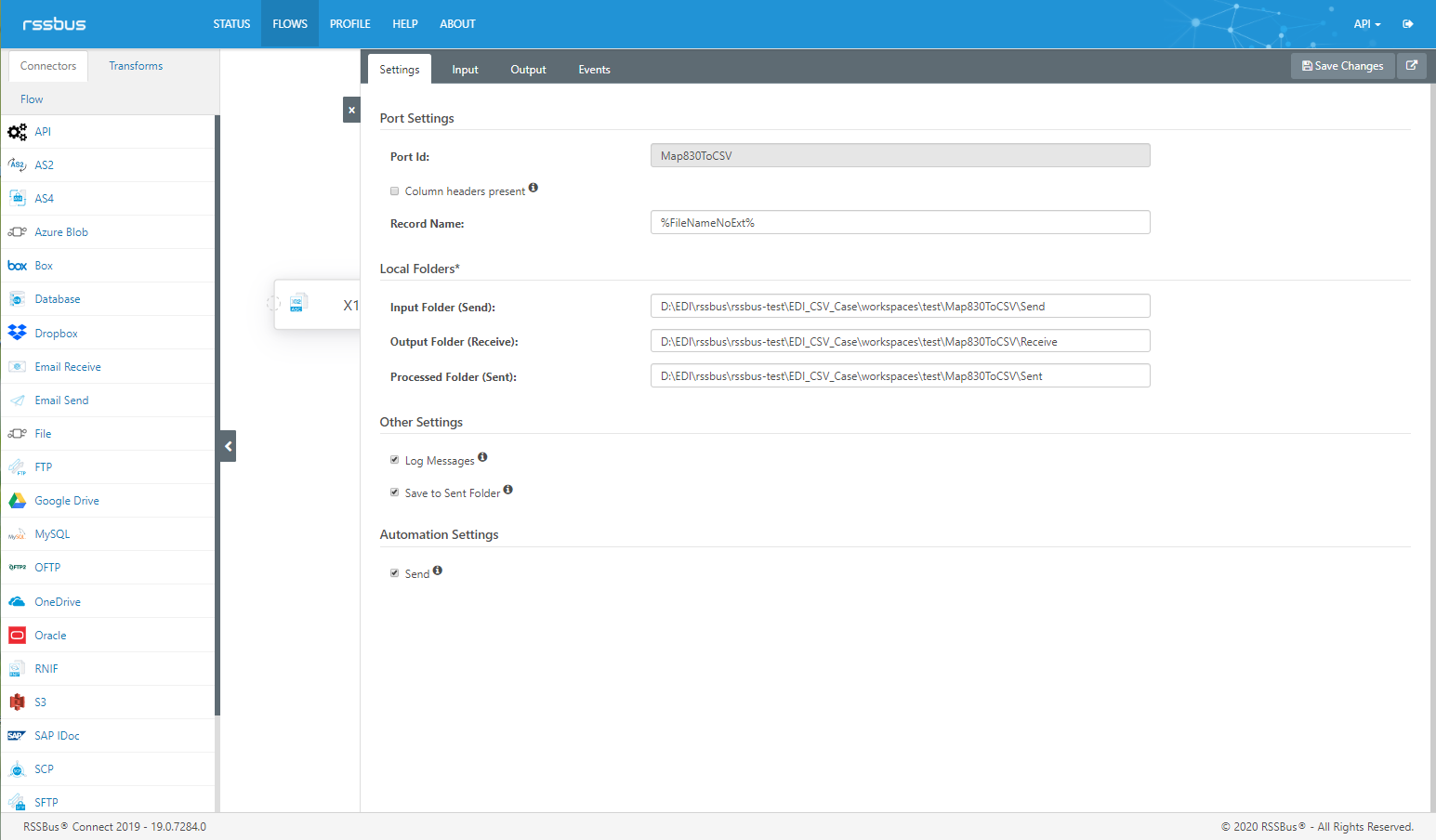
最后一步,通过CSV端口就可以将XML格式的文件转换为CSV格式。无需代码,使用端口现有功能即可快速将XML格式转换为CSV格式文件。
|
1
2
3
|
"ForecastNo","ReleaseNo","ScheduleType","ScheduleQtyType","StartDate","ForecastCreateDate","NotesID","Notes","RoutingSequenceCode","CarrierCode","TransportMethodCode","RoutingInformation","MaterialReleaseIssuerID","MaterialReleaseIssuerName","MaterialReleaseIssuerAddress1","MaterialReleaseIssuerAddress2","MaterialReleaseIssuerCity","MaterialReleaseIssuerState","MaterialReleaseIssuerPostal","MaterialReleaseIssuerCountry","MaterialReleaseIssuerContactCode","MaterialReleaseIssuerCommunicationType","MaterialReleaseIssuerCommunicationNumber","ShiptoID","ShiptoName","ShiptoAddress1","ShiptoAddress2","ShiptoCity","ShiptoState","ShiptoPostal","ShiptoCountry","ShiptoContactCode","ShiptoCommunicationType","ShiptoCommunicationNumber","SupplierID","SupplierName","SupplierAddress1","SupplierAddress2","SupplierCity","SupplierState","SupplierPostal","SupplierCountry","SupplierContactCode","SupplierCommunicationType","SupplierCommunicationNumber","POLineNumber","BuyerPartNumber","PartDescription","PartRevisionLevel","PONumber","Unit","UnitPrice","ExpeditorName","ExpeditorTel","MaterialSchedulerName","MaterialSchedulerTel","ResourceAuthorizationCode","AuthorizationThroughDate","AuthorizationCumulatedQuantity","CumulativeStartDate","Quantity","ForecastCode","ForecastTime","ScheduleStartDate","ScheduleEndDate","ForecastReferenceNumber","LastReceivedQty","CumulativeQtyReceived","CumulativeScrapQtyReceived","LastReceivedDate","CumulativeQtyReceivedStartDate","CumulativeQtyReceivedEndDate","CumulativeScrapQtyReceivedStartDate","CumulativeScrapQtyReceivedEndDate"
"","21","DL","A","20200217","20200227","","","","","","","","","","","","","","","SC","TE","123456788","1100","ABC","","","","","","","","","","","CAB Automotive","","","","","","","","","","00020","12AB4356","HOUSING-TEST","","1234546543","PC","","","","","","","","","","4032","C","D","20200217","20200217","","6048","","","20200210","","","",""
"","21","DL","A","20200217","20200227","","","","","","","","","","","","","","","SC","TE","123456788","1100","ABC","","","","","","","","","","","CAB Automotive","","","","","","","","","","00020","12AB4356","HOUSING-TEST","","1234546543","PC","","","","","","","","","","6048","C","D","20200224","20200224","","6048","","","20200210","","","",""
|
经过以上3个端口的一次处理,原本生涩难懂的X12 830报文已经转为了CSV格式。不论是直接导入现有业务系统或是直接打开查看,您就能轻松地读取到重要的业务信息。
如何将EDI报文转换为CSV格式文件?的更多相关文章
- 导出CSV格式文件,用Excel打开乱码的解决办法
导出CSV格式文件,用Excel打开乱码的解决办法 1.治标不治本的办法 将导出CSV数据文件用记事本打开,然后另存为"ANSI"编码格式,再用Excel打开,乱码解决. 但是,这 ...
- Python数据写入csv格式文件
(只是传递,基础知识也是根基) Python读取数据,并存入Excel打开的CSV格式文件内! 这里需要用到bs4,csv,codecs,os模块. 废话不多说,直接写代码!该重要的内容都已经注释了, ...
- java导出csv格式文件
导出csv格式文件的本质是导出以逗号为分隔的文本数据 import java.io.BufferedWriter; import java.io.File; import java.io.FileIn ...
- elf格式转换为hex格式文件的两种方法
这周工作终于不太忙了,可以写点笔记总结一下了. 之前的文章如何在Keil-MDK开发环境生成Bin格式文件,介绍了如何在Keil开发环境使用fromelf软件,将生成的axf文件转换为bin文件,这次 ...
- python3 库pandas写入csv格式文件出现中文乱码问题解决方法
python3 库pandas写入csv格式文件出现中文乱码问题解决方法 解决方案: 问题是使用pandas的DataFrame的to_csv方法实现csv文件输出,但是遇到中文乱码问题,已验证的正确 ...
- 使用Spark读写CSV格式文件(转)
原文链接:使用Spark读写CSV格式文件 CSV格式的文件也称为逗号分隔值(Comma-Separated Values,CSV,有时也称为字符分隔值,因为分隔字符也可以不是逗号.在本文中的CSV格 ...
- mysql导入csv格式文件
今天测试导入csv格式文件,虽然简单但是如果不注意还是会出现错误,而且mysql在某些方面做的确实对新手不是很友好,记录一下:创建一个csv格式文件:[mysql@xxx1 ycrdb]$ more ...
- MYSQL导入CSV格式文件数据执行提示错误(ERROR 1290): The MySQL server is running with the --secure-file-priv option so it cannot execute this statement.
MYSQL导入CSV格式文件数据执行提示错误(ERROR 1290): The MySQL server is running with the --secure-file-priv option s ...
- OAF_文件系列2_实现OAF导出CSV格式文件ExportButton(案例)
20150727 Created By BaoXinjian
随机推荐
- Java 将Excel转为OFD
OFD是一种开放版式文档(Open Fixed-layout Document )的英文缩写,是我国国家版式文档格式标准.本文,通过Java后端程序代码展示如何将Excel转为OFD格式.方法步骤如下 ...
- 「算法笔记」2-SAT 问题
一.定义 k-SAT(Satisfiability)问题的形式如下: 有 \(n\) 个 01 变量 \(x_1,x_2,\cdots,x_n\),另有 \(m\) 个变量取值需要满足的限制. 每个限 ...
- C++输出控制小数点后位数的方法
以C++输出小数点两位数为例 setprecision(n)使用方法总结 首先要记住写头文件 #include <iomanip> //不要忘了头文件 以下是控制小数位数的三种写法 //t ...
- Log4j使用的方法
一.什么是log4j Log4J是Apache的一个开放源代码的项目.通过使用Log4J,程序员可以控制日志信息输送的目的地,包括控制台,文件,GUI组件和NT事件记录器,也可以控制每一条日志的输出格 ...
- 【跨域】SpringBoot跨域,拦截器中,第一次获取的请求头为NULL,发送两次请求的处理方式
背景: 在做前后端分离时,牵扯到跨域,但是已经设置了跨域 前端设置了允许携带Cookie axios.defaults.withCredentials = true; 后端也配置了跨域 浏览器端查看发 ...
- Hangfire任务调度框架使用
1.HangFire简介 HangFire是一个免费简单实用的分布式后台定时调度服务,在现在.net开发中,人气算是很高的. HangFire提供了内置集成化的控制台,可以直观明了的查看作业调度情况, ...
- Linux 使用 split 命令分割文件
使用方法: $ split --help 用法:split [选项]... [输入 [前缀]] 将输入内容拆分为固定大小的片段并输出到"前缀aa"."前缀ab" ...
- Nginx 全模块安装及匹配方式、反向代理和负载均衡配置
一.安装 OpenResty OpenResty 是一个基于 Nginx 与 Lua 的高性能 Web 平台,其内部集成了大量精良的 Lua 库.第三方模块以及大多数的依赖项.用于方便地搭建能够处理超 ...
- Redis真的又小又快又持久吗
一本正经 面试官:小伙子,谈谈对Redis的看法. 我:啊,看法呀,坐着看还是躺着看.Redis很小?很快?但很持久? 面试官:一本正经的说,我怀疑你在开车,不仅开开车还搞颜色. 我:... 面试官: ...
- react中Fragment组件
什么是Fragment?在我们定义组件的时候return里最外层包裹的div往往不想渲染到页面,那么就要用到我们的Fragment组件了,具体使用如下: import React, { Compone ...