
3.0 rust 项目路径
$ rustc --version
rustc 1.44.0 (49cae5576 2020-06-01)
将代码存在到不同的文件
main.rs
mod aa;

fn main() {

    println!("------------------------------------");

    aa::aa1();

}
mod aa表示引入aa模块,在rust中一个文件名就代表一个模块,创建aa.rs文件
aa.rs
pub fn aa1(){

    println!("---aa-----");

}
$ cargo run

   Compiling crate_path v0.1.0 (/opt/wks/rust_study/crate_path)

    Finished dev [unoptimized + debuginfo] target(s) in 0.20s

     Running `target/debug/crate_path`

------------------------------------

---aa-----
将代码存到不到的目录
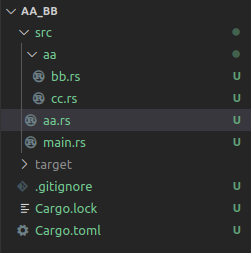
src下第一层目录文件结构
aa
aa.rs
main.rs
aa目录下有文件
bb.rs
cc.rs
rust中mod模块与文件名一一对应,存在一个mod aa,就必须得有一个叫aa.rs的文件存在;
但文件中不能再放文件,目录才可以放文件,于是rust就创建一个同名的目录,也叫aa,目录aa下再放其他文件
main.rs
mod aa;

fn main() {

    println!("------------------------------------------------");

    aa::bb::bb1();

    aa::cc::cc1();

}
aa.rs
pub mod bb;

pub mod cc;
aa/bb.rs
pub fn bb1(){

    println!("-----------bb1-----------");

}
aa/cc.rs
pub fn cc1(){

    println!("--------------cc1------------");

}
上面是两个可运行的例子,下面是完整的体系式的概念
Packages and Crates
A package is one or more crates that provide a set of functionality. A package contains a Cargo.toml file that describes how to build those crates.
A crate is a binary or library.
src/main.rs is the crate root of a binary crate with the same name as the package.
Likewise, Cargo knows that if the package directory contains src/lib.rs, the package contains a library crate with the same name as the package, and src/lib.rs is its crate root. Cargo passes the crate root files to rustc to build the library or binary.
$ cargo new my-project

     Created binary (application) `my-project` package

$ ls my-project

Cargo.toml

src

$ ls my-project/src

main.rs
Here, we have a package that only contains src/main.rs, meaning it only contains a binary crate named my-project. If a package contains src/main.rs and src/lib.rs, it has two crates: a library and a binary, both with the same name as the package. A package can have multiple binary crates by placing files in the src/bin directory: each file will be a separate binary crate.
Defining Modules to Control Scope and Privacy
the use keyword that brings a path into scope; and the pub keyword to make items public. We’ll also discuss the as keyword, external packages, and the glob operator.
. Create a new library named restaurant by running cargo new --lib restaurant;
mod front_of_house {

    mod hosting {

        fn add_to_waitlist() {}

        fn seat_at_table() {}

    }

    mod serving {

        fn take_order() {}

        fn serve_order() {}

        fn take_payment() {}

    }

}

fn main() {}
By using modules, we can group related definitions together and name why they’re related. Programmers using this code would have an easier time finding the definitions they wanted to use because they could navigate the code based on the groups rather than having to read through all the definitions. Programmers adding new functionality to this code would know where to place the code to keep the program organized.
Earlier, we mentioned that src/main.rs and src/lib.rs are called crate roots. The reason for their name is that the contents of either of these two files form a module named crate at the root of the crate’s module structure, known as the module tree.
crate

 └── front_of_house

     ├── hosting

     │   ├── add_to_waitlist

     │   └── seat_at_table

     └── serving

         ├── take_order

         ├── serve_order

         └── take_payment
如果你有很多文件,要在A文件中引用B的模型,就可以从根模型开始引用, 比如
crate::serving::take_order
从 crate:: 你可以路径到任一个定义的 mod, 只要它们有 pub 权限
Paths for Referring to an Item in the Module Tree
A path can take two forms:

An absolute path starts from a crate root by using a crate name or a literal crate.

A relative path starts from the current module and uses self, super, or an identifier in the current module.

Both absolute and relative paths are followed by one or more identifiers separated by double colons (::).
Bringing Paths into Scope with the use Keyword
创建新项目
aa.rs
mod bb {

    pub mod bb1{

        pub fn bb1_1(){

            println!("aa --> bb --> bb1 --> bb1_1");

        }

        pub fn bb1_2(){

            println!("-----self ----------------");

            self::bb1_1();

        }

    }

    pub fn bb2(){

        println!("aa --> bb --> bb2");

    }

}

//相当于在本crate中提供一个pub方法,供外部调用

use self::bb::bb1::bb1_1 as b1;

pub fn aa1(){

    b1();

}

//让pub bb2在其父mod bb私有的提前下,可供外部程序调用

//bb2本身必须pub

pub use self::bb::bb2;

//对外提供一个pub模块

pub mod cc {

    //crate是绝对路径,root crate是main.rs

    use crate::aa::bb::bb1::bb1_2 as b2;

    pub fn cc1(){

        b2();

    }

    pub mod cc2{

        pub fn cc2_1(){

            println!("aa --> cc --> cc2 --> cc2_1");

        }

    }

}
main.rs
mod aa;

use aa::cc::cc2;

fn main(){

    println!("-----------------------------------");

    aa::aa1();

    aa::cc::cc1();

    aa::bb2();

    cc2::cc2_1();

}
输出
$ cargo run

   Compiling test_lib v0.1.0 (/opt/wks/rust_study/test_lib)

    Finished dev [unoptimized + debuginfo] target(s) in 0.21s

     Running `target/debug/test_lib`

-----------------------------------

aa --> bb --> bb1 --> bb1_1

-----self ----------------

aa --> bb --> bb1 --> bb1_1

aa --> bb --> bb2

aa --> cc --> cc2 --> cc2_1
======================================================================================
上面的方式是可以运行的,但每个目录还要建立一个同名的rs文件,看上去不怎么好看。下面介绍另外一种方式
将同名的rs文件放到同名的目录下,统一重命名为mod.rs
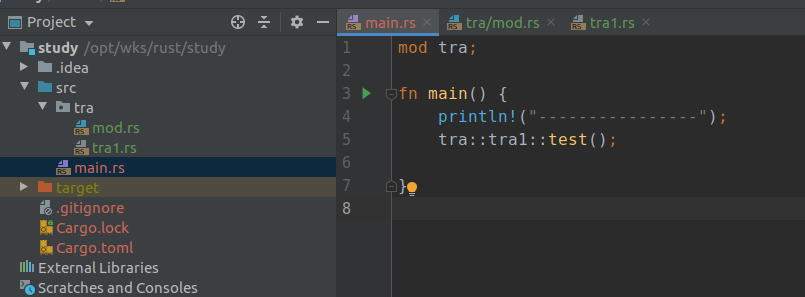
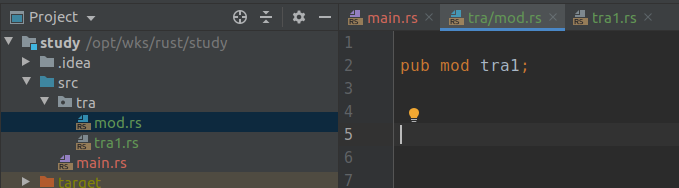
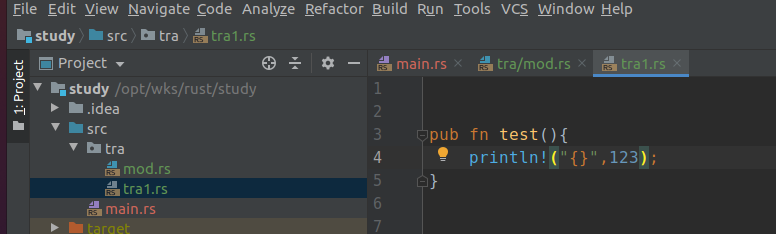
其他的没有变化,移动位置,重命名为mod.rs,然后就可以了
3.0 rust 项目路径的更多相关文章
- cocos studio UI 1.6.0.0 修改导出项目路径
因为cocos studio UI 1.6.0.0版本没有自动修改默认导出路径的功能,新建项目后默认导出的路径还是上一个项目的,每次导出都要重新设置路径很麻烦.于是考虑是否可以找到默认配置文件,终于还 ...
- asp.net 获取当前项目路径
方法一://获取当前项目的路径System.AppDomain.CurrentDomain.BaseDirectory.ToString(); // 得到的是当前项目的根目录取的值:F://Pro ...
- SSH框架通过JFreeChart实现柱状图和获取项目路径
获取项目路径:String url= ServletActionContext.getRequest().getRealPath("/upload"); 一.直接生成的图片输出到j ...
- ASP.NET Core 2.0 : 三. 项目结构
本章我们一起来对比着ASP.NET Framework版本看一下ASP.NET Core 2.0的项目结构.(此后的文章也尽量这样对比着, 方便学习理解.) 关注差异, 也为项目迁移做准备. 新建项目 ...
- springboot配置server相关配置&整合模板引擎Freemarker、thymeleaf&thymeleaf基本用法&thymeleaf 获取项目路径 contextPath 与取session中信息
1.Springboot配置server相关配置(包括默认tomcat的相关配置) 下面的配置也都是模板,需要的时候在application.properties配置即可 ############## ...
- 腾讯云centos7.2安装jdk1.7 tomcat7.0部署项目示例
说实话win server的性能并不好,所以程序员必须会在Linux上安装环境,部署项目. 第一步,官网下载tomcat和jdk压缩文件*.tar.gz 下载路径如下: jdk:http://www ...
- 纯html页面中js如何获得项目路径
js,全称javascript,不过虽然是以java开头,不过与java一点关系都没有. js和java有如下区别: (1)js是浏览器端的语言,而java是服务器端的语言. (2)js是动态语言,j ...
- tomcat中实现特定路径下的图片的url访问Tomcat配置图片保存路径,图片不保存在项目路径下
使用Tomcat作为服务器的时候,如果不配置图片保存路径,将图片保存在项目路径下,那么再次打war包发布项目可能会造成图片的丢失,每次重启前将图片先保存再copy到服务器明显不方便,这时可以配置图片保 ...
- javascript 获取当前部署项目路径
javascript 获取当前部署项目路径 ========================================= javascript获取当前部署项目路径: 主要用到Location 对 ...
随机推荐
- javac 不是内部或外部命令 和 错误 找不到或无法加载主类 的解决方法
使用package语句与import语句. 实验要求:按实验要求使用package语句,并用import语句使用Java平台提供的包中的类以及自定义包中的类.掌握一些重要的操作步骤. 代码: 模板1: ...
- Sentinel-Go 源码系列(二)|初始化流程和责任链设计模式
上节中我们知道了 Sentinel-Go 大概能做什么事情,最简单的例子如何跑起来 其实我早就写好了本系列的第二篇,但迟迟没有发布,感觉光初始化流程显得有些单一,于是又补充了责任链模式,二合一,内容显 ...
- RabbitMQ 线上事故!慌的一批,脑袋一片空白。。。
前言 那天我和同事一起吃完晚饭回公司加班,然后就群里就有人@我说xxx商户说收不到推送,一开始觉得没啥.我第一反应是不是极光没注册上,就让客服通知商户,重新登录下试试.这边打开极光推送的后台进行检查. ...
- 手把手教你学Dapr - 6. 发布订阅
上一篇:手把手教你学Dapr - 5. 状态管理 介绍 发布/订阅模式允许微服务使用消息相互通信.生产者或发布者在不知道哪个应用程序将接收它们的情况下向主题发送消息.这涉及将它们写入输入通道.同样,消 ...
- Python布尔值
在学到Python数据类型时,发现与大多数语言没什么区别 布尔值可以用 and or not 来运算 and运算是与运算,所有条件都符合才为true >>> True and Tru ...
- 算法题-n月后兔子数量
有一对兔子,从出生后第5个月起每个月都生一对兔子,小兔子长到第5个月后每个月又生一对兔子,假如兔子都不死,问每个月的兔子总数为多少? public class test3 { public stati ...
- [atARC113F]Social Distance
(由于是实数范围,端点足够小,因此区间都使用中括号,且符号取等号) 定义$P(X)$表示$\forall 2\le i\le n,a_{i}-a_{i-1}\ge X$的概率,那么我们所求的也就是$P ...
- [uoj576]服务调度
先考虑一个子问题:仅有一个询问且无修改 对每一种颜色的贡献分类讨论,结论:最远的点一定这些点集中(任意一组)最远点对中的两个点(选择较远的一个) 证明:设$dis(x,y)$为$x$到$y$的距离,$ ...
- [luogu3334]抛硬币
(数据范围的公式渲染有一些问题,大概是$a\le b\le 100$) 同洛谷4548,推导过程省略,直接给出答案-- 令$p_{H}=\frac{b}{a}$,$p_{T}=\frac{b}{b-a ...
- idea添加插件后重启后报错:cannot load project xxxx 解决方案
问题原因:新安装的idea下载插件后重启报错 找到windows上c:\Users\.IntelliJIdea<版本>\config\plugins\这个目录,然后 将对应插件删除