
Concurrent HTTP connections in Node.js
原文: https://fullstack-developer.academy/concurrent-http-connections-in-node-js/
------------------------------------------------------------------------------------------
Browsers, as well as Node.js, have limitations on concurrent HTTP connections. It is essential to understand these limitations because we can run into undesired situations whereby an application would function incorrectly. In this article, we will review everything that you, as a developer, need to be familiar with regarding concurrent HTTP connections.
Browser
Browsers adhere to protocols - and the HTTP 1.1 protocol states that a single client (a user client) should not maintain more than two concurrent connections. Now, some older browsers do enforce this, however, generally speaking, newer browsers - often referred to as "modern" browsers - allow a more generous limit. Here's a more precise list:
- IE 7: 2 connections
- IE 8 & 9: 6 connections
- IE 10: 8 connections
- IE 11: 13 connections
- Firefox, Chrome (Mobile and Desktop), Safari (Mobile and Desktop), Opera: 6 connections
For the rest of this article remember the number 6 - this will play a crucial part when we go through our example.
Node.js
If you have worked with, learned or just read about Node.js before, you know that it is a single-threaded, non-blocking framework. This means that it allows a significant number of concurrent connections - all of this is made available by the JavaScript event loop.
The actual limit of connections in Node.js is determined by the available resources on the machine running the code and by the operating system settings as well.
Back in the early days of Node.js (think v0.10 and earlier), there was an imposed limit of 5 simultaneous connections to/from a single host. What does this mean? Under the hood when you are using the Node.js built-in HTTP module or any other module that uses the HTTP module like Express.js or Restify, you are in fact using a connection pool and HTTP keep-alive. This is great for performance improvement - think about the cycle like the following: an HTTP request is processed, this opens a TCP connection, for a new request an existing TCP connection can be used. (Without the keep-alive the process would be less performant by having to create a TCP connection, serve a response close the TCP connection and start this again for the next request)
In version higher than 0.10 the maxSockets value has been changed to Infinity.
The
keep-aliveis sent by the browser and we can easily see this if we log therequestobject in Node.js in the appropriate location. It should yield something similar to this (example taken from a Restify server):headers:
{ host: 'localhost:3000',
'content-type': 'text/plain;charset=UTF-8',
origin: 'http://127.0.0.1:8080',
'accept-encoding': 'gzip, deflate',
connection: 'keep-alive',
Example
Let's take a look at a very straightforward example. Let's assume that we have some sort of a frontend where we are sending data to a backend (this is usually how modern applications work, a frontend framework making requests to a Backend API). For the our example, the data that we are sending is less important - it's equally applicable to a bulk file upload or anything else.
Trivia: I have in fact came across this issue while working on an application that did a bulk upload of images and sent it to a backend API for further processing.
Let's create a simple Restify API server:
const restify = require('restify');

const corsMiddleware = require('restify-cors-middleware');

const port = 3000;

const server = restify.createServer();

const bunyan = require('bunyan');

const cors = corsMiddleware({

  origins: ['*'],

});

server.use(restify.plugins.bodyParser());

server.pre(cors.preflight);

server.use(cors.actual);

server.post('/api', (req, res) => {

  const payload = req.body;

  console.log(`Processing: ${payload}`);

});

server.listen(port, () => console.info(`Server is up on ${port}.`));
This is very straightforward. Astute readers would already have noticed a somewhat crucial mistake in the code above but don't worry; it is made deliberately. So this API receives data sent via an HTTP POST request and displays a log message stating that it is processing whatever was sent as part of the request. (Again, the processing could be whatever we wanted, but for this discussion, it's just a simple console statement.)
Let's also create a simple frontend. Let's create a very simple index.htmland add the following content in between <script> tags:
const array = Array.from(Array(10).keys());

array.forEach(arrayItem => {

  fetch('http://localhost:3000/api', {

    method: 'POST',

    mode: 'cors',

    body: JSON.stringify(`hello${arrayItem}`)

  })

  .then(response => console.log(response.json()))

  .catch(error => console.error(`Fetch Error: `, error));

});
Here, the Fetch API is used to iterate through 9 items (mimicking an upload of 9 files for example) and sending 9 HTTP POST requests to the Restify API discussed earlier.
Start up the API, also load the index.html via an HTTP server and let's see the results.
Here are two easy ways of firing up an HTTP server in an easy way: either use
python -m SimpleHTTPServer 8000(v2) orpython -m http.server 8080(v3). Or do a globalnpminstall ofhttp-serverand then just dohttp-serverfrom the folder where you have theindex.htmlfile.
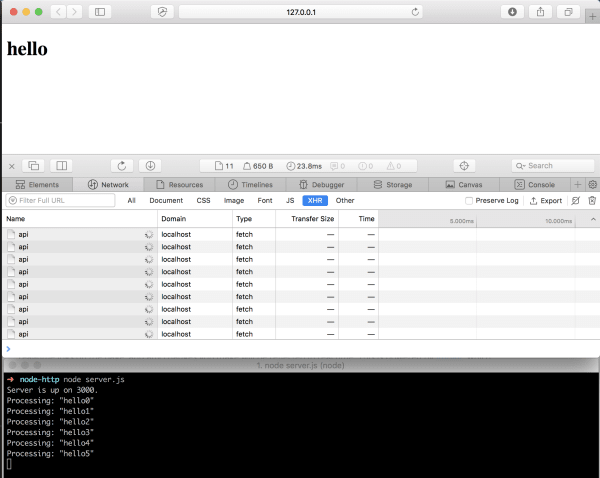
It's fascinating what we see. Even though we have made 9 HTTP POSTrequests only six have arrived to the Restify API since we see 6 log statements.
However, if you wait about 2 minutes, additional log statements will appear.
So what is going on here?
Remember what we said before - the browser (in this case Safari) is capable of making six requests to the same host (in this case the connection is between our browser and the API running on port 3000 on localhost).
The connection is kept alive because we are not returning anything from the Node.js API. This was the mistake that I have deliberately made to make a point. So the browser sends six requests, and Node.js receives these but it never sends any information back rendering the remaining requests to be blocked.
So why are the other log statements visible later? The answer is simple: there's also a timeout, which is by default 2 minutes. After 2 minutes the request is cleared, so new requests are processed.
Let's update our code with these values:
server.server.maxConnections = 20;

function getConnections() {

  server.server.getConnections((error, count) => console.log(count));

}

// add getConnections() in the API call:

server.post('/api', (req, res) => {

  // ...

  getConnections();

});
The server.server.maxConnections = 20; is there just to make a point that no matter how big this number is it's not going to change the outcome because we are still not returning anything (remember it is set to be Inifity anyway):
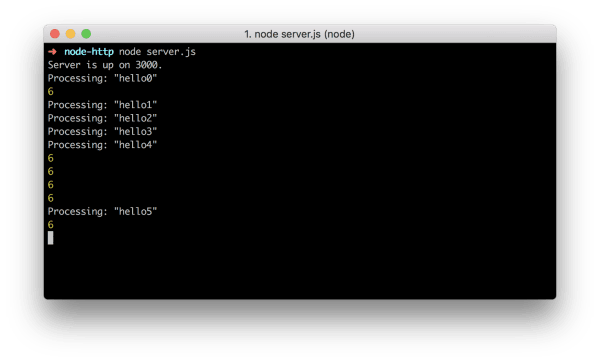
However, add the following setting to change the behaviour:
server.server.setTimeout(500);
The result is going to be a lot different. Since we are overwriting the timeout of the server, we only wait 500 ms and get rid of a pending request, allowing new requests to come in.
Please note that this is not a real solution to this problem, it is just for demonstration purposes.
Solving the problem
The right way to solve this problem is of course to return a response from the API:
server.post('/api', (req, res) => {

  const payload = req.body;

  console.log(`Processing: ${payload}`);

  return res.json(`Done processing: ${payload}`);

});
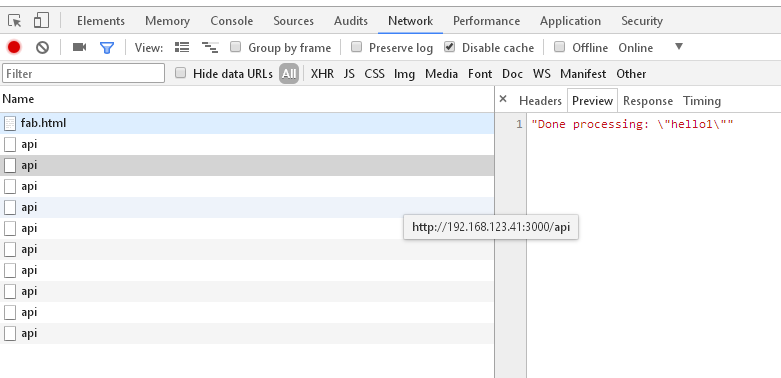
Now all data is going to be processed just fine:

All uploads are now processed just fine.
Remember, res.json() under the hood uses res.send() which in turn also uses res.end() to send a response and to end it. This is true for both Restify and Express.js as well.
Conclusion
What is the moral of the story? Always close HTTP connections - no matter how, but close them - if you're making API calls consult the API documentation as well to close any active HTTP connection.
Concurrent HTTP connections in Node.js的更多相关文章
- 深入浅出node.js游戏服务器开发1——基础架构与框架介绍
2013年04月19日 14:09:37 MJiao 阅读数:4614 深入浅出node.js游戏服务器开发1——基础架构与框架介绍 游戏服务器概述 没开发过游戏的人会觉得游戏服务器是很神秘的 ...
- What are some advantages of using Node.js over a Flask API?
https://www.quora.com/What-are-some-advantages-of-using-Node-js-over-a-Flask-API Flask is a Python w ...
- 002/Node.js(Mooc)--Http知识
1.什么是Http 菜鸟教程:http://www.runoob.com/http/http-tutorial.html 视频地址:https://www.imooc.com/video/6713 h ...
- (翻译)《Hands-on Node.js》—— Introduction
今天开始会和大熊君{{bb}}一起着手翻译node的系列外文书籍,大熊负责翻译<Node.js IN ACTION>一书,而我暂时负责翻译这本<Hands-on Node.js> ...
- JavaScript(Node.js)+ Selenium自动化测试
Selenium is a browser automation library. Most often used for testing web-applications, Selenium may ...
- Node.js连接Mysql,并把连接集成进Express中间件中
引言 在node.js连接mysql的过程,我们通常有两种连接方法,普通连接和连接池. 这两种方法较为常见,当我们使用express框架时还会选择使用中间express-myconnection,可以 ...
- node.js + webstorm :配置开发环境
一.配置开发环境: 1.先安装node (1).访问http://nodejs.org打开安装包,正常安装,点击next即可. 为了测试是否安装成功,打开命令提示符,输入node,则进入node.js ...
- Node.js Web 开发框架大全《中间件篇》
这篇文章与大家分享优秀的 Node.js 中间件模块.Node 是一个服务器端 JavaScript 解释器,它将改变服务器应该如何工作的概念.它的目标是帮助程序员构建高度可伸缩的应用程序,编写能够处 ...
- [译]简单得不得了的教程-一步一步用 NODE.JS, EXPRESS, JADE, MONGODB 搭建一个网站
原文: http://cwbuecheler.com/web/tutorials/2013/node-express-mongo/ 原文的源代码在此 太多的教程教你些一个Hello, World!了, ...
随机推荐
- 【面试虐菜】—— JAVA面试题(1)
今天参加笔试,里面有设计模式,和一些基础题! 印象最深的是:什么不是Object的函数,我蒙的finalize,哎,无知! 还问了,接口与抽象类的不同,还有多线程的实现方式!下面基本都有. 另外还问了 ...
- Mac下配置Apache服务器
有的时候,我们需要在内网工作组中分享一些文件或是后台接口没有及时给出,你又想要模拟真实数据,直接在项目里创建plist也可以做到这种需求,但难免让工程变得冗余且看起来比较Low.这个时候就看出配置本地 ...
- ConcurrentHashMap之实现细节(转)
ConcurrentHashMap是Java 5中支持高并发.高吞吐量的线程安全HashMap实现.在这之前我对ConcurrentHashMap只有一些肤浅的理解,仅知道它采用了多个锁,大概也足够了 ...
- An Isolated DAC Using PWM Output
An Isolated DAC Using PWM Output Arduino‘s (ATmega328P) PWM outputs via analogWrite can be convenien ...
- Serial Wire Debugging the STM32 via the Bus Pirate
Serial Wire Debugging the STM32 via the Bus Pirate 2 October 2010 Step 1 - The Bus Pirate Step 2 - D ...
- [Go] 命令行参数解析包(flag 包)使用详解
Go 的 flag 包可以解析命令行的参数. 一.命令行语法 命令行语法主要有以下几种形式: cmd -flag // 只支持bool类型 cmd -flag=xxx cmd -flag ...
- asp.net core读取appsettings.json,如何读取多环境开发配置
摘要 在读取appsettings.json文件中配置的时候,觉得最简单的方式就是使用asp.net core注入的方式进行读取了. 步骤 首先根据配置项的结构定义一个配置类,比如叫AppSettin ...
- Linux内存管理学习3 —— head.S中的段页表的建立
作者 彭东林 pengdonglin137@163.com 平台 TQ2440 Qemu+vexpress-ca9 Linux-4.10.17 正文 继续分析head.S: ldr r13, =__m ...
- AngularJS路由系列(6)-- UI-Router的嵌套State
本系列探寻AngularJS的路由机制,在WebStorm下开发.本篇主要涉及UI-Route的嵌套State. 假设一个主视图上有两个部分视图,部分视图1和部分视图2,主视图对应着一个state,两 ...
- 一文犀利看懂中美贸易战 z
如今的中国面对着前所未有的经济全球化的大环境.面对着如何成为创新性国家的重任. 钛媒体注:美国东部时间 7 月 6 日凌晨0:01 分,美国正式开始对 340 亿美元的中国产品加征 25% 的关税,这 ...