
Spring Security教程之整合SpringMVC(六)
一、前言
Spring Security系列教程中,前五篇为同一人所写,而本文是博主依据第三方文章整合而出,与前五篇文章的作者不是同一系列。
但本文以前五篇文章为基础,在前面文章所建立的Spring Security的基础上,整合SpringMVC框架。
二、配置文件
spring-mvc.xml配置文件的存放位置可根据实际情况进行调整配置,如可以放在resource文件夹中,对应的web.xml配置classpath:spring-mvc.xml
<?xml version="1.0" encoding="UTF-8"?>

<beans xmlns="http://www.springframework.org/schema/beans"

    xmlns:context="http://www.springframework.org/schema/context"

    xmlns:p="http://www.springframework.org/schema/p"

    xmlns:mvc="http://www.springframework.org/schema/mvc"

    xmlns:xsi="http://www.w3.org/2001/XMLSchema-instance"

    xsi:schemaLocation="

        http://www.springframework.org/schema/beans

        http://www.springframework.org/schema/beans/spring-beans.xsd

        http://www.springframework.org/schema/mvc

        http://www.springframework.org/schema/mvc/spring-mvc.xsd

        http://www.springframework.org/schema/context

        http://www.springframework.org/schema/context/spring-context.xsd">

     <!-- 启动注解驱动的Spring MVC功能,注册请求url和注解POJO类方法的映射-->

     <mvc:annotation-driven />

     <!-- 启动包扫描功能,以便注册带有@Controller、@Service、@repository、@Component等注解的类成为spring的bean -->

     <context:component-scan base-package="com.mvc.test" />  <!--这个包根据自己的项目来配置,我的是com.mvc.test-->

     <!-- 对模型视图名称的解析,在请求时模型视图名称添加前后缀 -->

     <bean class="org.springframework.web.servlet.view.InternalResourceViewResolver" p:prefix="/WEB-INF/view/" p:suffix=".jsp" />

</beans>

然后配置web.xml:

     <context-param>

        <param-name>contextConfigLocation</param-name>

        <!-- 应用上下文配置文件 -->

        <param-value>/WEB-INF/spring-mvc.xml</param-value>

    </context-param>

    <listener>

        <listener-class>org.springframework.web.context.ContextLoaderListener</listener-class>

    </listener>

  <!-- 配置spring核心servlet -->

  <servlet>

      <servlet-name>spring</servlet-name>

      <servlet-class>org.springframework.web.servlet.DispatcherServlet</servlet-class>

      <load-on-startup>1</load-on-startup>

  </servlet>

  <!-- url-pattern配置为/ 拦截 -->

  <servlet-mapping>

      <servlet-name>spring</servlet-name>

      <url-pattern>/</url-pattern>

  </servlet-mapping>
web.xml
然后我们需要一个spring security 的过滤器配置、spring mvc Servlet完整配置的web.xml:
<?xml version="1.0" encoding="UTF-8"?>

<web-app version="2.5"

    xmlns="http://java.sun.com/xml/ns/javaee"

    xmlns:xsi="http://www.w3.org/2001/XMLSchema-instance"

    xsi:schemaLocation="http://java.sun.com/xml/ns/javaee

    http://java.sun.com/xml/ns/javaee/web-app_2_5.xsd">

    <context-param>

        <param-name>contextConfigLocation</param-name>

        <!-- 应用上下文配置文件 -->

        <param-value>/WEB-INF/spring-servlet.xml,/WEB-INF/applicationContext-security.xml</param-value>

    </context-param>

    <listener>

        <listener-class>org.springframework.web.context.ContextLoaderListener</listener-class>

    </listener>

    <!-- spring securit start -->

    <filter>

      <filter-name>springSecurityFilterChain</filter-name>

      <filter-class>org.springframework.web.filter.DelegatingFilterProxy</filter-class>

    </filter>

    <filter-mapping>

      <filter-name>springSecurityFilterChain</filter-name>

      <url-pattern>/*</url-pattern>

    </filter-mapping>

    <!-- spring securit start -->

    <!-- 配置spring核心servlet -->

    <servlet>

        <servlet-name>spring</servlet-name>

        <servlet-class>org.springframework.web.servlet.DispatcherServlet</servlet-class>

        <load-on-startup>1</load-on-startup>

    </servlet>

    <!-- url-pattern配置为/,不带文件后缀,会造成其它静态文件(js,css等)不能访问。如配为*.do,则不影响静态文件的访问 -->

    <servlet-mapping>

        <servlet-name>spring</servlet-name>

        <url-pattern>/</url-pattern>

    </servlet-mapping>

    <welcome-file-list>

      <welcome-file>index.jsp</welcome-file>

   </welcome-file-list>

</web-app>
三、添加Controller
@Controller

@Request("/student")

public class StudentController {

  @RequestMapping("/index")

  public ModelAndView index() {

    ModelAndView mav = new ModelAndView();

    mav.setViewName("student/index");

    return mav;

  }

}
四、添加student的index页面
在WEB-INF/student文件夹下添加index.jsp页面
<%@ page language="java" contentType="text/html; charset=UTF-8"

    pageEncoding="UTF-8"%>

<!DOCTYPE html>

<html>

<head>

<meta charset="UTF-8">

<title>Insert title here</title>

</head>

<body>

<h1>This is news index Page</h1>

</body>

</html>
五、在项目首页index.jsp中添加跳转到student/index.jsp页面的连接
<a href="${pageContext.request.contextPath }/student/index">goto student</a>
六、数据库中输入数据
在数据库resc表中,添加数据,其中res_string字段的值为/student/*
insert into resc values(null,'','URL','/student/*','学生页面');
并在对应的角色-资源中间表中插入数据,关联user角色和admin角色:
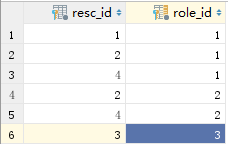
七、测试
输入:绝对路径/student/index会自动跳到登录页面,必须先登录才能访问连接。
Reference:
Beyond-bit, SpringMVC 3.1集成Spring Security 3.1, https://www.cnblogs.com/Beyond-bit/p/SpringMVC_And_SpringSecurity.html
Spring Security教程之整合SpringMVC(六)的更多相关文章
- Spring Security 教程 大牛的教程
https://www.iteye.com/blog/elim-2247073 Spring Security 教程 Spring Security(20)——整合Cas Spring Securit ...
- 临远的spring security教程
为啥选择Spring Security 欢迎阅读咱们写的Spring Security教程,咱们既不想写一个简单的入门教程,也不想翻译已有的国外教程.咱们这个教程就是建立在咱们自己做的OA的基础上,一 ...
- Spring Security教程系列(一)基础篇-2
第 4 章 自定义登陆页面 Spring Security虽然默认提供了一个登陆页面,但是这个页面实在太简陋了,只有在快速演示时才有可能它做系统的登陆页面,实际开发时无论是从美观还是实用性角度考虑,我 ...
- Spring Security教程(五):自定义过滤器从数据库从获取资源信息
在之前的几篇security教程中,资源和所对应的权限都是在xml中进行配置的,也就在http标签中配置intercept-url,试想要是配置的对象不多,那还好,但是平常实际开发中都往往是非常多的资 ...
- Spring Security教程(八):用户认证流程源码详解
本篇文章主要围绕下面几个问题来深入源码: 用户认证流程 认证结果如何在多个请求之间共享 获取认证用户信息 一.用户认证流程 上节中提到Spring Security核心就是一系列的过滤器链,当一个请求 ...
- Spring Security教程(三):自定义表结构
在上一篇博客中讲解了用Spring Security自带的默认数据库存储用户和权限的数据,但是Spring Security默认提供的表结构太过简单了,其实就算默认提供的表结构很复杂,也不一定能满足项 ...
- Spring Security教程(二):通过数据库获得用户权限信息
上一篇博客中,Spring Security教程(一):初识Spring Security,我把用户信息和权限信息放到了xml文件中,这是为了演示如何使用最小的配置就可以使用Spring Securi ...
- Spring Security教程(三)
在上一篇博客中讲解了用Spring Security自带的默认数据库存储用户和权限的数据,但是Spring Security默认提供的表结构太过简单了,其实就算默认提供的表结构很复杂,也不一定能满足项 ...
- Spring Security教程(二)
上一篇博客中,Spring Security教程(一),我把用户信息和权限信息放到了xml文件中,这是为了演示如何使用最小的配置就可以使用Spring Security,而实际开发中,用户信息和权限信 ...
随机推荐
- K8S的DNS服务
k8s集群部署完后第一件事就是要配置DNS服务,目前可选的方案有skydns, kube-dns, coredns kube-dns是k8s中的一个内置插件,目前作为一个独立的开源项目维护,见http ...
- Wait… What Happens When my React Native Application Starts? — An In-depth Look Inside React Native
Discover how React Native functions internally, and what it does for you without you knowing it. Dis ...
- 用友UI层获取机构的方法
U层: UFIDA.U9.UI.PDHelper.PDContext.Current.OrgIDPDContext.Current.OrgRef.CodeColumn
- linux中上传文件出现Refused to display 'http://***' in a frame because it set 'X-Frame-Options' to 'SAMEORIGIN'.
刚开始出现这个问题,去百度了一下,网上很多答案都是一致的,但是在我这里没有解决问题.这个问题服务器没有打印日志.说明没有访问到服务器上,但是前端又没有问题,很奇怪,后面终于有一个同事和我说会不会是腾讯 ...
- vi/vim的快捷操作(2)
1.拷贝当前行[yy],拷贝当前行向下的5行[5yy],并粘贴[p] 2.删除当前行[dd],删除当前行向下的5行[5dd] 3.在文件中查找某个单词,命令行模式下输入[/关键字],回车查找,输入[n ...
- 2019-09-16 http 和 https的区别
一.Http和Https的基本概念 Http:超文本传输协议(Http,HyperText Transfer Protocol)是互联网上应用最为广泛的一种网络协议.设计Http最初的目的是为了提供一 ...
- 关于Git的用法
关于Git Git 是一个分布式版本控制软件,与CVS.Subversion一类的集中式版本控制工具不同,它采用了分布式版本库的作法,不需要服务器端软件,就可以运作版本控制,使得源代码的发布和交流极其 ...
- 来自数组原型 Array.prototype 的遍历函数
1. Array.prototype.forEach() forEach() 是一个专为遍历数组而生的方法,它没有返回值,也不会改变原数组,只是简单粗暴的将数组遍历一次 参数: callback() ...
- 【MySQL】自增步长调整
mysql> show variables like '%increment%'; +-----------------------------+-------+ | Variable_name ...
- Python从零开始——基础语法