
windows下面,PHP如何启动一些扩展功能
我今天在试这个时,发现php有些默认设置,是需要人为介入修改的。
比如,当我们在安装一个软件,而这个软件需要启用php一些扩展功能。
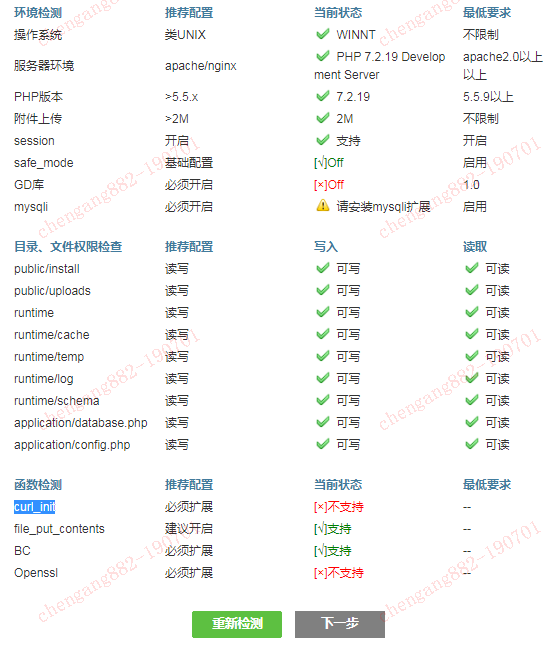
那么,按一般套路,将php.ini文件里的相关行的注释去掉即可。
;;;;;;;;;;;;;;;;;;;;;;
; Dynamic Extensions ;
;;;;;;;;;;;;;;;;;;;;;;

; If you wish to have an extension loaded automatically, use the following
; syntax:
;
;   extension=modulename
;
; For example:
;
;   extension=mysqli
;
; When the extension library to load is not located in the default extension
; directory, You may specify an absolute path to the library file:
;
;   extension=/path/to/extension/mysqli.so
;
; Note : The syntax used in previous PHP versions ('extension=<ext>.so' and
; 'extension='php_<ext>.dll') is supported for legacy reasons and may be
; deprecated in a future PHP major version. So, when it is possible, please
; move to the new ('extension=<ext>) syntax.
;
; Notes for Windows environments :
;
; - Many DLL files are located in the extensions/ (PHP 4) or ext/ (PHP 5+)
;   extension folders as well as the separate PECL DLL download (PHP 5+).
;   Be sure to appropriately set the extension_dir directive.
;
;extension=bz2
extension=curl
;extension=fileinfo
extension=gd2
;extension=gettext
;extension=gmp
;extension=intl
;extension=imap
;extension=interbase
;extension=ldap
;extension=mbstring
;extension=exif      ; Must be after mbstring as it depends on it
extension=mysqli
;extension=oci8_12c  ; Use with Oracle Database 12c Instant Client
;extension=odbc
extension=openssl
;extension=pdo_firebird
extension=pdo_mysql
;extension=pdo_oci
;extension=pdo_odbc
;extension=pdo_pgsql
;extension=pdo_sqlite
;extension=pgsql
;extension=shmop

; The MIBS data available in the PHP distribution must be installed.
; See http://www.php.net/manual/en/snmp.installation.php
;extension=snmp

;extension=soap
;extension=sockets
;extension=sqlite3
;extension=tidy
;extension=xmlrpc
;extension=xsl
但,如果只是改这些的话,在windows环境,重启Php会看到这些warn,表示启用未生效。
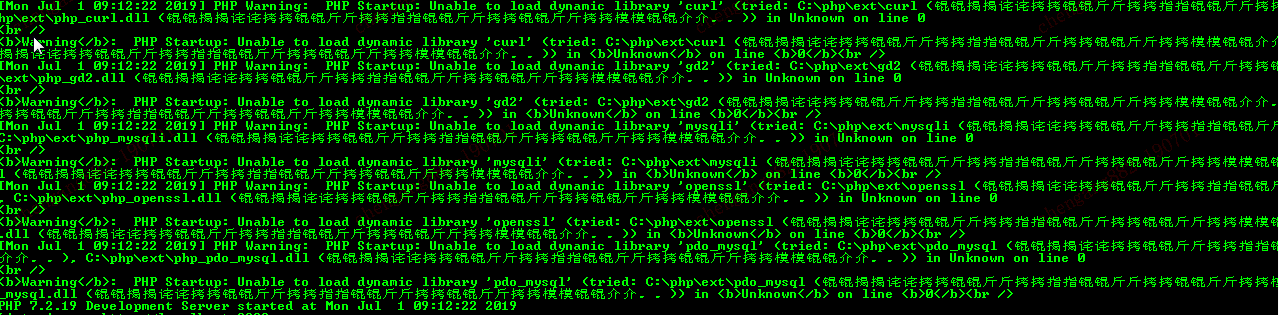
so,看来php.ini里有默认的php扩展,如果不定义,在windows环境里,会到c:\php\ext目录下面去找。那么,肿么办?
自己改改呗,还是php.ini文件。
;;;;;;;;;;;;;;;;;;;;;;;;;
; Paths and Directories ;
;;;;;;;;;;;;;;;;;;;;;;;;;

; UNIX: "/path1:/path2"
;include_path = ".:/php/includes"
;
; Windows: "\path1;\path2"
;include_path = ".;c:\php\includes"
;
; PHP's default setting for include_path is ".;/path/to/php/pear"
; http://php.net/include-path

; The root of the PHP pages, used only if nonempty.
; if PHP was not compiled with FORCE_REDIRECT, you SHOULD set doc_root
; if you are running php as a CGI under any web server (other than IIS)
; see documentation for security issues.  The alternate is to use the
; cgi.force_redirect configuration below
; http://php.net/doc-root
doc_root =

; The directory under which PHP opens the script using /~username used only
; if nonempty.
; http://php.net/user-dir
user_dir =

; Directory in which the loadable extensions (modules) reside.
; http://php.net/extension-dir
; extension_dir = "./"
; On windows:
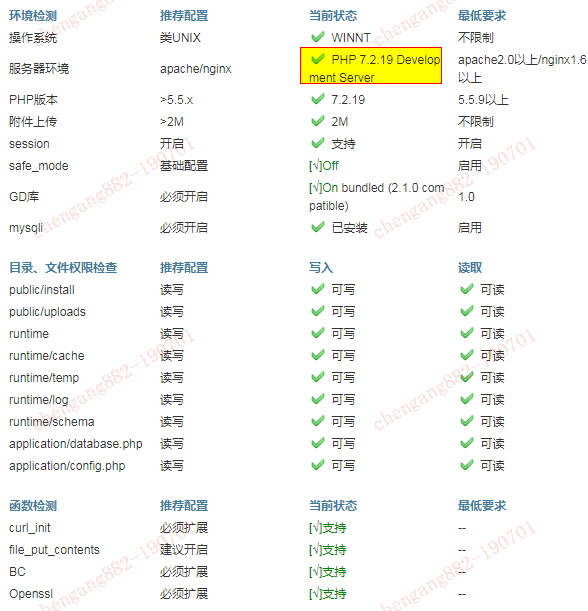
extension_dir = "d:\php72\ext"

; Directory where the temporary files should be placed.
; Defaults to the system default (see sys_get_temp_dir)
; sys_temp_dir = "/tmp"
然后,就没有然后啦。
windows下面,PHP如何启动一些扩展功能的更多相关文章
- Windows无法完成安装,若要在此计算机上安装Windows,请中心启动安装。
现在安装系统已经很简单了,我觉得U盘启动的话两步就差不多了, 壹:设置BIOS,将U盘启动作为系统默认启动选项 贰:直接进去大白菜之类的,一键安装... 今天终于看到第三部了, 报错:Windows无 ...
- windows下nginx的启动关闭
Windows下Nginx的启动.停止等命令 在Windows下使用Nginx,我们需要掌握一些基本的操作命令,比如:启动.停止Nginx服务,重新载入Nginx等,下面我就进行一些简单的介绍. .启 ...
- Windows 8.1升级至Windows 10后,启动VisualSVN Server Manager报错:提供程序无法执行所尝试的操作 (0x80041024)的解决
1.1.Windows 8.1升级至Windows 10后,启动VisualSVN Server Manager报错:提供程序无法执行所尝试的操作 (0x80041024),VisualSVN Ser ...
- Windows下Nginx的启动、停止等命令
Windows下Nginx的启动.停止等命令 在Windows下使用Nginx,我们需要掌握一些基本的操作命令,比如:启动.停止Nginx服务,重新载入Nginx等,下面我就进行一些简单的介绍.1.启 ...
- Windows下Nginx的启动、停止等命令(转)
Windows下Nginx的启动.停止等命令 在Windows下使用Nginx,我们需要掌握一些基本的操作命令,比如:启动.停止Nginx服务,重新载入Nginx等,下面我就进行一些简单的介绍.1.启 ...
- mysql绿色版在windows系统中的启动
mysql绿色版在windows系统中的启动 1.下载mysql免安装版 例如:mysql-5.7.11-winx64 2.修改配置文件,my-default.ini名称改为:my.ini,文件里面的 ...
- Windows ICS 服务无法启动问题解决
防火墙打不开肯定是"windows Firewall"服务没有启动.ICS服务启动不了能够通过下面方法解决: 1.找到本地连接,单击左键--属性--共享--勾选(√)--确定,如以 ...
- memcached 在windows下安装及启动
memcached 在windows下安装及启动 Memcached 是一个高性能的分布式内存对象缓存系统,用于动态Web应用以减轻数据库负载.它通过在内存中缓存数据和对象来减少读取数据库的次数, ...
- Windows Time服务无法启动 错误5拒绝访问
接着上次写的文章 XP和Win7设置系统自动同步系统时间方法 本文就把故障出现的过程和解决方法一共写下来,希望大家可以看到本文在解决此项服务的思路.大家以后出现类似的问题和问题可以一样使用此类方法解决 ...
- 背水一战 Windows 10 (99) - 关联启动: 关联指定的文件类型, 关联指定的协议
[源码下载] 背水一战 Windows 10 (99) - 关联启动: 关联指定的文件类型, 关联指定的协议 作者:webabcd 介绍背水一战 Windows 10 之 关联启动 关联指定的文件类型 ...
随机推荐
- myeclipse An internal error occurred during: "Initialize metrics".
重新安装的myeclipse,在打开的时候弹出: An internal error occurred during: "Initialize metrics". com/g ...
- ASP.NET Core DotNetCore 开源GitServer 实现自己的GitHub
ASP.NET Core 2.0 开源Git HTTP Server,实现类似 GitHub.GitLab. GitHub:https://github.com/linezero/GitServer ...
- Vue+abp树形表格
项目中需要用到树形表格,其他同学找了一个ZkTable,我也就跟着用了,不太好用,有更好的记得联系我.先说下缺点,如果这些不能满足你,后面也没必要看了. 缺点如下(也可能我不会用,如果你会一定记得告诉 ...
- sql调优方法实用性总结(一)
1.选择最有效率的表名顺序(只在基于规则的优化器): Oracle的解析器按照从右向左的顺序处理FROM子句中的表名,FROM子句中写在最后的表将被最先处理(基础表先处理,driving table) ...
- [转帖]很遗憾,没有一篇文章能讲清楚ZooKeeper
很遗憾,没有一篇文章能讲清楚ZooKeeper https://os.51cto.com/art/201911/606571.htm [51CTO.com原创稿件]互联网时代是信息爆发的时代,信息的高 ...
- day16——自定义模块、time、datetime、random
day16 自定义模块 自定义一个模块 import :导入(拿工具箱) # import test # test.func() 导入发生的事情 在当前的名称空间中开辟一个新的空间 将模块中所有的代码 ...
- libevent源码分析三--signal事件响应
libevent支持io事件,timeout事件,signal事件,这篇文件将分析libevent是如何组织signal事件,以及如何实现signal事件响应的. 1. sigmap 类似于io事件 ...
- linux配置环境jdk
条件:将jdk安装好,如果没有安装请看这里:linux(Centos7系统)中安装JDK.Tomcat.Mysql 步骤如下: linux中,环境变量是在 /etc/profile 中修改文件 vi ...
- 用HTML、CSS、JS制作圆形进度条(无动画效果)
逻辑 1.首先有一个圆:蓝色的纯净的圆,效果: 2.再来两个半圆,左边一个,右边一个将此蓝色的圆盖住,效果: 此时将右半圆旋转60°,就会漏出底圆,效果: 然后我们再用一个比底圆小的圆去覆盖这个大 ...
- Ubuntu中安装(升级)GraphicsMagick
1 前言 采用官方下载安装包然后强制安装升级Ubuntu中有的老版本gmagick-1.3.28,升级到gmagick-1.3.31 仅用来记录使用. 2.准备工作 1.下载安装包 https://s ...