
openresty开发系列30--openresty中使用http模块
OpenResty默认没有提供Http客户端,需要使用第三方提供的插件

我们可以从github上搜索相应的客户端,比如https://github.com/pintsized/lua-resty-http

安装方法:将 lua-resty-http/lib/resty/ 目录下的 http.lua 和 http_headers.lua

两个文件拷贝到 /usr/local/openresty/lualib/resty 目录下即可

(假设 OpenResty 安装目录为 /usr/local/openresty)

local res, err = httpc:request_uri(uri, {

    method = "POST/GET",  ---请求方式

    query = str,  ---get方式传参数

    body = str,     ---post方式传参数

    path = "url" ----路径

    headers = {  ---header参数

        ["Content-Type"] = "application/json",

    }

})

示例:编写模拟请求天猫的查询

--引入http模块

local http = require("resty.http")

--创建http客户端实例

local httpc = http:new()

local resp,err = httpc:request_uri("https://list.tmall.com",

{

    method = "GET",    ---请求方式

    --path="/search_product.htm?q=ipone",

    query="q=iphone",    ---get方式传参数

    body="name='jack'&age=18",    ---post方式传参数

    path="/search_product.htm",    ----路径

    ---header参数

    headers = {["User-Agent"]="Mozilla/5.0 (Windows NT 6.1; WOW64) AppleWebKit/537.36 (KHTML, like Gecko) Chrome/40.0.2214.111 Safari/537.36"}

})

if not resp then

    ngx.say("request error:",err)

    return

end

--获取状态码

ngx.status = resp.status

--获取响应信息

--响应头中的Transfer-Encoding和Connection可以忽略,因为这个数据是当前server输出的。

--获取遍历返回的头信息

for k, v in pairs(resp.headers) do

    if k ~= "Transfer-Encoding" and k ~= "Connection" then

        ngx.header[k] =v

    end

    if type(v) == "table" then

        ngx.log(ngx.WARN,"table:"..k, ": ", table.concat(v, ", "))

    else

        ngx.log(ngx.WARN,"one:"..k, ": ", v)

    end

end

ngx.say("end")

--响应体

ngx.say(resp.body)

httpc:close()

httpc:close()

# 后台日志

# /usr/local/openresty/nginx]# tail -f logs/debug.log

// :: [warn] #: * [lua] testhttp02.lua:: one:ufe-result: A6, client: 192.168.10.164, server: www.server1.com, request: "GET /testhttp02 HTTP/1.1", host: "192.168.10.164"

// :: [warn] #: * [lua] testhttp02.lua:: one:Date: Fri,  Aug  :: GMT, client: 192.168.10.164, server: www.server1.com, request: "GET /testhttp02 HTTP/1.1", host: "192.168.10.164"

// :: [warn] #: * [lua] testhttp02.lua:: one:Location: https://login.taobao.com/jump?target=https%3A%2F%2Flist.tmall.com%2Fsearch_product.htm%3Ftbpm%3D1%26q%3Diphone, client: 192.168.10.164, server: www.server1.com, request: "GET /testhttp02 HTTP/1.1", host: "192.168.10.164"

// :: [warn] #: * [lua] testhttp02.lua:: one:Connection: keep-alive, client: 192.168.10.164, server: www.server1.com, request: "GET /testhttp02 HTTP/1.1", host: "192.168.10.164"

// :: [warn] #: * [lua] testhttp02.lua:: one:EagleEye-TraceId: 0bfa16f315665542845385751e42fa, client: 192.168.10.164, server: www.server1.com, request: "GET /testhttp02 HTTP/1.1", host: "192.168.10.164"

// :: [warn] #: * [lua] testhttp02.lua:: one:Strict-Transport-Security: max-age=, client: 192.168.10.164, server: www.server1.com, request: "GET /testhttp02 HTTP/1.1", host: "192.168.10.164"

// :: [warn] #: * [lua] testhttp02.lua:: one:Content-Length: , client: 192.168.10.164, server: www.server1.com, request: "GET /testhttp02 HTTP/1.1", host: "192.168.10.164"

// :: [warn] #: * [lua] testhttp02.lua:: one:Timing-Allow-Origin: *, client: 192.168.10.164, server: www.server1.com, request: "GET /testhttp02 HTTP/1.1", host: "192.168.10.164"

// :: [warn] #: * [lua] testhttp02.lua:: one:Server: Tengine/Aserver, client: 192.168.10.164, server: www.server1.com, request: "GET /testhttp02 HTTP/1.1", host: "192.168.10.164"
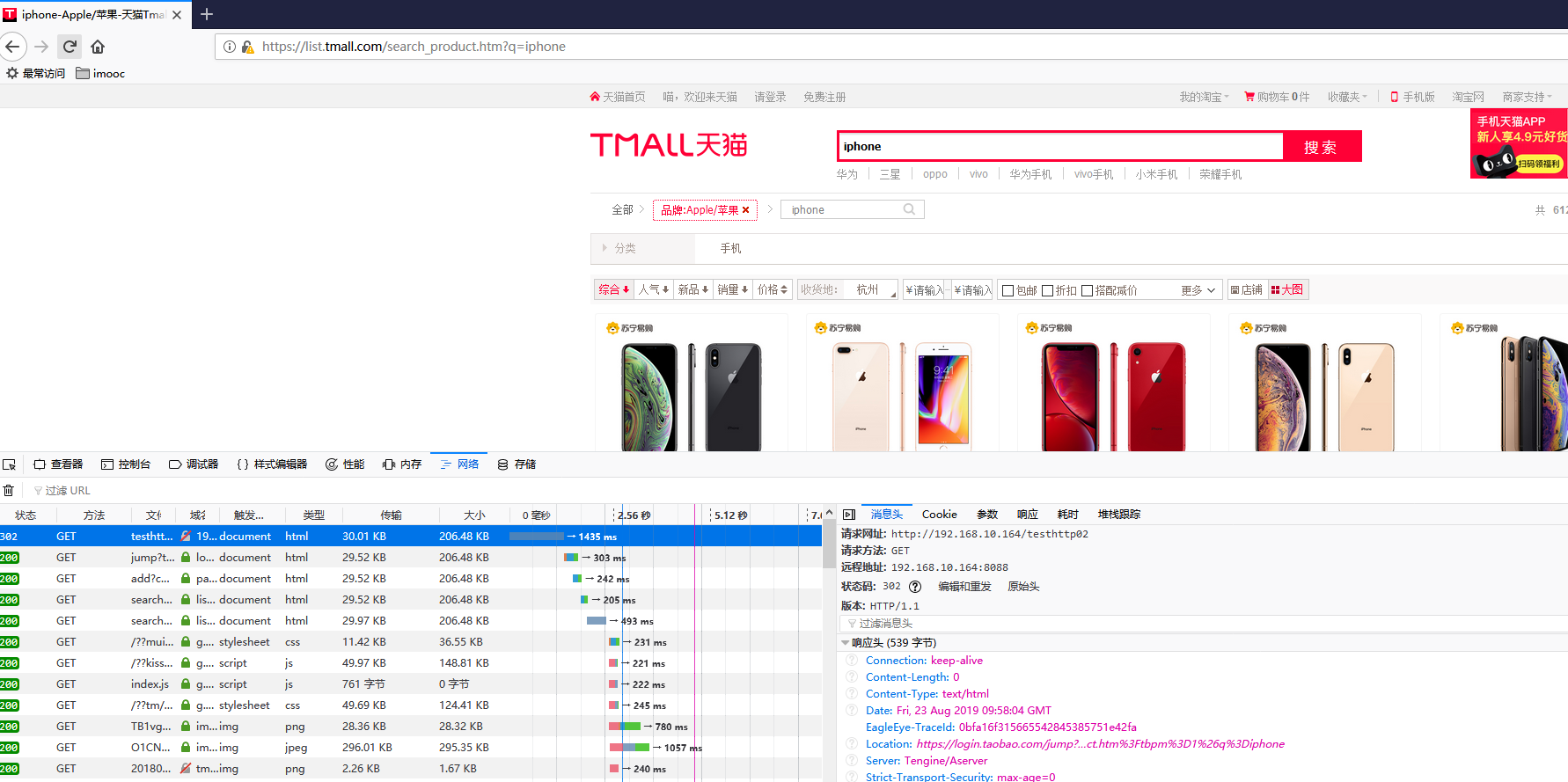
-------------------------------------------------------

发现报错

request error :no resolver defined to resolve "list.tmall.com"

此错误是因为要配置DNS解析器resolver 8.8.8.8,否则域名是无法解析的。

在nginx.conf配置文件中 http模块加上resolver 8.8.8.8; Google提供的免费DNS服务器的IP地址

配置好后,重启nginx

---------------------------------------------------------

访问https错误,因为我们访问的https,需要配置ssl证书

在nginx配置文件中,server虚拟主机模块设置

lua_ssl_verify_depth ;

lua_ssl_trusted_certificate "/etc/ssl/certs/ca-bundle.crt";

--------------------------------------------------------

http模块应用场景很多,这里只简单介绍了一下http模块的使用

还有很多openresty模块,可以参考 https://github.com/bungle/awesome-resty

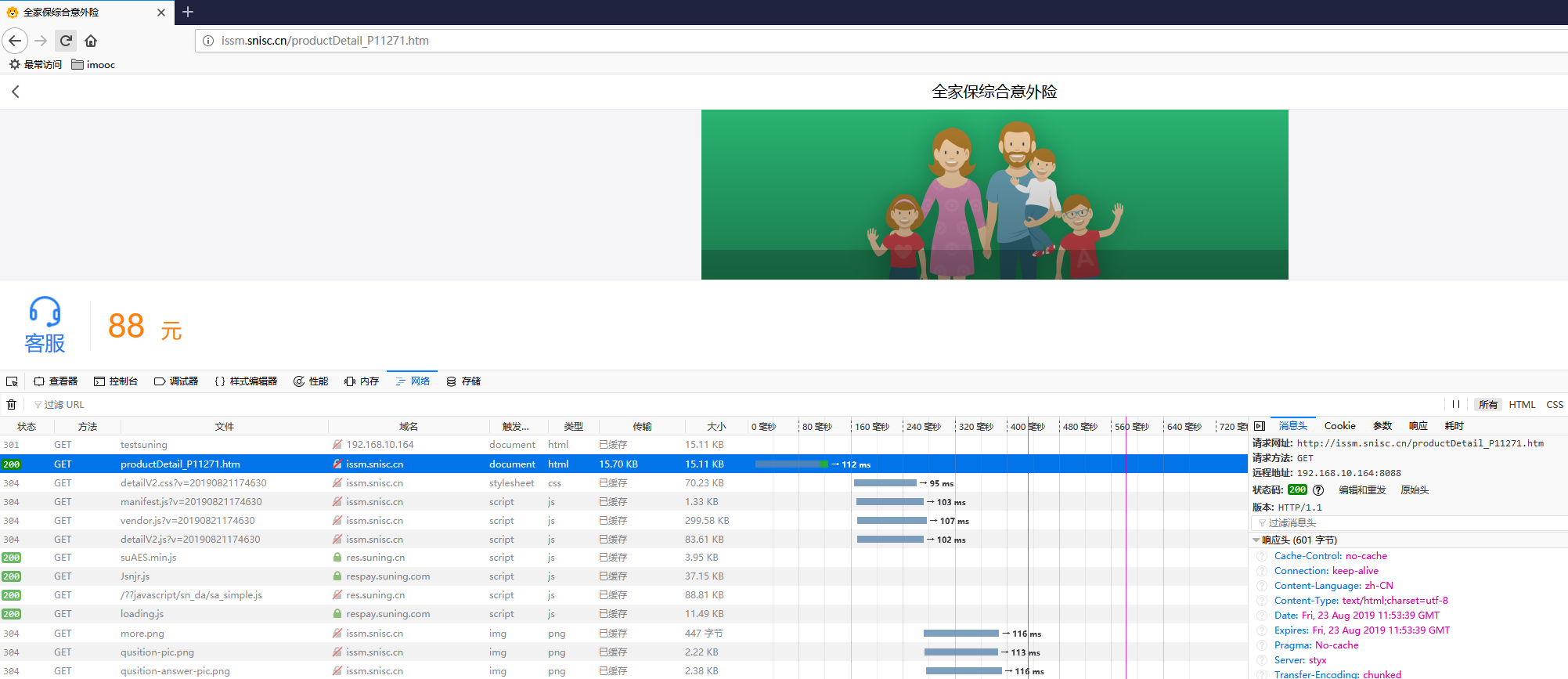
以suning.com为例:

local http = require("resty.http")

--创建http客户端实例

local httpc = http:new()

local resp,err = httpc:request_uri("http://issm.suning.com",

{

    method = "GET",

    path="/productDetail_P11271.htm",

    headers = {["User-Agent"]="Mozilla/5.0 (Windows NT 6.1; WOW64) AppleWebKit/537.36 (KHTML, like Gecko) Chrome/40.0.2214.111 Safari/537.36"}

})

if not resp then

    ngx.say("request error:",err)

    return

end

--获取状态码

ngx.status = resp.status

--获取响应信息

--响应头中的Transfer-Encoding和Connection可以忽略,因为这个数据是当前server输出的。

for k,v in pairs(resp.headers) do

    if k ~= "Transfer-Encoding" and k ~= "Connection" then

        ngx.header[k] =v

    end

end

--响应体

ngx.say(resp.body)

httpc:close()
配置示例
# cat /usr/local/openresty/nginx/conf/nginx.conf

worker_processes  ;

#pid        logs/nginx.pid;

events {

    worker_connections  ;

}

http {

    include       mime.types;

    default_type  text/html;

    sendfile        on;

    keepalive_timeout  ;

    resolver 8.8.8.8;

    server {

        listen       ;

        server_name  www.server1.com;

    lua_ssl_verify_depth ;

    lua_ssl_trusted_certificate "/etc/ssl/certs/ca-bundle.crt";

    location /tmall {

        access_by_lua_file /usr/local/lua/tmall.lua;

    }

        location / {

            root   html;

            index  index.html index.htm;

        }

        error_page        /50x.html;

        location = /50x.html {

            root   html;

        }

    }

}
lua脚本
# cat /usr/local/lua/tmall.lua

--引入http模块

local http = require("resty.http")

--创建http客户端实例

local httpc = http:new()

local resp,err = httpc:request_uri("https://list.tmall.com",

{

    method = "GET",    ---请求方式

    --path="/search_product.htm?q=ipone",

    query="q=iphone",    ---get方式传参数

    body="name='jack'&age=18",    ---post方式传参数

    path="/search_product.htm",    ----路径

    ---header参数

    headers = {["User-Agent"]="Mozilla/5.0 (Windows NT 6.1; WOW64) AppleWebKit/537.36 (KHTML, like Gecko) Chrome/40.0.2214.111 Safari/537.36"}

})

if not resp then

    ngx.say("request error:",err)

    return

end

--获取状态码

ngx.status = resp.status

--获取响应信息

--响应头中的Transfer-Encoding和Connection可以忽略,因为这个数据是当前server输出的。

--获取遍历返回的头信息

for k, v in pairs(resp.headers) do

    if k ~= "Transfer-Encoding" and k ~= "Connection" then

        ngx.header[k] =v

    end

    if type(v) == "table" then

        ngx.log(ngx.WARN,"table:"..k, ": ", table.concat(v, ", "))

    else

        ngx.log(ngx.WARN,"one:"..k, ": ", v)

    end

end

ngx.say("end")

--响应体

ngx.say(resp.body)

httpc:close()
openresty开发系列30--openresty中使用http模块的更多相关文章
- openresty开发系列36--openresty执行流程之6日志模块处理阶段
openresty开发系列36--openresty执行流程之6日志模块处理阶段 一)header_filter_by_lua 语法:header_filter_by_lua <lua-scri ...
- openresty开发系列30--openresty中使用全局缓存
openresty开发系列30--openresty中使用全局缓存 Nginx全局内存---本地缓存 使用过如Java的朋友可能知道如Ehcache等这种进程内本地缓存.Nginx是一个Master进 ...
- openresty开发系列29--openresty中发起http请求
openresty开发系列29--openresty中发起http请求 有些场景是需要nginx在进行请求转发 用户浏览器请求url访问到nginx服务器,但此请求业务需要再次请求其他业务:如用户请求 ...
- openresty开发系列28--openresty中操作mysql
openresty开发系列28--openresty中操作mysql Mysql客户端 应用中最常使用的就是数据库了,尤其mysql数据库,那openresty lua如何操作mysql呢? ...
- openresty开发系列27--openresty中封装redis操作
openresty开发系列27--openresty中封装redis操作 在关于web+lua+openresty开发中,项目中会大量操作redis, 重复创建连接-->数据操作-->关闭 ...
- openresty开发系列26--openresty中使用redis模块
openresty开发系列26--openresty中使用redis模块 在一些高并发的场景中,我们常常会用到缓存技术,现在我们常用的分布式缓存redis是最知名的, 操作redis,我们需要引入re ...
- openresty开发系列25--openresty中使用json模块
openresty开发系列25--openresty中使用json模块 web开发过程中,经常用的数据结构为json,openresty中封装了json模块,我们看如何使用 一)如何引入cjson模块 ...
- openresty开发系列24--openresty中lua的引入及使用
openresty开发系列24--openresty中lua的引入及使用 openresty 引入 lua 一)openresty中nginx引入lua方式 1)xxx_by_lua ---> ...
- openresty开发系列16--lua中的控制结构if-else/repeat/for/while
openresty开发系列16--lua中的控制结构if-else/repeat/for/while 一)条件 - 控制结构 if-else if-else 是我们熟知的一种控制结构.Lua 跟其他语 ...
- openresty开发系列40--nginx+lua实现获取客户端ip所在的国家信息
openresty开发系列40--nginx+lua实现获取客户端ip所在的国家信息 为了实现业务系统针对不同地区IP访问,展示包含不同地区信息的业务交互界面.很多情况下系统需要根据用户访问的IP信息 ...
随机推荐
- 【转】使用JavaParser获得Java代码中的类名、方法形参列表中的参数名以及统计总的文件个数与不能解析的文件个数
遍历目录查找Java文件: public static void ergodicDir(File dir, HashSet<String> argNameSet, HashSet<S ...
- vue 关于props 父组件传值
swiper.vue 子组件 info.vue 父组件 swiper.vue<template> <div class="swiper-wrap" @mouse ...
- 1210 BBS admin后台管理及侧边栏筛选个人站点
目录 昨日内容 django admin后台管理 使用 建表 用户图片的显示 MEDIA用户配置 查找照片 搭建个人站点 防盗链 新建css文件 侧边栏展示标签 定义分类栏与标签栏 定义时间栏 侧边栏 ...
- 《hello-world》第九次团队作业:【Beta】Scrum meeting 3
项目 内容 这个作业属于哪个课程 2016级计算机科学与工程学院软件工程(西北师范大学) 这个作业的要求在哪里 实验十三 团队作业9:Beta冲刺与团队项目验收 团队名称 <hello--wor ...
- destoon模板存放调取规则
一.模板存放及调用规则 模板存放于系统 template 目录,template 目录下的一个目录例如 template/default/ 即为一套模板 模板文件以 .htm 为扩展名,可直 ...
- 1.什么是spring
spring框架是一个为java应用程序的开发提供了综合,广泛的基础性支持的java开源框架, 使得开发者不用去关心一些冗杂的基础性问题,从而可以更加专注于应用程序的开发. spring框架是一个分层 ...
- drf框架 - 序列化组件 | ModelSerializer (查,增,删,改)
ModelSerializer 序列化准备: 配置 settings.py # 注册rest_framework框架 INSTALLED_APPS = [ ... 'rest_framework' ] ...
- git 删除错误commit
其实就是硬reset到之前对的commit记录然后强行再推送到远程库一下 具体操作: git reset --hard <commit_id> git push origin HEAD - ...
- IList<> IEnumerable<> ReadOnlyCollection<> 使用方向
无论你把它声明为IList<string>,IEnumerable<string>,ReadOnlyCollection<string>或别的东西,是你...... ...
- Oracle 异步IO 优缺点
一.Oracle在Linux下使用异步IO配置 最近在测试Oracle的时候,很想测试下使用异步IO的性能.但是异步IO是需要专门配置的,否则的话,容易遇到很著名的“ORA-01578: ORACLE ...