
flutter 的Animation简单了解
import 'package:flutter/material.dart';

class AnimationDemo extends StatelessWidget {

  @override

  Widget build(BuildContext context) {

    return Scaffold(

        appBar: AppBar(

          title: Text('AnimationDemo'),

          elevation: 0.0,

        ),

        body: AnimationDemoHome());

  }

}

class AnimationDemoHome extends StatefulWidget {

  @override

  _AnimationDemoHomeState createState() => _AnimationDemoHomeState();

}

class _AnimationDemoHomeState extends State<AnimationDemoHome>

    with TickerProviderStateMixin {

  AnimationController animationDemoController;

  Animation animation;

  Animation animationColor;

  CurvedAnimation curve;

  @override

  void initState() {

    super.initState();

    animationDemoController = AnimationController(

      // value: 32.0,

      // lowerBound: 32.0,

      // upperBound: 100.0,

      duration: Duration(milliseconds: 1000),

      vsync: this,

    );

    curve = CurvedAnimation(

        parent: animationDemoController, curve: Curves.bounceOut);

    animation = Tween(begin: 32.0, end: 100.0).animate(curve);

    animationColor =

        ColorTween(begin: Colors.red, end: Colors.red[900]).animate(curve);

    // animationDemoController.addListener(() {

    //   // print('${animationDemoController.value}');

    //   setState(() {});

    // });

    animationDemoController.addStatusListener((AnimationStatus status) {

      print(status);

    });

    // animationDemoController.forward();

  }

  @override

  void dispose() {

    super.dispose();

    animationDemoController.dispose();

  }

  @override

  Widget build(BuildContext context) {

    return Center(

      child: AnimatedHeart(

        animations: [

          animation,

          animationColor,

        ],

        controller: animationDemoController,

      ),

    );

  }

}

class AnimatedHeart extends AnimatedWidget {

  final List animations;

  final AnimationController controller;

  AnimatedHeart({

    this.animations,

    this.controller,

  }) : super(listenable: controller);

  @override

  Widget build(BuildContext context) {

    return IconButton(

      icon: Icon(Icons.favorite),

      iconSize: animations[0].value,

      color: animations[1].value,

      onPressed: () {

        switch (controller.status) {

          case AnimationStatus.completed:

            controller.reverse();

            break;

          default:

            controller.forward();

        }

      },

    );

  }

}
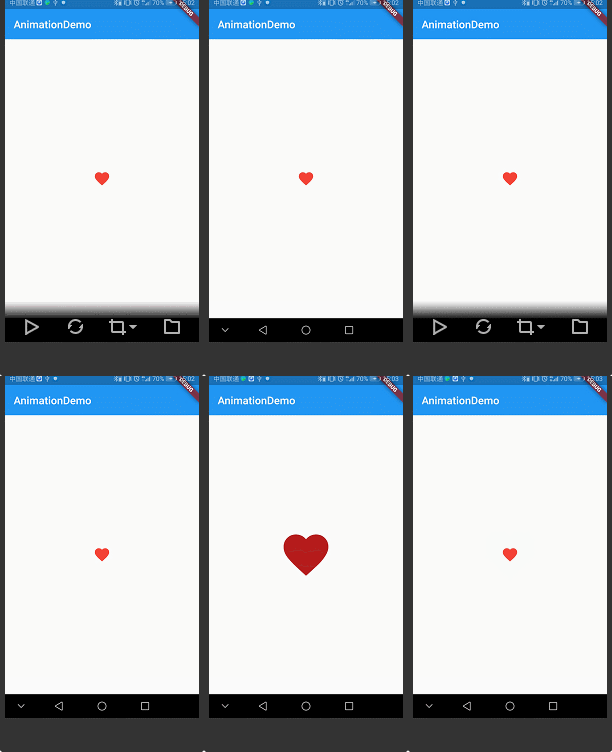
效果:
flutter 的Animation简单了解的更多相关文章
- Android动画Animation简单示例
Animation是Android给我们提供的一个可以实现动画效果的API,利用Animation我们可以实现一系列的动画效果,比如缩放动画,透明度动画,旋转动画,位移动画,布局动画,帧动画等等.An ...
- Flutter Plugin开发简单示例
新建Plugin项目: flutter create --template=plugin -i swift -a javahello lib/hello.dart: 插件包的Dart API. and ...
- [C#] Timer + Graphics To Get Simple Animation (简单的源码例子,适合初学者)
>_<" 这是一个非常简单的利用C#的窗口工程创立的程序,用来做一个简单的动画,涉及Timer和Graphics,适合初学者,高手略过~
- css3 动画(animation)-简单入门
css3之动画(animation) css3中我们可以使用动画,由于取代以前的gif图片,flash动画,以及部分javascript代码(相信有很多同学都用过jquery中的animate方法来做 ...
- Flutter 中SimpleDialog简单弹窗使用
import 'package:flutter/material.dart'; import 'dart:async'; enum Option { A, B, C } class SimpleDia ...
- Jaguar_websocket结合Flutter搭建简单聊天室
1.定义消息 在开始建立webSocket之前,我们需要定义消息,如:发送人,发送时间,发送人id等.. import 'dart:convert'; class ChatMessageData { ...
- 转:Flutter动画二
1. 介绍 本文会从代码层面去介绍Flutter动画,因此不会涉及到Flutter动画的具体使用. 1.1 Animation库 Flutter的animation库只依赖两个库,Dart库以及phy ...
- 【Flutter学习】之动画实现原理浅析(二)
1. 介绍 本文会从代码层面去介绍Flutter动画,因此不会涉及到Flutter动画的具体使用. 1.1 Animation库 Flutter的animation库只依赖两个库,Dart库以及phy ...
- Flutter Weekly Issue 52
教程 一个易迁移.兼容性高的 Flutter 富文本方案 复杂业务如何保证Flutter的高性能高流畅度? 插件 flutter_color_models A wrapper for the Dart ...
随机推荐
- macOS 10.13允许任何来源开启方法
软件下载网站: http://www.pc6.com/ 软件安装问题: macOS 10.13允许任何来源开启方法: 如果需要恢复允许“任何来源”的选项,即关闭系统的Gatekeeper,我们可以在“ ...
- 2019牛客多校第一场 A.Equivalent Prefixes
题目描述 Two arrays u and v each with m distinct elements are called equivalent if and only if RMQ(u,l,r ...
- Python高级编程和异步IO并发编程(笔记)
一.魔法函数 # 例子 class Company(object): def __init__(self, employee_list): self.employee = employee_list ...
- Java - 框架之 Maven
一. 下载依赖包 mvn help:system 2. 配置下载路径到 aliy (可选) <!-- 阿里云仓库 --> <mirror> <id>alimav ...
- docker 构建自己的image 镜像文件
docker build 构建自己的镜像文件. 1.在本地工程中运行生成一个springboot的可运行的jar. 因为我习惯用eclipse,所以在eclipse下新建一个springboot的工程 ...
- /bin/sh^M: bad interpreter: No such file or directory 问题解决
我系统为windows,.sh文件的格式为dos,上传到linux上报错/bin/sh^M: bad interpreter: No such file or directory,linux只能执行格 ...
- mongoDB sh.status() too many chunks to print
too many chunks to print, use verbose if you want to force print 想要看到详细的信息则需要执行: mongos> sh.statu ...
- 在运维中的shell经验总结
来自良许Linux公众号 编写 脚本开头部分应有脚本功能说明.参数使用说明.作者姓名.创建/修改日期.版本信息,格式为: 脚本编写时,注意格式对齐,如所有的循环或者判断语句前后的语句进行对齐,以及ca ...
- (19)打鸡儿教你Vue.js
了解vue2.x的核心技术 建立前端组件化的思想 常用的vue语法 vue-router,vuex,vue-cli 使用vue-cli工具 Vue框架常用知识点 vue核心技术 集成Vue 重点看,重 ...
- XMind 8 pro for Mac(思维导图软件)附序列号和破解教程【亲测可用!!】
年后了,又到一年面试时,最近在用思维导图整理知识点,原本使用的是在线思维导图 ProcessOn,奈何免费版的个人文件数量只能有9 张,远远不能满足我的需要,所以还是使用一个本地版的吧,but依然不想 ...