
SpringCloud基础
SpringCloud极大的简化了分布式系统的开发,实现了微服务的快速部署和灵活应用
SpringCloud主要框架
* 服务发现--Netfix Eureka
* 服务调用--Netfix Feign
* 熔断器--Netfix Hystrix
* 服务网关--Netfix Zuul
* 分布式配置--Spring Cloud Config
* 消息总线--Spring Cloud Bus
注意SpringCloud和SpringBoot版本要一一对应,不然会报错
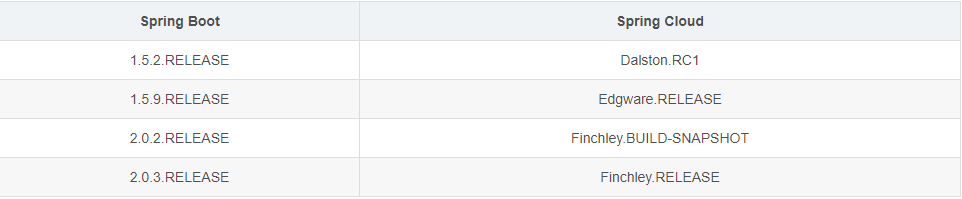
一。Eureka服务发现

外部的pom.xml
<?xml version="1.0" encoding="UTF-8"?>

<project xmlns="http://maven.apache.org/POM/4.0.0"

         xmlns:xsi="http://www.w3.org/2001/XMLSchema-instance"

         xsi:schemaLocation="http://maven.apache.org/POM/4.0.0 http://maven.apache.org/xsd/maven-4.0.0.xsd">

    <modelVersion>4.0.0</modelVersion>

    <packaging>pom</packaging>

    <modules>

        <module>tensquare_eureka</module>

    </modules>

    <parent>

        <groupId>org.springframework.boot</groupId>

        <artifactId>spring-boot-starter-parent</artifactId>

        <version>2.0.3.RELEASE</version>

    </parent>

    <groupId>com.jinke</groupId>

    <artifactId>springboot</artifactId>

    <version>1.0-SNAPSHOT</version>

    <dependencyManagement>

        <dependencies>

            <dependency>

                <groupId>org.springframework.cloud</groupId>

                <artifactId>spring-cloud-dependencies</artifactId>

                <version>Finchley.RELEASE</version>

                <type>pom</type>

                <scope>import</scope>

            </dependency>

        </dependencies>

    </dependencyManagement>

    <dependencies>

        <dependency>

            <groupId>org.springframework.boot</groupId>

            <artifactId>spring-boot-starter-web</artifactId>

            <version>2.0.3.RELEASE</version>

        </dependency>

        <dependency>

            <groupId>org.springframework.boot</groupId>

            <artifactId>spring-boot-devtools</artifactId>

        </dependency>

    </dependencies>

</project>
内部的pom.xml
<?xml version="1.0" encoding="UTF-8"?>

<project xmlns="http://maven.apache.org/POM/4.0.0"

         xmlns:xsi="http://www.w3.org/2001/XMLSchema-instance"

         xsi:schemaLocation="http://maven.apache.org/POM/4.0.0 http://maven.apache.org/xsd/maven-4.0.0.xsd">

    <parent>

        <artifactId>springboot</artifactId>

        <groupId>com.jinke</groupId>

        <version>1.0-SNAPSHOT</version>

    </parent>

    <modelVersion>4.0.0</modelVersion>

    <artifactId>tensquare_eureka</artifactId>

    <dependencies>

        <dependency>

            <groupId>org.springframework.cloud</groupId>

            <artifactId>spring-cloud-starter-netflix-eureka-server</artifactId>

            <version>2.1.2.RELEASE</version>

        </dependency>

    </dependencies>

</project>
application.yml
server:

  port: 6868

eureka:

  client:

    register-with-eureka: false

    fetch-registery: false

    service-url:

      defaultZone: http://127.0.0.1:${server.port}/eureka/
EurekaServer.java
package com.tensquare.eureka;

import org.springframework.boot.SpringApplication;

import org.springframework.boot.autoconfigure.SpringBootApplication;

import org.springframework.cloud.netflix.eureka.server.EnableEurekaServer;

@SpringBootApplication

@EnableEurekaServer

public class EurekaServer {

    public static void main(String[] args) {

        SpringApplication.run(EurekaServer.class);

    }

}
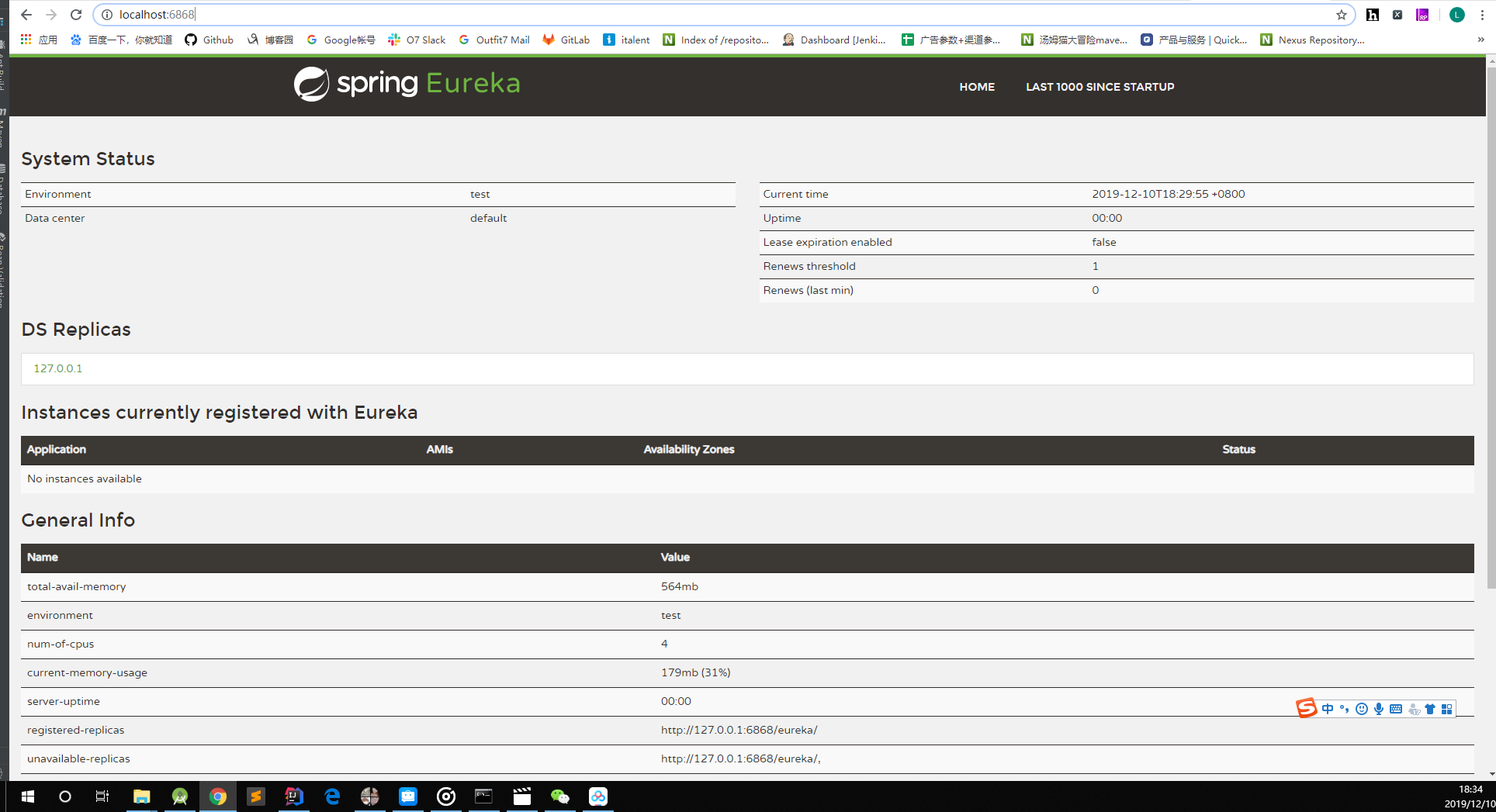
直接启动看
二。Eureka服务注册
新建一个module
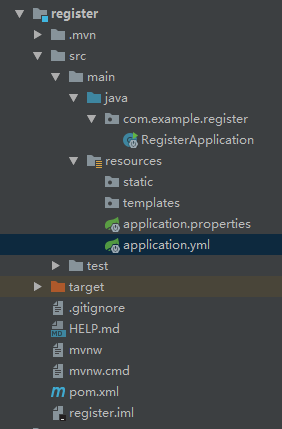
在pom.xml中增加
<dependency>

    <groupId>org.springframework.cloud</groupId>

    <artifactId>spring-cloud-starter-netflix-eureka-client</artifactId>

    <version>2.1.2.RELEASE</version>

</dependency>
application.yml
server:

  port: 9004

spring:

  application:

    name: register

eureka:

  client:

    service-url:

      defaultZone: http://127.0.0.1:6868/eureka/

  instance:

    prefer-ip-address: true
RegisterApplication.java
package com.example.register;

import org.springframework.boot.SpringApplication;

import org.springframework.boot.autoconfigure.SpringBootApplication;

import org.springframework.cloud.netflix.eureka.EnableEurekaClient;

@SpringBootApplication

@EnableEurekaClient

public class RegisterApplication {

    public static void main(String[] args) {

        SpringApplication.run(RegisterApplication.class, args);

    }

}
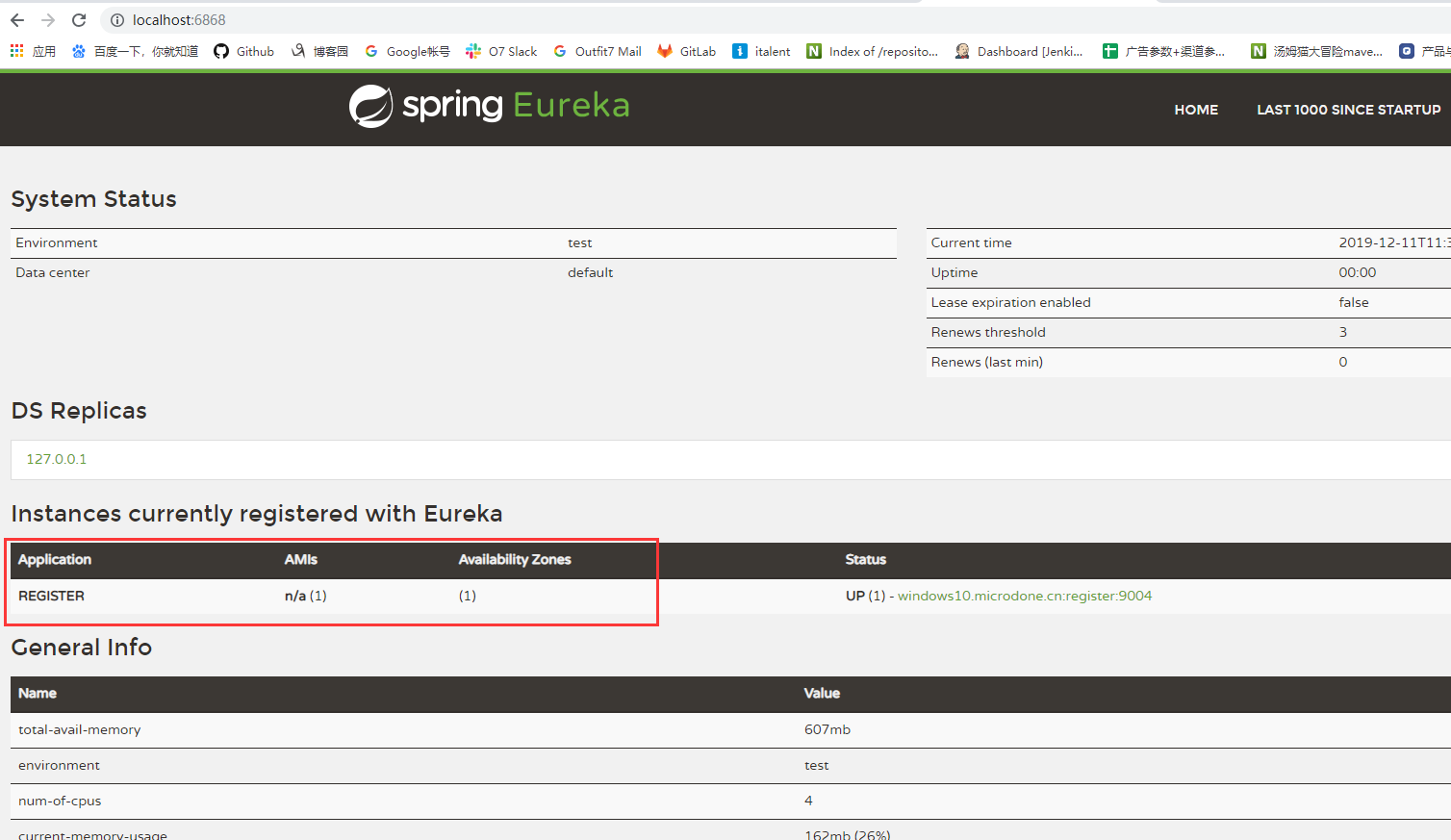
applicaiton跑起来,看结果已经注册成功了
三。服务调用
被调register的LabelController
package com.example.register.controller;

import org.springframework.web.bind.annotation.*;

@RestController

@RequestMapping("/label")

@CrossOrigin

public class LabelController {

    @RequestMapping(value = "/{labelId}", method = RequestMethod.GET)

    public String findById(@PathVariable("labelId") String id) {

        System.out.println("调用成功");

        return "success";

    }

}
主调register2的ProblerController
package com.example.register2.controller;

import com.example.register2.client.BaseClient;

import org.springframework.beans.factory.annotation.Autowired;

import org.springframework.web.bind.annotation.*;

@RestController

@CrossOrigin

@RequestMapping("/problem")

public class ProblemController {

    @Autowired

    private BaseClient baseClient;

    @RequestMapping(value = "/label/{labelId}", method = RequestMethod.GET)

    public String findByLabelId(@PathVariable String labelId) {

        baseClient.findById(labelId);

        return "success";

    }

}
application
package com.example.register2;

import org.springframework.boot.SpringApplication;

import org.springframework.boot.autoconfigure.SpringBootApplication;

import org.springframework.cloud.client.discovery.EnableDiscoveryClient;

import org.springframework.cloud.netflix.eureka.EnableEurekaClient;

import org.springframework.cloud.openfeign.EnableFeignClients;

@SpringBootApplication

@EnableEurekaClient

@EnableDiscoveryClient

@EnableFeignClients

public class Register2Application {

    public static void main(String[] args) {

        SpringApplication.run(Register2Application.class, args);

    }

}
BaseClient
package com.example.register2.client;

import org.springframework.cloud.openfeign.FeignClient;

import org.springframework.web.bind.annotation.PathVariable;

import org.springframework.web.bind.annotation.RequestMapping;

import org.springframework.web.bind.annotation.RequestMethod;

@FeignClient("register")

public interface BaseClient {

    @RequestMapping(value = "/label/{labelId}", method = RequestMethod.GET)

    public String findById(@PathVariable("labelId") String labelId);

}
eureka和register、register2服务都分别跑起来

同时可以看到register的控制台输出了“调用成功”,即代表调用其他服务成功
Spring已经实现了负载均衡,即调用服务集群时,会公平的轮流调用其中的服务
四。熔断器
熔断器可以有效避免雪崩现象
当被调服务挂掉以后,会走熔断器里面的内容
调用的服务增加实现类
package com.example.register2.client.impl;

import com.example.register2.client.BaseClient;

import org.springframework.stereotype.Component;

@Component

public class BaseClientImpl implements BaseClient {

    @Override

    public String findById(String labelId) {

        System.out.println("熔断器触发了");

        return "success";

    }

}
application.yml增加
feign:

  hystrix:

    enabled: true
五。网关
网关的作用就相当于一个中转分发站,接口
新建一个网关

pom.xml
<?xml version="1.0" encoding="UTF-8"?>

<project xmlns="http://maven.apache.org/POM/4.0.0"

         xmlns:xsi="http://www.w3.org/2001/XMLSchema-instance"

         xsi:schemaLocation="http://maven.apache.org/POM/4.0.0 http://maven.apache.org/xsd/maven-4.0.0.xsd">

    <parent>

        <artifactId>springboot</artifactId>

        <groupId>com.jinke</groupId>

        <version>1.0-SNAPSHOT</version>

    </parent>

    <modelVersion>4.0.0</modelVersion>

    <artifactId>manager</artifactId>

    <dependencies>

        <dependency>

            <groupId>org.springframework.cloud</groupId>

            <artifactId>spring-cloud-starter-netflix-eureka-client</artifactId>

            <version>2.1.2.RELEASE</version>

        </dependency>

        <dependency>

            <groupId>org.springframework.cloud</groupId>

            <artifactId>spring-cloud-starter-netflix-zuul</artifactId>

            <version>2.1.2.RELEASE</version>

        </dependency>

    </dependencies>

</project>
application.yml
server:

  port: 9011

spring:

  application:

    name: manager

eureka:

  client:

    service-url:

      defaultZone: http://127.0.0.1:6868/eureka/

  instance:

    prefer-ip-address: true

zuul:

  routes:

    register:

      path: /register/**

      serviceId: register
application
package com.jinke.manager;

import org.springframework.boot.SpringApplication;

import org.springframework.boot.autoconfigure.SpringBootApplication;

import org.springframework.cloud.netflix.eureka.EnableEurekaClient;

import org.springframework.cloud.netflix.zuul.EnableZuulProxy;

@SpringBootApplication

@EnableEurekaClient

@EnableZuulProxy

public class ManagerApplication {

    public static void main(String[] args) {

        SpringApplication.run(ManagerApplication.class);

    }

}
然后启动服务即可
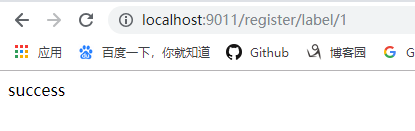
六。网关过滤
在网关模块新建一个过滤类即可
package com.jinke.manager.filter;

import com.netflix.zuul.ZuulFilter;

import com.netflix.zuul.exception.ZuulException;

import org.springframework.stereotype.Component;

@Component

public class ManagerFilter extends ZuulFilter {

    @Override

    public String filterType() {

        //过滤器类型:之前或之后

        return "pre";

    }

    @Override

    public int filterOrder() {

        //多个过滤器的执行顺序

        return 0;

    }

    @Override

    public boolean shouldFilter() {

        //是否开启该过滤器

        return true;

    }

    @Override

    public Object run() throws ZuulException {

        //如果设置setsendzullResponse(false)表示不再继续执行

        System.out.println("已经执行到最后了");

        return null;

    }

}
七。SpringCloudConfig配置
新建config的module
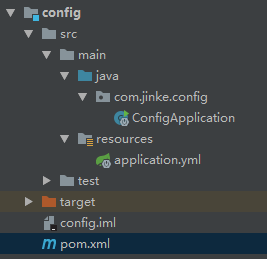
pom.xml
<?xml version="1.0" encoding="UTF-8"?>

<project xmlns="http://maven.apache.org/POM/4.0.0"

         xmlns:xsi="http://www.w3.org/2001/XMLSchema-instance"

         xsi:schemaLocation="http://maven.apache.org/POM/4.0.0 http://maven.apache.org/xsd/maven-4.0.0.xsd">

    <parent>

        <artifactId>springboot</artifactId>

        <groupId>com.jinke</groupId>

        <version>1.0-SNAPSHOT</version>

    </parent>

    <modelVersion>4.0.0</modelVersion>

    <artifactId>config</artifactId>

    <dependencies>

        <dependency>

            <groupId>org.springframework.cloud</groupId>

            <artifactId>spring-cloud-config-server</artifactId>

            <version>2.1.3.RELEASE</version>

        </dependency>

    </dependencies>

</project>
application.xml
server:

  port: 12000

spring:

  application:

    name: config

  cloud:

    config:

      server:

        git:

          uri: https://gitee.com/king1039/springcloud-config.git

          username: xxxxxxx@qq.com

          password: xxxxxx
application
package com.jinke.config;

import org.springframework.boot.SpringApplication;

import org.springframework.boot.autoconfigure.SpringBootApplication;

import org.springframework.cloud.config.server.EnableConfigServer;

@SpringBootApplication

@EnableConfigServer

public class ConfigApplication {

    public static void main(String[] args) {

        SpringApplication.run(ConfigApplication.class);

    }

}
服务跑起来,如果提示Authentication is required but no CredentialsProvider has been registered是因为要账号密码验证,在配置文件填上
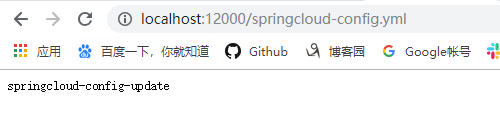
在git上修改以后,刷新会得到新的结果
下面通过配置来调用服务
新建一个base的module
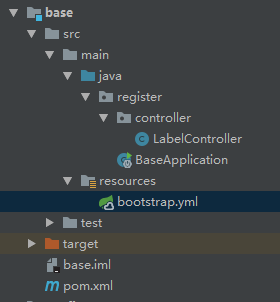
bootstrap.myl
spring:

  cloud:

    config:

      name: springcloud

      profile: config

      label: master

      uri: http://127.0.0.1:12000
git上的配置文件springcloud-config.yml
server:

  port: 9001

spring:

  application:

    name: base

eureka:

  client:

    service-url:

        defaultZone: http://127.0.0.1:6868/eureka/

  instance:

    prefer-ip-address: true
开启eureka、config、base三个服务,然后调用

流程就是先读取Git上的配置,然后拉下来,再调用服务
下面来通过bus消息开启监听
config的配置文件application.yml
server:

  port: 12000

spring:

  application:

    name: config

  cloud:

    config:

      server:

        git:

          uri: https://gitee.com/king1039/springcloud-config.git

          username: 821578297@qq.com

          password: wl802085

  rabbitmq:

    host: 172.16.10.221

management:

  endpoints:

    web:

      exposure:

        include: bus-refresh
被调的服务配置文件
server:

  port: 9001

spring:

  application:

    name: base

  rabbitmq:

    host: 172.16.10.221

eureka:

  client:

    service-url:

        defaultZone: http://127.0.0.1:6868/eureka/

  instance:

    prefer-ip-address: true
修改了被调配置文件后,使用post请求发送一次bus-refresh即可实现消息传递
如果要监听自定义的标签需要增加注解@RefreshScope
代码地址:https://github.com/king1039/SpringCloud.git
欢迎关注我的微信公众号:安卓圈

SpringCloud基础的更多相关文章
- 微服务架构案例(05):SpringCloud 基础组件应用设计
本文源码:GitHub·点这里 || GitEE·点这里 更新进度(共6节): 01:项目技术选型简介,架构图解说明 02:业务架构设计,系统分层管理 03:数据库选型,业务数据设计规划 04:中间件 ...
- SpringCloud 基础
目录 SpringCloud 基础 一.概述 二.服务发现组件 Eureka 1. 介绍 2. 搭建 Maven 父工程 3. 创建 Eureka 集群 4. 创建服务提供方集群 5. 创建服务消费方 ...
- SpringCloud基础概念学习笔记(Eureka、Ribbon、Feign、Zuul)
SpringCloud基础概念学习笔记(Eureka.Ribbon.Feign.Zuul) SpringCloud入门 参考: https://springcloud.cc/spring-cloud- ...
- 微服务之SpringCloud基础
SpringCloud微服务基础 微服务架构--SpringCloud网站架构模式 单点应用/分布式系统面向于服务架构(SOA) /微服务架构web项目三层架构1.控制层2.业务逻辑层3.数据访问层传 ...
- SpringCloud基础教程学习记录
这个学习记录是学习自翟永超前辈的SpringCloud的基础教程. 自己写这个教程的目的主要是在于,想要更凝练总结一些其中的一些实用点,顺便做个汇总,这样自己在复习查看的时候更加方便,也能顺着自己的思 ...
- spring-cloud - 基础环境搭建
spring-cloud中文文档:https://springcloud.cc/ spring-cloud中文导航:http://springcloud.fun/ 文章纯属用于个人学习的一个归纳,哪里 ...
- SpringCloud基础组件总结,与Dubbo框架、SpringBoot框架对比分析
本文源码:GitHub·点这里 || GitEE·点这里 一.基础组件总结 1.文章阅读目录 1).基础组件 Eureka组件,服务注册与发现 Ribbon和Feign组件,实现负载均衡 Hystri ...
- SpringCloud基础篇AOP之拦截优先级详解
前面两篇分别介绍了AOP的基本使用姿势和一些高级特性,当时还遗留了一个问题没有说明,即不同的advice,拦截同一个目标方法时,优先级是怎样的,本篇博文将进行详细分析 同一个切面中,不同类型的advi ...
- SpringCloud学习笔记(一、SpringCloud 基础)
目录: 概述 观察者模式 代理模式 概述: spring系列中使用了大量的设计模式,而最常见的便是这观察者.代理模式,所以在讲解SpringCloud之前我们先学习下这两个最常见的设计模式. 观察者模 ...
随机推荐
- linux日志详解-摘录
小编言:会看Linux日志是非常重要的,不仅在日常操作中可以迅速排错,也可以快速的定位.` Liunx的配置文件在/etc/rsyslog.d里,可以看到如下信息这里的意思是将不通的所有优先级的信息输 ...
- P3398 仓鼠找sugar[LCA]
题目描述 小仓鼠的和他的基(mei)友(zi)sugar住在地下洞穴中,每个节点的编号为1~n.地下洞穴是一个树形结构.这一天小仓鼠打算从从他的卧室(a)到餐厅(b),而他的基友同时要从他的卧室(c) ...
- 一些坑 Java 执行命令行命令 Spring Boot 打包为jar ResourceUtils.getFile 等出现的问题
Java 执行命令行命令 这个没技术含量的东西耗费了我半个多小时 String command = ....; Process process = Runtime.getRuntime().exec( ...
- objc_msgSend method_getTypeEncoding 与 @encode
struct objc_method { SEL _Nonnull method_name OBJC2_UNAVAILABLE; cha ...
- webapi HttpGet标签
该标签可以指定路由如HttpGet["Test"],以前用的很顺,后来加了Area后,按照area/controller/Test的路径去访问报404,原因是HTTPGet指定路由 ...
- Codeforces Round #603 (Div. 2) E. Editor(线段树)
链接: https://codeforces.com/contest/1263/problem/E 题意: The development of a text editor is a hard pro ...
- H5制作显示轮播图的方法Swiper
1.需要引入Swiper插件 <!-- swiper插件 --> <link rel="stylesheet" href="https://unpkg. ...
- [RN] React Native ScrollView自动滑动到顶部
react-native 自动滚到屏幕顶部,模仿微信朋友圈评论自动定位 <ScrollView showsVerticalScrollIndicator={false} style={[styl ...
- virsh使用总结
做下面操作前先安装这些工具: yum install virt-install libvirt-admin libvirt-client libvirt-daemon libvirt主要的配 ...
- ffmpeg结合SDL编写播放器(三)
接下来是解析影片的帧 /*** project.c ***/ #include<stdio.h> #include<libavcodec/avcodec.h> #include ...