
Spring @Conditional注解 详细讲解及示例
				版权声明:本文为博主原创文章,未经博主允许不得转载。					https://blog.csdn.net/xcy1193068639/article/details/81491071				</div>

							<link rel="stylesheet" href="https://csdnimg.cn/release/phoenix/template/css/ck_htmledit_views-f57960eb32.css">

    								            <link rel="stylesheet" href="https://csdnimg.cn/release/phoenix/template/css/ck_htmledit_views-f57960eb32.css">

					<div class="htmledit_views" id="content_views">

            <h2><a name="t0"></a>前言:</h2>
@Conditional是Spring4新提供的注解,它的作用是按照一定的条件进行判断,满足条件给容器注册bean。
@Conditional的定义:
-
//此注解可以标注在类和方法上
-
@Target({ElementType.TYPE, ElementType.METHOD})
-
@Retention(RetentionPolicy.RUNTIME)
-
@Documented
-
public @interface Conditional {
-
Class<? extends Condition>[] value();
-
}
从代码中可以看到,需要传入一个Class数组,并且需要继承Condition接口:
-
public interface Condition {
-
boolean matches(ConditionContext var1, AnnotatedTypeMetadata var2);
-
}
Condition是个接口,需要实现matches方法,返回true则注入bean,false则不注入。
示例:
首先,创建Person类:
-
public class Person {
-
-
private String name;
-
private Integer age;
-
-
public String getName() {
-
return name;
-
}
-
-
public void setName(String name) {
-
this.name = name;
-
}
-
-
public Integer getAge() {
-
return age;
-
}
-
-
public void setAge(Integer age) {
-
this.age = age;
-
}
-
-
public Person(String name, Integer age) {
-
this.name = name;
-
this.age = age;
-
}
-
-
@Override
-
public String toString() {
-
return "Person{" + "name='" + name + '\'' + ", age=" + age + '}';
-
}
-
}
创建BeanConfig类,用于配置两个Person实例并注入,一个是比尔盖茨,一个是林纳斯。
-
@Configuration
-
public class BeanConfig {
-
-
@Bean(name = "bill")
-
public Person person1(){
-
return new Person("Bill Gates",62);
-
}
-
-
@Bean("linus")
-
public Person person2(){
-
return new Person("Linus",48);
-
}
-
}
接着写一个测试类进行验证这两个Bean是否注入成功。
-
public class ConditionalTest {
-
-
AnnotationConfigApplicationContext applicationContext = new AnnotationConfigApplicationContext(BeanConfig.class);
-
-
@Test
-
public void test1(){
-
Map<String, Person> map = applicationContext.getBeansOfType(Person.class);
-
System.out.println(map);
-
}
-
}
运行,输出结果是这样的,两个Person实例被注入进容器。

这是一个简单的例子,现在问题来了,如果我想根据当前操作系统来注入Person实例,windows下注入bill,linux下注入linus,怎么实现呢?
这就需要我们用到@Conditional注解了,前言中提到,需要实现Condition接口,并重写方法来自定义match规则。
首先,创建一个WindowsCondition类:
-
public class WindowsCondition implements Condition {
-
-
/**
-
* @param conditionContext:判断条件能使用的上下文环境
-
* @param annotatedTypeMetadata:注解所在位置的注释信息
-
* */
-
@Override
-
public boolean matches(ConditionContext conditionContext, AnnotatedTypeMetadata annotatedTypeMetadata) {
-
//获取ioc使用的beanFactory
-
ConfigurableListableBeanFactory beanFactory = conditionContext.getBeanFactory();
-
//获取类加载器
-
ClassLoader classLoader = conditionContext.getClassLoader();
-
//获取当前环境信息
-
Environment environment = conditionContext.getEnvironment();
-
//获取bean定义的注册类
-
BeanDefinitionRegistry registry = conditionContext.getRegistry();
-
-
//获得当前系统名
-
String property = environment.getProperty("os.name");
-
//包含Windows则说明是windows系统,返回true
-
if (property.contains("Windows")){
-
return true;
-
}
-
return false;
-
}
-
}
matches方法的两个参数的意思在注释中讲述了,值得一提的是,conditionContext提供了多种方法,方便获取各种信息,也是SpringBoot中 @ConditonalOnXX注解多样扩展的基础。
接着,创建LinuxCondition类:
-
public class LinuxCondition implements Condition {
-
-
@Override
-
public boolean matches(ConditionContext conditionContext, AnnotatedTypeMetadata annotatedTypeMetadata) {
-
-
Environment environment = conditionContext.getEnvironment();
-
-
String property = environment.getProperty("os.name");
-
if (property.contains("Linux")){
-
return true;
-
}
-
return false;
-
}
-
}
接着就是使用这两个类了,因为此注解可以标注在方法上和类上,所以分开测试:
标注在方法上:
修改BeanConfig:
-
@Configuration
-
public class BeanConfig {
-
-
//只有一个类时,大括号可以省略
-
//如果WindowsCondition的实现方法返回true,则注入这个bean
-
@Conditional({WindowsCondition.class})
-
@Bean(name = "bill")
-
public Person person1(){
-
return new Person("Bill Gates",62);
-
}
-
-
//如果LinuxCondition的实现方法返回true,则注入这个bean
-
@Conditional({LinuxCondition.class})
-
@Bean("linus")
-
public Person person2(){
-
return new Person("Linus",48);
-
}
-
}
修改测试方法,使其可以打印当前系统名:
-
@Test
-
public void test1(){
-
String osName = applicationContext.getEnvironment().getProperty("os.name");
-
System.out.println("当前系统为:" + osName);
-
Map<String, Person> map = applicationContext.getBeansOfType(Person.class);
-
System.out.println(map);
-
}
运行结果如下:

我是运行在windows上的所以只注入了bill,嗯,没毛病。
接着实验linux下的情况,不能运行在linux下,但可以修改运行时参数:
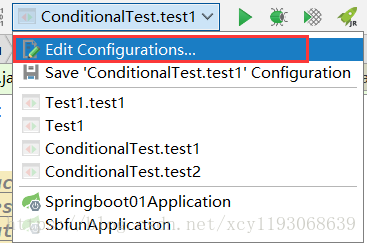

修改后启动测试方法:

一个方法只能注入一个bean实例,所以@Conditional标注在方法上只能控制一个bean实例是否注入。
标注在类上:
一个类中可以注入很多实例,@Conditional标注在类上就决定了一批bean是否注入。
我们试一下,将BeanConfig改写,这时,如果WindowsCondition返回true,则两个Person实例将被注入(注意:上一个测试将os.name改为linux,这是我将把这个参数去掉):
-
@Conditional({WindowsCondition.class})
-
@Configuration
-
public class BeanConfig {
-
-
@Bean(name = "bill")
-
public Person person1(){
-
return new Person("Bill Gates",62);
-
}
-
-
@Bean("linus")
-
public Person person2(){
-
return new Person("Linus",48);
-
}
-
}
结果两个实例都被注入:

如果将类上的WindowsCondition.class改为LinuxCondition.class,结果应该可以猜到:

结果就是空的,类中所有bean都没有注入。
多个条件类:
前言中说,@Conditional注解传入的是一个Class数组,存在多种条件类的情况。
这种情况貌似判断难度加深了,测试一波,新增新的条件类,实现的matches返回false(这种写死返回false的方法纯属测试用,没有实际意义O(∩_∩)O)
-
public class ObstinateCondition implements Condition {
-
-
@Override
-
public boolean matches(ConditionContext conditionContext, AnnotatedTypeMetadata annotatedTypeMetadata) {
-
return false;
-
}
-
}
BeanConfig修改一下:
-
@Conditional({WindowsCondition.class,ObstinateCondition.class})
-
@Configuration
-
public class BeanConfig {
-
-
@Bean(name = "bill")
-
public Person person1(){
-
return new Person("Bill Gates",62);
-
}
-
-
@Bean("linus")
-
public Person person2(){
-
return new Person("Linus",48);
-
}
-
}
结果:

现在如果将ObstinateCondition的matches方法返回值改成true,两个bean就被注入进容器:

结论得:
第一个条件类实现的方法返回true,第二个返回false,则结果false,不注入进容器。
第一个条件类实现的方法返回true,第二个返回true,则结果true,注入进容器中。
原文地址:https://blog.csdn.net/xcy1193068639/article/details/81491071
Spring @Conditional注解 详细讲解及示例的更多相关文章
- Spring Conditional注解使用小结
今天我们来总结下Conditional注解的使用. Conditional注解 增加配置类Config package condition; import org.springframework.co ...
- Spring @Conditional注解的使用
Spring Boot的强大之处在于使用了Spring 4框架的新特性:@Conditional注释,此注释使得只有在特定条件满足时才启用一些配置. 下面来介绍如何使用Condition 首先写一个类 ...
- Spring和SpringMvc详细讲解
转载自:https://www.cnblogs.com/doudouxiaoye/p/5693399.html 1. 为什么使用Spring ? 1). 方便解耦,简化开发 通过Spring提供的Io ...
- Spring常用注解(讲解的通俗易懂,很透彻)
使用注解来构造IoC容器 用注解来向Spring容器注册Bean.需要在applicationContext.xml中注册<context:component-scan base-package ...
- RabbitMQ与java、Spring结合实例详细讲解(转)
林炳文Evankaka原创作品.转载请注明出处http://blog.csdn.net/evankaka 摘要:本文介绍了rabbitMq,提供了如何在Ubuntu下安装RabbitMQ 服务的方法. ...
- RabbitMQ与java、Spring结合实例详细讲解
林炳文Evankaka原创作品.转载请注明出处http://blog.csdn.net/evankaka 摘要:本文介绍了rabbitMq,提供了如何在Ubuntu下安装RabbitMQ 服务的方法. ...
- Javascript正则表达式详细讲解和示例,通俗易懂
正则表达式可以: •测试字符串的某个模式.例如,可以对一个输入字符串进行测试,看在该字符串是否存在一个电话号码模式或一个信用卡号码模式.这称为数据有效性验证 •替换文本.可以在文档中使用一个正则表达式 ...
- 一文了解@Conditional注解说明和使用
@Conditional:Spring4.0 介绍了一个新的注解@Conditional,它的逻辑语义可以作为"If-then-else-"来对bean的注册起作用. @Con ...
- Spring @Conditional简单使用 以及 使用时注意事项一点
@Conditional注解在类的方法中 @Conditional注解失效的一种原因 @Conditional注解在类上 手写的低配版@ConditionalOnClass Spring @Cond ...
随机推荐
- 理想的正方形 HAOI2007(二维RMQ)
理想的正方形 省队选拔赛河南 时间限制: 1 s 空间限制: 256000 KB 题目等级 : 大师 Master 题目描述 Description 有一个a*b的整数组成的矩阵,现 ...
- C#的装箱与拆箱与基本类型
装箱:值类型转换为对象类型, 实例: int val = 8; object obj = val;//整型数据转换为了对象类型(装箱) 拆箱:之前由值类型转换而来的对象类型再转回值类型, 实例: in ...
- Math teacher's homework
Title:[Math teacher's homework] Description 题目大意:给你n个数m1,m2...mn,求满足X1 xor X2 xor ... xor Xn=k,0< ...
- javascript面试题集
1.如何把一句英文每个单词第一个字母大写? var str = "what fuck is 1235 going on ?"; var newArr = str.split(&qu ...
- OpenCV2.4.9 + VS2012 + win10 配置
Step1 下载opencv 2.4.9 pack Step2 解压到本地 我解压路径是: C:\OPENCV Step3 添加环境变量: 这里虽然把X64下的VC11(VC11对应VS2012的C+ ...
- [Python实战] 功能简单的数据查询及可视化系统
前言 数据时代,数据的多源集成和快速检索查询是第一步,配上数据分析及可视化才能算窥得大数据一角. 创建这个项目的主要目的一是对前期工作的一些总结,二是提升自己. 这里简单介绍一下sqlpro这个项目的 ...
- [ CodeForces 515 D ] Drazil and Tiles
\(\\\) \(Description\) 给出一个\(N\times M\) 的网格,一些位置是障碍,其他位置是空地,求是否存在一个用 \(1\times 2\)的骨牌铺满空地的方案,以及方案是否 ...
- Java运行报错问题——Picked up JAVA_TOOL_OPTIONS: -agentlib:jvmhook
http://blog.csdn.net/xifeijian/article/details/8830933 上述这个朋友博文提醒,可能是因为其他软件添加了JAVA_HOME的路径造成冲突.但他支持删 ...
- Java图片上查找图片算法
之前用按键精灵写过一些游戏辅助,里面有个函数叫FindPic,就是在屏幕范围查找给定的一张图片,返回查找到的坐标位置. 现在,Java来实现这个函数类似的功能. 算法描述: 屏幕截图,得到图A,(查找 ...
- VMWare虚拟机中Ubuntu 16.04 (linux无桌面)配置静态IP上网
1. 基础环境说明 虚拟机: VMWare 12.5.2 操作系统: Ubuntu 16.04 (无桌面) 物理主机操作系统: win 7 旗舰版 2. 摸底 VMware在安装之后,会创建2个虚拟的 ...