
web前端减少你按刷新的频率
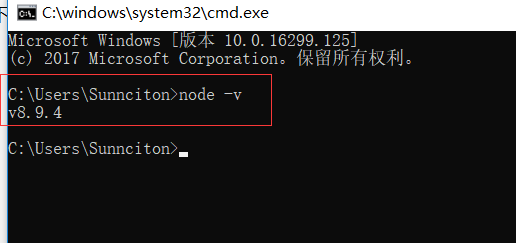
先下载:nodejs ,然后安装完以后,我们在命令行打印 node -v
完成后我们进行以下操作,安装browser-sync ,官网上有详细的教程,请访问:Browsersync
因为npm官网访问速度太慢造成的下载速度奇慢,我做了如下调整:
使用淘宝源,我使用的代码如下红色标识
C:\Users\Sunnciton>npm conf set registry https://registry.npm.taobao.org

C:\Users\Sunnciton>npm i -g cnpm --registry=https://registry.npm.taobao.org

C:\Users\Sunnciton\AppData\Roaming\npm\cnpm -> C:\Users\Sunnciton\AppData\Roaming\npm\node_modules\cnpm\bin\cnpm

+ cnpm@5.1.1

added 709 packages in 94.077s

C:\Users\Sunnciton>cnpm i -g browser-sync

Downloading browser-sync to C:\Users\Sunnciton\AppData\Roaming\npm\node_modules\browser-sync_tmp

Copying C:\Users\Sunnciton\AppData\Roaming\npm\node_modules\browser-sync_tmp\_browser-sync@2.23.2@browser-sync to C:\Users\Sunnciton\AppData\Roaming\npm\node_modules\browser-sync

Installing browser-sync's dependencies to C:\Users\Sunnciton\AppData\Roaming\npm\node_modules\browser-sync/node_modules

[1/27] connect-history-api-fallback@^1.5.0 installed at node_modules\_connect-history-api-fallback@1.5.0@connect-history-api-fallback

[2/27] etag@^1.8.1 installed at node_modules\_etag@1.8.1@etag

[3/27] emitter-steward@^1.0.0 installed at node_modules\_emitter-steward@1.0.0@emitter-steward

[4/27] dev-ip@^1.0.1 installed at node_modules\_dev-ip@1.0.1@dev-ip

[5/27] fresh@^0.5.2 installed at node_modules\_fresh@0.5.2@fresh

[6/27] http-proxy@1.15.2 installed at node_modules\_http-proxy@1.15.2@http-proxy

[7/27] micromatch@2.3.11 existed at node_modules\_micromatch@2.3.11@micromatch

[8/27] immutable@3.8.1 installed at node_modules\_immutable@3.8.1@immutable

[9/27] connect@3.5.0 installed at node_modules\_connect@3.5.0@connect

[10/27] fs-extra@3.0.1 installed at node_modules\_fs-extra@3.0.1@fs-extra

[11/27] eazy-logger@3.0.2 installed at node_modules\_eazy-logger@3.0.2@eazy-logger

[12/27] qs@6.2.1 installed at node_modules\_qs@6.2.1@qs

[13/27] opn@4.0.2 installed at node_modules\_opn@4.0.2@opn

[14/27] resp-modifier@6.0.2 installed at node_modules\_resp-modifier@6.0.2@resp-modifier

[15/27] portscanner@2.1.1 installed at node_modules\_portscanner@2.1.1@portscanner

[16/27] server-destroy@1.0.1 installed at node_modules\_server-destroy@1.0.1@server-destroy

[17/27] ua-parser-js@0.7.12 installed at node_modules\_ua-parser-js@0.7.12@ua-parser-js

[18/27] bs-recipes@1.3.4 installed at node_modules\_bs-recipes@1.3.4@bs-recipes

[19/27] serve-index@1.8.0 installed at node_modules\_serve-index@1.8.0@serve-index

[20/27] easy-extender@2.3.2 installed at node_modules\_easy-extender@2.3.2@easy-extender

[21/27] serve-static@1.12.2 installed at node_modules\_serve-static@1.12.2@serve-static

[22/27] localtunnel@1.8.3 installed at node_modules\_localtunnel@1.8.3@localtunnel

[23/27] yargs@6.4.0 installed at node_modules\_yargs@6.4.0@yargs

[24/27] browser-sync-ui@v1.0.1 installed at node_modules\_browser-sync-ui@1.0.1@browser-sync-ui

[25/27] rx@4.1.0 installed at node_modules\_rx@4.1.0@rx

[26/27] socket.io@2.0.4 installed at node_modules\_socket.io@2.0.4@socket.io

fsevents@1.1.3 download from binary mirror: {"module_name":"fse","module_path":"./lib/binding/{configuration}/{node_abi}-{platform}-{arch}/","remote_path":"./v{version}/","package_name":"{module_name}-v{version}-{node_abi}-{platform}-{arch}.tar.gz","host":"https://npm.taobao.org/mirrors/fsevents"}

platform unsupported chokidar@1.7.0 › fsevents@^1.0.0 Package require os(darwin) not compatible with your platform(win32)

[fsevents@^1.0.0] optional install error: Package require os(darwin) not compatible with your platform(win32)

[27/27] chokidar@1.7.0 installed at node_modules\_chokidar@1.7.0@chokidar

execute post install 1 scripts...

[1/1] scripts.install socket.io@2.0.4 › engine.io@3.1.4 › uws@~0.14.4 run "node-gyp rebuild > build_log.txt 2>&1 || exit 0"

[1/1] scripts.install socket.io@2.0.4 › engine.io@3.1.4 › uws@~0.14.4 finished in 6s

Recently updated (since 2017-12-28): 1 packages (detail see file C:\Users\Sunnciton\AppData\Roaming\npm\node_modules\browser-sync\node_modules\.recently_updates.txt)

  2017-12-29

    → socket.io@2.0.4 › engine.io@3.1.4 › engine.io-parser@~2.1.0(2.1.2) (06:06:26)

All packages installed (266 packages installed from npm registry, used 21s, speed 514.7kB/s, json 245(426.09kB), tarball 10.12MB)

[browser-sync@2.23.2] link C:\Users\Sunnciton\AppData\Roaming\npm\browser-sync@ -> C:\Users\Sunnciton\AppData\Roaming\npm\node_modules\browser-sync\dist\bin.js

C:\Users\Sunnciton>dir

 驱动器 C 中的卷是 系统

 卷的序列号是 0BE6-0EDA

 C:\Users\Sunnciton 的目录

2018/01/04  10:26    <DIR>          .

2018/01/04  10:26    <DIR>          ..

2017/11/18  09:39    <DIR>          .android

2018/01/04  10:14             1,181 .bash_history

2017/12/07  15:13    <DIR>          .codeintel

2018/01/04  10:02    <DIR>          .config

2017/12/07  10:03               105 .gitconfig

2018/01/04  10:02                 0 .node_repl_history

2018/01/04  10:26    <DIR>          .npminstall_tarball

2018/01/04  10:23                42 .npmrc

2017/11/15  16:18    <DIR>          .vscode

2018/01/03  08:51    <DIR>          3D Objects

2017/12/06  10:36                 0 addmouseRight.bat

2017/11/15  10:48    <DIR>          AppData

2018/01/03  08:51    <DIR>          Contacts

2018/01/04  10:05    <DIR>          Desktop

2018/01/03  08:52    <DIR>          Documents

2018/01/03  09:10    <DIR>          Downloads

2018/01/03  08:51    <DIR>          Favorites

2017/11/15  10:49    <DIR>          Icons

2018/01/03  08:52    <DIR>          Links

2018/01/03  08:51    <DIR>          Music

2017/11/17  09:49    <DIR>          OneDrive

2018/01/03  08:51    <DIR>          Pictures

2017/12/01  09:48                 0 Q.txt

2018/01/03  08:52    <DIR>          Saved Games

2018/01/03  08:51    <DIR>          Searches

2018/01/03  08:51    <DIR>          Videos

               6 个文件          1,328 字节

              22 个目录 118,103,502,848 可用字节

C:\Users\Sunnciton>cd F:\tomcat\webapps\ROOT\WEB-INF\phpbin

C:\Users\Sunnciton>f:

F:\tomcat\webapps\ROOT\WEB-INF\phpbin>dir

 驱动器 F 中的卷是 文档

 卷的序列号是 0BE6-0F39

 F:\tomcat\webapps\ROOT\WEB-INF\phpbin 的目录

2018/01/04  10:28    <DIR>          .

2018/01/04  10:28    <DIR>          ..

2018/01/03  14:33               746 concat.php

2018/01/04  10:29    <DIR>          css

2018/01/03  16:39             1,941 index.php

2018/01/04  09:10             1,218 poll.html

2018/01/04  10:27                 6 poll_result.txt

2018/01/04  10:27             1,056 poll_vote.php

               5 个文件          4,967 字节

               3 个目录 256,829,313,024 可用字节

F:\tomcat\webapps\ROOT\WEB-INF\phpbin>browser-sync start --proxy "localhost" "css/*.css"

[Browsersync] Proxying: http://localhost

[Browsersync] Access URLs:

 --------------------------------------

       Local: http://localhost:3000

    External: http://192.168.1.100:3000

 --------------------------------------

          UI: http://localhost:3001

 UI External: http://192.168.1.100:3001

 --------------------------------------
已经使用监听成功!
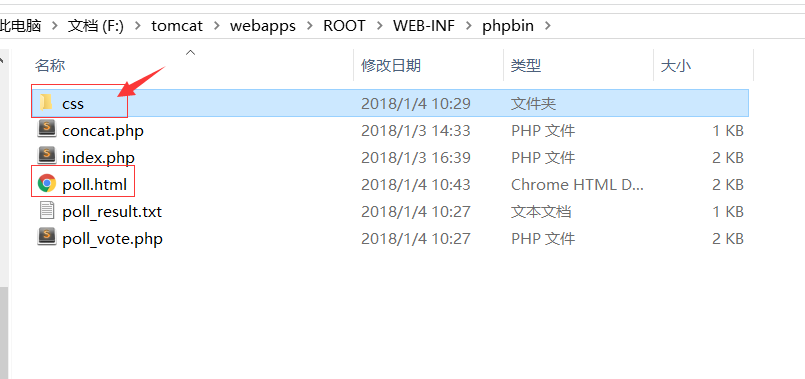
注意一个小细节,监控本地与开启静态服务,如果本地已有PHP服务器,假如是以下条件:
本地PHP服务器端口:8080
访问目录是:phpbin
文件是:poll.html
文件目录结构如下:
css
--poll.css
那么你在监听本地网页的时候,输入的命令如下:
1.监听单个/多个文件改变
browser-sync start --proxy "localhost:8080/phpbin/poll.html" --files "css/*.css"
2.监听所有文件改变
browser-sync start --proxy "localhost:8080/phpbin/poll.html" --files "*/*"
监听的是poll.html文件,以及css下面的所有css文件,一旦修改css文件,html文件会即时发生改变!
web前端减少你按刷新的频率的更多相关文章
- Web前端性能优化教程06:减少DNS查找、避免重定向
本文是Web前端性能优化系列文章中的第六篇,主要讲述内容:减少DNS查找.避免重定向.完整教程可查看: 一.减少DNS查找 基础知识 DNS(Domain Name System): 负责将域名UR ...
- js中对arry数组的各种操作小结 瀑布流AJAX无刷新加载数据列表--当页面滚动到Id时再继续加载数据 web前端url传递值 js加密解密 HTML中让表单input等文本框为只读不可编辑的方法 js监听用户的键盘敲击事件,兼容各大主流浏览器 HTML特殊字符
js中对arry数组的各种操作小结 最近工作比较轻松,于是就花时间从头到尾的对js进行了详细的学习和复习,在看书的过程中,发现自己平时在做项目的过程中有很多地方想得不过全面,写的不够合理,所以说啊 ...
- web前端面试试题总结---css篇
CSS 介绍一下标准的CSS的盒子模型?低版本IE的盒子模型有什么不同的? (1)有两种, IE 盒子模型.W3C 盒子模型: (2)盒模型: 内容(content).填充(padding).边界(m ...
- web前端性能优化总结
网站的划分一般为二:前端和后台.我们可以理解成后台是用来实现网站的功能的,比如:实现用户注册,用户能够为文章发表评论等等.而前端呢?其实应该是属于功能的表现.并且影响用户访问体验的绝大部分来自前端页面 ...
- 【理论面试篇】收集整理来自网络上的一些常见的 经典前端、H5面试题 Web前端开发面试题
##2017.10.30收集 面试技巧 5.1 面试形式 1) 一般而言,小公司做笔试题:大公司面谈项目经验:做地图的一定考算法 2) 面试官喜欢什么样的人 ü 技术好. ...
- web前端性能优化总结一
转自:http://www.2cto.com/kf/201604/498725.html 网站的划分一般为二:前端和后台.我们可以理解成后台是用来实现网站的功能的,比如:实现用户注册,用户能够为文章发 ...
- (转)web前端知识精简
Web前端技术由 html.css 和 javascript 三大部分构成,是一个庞大而复杂的技术体系,其复杂程度不低于任何一门后端语言.而我们在学习它的时候往往是先从某一个点切入,然后不断地接触和学 ...
- Web前端知识体系
看到一篇不错的文章,拿来收藏和分享. 原文:http://mp.weixin.qq.com/s/UFTfdE7LYhHquWEzwZKLCQ Web前端技术由html.css和 javascript三 ...
- WEB前端的性能优化
转自:http://www.2cto.com/kf/201604/498725.html 网站的划分一般为二:前端和后台.我们可以理解成后台是用来实现网站的功能的,比如:实现用户注册,用户能够为文章发 ...
随机推荐
- C++ 多态、虚函数、虚析构函数
1.若某种语言只支持类但不支持多态,则只能称为基于对象,不能说是面向对象. 2.多态:向不同对象发送同一个消息,不同的对象会产生不同的行为,发送消息可以是调用函数等操作.函数重载.运算符重载都是多态. ...
- 未来IT行业的掌控者
(题外话,我发现很多高手都喜欢讲代码实现,喜欢贴代码贴图,我个人不大喜欢这种方式,我觉得最重要的是思想,是想法,具体的实现代码实现步骤由读者自己去实现.这纯属我个人喜好,望各大内高手勿喷,可能是本人水 ...
- cocos2dx游戏如何架构
声明:此篇文章不介绍如何使用cocos2dx制作游戏.站在架构师的角度如果制作游戏. 以我多年的游戏开发经验,和其他技术积累, 市面的所谈的一些软件架构模式都不太适合游戏软件. 我指的架构模式,MVC ...
- [Luogu] P4460 [CQOI2018]解锁屏幕
题目背景 使用过Android 手机的同学一定对手势解锁屏幕不陌生.Android 的解锁屏幕由3X3 个点组成,手指在屏幕上画一条线,将其中一些点连接起来,即可构成一个解锁图案.如下面三个例子所示: ...
- Mybatis的一级二级缓存
Mybatis提供了缓存机制,可以减轻数据库的压力,提高性能 Mybatis的缓存分为两级:一个是一级缓存,一个二级缓存 一级缓存:即默认使用的缓存SqlSession级别的缓存,只在sqlsessi ...
- [Python3网络爬虫开发实战] 3.1.3-解析链接
前面说过,urllib库里还提供了parse这个模块,它定义了处理URL的标准接口,例如实现URL各部分的抽取.合并以及链接转换.它支持如下协议的URL处理:file.ftp.gopher.hdl.h ...
- 配置Mysql审计
mysql-audit.json:Mysql审计日志 插件下载地址: https://bintray.com/mcafee/mysql-audit-plugin/release/1.1.4-725#f ...
- scrapy爬取简书整站文章
在这里我们使用CrawlSpider爬虫模板, 通过其过滤规则进行抓取, 并将抓取后的结果存入mysql中,下面直接上代码: jianshu_spider.py # -*- coding: utf-8 ...
- Data of Ch5 --Dual rotor
* Results *Conclusion*- little effect of rear rotor on Cp_1- Cp1 is independent of TI** TI effect on ...
- 75-ADMI,Average Directional Movement Index,平均方向性运动指标.(2015.7.1)
ADMI,Average Directional Movement Index 平均方向性运动指标 Directional Movement Index,平均方向性运动指标.(2015.7.1)&qu ...