
PCB genesis短槽加引导孔实现方法
一.何为短槽
短槽通常定义:槽长小于2倍槽宽 如:槽长1.8mm,槽宽1.0mm
二.为什么要加短槽加引孔呢
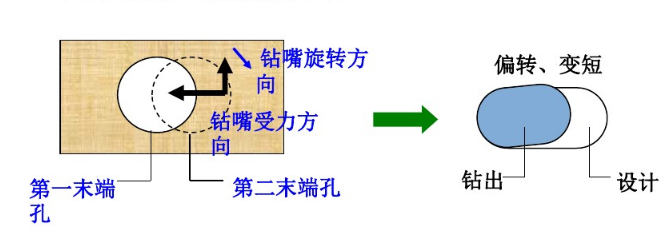
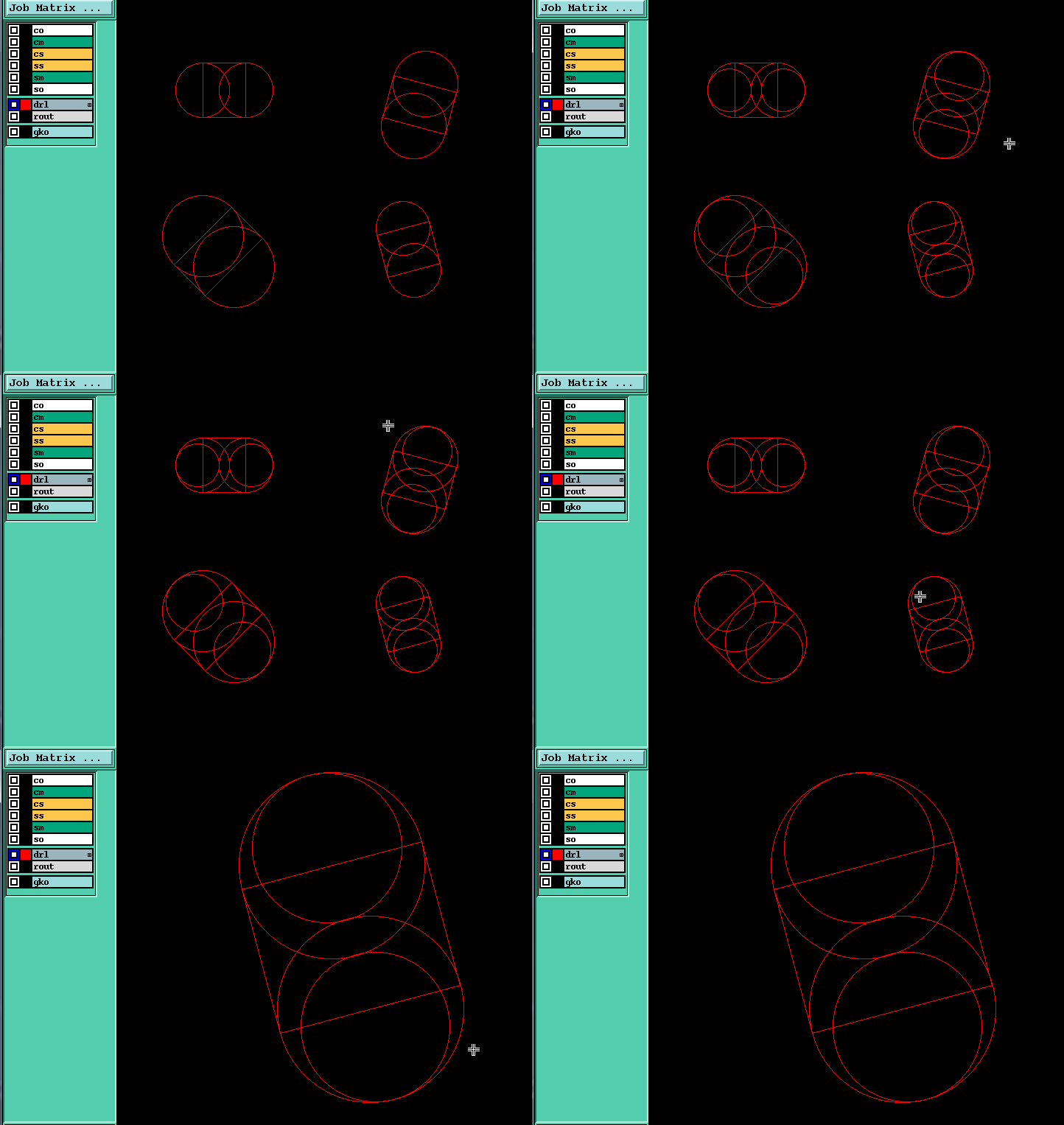
短槽孔在钻孔时孔易偏斜导致槽长偏短, 当槽长宽比越小,则受力越不均匀,在钻第2个孔时,钻头两边受力不均匀再加上是顺时针旋转,会导至第2个孔往逆时针方向偏转且变短(如下图)
短槽偏位问题如何解决呢,在我们PCB行业最佳作法是在钻槽孔之前,先在槽孔两端2个小孔(如下图).
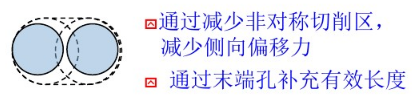
PCB行业已有很多短槽加工方法了
具体方法请链接:PCB钻孔--超短坑槽的加工方法
三.加短槽引孔实现原理
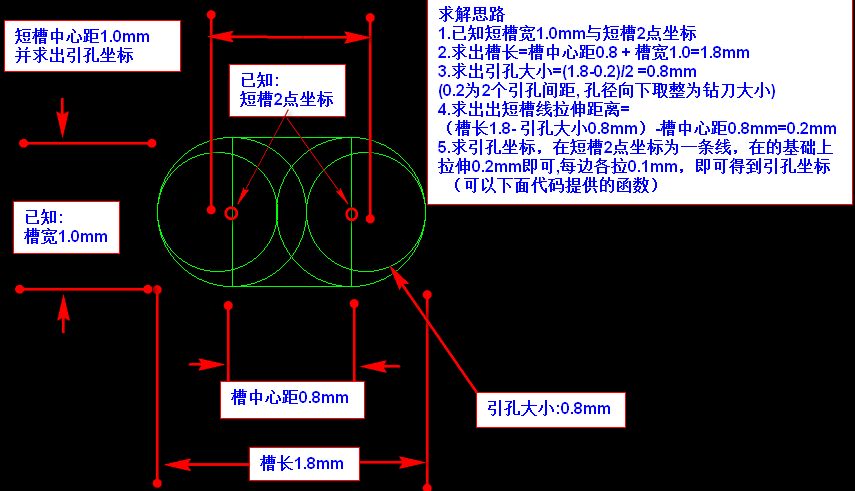
求解思路
1.已知短槽宽1.0mm与短槽2点坐标
2.求出槽长=槽中心距0.8 + 槽宽1.0=1.8mm
3.求出引孔大小=(1.8-0.2)/2 =0.8mm
(0.2为2个引孔间距, 孔径向下取整为钻刀大小)
4.求出短槽的线拉伸距离=
(槽长1.8- 引孔大小0.8mm)-槽中心距0.8mm=0.2mm
5.求引孔坐标,在短槽2点坐标为一条线,在的基础上拉伸0.2mm即可,每边各拉0.1mm,即可得到引孔坐标(下面代码有提供线拉伸函数)
四.C#简易代码实现:
1.加短槽代码
            #region 短槽加引孔  ydkdrl

            List<gL> SlotList = glayer.Llist.Where(tt => ((calc2.p2p_di(tt.ps, tt.pe) + tt.width * 0.001) / (tt.width * 0.001)) < ).ToList();

            if (SlotList.Count() > )

            {

                if (!g.Check_Layer_Exist("ydkdrl")) g.CreateLayer("ydkdrl");

                g.SetAffectedLayer("ydkdrl");

                for (int i = ; i < SlotList.Count; i++)

                {

                    double HoleSize = ((int)(Math.Floor(((calc2.p2p_di(SlotList[i].ps, SlotList[i].pe) *  + SlotList[i].width)) * 0.5 / )) * );

                    SlotList[i] = calc2.l_extend(SlotList[i], (SlotList[i].width - HoleSize) * 0.001);

                    addCOM.pad(SlotList[i].ps, HoleSize);

                    addCOM.pad(SlotList[i].pe, HoleSize);

                }

                g.SetAffectedLayer("");

            }

            #endregion
2.线拉伸函数(关键在于此函数实现)
 /// <summary>

        /// 线Line拉伸

        /// </summary>

        /// <param name="l"></param>

        /// <param name="extend_val">拉伸数值</param>

        /// <param name="type_">0两端拉伸  1起点拉伸  2端点拉伸</param>

        /// <returns></returns>

        public gL l_extend(gL l, double extend_val, byte type_ = )

        {

            gL tempL = l;

            double angle_ = p_ang(l.ps, l.pe);

            if (type_ == )

            {

                tempL.ps = p_val_ang(l.ps, extend_val, p_ang_invert(angle_));

            }

            else if (type_ == )

            {

                tempL.pe = p_val_ang(l.pe, extend_val, angle_);

            }

            else

            {

                extend_val = extend_val * 0.5;

                tempL.ps = p_val_ang(l.ps, extend_val, p_ang_invert(angle_));

                tempL.pe = p_val_ang(l.pe, extend_val, angle_);

            }

            return tempL;

        }

         /// <summary>

        /// 求方位角

        /// </summary>

        /// <param name="ps"></param>

        /// <param name="pe"></param>

        /// <returns></returns>

        public double p_ang(gPoint ps, gPoint pe)

        {

            double a_ang = Math.Atan((pe.y - ps.y) / (pe.x - ps.x)) / Math.PI * ;

            //象限角  转方位角   计算所属象限   并求得方位角

            if (pe.x >= ps.x && pe.y >= ps.y)  //↗    第一象限

            {

                return a_ang;

            }

            else if (!(pe.x >= ps.x) && pe.y >= ps.y)  // ↖   第二象限

            {

                return a_ang + ;

            }

            else if (!(pe.x >= ps.x) && !(pe.y >= ps.y))  //↙   第三象限

            {

                return a_ang + ;

            }

            else if (pe.x >= ps.x && !(pe.y >= ps.y))  // ↘   第四象限

            {

                return a_ang + ;

            }

            else

            {

                return a_ang;

            }

        }

        /// <summary>

        /// 求反方位角

        /// </summary>

        /// <param name="ang_direction"></param>

        /// <returns></returns>

        public double p_ang_invert(double ang_direction)//求反方位角

        {

            if (ang_direction >= )

                return ang_direction - ;

            else

                return ang_direction + ;

        }

        /// <summary>

        /// 求增量坐标

        /// </summary>

        /// <param name="ps">起点</param>

        /// <param name="val">增量值</param>

        /// <param name="ang_direction">角度</param>

        /// <returns></returns>

        public gPoint p_val_ang(gPoint ps, double val, double ang_direction)

        {

            gPoint pe;

            pe.x = ps.x + val * Math.Cos(ang_direction * Math.PI / );

            pe.y = ps.y + val * Math.Sin(ang_direction * Math.PI / );

            return pe;

        }
3.点线数据结构
    /// <summary>

    /// 点  数据类型 (XY)

    /// </summary>

    public struct gPoint

    {

        public gPoint(gPoint p_)

        {

            this.x = p_.x;

            this.y = p_.y;

        }

        public gPoint(double x_val, double y_val)

        {

            this.x = x_val;

            this.y = y_val;

        }

        public double x;

        public double y;

        public static gPoint operator +(gPoint p1, gPoint p2)

        {

            p1.x += p2.x;

            p1.y += p2.y;

            return p1;

        }

        public static gPoint operator -(gPoint p1, gPoint p2)

        {

            p1.x -= p2.x;

            p1.y -= p2.y;

            return p1;

        }

    }

     /// <summary>

    /// Line 数据类型

    /// </summary>

    public struct gL

    {

        public gL(double ps_x, double ps_y, double pe_x, double pe_y, double width_)

        {

            this.ps = new gPoint(ps_x, ps_y);

            this.pe = new gPoint(pe_x, pe_y);

            this.negative = false;

            this.symbols = "r";

            this.attribut = string.Empty;

            this.width = width_;

        }

        public gL(gPoint ps_, gPoint pe_, double width_)

        {

            this.ps = ps_;

            this.pe = pe_;

            this.negative = false;

            this.symbols = "r";

            this.attribut = string.Empty;

            this.width = width_;

        }

        public gL(gPoint ps_, gPoint pe_, string symbols_, double width_)

        {

            this.ps = ps_;

            this.pe = pe_;

            this.negative = false;

            this.symbols = symbols_;

            this.attribut = string.Empty;

            this.width = width_;

        }

        public gPoint ps;

        public gPoint pe;

        public bool negative;//polarity-- positive  negative

        public string symbols;

        public string attribut;

        public double width;

        public static gL operator +(gL l1, gPoint move_p)

        {

            l1.ps += move_p;

            l1.pe += move_p;

            return l1;

        }
五.加短槽引孔脚本UI
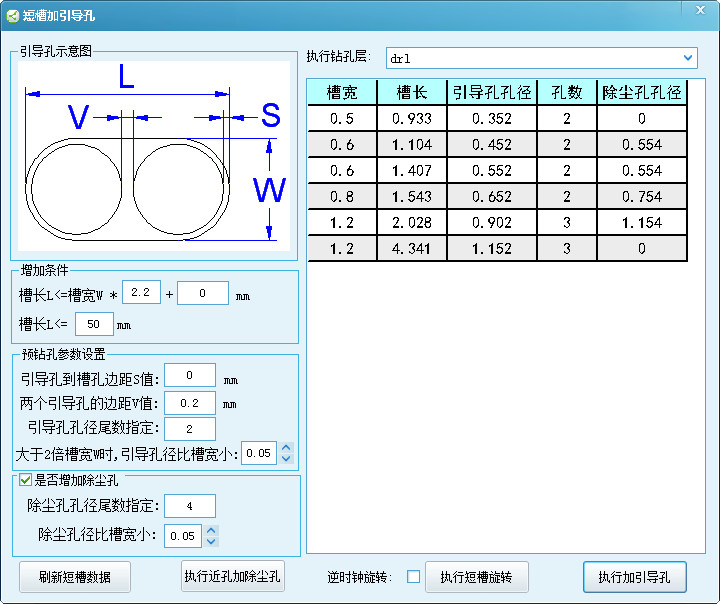
六.加短槽效果
PCB genesis短槽加引导孔实现方法的更多相关文章
- PCB genesis连孔加除毛刺孔(槽孔与槽孔)实现方法(三)
一.为什么 连孔加除毛刺孔 原因是 PCB板材中含有玻璃纤维, 毛刺产生位置在于2个孔相交位置,由于此处钻刀受力不均导致纤维切削不断形成毛刺 ,为了解决这个问题:在钻完2个连孔后,在相交处再钻一个孔, ...
- PCB genesis Slot槽转钻孔(不用G85命令)实现方法
PCB钻Slot槽一般都采用G85命令钻槽孔,而采用G85命令工程CAM无法准确的知道Slot槽钻多少个孔,并不能决定钻槽孔的顺序,因为采用G85命令钻孔密度与钻槽顺序由钻机本身决定的.在这里介绍一种 ...
- PCB genesis自制孔点 Font字体实现方法
一.先看genesis原有Font字体 在PCB工程CAM加孔点字体要求时,通常我们直接用Geneis软件给我们提供了2种孔点字体canned_57与canned_67,但此字体可能不能满足各个工厂个 ...
- PCB genesis连孔加除毛刺孔(圆孔与槽孔)实现方法(二)
一.为什么 连孔加除毛刺孔 原因是 PCB板材中含有玻璃纤维, 毛刺产生位置在于2个孔相交位置,由于此处钻刀受力不均导致纤维切削不断形成毛刺 ,为了解决这个问题:在钻完2个连孔后,在相交处再钻一个孔, ...
- PCB genesis连孔加除毛刺孔(圆孔与圆孔)实现方法(一)
一.为什么 连孔加除毛刺孔 原因是 PCB板材中含有玻璃纤维, 毛刺产生位置在于2个孔相交位置,由于此处钻刀受力不均导致纤维切削不断形成毛刺 ,为了解决这个问题:在钻完2个连孔后,在相交处再钻一个孔, ...
- PCB genesis大孔加小孔(即卸力孔)实现方法
一.为什么 大孔中要加小孔(即卸力孔) 这其实跟钻刀的排屑有关了,当钻刀越大孔,排屑量也越大(当然这也得跟转速,下刀速的参数有关系),通常当钻刀越大,转速越慢,下刀速也越慢(因为要保证它的排屑通畅). ...
- PCB Genesis拼SET画工艺边 实现方法(一)
在PCB行业中,客户提供的PCB尺寸较小,为方便PCB加工,并生产提高生产效率,通常小于80X80mm需拼板处理的, 拼板要求可能来自按户指定拼板,也有可能是由工厂自行拼板,但对于CAM来说就需将PC ...
- PCB Genesis或Incam 右键导入TGZ 实现方法
使用Genesis导入TGZ方式很多 的,比如有:写个脚本框选TGZ的的方式实现TGZ导入,将TGZ拖入脚本界面实现TGZ导入, 给Engineering Toolkit窗口句柄注册拖拽事件实现TGZ ...
- PCB Genesis脚本C#使用WPF窗体实现方法
用C#写脚本做UI界面基本上都是用WinForm界面,如果想制作很漂亮动态的界面用WPF界面挺不错的选择, 这里介绍如何使用控制台程序调用WPF窗口 一.方法一 在控制台程序中,通过Main方法启动W ...
随机推荐
- 解决idea控制台打印乱码问题
idea控制台打印乱码,用起来总别扭,也是在网上搜索了一番,靠一点猜测解决了. 首先打开你自己的idea的安装目录下(即右键桌面图标,点击打开文件所在位置),然后找到idea.exe.vmoption ...
- PHP+Python,轻量维护超轻松
window下安装Python 直接去Python官网下载msi安装程序安装即可(选择自定义安装才能修改程序安装路径哦) widows下Python的数据库访问模块PyMysql的安装 1.open ...
- 微信小程序开发过程中tabbar页面显示的相关问题及解决办法!
在微信小程序的开发过程中如果有使用过tabbar的同学,我相信一定会遇到一些困扰.为什么有些时候代码中明明已经在app.json里面增加了tabbar,可以页面中就是不显示呢?可不可以有些页面显示ta ...
- oc门的设计思路
oc门,又称集电极开路门,Open Collector. mc1413bd就是这样一款oc门,在网上听说又叫uln2003a. 1.其符号是: 2.内部的组成就是NPN型的达林顿管 用非门的意思,我的 ...
- MSSQL获取指定日期的SQL语句
--1.一个月第一天的 SELECT DATEADD(mm,DATEDIFF(mm,0,getdate()),0) --2.本周的星期一 SELECT DATEADD(wk,DATEDIFF(wk,0 ...
- 【Codeforces 988D】Points and Powers of Two
[链接] 我是链接,点我呀:) [题意] 让你从一个集合中找出来一个子集 使得这个子集中任意两个数相减的绝对值是2^的整数次幂 且集合的大小最大 [题解] 考虑子集的个数为4个或4个以上 那么我们找到 ...
- [luoguP1130] 红牌(DP)
传送门 幼儿园DP. ——代码 #include <cstdio> #include <iostream> ; << ); int a[MAXN][MAXN], f ...
- [K/3Cloud]如何解决kdpkg无法部署到业务站点的问题
自从下载了sp1后,就迫不急待的试用下,看看反馈的几个关键bug是否修复,可惜sp1安装后发现业务站点下的组件一个都没有被更新,这指定是有问题了,这真是让哥百思不得其解,真后悔在研发时没仔细研究下部署 ...
- 轰炸II
题目背景 本题为轰炸数据加强版 题目描述 一个城市遭到了M次轰炸,每次都炸了一个每条边都与边界平行的矩形 在轰炸后,有N个关键点,指挥官想知道,它们有没有受到过轰炸,如果有,被炸了几次,最后一次是第几 ...
- 0213微信ZABBIX报警
简介 微信作为日常使用最频繁的工具,因此希望将微信接入zabbix报警. 微信企业号 1.申请微信企业号 申请后,请在“我的企业”页面下记录企业号的CorpID 2.添加通讯录 部门添加完成后,根据实 ...