
PCB Genesis或Incam 右键导入TGZ 实现方法
使用Genesis导入TGZ方式很多 的,比如有:写个脚本框选TGZ的的方式实现TGZ导入,将TGZ拖入脚本界面实现TGZ导入, 给Engineering Toolkit窗口句柄注册拖拽事件实现TGZ导入, 右键实现TGZ导入等,本篇介绍最后一种右键导入TGZ的方法.
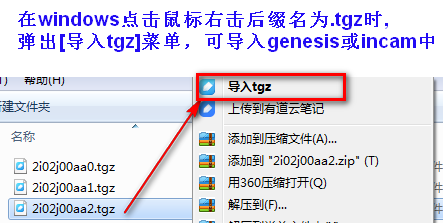
1.tgz文件右键导入
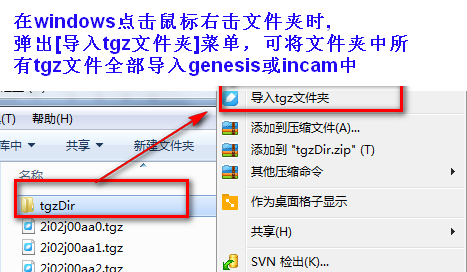
2.tgz文件夹右键导入
1.C#实现代码部份
using System;

using System.Collections.Generic;

using System.Diagnostics;

using System.IO;

using System.Linq;

using System.Text;

using System.Windows.Forms;

using System.Xml.Serialization;

namespace InputTGZ

{

    static class Program

    {

        static Process process = new Process();

        private static bool isIncam = false;

        static string db_name = "genesis";  //db名为默认值,满足个性化可以改为配置读取

        /// <summary>

        /// 应用程序的主入口点。

        /// </summary>

        [STAThread]

        static void Main(string[] args)

        {

            if (args.Length == )

            {

                try

                {

                    string file_path = args[];

                    string OpenStepName = System.Configuration.ConfigurationManager.AppSettings["OpenStepName"] ?? "";

                    string StateInfo = getPid();

                    if (!string.IsNullOrEmpty(StateInfo))

                    {

                        MessageBox.Show($"{StateInfo}", "提示", MessageBoxButtons.OK, MessageBoxIcon.Information);

                        return;

                    }

                    List<string> job_list = getJOBlist();

                    var isDirExists = Directory.Exists(file_path);

                    //导入目录下所有TGZ

                    if (isDirExists)

                    {

                        var tgzFileList = Directory.GetFiles(file_path, "*.tgz");

                        foreach (var item in tgzFileList)

                        {

                            string job_name1 = Path.GetFileNameWithoutExtension(item).ToLower().Trim();

                            if (job_list.Any(tt => tt == job_name1))

                            {

                                COM($"close_job,job={job_name1}");

                                COM($"close_form,job={job_name1}");

                                COM($"close_flow,job={job_name1}");

                                COM($"delete_entity,job=,type=job,name={job_name1}");

                            }

                            COM($"import_job,db= {db_name},path={item},name ={job_name1}");

                        }

                        return;

                    }

                    //单个TGZ导入

                    string job_name = Path.GetFileNameWithoutExtension(file_path).ToLower().Trim();

                    if (job_list.Any(tt => tt == job_name))

                    {

                        var isYes = MessageBox.Show($"TGZ名【{job_name}】已存在,请确认是否覆盖?", "提示", MessageBoxButtons.YesNo, MessageBoxIcon.Question);

                        if (isYes == DialogResult.No)

                            return;

                        COM($"close_job,job={job_name}");

                        COM($"close_form,job={job_name}");

                        COM($"close_flow,job={job_name}");

                        COM($"delete_entity,job=,type=job,name={job_name}");

                    }

                    COM($"import_job,db= {db_name},path={file_path},name ={job_name}");

                    if (!string.IsNullOrEmpty(OpenStepName))

                    {

                        COM($"open_job,job={job_name}");

                        COM($"open_entity,job={job_name},type=step,name={OpenStepName}");

                    }

                }

                catch (Exception ex)

                {

                    MessageBox.Show($"导入TGZ出错了{ex.Message}", "提示", MessageBoxButtons.YesNo, MessageBoxIcon.Warning);

                }

                finally

                {

                    if (process.StartInfo.FileName.Length > )

                    {

                        if (!process.HasExited)

                            process.Kill();

                    }

                }

            }

        }

        /// <summary>

        /// 执行COM指令

        /// </summary>

        /// <param name="command"></param>

        /// <returns></returns>

        public static string COM(string command)

        {

            process.StandardInput.WriteLine("COM " + command);

            var STATUS = process.StandardOutput.ReadLine();

            process.StandardInput.WriteLine("COMANS");

            return process.StandardOutput.ReadLine();

        }

        /// <summary>

        /// 设置genesis或incam PID

        /// </summary>

        /// <returns></returns>

        public static string getPid()

        {

            int gpid = getPIDonly();

            if (gpid < ) return "未打开Genesis或incam";

            var gatewayFilePath = "";

            if (!isIncam)

            {

                gatewayFilePath = System.Environment.GetEnvironmentVariable("GENESIS_EDIR").Replace("/", "\\") + @"\misc\gateway.exe";

            }

            else

            {

                gatewayFilePath = @"D:\InCAM\release\bin\gateway.exe";

                if (!File.Exists(gatewayFilePath)) gatewayFilePath = @"C:\InCAM\release\bin\gateway.exe";

            }

            process = new Process();

            process.StartInfo.FileName = gatewayFilePath;

            process.StartInfo.UseShellExecute = false;

            process.StartInfo.RedirectStandardInput = true;

            process.StartInfo.RedirectStandardOutput = true;

            process.StartInfo.RedirectStandardError = true;

            process.StartInfo.CreateNoWindow = true;

            process.StartInfo.Arguments = "%" + gpid.ToString();

            process.Start();

            return "";

        }

        /// <summary>

        /// 获取的有JOB列表

        /// </summary>

        /// <returns></returns>

        public static List<string> getJOBlist()

        {

            List<string> job_list = new List<string>();

            if (!isIncam)

            {

                string path = (System.Environment.GetEnvironmentVariable("GENESIS_DIR").Replace("/", "\\")) + "/share/joblist";

                using (StreamReader sr = new StreamReader(path, Encoding.Default))

                {

                    while (!sr.EndOfStream)

                    {

                        string strline = sr.ReadLine();

                        int start = strline.IndexOf("NAME=");

                        if (start != -)

                        {

                            job_list.Add(strline.Substring(start + ));

                        }

                    }

                }

                db_name = "genesis";  //默认

            }

            else

            {

                string filePath = @"D:\InCAM\server\config\joblist.xml";

                if (!File.Exists(filePath)) filePath = @"C:\InCAM\server\config\joblist.xml";

                string xml = File.ReadAllText(filePath);

                xml = "<RootXml>" + xml + "</RootXml>";

                using (StringReader sr = new StringReader(xml))

                {

                    XmlSerializer xmldes = new XmlSerializer(typeof(RootXml));

                    job_list = (xmldes.Deserialize(sr) as RootXml).JobList.Select(tt => tt.Name).ToList(); ;

                }

                db_name = "db1";//默认

            }

            return job_list;

        }

        /// <summary>

        /// 获取唯一PID  仅用单开

        /// </summary>

        /// <returns></returns>

        public static int getPIDonly()

        {

            Process[] arrayProcess = Process.GetProcesses();

            foreach (Process p in arrayProcess)

            {

                if (p.ProcessName.ToLower() == "get" || p.ProcessName.ToLower() == "gfx")

                {

                    return p.Id;

                }

                if (p.ProcessName.ToLower() == "incam")

                {

                    isIncam = true;

                    return p.Id;

                }

            }

            return ;

        }

    }

    [XmlRoot("RootXml")]

    public class RootXml

    {

        [XmlArray("JobList")]

        [XmlArrayItem("job")]

        public List<job> JobList { get; set; } = new List<job>();

    }

    [XmlRootAttribute("job")]

    public class job

    {

        [XmlAttribute("name")]

        public string Name { get; set; }

        [XmlAttribute("dbName")]

        public string dbName { get; set; }

    }

}
2.app.config 设置打开StepName名
<?xml version="1.0" encoding="utf-8"?>

<configuration>

  <startup><supportedRuntime version="v4.0" sku=".NETFramework,Version=v4.0"/></startup>

    <appSettings>

      <!--打开StepName-->

      <add key="OpenStepName" value="cam"/>

    </appSettings>

</configuration>
1.tgz后缀文件名加入右键【导入tgz】
        /// <summary>

        /// tgz后缀文件名加入右键[导入tgz]

        /// </summary>

        static void tgz_SuffixFile()

        {

            string FileSuffix = ".tgz";

            string FileSuffixName = "tgz";

            string menuName = "导入tgz";

            //加入TGZ后缀

            RegistryKey shell = Registry.ClassesRoot;

            RegistryKey custom = shell.CreateSubKey(FileSuffix);

            custom.SetValue("", FileSuffixName);

            custom.Close();

            shell.Close();

           //TGZ绑定程序

            var FileSuffix2Root = Registry.ClassesRoot.CreateSubKey(FileSuffixName);

            string OpenFilePath = Application.StartupPath  + @"\InputTGZ.exe";

            string OpenFilePathIco = Application.StartupPath  + @"\InputTGZ.ico";

            RegistryKey shell2 = FileSuffix2Root.CreateSubKey("shell");

            RegistryKey custom2 = shell2.CreateSubKey(menuName);

            custom2.SetValue("", menuName  );

            custom2.SetValue("Icon", OpenFilePathIco);

            RegistryKey cmd = custom2.CreateSubKey("command");

            cmd.SetValue("", OpenFilePath + " %1");

            FileSuffix2Root.Close();

            cmd.Close();

            custom.Close();

            shell2.Close();

        }
2.文件夹加入右键【导入tgz文件夹】
        /// <summary>

        ///  文件夹加入右键[导入tgz文件夹]

        /// </summary>

        static void tgz_Dir()

        {

            string menuName = "导入tgz文件夹";

            string OpenFilePath = Application.StartupPath + @"\InputTGZ.exe";

            string OpenFilePathIco = Application.StartupPath + @"\InputTGZ.ico";

            RegistryKey shell = Registry.ClassesRoot.OpenSubKey(@"Directory\shell", true);

            RegistryKey custom = shell.CreateSubKey(menuName);

            custom.SetValue("", menuName  );

            custom.SetValue("Icon", OpenFilePathIco);

            RegistryKey cmd = custom.CreateSubKey("command");

            cmd.SetValue("", OpenFilePath + " %1");

            cmd.Close();

            custom.Close();

            shell.Close();

        }
PCB Genesis或Incam 右键导入TGZ 实现方法的更多相关文章
- PCB Genesis 鼠标滚轮缩放与TGZ拖放 插件实现
一.背景: 做过CAM的人都用过Geneiss软件,由于处理资料强大,目前奥宝公司出品的Genesis占领整个PCB行业,整个行业无人不知呀, 而此软件有一个吐槽点Genesis 无滚轮缩放与TGZ拖 ...
- PCB genesis自制孔点 Font字体实现方法
一.先看genesis原有Font字体 在PCB工程CAM加孔点字体要求时,通常我们直接用Geneis软件给我们提供了2种孔点字体canned_57与canned_67,但此字体可能不能满足各个工厂个 ...
- PCB genesis短槽加引导孔实现方法
一.何为短槽 短槽通常定义:槽长小于2倍槽宽 如:槽长1.8mm,槽宽1.0mm 二.为什么要加短槽加引孔呢 短槽孔在钻孔时孔易偏斜导致槽长偏短, 当槽长宽比越小,则受力越不均匀,在钻第2个 ...
- PCB Genesis拼SET画工艺边 实现方法(一)
在PCB行业中,客户提供的PCB尺寸较小,为方便PCB加工,并生产提高生产效率,通常小于80X80mm需拼板处理的, 拼板要求可能来自按户指定拼板,也有可能是由工厂自行拼板,但对于CAM来说就需将PC ...
- PCB Genesis脚本C#使用WPF窗体实现方法
用C#写脚本做UI界面基本上都是用WinForm界面,如果想制作很漂亮动态的界面用WPF界面挺不错的选择, 这里介绍如何使用控制台程序调用WPF窗口 一.方法一 在控制台程序中,通过Main方法启动W ...
- PCB Genesis SET拼板(圆形板拼板) 实现效果(二)
越来发现Genesis采用Surface多边形数据结构的重要性了,当撑握了多边形缩放,交集, 差集,并集等算法, 想实现PCB拼板简直轻而易举了;当然借助多边形算法可以开发出更多的PCB实用的工具出来 ...
- PCB genesis连孔加除毛刺孔(槽孔与槽孔)实现方法(三)
一.为什么 连孔加除毛刺孔 原因是 PCB板材中含有玻璃纤维, 毛刺产生位置在于2个孔相交位置,由于此处钻刀受力不均导致纤维切削不断形成毛刺 ,为了解决这个问题:在钻完2个连孔后,在相交处再钻一个孔, ...
- PCB genesis连孔加除毛刺孔(圆孔与槽孔)实现方法(二)
一.为什么 连孔加除毛刺孔 原因是 PCB板材中含有玻璃纤维, 毛刺产生位置在于2个孔相交位置,由于此处钻刀受力不均导致纤维切削不断形成毛刺 ,为了解决这个问题:在钻完2个连孔后,在相交处再钻一个孔, ...
- PCB genesis连孔加除毛刺孔(圆孔与圆孔)实现方法(一)
一.为什么 连孔加除毛刺孔 原因是 PCB板材中含有玻璃纤维, 毛刺产生位置在于2个孔相交位置,由于此处钻刀受力不均导致纤维切削不断形成毛刺 ,为了解决这个问题:在钻完2个连孔后,在相交处再钻一个孔, ...
随机推荐
- js变量类型详解
<html> <title>js变量类型详解</title> <meta http-equiv="content-type" conten ...
- Codeforces Round #364 (Div. 2),只有A与B
A. Cards time limit per test 1 second memory limit per test 256 megabytes input standard input outpu ...
- HDU 4960 (水dp)
Another OCD Patient Problem Description Xiaoji is an OCD (obsessive-compulsive disorder) patient. Th ...
- java中使用Protobuf的实例(Demo)
由于Protobuf受到推崇,故尝试采用protobuf来摒弃传统的xml进行传输数据. 首先,需要下载的关于Protobuf的文件: 1.到http://code.google.com/p/prot ...
- AjaxFileUpload文件上传组件(php+jQuery+ajax)
jQuery插件AjaxFileUpload可以实现ajax文件上传,下载地址:http://www.phpletter.com/contents/ajaxfileupload/ajaxfileupl ...
- 【Windows系统】-- 远程桌面时,WIN键被锁定
问题重现: 在对远程机器进行操作的时候,按键时会自动变成WIN组合键,比如:你按D的效果为[WIN+D]组合键的效果 就是切换到桌面,按E就是[WIN+E]组合键的效果,就是打开资源管理器. 解决方案 ...
- 在HTML中显示图片时希望如果图片不存在或者无法显示时,能够显示默认图片
很多时候,在HTML中显示图片时希望如果图片不存在或者无法显示时,能够显示默认图片.可以通过以下方式: <img src="xxx.jpg" onError="th ...
- AE After Effect 如何替换和修改素材
替换素材:如图所示,相框外的人是成双成对的,相框里面的却只有一个人,我们想要把这个素材替换成两个人的.我们鼠标放到视频预览框的任何一个元素上面底部都会提示这是什么素材.比如我放到一个人的上面,则该人物 ...
- vuex资料
vuex最简单.最详细的入门文档 链接:https://segmentfault.com/a/1190000009404727 https://www.jb51.net/article/138239. ...
- WCF探索之旅(五)——WCF与WebService的异同
前几篇文章我们简单的介绍了WCF以及怎样使用它,今天我们来讨论一下WCF和WebService的异同. 相信大多数同学跟我一样,对于WebService有所了解.并且应该说你是先听说WebServic ...