
Bootstrap -- 表格样式、表单布局
Bootstrap -- 表格样式、表单布局
1. 表格的一些样式
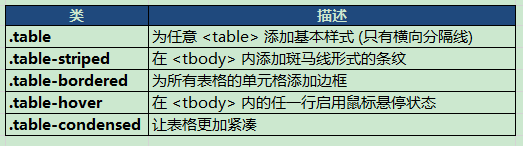
举例:
<!DOCTYPE html>

<html>

<head>

<meta http-equiv="Content-Type" content="text/html; charset=utf-8"/>

<title>My Test bootstrap</title>

    <link rel="stylesheet" href="./css/bootstrap.min.css">

    <script type="text/javascript" src="./js/bootstrap.min.js"></script>

</head>

<body>

 <table class="table table-striped">

  <caption>这是一个测试表格</caption>

  <thead>

    <tr>

      <th>姓名</th>

      <th>年龄</th>

      <th>地区</th>

    </tr>

  </thead>

  <tbody>

    <tr>

      <td>小胡子</td>

      <td>26</td>

      <td>陕西</td>

    </tr>

    <tr>

      <td>大胡子</td>

      <td>26</td>

      <td>北京</td>

    </tr>

   </tbody>

</table>

</body>

</html>
页面效果:

2. 表格行或单元格的样式

举例:
<!DOCTYPE html>

<html>

<head>

<meta http-equiv="Content-Type" content="text/html; charset=utf-8"/>

<title>My Test bootstrap</title>

    <link rel="stylesheet" href="./css/bootstrap.min.css">

    <script type="text/javascript" src="./js/bootstrap.min.js"></script>

</head>

<body>

 <table class="table table-striped">

  <caption>这是一个测试表格</caption>

  <thead>

    <tr>

      <th>姓名</th>

      <th>年龄</th>

      <th>地区</th>

    </tr>

  </thead>

  <tbody>

    <tr class="info">

      <td>小胡子</td>

      <td>26</td>

      <td>陕西</td>

    </tr>

    <tr class="warning">

      <td>大胡子</td>

      <td>26</td>

      <td>北京</td>

    </tr>

   </tbody>

</table>

</body>

</html>
页面效果:

3. 表单布局
(1)垂直表单:
<!DOCTYPE html>

<html>

<head>

<meta http-equiv="Content-Type" content="text/html; charset=utf-8"/>

<title>My Test bootstrap</title>

    <link rel="stylesheet" href="./css/bootstrap.min.css">

    <script type="text/javascript" src="./js/bootstrap.min.js"></script>

</head>

<body>

<form role="form">

  <div class="form-group">

    <label for="name">姓名</label>

    <input type="text" class="form-control" id="name" placeholder="请输入姓名">

  </div>

  <div class="form-group">

    <label for="inputfile">选择文件</label>

    <input type="file" id="inputfile">

  </div>

  <button type="submit" class="btn btn-default">提交</button>

</form>

</body>

</html>
效果:

(2)内联表单:它的所有元素是内联的,向左对齐的,标签是并排的
<!DOCTYPE html>

<html>

<head>

<meta http-equiv="Content-Type" content="text/html; charset=utf-8"/>

<title>My Test bootstrap</title>

    <link rel="stylesheet" href="./css/bootstrap.min.css">

    <script type="text/javascript" src="./js/bootstrap.min.js"></script>

</head>

<body>

<form role="form" class="form-inline">

  <div class="form-group">

    <label for="name">姓名</label>

    <input type="text" class="form-control" id="name" placeholder="请输入姓名">

  </div>

  <div class="form-group">

    <label for="inputfile">选择文件</label>

    <input type="file" id="inputfile">

  </div>

  <button type="submit" class="btn btn-default">提交</button>

</form>

</body>

</html>
效果:

(3)水平表单:水平表单与其他表单不仅标记的数量上不同,而且表单的呈现形式也不同
<!DOCTYPE html>

<html>

<head>

<meta http-equiv="Content-Type" content="text/html; charset=utf-8"/>

<title>My Test bootstrap</title>

    <link rel="stylesheet" href="./css/bootstrap.min.css">

    <script type="text/javascript" src="./js/bootstrap.min.js"></script>

</head>

<body>

<form role="form" class="form-horizontal">

  <div class="form-group">

        <label for="name" class="col-sm-2 control-label">姓名</label>

        <div class="col-sm-10">

            <input type="text" class="form-control" id="name" placeholder="请输入姓名">

        </div>

  </div>

  <div class="form-group">

        <label for="inputfile" class="col-sm-2 control-label">选择文件</label>

        <div class="col-sm-10">

            <input type="file" id="inputfile">

        <div>

  </div>

  <div class="form-group">

      <div class="col-sm-12">

        <button type="submit" class="btn btn-default">提交</button>

      </div>

  </div>

</form>

</body>

</html>
效果:

Bootstrap -- 表格样式、表单布局的更多相关文章
- 推荐的bootstrap之 formgroup表单布局样式
一直没能找到比较好的Form Group样式,直到找到如下样式 转自 https://www.cnblogs.com/jokerjason/p/5721349.html <form class= ...
- bootstrap之 formgroup表单布局样式
<form class="form-horizontal" role="form"> <fieldset> <legend> ...
- BootStrap入门教程 (二) :BASE CSS(排版(Typography),表格(Table),表单(Forms),按钮(Buttons))
上讲回顾:Bootstrap的手脚架(Scaffolding)提供了固定(fixed)和流式(fluid)两种布局,它同时建立了一个宽达940px和12列的格网系统. 基于手脚架(Scaffoldin ...
- 一步一步学习Bootstrap系列--表单布局
前言:Bootstrap 属于前端 ui 库,通过现成的ui组件能够迅速搭建前端页面,简直是我们后端开发的福音,通过几个项目的锻炼有必要总结些常用的知识,本篇把常用的Bootstrap表单布局进行归纳 ...
- Bootstrap<基础六> 表单
Bootstrap 通过一些简单的 HTML 标签和扩展的类即可创建出不同样式的表单. 表单布局 Bootstrap 提供了下列类型的表单布局: 垂直表单(默认) 内联表单 水平表单 垂直或基本表单 ...
- bootstrap+jQuery.validate表单校验
谈谈表单校验 这大概是一种惯例,学习前台后台最开始接触的业务都是用户注册和登录.现在社会坚持以人为本的理念,在网站开发过程同样如此.User是我们面对较多的对象,也是较核心的对象.最开始的用户注册和登 ...
- HTML&CSS精选笔记_表格与表单
表格与表单 表格标记 创建表格 要想创建表格,就需要使用表格相关的标记 <table> <tr> <td>单元格内的文字</td> ...
- 基于表单布局:分析过时的table结构与当下的div结构
一些话在前面 最近做了百度前端学院一个小任务,其中涉及到表单布局的问题, 它要处理的布局问题:左边的标签要右对齐,右边的输入框.单选按钮等要实现左对齐. 从开始入门就被告知table布局已经过时了,当 ...
- css011 表格和表单的格式化
css011 表格和表单的格式化 一. 让表格专司其职 Html中创建一个三行三列的表格 <table> <caption align="bottom" ...
随机推荐
- 【Spark篇】---Spark解决数据倾斜问题
一.前述 数据倾斜问题是大数据中的头号问题,所以解决数据清洗尤为重要,本文只针对几个常见的应用场景做些分析 . 二.具体方法 1.使用Hive ETL预处理数据 方案适用场景: 如果导致数据倾斜的是 ...
- 【Storm篇】--Storm并发机制
一.前述 为了提高Storm的并行能力,通常需要设置并行. 二.具体原理 1. Storm并行分为几个方面: Worker – 进程一个Topology拓扑会包含一个或多个Worker(每个Worke ...
- JVM基础系列第11讲:JVM参数之堆栈空间配置
JVM 中最重要的一部分就是堆空间了,基本上大多数的线上 JVM 问题都是因为堆空间造成的 OutOfMemoryError.因此掌握 JVM 关于堆空间的参数配置对于排查线上问题非常重要. tips ...
- C++ 动态生成对象
1.啰嗦一下 说起C++,很多人都觉着难学,其实我也是这么觉着的,在这个移动端火到爆的时代,我都想改行了,移动端做东西那都是现有的第三方库,拿来就可以用,而且稳定性好,开发速度快,而且最关键的是出东西 ...
- java基础(十五)----- Java 最全异常详解 ——Java高级开发必须懂的
本文将详解java中的异常和异常处理机制 异常简介 什么是异常? 程序运行时,发生的不被期望的事件,它阻止了程序按照程序员的预期正常执行,这就是异常. Java异常的分类和类结构图 1.Java中的所 ...
- Java 多线程(三)—— 线程的生命周期及方法
这篇博客介绍线程的生命周期. 线程是一个动态执行的过程,它也有从创建到死亡的过程. 线程的几种状态 在 Thread 类中,有一个枚举内部类: 上面的信息以图片表示如下: 第一张图: 第二张图:把等待 ...
- Java开发知识之Java的继承多态跟接口*
Java开发知识之Java的继承多态跟接口 一丶继承 1.继承的写法 在Java中继承的 关键字是 extends 代表一个类继承另一个类. 继承的含义以及作用: 继承就是基于某个父类的扩展.制定出来 ...
- Linux 的进程间通信:管道
本文由云+社区发表 作者:邹立巍 版权声明: 本文章内容在非商业使用前提下可无需授权任意转载.发布. 转载.发布请务必注明作者和其微博.微信公众号地址,以便读者询问问题和甄误反馈,共同进步. 微博ID ...
- Nagios 监控系统架构
Nagios 监控系统架设全攻略 简介: Nagios 全名为(Nagios Ain’t Goona Insist on Saintood),最初项目名字是 NetSaint.它是一款免费的开源 IT ...
- [六] 函数式接口的复合方法示例 predicate 谓词逻辑运算 Function接口 组合运算 比较器 逆序 比较链
复合的方法 有些函数式接口提供了允许复合的方法 也就是可以将Lambda表达式复合成为一个更加复杂的方法 之前的章节中有说到: 接口中的compose, andThen, and, or, negat ...