
Python turtle安装和使用教程
1 安装turtle
Python2安装命令:
pip install turtule
Python3安装命令:
pip3 install turtle
因为turtle库主要是在Python2中使用的,所以安装的时候可能会提示错误:
Command "python setup.py egg_info" failed with error code 1
2 基础概念
2.1 画布(canvas)
画布就是turtle为我们展开用于绘图区域, 我们可以设置它的大小和初始位置。
常用的画布方法有两个:screensize()和setup()。
(1)turtle.screensize(canvwidth=None, canvheight=None, bg=None)
参数分别为画布的宽(单位像素), 高, 背景颜色
如:
turtle.screensize(800, 600, "green")

turtle.screensize() #返回默认大小(400, 300)
(2)turtle.setup(width=0.5, height=0.75, startx=None, starty=None)
参数:
- width, height: 输入宽和高为整数时, 表示像素; 为小数时, 表示占据电脑屏幕的比例
- (startx, starty): 这一坐标表示 矩形窗口左上角顶点的位置, 如果为空,则窗口位于屏幕中心
如:
turtle.setup(width=0.6, height=0.6)

turtle.setup(width=800, height=800, startx=100, starty=100)
2.2 画笔
在画布上,默认有一个坐标原点为画布中心的坐标轴, 坐标原点上有一只面朝x轴正方向小乌龟。
这里我们描述小乌龟时使用了两个词语:标原点(位置),面朝x轴正方向(方向),turtle绘图中, 就是使用位置方向描述小乌龟(画笔)的状态
(1)画笔的属性
画笔有颜色、画线的宽度等属性。
1) turtle.pensize() :设置画笔的宽度;
2) turtle.pencolor() :没有参数传入返回当前画笔颜色;传入参数设置画笔颜色,可以是字符串如"green", "red",也可以是RGB 3元组。
    >>> pencolor('brown')

    >>> tup = (0.2, 0.8, 0.55)

    >>> pencolor(tup)

    >>> pencolor()

    '#33cc8c'
3) turtle.speed(speed) :设置画笔移动速度,画笔绘制的速度范围[0,10]整数, 数字越大越快
(2)绘图命令
操纵海龟绘图有着许多的命令,这些命令可以划分为3种:运动命令,画笔控制命令和全局控制命令
画笔运动命令:
| 命令 | 说明 |
|---|---|
| turtle.forward(distance) | 向当前画笔方向移动distance像素长 |
| turtle.backward(distance) | 向当前画笔相反方向移动distance像素长度 |
| turtle.right(degree) | 顺时针移动degree° |
| turtle.left(degree) | 逆时针移动degree° |
| turtle.pendown() | 移动时绘制图形,缺省时也为绘制 |
| turtle.goto(x,y) | 将画笔移动到坐标为x,y的位置 |
| turtle.penup() | 移动时不绘制图形,提起笔,用于另起一个地方绘制时用 |
| turtle.speed(speed) | 画笔绘制的速度范围[0,10]整数 |
| turtle.circle() | 画圆,半径为正(负),表示圆心在画笔的左边(右边)画圆 |
画笔控制命令:
| 命令 | 说明 |
|---|---|
| turtle.pensize(width) | 绘制图形时的宽度 |
| turtle.pencolor() | 画笔颜色 |
| turtle.fillcolor(colorstring) | 绘制图形的填充颜色 |
| turtle.color(color1, color2) | 同时设置pencolor=color1, fillcolor=color2 |
| turtle.filling() | 返回当前是否在填充状态 |
| turtle.begin_fill() | 准备开始填充图形 |
| turtle.end_fill() | 填充完成; |
| turtle.hideturtle() | 隐藏箭头显示; |
| turtle.showturtle() | 与hideturtle()函数对应 |
全局控制命令
| 命令 | 说明 |
|---|---|
| turtle.clear() | 清空turtle窗口,但是turtle的位置和状态不会改变 |
| turtle.reset() | 清空窗口,重置turtle状态为起始状态 |
| turtle.undo() | 撤销上一个turtle动作 |
| turtle.isvisible() | 返回当前turtle是否可见 |
| stamp() | 复制当前图形 |
| turtle.write(s[,font=("font-name",font_size,"font_type")]) | 写文本,s为文本内容,font是字体的参数,里面分别为字体名称,大小和类型;font为可选项, font的参数也是可选项 |
3 绘图举例
3.1 太阳花
 


import turtle as t

import time

t.color("red", "yellow")

t.speed(10)

t.begin_fill()

for _ in range(50):

    t.forward(200)

    t.left(170)

end_fill()

time.sleep(1)
3.2 绘制小蟒蛇
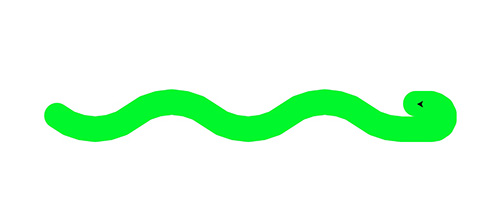 

import turtle

def drawSnake(rad, angle, len, neckrad):

    for _ in range(len):

        turtle.circle(rad, angle)

        turtle.circle(-rad, angle)

    turtle.circle(rad, angle/2)

    turtle.forward(rad/2)  # 直线前进

    turtle.circle(neckrad, 180)

    turtle.forward(rad/4)

if __name__ == "__main__":

   turtle.setup(1500, 1400, 0, 0)

   turtle.pensize(30)  # 画笔尺寸

   turtle.pencolor("green")

   turtle.seth(-40)    # 前进的方向

   drawSnake(70, 80, 2, 15)
3.3 绘制五角星
 

import turtle

import time

turtle.pensize(5)

turtle.pencolor("yellow")

turtle.fillcolor("red")

turtle.begin_fill()

for _ in range(5):

    turtle.forward(200)

    turtle.right(144)

turtle.end_fill()

time.sleep(2)

turtle.penup()

turtle.goto(-150,-120)

turtle.color("violet")

turtle.write("Done", font=('Arial', 40, 'normal'))

time.sleep(1)
3.4 绘制谢尔宾斯基三角形
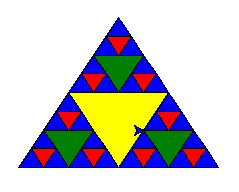
# coding: utf-8

import turtle

def draw_triangle(points, color, t):

    t.fillcolor(color)

    t.up()

    t.goto(points[0][0], points[0][1])

    t.down()

    t.begin_fill()

    t.goto(points[1][0], points[1][1])

    t.goto(points[2][0], points[2][1])

    t.goto(points[0][0], points[0][1])

    t.end_fill()

def get_mid(point1, point2):

    return (point1[0] + point2[0]) / 2, (point1[1] + point2[1]) / 2

def sierpinski(points, degree, t):

    color_map = ['blue', 'red', 'green', 'yellow', 'violet', 'orange', 'white',]

    draw_triangle(points, color_map[degree], t)

    if degree > 0:

        sierpinski([points[0], get_mid(points[0], points[1]), get_mid(points[0], points[2])], degree - 1, t)

        sierpinski([points[1], get_mid(points[0], points[1]), get_mid(points[1], points[2])], degree - 1, t)

        sierpinski([points[2], get_mid(points[0], points[2]), get_mid(points[1], points[2])], degree - 1, t)

if __name__ == "__main__"

    t = turtle.Turtle()

    t.speed(5)

    win = turtle.Screen()

    points = [[-100, -50], [0, 100], [100, -50]]

    sierpinski(points, 3, t)

    win.exitonclick()
Python turtle安装和使用教程的更多相关文章
- Python3 turtle安装和使用教程
Python3 turtle安装和使用教程 Turtle库是Python语言中一个很流行的绘制图像的函数库,想象一个小乌龟,在一个横轴为x.纵轴为y的坐标系原点,(0,0)位置开始,它根据一组函数 ...
- Python idle安装与使用教程 调试、下载
Python idle安装与使用教程 调试.下载 今天我们就来讲一下如何安装Python idle编辑器,也它的调试和使用. 第一步,我们先去下载一个Python idle程序安装包. 本节讲的是wi ...
- Python IDLE 安装与使用教程(调试、下载)
原文:http://www.jb51.net/softjc/142580.html ---------------------------------------------------------- ...
- Python PyInstaller安装和使用教程
安装 PyInstalle Python 默认并不包含 PyInstaller 模块,因此需要自行安装 PyInstaller 模块. 安装 PyInstaller 模块与安装其他 Python 模块 ...
- Python 3.6.3 官网 下载 安装 测试 入门教程 (windows)
1. 官网下载 Python 3.6.3 访问 Python 官网 https://www.python.org/ 点击 Downloads => Python 3.6.3 下载 Python ...
- python中RabbitMQ的使用(安装和简单教程)
1,简介 RabbitMQ是一个由erlang开发的AMQP(Advanced Message Queue )的开源实现的产品,RabbitMQ是一个消息代理,从"生产者"接收消息 ...
- python基础系列教程——Python的安装与测试:python的IDE工具PyDev和pycharm,anaconda
---恢复内容开始--- python基础系列教程——Python的安装与测试:python的IDE工具PyDev和pycharm,anaconda 从头开启python的开发环境搭建.安装比较简单, ...
- ~~Python解释器安装教程及环境变量配置~~
进击のpython Python解释器安装教程以及环境变量配置 对于一个程序员来说,能够自己配置python解释器是最基础的技能 那么问题来了,现在市面上有两种Python版本 Python 2.x ...
- Python解释器安装教程以及环境变量配置 以及 pycharm的安装与激活
计算机的组成 主板:人的骨架,用于拓展设备 CPU:人的大脑,用于计算和逻辑处理 硬盘:存储数据(永久储存),比如电脑上的 C盘,D盘 内存:临时记忆(断电即消失) 操作系统:XP win7 win1 ...
随机推荐
- delphi idhttp post 普通提交乱码处理
var IdHTTP1:TIdHTTP; postStream : TStringStream; Wstr:WideString; res:WideString; begin IdHTTP1 := T ...
- k8s构建镜像-基于centos的python环境+pip
FROM centos:7.4.1708 #维护者信息MAINTAINER by icdss # 标签LABEL version="1.0" # 安装依赖RUN yum -y up ...
- 大佬是怎么思考设计MySQL优化方案的?
在进行MySQL的优化之前,必须要了解的就是MySQL的查询过程,很多查询优化工作实际上就是遵循一些原则,让MySQL的优化器能够按照预想的合理方式运行而已. 一.优化的哲学 注:优化有风险,涉足需谨 ...
- SSM-网站前台博客系统制作(1)---前台+Google的Kaptcha
前提: 1天半时间简单自己手写了一下前端布局和后台验证码的基本工作,简要说明一下遇到的问题和收获吧. 这次基本就是前台设计(首页)+Kaptcha图片验证码(之前弄了一个reCaptcha验证码 但是 ...
- chrome浏览器导出文件提示病毒扫描失败
转自https://zhidao.baidu.com/question/758059392558639324.html 1.windows+R,打开运行 2.输入regedit.exe,确定,打开注册 ...
- JS宽高理解
1.clentWidth和clientHeight ①加入无padding.无滚动条显示占据位置 clientWidth=style.width ②假如有padding.无滚动 clientWidth ...
- CSDN去广告插件
因为避免不了与代码打交道,所以经常要上网搜代码,一般搜索到的资源都指向了CSDN,然而,好好的一篇博文,上面有很多广告,看着很不舒服,冲vip是不可能的,穷的的要死,怎么办呢?写个插件把! 去广告原理 ...
- Linux SSH 基于密钥交换的自动登录原理简介及配置说明
协商交互过程 1.客户端向目标服务器发送登录请求.在SSH 服务启用了证书验证登录方式后,会优先通过证书验证方式进行登录验证. 2.目标服务器根据 SSH 服务配置,在用户对应目录及文件中读取到有效的 ...
- 开箱即用的VScode C++环境
对大部分人来说vscode配置c++环境十分繁琐,这里提供简单方法. 1. 下载VSCode 官方网站下载(便携版):VSCode-win32-ia32-1.32.1.zip 解压VSCode-win ...
- python - Random常用方法记录
import random # range [a,b) 不包含b # 获取随机整数 # randrange [a,b) 不包含b a = random.randrange(0, 101, 5) # E ...