
perf + Flame Graph火焰图分析程序性能
1、perf命令简要介绍
性能调优时,我们通常需要分析查找到程序百分比高的热点代码片段,这便需要使用 perf record 记录单个函数级别的统计信息,并使用 perf report 来显示统计结果;
usage: perf [--version] [--help] [OPTIONS] COMMAND [ARGS]

 The most commonly used perf commands are:

   annotate        Read perf.data (created by perf record) and display annotated code

   archive         Create archive with object files with build-ids found in perf.data file

   bench           General framework for benchmark suites

   buildid-cache   Manage build-id cache.

   buildid-list    List the buildids in a perf.data file

   data            Data file related processing

   diff            Read perf.data files and display the differential profile

   evlist          List the event names in a perf.data file

   inject          Filter to augment the events stream with additional information

   kmem            Tool to trace/measure kernel memory properties

   kvm             Tool to trace/measure kvm guest os

   list            List all symbolic event types

   lock            Analyze lock events

   mem             Profile memory accesses

   record          Run a command and record its profile into perf.data

   report          Read perf.data (created by perf record) and display the profile

   sched           Tool to trace/measure scheduler properties (latencies)

   script          Read perf.data (created by perf record) and display trace output

   stat            Run a command and gather performance counter statistics

   test            Runs sanity tests.

   timechart       Tool to visualize total system behavior during a workload

   top             System profiling tool.

   trace           strace inspired tool

   probe           Define new dynamic tracepoints

 See 'perf help COMMAND' for more information on a specific command.
举例
perf record -e cpu-clock -g -p 222
-g 选项是告诉perf record额外记录函数的调用关系
-e cpu-clock 指perf record监控的指标为cpu周期
-p 指定需要record的进程pid
程序运行完之后,perf record会生成一个名为perf.data的文件,如果之前已有,那么之前的perf.data文件会被覆盖
获得这个perf.data文件之后,就需要perf report工具进行查看
perf report -i perf.data
-i 指定要查看的文件
以诊断fluentd为例,report结果:
$perf report -i perf.data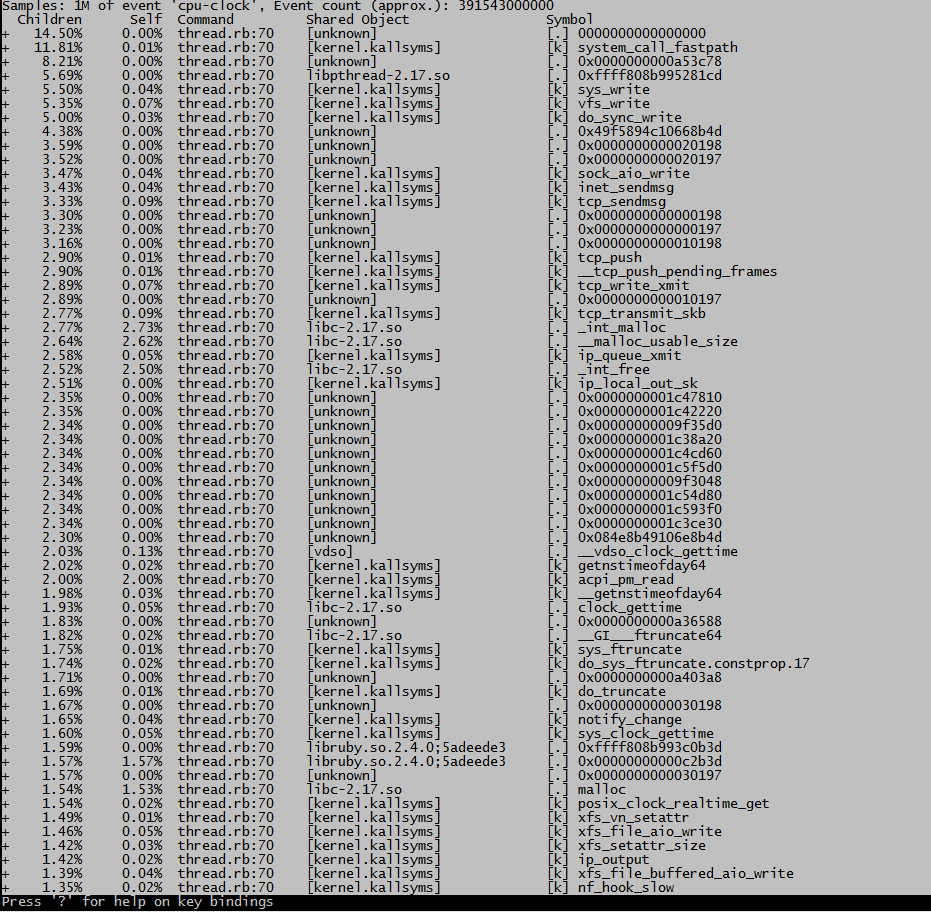
这种格式很不直观
2、使用火焰图展示结果
1、Flame Graph项目位于GitHub上:https://github.com/brendangregg/FlameGraph
2、可以用git将其clone下来:git clone https://github.com/brendangregg/FlameGraph.git
注意:git clone之后,下面用到的*.pl文件先给+x可执行权限,注意路径
我们以perf为例,看一下flamegraph的使用方法:
1、第一步
$perf record -e cpu-clock -g -p 28591
Ctrl+c结束执行后,在当前目录下会生成采样数据perf.data.
2、第二步
用perf script工具对perf.data进行解析
perf script -i perf.data &> perf.unfold
3、第三步
将perf.unfold中的符号进行折叠:
./stackcollapse-perf.pl perf.unfold &> perf.folded
注意:该命令可能有错误,错误提示在perf.folded
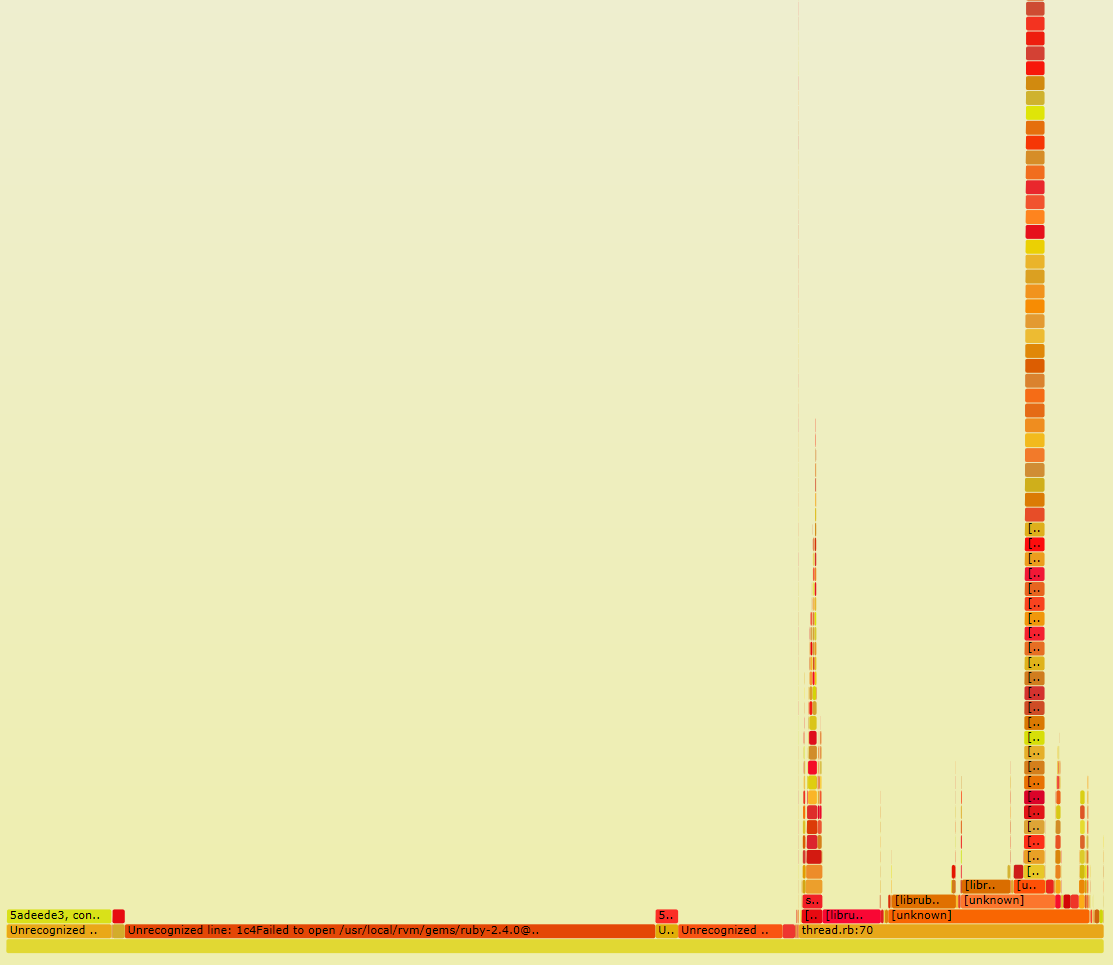
4、最后生成svg图:
./flamegraph.pl perf.folded > perf.svg
perf + Flame Graph火焰图分析程序性能的更多相关文章
- [转]perf + 火焰图分析程序性能
1.perf命令简要介绍 性能调优时,我们通常需要分析查找到程序百分比高的热点代码片段,这便需要使用 perf record 记录单个函数级别的统计信息,并使用 perf report 来显示统计结果 ...
- perf + 火焰图分析程序性能
1.perf命令简要介绍 性能调优时,我们通常需要分析查找到程序百分比高的热点代码片段,这便需要使用 perf record 记录单个函数级别的统计信息,并使用 perf report 来显示统计结果 ...
- 用 CPI 火焰图分析 Linux 性能问题
https://yq.aliyun.com/articles/465499 用 CPI 火焰图分析 Linux 性能问题 yangoliver 2018-02-11 16:05:53 浏览1076 ...
- 使用perf生成Flame Graph(火焰图)
具体的步骤参见这里: <flame graph:图形化perf call stack数据的小工具> 使用SystemTap脚本制作火焰图,内存较少时,分配存储采样的数组可能失败,需 ...
- 火焰图分析CPU性能问题
1.找出应用程序或内核消耗CPU的PID 2.执行perf record 命令,记录该PID的行为 perf record -a -g -p 14851 -- sleep 30 --30秒后退出 3. ...
- 超好用的自带火焰图的 Java 性能分析工具 Async-profiler 了解一下
如果你经常遇到 Java 线上性能问题束手无策,看着线上服务 CPU 飙升一筹莫展,发现内存不断泄露满脸茫然.别慌,这里有一款低开销.自带火焰图.让你大呼好用的 Java 性能分析工具 - async ...
- 利用火焰图分析ceph pg分布
前言 性能优化大神Brendan Gregg发明了火焰图来定位性能问题,通过图表就可以发现问题出在哪里,通过svg矢量图来查看性能卡在哪个点,哪个操作占用的资源最多 在查看了原始数据后,这个分析的原理 ...
- 火焰图分析openresty性能瓶颈
注:本文操作基于CentOS 系统 准备工作 用wget从https://sourceware.org/systemtap/ftp/releases/下载最新版的systemtap.tar.gz压缩包 ...
- python cProfile分析程序性能
转自:http://xianglong.me/article/analysis-python-application-performance-using-cProfile/?utm_source=tu ...
随机推荐
- 推荐几个Spring Cloud学习资料
研究Spring Cloud也有一段时间了,手头上有一点收集的资料,分享给小伙伴们学习. 博客 1.跟我学Spring Cloud 2.周立|Spring Cloud 3.Spring Cloud基础 ...
- 带着萌新看springboot源码13(手写一个自己的starter)
springboot的最强大的就是那些xxxAutoconfiguration,但是这些xxxAutoConfiguration又依赖那些starter,只有导入了这些场景启动器(starter),我 ...
- .NET Core2.1获取自定义配置文件信息
前言 .net core来势已不可阻挡.既然挡不了,那我们就顺应它.了解它并学习它.今天我们就来看看和之前.net版本的配置文件读取方式有何异同,这里不在赘述.NET Core 基础知识. ps:更新 ...
- Redis Windows 64位下安装Redis详细教程
Windows Redis 下载地址:点击打开链接https://github.com/MicrosoftArchive/redis/releases 点击打开链接 文件介绍 redis-benchm ...
- springboot+mybatis+dubbo+aop日志第三篇
AOP称为面向切面编程,在程序开发中主要用来解决一些系统层面上的问题,比如日志,事务,权限等等. Spring AOP模块提供截取拦截应用程序的拦截器,例如,当执行方法时,可以在执行方法之前或之后添加 ...
- Redis应用之[限制访问频率]
我们知道当网站的访问量突然很大的时候肯定会对服务器造成影响,甚至无法访问,如果是正常的访问那么很好说明业务量增大可以考虑系统的扩展,但是如果是搜索引擎爬虫频繁访问或是一些恶意访问,那这时候我们就应 ...
- JDK动态代理深入理解分析并手写简易JDK动态代理(上)
原文同步发表至个人博客[夜月归途] 原文链接:http://www.guitu18.com/se/java/2019-01-03/27.html 作者:夜月归途 出处:http://www.guitu ...
- 第一册:lesson 107.
第一册: It's too small. Do you like this dress,madam? I like the colour very much.It's a lovely dress,b ...
- arcgis10.0的ArcGIS Services Directory显示401,需要身份验证,访问被拒绝,rest/services需要输入用户名和密码
大家好! 这个错误我也不想说什么,主要是应公司开发需求,从自己的arcgis10.2的版本改为arcgis10.0的版本,装完之后遇到一个错误,老是显示访问被拒绝,我也是找了很多的方式,没有在网上找到 ...
- [PHP] curl访问https与CA证书问题
CA证书,用来在调用HTTPS资源的时候,验证对方网站是否是CA颁布的证书,而不是自己随便生成的 curl命令1.需要下载CA证书 文件地址是 http://curl.haxx.se/ca/cacer ...