
(二)Java工程化--Maven实践
Maven项目版本号
- 默认版本号: 1.0-SNAPSHOT 最佳实践是约定该版本为不稳定版本,如果发布一定要删除;
- 建议的版本规则: 主版本号.次版本号.增量版本号-<里程碑版本> 如:1.0.0-RELEASE 10.2.5-FINAL 等. 最佳实践是结合自身情况制定大家都认可的版本号规则.
常见命令
内置的maven插件提供了常见的命令, 可以在以下位置找到对应的包: .m2\repository\org\apache\maven\plugins
- compile
- clean 删除/target,将已编译的二进制文件等删除
- test test case junit/testNG
- package 打包
- install 把项目install到本地仓库
- deploy 发布jar到remote服务器
- mvn help:system 查看环境变量
插件
插件仓库
常见插件
- findbugs 静态代码检查
- versions 统一升级版本号 统一升级版本 http://www.mojohaus.org/versions-maven-plugin/ 可以查看使用示例, 常用的设置版本的命令为mvn versions: set –DnewVersion=1.1.0-final
- mvn versions:set -DnewVersion=1.1
- source 打包源代码,当jar提供给外部的时候斟酌使用
- assembly 打包zip、war
- tomcat7
<plugins>

    <!--静态代码bug扫描-->

    <plugin>

        <groupId>org.codehaus.mojo</groupId>

        <artifactId>findbugs-maven-plugin</artifactId>

        <version>3.0.0</version>

        <configuration>

            <threshold>High</threshold>

            <effort>Default</effort>

            <findbugsXmlOutput>true</findbugsXmlOutput>

            <findbugsXmlOutputDirectory>target/site</findbugsXmlOutputDirectory>

        </configuration>

    </plugin>

    <!--版本号管理-->

    <plugin>

        <groupId>org.codehaus.mojo</groupId>

        <artifactId>versions-maven-plugin</artifactId>

        <version>2.3</version>

    </plugin>

    <!--打包源代码-->

    <plugin>

        <artifactId>maven-source-plugin</artifactId>

        <version>2.3</version>

        <executions>

            <execution>

                <id>attach-sources</id>

                <phase>install</phase>

                <goals>

                    <goal>jar-no-fork</goal>

                </goals>

            </execution>

        </executions>

    </plugin>

    <!--这个有点晕,生成可执行jar包什么的-->

    <plugin>

        <artifactId>maven-assembly-plugin</artifactId>

        <version>3.0.0</version>

        <configuration>

            <archieve>

                <manifest>

                    <mainClass>com.xlx.Test</mainClass>

                </manifest>

            </archieve>

            <descriptorRefs>

                <descriptorRef>jar-with-dependencies</descriptorRef>

            </descriptorRefs>

        </configuration>

    </plugin>

    <!--tomcat插件-->

    <plugin>

        <groupId>org.apache.tomcat.maven</groupId>

        <artifactId>tomcat7-maven-plugin</artifactId>

        <version>2.2</version>

        <configuration>

            <port>8080</port>

            <path>/</path>

        </configuration>

    </plugin>

</plugins>
自定义插件
学习地址https://maven.apache.org/guides/plugin/guide-java-plugin-development.html
- 创建项目
- 修改pom的
<packaging>maven-plugin</packaging> - 添加依赖
<dependencies>

    <dependency>

        <groupId>org.apache.maven</groupId>

        <artifactId>maven-plugin-api</artifactId>

        <version>LATEST</version>

    </dependency>

    <dependency>

        <groupId>org.apache.maven.plugin-tools</groupId>

        <artifactId>maven-plugin-annotations</artifactId>

        <version>LATEST</version>

        <scope>provided</scope>

    </dependency>

</dependencies>
- 写代码实现
AbstractMojo
@Mojo(name="xlxTest",defaultPhase = LifecyclePhase.PACKAGE)

public class Test extends AbstractMojo {

    /**

     * 接收的参数

     */

    @Parameter

    private String message;

    /**

     * 接收多个值的参数

     */

    @Parameter

    private List<String> options;

    /**

     * 命令行中接收,注意必须有property mvn:package -Dargs=this is from cmd

     */

    @Parameter(property = "args")

    private String args;

    public void execute() throws MojoExecutionException, MojoFailureException {

        System.out.println("my first maven plugin message is : " + message);

        System.out.println("my first maven plugin options is : " + options);

        System.out.println("my first maven plugin args from evm is : " + args);

    }

}
- mvn install
- 使用, maven可以接收参数, 也可以使用环境变量取,如${settings.localRepository},${project.baseUri}等
<!--项目pom修改-->

<build>

    <plugins>

        <plugin>

            <groupId>com.xlx</groupId>

            <artifactId>engineering</artifactId>

            <version>1.0-SNAPSHOT</version>

            <executions>

                <execution>

                    <phase>package</phase>

                    <goals>

                        <goal>xlxTest</goal>

                    </goals>

                </execution>

            </executions>

            <configuration>

                <message>message</message>

                <options>

                    <option>one</option>

                    <option>two</option>

                </options>

            </configuration>

        </plugin>

    </plugins>

</build>
Profile
- 不同运行环境 dev/prod/test等
- mvn clean package –P dev
- settings.xml 可以指定不同服务器仓储配置
<profile.active>私服或者官方</profile.active>
多环境配置的配置文件路径
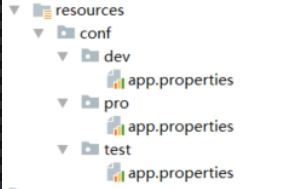
<profiles>

    <profile>

        <id>dev</id>

        <properties>

            <profile.active>dev</profile.active>

        </properties>

        <activation>

            <activeByDefault>true</activeByDefault>

        </activation>

    </profile>

    <profile>

        <id>test</id>

        <properties>

            <profile.active>test</profile.active>

        </properties>

    </profile>

</profiles>

<build>

    <resources>

        <resource>

            <directory>${baseDir}/src/main/resources</directory>

            <excludes>

                <exclude>conf/**</exclude>

            </excludes>

        </resource>

         <resource>

            <directory>src/main/resources/conf/${profile.active}</directory>

        </resource>

    </resources>

</build>
私服
- 下载: https://www.sonatype.com/download-oss-sonatype?hsCtaTracking=920dd7b5-7ef3-47fe-9600-10fecad8aa32|f59d5f10-099f-4c66-a622-0254373f4a92
- 安装, 解压即可, 如果需要修改端口号等信息, 可以修改文件\nexus-3.13.0-01\etc\nexus-default.properties
- 启动命令 转到\nexus-3.13.0-01\bin下, nexus /run 可查看启动日志
- 使用: http://books.sonatype.com/nexus-book/reference3/index.html
pom中增加发布节点
<distributionManagement>

    <repository>

        <id>nexus-release</id>

        <name>nexus-release</name>

        <url>http://localhost:8099/repository/maven-releases/</url>

    </repository>

    <snapshotRepository>

        <id>nexus-snapshot</id>

        <name>nexus-snapshot</name>

        <url>http://localhost:8099/repository/maven-snapshots/</url>

    </snapshotRepository>

</distributionManagement>
修改settings.xml 增加服务器账号密码信息
<server>

    <id>nexus-release</id>

    <username>admin</username>

    <password>admin123</password>

</server>

<server>

    <id>nexus-snapshot</id>

    <username>admin</username>

    <password>admin123</password>

</server>
生成脚手架
- mvn archetype: create-from-project 从项目生成脚手架
- cd /target/generated-soource/archetype 转到此目录
- mvn install 发布到仓库
- 可以添加到ide的脚手架列表
- mvn archetype:generate –DarchetypeCatagory=local 命令行方式创建项目 local参数指定走本地仓库
(二)Java工程化--Maven实践的更多相关文章
- (一)Java工程化--Maven基础
Maven 读作['mevən] 翻译成中文是"内行,专家" Maven是什么 包依赖的前世今生: 原始的jar包引用--> ant --> maven. 是一种项目管 ...
- JEECG(二) JEECG框架下调用webservice java springmvc maven 调用 webservice
JEECG系列教程二 如何在JEECG框架下使用webservice 本文所使用的webservice是c#开发的 其实无论是什么语言开发的webservice用法都一样 java springmvc ...
- Java Servlet DAO实践(二)
Java Servlet DAO实践(二) DAO连接类 package com.seller.servlets.dao; import java.sql.*; public class DataBa ...
- Java 理论与实践: 处理 InterruptedException
捕捉到它,然后怎么处理它? 很多 Java™ 语言方法,例如 Thread.sleep() 和 Object.wait(),都可以抛出InterruptedException.您不能忽略这个异常,因为 ...
- Google Developing for Android 二 - Memory 最佳实践 // lightSky‘Blog
Google Developing for Android 二 - Memory 最佳实践 | 分类于 Android最佳实践 原文:Developing for Android, II Th ...
- 实验二 Java面向对象程序设计
实验二 Java面向对象程序设计 实验内容 1. 初步掌握单元测试和TDD 2. 理解并掌握面向对象三要素:封装.继承.多态 3. 初步掌握UML建模 4. 熟悉S.O.L.I.D原则 5. 了解设计 ...
- Java 理论与实践: 处理 InterruptedException(转)
很多 Java™ 语言方法,例如 Thread.sleep() 和 Object.wait(),都可以抛出InterruptedException.您不能忽略这个异常,因为它是一个检查异常(check ...
- Maven(二)之Maven项目构建演练
从上一篇的讲解中我们知道了什么是Maven,然后它的安装配置,到修改本地仓库,这篇我们用一个实际的例子,带领大家走进我们的Maven之旅.让我们一起来体验一下Maven的高度自动化构建项目的过程. 一 ...
- kafka原理和实践(二)spring-kafka简单实践
系列目录 kafka原理和实践(一)原理:10分钟入门 kafka原理和实践(二)spring-kafka简单实践 kafka原理和实践(三)spring-kafka生产者源码 kafka原理和实践( ...
随机推荐
- 011_python常用查询
一.获取指定日期的后(前)一(n)天 # coding=utf-8 import datetime #获取今天日期(年-月-日) today = datetime.date.today() #< ...
- 8-过滤器Filter和监听器Listener
一.web监听器:监听特殊事件的发生1.监听实现步骤 a.写一个java类,实现特定的接口,重写相关方法 b.在web.xml中,牌配置 <listener> <listener-c ...
- zookeeper的分布式锁
实现分布式锁目前有三种流行方案,分别为基于数据库.Redis.Zookeeper的方案,其中前两种方案网络上有很多资料可以参考,本文不做展开.我们来看下使用Zookeeper如何实现分布式锁. 什么是 ...
- Axios
axios 是一个基于Promise 用于浏览器和 nodejs 的 HTTP 客户端.简单的理解就是ajax的封装 它本身具有以下特征: a.从浏览器中创建 XMLHttpRequest b ...
- 【Topcoder 1879】Scheduling
题意:给一个\(dag\),每一个点有一个访问时间. 现在可以同时访问两个点,但当连向这个点的所有点都被访问完成后才可以访问这个点. 问最短访问时间. 思路:一眼贪心.可惜是错的. 第二眼暴搜.就这么 ...
- Linux内存管理 (25)内存sysfs节点解读
1. General 1.1 /proc/meminfo /proc/meminfo是了解Linux系统内存使用状况主要接口,也是free等命令的数据来源. 下面是cat /proc/meminfo的 ...
- 【转】IT行业岗位以及发展方向
以下转自https://blog.csdn.net/qq_23994787/article/details/79847270 职业生涯规划的意义 1.以既有的成就为基础,确立人生的方向,提供奋斗的策略 ...
- 解决SpringSecurity阻止ajax的POST和PUT请求,导致403Forbidden的问题
前言: 最近在整合springboot+springsecurity,在PUT请求的时候出现了403的问题,这里记录一下解决的过程 到Spring的官网去查查SpringSecurity的参考手册看看 ...
- Python——socketserver编程(客户端/服务器)
一.socketserver是标准库中的高级模块,它的目标是简化很多多样板代码,是创建网络客户端和服务器所必须的代码.(事件驱动) 二.模块类 BaseServer :包含核心服务器功能和mix-in ...
- Elasticsearch6.x和Kibana6.x的安装
Elasticsearch6.x的安装(centos6.x下) Elasticsearch6.x目前需要至少jdk8的支持,关于如何安装jdk不在讲述.Oracle的推荐安装文档可以在Oracle的网 ...