
401 experience
AM:
块元素与内联元素 :
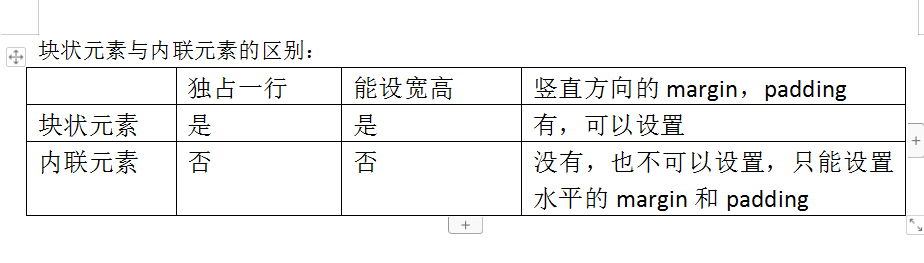
div与span的区别 span只能设置水平的margin(左右内外边距)
在span里面加 display:block; 内联转块(相当于给span加了上下的边距)反之
/*将块元素转换成内联元素*/
display: inline;
/*将元素隐藏起来*/
display: none;
/*将内联元素转换成块元素*/
display: block;
PM
1.相对定位:相对与元素自己本身来移动定位
2. 绝对定位:距离父类(有position样式的父类)...要是没有找到父类,就有默认的body来代替
备注;
/*z-index:值后面不要加像素 想让哪个在前面就把哪个的值设大*/
3.fixed定位相对于浏览器窗口定位 position:fixed;
/* fixed 定位:对于浏览器窗口 */
position: fixed;
left: 20px;top: 50px;
360导航狗:

<!doctype html>

<html>

<head>

<meta charset="utf-8">

<title>360导航狗</title>

    <style>

        #da{

            width:68px;

            height: 280px;

            position: fixed;

            right: 50px;

            top:280px;

            background: whitesmoke;

        }

        #a1{

            width: 74px;

            height: 82px;

            position: absolute;

            position: fixed;

            right:50px;

            top:200px;

            background-image:url(img/a1.png);

        }

        .st{

            float: right;

            position: relative;

            bottom: 30px;

            margin-right: 10px;

        }

        .zt{

            text-decoration: none;

            color: gray;

            font-size: 7px;

        }

        .zt:hover{

            color: greenyellow;

        }

        #db{

            width:50px;

            height: 280px;

            position: fixed;

            right: 60px;

            bottom:70px;

        }

        #db1{

            color: gray;

            text-decoration: none;

            font-size: 10px;

        }

        #db1:hover{

            color: greenyellow;

        }

    </style>

</head>

<body>

<div id="da">

    <div>

        <div><img src="img/a2.png" width="31px"></div>

        <div class="st"><a href="#" class="zt">娱乐</a></div>

    </div><br>

    <div>

        <div><img src="img/a3.png" width="31px"></div>

        <div class="st"><a href="#" class="zt">看片</a></div>

    </div><br>

    <div>

        <div><img src="img/a4.png" width="31px"></div>

        <div class="st"><a href="#" class="zt">购物</a></div>

    </div><br>

    <div>

        <div><img src="img/a5.png" width="31px"></div>

        <div class="st"><a href="#" class="zt">游戏</a></div>

    </div><br>

    <div>

        <div><img src="img/a6.png" width="31px"></div>

        <div class="st"><a href="#" class="zt">生活</a></div>

    </div><br>

    <div>

        <div><img src="img/a7.png" width="31px"></div>

        <div class="st"><a href="#" class="zt">借钱</a></div>

    </div>

</div>

    <div>

        <div id="db"><a href="#" id="db1">回顶部</a></div>

    </div>

<div id="a1"></div>

<br><br><br><br><br><br><br><br><br><br><br><br><br><br><br><br><br><br><br><br>

<br><br><br><br><br><br><br><br><br><br><br><br><br><br><br><br><br><br><br><br>

<br><br><br><br><br><br><br><br><br><br><br><br><br><br><br><br><br><br><br><br>

<br><br><br><br><br><br><br><br><br><br><br><br><br><br><br><br><br><br><br><br>

</body>

</html>
163邮箱登录框

<!doctype html>

<html>

<head>

<meta charset="utf-8">

<title>163邮箱登录框</title>

<style>

    #d{

        width: 340px;

        height: 45px;

        background-color:white;

        border: 1px solid #666666;}

    #d1{

        width: 38px;

        height: 45px;

        background-color: white;

        float: left;

        background-image: url( a.png);

        background-position:-242px 424px;

    }

    #d2{

        width: 202px;

        height: 44px;

        background-color:white;

        float: left;

    }

    #d3{

        width: 100px;

        height: 35px;

        background-color:white;

        float: left;

        padding-top:10px;

        }

    #d4{

        display:inline;

        font-size: 15px;

        padding:17px;

    }

    #d5{

        border: 0px;

        height: 43px;

        text-indent: 30px;

    }

    input{

        width: 202px;

        height: 39px;

        font-size: 15px;

    }

    #d6{

        width: 340px;

        height: 45px;

        background-color:white;

        border: 1px solid #666666;

    }

    #d7{

        width: 38px;

        height: 45px;

        background-color: white;

        float: left;

        background-image: url( a.png);

        background-position:-284px 424px;

    }

    #d8{

        border: 0px;

        text-indent: 30px;

        height: 43px;

        width: 250px;

    }

    </style>

</head>

<body>

<div id="d">

    <div id="d1"></div>

    <div id="d2">

        <input id="d5" type="text" name="user" placeholder="邮箱账号或手机号码">

    </div>

    <div id="d3"><span id="d4">@163.com</span></div>

</div>

<br>

<div id="d6">

    <div id="d7"></div>

        <input id="d8" type="text" placeholder="输入密码">

</div>

</body>

</html>
401 experience的更多相关文章
- IIS启动失败,启动Windows Process Activation Service时,出现错误13:数据无效 ;HTTP 错误 401.2 - Unauthorized 由于身份验证头无效,您无权查看此页
因为修改过管理员账号的密码后重启服务器导致IIS无法启动,出现已下异常 1.解决:"启动Windows Process Activation Service时,出现错误13:数据无效&quo ...
- Pramp - mock interview experience
Pramp - mock interview experience February 23, 2016 Read the article today from hackerRank blog on ...
- git clone出现的error: The requested URL returned error: 401 Unauthorized
error: The requested URL returned error: 401 Unauthorized while accessing https://git.oschina.net/.. ...
- 允许asp.net MVC报 错说明: 访问服务此请求所需的资源时出错。服务器可能未配置为访问所请求的 URL。错误消息 401.2。: 未经授权
运行mvc3程序报以下错误 详细报错如下: “/”应用程序中的服务器错误. 访问被拒绝. 说明: 访问服务此请求所需的资源时出错.服务器可能未配置为访问所请求的 URL. 错误消息 401.2.: 未 ...
- 19.在HTTP 1.0中,状态码401的含义是(?);如果返回“找不到文件”的提示,则可用 header 函数,其语句为(?)写出http常见的状态码和含义,至少5个.[完善题目]
状态401代表未被授权,header("Location:www.xxx.php"); 100-199 用于指定客户端应相应的某些动作. 200-299 用于表示请求成功. 300 ...
- "错误消息 401.2。: 未经授权: 服务器配置导致登录失败。"的解决办法
[详细报错如下]: “/”应用程序中的服务器错误. 访问被拒绝. 说明: 访问服务此请求所需的资源时出错.服务器可能未配置为访问所请求的 URL. 错误消息 401.2.: 未经授权: 服务器配置导致 ...
- Enhanced Mitigation Experience Toolkit 软件安全性强化工具
Enhanced Mitigation Experience Toolkit软件是微软为应对互联网中层出不穷的漏洞而推出的一款安全工具,可以在Window Update未获取到补丁前,对系统进行保护. ...
- 新版本eclipse Neon 4.6.1,登录git报401 没有权限
新版本eclipse Neon 4.6.1,登录git报401 没有权限 经过查找原因竟然是新的eclipse需要进行update.比较坑,新版eclipse竟然需要先更新一下才能用! eclipse ...
- 401 Not Authorized For MSDEPLOY (msdeployAgentService)
When you get this error from msdeploy:“Error: The remote server returned an error: (401) Unauthorize ...
随机推荐
- C语言的3种参数传递方式
参数传递,是在程序运行过程中,实际参数就会将参数值传递给相应的形式参数,然后在函数中实现对数据处理和返回的过程,方法有3种方式 值传递 地址传递 引用传递 tips: 被调用函数的形参只有函数被调用时 ...
- 如何在Jupyter里以不同的运行模式使用Pyspark
假设你的环境已经安装好了以下东西,如何详细的安装它们不在本文的讨论范围之内 具体的可疑参考三分钟搞定jupyter和pyspark整合 anaconda2 findspark pyspark 这里多说 ...
- 基于 HTML5 WebGL 的 3D 工控裙房系统
前言 工业物联网在中国的发展如火如荼,网络基础设施建设,以及工业升级的迫切需要都为工业物联网发展提供了很大的机遇.中国工业物联网企业目前呈现两种发展形式并存状况:一方面是大型通讯.IT企业的布局:一方 ...
- idea免费破解
1.下载破解补丁. https://pan.baidu.com/s/1pWCr_HIHURSAbGvvo70wKA 密码:pxkv 2.下载idea网址: https://www.jetbrain ...
- docker(四) 使用Dockerfile构建镜像
下面以一个例子来演示构建镜像的过程. #在/tmp目录下演示 cd tmp mkdir build-redis-image 1.创建Dockerfile文件 vim Dockerfile 并写入如下内 ...
- Java的selenium代码随笔(1)
package ShareClass; import java.awt.AWTException;import java.awt.Robot;import java.awt.Toolkit;impor ...
- Python exe2shellcode,shellcode2exe
exe2shellcode #! /usr/bin/env python # -*- coding: utf-8 -*- import os import sys def payload(files) ...
- [转帖]Linux操作系统中,*.zip、*.tar、*.tar.gz、*.tar.bz2、*.tar.xz、*.jar、*.7z等格式的压缩与解压
Linux操作系统中,*.zip.*.tar.*.tar.gz.*.tar.bz2.*.tar.xz.*.jar.*.7z等格式的压缩与解压 https://blog.csdn.net/gatieme ...
- mysqldump 导出
导出单张表数据:mysqldump -h127.0.0.1 -uroot -p database_name table_name > user_action.sql
- Codeforces484 A. Bits
题目类型:位运算 传送门:>Here< 题意:求区间\([L,R]\)内二进制中1的个数最多的那个数,如果有多解输出最小解 解题思路 想了15min就一遍A了 我们可以贪心地在\(L\)的 ...