
CentOS7 DHCP 服务搭建
一、实验环境
1、VMware12、俩台Linux(Ser 和 Client )、DHCP安装包。
二、操作流程
1、安装DHCP
2、配置DHCP的配置文件: /etc/dhcp/dhcpd.conf
3、测试服务
三、实操如下
1、# yum -y install dhcp* //安装DHCP,注意要带上* 在Ser上操作。
2、# vim /etc/sysconfig/network-scripts/ifcfg-ens33-1 //在Ser上配置网络IP地址,一般都是ens33
3、网络IP设置如下:
HWADDR=00:0C:29:03:EA:35
TYPE=Ethernet
PROXY_METHOD=none
BROWSER_ONLY=no
BOOTPROTO=static //改为static,表示静态地址
IPADDR=192.168.1.20 //改为和subnet 同网段的地址(此地址最好选择range之外的地址)
PREFIX=24 //改为和网路IP地址对应的子网掩码
GATEWAY=192.168.1.1 //注意:此处网关必须设置和DHCP作用域里面的网关相同
DNS1=8.8.8.8 //DNS设置正常的就可以
DEFROUTE=yes
IPV4_FAILURE_FATAL=no
IPV6INIT=yes
IPV6_AUTOCONF=yes
IPV6_DEFROUTE=yes
IPV6_FAILURE_FATAL=no
IPV6_ADDR_GEN_MODE=stable-privacy
NAME=ens33
UUID=2d5fde3e-2e83-49af-b7d7-f326fc3a7001
ONBOOT=yes //保证网卡处于yes 启动状态
⏩按键esc 输入:wq 保存退出。
#systemctl restart network //重启网卡 (建议重启系统)
4、配置DHCP的配置文件: vim /etc/dhcp/dhcpd.conf
打开配置文件按照提示 #cp /usr/share/doc/dhcp*/dhcpd.conf.example /etc/dhcp/dhcpd.conf //用示例文件覆盖配置文件
#vim /etc/dhcp/dhcpd.conf //正式开始编辑配置文件,加底色的保留,其他的全部dd
#
# Sample configuration file for ISC dhcpd
#
option domain-name "example.org"; //作用域名
option domain-name-servers ns1.example.org, ns2.example.org; //DNS
max-lease-time 7200; //最大租约时间
#ddns-update-style none;
# network, the authoritative directive should be uncommented.
#authoritative;
# have to hack syslog.conf to complete the redirection).
# DHCP server to understand the network topology.
} //声明网络拓扑
range 10.254.239.10 10.254.239.20;
option routers rtr-239-0-1.example.org, rtr-239-0-2.example.org;
}
# which we don't really recommend.
range dynamic-bootp 10.254.239.40 10.254.239.60;
option broadcast-address 10.254.239.31;
}
subnet 10.5.5.0 netmask 255.255.255.224 { //作用域网段
range 10.5.5.26 10.5.5.30; //地址池范围
option domain-name-servers ns1.internal.example.org; //DNS
option domain-name "internal.example.org"; //作用域名
option routers 10.5.5.1; //网关,Ser上面配置的网关和此网关要一致
option broadcast-address 10.5.5.31; //广播地址
default-lease-time 600; //默认租约时间
max-lease-time 7200; //最大租约时间
} //创建一个子网地址池
# host statements. If no address is specified, the address will be
# allocated dynamically (if possible), but the host-specific information
# will still come from the host declaration.
hardware ethernet 0:0:c0:5d:bd:95;
filename "vmunix.passacaglia";
server-name "toccata.fugue.com";
}
# should not also be listed as being available for dynamic assignment.
# Hosts for which fixed IP addresses have been specified can boot using
# BOOTP or DHCP. Hosts for which no fixed address is specified can only
# be booted with DHCP, unless there is an address range on the subnet
# to which a BOOTP client is connected which has the dynamic-bootp flag
# set.
host fantasia {
hardware ethernet 08:00:07:26:c0:a5;
fixed-address fantasia.fugue.com;
}
# based on that. The example below shows a case where all clients
# other clients get addresses on the 10.0.29/24 subnet.
match if substring (option vendor-class-identifier, 0, 4) = "SUNW";
}
subnet 10.17.224.0 netmask 255.255.255.0 {
option routers rtr-224.example.org;
}
subnet 10.0.29.0 netmask 255.255.255.0 {
option routers rtr-29.example.org;
}
pool {
allow members of "foo";
range 10.17.224.10 10.17.224.250;
}
pool {
deny members of "foo";
}
}
⏩按键esc 输入:wq 保存退出。
#systemctl start dhcpd //启动DHCP服务
5、测试地址分发
首先将俩台虚拟系统Ser 和 Client 的网卡配置在同一个虚拟网络环境中,如下图
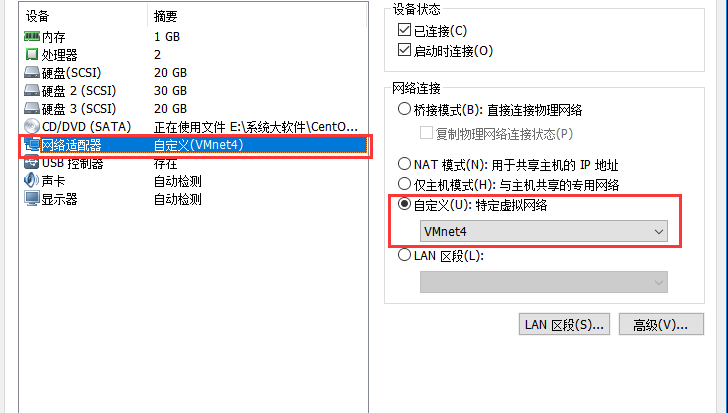
然后在Client 上 修改网卡配置文件,BOOTPROTO=dhcp 删除静态地址后保存 重启网卡(也重启电脑)
同样在Client 上安装DHCP服务
验证如下:
ifconfig 查看获取情况
route -n //查看路由信息
也可以在Ser上执行status 命令
#systemctl status dhcpd
CentOS7 DHCP 服务搭建的更多相关文章
- DHCP协议格式、DHCP服务搭建、DHCP协商交互过程入门学习
相关学习资料 http://www.rfc-editor.org/rfc/rfc2131.txt http://baike.baidu.com/view/7992.htm?fromtitle=DHCP ...
- Linux 之dhcp服务搭建
DHCP(Dynamic Host Configuration Protocol,动态主机配置协议)是一个局域网的网络协议 dhcp服务器端监控端口67 涉及的配置文件:/etc/dhcp/dhcpd ...
- DHCP服务搭建
DHCP(Dynamic Host Configuration Protocol,动态主机配置协议)是一个局域网的网络协议,使用UDP协议工作, 主要有两个用途:给内部网络或网络服务供应商自动分配IP ...
- 24、dhcp服务搭建
1.dhcp介绍: DHCP(Dynamic Host Configuration Protocol),动态主机配置协议,DHCP 协议主要是用来自动为局域网中的客户机分配 TCP/IP 信息的网络协 ...
- CentOS7 FTP服务搭建(虚拟用户访问FTP服务)
概述 最近在搞Oracle在Linux系统下集群,针对Linux系统,笔人也是一片空白.Liunx外部文件的传输,避免不了使用FTP服务,所以现在就整理下,CentOS7环境下,FTP服务的搭建.FT ...
- CentOS7 Rsync服务搭建-Rsync+Inotify架构实现实时同步
一.rsync 概念 1.rsyncrsync是类unix/linux系统下的数据镜像备份工具.使用快速增量备份工具Remote Sync可以远程同步,支持本地复制,或者与其他SSH.rsync主机同 ...
- DHCP服务
DHCP服务 DHCP服务(需要dhcp命令):负责ip,掩码,网关地址,DNS地址等自动分发的软件服务 /usr/sbin/dhcpd或/usr/sbin/dhcrelay(中继命令):执行程序 / ...
- dhcp服务简单配置
dhcp服务搭建 注意事项: > 配置虚拟机虚拟网络编辑器,取消"使用本地DHCP服务将IP地址分配给虚拟机" > 虚拟机网络连接设置为"仅主机模式" ...
- CentOS搭建NAT和DHCP服务,实现共享上网
什么是NAT? NAT(Network address translation)即网络地址转换,作为一种过渡解决手段,可以用来减少对全球合法IP地址的需求.简单的说,NAT就是在内部专用网络中使用内部 ...
随机推荐
- PowerBI功能发布时间线
DAX/PowerBI系列 - PowerBI功能发布时间线 PowerBI从GA/上线以来,每月发布的功能收集起来做成了一个报表:(耐心等待PowerBI 出来,噔噔噔噔~~~) 上图显示: 1)D ...
- js中把ajax获取的数据转化成树状结构(并做成多级联动效果)
1.首先通过ajax获取数据,此处省略,直接贴出获取到的数据格式 var arr = [{ id: 1, name: "一级标题", pid: 0 }, { id: 2, name ...
- UGUI-Text——自适应
Text组件上勾选Best Fit,当内容变多时,按原来大小装不下时,会总体缩放显示
- Spring Boot:快速入门(二)
学习完成怎么搭建一个独立Spring Boot项目后,上面是整理出来的一些相关文件以及用途. 原本是一个Excel文件,拷贝到博客园就成了图片,当做几个笔记了,用到的时候可以查阅,也欢迎转载,收藏. ...
- 记录心得-shiro框架demo示例
从懵懂到了解,再到熟悉,是一个进步的过程! 先撸代码,跑起来看效果,再做详细的介绍,开始干活! 1,先列出工程目录结构,自己需要创建对应层级的程序和相关配置文件. 2,导入maven依赖的jar包.打 ...
- 如何在Jenkins上配置一个可以从其它Job取回Artifact的Job
今天因为工作上的需求,需要在Jenskin上配置一个job, 它应该可以从其它所选择的Job中取回Artifact. 首先,在"构建"步骤中添加 "Copy Artifa ...
- CentOS7.3安装zimbra8.7.11
系统版本:CentOS7.3 Zimbra版本:8.7.11 设置IP地址 vi /etc/sysconfig/network-scripts/ifcfg-ens33 #使用vi命令修改ip BOOT ...
- omitting directory `folder/'
题记:一个问题,若遇见第一次,不知道如何解决,经查资料后处理掉可以原谅:若遇见第二次,还是一头雾水!反省自己,特此备录. 在linux CentOS6.5 系统中复制文件夹时提示如下: cp: omi ...
- JAVA课堂测试之查找字母和单词出现次数、频率
代码如下:没有加注释,自己研究吧. import java.io.BufferedReader;import java.io.File;import java.io.FileInputStream;i ...
- volatile CAS区别