
Axios、Vue组件-生命周期、计算属性、Slot插槽、自定义事件、v-router、钩子函数
Axios:网络通信
<script>

    var vm =new vue({

        el:"#app",

        data(){

        return{

        info:{

        //返回的数据必须和json的数据一样

    	name:null,

        city:null

    }

    }

        },

        mouted(){

            axios.get('../data.json').then(response=>(console.log(this.info=response.data)));

        }

    })

</script>
axios:网络请求库
- axios.get(地址).then(function(response){},function(err){})
- axios.get(地址?查询字符串&).then(function(response){},function(err){})
- axios.post(地址,{name:"我的"}).then(function(response){},function(err){})
请求的例子:https://autumnfish.cn/api/joke/list?num=10
Vue的组件
- component
- props
- template
<div id="app">

    <zujian v-for="item in item" v-bind:qin="item"></zujian>

</div>

<script>

//定义一个Vue组件

    Vue.component("zujian",{

      props:['qin'],

	template:'<li>{{qin}}</li>'

    });

    var vm =new Vue({

        el:"#app",

        data:{

            item:["java","linus","前端"]

        }

    })

</script>
Vue生命周期
钩子函数
先加载模版--再加载数据
- new vue()--实例化Vue对象
- init()--初始化事件和生命走起Event&Lifecycle
- 创建实例执行钩子函数 beforeCreate
- init--初始化注入 injections&reactivity
- 实例化创建完成后执行钩子Create
计算属性
计算属性的重点在属性上,首先它是个属性,其次这个属性要有计算的能力,这里的计算是一个函数。它就是一个能够将计算结果缓存起来的属性(将行为转化为静态的属性)可以想象缓存
- 不经常变化的computed
- 常用的变化的methods
<div id="app">

    <zujian v-for="item in item" v-bind:qin="item"></zujian>

</div>

<script>

//定义一个Vue组件

    Vue.component("zujian",{

      props:['qin'],

	template:'<li>{{qin}}</li>'

    });

    var vm =new Vue({

        el:"#app",

       data:{

	},

        methods:{

		currentTime:function(){

			return Date.now();

        },

            computed:{//计算属性的方法不能和methods名字重复

                currentTime:function(){

                    return Date.now();

                }

            }

        }

    })

</script>
Slot插槽
把简单的html变成我看不懂的
<div id="app">

    <todo>

    	<todo-title slot="todo-title" :title="title"></todo-title>

        <todo-item slot="todo-item" v-for="item in todoItems" :item="item"></todo-item>

    </todo>

</div>

<script>

    Vue.components("todo",{

        template:

                "<div>\

                    <slot name="todo-title"></slot>\

                    <ul>\

                        <slot name="todo-item"></slot>\

                    </ul>\

                </div>"

    }),

        Vue.compoent("todo-title",{

        props:["title"],

        template:'<div>{{title}}</div>'

    }),

        Vue.compoent("todo-item",{

        props:['item']

        template:'<li>{{item}}</li>'

    })

    var vm =new Vue({

        el:"#app",

        data:{

            title:'郝泾钊',

            todoItems:['JAVA','Linux','前端']

        }

    })

</script>
自定义事件
组件中的组件只能调用组件的方法,但是如何删除Vue实例中的数据呢?用到了vue的参数传递和事件分发
this,$emit(‘自定义事件’,参数);
<div id="app">

    <todo>

    	<todo-title slot="todo-title" :title="title"></todo-title>

        <todo-item slot="todo-item" v-for="(item,index) in todoItems" :item="item" :index="index" @remove="removeItem(index)" @key="index"></todo-item>

    </todo>

</div>

<script>

    Vue.components("todo",{

        template:

                "<div>\

                    <slot name="todo-title"></slot>\

                    <ul>\

                        <slot name="todo-item"></slot>\

                    </ul>\

                </div>"

    }),

        Vue.compoent("todo-title",{

        props:["title"],

        template:'<div>{{title}}</div>'

    }),

        Vue.compoent("todo-item",{

        props:['item','index']

        template:'<li>{{index}}----{{item}}<button @click=""remove">删除</button></li>',

        methods:{

        remove:function(index){

       this.$emit('remove',index);

    }

    }

    })

    var vm =new Vue({

        el:"#app",

        data:{

            title:'郝泾钊',

            todoItems:['JAVA','Linux','前端']

        },

        methods:{

            removeItem:function(index){

                this.todoItems.splice(index,1);

            }

        }

    })

</script>
Vue-rooter
index.js:
import Vue from 'vue'

import VueRouter from 'vue-router'

import HomeView from '../views/HomeView.vue'

import Test from "../views/Test";

import Index from "../views/index"

import Update from "@/views/update";

//安装路由

Vue.use(VueRouter)

//配置导出路由

const routes = [

  {

    path: '/update',

    name: 'Update',

    component: Update

  },

  {

    path: '/index',

    name: 'Index',

    component: Index

  },

  {

    path: '/test',

    name: 'Test',

    component: Test

  },

  {

    path: '/',

    name: 'home',

    component: HomeView

  },

  {

    path: '/about',

    name: 'about',

    // route level code-splitting

    // this generates a separate chunk (about.[hash].js) for this route

    // which is lazy-loaded when the route is visited.

    component: () => import(/* webpackChunkName: "about" */ '../views/AboutView.vue')

  }

]

const router = new VueRouter({

  mode: 'history',

  base: process.env.BASE_URL,

  routes

})

//配置导出路由

export default router
main.js:
import Vue from 'vue'

import './plugins/axios'

import App from './App.vue'

import router from './router'

import store from './store'

import './plugins/element.js'

Vue.config.productionTip = false

new Vue({

  //配置路由

  router,

  store,

  render: h => h(App)

}).$mount('#app')
跳转:
<router-link to="/main">首页</router-link>

<router-view></router-view>
嵌套路由
配置:
{

    path:'/login',

    component:Login,

    children:[

        {

            path:"/user/profile",component:UserProfile

        },

         {

            path:"/user/list",component:Userlist

        }

    ]

}
参数传递及重定向
<router-link v-bind:to="{name:'UserProfile',params:{id:1}}"></router-link>
{

    path:'/login',

    component:Login,

    children:[

        {

            path:"/user/profile/:id",name:UserProfile,component:UserProfile,props:true

        },

         {

            path:"/user/list",component:Userlist

        }

    ]

}
//所有元素必须不能再根节点下

<div>

 {{$route.params.id}}

    {{id}}

</div>

....

<script>

    export default{

        props:["id"]

    }

</script>
//重定向

{

path:"/gohome",

redirect:"/main"

}
钩子函数
beforeCreate() {

		console.log('beforeCreate', '创建前');

	},

	created() {

		console.log('created', '创建完成');

	},

	beforeMount() {

		console.log('beforeMount', '挂载前');

	},

	mounted() {

		console.log('mounted', '挂载完成');

	},

	beforeUpdate() {

		console.log('beforeUpdate', '更新前');

	},

	updated() {

		console.log('updated', '更新完成');

	},

	beforeDestroy() {

		console.log('beforeDestroy', '销毁前');

		clearInterval(this.interID)

	},

	destroyed() {

		console.log('Destroy', '销毁完成');

	}
- 一个组件从创建到销毁会经历一系列的特殊过程,把执行过程叫做组件的生命周期
每个生命周期都会执行特殊的函数,把这些函数称为生命钩子函数 - vue生命周期4组8个常用 创建前后,挂载前后︰更新前后,销毁前后
常用的钩子函数
created 创建完成 可以获取this ajax加载 开启定时器

mounted 挂载完成(内容以及渲染完毕) 可以获取dom节点

beforeDestroy 销毁前 清除定时器 移除监听事件
vue父子组件生命周期执行顺序
加载渲染过程:父beforeCreate —> 父created —> 父beforeMount —> 子beforeCreate —> 子created —> 子beforeMount —> 子mounted —> 父mounted

子组件更新过程:父beforeUpdate —> 子beforeUpdate —> 子updated —> 父updated

父组件更新过程:父beforeUpdate —> 父updated

销毁过程:父beforeDestroy —> 子beforeDestroy —> 子destroyed —> 父destroyed
<script>

    export default{

        props:["id"],

        name:"user",

        beforeRouteEnter:(to,from,next){

        next();

    },

        beforeRouteLeave:(to,from,next){

         next();

        }

    }

</script>
参数说明:
- to:路由跳转的路径信息
- from:路由跳转前的路由信息
- next:路由的控制参数
- next()跳转到下一个页面
- next("/path")改变页面的跳转方向,使其跳转到另一个页面
- next(false)返回原来的页面
- next((vm)=>{})仅再beforeRouteEnter中可用,vm是组件的实例
Axios
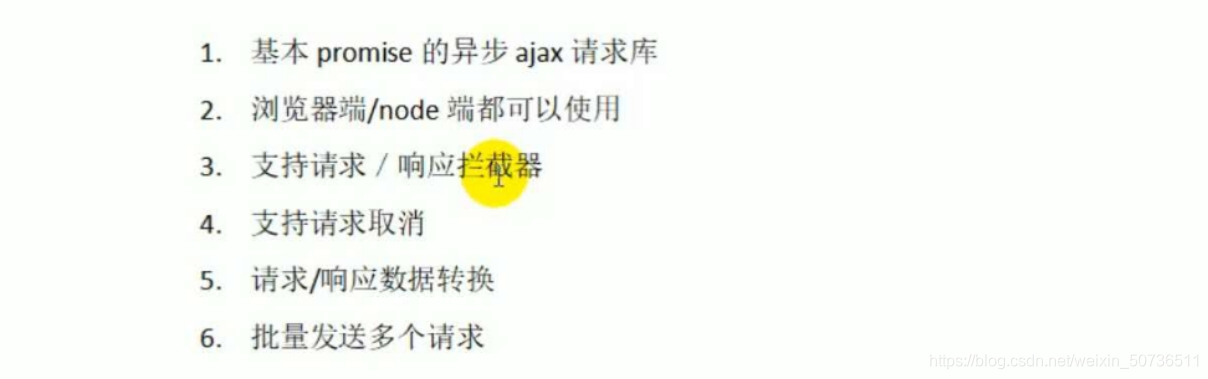
特点:
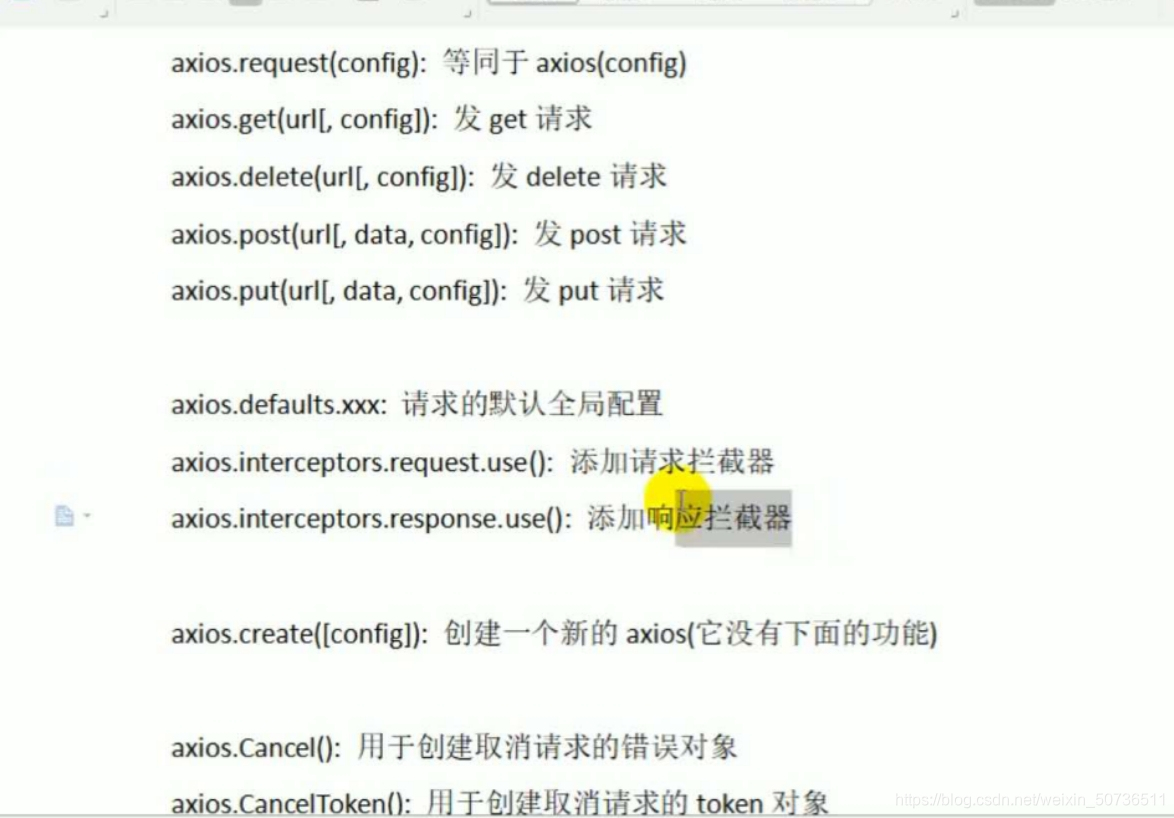
语法:
发送get请求
axios({

url:’/posts’,

//url参数 对象

params:{

id: 1

},

})

.then(a=>{

console.log(a.data);

})

axios默认发get请求搜易不用定义 method属性
发送post请求
axios({

url:’/posts’,

method:‘POST’,

//请求体参数

data:{“title”: “json-server111”,“author111”: “typicode111”}

})

.then(a=>{

console.log(a.data);

})

这里定义method后面的请求形式最好是大写
问题:
1.解决闪烁问题:
白屏--模版
<style>

    [v-clock]{

        display:none;

    }

</style>
Axios、Vue组件-生命周期、计算属性、Slot插槽、自定义事件、v-router、钩子函数的更多相关文章
- Vue 组件生命周期钩子
Vue 组件生命周期钩子 # 1)一个组件从创建到销毁的整个过程,就称之为组件的生命周期 # 2)在组件创建到销毁的过程中,会出现众多关键的时间节点, 如: 组件要创建了.组件创建完毕了.组件数据渲染 ...
- vue组件生命周期详解
Vue所有的生命周期钩子自动绑定在this上下文到实例中,因此你可以访问数据,对属性和方法进行运算.这意味着你不能使用箭头函数来定义一个生命周期方法.这是因为箭头函数绑定了父上下文,因此this与你期 ...
- vue组件生命周期
分为4个阶段:create/mount/update/destroy 每一个阶段都对应着有自己的处理函数 create: beforeCreate created 初始化 mount: beforeM ...
- Vue父子组件生命周期执行顺序及钩子函数的个人理解
先附一张官网上的vue实例的生命周期图,每个Vue实例在被创建的时候都需要经过一系列的初始化过程,例如需要设置数据监听,编译模板,将实例挂载到DOM并在数据变化时更新DOM等.同时在这个过程中也会运行 ...
- vue 学习一 组件生命周期
先上一张vue组件生命周期的流程图 以上就是一个组件完整的生命周期,而在组件处于每个阶段时又会提供一些周期钩子函数以便我们进行一些逻辑操作,而总体来讲 vue的组件共有8个生命周期钩子 beforeC ...
- Vue ---- 组件文件分析 组件生命周期钩子 路由 跳转 传参
目录 Vue组件文件微微细剖 Vue组件生命周期钩子 Vue路由 1.touter下的index.js 2.路由重定向 3.路由传参数 补充:全局样式导入 路由跳转 1. router-view标签 ...
- vue- Vue-Cli脚手架工具安装 -创建项目-页面开发流程-组件生命周期- -03
目录 Vue-Cli 项目环境搭建 与 python 基础环境对比 环境搭建 创建启动 vue 项目 命令创建项目(步骤小多) 启动 vue 项目(命令行方式) 启动 vue 项目(pycharm 方 ...
- 【Vue实例生命周期】
目录 实例创建之前执行--beforeCreate 实例创建之后执行--created 挂载之前执行--beforeMount 挂载之后执行--mounted 数据更新之前执行--beforeUpda ...
- vue 源码详解(二): 组件生命周期初始化、事件系统初始化
vue 源码详解(二): 组件生命周期初始化.事件系统初始化 上一篇文章 生成 Vue 实例前的准备工作 讲解了实例化前的准备工作, 接下来我们继续看, 我们调用 new Vue() 的时候, 其内部 ...
- vue父子组件生命周期执行顺序
之前写了vue的生命周期,本以为明白了vue实例在创建到显示在页面上以及销毁等一系列过程,以及各个生命周期的特点.然而今天被问到父子组件生命周期执行顺序的时候一头雾水,根本不知道怎么回事.然后写了一段 ...
随机推荐
- bugku web2
打开全是滑稽.... 直接查看源码(用firefox的F12来查看,其他的会注释掉)可以得到flag(抓包不知道怎么回事抓不到,不然应该也可以看到注释的flag)
- pyinstaller打包TVM/RPC相关脚本及DSO文件
0. 创建anaconda env numpy中MKL/BLAS库占用很大空间.使用如下命令创建新环境,并替换numpy. conda create -n extranumpy python=3.8. ...
- C温故补缺(一):数据类型和基本类型占位
数据类型 基本类型:就是算术类型,包括整型和实型 枚举类型:一组离散的整数 void类型:无可用值类型 派生类型:指针(*),数组([]),结构体(struct),共用体(union),函数(fun( ...
- redis集群之分片集群的原理和常用代理环境部署
上篇文章刚刚介绍完redis的主从复制集群,但主从复制集群主要是为了解决redis集群的单点故障问题,通过整合哨兵能实现集群的高可用:但是却无法解决数据容量以及单节点的压力问题,所以本文继续介绍red ...
- 【每日一题】【暴力&双指针&动态规划】42. 接雨水-211130/220214
给定 n 个非负整数表示每个宽度为 1 的柱子的高度图,计算按此排列的柱子,下雨之后能接多少雨水. 方法1:暴力求解(超时) import java.util.*; public class Solu ...
- 【每日一题】【快速排序过程、循环过程无=、递归参数】2022年1月16日-NC140 排序
快速排序 对时间复杂度和空间复杂度有要求 方法1:快速排序-递归 import java.util.*; public class Solution { /** * 代码中的类名.方法名.参数名已经指 ...
- 真正“搞”懂HTTP协议06之body的玩法(理论篇)
本来啊,本来,本来我在准备完善这个鸽了四年的系列的时候,是打算按照时间的顺序来完成的,好吧.我承认那个时候考虑的稍稍稍稍稍微有些不足,就是我忽略了HTTP协议的"模块性".因为虽然 ...
- python 中变量的命名规则与注释
变量命名规则 1.变量名必须是大小写英文字母.数字或下划线 _ 的组合,不能用数字开头,并且对大小写敏感 2.关键字不能用于命名变量,关键字一共有35个,以下为关键字的获取 注释 代码注释提高了代码的 ...
- 基于容器的PaaS混合云的几种形式
概述 这是 Gartner 的一个图,提供了全球的基于容器的 PaaS 公有云.混合云服务的梳理展示: 这里提供一个其他的视角: 中国市场,基于容器的 PaaS 混合云(公有云 + 私有云)的相关厂商 ...
- vivo 游戏中心低代码平台的提效秘诀
作者:vivo 互联网服务器团队- Chen Wenyang 本文根据陈文洋老师在"2022 vivo开发者大会"现场演讲内容整理而成.公众号回复[2022 VDC]获取互联网技术 ...