
linux Usb serial console
ubuntu
Usb serial console 能够把下电时打印输出到串口上,可以记录,而netconsole只能输出下电到disk 之前的打印
- Usb串口线,ftdi或pl2303都可以
- 如果是ubuntu,需要重新编译内核,CONFIG_USB_SERIAL_CONSOLE=y
CONFIG_USB_SERIAL=y,其他可以把ftdi或pl2303编译进内核。注2
- 编辑/etc/default/grub
找到GRUB_CMDLINE_LINUX_DEFAULT="quiet splash" 替换成 GRUB_CMDLINE_LINUX_DEFAULT="debug ignore_loglevel console=tty0 console=ttyUSB0,115200n8 ",注意Ubuntu需要加ignore_loglevel4. centos执行grub2-mkconfig –o /boot/grub2/grub.cfg (grub.cfg也可能在/boot/efi/里)。Ubuntu执行update-grub5. reboot6. Ubuntu会显示login,原因是systemd主动把ttyUSB0加到getty了,可以chmod a-x /lib/systemd/system-generators/system-getty-generator
附录参考
注1:
Serial Console
Serial console enables one to dump out console messages over a serial cable. Most modern PCs do not have legacy serial ports, so instead, one can use a USB serial dongle instead. A "null serial cable" or "universal file transfer cable" is needed to connect the target computer with the host. Most commonly this will be a DB9 female to DB9 female null serial cable. In addition, one needs to enable USB serial support as a kernel build configuration:
CONFIG_USB_SERIAL_CONSOLE=y
CONFIG_USB_SERIAL=y
and enable the appropriate driver, e.g.:
CONFIG_USB_SERIAL_PL2303=y
and boot this kernel with
console=ttyUSB0,9600n8
one may need to adjust the baud rate appropriately.
Note: Generally, there is NO hardware or software flow control on serial console drivers, which means one may get dropped characters when running very high speed tty baud rates, such as 115200 baud.
注2,ubuntu 内核编译
1.下载对应源码 apt-get source linux-image-$(uname -r)
2.安装编译工具略
https://wiki.ubuntu.com/Kernel/BuildYourOwnKernel
centos8+ASUA B560M-Plus
centos8中的默认串口为ttyS0
首先连接串口线:如下图
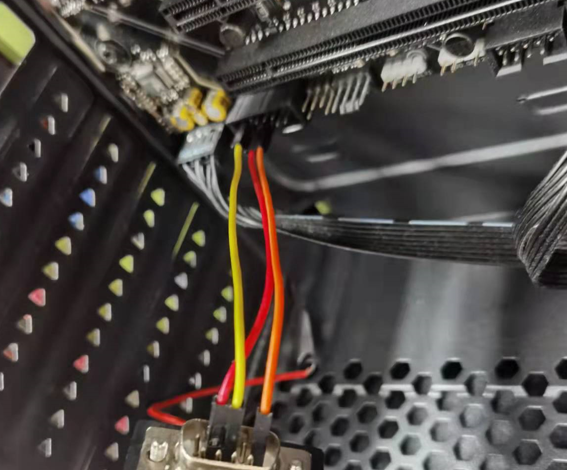
修改grub配置:
打开/etc/default/grub,增加如下配置。
GRUB_TERMINAL="console serial"
GRUB_SERIAL_COMMAND="serial --speed=115200 --unit=0 --word=8 --parity=no --stop=1"
GRUB_CMDLINE_LINUX_DEFAULT="console=tty0 console=ttyS0,115200"
更新grub
grub2-mkconfig -o /boot/grub2/grub.cfg
用其他电脑连接串口。
linux Usb serial console的更多相关文章
- Linux/drivers/usb/serial/ftdi_sio.c
Linux/drivers/usb/serial/ftdi_sio.h /* 2 * Driver definitions for the FTDI USB Single Port Serial Co ...
- install usb serial
Install driver for USB-UART bridge converter on Linux Ubuntu12.04 Ubuntu下USB转串口芯片驱动程序安装,支持cp210x,pl2 ...
- Linux usb子系统(一) _写一个usb鼠标驱动
USB总线是一种典型的热插拔的总线标准,由于其优异的性能几乎成为了当下大小设备中的标配. USB的驱动可以分为3类:SoC的USB控制器的驱动,主机端USB设备的驱动,设备上的USB Gadget驱动 ...
- 《网蜂A8实战演练》——8.Linux USB 主机控制器和设备驱动
USB 的全称是 Universal Serial Bus,顾名思义:通用串行总线. 提到总线,联想一下,在你心目中总线总是用来干嘛的?还记得 I2C 总线? I2C 总线上挂有二条信号线,一条是 S ...
- Hi3559AV100外接UVC/MJPEG相机实时采图设计(一):Linux USB摄像头驱动分析
下面将给出Hi3559AV100外接UVC/MJPEG相机实时采图设计的整体流程,主要实现是通过V4L2接口将UVC/MJPEG相机采集的数据送入至MPP平台,经过VDEC.VPSS.VO最后通过HD ...
- Linux USB Project
转自:http://www.linux-usb.org/ Welcome to the home of the Linux USB Project This web site was created ...
- Linux USB驱动
linux usb 驱动详解 一 http://blog.163.com/cl2006ky@126/blog/static/87195173201131245557340/ USB设备驱动开发-USB ...
- usb serial for android
/******************************************************************** * usb serial for android * 说明: ...
- Linux usb子系统(二):USB设备驱动usb-skeleton.c
usb驱动分为通过usbfs操作设备的用户空间驱动,内核空间的内核驱动.两者不能同时进行,否则容易引发对共享资源访问的问题,死锁!使用了内核驱动,就不能在usbfs里驱动该设备. 下面转载的一篇分析u ...
- Linux usb子系统(一):子系统架构
一.USB协议基础知识 前序:USB概念概述 USB1.0版本速度1.5Mbps(低速USB) USB1.1版本速度12Mbps(全速USB) USB2.0版本速度480Mbps(高速USB). ...
随机推荐
- 无感知WPF窗口透明加穿透
在窗口的XAML文件中添加以下属性: ShowInTaskbar="False" WindowStyle="None" AllowsTransparency=& ...
- reduce对数组及数组对象的常见操作
语法: array.reduce(function(prev, currentValue, currentIndex, arr), initialValue)prev: 初始值,或者是计算结束后的返回 ...
- ubuntu 下如何设置环境变量
一.设置环境变量的三种方法 1.1 临时设置 export PATH=/home/yan/share/usr/local/arm/3.4.1/bin:$PATH 1.2 当前用户的全局设置 打开~/. ...
- C# List提取类中某列保存成新list
例如,将oldList中的ID列提取出来存放到newList中: List<ushort> newList = new List<ushort>(oldList.Select( ...
- Windows系统运行selenium
1.系统已安装python: 2.安装pip 官网下载pip安装包:https://pypi.org/project/pip/#files 解压后 python setup.py install ...
- mysql慢sql监控
1.思路 之前用 mysql 一直没有考虑到这点,mysql 慢 sql 监控是很重要的,它能帮我们梳理我们的业务 sql 到底是哪里处了问题,那么慢 sql 监控怎么做呢? 有两种思路来实现: 在应 ...
- Chrome上谷歌翻译不能使用问题
# 修改hosts文件(hosts文件位于 C:\Windows\System32\drivers\etc) 142.250.107.90 http://translate.googleapis.co ...
- Unity实现手机录音功能
using UnityEngine;using System.Collections;public class MicPhoneScripts : MonoBehaviour{ private ...
- mybatis-关联查询1-一对多关联查询
或者多表单独查询方式
- java基于springboot的新生报到小程序带论文
简介 本项目主要是新生报道系统,包含的新生入学流程的功能:新生可以在app里提交预报到日期确认报到,查看自己的学费缴费记录,更改自己的银行卡号,查看课表,查看寝室,查看自己的专业班级等个人信息,查看饭 ...