
linux Usb serial console
ubuntu
Usb serial console 能够把下电时打印输出到串口上,可以记录,而netconsole只能输出下电到disk 之前的打印
- Usb串口线,ftdi或pl2303都可以
- 如果是ubuntu,需要重新编译内核,CONFIG_USB_SERIAL_CONSOLE=y
CONFIG_USB_SERIAL=y,其他可以把ftdi或pl2303编译进内核。注2
- 编辑/etc/default/grub
找到GRUB_CMDLINE_LINUX_DEFAULT="quiet splash" 替换成 GRUB_CMDLINE_LINUX_DEFAULT="debug ignore_loglevel console=tty0 console=ttyUSB0,115200n8 ",注意Ubuntu需要加ignore_loglevel4. centos执行grub2-mkconfig –o /boot/grub2/grub.cfg (grub.cfg也可能在/boot/efi/里)。Ubuntu执行update-grub5. reboot6. Ubuntu会显示login,原因是systemd主动把ttyUSB0加到getty了,可以chmod a-x /lib/systemd/system-generators/system-getty-generator
附录参考
注1:
Serial Console
Serial console enables one to dump out console messages over a serial cable. Most modern PCs do not have legacy serial ports, so instead, one can use a USB serial dongle instead. A "null serial cable" or "universal file transfer cable" is needed to connect the target computer with the host. Most commonly this will be a DB9 female to DB9 female null serial cable. In addition, one needs to enable USB serial support as a kernel build configuration:
CONFIG_USB_SERIAL_CONSOLE=y
CONFIG_USB_SERIAL=y
and enable the appropriate driver, e.g.:
CONFIG_USB_SERIAL_PL2303=y
and boot this kernel with
console=ttyUSB0,9600n8
one may need to adjust the baud rate appropriately.
Note: Generally, there is NO hardware or software flow control on serial console drivers, which means one may get dropped characters when running very high speed tty baud rates, such as 115200 baud.
注2,ubuntu 内核编译
1.下载对应源码 apt-get source linux-image-$(uname -r)
2.安装编译工具略
https://wiki.ubuntu.com/Kernel/BuildYourOwnKernel
centos8+ASUA B560M-Plus
centos8中的默认串口为ttyS0
首先连接串口线:如下图
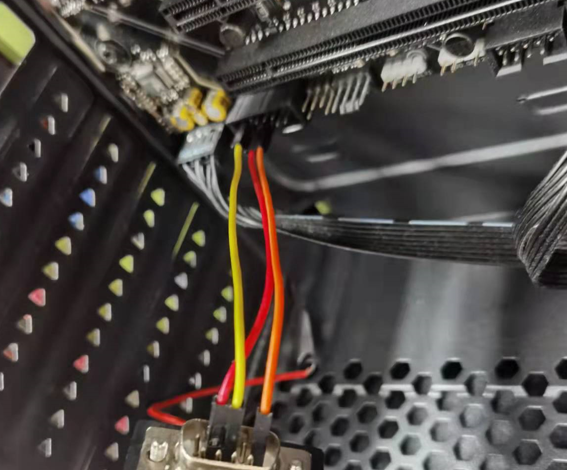
修改grub配置:
打开/etc/default/grub,增加如下配置。
GRUB_TERMINAL="console serial"
GRUB_SERIAL_COMMAND="serial --speed=115200 --unit=0 --word=8 --parity=no --stop=1"
GRUB_CMDLINE_LINUX_DEFAULT="console=tty0 console=ttyS0,115200"
更新grub
grub2-mkconfig -o /boot/grub2/grub.cfg
用其他电脑连接串口。
linux Usb serial console的更多相关文章
- Linux/drivers/usb/serial/ftdi_sio.c
Linux/drivers/usb/serial/ftdi_sio.h /* 2 * Driver definitions for the FTDI USB Single Port Serial Co ...
- install usb serial
Install driver for USB-UART bridge converter on Linux Ubuntu12.04 Ubuntu下USB转串口芯片驱动程序安装,支持cp210x,pl2 ...
- Linux usb子系统(一) _写一个usb鼠标驱动
USB总线是一种典型的热插拔的总线标准,由于其优异的性能几乎成为了当下大小设备中的标配. USB的驱动可以分为3类:SoC的USB控制器的驱动,主机端USB设备的驱动,设备上的USB Gadget驱动 ...
- 《网蜂A8实战演练》——8.Linux USB 主机控制器和设备驱动
USB 的全称是 Universal Serial Bus,顾名思义:通用串行总线. 提到总线,联想一下,在你心目中总线总是用来干嘛的?还记得 I2C 总线? I2C 总线上挂有二条信号线,一条是 S ...
- Hi3559AV100外接UVC/MJPEG相机实时采图设计(一):Linux USB摄像头驱动分析
下面将给出Hi3559AV100外接UVC/MJPEG相机实时采图设计的整体流程,主要实现是通过V4L2接口将UVC/MJPEG相机采集的数据送入至MPP平台,经过VDEC.VPSS.VO最后通过HD ...
- Linux USB Project
转自:http://www.linux-usb.org/ Welcome to the home of the Linux USB Project This web site was created ...
- Linux USB驱动
linux usb 驱动详解 一 http://blog.163.com/cl2006ky@126/blog/static/87195173201131245557340/ USB设备驱动开发-USB ...
- usb serial for android
/******************************************************************** * usb serial for android * 说明: ...
- Linux usb子系统(二):USB设备驱动usb-skeleton.c
usb驱动分为通过usbfs操作设备的用户空间驱动,内核空间的内核驱动.两者不能同时进行,否则容易引发对共享资源访问的问题,死锁!使用了内核驱动,就不能在usbfs里驱动该设备. 下面转载的一篇分析u ...
- Linux usb子系统(一):子系统架构
一.USB协议基础知识 前序:USB概念概述 USB1.0版本速度1.5Mbps(低速USB) USB1.1版本速度12Mbps(全速USB) USB2.0版本速度480Mbps(高速USB). ...
随机推荐
- StringBuilder 凭借字符串
//拼接信息 StringBuilder sb = new StringBuilder(); sb.Append("条码:00002"); sb.AppendLine(); sb. ...
- OM6621P系列国产M4F内核低功耗BLE5.1 SoC蓝牙芯片
随着5G与物联网时代到来,智慧城市.电动出行.智能家居.可穿戴设备等应用高速发展,低功耗蓝牙技术在近几年智能化浪潮中的地位也尤为重要.OM6621P系列的开发即是为解决国内低功耗蓝牙应用设计需求,其主 ...
- 关于 dangerouslySetInnerHTML
之前不太了解react,第一次看dangerouslySetInnerHTML,以为可以用来防止xss注入. 后面看待又补充了一个DOMPurify,才知道这个东西只有一个提醒的作用,并不能防止xss ...
- ssl自动更新证书
安装证书 yum install certbot 更新证书之前先开启80 443 端口 自动生成证书certbot certonly --standalone --agree-tos -n -d ww ...
- 【阿里云ACP】-04(负载均衡SLB、弹性伸缩AS内容分发、网络与VPC)
阿里云例题介绍-CDN F公司新推出一款手机APP,将安装包链接挂在公司的官网(基于云服务器ECS实例)进行下载(安装包大小:6Mb),上线前两个月下载速度还能接受.自从上周公司在CCTV做了一次广告 ...
- VIM的撤销与恢复设置行数
vim撤销操作:u vim恢复操作:ctrl+r 设置行数: :set nu
- 取消Andorid设备的严格模式
在做文件拍照选择等应用时,发现7.0以上手机需要主动关闭严格模式才能让代码不报错 通过关闭严格模式绕过fileprovider 权限的控制的方法,绕过FileProvider在应用间共享文件的限制 7 ...
- YieldReturn语法解析
/* * * 学习Yield Return 语法 * 使用两个方法,显示1 - 100之间的全部偶数 * * */ using System;using System.Collections.Gene ...
- Windows初始化.net core环境
1.项目使用.ner core版本(例:.net core.3.1) 1.1安装运行环境 https://dotnet.microsoft.com/en-us/download 1.2安装.net 运 ...
- 微信小程序级联选择器省市区选择器部分安卓手机兼容的问题:无法只选省份,必须选择到市
代码片段: 1 <view class="item"> 2 <view class="i-name"><text class=&q ...