
基于Python+Sqlite3实现最简单的CRUD
一、基本描述
使用Python,熟悉sqlite3的基本操作(查插删改),以及基本数据类型、事务(ACID)。
准备工作:在sqlite3的官网上下载预编译的sqlite文件(windows),包括tools和dll这两个文件。下载后,将它们解压后的文件放到一个文件夹中,并设置sqlite的环境变量。这样就可以直接在命令行打开sqlite3.exe。使用sqlite3.exe是为了方便操作,例如查看表、表头,以及实现交互式的数据库操作。
先使用命令行熟悉,sqlite3。第一步打开cmd,输入sqlite3进入sqlite的命令行模式,输入.open test.db可以创建数据库(open是打开数据库,但若目录下不存在相应文件则会自动创建)。然后输入以下命令新建一张很简单的user表,并插入一条记录。( Enter ".help" for instructions。Enter SQL statements terminated with a ";" 数据库描述和操作语言都需要加;作为命令的结束符)
create table user (

id   varchar(20)  primary key  not null,

name varchar(20)               not null);

insert into user (id,name) values (1, 'paul');
此时可以使用.databases查看数据库,使用.tables查当前数据库中的表,也可以使用.schema user查看user表的关系模式。可以使用select语句查看数据。
select * from user;
可以使用begin;开始一个事务,例如执行插入、删除或更新一条记录,然后执行commit;或rollback;, rollback指令会将上一次事务结束(就是commit或rollback后)的所有数据库操作回滚,恢复至上一次事务结束的状态。
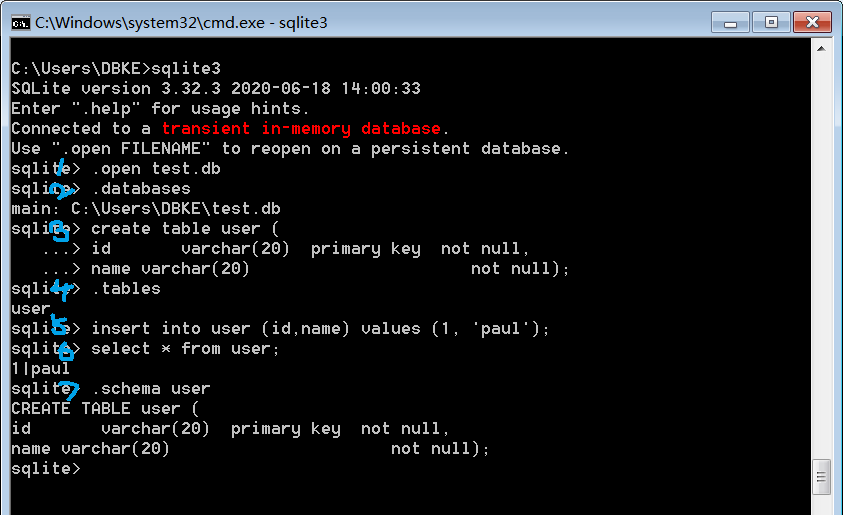
二、简易程序
首先在python中首先创建数据库文件test.db,同样的,若目录下不存在相应文件则会自动创建。
import os

import sqlite3 #导入SQLite驱动:

def create_table(db_name):

    #连接到SQlite数据库 'test.db',创建数据库并新建一张表

    conn = sqlite3.connect(db_name) #数据库文件是test.db,不存在,则自动创建

    print("Database {} created successfully".format(db_name))

    cursor = conn.cursor()

    # sqlite3中EXECTUEM命令,不区分大小写

    cursor.execute('''create table user (

                    id           varchar(20)     primary key  not null,

                    name         varchar(20)              not null);''')

    cursor.close()

    conn.commit()

    conn.close()

    print("Table {} created successfully".format('user'))
然后定义CRUD操作
def insert_info(db_name, values):

    conn = sqlite3.connect(db_name) #数据库文件是test.db,不存在,则自动创建

    cursor = conn.cursor()

    #插入一条记录: cursor.execute('insert into user (id, name) values (\'1\', \'Michael\')')

    cursor.execute("insert into user values (?, ?);", (values[0], values[1]))

    print(cursor.rowcount) #通过rowcount获得插入的行数:reusult 1

    cursor.close()

    conn.commit()  #提交事务begin commit rollback end transaction

    print("Records created successfully")

    conn.close()

def select_info(db_name, id):

    conn = sqlite3.connect(db_name) #数据库文件是test.db,不存在,则自动创建

    cursor = conn.cursor()

    cursor.execute('select * from user where id=?;', (id,))

    values = cursor.fetchall() # rows of info

    cursor.close()

    conn.close()

    print(values)

def update_info(db_name, values):

    conn = sqlite3.connect(db_name) #数据库文件是test.db,不存在,则自动创建

    cursor = conn.cursor()

    cursor.execute('update user set name=?  where id=?;', (values[1], values[0]))

    conn.commit()

    cursor.close()

    conn.close()

    print("updated")

def delete_info(db_name, id):

    conn = sqlite3.connect(db_name) #数据库文件是test.db,不存在,则自动创建

    cursor = conn.cursor()

    cursor.execute('delete from user where id=?;', (id))

    conn.commit()

    print("Total number of rows deleted :", conn.total_changes)

    c = conn.execute('select * from user')

    for row in c:

       print("id: {}, name: {}".format(row[0], row[1]))

    c.close()

    cursor.close()

    conn.close()

    print("delete done successfully")

def show_all(db_name):

    conn = sqlite3.connect(db_name)

    c = conn.execute('select * from user')

    cnt = 1

    for row in c:

        print("id:{}, name:{}".format(row[0], row[1]), end="   ")

        if cnt % 3 == 0:

            print("")

        cnt += 1

    c.close()

    conn.close()
最后是主程序:
def main():
   db_name = 'test.db'
   root_path = os.path.split(os.path.realpath(__file__))[0] + os.sep

    file_path = root_path + db_name

    print(file_path)

    cwd_path = os.getcwd()

    print("Current Python Working Directory is " + cwd_path)

    os.chdir(root_path)     # 将python的工作目录切换到源文件所在目录

    print("\nChange Directory to:", root_path)

    if not os.path.exists(file_path):

        create_table(db_name) # 检查db文件

    else:

        print("{} file exist already!".format(db_name))

    flag = True         # 指示位,控制循环

    operation = 0        # 操作码, 代表各种操作

    op_table = ["Select", "Insert", "Update", "Delete", "ShowAll"]

    op_idx = {op:i for i, op in enumerate(op_table)}

    idx_op = {i:op for i, op in enumerate(op_table)}

    print("\nTest Sqlite3")

    while flag != False:

        for key, val in op_idx.items():

            print("{}:{}  ".format(key, val), end=" ")

        oper = input("\nPlease input your choice:")

        oper = int(oper)

        if 4 >= oper >= 0:

            print("\nExecute {}".format(idx_op[oper]))

        else:

            print("Operation code {} error! Please retry!".format(oper))

            continue

        if oper == 0:

            print("Please input id for query")   # select

            query_id = input()

            select_info(db_name, query_id)

        elif oper == 1:

            print("Please input id and name")    # insert

            text = input()

            values = text.split(" ")

            insert_info(db_name, values)

        elif oper == 2:

            print("Please input id and name")    # update

            text = input()

            values = text.split(" ")

            update_info(db_name, values)

        elif oper == 3:

            print("Please input id for delelte") # delete

            del_id = input()

            delete_info(db_name, del_id)

        elif oper == 4:

            show_all(db_name)

        sign = input("\nContinue or not,: 0 stop, 1 continue:")

        if int(sign) == 0:

            flag = False

            print("Close Application")

if __name__ == "__main__":

    main()
基于Python+Sqlite3实现最简单的CRUD的更多相关文章
- 基于Python使用SVM识别简单的字符验证码的完整代码开源分享
关键字:Python,SVM,字符验证码,机器学习,验证码识别 1 概述 基于Python使用SVM识别简单的验证字符串的完整代码开源分享. 因为目前有了更厉害的新技术来解决这类问题了,但是本文作 ...
- Python 基于Python及zookeeper实现简单分布式任务调度系统设计思路及核心代码实现
基于Python及zookeeper实现简单分布式任务调度系统设计思路及核心代码实现 by:授客 QQ:1033553122 测试环境 功能需求 实现思路 代码实践(关键技术点实现) 代码模块组织 ...
- 如何简单实现接口自动化测试(基于 python) 原博主地址https://blog.csdn.net/gitchat/article/details/77849725
如何简单实现接口自动化测试(基于 python) 2017年09月05日 11:52:25 阅读数:9904 GitChat 作者:饿了么技术社区 原文:如何简单实现接口自动化测试(基于 python ...
- 一次简单完整的自动化登录测试-基于python+selenium进行cnblog的自动化登录测试
Web登录测试是很常见的测试,手动测试大家再熟悉不过了,那如何进行自动化登录测试呢!本文就基于python+selenium结合unittest单元测试框架来进行一次简单但比较完整的cnblog自动化 ...
- Websocket - Websocket原理(握手、解密、加密)、基于Python实现简单示例
一.Websocket原理(握手.解密.加密) WebSocket协议是基于TCP的一种新的协议.WebSocket最初在HTML5规范中被引用为TCP连接,作为基于TCP的套接字API的占位符.它实 ...
- 简单实现接口自动化测试(基于python+unittest)
简单实现接口自动化测试(基于python+unittest) 简介 本文通过从Postman获取基本的接口测试Code简单的接口测试入手,一步步调整优化接口调用,以及增加基本的结果判断,讲解Pytho ...
- 实用的Python(3)超简单!基于Python搭建个人“云盘”
1 简介 当我们想要从本地向云服务器上传文件时,比较常用的有pscp等工具,但避免不了每次上传都要写若干重复的代码,而笔者最近发现的一个基于Python的工具updog,可以帮助我们在服务器上搭建类似 ...
- python sqlite3简单操作
python sqlite3简单操作(原创)import sqlite3class CsqliteTable: def __init__(self): pass def linkSqlite3(sel ...
- 超简单!基于Python搭建个人“云盘”
1. 简介 当我们想要从本地向云服务器上传文件时,比较常用的有pscp等工具,但避免不了每次上传都要写若干重复的代码,而笔者最近发现的一个基于Python的工具updog,可以帮助我们在服务器上搭建类 ...
随机推荐
- JavaScript一行代码获取公网IP及城市信息
废话不多说,直接上代码! <script type="text/javascript" src="http://pv.sohu.com/cityjson?ie=ut ...
- vue 实现高德坐标转GPS坐标
vue 实现高德坐标转GPS坐标 首先介绍一下常见的几种地图的坐标类型: WGS-84:这是一个国际标准,也就是GPS坐标(Google Earth.或者GPS模块采集的都是这个类型). GCJ-02 ...
- Ansible Notes: Tower Credential的本质
Ansible AWX/Tower credential 的本质 Ansible Tower (社区版本叫AWX)用credential这个资源来对象来存储playbook运行过程中用到的机密信息.比 ...
- HMS Core Discovery第14期回顾长文|纵享丝滑剪辑,释放视频创作力
HMS Core Discovery第14期直播<纵享丝滑剪辑,释放视频创作力>,已于4月21日圆满结束,本期直播我们同HMS Core视频编辑服务(Video Editor Kit)的产 ...
- kafka从入门到了解
kafka从入门到了解 一.什么是kafka Apache Kafka是Apache软件基金会的开源的流处理平台,该平台提供了消息的订阅与发布的消息队列,一般用作系统间解耦.异步通信.削峰填谷等作用. ...
- Java面试题资料合集
Java面试题资料合集 2021年最新版--Java+最常见的+200++面试题汇总+答案总结汇总.pdf BIO,NIO,AIO,Netty面试题 35道.pdf Dubbo面试题 47道.pdf ...
- StringBoot整合ELK实现日志收集和搜索自动补全功能(详细图文教程)
@ 目录 StringBoot整合ELK实现日志收集和搜索自动补全功能(详细图文教程) 一.下载ELK的安装包上传并解压 1.Elasticsearch下载 2.Logstash下载 3.Kibana ...
- umi框架应用服务端SSR,实现数据预渲染
当我们的应用使用服务端渲染的方式时,可能需要把初始化加载的数据例如推荐等不需要用户输入的内容直接渲染获取,也有利于SEO. 上一篇已经实现服务端渲染,本次实现服务端获取数据后在做渲染. 利用getIn ...
- 从零开始,开发一个 Web Office 套件(16):拖动控制点,调整编辑器大小
这是一个系列博客,最终目的是要做一个基于 HTML Canvas 的.类似于微软 Office 的 Web Office 套件(包括:文档.表格.幻灯片--等等). 博客园:<从零开始, 开发一 ...
- Flatbuffers学习
flatbuffers简介 FlatBuffers 是一个(二进制 buffer)序列化开源库,由 Google 开源现在它支持C++, C#, C, Go, Java, Kotlin, JavaSc ...