
基于后端和爬虫创建的代理ip池
搭建免费的代理ip池
需要解决的问题:
使用什么方式存储ip
文件存储
缺点: 打开文件修改文件操作较麻烦
mysql
缺点: 查询速度较慢
mongodb
缺点: 查询速度较慢. 没有查重功能
redis --> 使用redis存储最为合适
所以 -> 数据结构采用redis中的zset有序集合
获取ip的网站
项目架构???
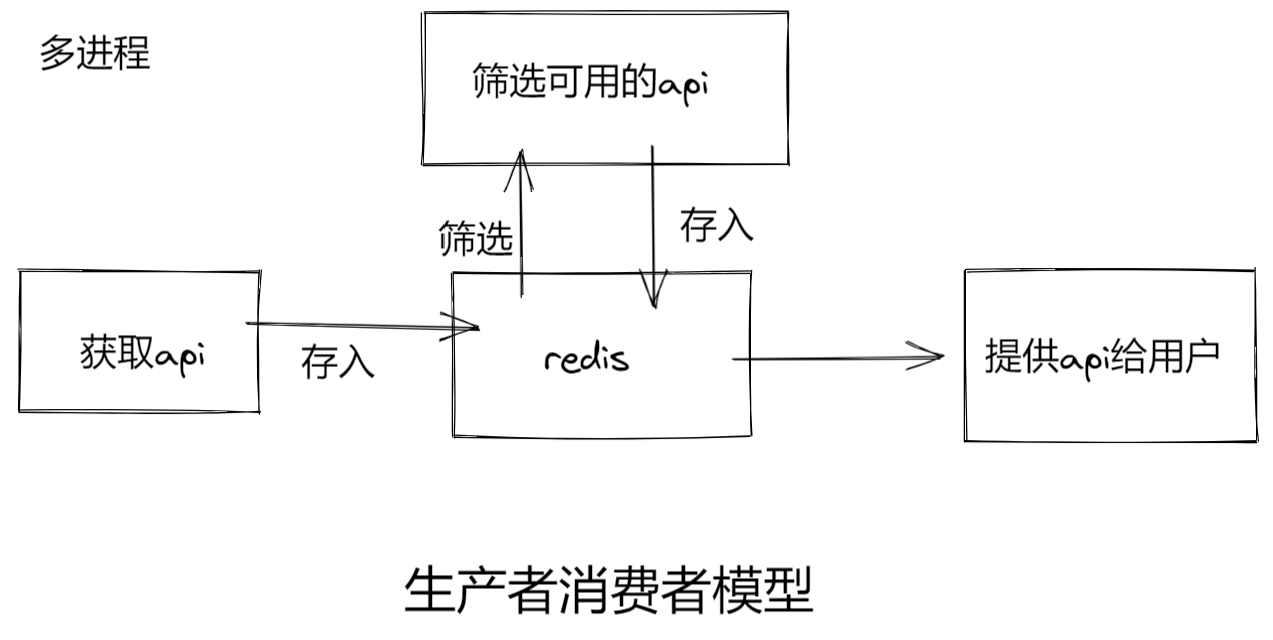
项目架构
- 获取api
- 筛选api
- 验证api的有效性
- 提供api
项目结构图
项目结构如下:
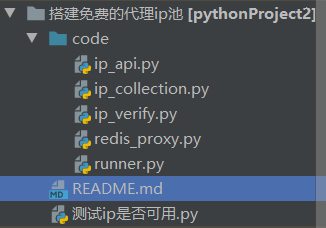
项目代码
code文件夹
redis_proxy.py
# -*- encoding:utf-8 -*-

# @time: 2022/7/4 11:32

# @author: Maxs_hu

"""

这里用来做redis中间商. 去控制redis和ip之间的调用关系

"""

from redis import Redis

import random

class RedisProxy:

    def __init__(self):

        # 连接到redis数据库

        self.red = Redis(

            host='localhost',

            port=6379,

            db=9,

            password=123456,

            decode_responses=True

        )

    # 1. 存储到redis中. 存储之前需要提前判断ip是否存在. 防止将已存在的ip的score抵掉

    # 2. 需要校验所有的ip. 查询ip

    # 3. 验证可用性. 可用分值拉满. 不可用扣分

    # 4. 将可用的ip查出来返回给用户

    #       先给满分的

    #       再给有分的

    #       都没有分. 就不给

    def add_ip(self, ip):  # 外界调用并传入ip

        # 判断ip在redis中是否存在

        if not self.red.zscore('proxy_ip', ip):

            self.red.zadd('proxy_ip', {ip: 10})

            print('proxy_ip存储完毕', ip)

        else:

            print('存在重复', ip)

    def get_all_proxy(self):

        # 查询所有的ip功能

        return self.red.zrange('proxy_ip', 0, -1)

    def set_max_score(self, ip):

        self.red.zadd('proxy_ip', {ip: 100})  # 注意是引号的格式

    def deduct_score(self, ip):

        # 先将分数查询出来

        score = self.red.zscore('proxy_ip', ip)

        # 如果有分值.那就扣一分

        if score > 0:

            self.red.zincrby('proxy_ip', -1, ip)

        else:

            # 如果分值已经扣的小于0了. 那么可以直接删除了

            self.red.zrem('proxy_ip', ip)

    def effect_ip(self):

        # 先将ip通过分数筛选出来

        ips = self.red.zrangebyscore('proxy_ip', 100, 100, 0, -1)

        if ips:

            return random.choice(ips)

        else:  # 没有满分的

            # 将九十分以上的筛选出来

            ips = self.red.zrangebyscore('proxy_ip', 11, 99, 0, -1)

            if ips:

                return random.choice(ips)

            else:

                print('无可用ip')

                return None
ip_collection.py
# -*- encoding:utf-8 -*-

# @time: 2022/7/4 11:32

# @author: Maxs_hu

"""

这里用来收集ip

"""

from redis_proxy import RedisProxy

import requests

from lxml import html

from multiprocessing import Process

import time

import random

def get_kuai_ip(red):

    url = "https://free.kuaidaili.com/free/intr/"

    headers = {

        "User-Agent": "Mozilla/5.0 (Windows NT 10.0; Win64; x64) AppleWebKit/537.36 (KHTML, like Gecko) Chrome/102.0.0.0 Safari/537.36"

    }

    resp = requests.get(url, headers=headers)

    etree = html.etree

    et = etree.HTML(resp.text)

    trs = et.xpath('//table//tr')

    for tr in trs:

        ip = tr.xpath('./td[1]/text()')

        port = tr.xpath('./td[2]/text()')

        if not ip:  # 将不含有ip值的筛除

            continue

        proxy_ip = ip[0] + ":" + port[0]

        red.add_ip(proxy_ip)

def get_unknown_ip(red):

    url = "https://ip.jiangxianli.com/"

    headers = {

        "User-Agent": "Mozilla/5.0 (Windows NT 10.0; Win64; x64) AppleWebKit/537.36 (KHTML, like Gecko) Chrome/102.0.0.0 Safari/537.36"

    }

    resp = requests.get(url, headers=headers)

    etree = html.etree

    et = etree.HTML(resp.text)

    trs = et.xpath('//table//tr')

    for tr in trs:

        ip = tr.xpath('./td[1]/text()')

        port = tr.xpath('./td[2]/text()')

        if not ip:  # 将不含有ip值的筛除

            continue

        proxy_ip = ip[0] + ":" + port[0]

        red.add_ip(proxy_ip)

def get_happy_ip(red):

    page = random.randint(1, 5)

    url = f'http://www.kxdaili.com/dailiip/2/{page}.html'

    headers = {

        "User-Agent": "Mozilla/5.0 (Windows NT 10.0; Win64; x64) AppleWebKit/537.36 (KHTML, like Gecko) Chrome/102.0.0.0 Safari/537.36"

    }

    resp = requests.get(url, headers=headers)

    etree = html.etree

    et = etree.HTML(resp.text)

    trs = et.xpath('//table//tr')

    for tr in trs:

        ip = tr.xpath('./td[1]/text()')

        port = tr.xpath('./td[2]/text()')

        if not ip:  # 将不含有ip值的筛除

            continue

        proxy_ip = ip[0] + ":" + port[0]

        red.add_ip(proxy_ip)

def get_nima_ip(red):

    url = 'http://www.nimadaili.com/'

    headers = {

        "User-Agent": "Mozilla/5.0 (Windows NT 10.0; Win64; x64) AppleWebKit/537.36 (KHTML, like Gecko) Chrome/102.0.0.0 Safari/537.36"

    }

    resp = requests.get(url, headers=headers)

    etree = html.etree

    et = etree.HTML(resp.text)

    trs = et.xpath('//table//tr')

    for tr in trs:

        ip = tr.xpath('./td[1]/text()')  # 这里存在空值. 所以不能在后面加[0]

        if not ip:

            continue

        red.add_ip(ip[0])

def get_89_ip(red):

    page = random.randint(1, 26)

    url = f'https://www.89ip.cn/index_{page}.html'

    headers = {

        "User-Agent": "Mozilla/5.0 (Windows NT 10.0; Win64; x64) AppleWebKit/537.36 (KHTML, like Gecko) Chrome/102.0.0.0 Safari/537.36"

    }

    resp = requests.get(url, headers=headers)

    etree = html.etree

    et = etree.HTML(resp.text)

    trs = et.xpath('//table//tr')

    for tr in trs:

        ip = tr.xpath('./td[1]/text()')

        if not ip:

            continue

        red.add_ip(ip[0].strip())

def main():

    # 创建一个redis实例化对象

    red = RedisProxy()

    print("开始采集数据")

    while 1:

        try:

            # 这里可以添加各种采集的网站

            print('>>>开始收集快代理ip')

            get_kuai_ip(red)  # 收集快代理

            # get_unknown_ip(red)  # 收集ip

            print(">>>开始收集开心代理ip")

            get_happy_ip(red)  # 收集开心代理

            print(">>>开始收集泥马代理ip")

            # get_nima_ip(red)  # 收集泥马代理

            print(">>>开始收集89代理ip")

            get_89_ip(red)

            time.sleep(60)

        except Exception as e:

            print('ip储存出错了', e)

            time.sleep(60)

if __name__ == '__main__':

    main()

    # 创建一个子进程

    # p = Process(target=main)

    # p.start()
ip_verify.py
# -*- encoding:utf-8 -*-

# @time: 2022/7/4 11:34

# @author: Maxs_hu

"""

这里用来验证ip的可用性: 使用携程发送请求增加效率

"""

from redis_proxy import RedisProxy

from multiprocessing import Process

import asyncio

import aiohttp

import time

async def verify_ip(ip, red, sem):

    timeout = aiohttp.ClientTimeout(total=10)  # 设置网页等待时间不超过十秒

    try:

        async with sem:

            async with aiohttp.ClientSession() as session:

                async with session.get(url='http://www.baidu.com/',

                                       proxy='http://'+ip,

                                       timeout=timeout) as resp:

                    page_source = await resp.text()

                    if resp.status in [200, 302]:

                        # 如果可用. 加分

                        red.set_max_score(ip)

                        print('验证没有问题. 分值拉满~', ip)

                    else:

                        # 如果不可用. 扣分

                        red.deduct_score(ip)

                        print('问题ip. 扣一分', ip)

    except Exception as e:

        print('出错了', e)

        red.deduct_score(ip)

        print('问题ip. 扣一分', ip)

async def task(red):

    ips = red.get_all_proxy()

    sem = asyncio.Semaphore(30)  # 设置每次三十的信号量

    tasks = []

    for ip in ips:

        tasks.append(asyncio.create_task(verify_ip(ip, red, sem)))

    if tasks:

        await asyncio.wait(tasks)

def main():

    red = RedisProxy()

    time.sleep(5)  # 初始的等待时间. 等待采集到数据

    print("开始验证可用性")

    while 1:

        try:

            asyncio.run(task(red))

            time.sleep(100)

        except Exception as e:

            print("ip_verify出错了", e)

            time.sleep(100)

if __name__ == '__main__':

    main()

    # 创建一个子进程

    # p = Process(target=main())

    # p.start()
ip_api.py
# -*- encoding:utf-8 -*-

# @time: 2022/7/4 11:35

# @author: Maxs_hu

"""

这里用来提供给用户ip接口. 通过写后台服务器. 用户访问我们的服务器就可以得到可用的代理ip:

   1. flask

   2. sanic --> 今天使用这个要稍微简单一点

"""

from redis_proxy import RedisProxy

from sanic import Sanic, json

from sanic_cors import CORS

from multiprocessing import Process

# 创建一个app

app = Sanic('ip')  # 随便给个名字

# 解决跨域问题

CORS(app)

red = RedisProxy()

@app.route('maxs_hu_ip')  # 添加路由

def api(req):  # 第一个请求参数固定. 请求对象

   ip = red.effect_ip()

   return json({"ip": ip})

def main():

   # 让sanic跑起来

   app.run(host='127.0.0.1', port=1234)

if __name__ == '__main__':

   main()

   # p = Process(target=main())

   # p.start()
runner.py
# -*- encoding:utf-8 -*-

# @time: 2022/7/5 17:36

# @author: Maxs_hu

from ip_api import main as api_run

from ip_collection import main as coll_run

from ip_verify import main as veri_run

from multiprocessing import Process

def main():

    # 设置互不干扰的三个进程

    p1 = Process(target=api_run)  # 只需要将目标函数的内存地址传过去即可

    p2 = Process(target=coll_run)

    p3 = Process(target=veri_run)

    p1.start()

    p2.start()

    p3.start()

if __name__ == '__main__':

    main()
测试ip是否可用.py
# -*- encoding:utf-8 -*-

# @time: 2022/7/5 18:15

# @author: Maxs_hu

import requests

def get_proxy():

    url = "http://127.0.0.1:1234/maxs_hu_ip"

    resp = requests.get(url)

    return resp.json()

def main():

    url = 'http://mip.chinaz.com/?query=' + get_proxy()["ip"]

    proxies = {

        "http": 'http://' + get_proxy()["ip"],

        "https": 'http://' + get_proxy()["ip"]  # 目前代理只支持http请求

    }

    headers = {

        "User-Agent": "Mozilla/5.0 (Windows NT 10.0; Win64; x64) AppleWebKit/537.36 (KHTML, like Gecko) Chrome/102.0.0.0 Safari/537.36",

    }

    resp = requests.get(url, proxies=proxies, headers=headers)

    resp.encoding = 'utf-8'

    print(resp.text)  # 物理位置

if __name__ == '__main__':

    main()
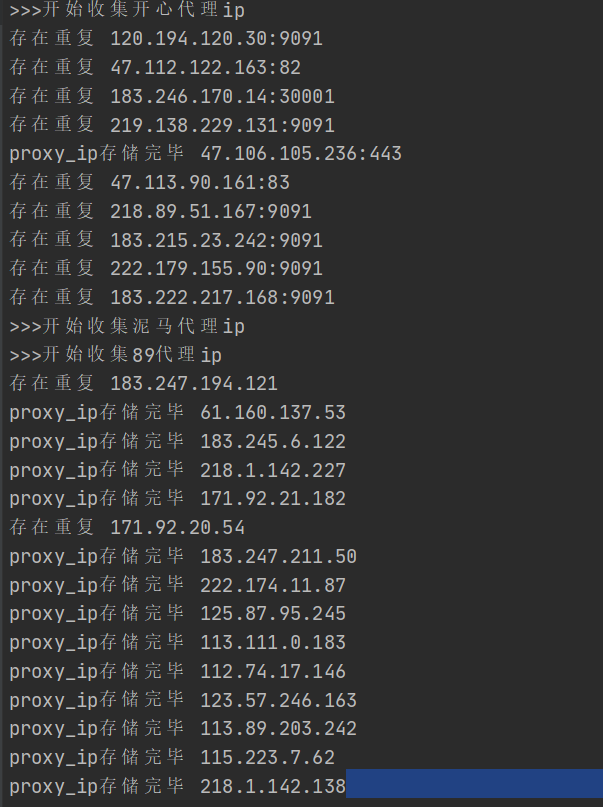
运行效果
项目运行截图:
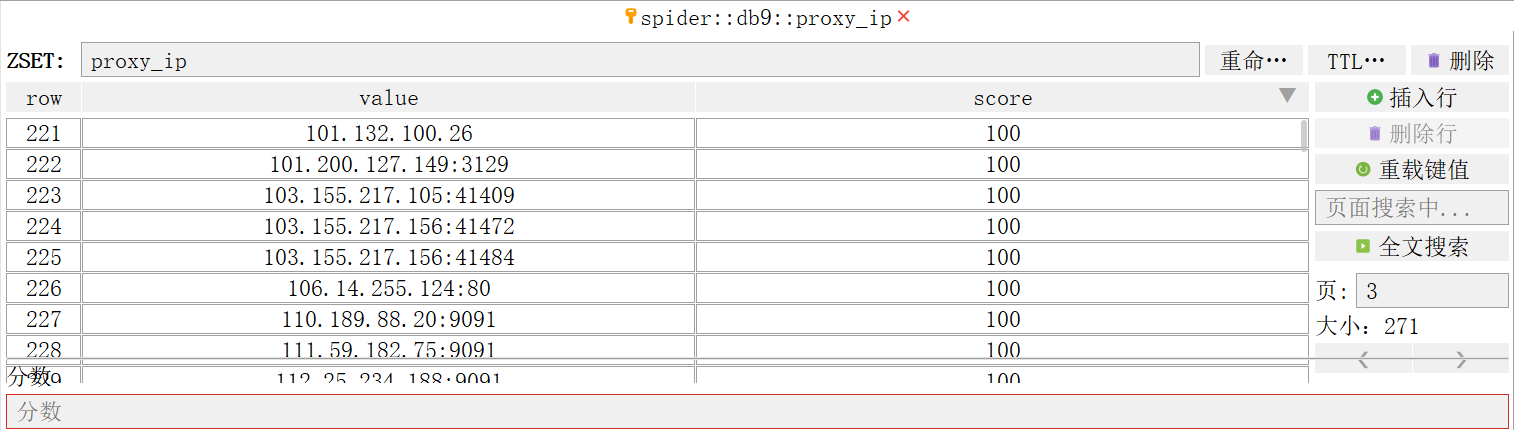
redis储存截图:
总结
- 免费代理ip只支持http的网页操作. 并不好用. 如果有需求可以进行购买然后加入ip代理池
- 网页部署到自己的服务器上. 别人访问自己的服务器. 以后学了全栈可以加上登录. 和付费功能. 实现功能的进一步拓展
- 项目架构是生产者消费者模型. 三个模块同时运行. 每个模块为一个进程. 互不影响
- 代理设计细节有待处理. 但总体运行效果还可以. 遇到问题再修改
基于后端和爬虫创建的代理ip池的更多相关文章
- 构建一个给爬虫使用的代理IP池
做网络爬虫时,一般对代理IP的需求量比较大.因为在爬取网站信息的过程中,很多网站做了反爬虫策略,可能会对每个IP做频次控制.这样我们在爬取网站时就需要很多代理IP. 代理IP的获取,可以从以下几个途径 ...
- 爬虫爬取代理IP池及代理IP的验证
最近项目内容需要引入代理IP去爬取内容. 为了项目持续运行,需要不断构造.维护.验证代理IP. 为了绕过服务端对IP 和 频率的限制,为了阻止服务端获取真正的主机IP. 一.服务器如何获取客户端IP ...
- Python爬虫教程-11-proxy代理IP,隐藏地址(猫眼电影)
Python爬虫教程-11-proxy代理IP,隐藏地址(猫眼电影) ProxyHandler处理(代理服务器),使用代理IP,是爬虫的常用手段,通常使用UserAgent 伪装浏览器爬取仍然可能被网 ...
- 反爬虫2(代理ip)
在进行爬虫访问时,被访问主机除了会校验访问身份,还会校验访问者的ip, 当短时间同ip大量访问时,主机有可能会拒绝 返回,所以就现需要代理ip, 百度中可以获取到大量的免费的代理ip(ps:注意在访问 ...
- Python爬虫篇(代理IP)--lizaza.cn
在做网络爬虫的过程中经常会遇到请求次数过多无法访问的现象,这种情况下就可以使用代理IP来解决.但是网上的代理IP要么收费,要么没有API接口.秉着能省则省的原则,自己创建一个代理IP库. 废话不多说, ...
- python爬虫构建代理ip池抓取数据库的示例代码
爬虫的小伙伴,肯定经常遇到ip被封的情况,而现在网络上的代理ip免费的已经很难找了,那么现在就用python的requests库从爬取代理ip,创建一个ip代理池,以备使用. 本代码包括ip的爬取,检 ...
- 爬虫入门到放弃系列05:从程序模块设计到代理IP池
前言 上篇文章吧啦吧啦讲了一些有的没的,现在还是回到主题写点技术相关的.本篇文章作为基础爬虫知识的最后一篇,将以爬虫程序的模块设计来完结. 在我漫(liang)长(nian)的爬虫开发生涯中,我通常将 ...
- 【python3】如何建立爬虫代理ip池
一.为什么需要建立爬虫代理ip池 在众多的网站防爬措施中,有一种是根据ip的访问频率进行限制的,在某段时间内,当某个ip的访问量达到一定的阀值时,该ip会被拉黑.在一段时间内被禁止访问. 这种时候,可 ...
- Python爬虫代理IP池
目录[-] 1.问题 2.代理池设计 3.代码模块 4.安装 5.使用 6.最后 在公司做分布式深网爬虫,搭建了一套稳定的代理池服务,为上千个爬虫提供有效的代理,保证各个爬虫拿到的都是对应网站有效的代 ...
随机推荐
- mmdetection获取最高map的epoch
自动从训练结果中获取最高的mAP所对应的epoch. <code>import json import os ''' :param work_dir 训练结果目录 :return 最好的m ...
- Arch Linux 安装简明流程
Arch Linux 安装简明流程 这是一篇为 GPT/EFI 引导 的电脑安装 Arch Linux(双系统)的中文简明流程,尽可能省略了可以省略的流程与文字以使得篇幅尽量短小,基本上基于 Arch ...
- npm install xxxx --legacy-peer-deps命令是什么?
摘要:带着好奇心,研究学习了一番npm install xxxx --legacy-peer-deps命令是什么?为什么可以解决下载时候产生的依赖冲突呢? 本文分享自华为云社区<npm inst ...
- 手机USB共享网络是个啥
智能手机一般都提供了USB共享网络的功能,将手机通过USB线与电脑连接,手机端开启『USB共享网络』,电脑就能通过手机上网. 手机端开启『USB共享网络』: 电脑端出现新的网络连接: 通过设备管理器看 ...
- MAC 地址为什么不需要全球唯一
MAC 地址(Media access control address)是分配给网络接口控制器(Network interface controller, NIC)的唯一标识符,它会在网络段中充当网络 ...
- js运算符、 流程控制 、函数、内置对象、BOM与DOM操作
运算符 # 1.算术运算符 var x=10; var res1=x++; '先赋值后自增1' var res2=++x; '先自增1后赋值' # 2.比较运算符 弱等于:自动转换类型 '5' == ...
- Java学习笔记-基础语法Ⅴ
学习一些Java常用的API Math:包含执行基本数字运算的方法 如果没有构造方法,一般类的成员都是静态的,通过类名可以直接调用 Java中有两种random函数,Math.Random()函数能够 ...
- react 疑问集锦
在 setState 后未 re-render function component 初始化调用接口
- Android源码环境生成Android SDK并导入Adnroid Studio
1.发现问题 之前使用Repo同步Android源码使用的是下面这条指令,即同步的是分支android-7.1.2_r18的代码 repo init -u https://mirrors.tuna.t ...
- QTP——功能测试
一.前言(课设目的及内容) QTP是quicktest Professional的简称,是一种自动测试工具.使用QTP的目的是想用它来执行重复的手动测试,主要是用于回归测试和测试同一软件的新版本.因此 ...