
插件开发-滑条(slide)开发
自己一直很喜欢开发组件,只是OPP学的不是很精,自己在项目中用别人的框架进行项目开发,难免受制于人,也许这就是个人实际项目需求和框架提供的多少有点不符,引导我自己尝试开发一些自己常用的组件,话不多说,直接贴代码。
HTML代码部分:
 <body>

     <div id="slide">

         <div class="sliderbar-wrap">

             <div class="sliderba-dot"></div>

             <span class="sliderba-line"></span>

             <span class="sliderba-baseline"></span>

         </div>

     </div>

     <div id="slide1">

         <div class="sliderbar-container">

             <div class="sliderba-dot"></div>

             <span class="sliderba-line"></span>

             <span class="sliderba-baseline"></span>

         </div>

     </div>

     <div id="slide2">

         <div class="sliderbar-wrap1">

             <div class="sliderba-dot"></div>

             <span class="sliderba-line"></span>

             <span class="sliderba-baseline"></span>

         </div>

     </div>

     <div id="slide3">

         <div class="sliderbar-container2">

             <div class="sliderba-dot"></div>

             <span class="sliderba-line"></span>

             <span class="sliderba-baseline"></span>

         </div>

     </div>

 </body>
CSS代码部分:
 #slide{

     width: 200px;

     height: 40px;

     margin-top:10px;

 }

 #slide1{

     width: 300px;

     height: 40px;

     margin-top:10px;

 }

 #slide2{

     width: 400px;

     height: 40px;

     margin-top:10px;

 }

 #slide3{

     width: 500px;

     height: 40px;

     margin-top:10px;

 }

 .sliderbar-wrap,.sliderbar-container,.sliderbar-wrap1,.sliderbar-container2{

     height: 40px;

     position: relative;

 }

 .sliderba-dot{

     width: 20px;

     height: 20px;

     background-color: #ccc;

     border-radius: 50%;

     border: 2px solid #ccc;

     position: absolute;

     top: 10px;

     z-index:;

 }

 .sliderba-line,.sliderba-baseline{

     height: 2px;

     position: absolute;

     top: 20px;

     left: 20px;

 }

 .sliderba-line{

     background-color: #ccc;

 }

 .sliderba-baseline{

     z-index:;

 }
Javascript代码部分:
 //构造函数

 function SlideBar(sClasee){

     var _this=this;

     this.aWrap=document.querySelector(sClasee);

     this.oDot=this.aWrap.querySelector('.sliderba-dot');

     this.oLine=this.aWrap.querySelector('.sliderba-line');

     this.oBaseline=this.aWrap.querySelector('.sliderba-baseline');

     this.disX=0;

     this.disY=0;

     this.oDot.onmousedown=function(ev){

         var ev=ev||window.event;

         _this.fnDown(ev);

     };

     return false;

 }

 //mousedown函数

 SlideBar.prototype.fnDown=function(ev){

     var ev=ev||window.event;

     var _this=this;

     this.ww=this.aWrap.offsetWidth-24;

     this.disX=ev.clientX-this.oDot.offsetLeft;

     document.onmousemove=function(ev){

         _this.fnMove(ev);

     };

     document.onmouseup=this.fnUp;

     return false;

 };

 //mousemove函数

 SlideBar.prototype.fnMove=function(ev){

     var ev=ev||window.event;

     var _this=this;

     this.oDot.style.left=(ev.clientX-this.disX<0)?0:((ev.clientX-this.disX>this.ww)?(this.ww+'px'):(ev.clientX-this.disX+'px'));

     this.oBaseline.style.width=this.oDot.offsetLeft+'px';

     this.callback({

         percent:Math.floor(this.oDot.offsetLeft/(this.aWrap.offsetWidth-this.oDot.offsetWidth)*100),

         distanceLeft:this.oDot.offsetLeft*this.step

     });

 };

 //mouseup函数

 SlideBar.prototype.fnUp=function(){

     document.onmousemove=null;

     document.onmouseup=null;

 };

 //配置函数

 SlideBar.prototype.config=function(options){

     this.options=options===undefined?{}:options;

     this.oDot.style.left=this.options.initPos === undefined?0:this.options.initPos;

     this.step=this.options.step===undefined? 1 : this.options.step;

     this.skin=this.options.skin===undefined? 1 : this.options.skin;

     this.element=this.options.element===undefined?'FFF':this.options.element;

     this.aWrap.style.width=this.options.width === undefined?'200px' : this.options.width ;

     this.oLine.style.width=this.options.width === undefined?'160px' : parseInt(this.options.width)-this.oDot.offsetWidth*2+4 +'px';

     this.callback=this.options.callback;

     if(this.skin==1){

         this.oDot.style.backgroundColor='#18df52';

         this.oDot.style.borderColor='#18df52';

         this.oBaseline.style.backgroundColor='#18df52';

     }else if(this.skin==2){

         this.oDot.style.backgroundColor='#18a2de';

         this.oDot.style.borderColor='#18a2de';

         this.oBaseline.style.backgroundColor='#18a2de';

     }else if(this.skin==3){

         this.oDot.style.backgroundColor='#b53400';

         this.oDot.style.borderColor='#b53400';

         this.oBaseline.style.backgroundColor='#b53400';

     }else if(this.skin==4){

         this.oDot.style.backgroundColor='#6b38de';

         this.oDot.style.borderColor='#6b38de';

         this.oBaseline.style.backgroundColor='#6b38de';

     }

 }

 </script>
调用:
 <script>

 window.onload=function(){

     //实例化一个对象 int

     var int=new SlideBar('.sliderbar-wrap');

     //设置配置参数

     int.config({

         initPos:0,//初始距离左边位置 默认是 0

         step:1,        //步长 默认是1

         skin:1,            // 圆点的颜色 skin 类型 1 2 3

         width:'200px', //外层sliderbar-wrap的宽度

         callback:function(res){//回调函数 默认传一个obj返回2个key 一个是百分比 一个是距离左边的px值

             console.log(res)

         }

     })

     //实例化一个对象 init

     var init = new SlideBar('.sliderbar-container');

     //设置配置参数

     init.config({

         initPos:'0px',//初始距离左边位置 默认是 0

         step:2,        //步长 默认是1

         skin:2,            // 圆点的颜色 skin 类型 1 2 3

         width:'300px', //外层sliderbar-wrap的宽度

         callback:function(res){//回调函数 默认传一个obj返回2个key 一个是百分比 一个是距离左边的px值

             console.log(res)

         }

     })

     //实例化一个对象 init

     var init1 = new SlideBar('.sliderbar-wrap1');

     //设置配置参数

     init1.config({

         initPos:'0px',//初始距离左边位置 默认是 0

         step:3,        //步长 默认是1

         skin:3,            // 圆点的颜色 skin 类型 1 2 3

         width:'400px', //外层sliderbar-wrap的宽度

         callback:function(res){//回调函数 默认传一个obj返回2个key 一个是百分比 一个是距离左边的px值

             console.log(res)

         }

     })

     //实例化一个对象 init

     var init2 = new SlideBar('.sliderbar-container2');

     //设置配置参数

     init2.config({

         initPos:'0px',//初始距离左边位置 默认是 0

         step:4,        //步长 默认是1

         skin:4,            // 圆点的颜色 skin 类型 1 2 3

         width:'500px', //外层sliderbar-wrap的宽度

         callback:function(res){//回调函数 默认传一个obj返回2个key 一个是百分比 一个是距离左边的px值

             console.log(res)

         }

     })

 }

 </script>
整个插件开发HTML:
 <!DOCTYPE html>

 <html lang="en">

 <head>

     <meta charset="UTF-8">

     <title>滑动条-slide 插件开发</title>

 </head>

 <style>

 #slide{

     width: 200px;

     height: 40px;

     margin-top:10px;

 }

 #slide1{

     width: 300px;

     height: 40px;

     margin-top:10px;

 }

 #slide2{

     width: 400px;

     height: 40px;

     margin-top:10px;

 }

 #slide3{

     width: 500px;

     height: 40px;

     margin-top:10px;

 }

 .sliderbar-wrap,.sliderbar-container,.sliderbar-wrap1,.sliderbar-container2{

     height: 40px;

     position: relative;

 }

 .sliderba-dot{

     width: 20px;

     height: 20px;

     background-color: #ccc;

     border-radius: 50%;

     border: 2px solid #ccc;

     position: absolute;

     top: 10px;

     z-index: 10;

 }

 .sliderba-line,.sliderba-baseline{

     height: 2px;

     position: absolute;

     top: 20px;

     left: 20px;

 }

 .sliderba-line{

     background-color: #ccc;

 }

 .sliderba-baseline{

     z-index: 9;

 }

 </style>

 <body>

     <div id="slide">

         <div class="sliderbar-wrap">

             <div class="sliderba-dot"></div>

             <span class="sliderba-line"></span>

             <span class="sliderba-baseline"></span>

         </div>

     </div>

     <div id="slide1">

         <div class="sliderbar-container">

             <div class="sliderba-dot"></div>

             <span class="sliderba-line"></span>

             <span class="sliderba-baseline"></span>

         </div>

     </div>

     <div id="slide2">

         <div class="sliderbar-wrap1">

             <div class="sliderba-dot"></div>

             <span class="sliderba-line"></span>

             <span class="sliderba-baseline"></span>

         </div>

     </div>

     <div id="slide3">

         <div class="sliderbar-container2">

             <div class="sliderba-dot"></div>

             <span class="sliderba-line"></span>

             <span class="sliderba-baseline"></span>

         </div>

     </div>

 </body>

 <script>

 window.onload=function(){

     //实例化一个对象 int

     var int=new SlideBar('.sliderbar-wrap');

     //设置配置参数

     int.config({

         initPos:0,//初始距离左边位置 默认是 0

         step:1,        //步长 默认是1

         skin:1,            // 圆点的颜色 skin 类型 1 2 3

         width:'200px', //外层sliderbar-wrap的宽度

         callback:function(res){//回调函数 默认传一个obj返回2个key 一个是百分比 一个是距离左边的px值

             console.log(res)

         }

     })

     //实例化一个对象 init

     var init = new SlideBar('.sliderbar-container');

     //设置配置参数

     init.config({

         initPos:'0px',//初始距离左边位置 默认是 0

         step:2,        //步长 默认是1

         skin:2,            // 圆点的颜色 skin 类型 1 2 3

         width:'300px', //外层sliderbar-wrap的宽度

         callback:function(res){//回调函数 默认传一个obj返回2个key 一个是百分比 一个是距离左边的px值

             console.log(res)

         }

     })

     //实例化一个对象 init

     var init1 = new SlideBar('.sliderbar-wrap1');

     //设置配置参数

     init1.config({

         initPos:'0px',//初始距离左边位置 默认是 0

         step:3,        //步长 默认是1

         skin:3,            // 圆点的颜色 skin 类型 1 2 3

         width:'400px', //外层sliderbar-wrap的宽度

         callback:function(res){//回调函数 默认传一个obj返回2个key 一个是百分比 一个是距离左边的px值

             console.log(res)

         }

     })

     //实例化一个对象 init

     var init2 = new SlideBar('.sliderbar-container2');

     //设置配置参数

     init2.config({

         initPos:'0px',//初始距离左边位置 默认是 0

         step:4,        //步长 默认是1

         skin:4,            // 圆点的颜色 skin 类型 1 2 3

         width:'500px', //外层sliderbar-wrap的宽度

         callback:function(res){//回调函数 默认传一个obj返回2个key 一个是百分比 一个是距离左边的px值

             console.log(res)

         }

     })

 }

 //构造函数

 function SlideBar(sClasee){

     var _this=this;

     this.aWrap=document.querySelector(sClasee);

     this.oDot=this.aWrap.querySelector('.sliderba-dot');

     this.oLine=this.aWrap.querySelector('.sliderba-line');

     this.oBaseline=this.aWrap.querySelector('.sliderba-baseline');

     this.disX=0;

     this.disY=0;

     this.oDot.onmousedown=function(ev){

         var ev=ev||window.event;

         _this.fnDown(ev);

     };

     return false;

 }

 //mousedown函数

 SlideBar.prototype.fnDown=function(ev){

     var ev=ev||window.event;

     var _this=this;

     this.ww=this.aWrap.offsetWidth-24;

     this.disX=ev.clientX-this.oDot.offsetLeft;

     document.onmousemove=function(ev){

         _this.fnMove(ev);

     };

     document.onmouseup=this.fnUp;

     return false;

 };

 //mousemove函数

 SlideBar.prototype.fnMove=function(ev){

     var ev=ev||window.event;

     var _this=this;

     this.oDot.style.left=(ev.clientX-this.disX<0)?0:((ev.clientX-this.disX>this.ww)?(this.ww+'px'):(ev.clientX-this.disX+'px'));

     this.oBaseline.style.width=this.oDot.offsetLeft+'px';

     this.callback({

         percent:Math.floor(this.oDot.offsetLeft/(this.aWrap.offsetWidth-this.oDot.offsetWidth)*100),

         distanceLeft:this.oDot.offsetLeft*this.step

     });

 };

 //mouseup函数

 SlideBar.prototype.fnUp=function(){

     document.onmousemove=null;

     document.onmouseup=null;

 };

 //配置函数

 SlideBar.prototype.config=function(options){

     this.options=options===undefined?{}:options;

     this.oDot.style.left=this.options.initPos === undefined?0:this.options.initPos;

     this.step=this.options.step===undefined? 1 : this.options.step;

     this.skin=this.options.skin===undefined? 1 : this.options.skin;

     this.element=this.options.element===undefined?'FFF':this.options.element;

     this.aWrap.style.width=this.options.width === undefined?'200px' : this.options.width ;

     this.oLine.style.width=this.options.width === undefined?'160px' : parseInt(this.options.width)-this.oDot.offsetWidth*2+4 +'px';

     this.callback=this.options.callback;

     if(this.skin==1){

         this.oDot.style.backgroundColor='#18df52';

         this.oDot.style.borderColor='#18df52';

         this.oBaseline.style.backgroundColor='#18df52';

     }else if(this.skin==2){

         this.oDot.style.backgroundColor='#18a2de';

         this.oDot.style.borderColor='#18a2de';

         this.oBaseline.style.backgroundColor='#18a2de';

     }else if(this.skin==3){

         this.oDot.style.backgroundColor='#b53400';

         this.oDot.style.borderColor='#b53400';

         this.oBaseline.style.backgroundColor='#b53400';

     }else if(this.skin==4){

         this.oDot.style.backgroundColor='#6b38de';

         this.oDot.style.borderColor='#6b38de';

         this.oBaseline.style.backgroundColor='#6b38de';

     }

 }

 </script>

 </html>
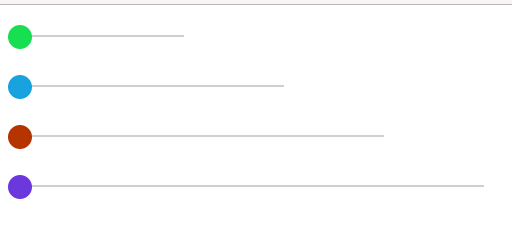
效果图如上,如果有BUG欢迎留言,共同完善。
插件开发-滑条(slide)开发的更多相关文章
- 滑屏 H5 开发实践九问
滑屏的交互形式自从在 H5 中流行起来,便广泛应用在产品宣传.广告.招聘和活动运营等场景中,作为微信朋友圈广告惯用的形式,其影响力更是得到了强化与放大.如今滑屏H5可谓玲琅满目,数不尽数. 作为一个 ...
- [js插件开发教程]一步步开发一个可以定制配置的隔行变色小插件
隔行变色功能,不用js,直接用css伪类就可以做,这个实例可以作为js插件开发很好的入门级实例.本文实现的隔行变色包括以下功能: 1,支持2种常用结构共存( div元素 和 表格类型 ) 2,一个页面 ...
- 一条java开发工程师的升级路线,从初级到无语言障碍
看了一篇文章,讲述的是如何进行后端开发升级,现在分享下,我的总结,感谢写文章的作者大大,觉得他很会坚持,虽然一直在骂人,但是,我觉得人最大的敌人就是懒惰,所以骂得好 现在写下我的总结,希望对有志者有帮 ...
- QGIS 3.14插件开发——Win10系统PyCharm开发环境搭建四步走
前言:最近实习要求做一个QGIS插件,网上关于QGIS 3.14插件开发环境搭建的文档不多,而且也不算太全面.正好实习的时候写了一个文档,在这里给大家分享一下. 因为是Word转的Markdown,可 ...
- H5滑条(input type=range)
input[type=range] { -webkit-appearance: none; width: 230px; border-radius: 10px; /*这个属性设置使填充进度条时的图形为 ...
- 16条Android开发小经验
1. TextView中的getTextSize返回值是以像素(px)为单位的, 而setTextSize()是以sp为单位的. 所以如果直接用返回的值来设置会出错,解决办法是 用setTextSiz ...
- 【插件开发】—— 10 JFace开发详解
前文回顾: 1 插件学习篇 2 简单的建立插件工程以及模型文件分析 3 利用扩展点,开发透视图 4 SWT编程须知 5 SWT简单控件的使用与布局搭配 6 SWT复杂空间与布局搭配 7 SWT布局详解 ...
- 滑条滚动发请求要用Debounce
import debounce from 'lodash.debounce'; this.deboucedFunc = debounce(this.viewModel.v_onHomeworkRequ ...
- IOS开发-UI学习-UISlider(滑动条)的使用
滑动条即UISlider,是我们常见的软件中设置音量,亮度等的滑条,初始化及基本设置如下: // 新建滑动条 UISlider *slider = [[UISlider alloc]initWithF ...
随机推荐
- tile38 roaming-geofences 试用
tile38 支持动态实时的移动对象的数据监控 环境准备 docker-compose 文件 version: "3" services: app: image: tile ...
- Debug outlook add-in (office.js) 小技巧
这几天在使用office.js 做outlook add-in的时候出现了一个问题: 不知道运行时去调试. 这里给大家介绍两个调试add-in 的方法. office365 其他软件 add-ins ...
- 谈谈在 .Net 平台上的 软件生态 和 软件生产力
我们可以先看看这篇文章 : <看 StackOverflow 如何用 25 台服务器撑起 5.6 亿的月 PV> http://www.nowamagic.net/librarys/ ...
- windows删除文件或目录CMD命令
rd/s/q 盘符:\某个文件夹 (强制删除文件文件夹和文件夹内所有文件)del/f/s/q 盘符:\文件名 (强制删除文件,文件名必须加文件后缀名)
- [转]linux中vim命令
在vi中按u可以撤销一次操作 u 撤销上一步的操作 ctrl+r 恢复上一步被撤销的操作 在vi中移动光标至: 行首:^或0 行尾:$ 页首:1G(或gg) 页尾:G(即shift+g) 显 ...
- react-router v4 实现路由拦截的一种思路(待验证)
出处:https://segmentfault.com/q/1010000010905474
- 通过 DDNS 解决宽带拨号 ip 变化问题
前面你的文章我已经写了 写了 DMZ 内网映射的 方式. 这样内网主机已经暴露在外网中了. 但是 拨号上网我们的ip是 会变化的.大概规律就是 每次拨号都会变化.如果不拨号,每 24 小时 ip也会自 ...
- Jmeter性能监测及安装插件(推荐)
本文部分理论转自Jmeter官网:https://jmeter-plugins.org/wiki/PerfMon/ ,并结合个人实践编写 一.介绍 在负载测试期间,了解加载服务器的运行状况很重要.如 ...
- tk简单使用
# 引入tk import tkinter as tk class UserLogin(object): """ 初始化窗口 """ def ...
- tornado 笔记
简单比较Django和Tornado Django是走大而全的方向,注重的是高效开发,最出名的是全自动化管理后台 Tornado走的是少而精的方向,注重的是性能的优化,最出名的是异步非堵塞 安装方式: ...