
Windows安装pycrypto失败记录
Windows 10家庭中文版,Python 3.6.4,
180824测试前端加密文本在后台揭秘,查询后发现,可以使用pycrypto模块实现,那么,安装它(pip),结果安装失败了。
本文暂时记录下失败的日志,后面找到解决问题了再完善博文。
pycrypto相关网址:
PyPI:https://pypi.org/project/pycrypto/
官网:https://www.dlitz.net/software/pycrypto/
官文:https://www.dlitz.net/software/pycrypto/api/current/
使用pip list,没有找到pycrypto,那么,安装它。
>pip3 install pycrypto
下面是安装过程日志中的部分错误信息:
...
Running setup.py bdist_wheel for pycrypto ... error
Complete output from command c:\python36\python3.exe -u -c "import setuptools, tokenize;__file__='C:\\Users\\log\\AppData\\Local\\Temp\\pip-install-0e9wj35t\\pycrypto\\setup.py';f=getattr(tokenize, 'open', open)(__file__);code=f.read().replace('\r\n', '\n');f.close();exec(compile(code, __file__, 'exec'))" bdist_wheel -d C:\Users\log\AppData\Local\Temp\pip-wheel-i1adunc1 --python-tag cp36:
...
warning: GMP or MPIR library not found; Not building Crypto.PublicKey._fastmath.
...
C:\Program Files (x86)\Microsoft Visual Studio 14.0\VC\BIN\x86_amd64\cl.exe /c /nologo /Ox /W3 /GL /DNDEBUG /MD -Isrc/ -Isrc/inc-msvc/ -Ic:\python36\include -Ic:\python36\include "-IC:\Program Files (x86)\Microsoft Visual Studio 14.0\VC\INCLUDE" "-IC:\Program Files (x86)\Windows Kits\10\include\10.0.10240.0\ucrt" "-IC:\Program Files (x86)\Windows Kits\8.1\include\shared" "-IC:\Program Files (x86)\Windows Kits\8.1\include\um" "-IC:\Program Files (x86)\Windows Kits\8.1\include\winrt" /Tcsrc/winrand.c /Fobuild\temp.win-amd64-3.6\Release\src/winrand.obj
winrand.c
C:\Program Files (x86)\Windows Kits\10\include\10.0.10240.0\ucrt\inttypes.h(26): error C2061: syntax error: identifier 'intmax_t'
C:\Program Files (x86)\Windows Kits\10\include\10.0.10240.0\ucrt\inttypes.h(27): error C2061: syntax error: identifier 'rem'
C:\Program Files (x86)\Windows Kits\10\include\10.0.10240.0\ucrt\inttypes.h(27): error C2059: syntax error: ';'
C:\Program Files (x86)\Windows Kits\10\include\10.0.10240.0\ucrt\inttypes.h(28): error C2059: syntax error: '}'
C:\Program Files (x86)\Windows Kits\10\include\10.0.10240.0\ucrt\inttypes.h(30): error C2061: syntax error: identifier 'imaxdiv_t'
C:\Program Files (x86)\Windows Kits\10\include\10.0.10240.0\ucrt\inttypes.h(30): error C2059: syntax error: ';'
...
C:\Program Files (x86)\Windows Kits\10\include\10.0.10240.0\ucrt\inttypes.h(95): error C2143: syntax error: missing '{' before '__cdecl'
error: command 'C:\\Program Files (x86)\\Microsoft Visual Studio 14.0\\VC\\BIN\\x86_amd64\\cl.exe' failed with exit status 2
...
----------------------------------------
Failed building wheel for pycrypto
Running setup.py clean for pycrypto
Failed to build pycrypto
Installing collected packages: pycrypto
Running setup.py install for pycrypto ... error
Complete output from command c:\python36\python3.exe -u -c "import setuptools, tokenize;__file__='C:\\Users\\log\\AppData\\Local\\Temp\\pip-install-0e9wj35t\\pycrypto\\setup.py';f=getattr(tokenize, 'open', open)(__file__);code=f.read().replace('\r\n', '\n');f.close();exec(compile(code, __file__, 'exec'))" install --record C:\Users\log\AppData\Local\Temp\pip-record-ux9dvuso\install-record.txt --single-version-externally-managed --compile:
running install
...
build\lib.win-amd64-3.6\Crypto\Signature
Skipping optional fixer: buffer
Skipping optional fixer: idioms
Skipping optional fixer: set_literal
Skipping optional fixer: ws_comma
running build_ext
warning: GMP or MPIR library not found; Not building Crypto.PublicKey._fastmath.
building 'Crypto.Random.OSRNG.winrandom' extension
...
C:\Program Files (x86)\Microsoft Visual Studio 14.0\VC\BIN\x86_amd64\cl.exe /c /nologo /Ox /W3 /GL /DNDEBUG /MD -Isrc/ -Isrc/inc-msvc/ -Ic:\python36\include -Ic:\python36\include "-IC:\Program Files (x86)\Microsoft Visual Studio 14.0\VC\INCLUDE" "-IC:\Program Files (x86)\Windows Kits\10\include\10.0.10240.0\ucrt" "-IC:\Program Files (x86)\Windows Kits\8.1\include\shared" "-IC:\Program Files (x86)\Windows Kits\8.1\include\um" "-IC:\Program Files (x86)\Windows Kits\8.1\include\winrt" /Tcsrc/winrand.c /Fobuild\temp.win-amd64-3.6\Release\src/winrand.obj
winrand.c
C:\Program Files (x86)\Windows Kits\10\include\10.0.10240.0\ucrt\inttypes.h(26): error C2061: syntax error: identifier 'intmax_t'
C:\Program Files (x86)\Windows Kits\10\include\10.0.10240.0\ucrt\inttypes.h(27): error C2061: syntax error: identifier 'rem'
C:\Program Files (x86)\Windows Kits\10\include\10.0.10240.0\ucrt\inttypes.h(27): error C2059: syntax error: ';'
C:\Program Files (x86)\Windows Kits\10\include\10.0.10240.0\ucrt\inttypes.h(28): error C2059: syntax error: '}'
...
----------------------------------------
Command "c:\python36\python3.exe -u -c "import setuptools, tokenize;__file__='C:\\Users\\log\\AppData\\Local\\Temp\\pip-install-0e9wj35t\\pycrypto\\setup.py';f=getattr(tokenize, 'open', open)(__file__);code=f.read().replace('\r\n', '\n');f.close();exec(compile(code, __file__, 'exec'))" install --record C:\Users\log\AppData\Local\Temp\pip-record-ux9dvuso\install-record.txt --single-version-externally-managed --compile" failed with error code 1 in C:\Users\log\AppData\Local\Temp\pip-install-0e9wj35t\pycrypto\
You are using pip version 10.0.1, however version 18.0 is available.
You should consider upgrading via the 'python -m pip install --upgrade pip' command.
----END----
从上面的错误日志来看,需要用到一个cl.exe命令,这个命令的路径存在于Microsoft Visual Studio 14.0或Windows Kits中,但是,孤的电脑上是没有的。
解决的方法当然是安装Microsoft Visual Studio,参考链接的解决方法也是说要安装一个,不过更详细一些。
另外,错误日志还提示GMP or MPIR library缺失,是否安装好Microsoft Visual Studio就有了呢?然后,之后就可以安装pycrypto了。
接下来,分为两步解决这个问题:
1.安装Microsoft Visual Studio;
2.安装pycrypto(此步骤的日志可以检查GMP or MPIR library是否已经有了,若是没有,且pycrypto安装失败,那么再找办法);
0825-0900新发现:
孤的电脑已经有错误日志中提到的Microsoft Visual Studio 14.0或Windows Kits目录及相关文件了,可是看来,上面说的解决方法是不对的,还需要继续dig才是
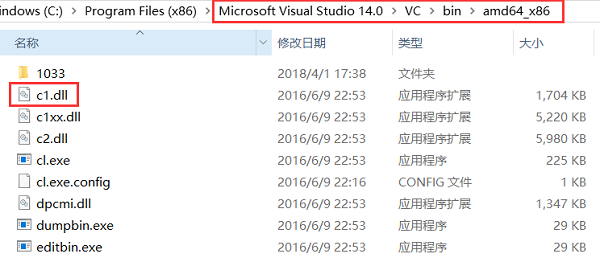


操作系统模块安装了Visual Studio 2015的部分功能吗?下图的这些是怎么来的呢?

既然如此,那么,又要怎么解决呢?再看看参考链接吧!
去Visual Studio官网看了一遍,好多软件,不愧是Microsoft!对于一位非Windows系程序员,要选对软件有些困难啊!
还要找找,到底Windows 10上能否安装pycrypto!
哎呀,都要耗费精时啊!
检查Python标准库,居然没有找到加密、安全相关的模块,搜索security、crypto都没有找到想要的——使用各种加密算法,看来,必须要用第三方库了,比如pycrypto。
参考链接:
windows 下的python 安装pycrypto by 园友 anne的夏天
0825-0930更新:哇哦,Ubuntu(18.04)上安装pycrypto好方便啊!嗖的一下就安装好勒!

安装好了,可是,import pycrypto失败!
>>> import pycrypto
Traceback (most recent call last):
File "<stdin>", line 1, in <module>
ModuleNotFoundError: No module named 'pycrypto'
疑问:怎么找到一个模块的用法呢?官网吗?通过模块本身可以知道吗?
参考下面的链接(官文)可以初步知道pycrypto模块的用法:
Windows安装pycrypto失败记录的更多相关文章
- windows安装go-sqlite3失败,提示找不到gcc
windows安装go-sqlite3失败,提示找不到gcc go get github.com/mattn/go-sqlite3时失败,提示exec: “gcc”: executable file ...
- windows安装pycrypto报错
在Windows上安装的时候直接 pip install pycrypto会报错 由于直接安装安装Crypto模块 会报错如下:因此需要先安装Microsoft Visual C++ 9.0 进入下载 ...
- opensuse安装pycurl失败记录
早上在opensuse安装pycurl,一直出现如下错误: pepper@VM_56_243_suse:~/code/gitosis-autotest> pip install pycurl C ...
- VNPY - windows 安装踩坑记录
twisted requires PyHamcrest>=, which is not ins grin requires argparse>=1.1, which is not inst ...
- Windows安装Tomcat失败:Failed installing tomcat7 service
今天在Win7下面安装tomcat(解压版),但是安装的时候老是弹出:Failed installing tomcat6 service.猜想是Win7安全权限管理的原因.网上搜了一下果然是这样. 解 ...
- deepin安装nginx失败记录
问题描述 在deepin系统中,apt install nginx 返回信息报错: nginx 依赖于 nginx-full (<< 1.10.3-1+deb9u2.1~) | nginx ...
- windows 下的python 安装pycrypto
一般在官方网站下载pycrypto: https://www.dlitz.net/software/pycrypto/ 然后使用命令就可以安装成功了: python setup.py build ...
- Windows 10安装DockerToolBox失败处理方法
指令运行报错: Windows 10安装DockerToolBox失败处理方法:升级Windows 10. (注意:只有Windows10 专业版才支持升级,Server和企业版无效)
- windows下PyTorch安装之路记录
最近两天被windows下pytorch的安装给搞得很烦了,不过在今天终于安装成功了,如下图所示 下面详细说下此次安装的详细记录吧.我的电脑环境是Windows10+cuda9.0+cudnn7.1. ...
随机推荐
- [转帖]在VMware ESXi服务器上配置NAT上网 需要学习一下。
http://blog.51cto.com/boytnt/1292487 在使用VMware workstation的时候,我们经常以NAT的方式配置虚拟机的网络,与桥接方式相比,这样配置可以让虚拟机 ...
- Java 工厂方法模式
在工厂对象上调用创建方法,生成接口的某个实现的对象 通过这种方式,接口与实现分离 方法接口 /** * 方法接口 */ public interface Service { void method1( ...
- [代码]--c#获取系统时间
public DateTime GetServerDataTime() { string sql = " select top 1 getdate() from sysobjects &qu ...
- LOJ #2145. 「SHOI2017」分手是祝愿
题目链接 LOJ #2145 题解 一道画风正常的--期望DP? 首先考虑如何以最小步数熄灭所有灯:贪心地从大到小枚举灯,如果它亮着则修改它.可以求出总的最小步数,设为\(cnt\). 然后开始期望D ...
- stm32的双向io口
# stm的io设置为双向问题,将io端口模式配置为 open-drain mode > 在io端口配置为输出模式时,输入通道上的施密特触发器一直是打开的,所以读取IDR是能检测到端口电平的 & ...
- 线段树区间更新 lazy
1. hdu1698 http://acm.hdu.edu.cn/showproblem.php?pid=1698 /* x y k x~y的值变为k */ #include <cstdio&g ...
- 借读:分布式锁和双写Redis
本帖最后由 howtodown 于 2016-10-3 16:01 编辑问题导读1.为什么会产生分布式锁?2.使用分布式锁的方法有哪些?3.本文创造的分布式锁的双写Redis框架都包含哪些内容? ...
- Ajax跨域CORS
在Ajax2.0中多了CORS允许我们跨域,但是其中有着几种的限制:Origin.Methods.Headers.Credentials 1.Origin 当浏览器用Ajax跨域请求的时候,会带上一个 ...
- 解决linux mysql命令 bash: mysql: command not found 的方法
错误: root@DB-02 ~]# mysql -u root-bash: mysql: command not found 原因:这是由于系统默认会查找/usr/bin下的命令,如果这个命令不在这 ...
- SQL记录-PLSQL-DBMS输出
PL/SQL DBMS输出 DBMS_OUTPUT是一个内置的软件包,能够显示输出显示调试信息,并从PL/ SQL块,子程序,包和触发器发送消息.我们已经使用这个包在我们所有的教程中. 让我们来看 ...