
Python实例---模拟微信网页登录(day2)
第三步: 实现长轮询访问服务器---day2代码
settings.py
"""

Django settings for weixin project.

Generated by 'django-admin startproject' using Django 2.0.1.

For more information on this file, see

https://docs.djangoproject.com/en/2.0/topics/settings/

For the full list of settings and their values, see

https://docs.djangoproject.com/en/2.0/ref/settings/

"""

import os

# Build paths inside the project like this: os.path.join(BASE_DIR, ...)

BASE_DIR = os.path.dirname(os.path.dirname(os.path.abspath(__file__)))

# Quick-start development settings - unsuitable for production

# See https://docs.djangoproject.com/en/2.0/howto/deployment/checklist/

# SECURITY WARNING: keep the secret key used in production secret!

SECRET_KEY = '*g4b=9ct3o#*1pr0o2$h+p$eb!czq!)83u933x8$(n7uj++!f%'

# SECURITY WARNING: don't run with debug turned on in production!

DEBUG = True

ALLOWED_HOSTS = []

# Application definition

INSTALLED_APPS = [

    'django.contrib.admin',

    'django.contrib.auth',

    'django.contrib.contenttypes',

    'django.contrib.sessions',

    'django.contrib.messages',

    'django.contrib.staticfiles',

    'App.apps.AppConfig',

]

MIDDLEWARE = [

    'django.middleware.security.SecurityMiddleware',

    'django.contrib.sessions.middleware.SessionMiddleware',

    'django.middleware.common.CommonMiddleware',

    # 'django.middleware.csrf.CsrfViewMiddleware',

    'django.contrib.auth.middleware.AuthenticationMiddleware',

    'django.contrib.messages.middleware.MessageMiddleware',

    'django.middleware.clickjacking.XFrameOptionsMiddleware',

]

ROOT_URLCONF = 'weixin.urls'

TEMPLATES = [

    {

        'BACKEND': 'django.template.backends.django.DjangoTemplates',

        'DIRS': [os.path.join(BASE_DIR, 'templates')],

        'APP_DIRS': True,

        'OPTIONS': {

            'context_processors': [

                'django.template.context_processors.debug',

                'django.template.context_processors.request',

                'django.contrib.auth.context_processors.auth',

                'django.contrib.messages.context_processors.messages',

            ],

        },

    },

]

WSGI_APPLICATION = 'weixin.wsgi.application'

# Database

# https://docs.djangoproject.com/en/2.0/ref/settings/#databases

DATABASES = {

    'default': {

        'ENGINE': 'django.db.backends.sqlite3',

        'NAME': os.path.join(BASE_DIR, 'db.sqlite3'),

    }

}

# Password validation

# https://docs.djangoproject.com/en/2.0/ref/settings/#auth-password-validators

AUTH_PASSWORD_VALIDATORS = [

    {

        'NAME': 'django.contrib.auth.password_validation.UserAttributeSimilarityValidator',

    },

    {

        'NAME': 'django.contrib.auth.password_validation.MinimumLengthValidator',

    },

    {

        'NAME': 'django.contrib.auth.password_validation.CommonPasswordValidator',

    },

    {

        'NAME': 'django.contrib.auth.password_validation.NumericPasswordValidator',

    },

]

# Internationalization

# https://docs.djangoproject.com/en/2.0/topics/i18n/

LANGUAGE_CODE = 'en-us'

TIME_ZONE = 'UTC'

USE_I18N = True

USE_L10N = True

USE_TZ = True

# Static files (CSS, JavaScript, Images)

# https://docs.djangoproject.com/en/2.0/howto/static-files/

STATIC_URL = '/static/'

TEMPLATE_DIRS = (os.path.join(BASE_DIR,  'templates'),)

STATICFILES_DIRS = (

    os.path.join(BASE_DIR, 'static'),

)
views.py
from django.shortcuts import render, redirect, HttpResponse

import re

import time

import json

import requests

# Create your views here.

QCODE = None

CURRENT_TIME = None

LOGIN_COOKIE_DICT = {}

TICKET_COOKIE_DICT = {}

TICKET_DICT = {}

TIP = 1  # 解决201后还不停pending的问题...

USER_INIT_DATA = {}

BASE_URL = "http://wx.qq.com"

BASE_SYNC_URL = "https://webpush.weixin.qq.com"

def login(request):

    # https://login.wx.qq.com/jslogin?appid=wx782c26e4c19acffb&redirect_uri=https%3A%2F%2Fwx.qq.com%2Fcgi-bin%2Fmmwebwx-bin%2Fwebwxnewloginpage&fun=new&lang=zh_CN&_=1486951705941

    base_qode_url = 'https://login.wx.qq.com/jslogin?appid=wx782c26e4c19acffb&redirect_uri=https%3A%2F%2Fwx.qq.com%2Fcgi-bin%2Fmmwebwx-bin%2Fwebwxnewloginpage&fun=new&lang=zh_CN&={0}'

    global CURRENT_TIME  # 更改全局变量需要更改添加global

    global QCODE

    CURRENT_TIME = str(time.time())  # 时间戳【返回是float类型,转换为str类型】

    q_code_url = base_qode_url.format(CURRENT_TIME)

    response = requests.get(q_code_url)  # 获取到随记字符串,返回是个response对象

    # code: <Response [200]>

    # type(code):  <class 'requests.models.Response'>

    # code.text : window.QRLogin.code = 200; window.QRLogin.uuid = "gb8OTUPMpA==";

    print('Response对象: ', response, type(response))

    print('Response内容: ', response.text)

    code = re.findall('uuid = "(.*)"', response.text)[0]  # findall返回一个列表,注意空格

    QCODE = code

    print("随记字符:", QCODE)

    return render(request, 'login.html', {"code": QCODE})

def pooling(request):

    # https://login.wx.qq.com/cgi-bin/mmwebwx-bin/login?loginicon=true&uuid=AY0FL0UZwA==&tip=1&r=1700853510&_=1523012536082

    # 201: 扫码,未确认

    # 200: 扫码,确认

    # 408: 等待中...

    global TIP  # 解决201后还不停pending的问题...

    ret = {'status': 408, 'data': None}

    base_login_url = "https://login.wx.qq.com/cgi-bin/mmwebwx-bin/login?loginicon=true&uuid={0}&tip={1}&r=-1700853510&_={2}"

    login_url = base_login_url.format(QCODE, TIP, CURRENT_TIME)

    response_login = requests.get(login_url)

    print('长轮询URL', login_url)

    print('长轮询状态码以及内容:', response_login.text)

    if 'window.code=201' in response_login.text:

        userAvatar = re.findall("userAvatar = '(.*)';", response_login.text)[0]

        ret['data'] = userAvatar

        ret['status'] = 201

        TIP = 0

    elif 'window.code=200' in response_login.text:

        global BASE_URL

        global BASE_SYNC_URL

        # 用户已经确认后获取Cookie内容

        LOGIN_COOKIE_DICT.update(response_login.cookies.get_dict())

        redirect_url = re.findall('window.redirect_uri="(.*)";', response_login.text)[0]

        if redirect_url.startswith('https://wx2.qq.com'):

            BASE_URL = 'https://wx2.qq.com'

            BASE_SYNC_URL = 'https://webpush.wx2.qq.com'

        else:

            BASE_URL = "http://wx.qq.com"

            BASE_SYNC_URL = "https://webpush.weixin.qq.com"

        # 微信正常的:https://wx.qq.com/cgi-bin/mmwebwx-bin/webwxnewloginpage?ticket=ATsWUC3qlrRteYUWzz_8hBMH@qrticket_0&uuid=QY2NxTcDcw==&lang=zh_CN&scan=1523018755&fun=new&version=v2&lang=zh_CN

        # 我们获取的:https://wx.qq.com/cgi-bin/mmwebwx-bin/webwxnewloginpage?ticket=AYTBkpgzEWsIgHOjaQK1tvSs@qrticket_0&uuid=AfxTcp1JXQ==&lang=zh_CN&scan=1523017763

        print('用户确认后获取的URL:', redirect_url)

        redirect_url += '&fun=new&version=v2&lang=zh_CN'

        print('用户确认后改装的跳转URL:', redirect_url)

        # 用户已经确认后获取票据内容

        response_ticket = requests.get(redirect_url, cookies=LOGIN_COOKIE_DICT)

        TICKET_COOKIE_DICT.update(response_ticket.cookies.get_dict())

        '''

            获取的凭据内容:

                <error>

                    <ret>0</ret>

                    <message></message>

                    <skey>@crypt_ea9ae4c7_090ef27aeb8539e92003afd7658c8f49</skey>

                    <wxsid>dDQOkKqhrvLnFm1o</wxsid>

                    <wxuin>1289256384</wxuin>

                    <pass_ticket>YWQzZ0sOdkr1Eq%2BExvGbyfBq2mbIwksh%2BipMvTyNVUxBwnfqhXKn4wTBPMhpHh%2B%2F</pass_ticket>

                    <isgrayscale>1</isgrayscale>

                </error>

        '''

        print('获取的凭据内容: ', response_ticket.text)  # 利用这个凭据进行下一次的数据访问

        '''

        格式化输出凭据内容

            ret 0

            message None

            skey @crypt_29bab75e_996fb921b5a09570d7793598f2e213dc

            wxsid g++XySA396Bnwljx

            wxuin 1600696821

            pass_ticket fbBFzsSbFhlD1kpNMJ7f39vrBwGqZTezGU7%2FpDZS1rzAueLDfKw%2FfoWp8sT8MdP6

            isgrayscale 1

        '''

        from bs4 import BeautifulSoup

        soup = BeautifulSoup(response_ticket.text, 'html.parser')

        for tag in soup.find():  # 格式化打印XML内容

            TICKET_DICT[tag.name] = tag.string  # 字典内部元素修改不需要global,重新赋值需要global

        ret['status'] = 200  # 解决我们后台的报错问题,因为前台一直在pending获取数据根后台我们拿到的数据不一致

    return HttpResponse(json.dumps(ret))
url.py
from django.contrib import admin

from django.urls import path

from App import views

urlpatterns = [

    path('admin/', admin.site.urls),

    path('login/', views.login),

    path('polling/', views.pooling),

]
login.html
<!DOCTYPE html>

<html lang="en">

<head>

    <meta charset="UTF-8">

    <title>WeChat By FTL1012</title>

</head>

<body>

    <div style="width: 300px; margin: 0 auto ">

        <img id="qcode" style="width: 300px; height: 300px;" src="https://login.weixin.qq.com/qrcode/{{ code }}"/>

    </div>

</body>

<script src="/static/jquery-3.2.1.min.js"></script>

<script>

     $(function () {

            polling();

        });

    // 发送长轮询

    function polling() {

        $.ajax({

            url: '/polling/',

            type: "GET",

            dataType: 'json',

            success: function (args) {

                if(args.status == 408){

                    polling();

                }else if(args.status == 201){

                    // 已经扫描,但未确认; --》获取微信用户的头像信息,继续发长轮询等待确认

                    $("#qcode").attr('src', args.data);

                    polling();

                }else{

                    // 此时手机端已经确认了信息,跳转主页面

                    location.href = '/index/'

                }

            }

        })

    }

</script>

</html>
页面请求:
http://127.0.0.1:8000/login/(扫码后)
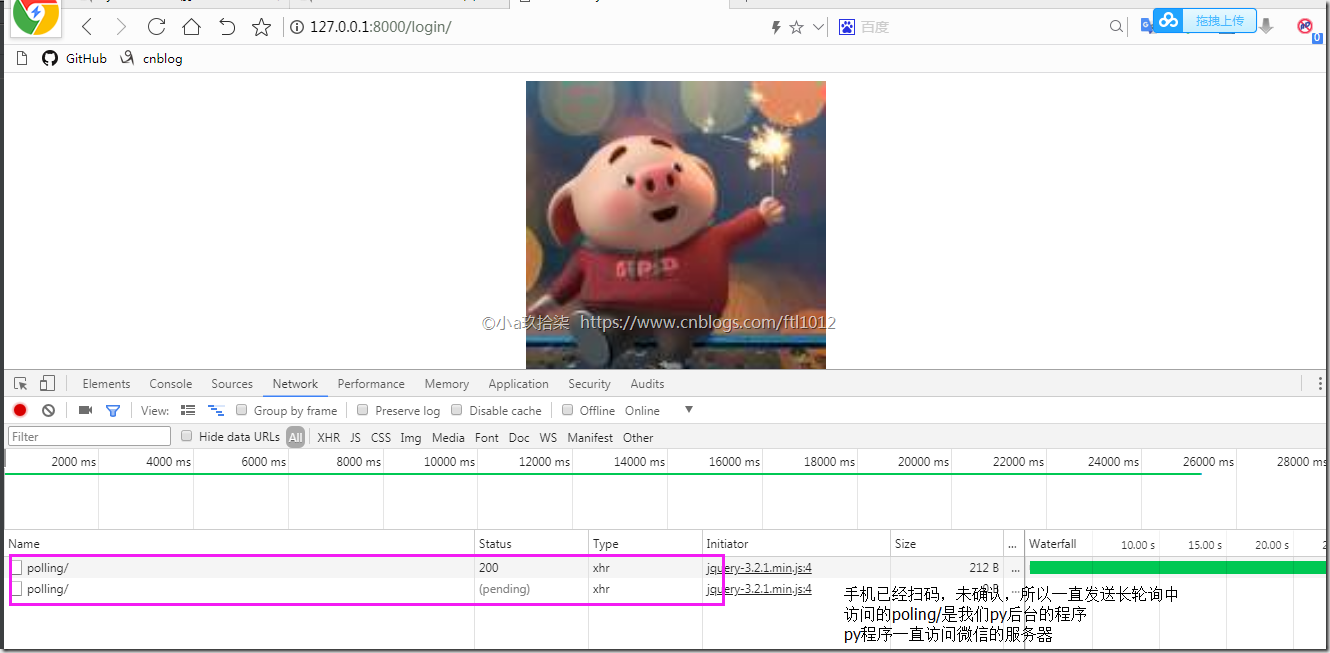
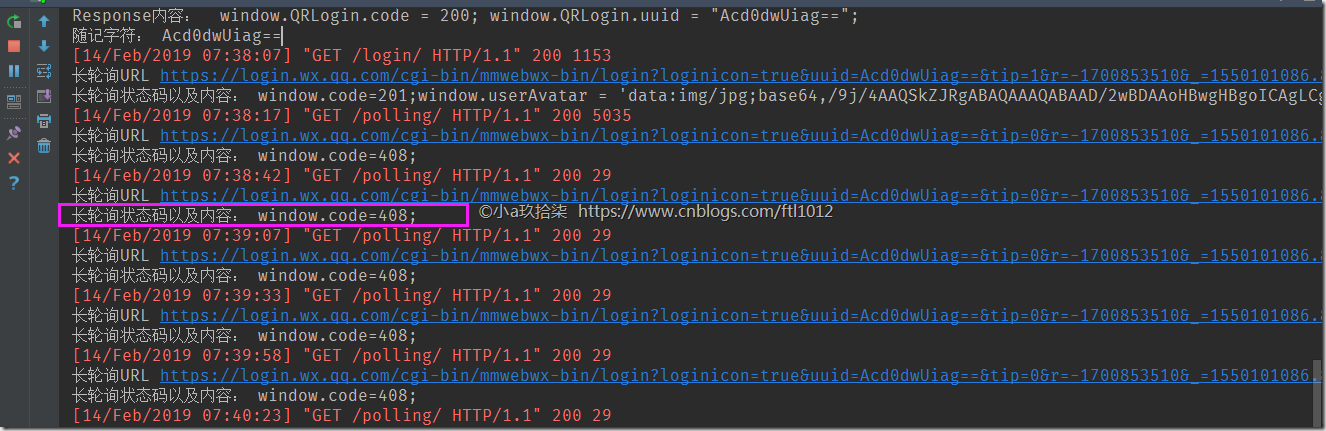
长轮询的状态码408
Python实例---模拟微信网页登录(day2)的更多相关文章
- Python实例---模拟微信网页登录(day5)
第六步: 实现发送/接受消息---day5代码 settings.py """ Django settings for weixin project. Generated ...
- Python实例---模拟微信网页登录(day4)
第五步: 获取联系人信息---day4代码 settings.py """ Django settings for weixin project. Generated b ...
- Python实例---模拟微信网页登录(day3)
第四步: 扫码成功后获取最近联系人信息---day3代码 settings.py """ Django settings for weixin project. Gene ...
- Python实例---模拟微信网页登录(day1)
第一步:创建Django项目 创建Django项目,添加App 创建静态文件夹static 修改settings.py文件 1. 取消csrf注释 2. 添加静态文件路径 # 添加静态文件路径 STA ...
- Python学习---模拟微信网页登录180410
WEB微信 网页登录的猜想: a. 访问页面出现二维码 b. 长轮询监听是否已经扫码并且点击确认 c. 如何进行会话保持 d. 如何获取用户列表 e. 如何发送消息(接收消息) 过程:访问微信官网[h ...
- JustAuth 1.15.9 版发布,支持飞书、喜马拉雅、企业微信网页登录
新增 修复并正式启用 飞书 平台的第三方登录 AuthToken 类中新增 refreshTokenExpireIn 记录 refresh token 的有效期 PR 合并 Github #101:支 ...
- 基于ASP.NET MVC 微信网页登录授权(scope为snsapi_base) 流程 上 获取OPENID
流程图 我们需要判断是否存在OPENID 首先我们得先定义一个全局的OPENID 类似于普通账号密码登录系统的 当前登录用户ID 因为我是MVC 框架 我这里定义一个控制器基类 BaseCont ...
- VC显示网页验证码、模拟CSDN网页登录
摘要:by:koma 这两天,本来想花点时间研究一下QQ空间.农场外挂,于是抓包分析一了下,只可惜,在QQ网页登录时进行了加密处理,可惜我对网页编程一窍不通.有些朋友曾讲过那些是通过JS代码进行加密, ...
- 微信网页登录Tips
http://www.ruanyifeng.com/blog/2014/05/oauth_2_0.html 以这篇文章为例,一般都是用户在第三方app中登录时,由第三方去申请资源服务器的登录权限等.即 ...
随机推荐
- WPF设置控件获取键盘焦点时的样式FocusVisualStyle
控件获取焦点除了用鼠标外,可以通过键盘来获取,比如Tab键或者方向键等,需要设置控件获取键盘焦点时的样式,可以通过设置FrameworkElemnt.FocusVisualStyle属性, 因为几乎所 ...
- DDA, Bresenham line's algorithm and Voxel Traversal used in the Grid-Accelerator in PBRT
- DDA(Digital Differential Analyzer, 数值微分法) - 计算机图形学中,经常会遇到一些计算机中”经典“的问题.例如,如何利用计算机”离散“的特质,模拟 ...
- Flutter踩坑日记:Tab导航栏保持子页面状态
最近应邀票圈小伙伴躺坑Flutter,项目初步雏形完结.以原来的工具链版本为基础做了Flutter版本,不过后面还是需要优化下项目接入Redux,以及扩展一些Native方法. 这里记录一下在开发过程 ...
- Tomcat学习总结(4)——基于Tomcat7、Java、WebSocket的服务器推送聊天室
前言 HTML5 WebSocket实现了服务器与浏览器的双向通讯,双向通讯使服务器消息推送开发更加简单,最常见的就是即时通讯和对信息实时性要求比较高的应用.以前的服务器消息推送大 ...
- webpack4 自学笔记一(babel的配置)
所有代码都可以再我的github上查看,每个文件夹下都会有README.md,欢迎star: https://github.com/Jasonwang911/webpackStudyInit/tree ...
- Docker 入门 之基本命令
3 Docker 入门 首先确保docker 已成功安装在Linux 或windows 系统中 我们可以使用 docker info 查看docker是否成功安装和正常运行 运行我们第一个docker ...
- Ubuntu16.04安装mac主题(转载)
Ubuntu16.04配置Mac主题 作者:tongqingliu 转载请注明出处:http://www.cnblogs.com/liutongqing/p/7072878.html 觉得有帮助?欢迎 ...
- [转]Centos系统中查看文件和文件夹大小
本文转自:https://blog.csdn.net/zgmu/article/details/52882868 当磁盘大小超过标准时会有报警提示,这时如果掌握df和du命令是非常明智的选择.df可以 ...
- java文件下载以及中文乱码解决
在客户端下载文件时替换下载文件的名称,但是当名称是中文时浏览器会出现乱码,解决代码如下: public org.springframework.http.ResponseEntity<Input ...
- tomcat 防火墙如何设置
tomcat 防火墙能够有效的防护我们电脑,那么我们要怎么样去设置呢?下面由学习啦小编给你做出详细的tomcat 防火墙设置方法介绍!希望对你有帮助! tomcat 防火墙设置方法一: 1.为tomc ...