
WPF自定义Window窗体样式
资源文件代码:
<ResourceDictionary xmlns="http://schemas.microsoft.com/winfx/2006/xaml/presentation"

                    xmlns:x="http://schemas.microsoft.com/winfx/2006/xaml">

    <!-- 最大化按钮形状 -->

    <PathGeometry x:Key="pathMaximize">

        <PathGeometry.Figures>

            M1,1  L1 ,11 L11,11 L11,1 z M0,0 L12,0 L12,12 L0,12 z

        </PathGeometry.Figures>

    </PathGeometry>

    <!-- 还原按钮形状 -->

    <PathGeometry x:Key="pathRestore">

        <PathGeometry.Figures>

            M1,3 L1,11 L9,11 L9,3 z M3,1 L3,2 L10,2 L10,9 L11,9 L11,1 z M2 ,0 L12,0 L12,10 L10,10 L10,12 L0,12 L0,2 L2 ,2 z

        </PathGeometry.Figures>

    </PathGeometry>

    <!-- 窗体模板 -->

    <ControlTemplate x:Key="tmplWindowEx" TargetType="{x:Type Window}">

        <Border>

            <Border CornerRadius="5" Background="#0998B8" Margin="{Binding BorderMargin}">

                <Grid>

                    <Grid.RowDefinitions>

                        <RowDefinition Height="28"></RowDefinition>

                        <RowDefinition></RowDefinition>

                    </Grid.RowDefinitions>

                    <TextBlock Text="{TemplateBinding Title}" Margin="10 0 0 0" FontFamily="微软雅黑,黑体" FontSize="12" Foreground="#fff" VerticalAlignment="Center"></TextBlock>

                    <!-- Border用于遮盖Title -->

                    <Border Margin="88 0 0 0" CornerRadius="0 5 0 0" Background="#0998B8" Width="90" HorizontalAlignment="{Binding BtnPanelHorizontalAlignment}"></Border>

                    <StackPanel Orientation="Horizontal" HorizontalAlignment="{Binding BtnPanelHorizontalAlignment}" Margin="98 0 5 0">

                        <Button x:Name="btnMinimize" Width="28" Height="28" WindowChrome.IsHitTestVisibleInChrome="True" Command="{Binding DataContext.WindowBtnCommand, RelativeSource={RelativeSource AncestorType=Window}}" CommandParameter="1" Visibility="{Binding BtnMinimizeVisibility}" >

                            <Button.Template>

                                <ControlTemplate>

                                    <Grid x:Name="grid" Background="Transparent">

                                        <Path x:Name="path1" Width="12" Height="12" Fill="#fff" Data="M0,5 L12,5 L12,6 L0,6 z" VerticalAlignment="Center" HorizontalAlignment="Center"></Path>

                                    </Grid>

                                    <ControlTemplate.Triggers>

                                        <Trigger Property="IsMouseOver" Value="true">

                                            <Setter TargetName="grid" Property="Background" Value="#0988a8"/>

                                        </Trigger>

                                    </ControlTemplate.Triggers>

                                </ControlTemplate>

                            </Button.Template>

                        </Button>

                        <Button x:Name="btnMaximize" Width="28" Height="28" WindowChrome.IsHitTestVisibleInChrome="True" Command="{Binding DataContext.WindowBtnCommand, RelativeSource={RelativeSource AncestorType=Window}}" CommandParameter="2" Visibility="{Binding BtnMaximizeVisibility}" >

                            <Button.Template>

                                <ControlTemplate>

                                    <Grid x:Name="grid" Background="Transparent">

                                        <Path x:Name="path1" Width="12" Height="12" Fill="#fff" Data="{Binding BtnMaximizePathData}" VerticalAlignment="Center" HorizontalAlignment="Center" ></Path>

                                    </Grid>

                                    <ControlTemplate.Triggers>

                                        <Trigger Property="IsMouseOver" Value="true">

                                            <Setter TargetName="grid" Property="Background" Value="#0988a8"/>

                                        </Trigger>

                                    </ControlTemplate.Triggers>

                                </ControlTemplate>

                            </Button.Template>

                        </Button>

                        <Button x:Name="btnClose" Width="28" Height="28" WindowChrome.IsHitTestVisibleInChrome="True" Command="{Binding DataContext.WindowBtnCommand, RelativeSource={RelativeSource AncestorType=Window}}" CommandParameter="3">

                            <Button.Template>

                                <ControlTemplate>

                                    <Grid x:Name="grid" Background="Transparent">

                                        <Path x:Name="path1" Width="12" Height="12" Fill="#fff" Data="M1,0 L6,5 L11,0 L12,1 L7,6 L12,11 L11,12 L6,7 L1,12 L0,11 L5,6 L0,1 z" VerticalAlignment="Center" HorizontalAlignment="Center" ></Path>

                                    </Grid>

                                    <ControlTemplate.Triggers>

                                        <Trigger Property="IsMouseOver" Value="true">

                                            <Setter TargetName="grid" Property="Background" Value="#0988a8"/>

                                        </Trigger>

                                    </ControlTemplate.Triggers>

                                </ControlTemplate>

                            </Button.Template>

                        </Button>

                    </StackPanel>

                    <Border Background="#d6e7f1" CornerRadius="3 0 3 3" Grid.Row="1" Margin="3 0 3 3" >

                        <ContentPresenter ></ContentPresenter>

                    </Border>

                </Grid>

            </Border>

        </Border>

    </ControlTemplate>

    <!-- 窗体样式 -->

    <Style x:Key="stlWindowEx" TargetType="{x:Type Window}">

        <Setter Property="Template" Value="{StaticResource tmplWindowEx}"/>

        <!--在代码中设置AllowsTransparency和WindowStyle-->

        <!--<Setter Property="AllowsTransparency" Value="True"></Setter>-->

        <!--<Setter Property="WindowStyle" Value="None" />-->

        <Setter Property="Background" Value="Transparent"></Setter>

        <Setter Property="BorderThickness" Value="0" />

        <Setter Property="BorderBrush" Value="Transparent" />

        <Setter Property="ResizeMode" Value="NoResize" />

        <Setter Property="ShowInTaskbar" Value="False" />

        <Setter Property="WindowChrome.WindowChrome">

            <Setter.Value>

                <WindowChrome CornerRadius="5"

                              CaptionHeight="28"

                              GlassFrameThickness="0"

                              UseAeroCaptionButtons="False"

                              NonClientFrameEdges="None">

                </WindowChrome>

            </Setter.Value>

        </Setter>

    </Style>

</ResourceDictionary>
自定义窗体封装WindowEx类代码:
using System;

using System.Collections.Generic;

using System.ComponentModel;

using System.Linq;

using System.Reflection;

using System.Resources;

using System.Text;

using System.Threading;

using System.Threading.Tasks;

using System.Windows;

using System.Windows.Input;

using System.Windows.Media;

using System.Windows.Resources;

using System.Windows.Shapes;

namespace SunCreate.Common.Controls

{

    /// <summary>

    /// 窗体封装

    /// </summary>

    public class WindowEx : Window, INotifyPropertyChanged

    {

        public event EventHandler<WindowExFixEventArgs> FixEvent;

        private ResourceDictionary _resource;

        private ICommand _WindowBtnCommand;

        /// <summary>

        /// 窗体按钮命令

        /// </summary>

        public ICommand WindowBtnCommand

        {

            get

            {

                return _WindowBtnCommand;

            }

            set

            {

                _WindowBtnCommand = value;

                OnPropertyChanged("WindowBtnCommand");

            }

        }

        private Thickness _BorderMargin = new Thickness(, , , );

        public Thickness BorderMargin

        {

            get

            {

                return _BorderMargin;

            }

            set

            {

                _BorderMargin = value;

                OnPropertyChanged("BorderMargin");

            }

        }

        private HorizontalAlignment _BtnPanelHorizontalAlignment = HorizontalAlignment.Right;

        /// <summary>

        /// 窗体按钮的Panel位置

        /// </summary>

        public HorizontalAlignment BtnPanelHorizontalAlignment

        {

            get

            {

                return _BtnPanelHorizontalAlignment;

            }

            set

            {

                _BtnPanelHorizontalAlignment = value;

                OnPropertyChanged("BtnPanelHorizontalAlignment");

            }

        }

        private Visibility _BtnMinimizeVisibility = Visibility.Visible;

        /// <summary>

        /// 窗体最小化按钮的显示状态

        /// </summary>

        public Visibility BtnMinimizeVisibility

        {

            get

            {

                return _BtnMinimizeVisibility;

            }

            set

            {

                _BtnMinimizeVisibility = value;

                OnPropertyChanged("BtnMinimizeVisibility");

            }

        }

        private Visibility _BtnMaximizeVisibility = Visibility.Visible;

        /// <summary>

        /// 窗体最大化按钮的显示状态

        /// </summary>

        public Visibility BtnMaximizeVisibility

        {

            get

            {

                return _BtnMaximizeVisibility;

            }

            set

            {

                _BtnMaximizeVisibility = value;

                OnPropertyChanged("BtnMaximizeVisibility");

            }

        }

        private Geometry _BtnMaximizePathData;

        /// <summary>

        /// 窗体最大化按钮的样式

        /// </summary>

        public Geometry BtnMaximizePathData

        {

            get

            {

                return _BtnMaximizePathData;

            }

            set

            {

                _BtnMaximizePathData = value;

                OnPropertyChanged("BtnMaximizePathData");

            }

        }

        private Visibility _TitleVisibility = Visibility.Visible;

        /// <summary>

        /// 是否显示标题

        /// </summary>

        public Visibility TitleVisibility

        {

            get

            {

                return _TitleVisibility;

            }

            set

            {

                _TitleVisibility = value;

                OnPropertyChanged("TitleVisibility");

            }

        }

        private WindowExTheme _Theme = WindowExTheme.Default;

        /// <summary>

        /// 窗体主题

        /// </summary>

        public WindowExTheme Theme

        {

            get

            {

                return _Theme;

            }

            set

            {

                _Theme = value;

                OnPropertyChanged("Theme");

            }

        }

        /// <summary>

        /// 窗体 构造函数

        /// </summary>

        public WindowEx()

        {

            this.Loaded += WindowEx_Loaded;

            this.DataContext = this;

            #region 窗体样式设置

            //this.AllowsTransparency = true; //AllowsTransparency会导致视频播放不显示

            this.WindowStyle = WindowStyle.None;

            #endregion

            #region 窗体按钮事件

            WindowBtnCommand windowBtnCommand = new WindowBtnCommand();

            windowBtnCommand.DoAction = (parameter) =>

            {

                if (parameter == ) //最小化

                {

                    MinimizedSet();

                    this.WindowState = WindowState.Minimized;

                }

                if (parameter == ) //窗口还原、最大化

                {

                    if (this.WindowState == WindowState.Normal)

                    {

                        MaximizedSet();

                        this.WindowState = WindowState.Maximized;

                    }

                    else if (this.WindowState == WindowState.Maximized)

                    {

                        RestoredSet();

                        this.WindowState = WindowState.Normal;

                    }

                    else if (this.WindowState == WindowState.Minimized)

                    {

                        RestoredSet();

                        this.WindowState = WindowState.Normal;

                    }

                }

                if (parameter == ) //关闭窗口

                {

                    this.Close();

                }

                if (parameter == ) //固定窗口

                {

                    if (FixEvent != null)

                    {

                        WindowExFixEventArgs args = new WindowExFixEventArgs(this.Content);

                        FixEvent(this, args);

                    }

                }

            };

            this.WindowBtnCommand = windowBtnCommand;

            this.StateChanged += (s, e) =>

            {

                if (this.WindowState == WindowState.Maximized)

                {

                    MaximizedSet();

                }

                if (this.WindowState == WindowState.Normal)

                {

                    RestoredSet();

                }

                if (this.WindowState == WindowState.Minimized)

                {

                    MinimizedSet();

                }

            };

            #endregion

        }

        /// <summary>

        /// 窗体Loaded

        /// </summary>

        private void WindowEx_Loaded(object sender, RoutedEventArgs e)

        {

            #region 窗体样式设置

            Uri uri = null;

            switch (Theme)

            {

                case WindowExTheme.Default:

                    uri = new Uri("/SunCreate.Common.Controls;Component/WindowEx/WindowExResource.xaml", UriKind.Relative);

                    break;

                case WindowExTheme.MessageBox:

                    uri = new Uri("/SunCreate.Common.Controls;Component/WindowEx/MessageBoxExResource.xaml", UriKind.Relative);

                    break;

                case WindowExTheme.TabContainer:

                    uri = new Uri("/SunCreate.Common.Controls;Component/WindowEx/TabContainerResource.xaml", UriKind.Relative);

                    break;

            }

            _resource = new ResourceDictionary();

            _resource.Source = uri;

            this.Style = _resource["stlWindowEx"] as Style;

            if (this.WindowState == WindowState.Maximized)

            {

                this.BtnMaximizePathData = _resource["pathRestore"] as PathGeometry;

            }

            else

            {

                this.BtnMaximizePathData = _resource["pathMaximize"] as PathGeometry;

            }

            #endregion

            #region 最大化设置

            if (this.WindowState == WindowState.Maximized)

            {

                this.BorderMargin = CalculateWinMargin(true);

            }

            #endregion

        }

        #region 最小化设置

        private void MinimizedSet()

        {

            this.BorderMargin = new Thickness(, , , );

            BtnPanelHorizontalAlignment = HorizontalAlignment.Left;

            BtnMinimizeVisibility = Visibility.Collapsed;

            if (this.Content != null) (this.Content as FrameworkElement).Visibility = Visibility.Collapsed; //最小化时隐藏Content

            if (this.Theme == WindowExTheme.TabContainer) TitleVisibility = Visibility.Visible;

            this.BtnMaximizePathData = _resource["pathRestore"] as PathGeometry;

        }

        #endregion

        #region 还原设置

        private void RestoredSet()

        {

            this.BorderMargin = new Thickness(, , , );

            BtnPanelHorizontalAlignment = HorizontalAlignment.Right;

            BtnMinimizeVisibility = Visibility.Visible;

            if (this.Content != null) (this.Content as FrameworkElement).Visibility = Visibility.Visible; //最大化或还原时显示Content

            this.BtnMaximizePathData = _resource["pathMaximize"] as PathGeometry;

            if (this.Theme == WindowExTheme.TabContainer) TitleVisibility = Visibility.Collapsed;

        }

        #endregion

        #region 最大化设置

        private void MaximizedSet()

        {

            this.BorderMargin = CalculateWinMargin(false);

            BtnPanelHorizontalAlignment = HorizontalAlignment.Right;

            BtnMinimizeVisibility = Visibility.Visible;

            if (this.Content != null) (this.Content as FrameworkElement).Visibility = Visibility.Visible; //最大化或还原时显示Content

            this.BtnMaximizePathData = _resource["pathRestore"] as PathGeometry;

            if (this.Theme == WindowExTheme.TabContainer) TitleVisibility = Visibility.Collapsed;

        }

        #endregion

        #region 计算窗体Margin大小

        /// <summary>

        /// 计算窗体Margin大小

        /// </summary>

        private Thickness CalculateWinMargin(bool firstLoad = false)

        {

            double taskBarHeight = SystemParameters.PrimaryScreenHeight - SystemParameters.WorkArea.Height;

            double taskBarWidth = SystemParameters.PrimaryScreenWidth - SystemParameters.WorkArea.Width;

            if (this.Theme == WindowExTheme.TabContainer || firstLoad)

            {

                if (taskBarWidth > )

                {

                    return new Thickness(, , taskBarWidth + , );

                }

                if (taskBarHeight > )

                {

                    return new Thickness(, , , taskBarHeight + );

                }

                return new Thickness(, , , );

            }

            else

            {

                if (taskBarWidth > )

                {

                    return new Thickness(, , taskBarWidth, );

                }

                if (taskBarHeight > )

                {

                    return new Thickness(, , , taskBarHeight);

                }

                return new Thickness(, , , );

            }

        }

        #endregion

        #region 实现INotifyPropertyChanged接口

        public event PropertyChangedEventHandler PropertyChanged;

        protected void OnPropertyChanged(string name)

        {

            if (PropertyChanged != null)

            {

                PropertyChanged(this, new PropertyChangedEventArgs(name));

            }

        }

        #endregion

    }

}
窗体最小化、最大化、关闭按钮的命令WindowBtnCommand:
using System;

using System.Collections.Generic;

using System.Linq;

using System.Text;

using System.Threading.Tasks;

using System.Windows.Input;

namespace SunCreate.Common.Controls

{

    public class WindowBtnCommand : ICommand

    {

        public Action<int> DoAction { get; set; }

        public event EventHandler CanExecuteChanged

        {

            add { CommandManager.RequerySuggested += value; }

            remove { CommandManager.RequerySuggested -= value; }

        }

        public bool CanExecute(object parameter)

        {

            return true;

        }

        public void Execute(object parameter)

        {

            if (DoAction != null)

            {

                DoAction(Convert.ToInt32(parameter));

            }

        }

    }

}
使用WindowEx类的示例代码:
<ui:WindowEx x:Class="SunCreate.Common.Controls.Demo.MyWindow"

        xmlns="http://schemas.microsoft.com/winfx/2006/xaml/presentation"

        xmlns:x="http://schemas.microsoft.com/winfx/2006/xaml"

        xmlns:ui="clr-namespace:SunCreate.Common.Controls;assembly=SunCreate.Common.Controls"

        Title="视频播放视频播放ABCDEFG" Height="300" Width="500" WindowStartupLocation="CenterScreen"

        BtnMinimizeVisibility="Visible" BtnMaximizeVisibility="Visible" >

    <Window.Resources>

        <ResourceDictionary>

            <ResourceDictionary.MergedDictionaries>

                <ResourceDictionary Source="/SunCreate.Common.Controls;Component/Themes/ScrollViewer.xaml"/>

                <ResourceDictionary Source="/SunCreate.Common.Controls;Component/Themes/ControlsResource.xaml"/>

            </ResourceDictionary.MergedDictionaries>

        </ResourceDictionary>

    </Window.Resources>

    <Grid>

        <StackPanel>

            <Border Margin="10">

                <Button Height="30" Width="80" Content="测试" Style="{StaticResource stlTxtBtn}" HorizontalAlignment="Left" Click="Button_Click" />

            </Border>

            <Border Margin="10">

                <TextBlock Text="测试内容ABC"></TextBlock>

            </Border>

        </StackPanel>

    </Grid>

</ui:WindowEx>
效果图:
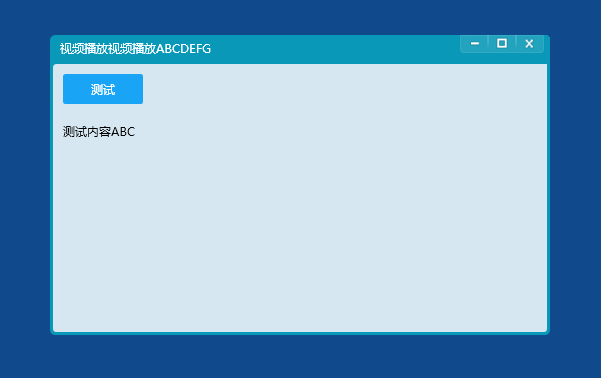
窗体最小化效果图:

WPF自定义Window窗体样式的更多相关文章
- WPF自定义Window样式(2)
1. 引言 在上一篇中,介绍了如何建立自定义窗体.接下来,我们需要考虑将该自定义窗体基类放到类库中去,只有放到类库中,我们才能在其他地方去方便的引用该基类. 2. 创建类库 接上一篇的项目,先添加一个 ...
- WPF自定义Window样式(1)
1. 引言 WPF是制作界面的一大利器.最近在做一个项目,用的就是WPF.既然使用了WPF了,那么理所当然的,需要自定义窗体样式.所使用的代码是在网上查到的,遗憾的是,整理完毕后,再找那篇帖子却怎么也 ...
- [WPF自定义控件]?Window(窗体)的UI元素及行为
原文:[WPF自定义控件]?Window(窗体)的UI元素及行为 1. 前言 本来打算写一篇<自定义Window>的文章,但写着写着发觉内容太多,所以还是把使用WindowChrome自定 ...
- WPF 自定义键盘焦点样式(FocusVisualStyle)
WPF 自带的键盘焦点样式是与传统控件样式搭配的,但 WPF 凭着其强大的自定义样式的能力,做出与传统控件样式完全不同风格的 UI 简直易如反掌.这时,其自带的键盘焦点样式(FocusVisualSt ...
- WPF移动Window窗体(鼠标点击左键移动窗体自定义行为)
XAML代码部分:1.引用System.Windows.Interactivity 2.为指定的控件添加一个拖动的行为 3.很简单的了解行为的作用和用法 <Window xmlns=" ...
- 【WPF】Window窗体禁用最大化/最小化按钮
需求:弹窗的右上角不显示最大化.最小化按钮. 在< Window >节点添加属性以下属性即可: ResizeMode="NoResize" 或者直接在Propertie ...
- WPF 自定义ProgressBar滚动条样式
一.前言 滚动条一般用于加载进度,我们在看视频的时候或者在浏览网页的时候经常能看到加载进度的页面.在程序开发中,默认的进度加载样式可能跟程序风格不太一样,或者加载进度的时候需要更改一下加载的样式.这个 ...
- 一个自定义的窗体样式MessageBox控件
using System;using System.Collections.Generic;using System.Text;using System.Drawing;using System.Dr ...
- 获取当前进程(程序)主窗体句柄并设置wpf的父窗体为此句柄
有时候在c++调用wpf控件的时候,wpf控件想自己显示窗体,但需要设置owner属性.迂回解决办法是设置wpf的window窗体的父窗体为进程的句柄. 1.获取当前进程id int id = Pro ...
随机推荐
- python 字典遍历
dic1={"name":"kxb","age":28}for k,v in dic1.items(): print(k+",,, ...
- dedecms首页搜索 添加仿百度下拉框
1:找到uploads/templets/default/head.htm 2: 找到 <input name="q" type="text" clas ...
- cxf 介绍
CXF 编辑 目录 1Apache CXF 简介 关于Apache CXF 功能特性 项目目标 2Apache CXF特点 灵活部署 支持多种编程语言 代码生成 1Apache CXF ...
- 旅行家的预算(NOIP1999&水题测试2017082301)
题目链接:旅行家的预算 这题还可以,不算太水. 这题贪心即可. 我们采取如下动作: 如果在装满油的情况下能到达的范围内,没有加油站,则无解. 如果在装满油的情况下能到达的范围内,油价最低的加油站的油价 ...
- python学习 day20 (3月27日)----(单继承多继承c3算法)
继承: 提高代码的重用性,减少了代码的冗余 这两个写法是一样的 Wa('青蛙').walk() #青蛙 can walk wa = Wa('青蛙') wa.walk() #青蛙 can walk 1. ...
- normalized
共同点:实现规范化,让一个向量保持相同的方向,但它的长度为1.0,如果这个向量太小而不能被规范化,一个零向量将会被返回. 不同点:Vector3.normalized的作特点是当前向量是不改变的并且返 ...
- 走进JDK(三)------AbstractStringBuilder、StringBuffer、StringBuilder
AbstractStringBuilder是一个抽象类,StringBuffer.StringBuilder则继承AbstractStringBuilder,所以先说AbstractStringBui ...
- 在vue或者react中使用express框架
在react 或者 vue项目中使用express框架 1.创建vue或者 react 项目 2.在项目中创建server文件夹,创建server.js //require()方法引入express模 ...
- IntelliJ IDEA 2017版 spring-boot2.0.4+mybatis 自动部署的细节问题
一.加载pom依赖包 <!--spring-boot开发热部署--> <dependency> <groupId>org.springframework.boot& ...
- 以太坊虚拟机(EVM)
转载链接:https://ethfans.org/posts/solidity-chapter1-introduciton-to-smart-contracts 概括总览: 以太坊虚拟机(EVM)是以 ...