
spring之hello(简单环境配置)
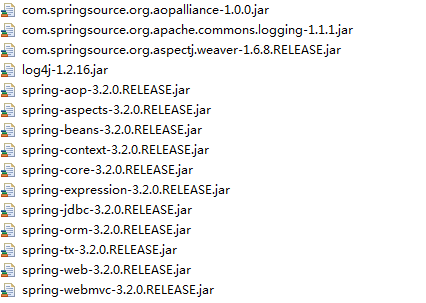
导入java包
配置springmvc.xml文件
<?xml version="1.0" encoding="UTF-8"?>

<beans xmlns="http://www.springframework.org/schema/beans"

	xmlns:xsi="http://www.w3.org/2001/XMLSchema-instance" xmlns:mvc="http://www.springframework.org/schema/mvc"

	xmlns:context="http://www.springframework.org/schema/context"

	xmlns:aop="http://www.springframework.org/schema/aop" xmlns:tx="http://www.springframework.org/schema/tx"

	xsi:schemaLocation="http://www.springframework.org/schema/beans

		http://www.springframework.org/schema/beans/spring-beans-3.2.xsd

		http://www.springframework.org/schema/mvc

		http://www.springframework.org/schema/mvc/spring-mvc-3.2.xsd

		http://www.springframework.org/schema/context

		http://www.springframework.org/schema/context/spring-context-3.2.xsd

		http://www.springframework.org/schema/aop

		http://www.springframework.org/schema/aop/spring-aop-3.2.xsd

		http://www.springframework.org/schema/tx

		http://www.springframework.org/schema/tx/spring-tx-3.2.xsd">

	<!-- 配置处理器映射器 -->

	<bean

		class="org.springframework.web.servlet.handler.BeanNameUrlHandlerMapping"></bean>

	<!-- 配置处理器适配器 -->

	<bean

		class="org.springframework.web.servlet.mvc.SimpleControllerHandlerAdapter"></bean>

	<!-- 自定义controll -->

	<bean id="/helloSpringmvc.do" class="com.baidu.web.controll.MyControll"></bean>

</beans>
配置web.xml文件
<?xml version="1.0" encoding="UTF-8"?>

<web-app xmlns:xsi="http://www.w3.org/2001/XMLSchema-instance" xmlns="http://java.sun.com/xml/ns/javaee" xmlns:web="http://java.sun.com/xml/ns/javaee/web-app_2_5.xsd" xsi:schemaLocation="http://java.sun.com/xml/ns/javaee http://java.sun.com/xml/ns/javaee/web-app_2_5.xsd" id="WebApp_ID" version="2.5">

  <display-name>springmvc_hello</display-name>

  <welcome-file-list>

    <welcome-file>index.html</welcome-file>

    <welcome-file>index.htm</welcome-file>

    <welcome-file>index.jsp</welcome-file>

    <welcome-file>default.html</welcome-file>

    <welcome-file>default.htm</welcome-file>

    <welcome-file>default.jsp</welcome-file>

  </welcome-file-list>

  <servlet>

  <servlet-name>springmvc</servlet-name>

  <servlet-class>org.springframework.web.servlet.DispatcherServlet</servlet-class>

  <!-- 加载配置文件 -->

   <init-param>

   <param-name>contextConfigLocation</param-name>

   <param-value>classpath:springmvc.xml</param-value>

   </init-param>

  </servlet>

  <servlet-mapping>

  <servlet-name>springmvc</servlet-name>

  <url-pattern>*.do</url-pattern>

  </servlet-mapping>

</web-app>
package com.baidu.web.controll;

import javax.servlet.http.HttpServletRequest;

import javax.servlet.http.HttpServletResponse;

import org.springframework.web.servlet.ModelAndView;

import org.springframework.web.servlet.mvc.Controller;

public class MyControll implements Controller{

	@Override

	public ModelAndView handleRequest(HttpServletRequest request,

			HttpServletResponse response) throws Exception {

		ModelAndView mv=new ModelAndView();

		mv.addObject("test", "springmvc成功了");

		mv.setViewName("/WEB-INF/success.jsp");

		return mv;

	}

}
<%@ page language="java" contentType="text/html; charset=UTF-8"

    pageEncoding="UTF-8"%>

<!DOCTYPE html PUBLIC "-//W3C//DTD HTML 4.01 Transitional//EN" "http://www.w3.org/TR/html4/loose.dtd">

<html>

<head>

<meta http-equiv="Content-Type" content="text/html; charset=UTF-8">

<title>Insert title here</title>

</head>

<body>

${test}

</body>

</html>
加载服务器
spring之hello(简单环境配置)的更多相关文章
- cisco路由器 三层交换机简单环境配置实例(图)
出处:http://www.jb51.NET/softjc/56600.html cisco路由器&三层交换机简单环境配置实例 一.网络拓扑图: 二.配置命令: 1.路由器的配置: inter ...
- 学习spring1--跟我一起学Spring 3(2)–开发环境配置
http://www.importnew.com/13185.html#spring 首页 所有文章 资讯 Web 架构 基础技术 书籍 教程 我要投稿 更多频道 » - 导航条 - 首页 所 ...
- Spring Cloud:多环境配置、eureka 安全认证、容器宿主机IP注册
记录一下搭建 Spring Cloud 过程中踩过的一些坑,测试的东西断断续续已经弄了好多了,一直没有时间整理搭建过程,时间啊~时间~ Spring 版本 Spring Boot:2.0.6.RELE ...
- Spring DM 2.0 环境配置 解决Log4j问题
搭建 spring dm 2.0 环境出的问题 log4j 的问题解决办法是 一.引入SpringDM2.0的Bundle,最后完成如下图所示:注意:要引入slf4j.api.slf4j.log4j. ...
- Spring MVC 学习总结(八)——Spring MVC概要与环境配置(IDEA+Maven+Tomcat7+JDK8、示例与视频)
一.MVC概要 MVC是模型(Model).视图(View).控制器(Controller)的简写,是一种软件设计规范,用一种将业务逻辑.数据.显示分离的方法组织代码,MVC主要作用是降低了视图与业务 ...
- Spring boot profile 多环境配置
1.多Profile文件 我们在主配置文件编写的时候,文件名可以是 application-{profile}.properties/yml 默认使用application.properties的配置 ...
- spring boot 基础 多环境配置
对于多环境的配置,各种项目构建工具的思路基本上一致,都是通过配置多份不同环境的配置文件来区分. 1. 首先我们先创建不同环境下的属性文件,截图如下: application.properties 是 ...
- UltraEdit环境下,php简单环境配置
1.语法高亮 菜单->视图->查看方式->选中“PHP” 2.自动补全 菜单->高级->配置->自动完成->选中“自动显示自动完成对话框”,字符数选择2-3为 ...
- Spring操作指南-IoC基础环境配置(基于注解自动装配)
项目源码:http://code.taobao.org/p/LearningJavaEE/src/LearningSpring001%20-%20Automatically%20wiring%20be ...
随机推荐
- PL/SQL的快捷键设置
PL/SQL用来连接Oracle数据库的一种工具,它可以设置快捷方式,以便于我们快速的操作. PL/SQL设置快捷键 tools->Preferences(首选项)->User In ...
- admin 的流程 Xadmin
提交根评论 显示根评论 --- render显示 --- ajax显示 提交子评论 显示子评论 ---- render显示 ---- Ajax显示(扩展) 评论树 博客:富文本编辑器 beautful ...
- IIS站点工作原理与ASP.NET工作原理
IIS站点工作原理与ASP.NET工作原理 一.IIS IIS 7.0工作原理图 两种模式: 1.用户模式(User Mode)(运行用户的程序代码.限制在特定的范围内活动.有些操作必须要受到Ker ...
- PAT 1014 福尔摩斯的约会 (20)(代码+思路)
1014 福尔摩斯的约会 (20)(20 分) 大侦探福尔摩斯接到一张奇怪的字条:"我们约会吧! 3485djDkxh4hhGE 2984akDfkkkkggEdsb s&hgsfd ...
- .net序列化
在开发过程中,会遇到很多需要使用序列化的场景,比如wcf,webservice或者jquery+.net等.那今天就说说我对序列化的理解. 在.net中有几种序列化的方式,XML.二进制.SOAP.还 ...
- Python3字符编码
编码 字符串是一种数据类型,但是,字符串比较特殊的是还有一个编码问题. 因为计算机只能处理数字,如果要处理文本,就必须先把文本转换为数字才能处理.最早的计算机在设计时采用8个比特(bit)作为一个字节 ...
- python_docx制作word文档详细使用说明【转】
目前网上对这一个库的介绍得很少,很零散,所以很多功能我是尽量参考其官网,但是官网上面很多功能目前只有说明文档,而代码并还没有及时更新,以至于按照官网上面做了,python却报错.比如:自定义表格的 ...
- netstat 查看端口命令
查看特定端口是否启动 netstat -lnp |
- Linq去重 不用实现IEqualityComparer接口的方法超级简单
RskFactorRelation.Instance.GetCache<RskFactorRelation>(true).Where(x => !string.IsNullOrEmp ...
- Java SE EE ME用处
Java SE: 又称J2SE,开发部署桌面应用程序: Java EE:又称J2EE,开发网站 Java ME:是做手机APP开发 EE在SE基础上构建,提供web服务.组件模型.管理和通信API