
ArcGIS基于DEM计算水流方向的方法(D8算法)
ArcGIS采用D8算法计算水流方向(9.3.1后新增),输入数据应首先完成了洼地填充处理:
One of the keys to deriving hydrologic characteristics about a surface is the ability to determine the direction of flow from every cell in the raster. This is done with the Flow Direction function.
This function takes a surface as input and outputs a raster showing the direction of flow out of each cell. If the output drop raster option is chosen, an output raster is created showing a ratio of the maximum change in elevation from each cell along the direction of flow to the path length between centers of cells and is expressed in percentages. If the force all edge cells to flow outward option is chosen, all cells at the edge of the surface raster will flow outward from the surface raster.
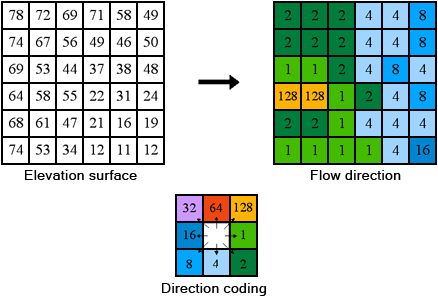
There are eight valid output directions relating to the eight adjacent cells into which flow could travel. This approach is commonly referred to as an eight direction (D8) flow model and follows an approach presented in Jensen and Domingue (1988).
The direction of flow is determined by finding the direction of steepest descent, or maximum drop, from each cell. This is calculated as
maximum drop = change in z-value / distance
The distance is determined between cell centers. Therefore if the cell size is one, the distance between two orthogonal cells is one and the distance between two diagonal cells is 1.414216, the square root of two. If the maximum descent to several cells is the same, the neighborhood is enlarged until the steepest descent is found.
When a direction of steepest descent is found, the output cell is coded with the value representing that direction.
If all neighbors are higher than the processing cell, the processing cell is a sink and has an undefined flow direction. Cells with undefined flow direction can be flagged as sinks using the Sink function. To obtain an accurate representation of flow direction across a surface, the sinks should be filled.
ArcGIS基于DEM计算水流方向的方法(D8算法)的更多相关文章
- Arcgis基于高程(DEM)计算地形湿度指数(TWI),以及坡度(Slope)度单位转换为弧度
以30m*30m分辨率的图层为例 一.基于表面工具箱Surface计算Slope 1.如下图输入图层DEM,输出Slope 2.单位转换: Scale_slope=Slope*pi/180 二.基于水 ...
- 基于MATLAB的多项式数据拟合方法研究-毕业论文
摘要:本论文先介绍了多项式数据拟合的相关背景,以及对整个课题做了一个完整的认识.接下来对拟合模型,多项式数学原理进行了详细的讲解,通过对文献的阅读以及自己的知识积累对原理有了一个系统的认识.介绍多项式 ...
- 一种基于uCos-II操作系统和lwIP协议栈的IEEE-1588主站以及基于该主站的报文处理方法
主站以及应用于电力系统的支持IEEE‐1588协议的主时钟(IEEE‐1588主站)的实现方法.该方法是在一个低成本的硬件平台上,借助uCos‐II操作系统和TCP/IP的协议栈,对以太网数据进行了分 ...
- 基于Deep Learning 的视频识别方法概览
深度学习在最近十来年特别火,几乎是带动AI浪潮的最大贡献者.互联网视频在最近几年也特别火,短视频.视频直播等各种新型UGC模式牢牢抓住了用户的消费心里,成为互联网吸金的又一利器.当这两个火碰在一起,会 ...
- -05 08:57 ARCGIS地统计学计算文件后缀名为.shp文件制作
2011-07-05 08:57 ARCGIS地统计学计算文件后缀名为.shp文件制作 ARCAMP软件要进行地统计计算的文件后格式后缀名必须为.shp的文件,网上介绍的方法复杂难懂,那么制作.shp ...
- 基于查表的整数霍夫变换方法实现(matlab)
暂时先用matlab把算法弄一下,这是基于查表的整数霍夫变换方法实现及解释. 接着再实现FPGA的霍夫变换. 霍夫变换原理和算法这里不多说,可参考以下链接: http://blog.csdn.net/ ...
- 【转】STM32: 一种计算CPU使用率的方法及其实现原理
1 前言出于性能方面的考虑,有的时候,我们希望知道CPU的使用率为多少,进而判断此CPU的负载情况和对于当前运行环境是否足够“胜任”.本文将介绍一种计算CPU占有率的方法以及其实现原理. 2 移植 ...
- Spark 介绍(基于内存计算的大数据并行计算框架)
Spark 介绍(基于内存计算的大数据并行计算框架) Hadoop与Spark 行业广泛使用Hadoop来分析他们的数据集.原因是Hadoop框架基于一个简单的编程模型(MapReduce),它支持 ...
- 使用基于Apache Spark的随机森林方法预测贷款风险
使用基于Apache Spark的随机森林方法预测贷款风险 原文:Predicting Loan Credit Risk using Apache Spark Machine Learning R ...
随机推荐
- 安装MySQL-python时报错
(py27) [root@test SimpletourDevops]# pip install MySQL-python DEPRECATION: Python 2.7 will reach the ...
- Solr6.5配置中文分词IKAnalyzer和拼音分词pinyinAnalyzer (二)
之前在 Solr6.5在Centos6上的安装与配置 (一) 一文中介绍了solr6.5的安装.这篇文章主要介绍创建Solr的Core并配置中文IKAnalyzer分词和拼音检索. 一.创建Core: ...
- Scala使用隐式转换进行比较
Boy.scala class Boy(val name: String, val faceValue: Int) extends Comparable[Boy]{ override def comp ...
- 线程中的同步辅助类CountDownLatch
四个类可协助实现常见的专用同步语句.Semaphore 是一个经典的并发工具.CountDownLatch 是一个极其简单但又极其常用的实用工具,用于在保持给定数目的信号.事件或条件前阻塞执行.Cyc ...
- Hadoop环境搭建及wordcount程序
目的: 前期学习了一些机器学习基本算法,实际企业应用中算法是核心,运行的环境和数据处理的平台是基础. 手段: 搭建简易hadoop集群(由于机器限制在自己的笔记本上通过虚拟机搭建) 一.基础环境介绍 ...
- ASP.NET WebAPI Bearer Authorization
使用VS2015新建一个WebApi项目. 关键的配置在Startup.Auth.cs里 public partial class Startup { public static OAuthAutho ...
- JavaScript -- Window-弹出窗口
-----033-Window-弹出窗口.html----- <!DOCTYPE html> <html> <head> <meta http-equiv=& ...
- [java初探06]__排序算法的简单认识
今天,准备填完昨天没填的坑,将排序算法方面的知识系统的学习一下,但是在简单的了解了一下后,有些不知如何组织学习了,因为排序算法的种类,实在是太多了,各有优略,各有适用的场景.有些不知所措,从何开始. ...
- Mysql的select in会自动过滤重复的数据
默认使用 SELECT 语句: 当加上in范围后,结果如下图: in范围内的数据,如果有重复的,只会选择第一个数据. 所以如果不是直接使用SQL语句来查询,而是在代码中来查询时,记得使用 distin ...
- Docker基础教程(安装篇)
Linux安装: 1.yum -y install docker-io 2.service docker start 3.chkconfig docker on Window安装: Docker 引擎 ...