
[转] Git caret(^) and tilde(~)
I spent a little bit of time playing with Git today, specifically the way that the ^ (caret) and ~ (tilde) work and thought I'd document it here in case I forget.
The short version
If you want a deeper explanation skip down to "The long version".
ref~ is shorthand for ref~1 and means the commit's first parent. ref~2 means the commit's first parent's first parent. ref~3 means the commit's first parent's first parent's first parent. And so on.
ref^ is shorthand for ref^1 and means the commit's first parent. But where the two differ is that ref^2 means the commit's second parent (remember, commits can have two parents when they are a merge).
The ^ and ~ operators can be combined.
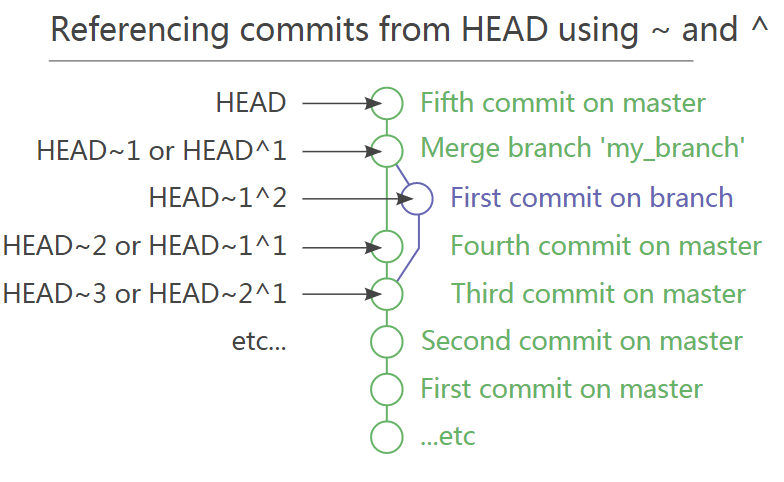
Here's a diagram showing how to reference various commits using HEAD as the starting point.
The long version
I've created a dummy repository with several commits in it.
|
Starting at the bottom, the early commits were made straight onto master.
The commits starting at 748855b and moving up to c7c2590 were made on a branch and merged into master, but no changes had been made on master in the mean time.
The commits a8fe411 and 956c87d were made on separate branches at the same time. They were merged together in commit f5717b0.
Finally, 8329384 was committed straight onto master.
We can use git show to look at individual commits.
You'll already know that HEAD points to the tip of the current branch:
|
Putting the caret symbol (^) next to a commit means the parent of that commit. So the following will show the parent of HEAD:
|
HEAD^ is shorthand for saying HEAD^1, which literally means show me parent 1 of that commit. You can also say HEAD^2 but in this instance it won't make any sense:
|
Because HEAD only has 1 parent.
But f5717b0, the point where the two branches were merged, has two parents, one on master and one on the branch:
|
The tilde symbol (~) works in a similar way. In fact HEAD~ will reference the same commit as HEAD^:
|
Again, HEAD~ is shorthand for HEAD~1, but here this means the first ancestor of HEAD – HEAD~2 is not the second parent of HEAD but the grandparent of HEAD:
|
As you can see, 956c87d Fourth commit on a branch is not visible when using the tilde operator. This is because the tilde operator always presumes you want to view the first parent's parent.
To access the second parent's parent the tilde and caret symbols can be combined:
|
In this way you should be able to reference any commit in your repository's history.
[转] Git caret(^) and tilde(~)的更多相关文章
- Git - Tutorial [Lars Vogel]
From: http://www.vogella.com/tutorials/Git/article.html Git - Tutorial Lars Vogel Version 5.6 Copyri ...
- Git - Tutorial官方【转】
转自:http://www.vogella.com/tutorials/Git/article.html#git_rename_branch Lars Vogel Version 5.8 Copyri ...
- What's the difference between HEAD^ and HEAD~ in Git?
https://stackoverflow.com/questions/2221658/whats-the-difference-between-head-and-head-in-git Rules ...
- git cherry-pick简介
本文编辑整理自: http://sg552.iteye.com/blog/1300713 http://web.mit.edu/bitbucket/git-doc/git-cherry-pick.tx ...
- git cherry-pick简介(转载)
转自:http://hubingforever.blog.163.com/blog/static/1710405792012587115533/ 本文编辑整理自: http://sg552.iteye ...
- 进入git diff 界面,无法继续输入命令
在终端,输入 git diff 文件名 命令之后回车,显示如下界面: 在网上查找,说输入q回车即可退出显示,执行,果然有效,输入h可以显示所有命令 命令如下: SUMMARY OF LESS COM ...
- Git命令中波浪号~与脱字符^的区别
0.前言 波浪号~,英文名叫 tilde.脱字符^,英文名叫caret. 这两种符号常见于git reset的情景,简单的项目结构和操作一般不会涉及到两者之间的区别,似乎用哪个都可以.如果遇到比较繁杂 ...
- Git for Windows v2.11.0 Release Notes
homepage faq contribute bugs questions Git for Windows v2.11.0 Release Notes Latest update: December ...
- git diff 理解
0. 理解 git diff 返回信息 1. 命令 $ git diff README.md 2. 返回信息,注解 diff --git a/README.md b/README.md ## 1. 表 ...
随机推荐
- 使用Html5对图片加水印及多图合成
转载请注明原地址: ...
- js 简单有效判断日期有效性(含闰年)
原文:https://zhidao.baidu.com/question/1701946584925153620.html 要想精确验证,最容易想到的方法就是通过月份判断日期是否合法(1~28/29/ ...
- spring源码解析-ApplicationContext解析
ApplicationContext和BeanFactory一样都是bean的容器,而BeanFactory是一切Bean容器的父类,ApplicationContext继承于BeanFactory( ...
- Java Number & Math类
java Number类 Java的内置数据类型有byte.int.long.double等. Java 语言为每一个内置数据类型提供了对应的包装类. int对应的包装类为Integer long对应 ...
- MySQL的CHAR 和 VARCHAR的区别
CHAR 和 VARCHAR 类型,CHAR 列的长度固定, VARCHAR 列中的值为可变长字符串.在检索的时候,CHAR 列删除了尾部的空格,而 VARCHAR 则保留这些空格s
- .Net Core之仓储(Repository)模式
我们经常在项目中使用仓储(Repository)模式,来实现解耦数据访问层与业务层.那在.net core使用EF core又是怎么做的呢? 现在我分享一下我的实现方案: 一.在领域层创建Reposi ...
- 初窥 BB-Framework
- Servlet配置及生命周期
1.设置Ecilipse快捷 file new 2.创建Servlet程序 1). 创建一个 Servlet 接口的实现类. public class HelloServl ...
- Unable to start services. See log file /tmp/vmware-root/vmware-6853.log for details.
debian安装vmware错误 https://github.com/AdministratorGithub/vmshell vm15.1.0解决linux安装出现Unable to start s ...
- Rocket - tilelink - WidthWidget
https://mp.weixin.qq.com/s/pmJcsRMviJZjMwlwYw6OgA 简单介绍WidthWidget的实现. 1. 基本介绍 用于设定与上游节点连接 ...