
完美解决asp.net core 3.1 两个AuthenticationScheme(cookie,jwt)共存在一个项目中
内容
在我的项目中有mvc controller(view 和 razor Page)同时也有webapi,那么就需要网站同时支持2种认证方式,web页面的需要传统的cookie认证,webapi则需要使用jwt认证方式,两种默认情况下不能共存,一旦开启了jwt认证,cookie的登录界面都无法使用,原因是jwt是验证http head "Authorization" 这属性.所以连login页面都无法打开.
解决方案
实现web通过login页面登录,webapi 使用jwt方式获取认证,支持refreshtoken更新过期token,本质上背后都使用cookie认证的方式,所以这样的结果是直接导致token没用,认证不是通过token唯一的作用就剩下refreshtoken了
通过nuget 安装组件包
Microsoft.AspNetCore.Authentication.JwtBearer
下面是具体配置文件内容


//Jwt Authentication

      services.AddAuthentication(opts =>

      {

        //opts.DefaultAuthenticateScheme = CookieAuthenticationDefaults.AuthenticationScheme;

        //opts.DefaultChallengeScheme = JwtBearerDefaults.AuthenticationScheme;

      })

      //这里是关键,添加一个Policy来根据http head属性或是/api来确认使用cookie还是jwt chema

        .AddPolicyScheme(settings.App, "Bearer or Jwt", options =>

        {

          options.ForwardDefaultSelector = context =>

          {

            var bearerAuth = context.Request.Headers["Authorization"].FirstOrDefault()?.StartsWith("Bearer ") ?? false;

            // You could also check for the actual path here if that's your requirement:

            // eg: if (context.HttpContext.Request.Path.StartsWithSegments("/api", StringComparison.InvariantCulture))

            if (bearerAuth)

              return JwtBearerDefaults.AuthenticationScheme;

            else

              return CookieAuthenticationDefaults.AuthenticationScheme;

          };

        })

//这里和传统的cookie认证一致       .AddCookie(CookieAuthenticationDefaults.AuthenticationScheme, options =>

       {

         options.LoginPath = "/Identity/Account/Login";

         options.LogoutPath = "/Identity/Account/Logout";

         options.AccessDeniedPath = "/Identity/Account/AccessDenied";

         options.Cookie.Name = "CustomerPortal.Identity";

         options.SlidingExpiration = true;

         options.ExpireTimeSpan = TimeSpan.FromSeconds(); //Account.Login overrides this default value

       })

        .AddJwtBearer(x =>

      {

        x.RequireHttpsMetadata = false;

        x.SaveToken = true;

        x.TokenValidationParameters = new TokenValidationParameters

        {

          ValidateIssuerSigningKey = true,

          IssuerSigningKey = new SymmetricSecurityKey(Encoding.ASCII.GetBytes(Configuration["Jwt:Key"])),

          ValidateIssuer = true,

          ValidateAudience = true,

          ValidateLifetime = true,

          ValidIssuer = Configuration["Jwt:Issuer"],

          ValidAudience = Configuration["Jwt:Issuer"],

        };

      });

 //这里需要对cookie做一个配置

      services.ConfigureApplicationCookie(options =>

      {

        // Cookie settings

        options.Cookie.Name = settings.App;

        options.Cookie.HttpOnly = true;

        options.ExpireTimeSpan = TimeSpan.FromSeconds();

        options.LoginPath = "/Identity/Account/Login";

        options.LogoutPath = "/Identity/Account/Logout";

        options.Events = new CookieAuthenticationEvents()

        {

          OnRedirectToLogin = context =>

          {

           //这里区分当访问/api 如果cookie过期那么 不重定向到login登录界面

            if (context.Request.Path.Value.StartsWith("/api"))

            {

              context.Response.Clear();

              context.Response.StatusCode = ;

              return Task.FromResult();

            }

            context.Response.Redirect(context.RedirectUri);

            return Task.FromResult();

          }

        };

        //options.AccessDeniedPath = "/Identity/Account/AccessDenied";

      });
startup.cs
下面userscontroller 认证方式
重点:我简化了refreshtoken的实现方式,原本规范的做法是通过第一次登录返回一个token和一个唯一的随机生成的refreshtoken,下次token过期后需要重新发送过期的token和唯一的refreshtoken,同时后台还要比对这个refreshtoken是否正确,也就是说,第一次生成的refreshtoken必须保存到数据库里,这里我省去了这个步骤,这样做是不严谨的的.
[ApiController]

  [Route("api/users")]

  public class UsersEndpoint : ControllerBase

  {

    private readonly ILogger<UsersEndpoint> _logger;

    private readonly ApplicationDbContext _context;

    private readonly UserManager<ApplicationUser> _manager;

    private readonly SignInManager<ApplicationUser> _signInManager;

    private readonly SmartSettings _settings;

    private readonly IConfiguration _config;

    public UsersEndpoint(ApplicationDbContext context,

      UserManager<ApplicationUser> manager,

      SignInManager<ApplicationUser> signInManager,

      ILogger<UsersEndpoint> logger,

      IConfiguration config,

      SmartSettings settings)

    {

      _context = context;

      _manager = manager;

      _settings = settings;

      _signInManager = signInManager;

      _logger = logger;

      _config = config;

    }

    [Route("authenticate")]

    [AllowAnonymous]

    [HttpPost]

    public async Task<IActionResult> Authenticate([FromBody] AuthenticateRequest model)

    {

      try

      {

        //Sign user in with username and password from parameters. This code assumes that the emailaddress is being used as the username.

        var result = await _signInManager.PasswordSignInAsync(model.UserName, model.Password, true, true);

        if (result.Succeeded)

        {

          //Retrieve authenticated user's details

          var user = await _manager.FindByNameAsync(model.UserName);

          //Generate unique token with user's details

          var accessToken = await GenerateJSONWebToken(user);

          var refreshToken = GenerateRefreshToken();

          //Return Ok with token string as content

          _logger.LogInformation($"{model.UserName}:JWT登录成功");

          return Ok(new { accessToken = accessToken, refreshToken = refreshToken });

        }

        return Unauthorized();

      }

      catch (Exception e)

      {

        return StatusCode(, e.Message);

      }

    }

    [Route("refreshtoken")]

    [AllowAnonymous]

    [HttpPost]

    public async Task<IActionResult> RefreshToken([FromBody] RefreshTokenRequest model)

    {

      var principal = GetPrincipalFromExpiredToken(model.AccessToken);

      var nameId = principal.Claims.First(x => x.Type == ClaimTypes.NameIdentifier).Value;

      var user = await _manager.FindByNameAsync(nameId);

      await _signInManager.RefreshSignInAsync(user);

        //Retrieve authenticated user's details

        //Generate unique token with user's details

        var accessToken = await GenerateJSONWebToken(user);

        var refreshToken = GenerateRefreshToken();

        //Return Ok with token string as content

        _logger.LogInformation($"{user.UserName}:RefreshToken");

        return Ok(new { accessToken = accessToken, refreshToken = refreshToken });

    }

    private async Task<string> GenerateJSONWebToken(ApplicationUser user)

    {

      //Hash Security Key Object from the JWT Key

      var securityKey = new SymmetricSecurityKey(Encoding.UTF8.GetBytes(_config["Jwt:Key"]));

      var credentials = new SigningCredentials(securityKey, SecurityAlgorithms.HmacSha256);

      //Generate list of claims with general and universally recommended claims

      var claims = new List<Claim>  {

           new Claim(ClaimTypes.NameIdentifier, user.UserName),

           new Claim(ClaimTypes.Name, user.UserName),

                new Claim(JwtRegisteredClaimNames.Sub, user.Email),

                new Claim(JwtRegisteredClaimNames.Jti, Guid.NewGuid().ToString()),

                new Claim(ClaimTypes.NameIdentifier, user.Id),

                //添加自定义claim

                new Claim(ClaimTypes.GivenName, string.IsNullOrEmpty(user.GivenName) ? "" : user.GivenName),

                new Claim(ClaimTypes.Email, user.Email),

                new Claim("http://schemas.microsoft.com/identity/claims/tenantid", user.TenantId.ToString()),

                new Claim("http://schemas.microsoft.com/identity/claims/avatars", string.IsNullOrEmpty(user.Avatars) ? "" : user.Avatars),

                new Claim(ClaimTypes.MobilePhone, user.PhoneNumber)

      };

      //Retreive roles for user and add them to the claims listing

      var roles = await _manager.GetRolesAsync(user);

      claims.AddRange(roles.Select(r => new Claim(ClaimsIdentity.DefaultRoleClaimType, r)));

      //Generate final token adding Issuer and Subscriber data, claims, expriation time and Key

      var token = new JwtSecurityToken(_config["Jwt:Issuer"]

          , _config["Jwt:Issuer"],

          claims,

          null,

          expires: DateTime.Now.AddDays(),

          signingCredentials: credentials

      );

      //Return token string

      return new JwtSecurityTokenHandler().WriteToken(token);

    }

    public string GenerateRefreshToken()

    {

      var randomNumber = new byte[];

      using (var rng = RandomNumberGenerator.Create())

      {

        rng.GetBytes(randomNumber);

        return Convert.ToBase64String(randomNumber);

      }

    }

    private ClaimsPrincipal GetPrincipalFromExpiredToken(string token)

    {

      var tokenValidationParameters = new TokenValidationParameters

      {

        ValidateIssuerSigningKey = true,

        IssuerSigningKey = new SymmetricSecurityKey(Encoding.ASCII.GetBytes(_config["Jwt:Key"])),

        ValidateIssuer = true,

        ValidateAudience = true,

        ValidateLifetime = true,

        ValidIssuer = _config["Jwt:Issuer"],

        ValidAudience = _config["Jwt:Issuer"],

      };

      var tokenHandler = new JwtSecurityTokenHandler();

      SecurityToken securityToken;

      var principal = tokenHandler.ValidateToken(token, tokenValidationParameters, out securityToken);

      var jwtSecurityToken = securityToken as JwtSecurityToken;

      if (jwtSecurityToken == null || !jwtSecurityToken.Header.Alg.Equals(SecurityAlgorithms.HmacSha256, StringComparison.InvariantCultureIgnoreCase))

      {

        throw new SecurityTokenException("Invalid token");

      }

      return principal;

    }

....

}

}
ControllerBase
下面是测试
获取token
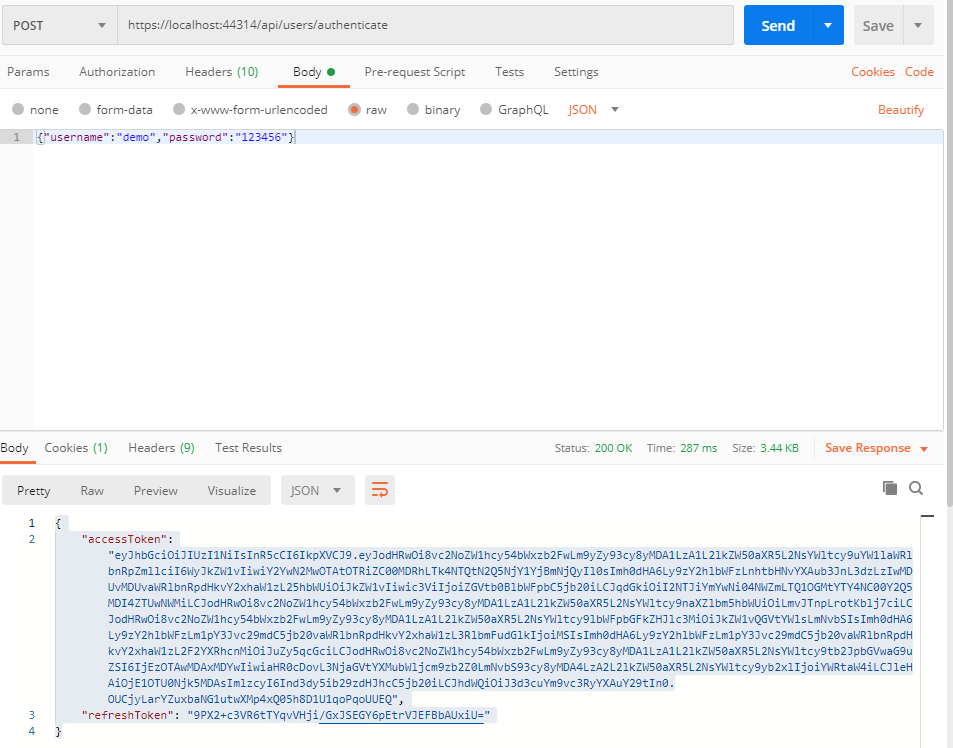
refreshtoken
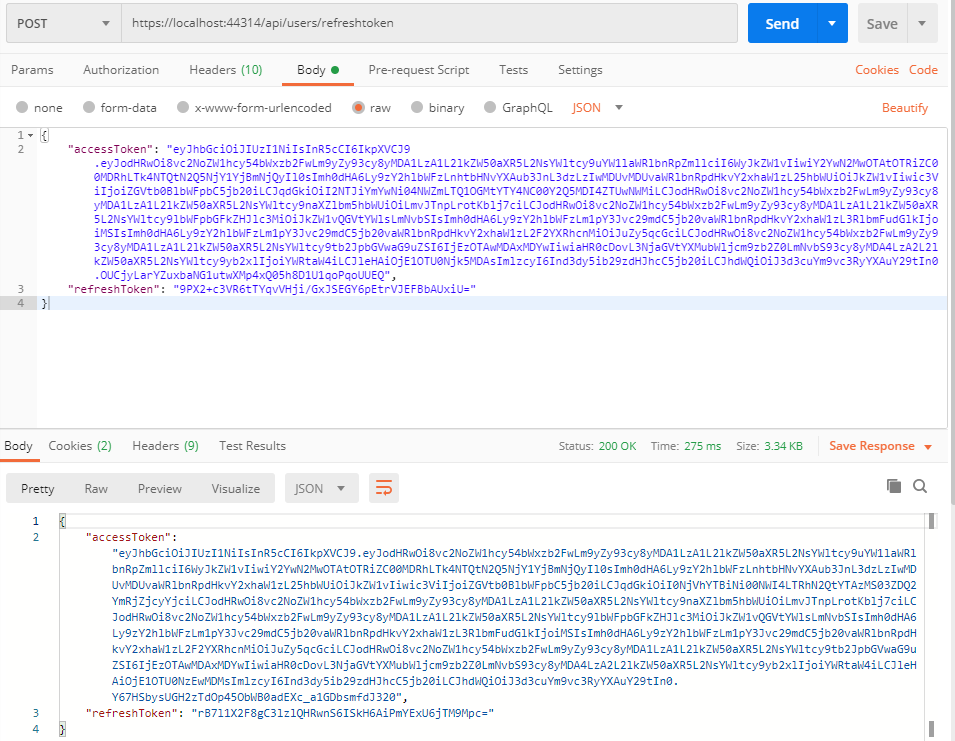
获取数据
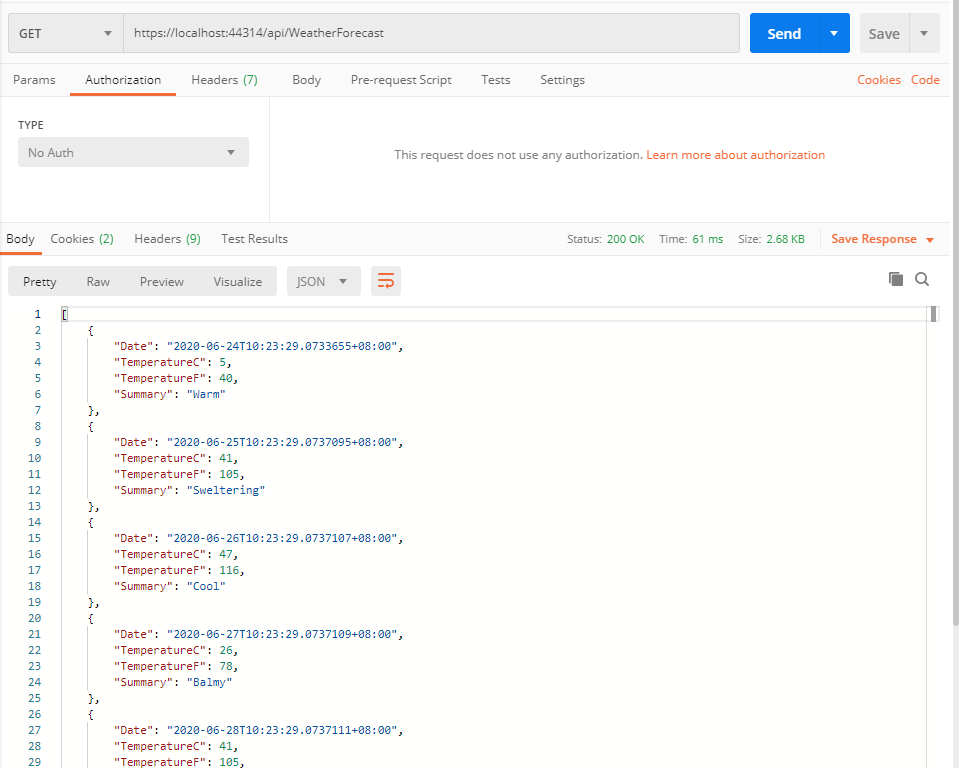
这里获取数据的时候,其实可以不用填入token,因为调用authenticate或refreshtoken是已经记录了cookie到客户端,所以在postman测试的时候都可以不用加token也可以访问
推广一下我的开源项目
基于领域驱动设计(DDD)超轻量级快速开发架构
https://www.cnblogs.com/neozhu/p/13174234.html
源代码
https://github.com/neozhu/smartadmin.core.urf
完美解决asp.net core 3.1 两个AuthenticationScheme(cookie,jwt)共存在一个项目中的更多相关文章
- 解决asp.net core 日期格式 datetime Json返回 带T的问题
原文:解决asp.net core 日期格式 datetime Json返回 带T的问题 记录一下: Startup中,将 services.AddMvc(); 改为: services.AddMvc ...
- 如何解决 ASP.NET Core 中的依赖问题
依赖性注入是一种技术,它允许我们注入一个特定类的依赖对象,而不是直接创建这些实例. 使用依赖注入的好处显而易见,它通过放松模块间的耦合,来增强系统的可维护性和可测试性. 依赖注入允许我们修改具体实现, ...
- List多个字段标识过滤 IIS发布.net core mvc web站点 ASP.NET Core 实战:构建带有版本控制的 API 接口 ASP.NET Core 实战:使用 ASP.NET Core Web API 和 Vue.js 搭建前后端分离项目 Using AutoFac
List多个字段标识过滤 class Program{ public static void Main(string[] args) { List<T> list = new List& ...
- ASP.NET Core 3.0 自动挡换手动挡:在 Middleware 中执行 Controller Action
最近由于发现奇怪的 System.Data.SqlClient 性能问题(详见之前的博文),被迫提前了向 .NET Core 3.0 的升级工作(3.0 Preview 5 中问题已被修复).郁闷的是 ...
- 解决 ASP.NET Core 自定义错误页面对 Middleware 异常无效的问题
我们基于 Razor Class Library 实现了自定义错误页面的公用类库(详见之前的随笔),但是在实际使用时发现如果在 middleware 中发生了异常,则不能显示自定义错误页面,而是返回默 ...
- 用工厂模式解决ASP.NET Core中依赖注入的一个烦恼
这是最近在实际开发中遇到的一个问题,用 asp.net core 开发一个后端 web api ,根据指定的 key 清除 2 台 memcached 服务器上的缓存.背景是我们在进行 .net co ...
- 解决ASP.NET Core在Task中使用IServiceProvider的问题
前言 问题的起因是在帮同事解决遇到的一个问题,他的本意是在EF Core中为了解决避免多个线程使用同一个DbContext实例的问题.但是由于对Microsoft.Extensions.Depende ...
- 解决 ASP.NET Core Hangfire 未授权(401 Unauthorized)
相关文章:ASP.NET Core 使用 Hangfire 定时任务 ASP.NET Core Hangfire 在正式环境发布之后,如果访问 http://10.1.2.31:5000/hangfi ...
- 解决 ASP.NET Core MySql varchar 字符串截取(长度 255)
ASP.NET Core 中使用 MySql,如果字段类型为varchar,不管设置多少长度,插入或更新数据的时候,会自动截断(截取 255 长度的字符). 出现问题的原因,就是使用了MySql.Da ...
随机推荐
- 【Python】自己写日志功能
Python有自带的logging模块,用于日志记录,功能很强大,但不好用,使用挺麻烦的,而且发现了几个bug,调用了一个logger.warning()一次,结果日志文件中出现了n行记录,且逐渐变成 ...
- SpringBoot获取配置文件,就这么简单。
在讲SpringBoot 获取配置文件之前我们需要对SpringBoot 的项目有一个整体的了解,如何创建SpringBoot 项目,项目结构等等知识点,我在这里就不一一讲述了,没有学过的小伙伴可以自 ...
- dell5460笔记本电脑ubuntu18.04系统音频驱动的安装和使用
一.背景: 近期使用dell5460笔记本在ubuntu系统下观看视频,发现没有声音,考虑安装音频驱动. 二.音频驱动的安装 linux系统的音频驱动基于ALSA(即Advanced Linux So ...
- 1. vue文件结构
1)这是文件规则 <template> <div > </div> </template> <script> Name:"当前的名 ...
- PAT 1036 Boys vs Girls (25分) 比大小而已
题目 This time you are asked to tell the difference between the lowest grade of all the male students ...
- Rocket - jtag - JtagShifter
https://mp.weixin.qq.com/s/pHtrlmSCPqzlDdfj3qkNPQ 简单介绍JtagShifter的实现. 1. 简单介绍 实现移位寄存器链,包含并行Capture和U ...
- Java实现 LeetCode 679 24 点游戏(递归)
679. 24 点游戏 你有 4 张写有 1 到 9 数字的牌.你需要判断是否能通过 *,/,+,-,(,) 的运算得到 24. 示例 1: 输入: [4, 1, 8, 7] 输出: True 解释: ...
- Java实现 蓝桥杯VIP 算法提高 解二元一次方程组
算法提高 解二元一次方程组 时间限制:1.0s 内存限制:256.0MB 问题描述 给定一个二元一次方程组,形如: a * x + b * y = c; d * x + e * y = f; x,y代 ...
- java实现硬币方案
标题:硬币方案 有50枚硬币,可能包括4种类型:1元,5角,1角,5分. 已知总价值为20元.求各种硬币的数量. 比如:2,34,6,8 就是一种答案. 而 2,33,15,0 是另一个可能的答案,显 ...
- java实现第七届蓝桥杯抽签
抽签 抽签 X星球要派出一个5人组成的观察团前往W星. 其中: A国最多可以派出4人. B国最多可以派出2人. C国最多可以派出2人. .... 那么最终派往W星的观察团会有多少种国别的不同组合呢? ...