
Shell 脚本 —— java 代码远程调用shell脚本重启 tomcat
个人博客网:https://wushaopei.github.io/ (你想要这里多有)
1、创建maven 工程
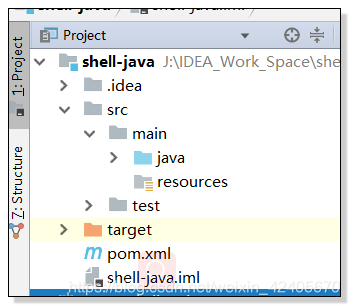

maven 依赖:
        <dependency>

            <groupId>commons-io</groupId>

            <artifactId>commons-io</artifactId>

            <version>2.1</version>

        </dependency>

        <!-- https://mvnrepository.com/artifact/org.junit.jupiter/junit-jupiter-api -->

        <!-- https://mvnrepository.com/artifact/junit/junit -->

        <dependency>

            <groupId>junit</groupId>

            <artifactId>junit</artifactId>

            <version>4.11</version>

            <scope>test</scope>

        </dependency>

        <!-- https://mvnrepository.com/artifact/org.springframework/spring-test -->

        <dependency>

            <groupId>org.springframework</groupId>

            <artifactId>spring-test</artifactId>

            <version>5.0.13.RELEASE</version>

            <scope>test</scope>

        </dependency>

        <!-- https://mvnrepository.com/artifact/logutil/logutil -->

        <!-- https://mvnrepository.com/artifact/org.apache.logging.log4j/log4j-core -->

        <dependency>

            <groupId>org.apache.logging.log4j</groupId>

            <artifactId>log4j-core</artifactId>

            <version>2.11.1</version>

        </dependency>
2、创建 RemoteShellExecutor. java 文件用于远程连接Linux 服务器
package com.webcode.cn;

import ch.ethz.ssh2.ChannelCondition;

import ch.ethz.ssh2.Session;

import ch.ethz.ssh2.StreamGobbler;

import org.apache.commons.io.IOUtils;

import ch.ethz.ssh2.Connection;

import java.io.IOException;

import java.io.InputStream;

import java.io.UnsupportedEncodingException;

import java.nio.charset.Charset;

public class RemoteShellExecutor {

    private Connection conn;

       /** 远程机器IP */

               private String ip;

       /** 用户名 */

               private String osUsername;

       /** 密码 */

               private String password;

       private String charset = Charset.defaultCharset().toString();

               private static final int TIME_OUT = 1000 * 5 * 60;

               /**

         * 构造函数

         * @param ip

         * @param usr

         * @param pasword

         */

               public RemoteShellExecutor(String ip, String usr, String pasword) {

                   this.ip = ip;

                  this.osUsername = usr;

                  this.password = pasword;

              }

               /**

        * 登录

        * @return

        * @throws IOException

        */

               private boolean login() throws IOException {

                  conn = new Connection(ip);

                 conn.connect();

                  return conn.authenticateWithPassword(osUsername, password);

              }

               /**

        * 执行脚本

        *

       * @param cmds

        * @return

        * @throws Exception

        */

               public int exec(String cmds) throws Exception {

                  InputStream stdOut = null;

                  InputStream stdErr = null;

                  String outStr = "";

                  String outErr = "";

                  int ret = -1;

                  try {

                      if (login()) {

                              // Open a new {@link Session} on this connection

                              Session session = conn.openSession();

                          // Execute a command on the remote machine.

                              session.execCommand(cmds);

                              stdOut = new StreamGobbler(session.getStdout());

                              outStr = processStream(stdOut, charset);

                              stdErr = new StreamGobbler(session.getStderr());

                              outErr = processStream(stdErr, charset);

                              session.waitForCondition(ChannelCondition.EXIT_STATUS, TIME_OUT);

                              System.out.println("outStr=" + outStr);

                              System.out.println("outErr=" + outErr);

                              ret = session.getExitStatus();

                          } else {

                              throw new Exception("登录远程机器失败" + ip); // 自定义异常类 实现略

                          }

                      } finally {

                          if (conn != null) {

                                  conn.close();

                              }

                          IOUtils.closeQuietly(stdOut);

                          IOUtils.closeQuietly(stdErr);

                      }

                  return ret;

              }

               /**

        * @param in

        * @param charset

        * @return

        * @throws IOException

        * @throws UnsupportedEncodingException

        */

               private String processStream(InputStream in, String charset) throws Exception {

                  byte[] buf = new byte[1024];

                  StringBuilder sb = new StringBuilder();

                  while (in.read(buf) != -1) {

                          sb.append(new String(buf, charset));

                      }

                  return sb.toString();

              }

             public static void main(String args[]) throws Exception {

                 RemoteShellExecutor executor = new RemoteShellExecutor("192.168.2xx.118", "root", "15989xxxxxx***");

                 // 执行myTest.sh 参数为java Know dummy

                 System.out.println(executor.exec("/home/wenmin/kill-tomcat.sh"));

             }

}
3、在Linux /home/wenmin 目录下创建 kill-tomcat.sh 脚本文件
#!/bin/bash

#kill tomcat pid

pidlist=`ps -ef|grep apache-tomcat-7.0.75|grep -v "grep"|awk '{print $2}'`  #找到tomcat的PID号

echo "tomcat Id list :$pidlist"  //显示pid

kill -9 $pidlist  #杀掉改进程

echo "KILL $pidlist:" //提示进程以及被杀掉

echo "service stop success"

echo "start tomcat"

cd /opt/apache-tomcat-7.0.75

pwd

rm -rf work/*

cd bin

./startup.sh #;tail -f ../logs/catalina.out
4、执行 main 方法
J:\folder\JDK1.8\bin\java -javaagent:J:\P2C\ideaIU-2017.2.win\lib\idea_rt.jar=62052:J:\P2C\ideaIU-2017.2.win\bin -Dfile.encoding=UTF-8 -classpath J:\folder\JDK1.8\jre\lib\charsets.jar;J:\folder\JDK1.8\jre\lib\deploy.jar;J:\folder\JDK1.8\jre\lib\ext\access-bridge-64.jar;J:\folder\JDK1.8\jre\lib\ext\cldrdata.jar;J:\folder\JDK1.8\jre\lib\ext\dnsns.jar;J:\folder\JDK1.8\jre\lib\ext\jaccess.jar;J:\folder\JDK1.8\jre\lib\ext\jfxrt.jar;J:\folder\JDK1.8\jre\lib\ext\localedata.jar;J:\folder\JDK1.8\jre\lib\ext\nashorn.jar;J:\folder\JDK1.8\jre\lib\ext\sunec.jar;J:\folder\JDK1.8\jre\lib\ext\sunjce_provider.jar;J:\folder\JDK1.8\jre\lib\ext\sunmscapi.jar;J:\folder\JDK1.8\jre\lib\ext\sunpkcs11.jar;J:\folder\JDK1.8\jre\lib\ext\zipfs.jar;J:\folder\JDK1.8\jre\lib\javaws.jar;J:\folder\JDK1.8\jre\lib\jce.jar;J:\folder\JDK1.8\jre\lib\jfr.jar;J:\folder\JDK1.8\jre\lib\jfxswt.jar;J:\folder\JDK1.8\jre\lib\jsse.jar;J:\folder\JDK1.8\jre\lib\management-agent.jar;J:\folder\JDK1.8\jre\lib\plugin.jar;J:\folder\JDK1.8\jre\lib\resources.jar;J:\folder\JDK1.8\jre\lib\rt.jar;J:\IDEA_Work_Space\shell-java\target\classes;C:\Users\wushaopei\.m2\repository\org\jvnet\hudson\ganymed-ssh2\build210-hudson-1\ganymed-ssh2-build210-hudson-1.jar;C:\Users\wushaopei\.m2\repository\commons-io\commons-io\2.1\commons-io-2.1.jar;C:\Users\wushaopei\.m2\repository\org\apache\logging\log4j\log4j-core\2.11.1\log4j-core-2.11.1.jar;C:\Users\wushaopei\.m2\repository\org\apache\logging\log4j\log4j-api\2.11.1\log4j-api-2.11.1.jar com.webcode.cn.RemoteShellExecutor

outStr=tomcat Id list :14141 //显示pid

KILL 14141: //提示进程以及被杀掉

service stop success

start tomcat

/opt/apache-tomcat-7.0.75

                                                                                                                                                                                                                                                                                                                                                                                                                                                                                                                                                                                                                                                                                                                                                                                                                                                                                                                        Using CATALINA_BASE:   /opt/apache-tomcat-7.0.75

Using CATALINA_HOME:   /opt/apache-tomcat-7.0.75

tart tomcat

/opt/apache-tomcat-7.0.75

                                                                                                                                                                                                                                                                                                                                                                                                                                                                                                                                                                                                                                                                                                                                                                                                                                                                                                                        Using CATALINA_TMPDIR: /opt/apache-tomcat-7.0.75/temp

 CATALINA_HOME:   /opt/apache-tomcat-7.0.75

tart tomcat

/opt/apache-tomcat-7.0.75

                                                                                                                                                                                                                                                                                                                                                                                                                                                                                                                                                                                                                                                                                                                                                                                                                                                                                                                        Using JRE_HOME:        /usr

Using CLASSPATH:       /opt/apache-tomcat-7.0.75/bin/bootstrap.jar:/opt/apache-tomcat-7.0.75/bin/tomcat-juli.jar

                                                                                                                                                                                                                                                                                                                                                                                                                                                                                                                                                                                                                                                                                                                                                                                                                                                                                                                   Tomcat started.

       /usr

Using CLASSPATH:       /opt/apache-tomcat-7.0.75/bin/bootstrap.jar:/opt/apache-tomcat-7.0.75/bin/tomcat-juli.jar

outErr=

0

Process finished with exit code 0
Shell 脚本 —— java 代码远程调用shell脚本重启 tomcat的更多相关文章
- eclipse mavenWeb项目真正实现热部署(修改java代码和页面文件不用重启tomcat)
1.前言 首先,本文创作灵感源于博客园园作者signheart,特此鸣谢!原文链接见文末推荐: 百度都搜破了,全网讲的都是如何将maven项目部署到tomcat上,对于热部署的认知,真 ...
- Java实践-远程调用Shell脚本并获取输出信息
1.添加依赖 <dependency> <groupId>ch.ethz.ganymed</groupId> <artifactId>ganymed-s ...
- Java SSH远程执行Shell脚本实现(转)
前言 此程序需要ganymed-ssh2-build210.jar包(下载地址:http://www.ganymed.ethz.ch/ssh2/) 为了调试方便,可以将\ganymed-ssh2-bu ...
- Mac笔记本中是用Idea开发工具在Java项目中调用python脚本遇到的环境变量问题解决
问题描述: mac笔记本本身会自带几个python版本,比如python2.7版本,我没有改动mac默认的python版本,只是安装了python3.7版本. 使用Pycharm开发Python项目没 ...
- java代码运行linux shell操作
1.Java调用shell Java语言以其跨平台性和简易性而著称,在Java里面的lang包里(java.lang.Runtime)提供了一个允许Java程序与该程序所运行的环境交互的接口,这就是 ...
- JMeter脚本java代码String数组要写成String[] args,不能写成String args[],否则报错。
JMeter脚本java代码String数组中括号要写在类型关键字后面,不能写在变量名后面.
- 在Eclipse中运行JAVA代码远程操作HBase的示例
在Eclipse中运行JAVA代码远程操作HBase的示例 分类: 大数据 2014-03-04 13:47 3762人阅读 评论(2) 收藏 举报 下面是一个在Windows的Eclipse中通过J ...
- 第3节 sqoop:7、通过java代码远程连接linux执行shell命令
数据库的数据同步软件sqoop 数据同步 关系型数据库到大数据平台 任务:sqoop 是批量导入数据太慢,如何做到实时的数据同步 实时的数据同步工具: canal 阿里开源的一个数据库数据实时同步的软 ...
- Java远程调用Linux脚本
参考:http://blog.csdn.net/xiao_jun_0820/article/details/26254813 http://blog.csdn.net/a19881029/artic ...
随机推荐
- STM32学习笔记——GPIO
单片机型号STM32F407VET6. 概述 GPIO的分类: 可接受5V输入的(FT),绝大多数引脚都是: 只能接受3.3V输入的(TTa),只有PA4和PA5,就是DAC输出的两个引脚: 其他,包 ...
- [hdu]5202
思路:把所有'?'用'a'代替,如果冲突则最后一个改为'b',注意特判最后一个问号在中间的情况.
- 使用 pyautogui 进行跨平台的 GUI 自动化操作
有个朋友最近问我有没有推荐 GUI 桌面应用自动化的技术,我只能回答他:不好意思,这个真有,他是 pyautogui.主要有三大特征: 纯纯的 python, 源码一览无余: 跨平台,linux, w ...
- springmvc 文件上传异步处理
springmvc3提供了文件上传异步处理功能,当文件上传时,controller不需要一直等到文件上传成功后再返回视图,而是先返回到servlet容器,待异步处理的线程完成后转向指定视图! 首先要在 ...
- 20184302 实验三《Python程序设计》实验报告
20184302 2019-2020-2 <Python程序设计>实验3报告 课程:<Python程序设计> 班级: 1843 姓名: 李新锐 学号:20184302 实验教师 ...
- 如何发布自己用python写的py模块
Python——怎么发布你的Python模块 我们在学习Python的时候,除了用pip安装一些模块之外,有时候会从网站下载安装包下来安装,我也想要把我自己编写的模块做成这样的安装包,该怎么办,如何发 ...
- elasticsearch 小总结
elasticsearch 小总结 0. 起因 距离初次写关于es的文章 https://blog.csdn.net/aca_jingru/article/details/44488703 已经过去4 ...
- 「雕爷学编程」Arduino动手做(19)—震动报警模块
37款传感器与模块的提法,在网络上广泛流传,其实Arduino能够兼容的传感器模块肯定是不止37种的.鉴于本人手头积累了一些传感器和模块,依照实践出真知(一定要动手做)的理念,以学习和交流为目的,这里 ...
- react+express实现跨域
1. 首先复习一下跨域的几种主要方式: a. jsonp b. cors c. 代理服务(开发环境下常用) 2. 代理服务器:可实现转发请求.即浏览器在3000端口发出请求,通过代理转发,将请求发送给 ...
- SpringBoot+SpringCloud面试题整理
什么是SpringBoot?1.用来简化spring初始搭建和开发过程使用特定的方式进行配置(properties或者yml文件)2.创建独立的spring引用程序main方法运行3.嵌入Tomcat ...