
安卓开发-Activity-多个Activity的开发方法。
原文链接:https://blog.csdn.net/weixin_38420342/article/details/84344496
一、切换Activity的5种方式
Intent intent = new Intent();
(1)intent.setClass(this,OtherActivity.class);
(2)intent.setClassName(this,"com.xiazdong.OtherActivity");
(3)intent.setClassName("com.xiazdong","com.xiazdong.OtherActivity");//此种方式用来激活不同应用的Activity,只需要指定第一个参数:包名 为另一个应用即可;
(4)
Component comp = new Component(this,OtherActivity.class);
intent.setComponent(comp);
(5)Intent intent = new Intent(this,OtherActivity.class);
————————————————
二、发送参数与接收参数方式
1、putExtra方式:
发送
intent.putExtra("name","xiazdong");
intent.putExtra("age",20);
接收
String name = intent.getStringExtra("name");
int age = intent.getIntExtra("age");
2、Bundle方式:
发送
Bundle bundle = new Bundle();
bundle.putString("name","xiazdong");
bundle.putInt("age",20);
intent.putExtras(bundle);
接收
Bundle bundle = intent.getExtras();
String name = bundle.getString("name");
int age = bundle.getInt("age");
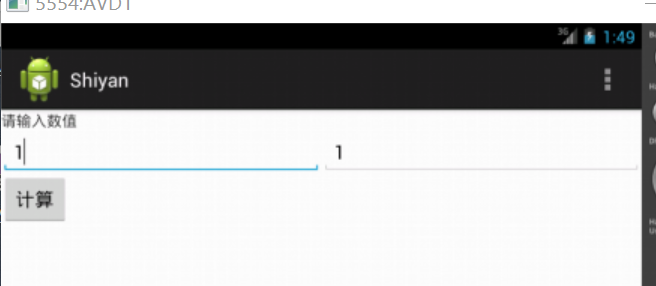
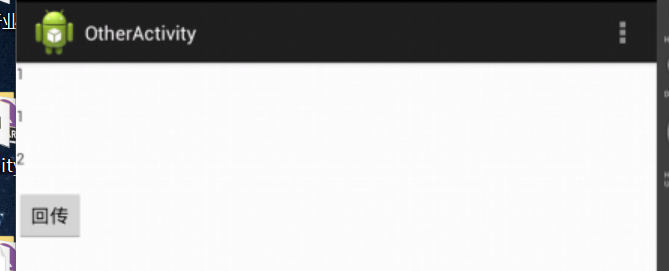
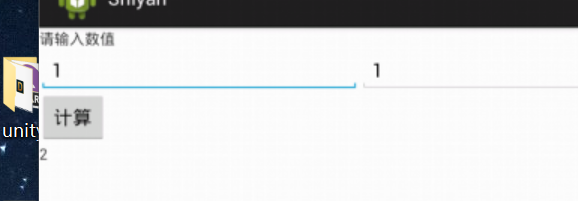
编写一个程序,可在第一个Activity中输入两个整数,单击“计算”按钮后,在第二个Activity负责求和计算,并将结果返回
 <LinearLayout xmlns:android="http://schemas.android.com/apk/res/android"

     xmlns:tools="http://schemas.android.com/tools"

     android:layout_width="match_parent"

     android:layout_height="match_parent"

     android:orientation="vertical"

        tools:context=".MainActivity" >

     <TextView

         android:id="@+id/tex"

         android:layout_width="fill_parent"

         android:layout_height="wrap_content"

         android:text="请输入数值" />

     <LinearLayout

         android:layout_width="fill_parent"

         android:layout_height="wrap_content"

         android:orientation="horizontal" >

         <EditText

             android:id="@+id/edt"

             android:layout_width="0dp"

             android:layout_height="wrap_content"

             android:layout_weight="1" />

         <EditText

             android:id="@+id/edt1"

             android:layout_width="0dp"

             android:layout_height="wrap_content"

             android:layout_weight="1" />

     </LinearLayout>

     <Button

         android:id="@+id/but"

         android:layout_width="wrap_content"

         android:layout_height="wrap_content"

         android:text="计算" />

     <TextView

         android:id="@+id/tex1"

         android:layout_width="300dp"

         android:layout_height="50dp"

        />

 </LinearLayout>
activity_mian.xml 程序
 <LinearLayout xmlns:android="http://schemas.android.com/apk/res/android"

     xmlns:tools="http://schemas.android.com/tools"

     android:layout_width="match_parent"

     android:layout_height="match_parent"

     android:orientation="vertical"

        tools:context=".MainActivity" >

      <TextView

             android:id="@+id/e1"

             android:layout_width="fill_parent"

             android:layout_height="40dp"

           />

         <TextView

             android:id="@+id/e2"

             android:layout_width="fill_parent"

             android:layout_height="40dp"

             />

          <TextView

             android:id="@+id/e3"

             android:layout_width="fill_parent"

             android:layout_height="40dp"

             />

   <Button

         android:id="@+id/b1"

         android:layout_width="wrap_content"

         android:layout_height="wrap_content"

         android:text="回传" />

 </LinearLayout>
activity_other.xml
 package com.example.shiyan;

 import android.os.Bundle;

 import android.app.Activity;

 import android.content.Intent;

 import android.view.Menu;

 import android.view.View;

 import android.view.View.OnClickListener;

 import android.widget.Button;

 import android.widget.EditText;

 import android.widget.TextView;

 public class MainActivity extends Activity {

     private EditText edt;

     private EditText edt1;

     private TextView tex1;

     @Override

     protected void onCreate(Bundle savedInstanceState) {

         super.onCreate(savedInstanceState);

         setContentView(R.layout.activity_main);

         edt=(EditText)this.findViewById(R.id.edt);

        edt=(EditText)this.findViewById(R.id.edt1);

        tex1=(TextView)this.findViewById(R.id.tex1);

         Button but=(Button)this.findViewById(R.id.but);

         but.setOnClickListener(new OnClickListener()

         {

             public void onClick(View v) {

                 String number = edt.getText().toString();

                 String number1 = edt.getText().toString();

                 Intent intent = new Intent();

                 intent.setClass(MainActivity.this,OtherActivity.class);

                 intent.putExtra("shu1",number);

                 intent.putExtra("shu2",number1);

                 MainActivity.this.startActivityForResult(intent,100);

             }

         });

         }

     @Override

     protected void onActivityResult(int requestCode, int resultCode, Intent data) {

         super.onActivityResult(requestCode, resultCode, data);

         if(requestCode==100&&resultCode==200){

             String a=data.getStringExtra("sum");

             tex1.setText(a);

         }

     }

     @Override

     public boolean onCreateOptionsMenu(Menu menu) {

         // Inflate the menu; this adds items to the action bar if it is present.

         getMenuInflater().inflate(R.menu.main, menu);

         return true;

     }

 }
MainActivity
 package com.example.shiyan;

 import android.os.Bundle;

 import android.app.Activity;

 import android.content.Intent;

 import android.view.Menu;

 import android.view.View;

 import android.view.View.OnClickListener;

 import android.widget.Button;

 import android.widget.EditText;

 import android.widget.TextView;

 public class OtherActivity extends Activity {

     private TextView e1;

     private TextView e2;

     private TextView e3;

     @Override

     protected void onCreate(Bundle savedInstanceState) {

         super.onCreate(savedInstanceState);

         setContentView(R.layout.activity_other);

          e1=(TextView)this.findViewById(R.id.e1);

          e2=(TextView)this.findViewById(R.id.e2);

          e3=(TextView)this.findViewById(R.id.e3);

          Intent intent=getIntent();

          String a=intent.getStringExtra("shu1");

          String b=intent.getStringExtra("shu2");

          int c=Integer.parseInt(a)+Integer.parseInt(b) ;

          String str = String.valueOf(c);

          e1.setText(a);

          e2.setText(b);

          e3.setText(str);

          Button b1=(Button)this.findViewById(R.id.b1);

             b1.setOnClickListener(new OnClickListener()

             {

                 public void onClick(View v) {

                      Intent intent=getIntent();

                      String a=intent.getStringExtra("shu1");

                      String b=intent.getStringExtra("shu2");

                      int c=Integer.parseInt(a)+Integer.parseInt(b) ;

                      String str = String.valueOf(c);

                     intent.putExtra("sum",str);

                     setResult(200,intent);

                     OtherActivity.this.finish();

                 }

             });

     }

     @Override

     public boolean onCreateOptionsMenu(Menu menu) {

         // Inflate the menu; this adds items to the action bar if it is present.

         getMenuInflater().inflate(R.menu.other, menu);

         return true;

     }

 }
OtherActivity
安卓开发-Activity-多个Activity的开发方法。的更多相关文章
- 【Android Studio】安卓开发初体验2——Activity
Activity是什么 Activity用于提供可视化用户界面的组件,可以与用户进行交互来完成某项任务,一个应用程序中可以包含零个或多个活动 Activity的创建 首先将左侧的Active Tool ...
- 安卓开发笔记——重识Activity
Activity并不是什么新鲜的东西,老生常谈,这里只是随笔记录一些笔记. 每当说起Activity,感觉最关注的还是它的生命周期,因为要使我们的应用程序更加健壮,客户体验更加良好,如果对生命周期不熟 ...
- android开发中关于继承activity类中方法的调用
android开发中关于继承activity类中的函数,不能在其他类中调用其方法. MainActivity.java package com.example.testmain; import and ...
- Android开发之漫漫长途 Ⅱ——Activity的显示之Window和View(2)
该文章是一个系列文章,是本人在Android开发的漫漫长途上的一点感想和记录,我会尽量按照先易后难的顺序进行编写该系列.该系列引用了<Android开发艺术探索>以及<深入理解And ...
- Android开发之漫漫长途 Ⅱ——Activity的显示之Window和View(1)
该文章是一个系列文章,是本人在Android开发的漫漫长途上的一点感想和记录,我会尽量按照先易后难的顺序进行编写该系列.该系列引用了<Android开发艺术探索>以及<深入理解And ...
- Android开发学习之路--Activity之初体验
环境也搭建好了,android系统也基本了解了,那么接下来就可以开始学习android开发了,相信这么学下去肯定可以把android开发学习好的,再加上时而再温故下linux下的知识,看看androi ...
- Android开发——异步任务中Activity销毁时的问题
0. 前言 在Android开发中经常会发生Activity的销毁重建,比如用户长时间接听一个电话后回到APP.在Android开发--Fragment知识整理(二)中我们提到了使用Fragment ...
- Android开发之漫漫长途 Ⅲ——Activity的显示之Window和View(2)
该文章是一个系列文章,是本人在Android开发的漫漫长途上的一点感想和记录,我会尽量按照先易后难的顺序进行编写该系列.该系列引用了<Android开发艺术探索>以及<深入理解And ...
- Activity设置背景透明之开发坑
Activity设置背景透明的常规方法 方法一.在Manifest.xml中,直接在需要设置的Activity中添加主题样式: Android:theme="@android:style/T ...
- Android开发 旋转屏幕导致Activity重建解决方法(转)
文章来源:http://www.jb51.net/article/31833.htm Android开发文档上专门有一小节解释这个问题.简单来说,Activity是负责与用户交互的最主要机制,任何“ ...
随机推荐
- ubuntu部署TimescaleDB
系统环境: ubuntu16.04 PostgreSQL 版本: 12 注意:TimescaleDB 需要PostgreSQL 11.4+或12.0+.不再支持PostgreSQL 9.6.3+和10 ...
- 【C++】变量
注意:以下内容摘自文献[1],修改了部分内容. 1.变量:在程序运行期间其值可以改变的量称为变量.一个变量应该有一个名字,并在内存中占据一定的存储单元,在该存储单元中存放变量的值.变量名代表内存中的一 ...
- [工具-004]如何从apk中提取AndroidManifest.xml并提取相应信息
跟上一篇类似,我们也需要对APK的一些诸如umengkey,ADkey,TalkingData进行验证,那么我们同样需要解压apk文件,然后提取其中的AndroidManifest.xml.然后解析x ...
- JAVA WEB EL表达式注入
看猪猪侠以前的洞,顺便总结下: 一.EL表达式简介 EL 全名为Expression Language.EL主要作用: 1.获取数据 EL表达式主要用于替换JSP页面中的脚本表达式,以从各种类型的we ...
- MySQL不香吗,清华架构师告诉你为什么还要有noSQL?
强烈推荐观看: 阿里P8架构师谈(数据库系列):NoSQL使用场景和选型比较,以及与SQL的区别_哔哩哔哩 (゜-゜)つロ 干杯~-bilibiliwww.bilibili.com noSQL的大概 ...
- Rocket - debug - TLDebugModuleInner - Drive Custom Access
https://mp.weixin.qq.com/s/1bIqzDYXM36MIfSsjvvYIw 简单介绍TLDebugModuleInner中的针对Custom的访问. 1. customNode ...
- Rocket - diplomacy - enumerateMask
https://mp.weixin.qq.com/s/s3hr5JJX2_pwNgdu8WqV0Q 介绍enumerateMask的实现.(仅供理解,非严谨证明) 1. 基本定义 ...
- 【HBase】HBase架构中各种组件的作用
client: 发起读写请求 维护cache,加快读取速度 zookeeper: HMaster选举,存储meta-region的路由信息,监控集群从节点HRegionSever上信息 HMaster ...
- 企业级Python开发大佬利用网络爬虫技术实现自动发送天气预告邮件
前天小编带大家利用Python网络爬虫采集了天气网的实时信息,今天小编带大家更进一步,将采集到的天气信息直接发送到邮箱,带大家一起嗨~~拓展来说,这个功能放在企业级角度来看,只要我们拥有客户的邮箱,之 ...
- ASP.NET给图片自动添加水印
先建一个类,感觉注释已经很详细了,有不懂的欢迎评论 using System; using System.Collections.Generic; using System.Drawing; usin ...