
相同域名不同端口的两个应用,cookie名字、路径都相同的情况下,会覆盖吗
首先答案是:
会的。
本地测试流程:
两个相同的应用,代码完全相同;只是部署在两个不同的tomcat;域名都是localhost
应用A:部署在http://localhost:8087/
应用B:部署在http://localhost:8089/
在intelj idea中很简单,建立两个不同的运行配置即可:


步骤1:清空所有cookie
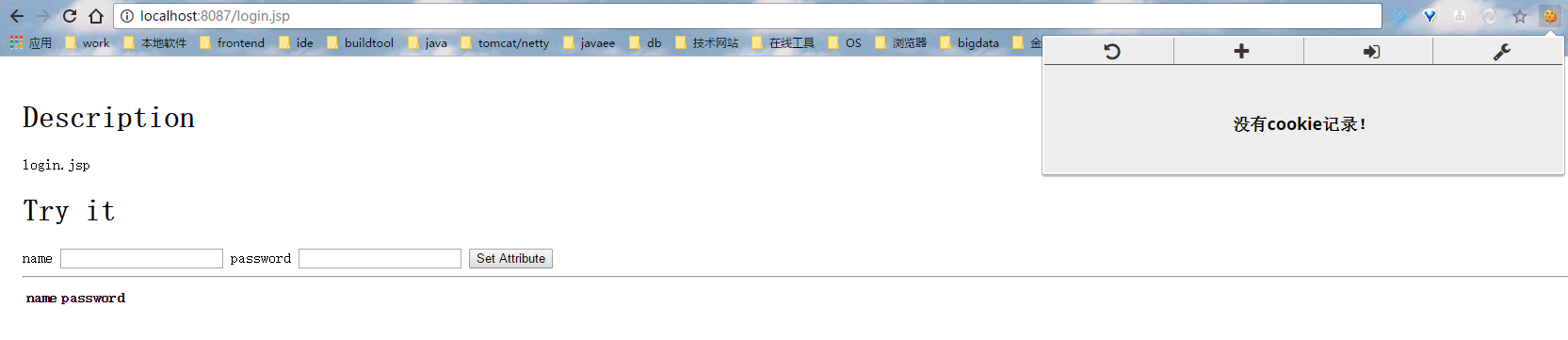
步骤2、在8087发送请求,用chrome开发工具查看

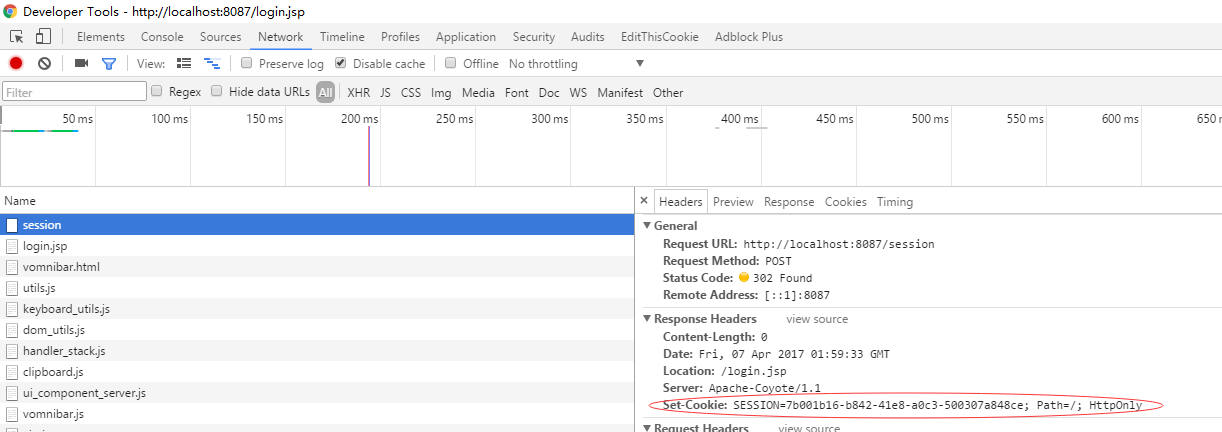
可以看到,生成了cookie。
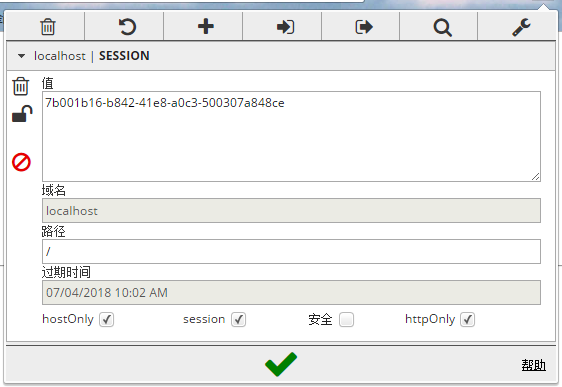
用我的cookie扩展(名字叫editThisCookie),可以看到该cookie貌似没有区分端口号。
步骤3、在8089上测试一下
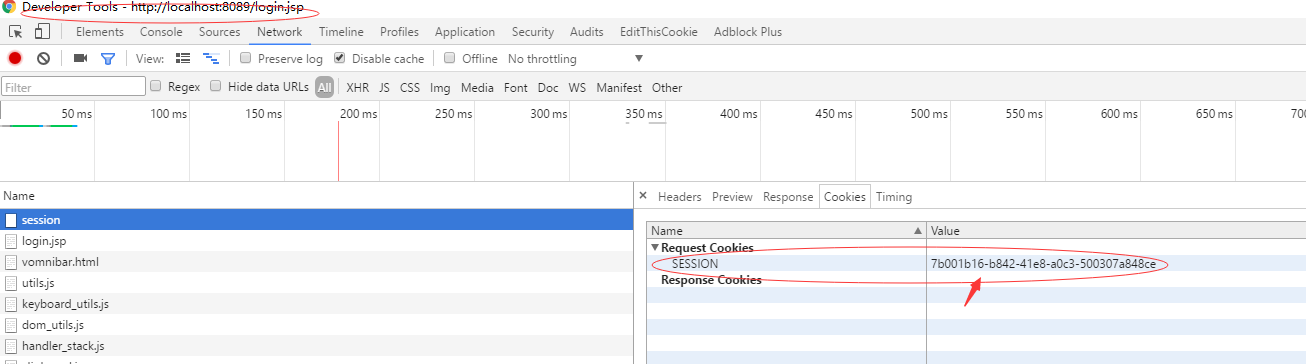
结论:可以看到,在请求8089端口的应用时,把8087应用返回的cookie带过去了,所以标题的答案就是:
同域名情况下,cookie同名同路径的话,会被覆盖(路径不同是否会覆盖没测试,有兴趣的同学自己测下)
参考资料
http://blog.csdn.net/wangjun5159/article/details/52399497
附项目文件如下:
web.xml
<web-app xmlns="http://xmlns.jcp.org/xml/ns/javaee"

         xmlns:xsi="http://www.w3.org/2001/XMLSchema-instance"

         xsi:schemaLocation="http://xmlns.jcp.org/xml/ns/javaee

         http://xmlns.jcp.org/xml/ns/javaee/web-app_3_1.xsd"

         version="3.1">

    <welcome-file-list>

        <welcome-file>login.jsp</welcome-file>

    </welcome-file-list>

    <!-- 登录过滤器 -->

    <filter>

        <filter-name>sessionFilter</filter-name>

        <filter-class>SessionFilter</filter-class>

    </filter>

    <filter-mapping>

        <filter-name>sessionFilter</filter-name>

        <url-pattern>*</url-pattern>

    </filter-mapping>

</web-app>
import org.springframework.web.filter.OncePerRequestFilter;

import javax.servlet.*;

import javax.servlet.http.HttpServletRequest;

import javax.servlet.http.HttpServletResponse;

import javax.servlet.http.HttpSession;

import java.io.IOException;

/**

 * Email: caokunliang@sgrcr.com

 * Date: 2017/4/6

 * desc:登录页面不进该filter

 */

public class SessionFilter extends OncePerRequestFilter {

    protected void doFilterInternal(HttpServletRequest httpServletRequest, HttpServletResponse httpServletResponse, FilterChain filterChain) throws ServletException, IOException {

        String uri = httpServletRequest.getRequestURI();

        System.out.println(uri);

        if (uri.contains("login.jsp") || uri.contains("index.jsp") || uri.contains("session")){

            filterChain.doFilter(httpServletRequest,httpServletResponse);

            return;

        }

        HttpSession session = httpServletRequest.getSession(false);

        if (session == null){

            //第一次访问,没带sessionid;下面的操作会默认创建一个session空间,并写cookie:jsessionid

            session = httpServletRequest.getSession(true);

        }else {

            //不是第一次访问的话,已经有session空间了

            System.out.println(session.getAttribute("SESSION"));

        }

        //判断session空间中有没有登录标识

        Boolean isLogin = (Boolean) session.getAttribute("isLogin");

        if (isLogin != null && isLogin.equals(Boolean.TRUE)){

            filterChain.doFilter(httpServletRequest,httpServletResponse);

        }else {

            //未登录

            httpServletResponse.sendRedirect("/login.jsp");

        }

    }

}
servlet:
import javax.servlet.ServletException;

import javax.servlet.annotation.WebServlet;

import javax.servlet.http.HttpServlet;

import javax.servlet.http.HttpServletRequest;

import javax.servlet.http.HttpServletResponse;

import javax.servlet.http.HttpSession;

import java.io.IOException;

// tag::class[]

@WebServlet("/session")

public class SessionServlet extends HttpServlet {

    @Override

    protected void doPost(HttpServletRequest req, HttpServletResponse resp)

            throws ServletException, IOException {

        String attributeName = req.getParameter("attributeName");

        String attributeValue = req.getParameter("attributeValue");

        HttpSession session = req.getSession(false);

        if (session == null){

            session = req.getSession(true);

        }

        System.out.println("SessionServlet" + session.getAttribute("SESSION"));

        if (attributeName.equals("ckl") && attributeValue.equals("123456")){

            session.setAttribute("isLogin", Boolean.valueOf(true));

            resp.sendRedirect(req.getContextPath() + "/index.jsp");

        }else {

            resp.sendRedirect(req.getContextPath() + "/login.jsp");

        }

    }

    private static final long serialVersionUID = 2878267318695777395L;

}
index.jsp
<!DOCTYPE html>

<html lang="en">

<title>Session Attributes</title>

<style type="text/css">

    body {

        padding: 1em;

    }

</style>

<head></head>

<body>

    <div class="container">

        <h1>Description</h1>

        <p>index.jsp</p>

        <h1>Try it</h1>

        <div>登录成功后主页</div>

        <hr/>

        <table class="table table-striped">

            <thead>

            <tr>

                <th>Attribute Name</th>

                <th>Attribute Value</th>

            </tr>

            </thead>

            <tbody>

            </tbody>

        </table>

    </div>

</body>

</html>
login.jsp:
<!DOCTYPE html>

<html lang="en">

<title>Session Attributes</title>

<style type="text/css">

    body {

        padding: 1em;

    }

</style>

<head></head>

<body>

    <div class="container">

        <h1>Description</h1>

        <p>login.jsp</p>

        <h1>Try it</h1>

        <form class="form-inline" role="form" action="./session" method="post">

            <label for="attributeName">name</label>

            <input id="attributeName" type="text" name="attributeName"/>

            <label for="attributeValue">password</label>

            <input id="attributeValue" type="text" name="attributeValue"/>

            <input type="submit" value="Set Attribute"/>

        </form>

        <hr/>

        <table class="table table-striped">

            <thead>

            <tr>

                <th>name</th>

                <th>password</th>

            </tr>

            </thead>

            <tbody>

            </tbody>

        </table>

    </div>

</body>

</html>
相同域名不同端口的两个应用,cookie名字、路径都相同的情况下,会覆盖吗的更多相关文章
- Tengine笔记2:通过IP、域名、端口实现虚拟主机
一.通过端口创建虚拟主机 案例:通过端口访问两个不同的页面 将/usr/local/tengine-2.1.0/html/index.html内的内容改为 Welcom to port1 然后在/op ...
- tomact配置域名和端口直接访问网站
tomact配置域名和端口直接访问网站,就是使用域名解析到主机,通过端口执行网站地址,实现访问,在上一章节中发布了两个web项目,但是都是执行同一个根文件夹,通过 http://localhost:8 ...
- .net core 启动域名及端口配置
前两天转载一篇.net core 启动分析,由于发布时候一直纠结在默认5000端口上,所以好好研究了一下. 1.IIS集成 如果通过IIS当宿主的话,那这些都不是事情,强大的IIS可以帮助我们对站点的 ...
- C# System.Uri类_获取Url的各种属性_文件名_参数_域名_端口等等
System.Uri类用于处理Uri地址信息,常用到它的地方有,相对Uri地址转绝对Uri地址,获取Uri的某部分信息等等,可以说是一个非常有用的类. 一.属性 AbsolutePath 获取 URI ...
- System.Uri类 - 获取Url的各种属性,文件名,参数,域名,端口等等
System.Uri类用于处理Uri地址信息,常用到它的地方有,相对Uri地址转绝对Uri地址,获取Uri的某部分信息等等,可以说是一个非常有用的类. 一.属性 AbsolutePath 获取 URI ...
- nginx配置基于域名、端口、IP的虚拟主机
1.基于域名的虚拟主机: 绝大多数企业对外提供服务的网站使用的都是基于域名的主机,通过不同的域名区分不同的虚拟主机. 首先我们进入安装nginxd的目录下:/application/nginx-1.6 ...
- 使用eclipse上Tomcat插件配置域名、端口号、启动时间详解
作者:NiceCui 本文谢绝转载,如需转载需征得作者本人同意,谢谢. 本文链接:http://www.cnblogs.com/NiceCui/p/7856284.html 邮箱:moyi@moyib ...
- Nginx配置基于多域名、端口、IP的虚拟主机
原文:https://www.cnblogs.com/ssgeek/p/9220922.html ------------------------------- Nginx配置基于多域名.端口.IP的 ...
- nginx 域名绑定 域名, nginx 域名绑定 端口
一.nginx 域名绑定 域名 nginx绑定多个域名可又把多个域名规则写一个配置文件里,也可又分别建立多个域名配置文件,我一般为了管理方便,每个域名建一个文件,有些同类域名也可又写在一个总的配置文件 ...
随机推荐
- 使用Angular CLI进行Build (构建) 和 Serve
第一篇文章是: "使用angular cli生成angular5项目" : http://www.cnblogs.com/cgzl/p/8594571.html 第二篇文章是: & ...
- guava cache使用和源码分析
guava cache的优点和使用场景,用来判断业务中是否适合使用此缓存 介绍常用的方法,并给出示例,作为使用的参考 深入解读源码. guava简介 guava cache是一个本地缓存.有以下优点: ...
- 通过Beego将之前实现的短url项目实现
正好通过这个小例子对之前了解的beego框架的基本内容进行一个简单的应用 实现的完整代码地址:https://github.com/pythonsite/go_simple_code/tree/mas ...
- 面向服务的体系架构 SOA(三) --- Zookeeper API、zkClient API的使用
zookeeper简单介绍及API使用 1.1 zookeeper简介 zookeeper是一个针对大型分布式系统的可靠的协调系统,提供的功能包括配置维护.名字服务.分布式同步.组服务等.zookee ...
- 1-4 criteria用法大全
Criteria的完整用法 QBE (Query By Example) Criteria cri = session.createCriteria(Student.class); cri.add(E ...
- 【Zabbix】 Zabbix表结构说明【转载】
本文转自[https://www.cnblogs.com/shhnwangjian/p/5484352.html] 参考文[https://www.cnblogs.com/learningJAVA/p ...
- 1.由浅入深解析 SimpleDateFormat
一.SimpleDateFormat简介 SimpleDateFormat 是一个以国别敏感的方式格式化和分析数据的具体类. 它允许格式化 (date -> text).语法分析 (text - ...
- 在linux环境下安装JDK并配置环境变量
操作步骤如下 1.根据linux服务器的系统版本在官网下载相应linux版本JDK(32位下载x86,64位下载x64) 2.通过远程连接工具(filezilla)将下载好的JDK上传至linux服务 ...
- 高级软件工程2017第7次作业--C++团队项目:Beta阶段综合报告
1.Beta阶段敏捷冲刺每日报告 Bate版敏捷冲刺报告--day0 Bate版敏捷冲刺每日报告--day1 Bate敏捷冲刺每日报告--day2 Bate敏捷冲刺每日报告--day3 Bate敏捷冲 ...
- android 广播安装指定下载的apk
// 广播出去,由广播接收器来处理下载完成的文件 Intent sendIntent = new Intent("com.test.downloadComplete"); ...