
SpringBoot进阶教程(二十四)整合Redis
缓存现在几乎是所有中大型网站都在用的必杀技,合理的利用缓存不仅能够提升网站访问速度,还能大大降低数据库的压力。Redis提供了键过期功能,也提供了灵活的键淘汰策略,所以,现在Redis用在缓存的场合非常多。
之前有两篇博文(centos安装Redis 和 Redis五大数据类型的常用操作),分别介绍了Redis的安装和Redis的常用操作。今天主要介绍介绍springboot整合Redis。
v应用场景
现在公司做的项目都偏重论坛/社区/社交类产品,所以对Redis的实用场景主要集中在排行榜,最新/最热内容,Redis提供的有序集合数据类构能实现各种复杂的排行榜应用。还有点赞、踩、关注/被关注、共同好友等是社交网站的基本功能,社交网站的访问量通常来说比较大,而且传统的关系数据库类型不适合存储这种类型的数据,Redis提供的哈希、集合等数据结构能很方便的的实现这些功能。
还有很多应用场景,比如分布式会话和分布式锁(分布式锁感兴趣的可以看我之前的一篇文章《Java分布式锁,搞懂分布式锁实现看这篇文章就对了》)等等,总之越来越广泛。
v搭建Redis
1.1. 引入Redis
        <dependency>

            <groupId>org.springframework.boot</groupId>

            <artifactId>spring-boot-starter-data-redis</artifactId>

        </dependency>

        <!--<dependency>-->

            <!--<groupId>redis.clients</groupId>-->

            <!--<artifactId>jedis</artifactId>-->

            <!--<version>2.9.0</version>-->

        <!--</dependency>-->
注意redis.clients是我本地调试测试用的,可以忽略。
1.2. 添加RedisCacheConfig
package com.demo.Redis;

import org.springframework.beans.factory.annotation.Autowired;

import org.springframework.cache.annotation.EnableCaching;

import org.springframework.context.annotation.Bean;

import org.springframework.context.annotation.Configuration;

import org.springframework.data.redis.connection.RedisConnectionFactory;

import org.springframework.data.redis.core.StringRedisTemplate;

import org.springframework.data.redis.listener.PatternTopic;

import org.springframework.data.redis.listener.RedisMessageListenerContainer;

import org.springframework.data.redis.listener.adapter.MessageListenerAdapter;

import java.util.concurrent.CountDownLatch;

/**

 * Created by toutou on 2019/1/20.

 */

@Configuration

@EnableCaching

public class RedisCacheConfig {

    @Bean

    RedisMessageListenerContainer container(RedisConnectionFactory connectionFactory,

                                            MessageListenerAdapter listenerAdapter) {

        RedisMessageListenerContainer container = new RedisMessageListenerContainer();

        container.setConnectionFactory(connectionFactory);

        container.addMessageListener(listenerAdapter, new PatternTopic("chat"));

        return container;

    }

    @Bean

    MessageListenerAdapter listenerAdapter(Receiver receiver) {

        return new MessageListenerAdapter(receiver, "receiveMessage");

    }

    @Bean

    Receiver receiver(CountDownLatch latch) {

        return new Receiver(latch);

    }

    @Bean

    CountDownLatch latch() {

        return new CountDownLatch(1);

    }

    @Bean

    StringRedisTemplate template(RedisConnectionFactory connectionFactory) {

        return new StringRedisTemplate(connectionFactory);

    }

    public class Receiver {

        private CountDownLatch latch;

        @Autowired

        public Receiver(CountDownLatch latch) {

            this.latch = latch;

        }

        public void receiveMessage(String message) {

            latch.countDown();

        }

    }

}
可以按需添加,也可以按需忽略。
1.3. 添加Redis配置,修改application.properties
# ----- Redis -------- #

# REDIS (RedisProperties)

# Redis数据库索引(默认为0)

spring.redis.database=0

# Redis服务器地址

spring.redis.host=10.168.11.129

# Redis服务器连接端口

spring.redis.port=6379

# Redis服务器连接密码(默认为空)

spring.redis.password=

# 连接池最大连接数(使用负值表示没有限制)

spring.redis.pool.max-active=8

# 连接池最大阻塞等待时间(使用负值表示没有限制)

spring.redis.pool.max-wait=-1

# 连接池中的最大空闲连接

spring.redis.pool.max-idle=8

# 连接池中的最小空闲连接

spring.redis.pool.min-idle=0

# 连接超时时间(毫秒)

spring.redis.timeout=5000
1.4. 添加Service
package com.demo.service;

import com.demo.pojo.UserDetails;

/**

 * Created by toutou on 2018/10/15.

 */

public interface UserService {

    UserDetails getUserDetailsByUid(int uid);

    String getUserNameById(Integer uid);

    void setUserNameById(Integer uid, String userName);

}
UserServiceImpl
package com.demo.service;

import com.demo.dao.UserDetailsMapper;

import com.demo.dao.UserPositionMapper;

import com.demo.pojo.UserDetails;

import com.demo.pojo.UserPosition;

import com.google.common.base.Strings;

import org.springframework.beans.factory.annotation.Autowired;

import org.springframework.data.redis.core.StringRedisTemplate;

import org.springframework.stereotype.Service;

import java.math.BigDecimal;

import java.util.List;

/**

 * Created by toutou on 2018/10/15.

 */

@Service

public class UserServiceImpl implements UserService{

    @Autowired

    UserDetailsMapper userDetailsMapper;

    @Autowired

    UserPositionMapper userPositionMapper;

    @Autowired

    StringRedisTemplate template;

    static final String KEY_USER_INFO__NAME = "com_demo_user_info_007_%s";

    public String getUserNameById(Integer uid){

        String userName = "未知用户";

        try {

            userName = template.opsForValue().get(String.format(KEY_USER_INFO__NAME, uid));

            if (Strings.isNullOrEmpty(userName)) {

                // Redis中没有就读数据库

                UserDetails userDetails = getUserDetailsByUid(uid);

                if (userDetails != null && !Strings.isNullOrEmpty(userDetails.getCity())) {

                    userName = userDetails.getCity();

                }

            }

        }catch(Exception e){

            System.out.println(e.toString());

        }

        return userName;

    }

    public void setUserNameById(Integer uid, String userName){

        template.opsForValue().set(String.format(KEY_USER_INFO__NAME, uid), userName);

    }

    public UserDetails getUserDetailsByUid(int uid){

        return userDetailsMapper.getUserDetailsByUid(uid);

    }

}
1.5. 添加RedisController
package com.demo.controller;

import com.demo.service.UserService;

import lombok.extern.slf4j.Slf4j;

import org.springframework.beans.factory.annotation.Autowired;

import org.springframework.web.bind.annotation.RequestMapping;

import org.springframework.web.bind.annotation.RestController;

import redis.clients.jedis.Jedis;

/**

 * Created by toutou on 2019/1/20.

 */

@RestController

@Slf4j

public class RedisController {

    @Autowired

    UserService userService;

    @RequestMapping(value = "/getusernamebyid")

    public String getUserNameById(Integer uid)

    {

        return userService.getUserNameById(uid);

    }

    @RequestMapping(value = "/setusernamebyid")

    public String setUserNameById(Integer uid, String uname)

    {

        userService.setUserNameById(uid, uname);

        return "设置成功";

    }

    @RequestMapping(value = "/jedistest")

    public String jedisTest(){

        // 创建一个jedis对象

        Jedis jedis = new Jedis("ip", 6379);

        // 直接调用jedis对象的方法,方法名称和redis的命令一致

        jedis.set("key1", "test01");

        String key1 = jedis.get("key1");

        System.out.println(key1 + " " + key1);

        // 关闭jedis

        jedis.close();

        return key1;

    }

}
注意jedisTest是我本地调试测试用的,可以忽略。
vRedis测试效果
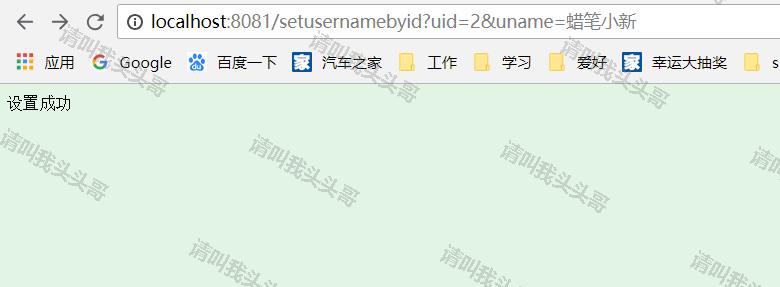
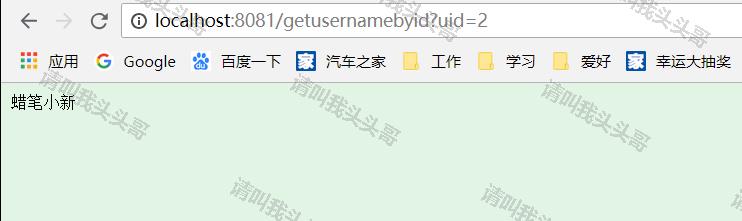
v源码地址
https://github.com/toutouge/javademosecond/tree/master/hellospringboot
作 者:请叫我头头哥
出 处:http://www.cnblogs.com/toutou/
关于作者:专注于基础平台的项目开发。如有问题或建议,请多多赐教!
版权声明:本文版权归作者和博客园共有,欢迎转载,但未经作者同意必须保留此段声明,且在文章页面明显位置给出原文链接。
特此声明:所有评论和私信都会在第一时间回复。也欢迎园子的大大们指正错误,共同进步。或者直接私信我
声援博主:如果您觉得文章对您有帮助,可以点击文章右下角【推荐】一下。您的鼓励是作者坚持原创和持续写作的最大动力!
SpringBoot进阶教程(二十四)整合Redis的更多相关文章
- SpringBoot进阶教程(二十九)整合Redis 发布订阅
SUBSCRIBE, UNSUBSCRIBE 和 PUBLISH 实现了 发布/订阅消息范例,发送者 (publishers) 不用编程就可以向特定的接受者发送消息 (subscribers). Ra ...
- SpringBoot进阶教程(二十八)整合Redis事物
Redis默认情况下,事务支持被禁用,必须通过设置setEnableTransactionSupport(true)为使用中的每个redistplate显式启用.这样做会强制将当前重新连接绑定到触发m ...
- SpringBoot进阶教程(二十六)整合Redis之共享Session
集群现在越来越常见,当我们项目搭建了集群,就会产生session共享问题.因为session是保存在服务器上面的.那么解决这一问题,大致有三个方案,1.通过nginx的负载均衡其中一种ip绑定来实现( ...
- SpringBoot进阶教程(二十五)整合Redis之@Cacheable、@CachePut、@CacheEvict的应用
在上一篇文章(<SpringBoot(二十四)整合Redis>)中,已经实现了Spring Boot对Redis的整合,既然已经讲到Cache了,今天就介绍介绍缓存注解.各家互联网产品现在 ...
- SpringBoot进阶教程(七十四)整合ELK
在上一篇文章<SpringBoot进阶教程(七十三)整合elasticsearch >,已经详细介绍了关于elasticsearch的安装与使用,现在主要来看看关于ELK的定义.安装及使用 ...
- SpringBoot进阶教程(六十四)注解大全
在Spring1.x时代,还没出现注解,需要大量xml配置文件并在内部编写大量bean标签.Java5推出新特性annotation,为spring的更新奠定了基础.从Spring 2.X开始spri ...
- SpringBoot进阶教程(五十九)整合Codis
上一篇博文<详解Codis安装与部署>中,详细介绍了codis的安装与部署,这篇文章主要介绍介绍springboot整合codis.如果之前看过<SpringBoot进阶教程(五十二 ...
- SpringBoot进阶教程(二十二)集成RabbitMQ---MQ实战演练
RabbitMQ是一个在AMQP基础上完成的,可复用的企业消息系统.他遵循Mozilla Public License开源协议.RabbitMQ是流行的开源消息队列系统,用erlang语言开发.Rab ...
- SpringBoot进阶教程(二十七)整合Redis之分布式锁
在之前的一篇文章(<Java分布式锁,搞懂分布式锁实现看这篇文章就对了>),已经介绍过几种java分布式锁,今天来个Redis分布式锁的demo.redis 现在已经成为系统缓存的必备组件 ...
随机推荐
- gradle 将依赖打入Jar包的方法
使用的是IDEA,直接引入 plugins { id 'com.github.johnrengelman.shadow' version '1.2.3' } 放在build.gradle的最上面,然后 ...
- Java并发之ReentrantLock
一.ReentrantLock简介 ReentrantLock字面意义上理解为可重入锁.那么怎么理解可重入这个概念呢?或者说和我们经常用的synchronized又什么区别呢? ReentrantLo ...
- JSON Patch
1.前言 可以这么说的是,任何一种非强制性约束同时也没有"标杆"工具支持的开发风格或协议(仅靠文档是远远不够的),最终的实现上都会被程序员冠上"务实"的名头,而 ...
- java基础 lang包 详细介绍
Java.javax和org.其中以java开头的包名是JDK的基础语言包,以javax开头的属 (org是organization的简写).而在JDK API中还包含了一些以com.sun开头的包名 ...
- KVM内核文档阅读笔记
KVM在内核中有丰富的文档,位置在Documentation/virtual/kvm/. 00-INDEX:整个目录的索引及介绍文档. api.txt:KVM用户空间API,所谓的API主要是通过io ...
- 集成学习之Boosting —— AdaBoost原理
集成学习大致可分为两大类:Bagging和Boosting.Bagging一般使用强学习器,其个体学习器之间不存在强依赖关系,容易并行.Boosting则使用弱分类器,其个体学习器之间存在强依赖关系, ...
- 怎么轻松学习JavaScript
js给初学者的印象总是那么的“杂而乱”,相信很多初学者都在找轻松学习js的途径.我试着总结自己学习多年js的经验,希望能给后来的学习者探索出一条“轻松学习js之路”.js给人那种感觉的原因多半是因为它 ...
- 分布式服务跟踪及Spring Cloud的实现
在分布式服务架构中,需要对分布式服务进行治理——在分布式服务协同向用户提供服务时,每个请求都被哪些服务处理?在遇到问题时,在调用哪个服务上发生了问题?在分析性能时,调用各个服务都花了多长时间?哪些调用 ...
- Spring Boot 整合Spring Security 和Swagger2 遇到的问题小结
How to configure Spring Security to allow Swagger URL to be accessed without authentication @Configu ...
- CSS3 :nth-child() 选择器---挖坑
E:nth-child(n) 语法: E:nth-child(n) { sRules } 说明: 匹配父元素的第n个子元素E,假设该子元素不是E,则选择符无效.(也就是说,会检查从body开始的每个元 ...