
SpringBoot进阶教程(二十四)整合Redis
缓存现在几乎是所有中大型网站都在用的必杀技,合理的利用缓存不仅能够提升网站访问速度,还能大大降低数据库的压力。Redis提供了键过期功能,也提供了灵活的键淘汰策略,所以,现在Redis用在缓存的场合非常多。
之前有两篇博文(centos安装Redis 和 Redis五大数据类型的常用操作),分别介绍了Redis的安装和Redis的常用操作。今天主要介绍介绍springboot整合Redis。
v应用场景
现在公司做的项目都偏重论坛/社区/社交类产品,所以对Redis的实用场景主要集中在排行榜,最新/最热内容,Redis提供的有序集合数据类构能实现各种复杂的排行榜应用。还有点赞、踩、关注/被关注、共同好友等是社交网站的基本功能,社交网站的访问量通常来说比较大,而且传统的关系数据库类型不适合存储这种类型的数据,Redis提供的哈希、集合等数据结构能很方便的的实现这些功能。
还有很多应用场景,比如分布式会话和分布式锁(分布式锁感兴趣的可以看我之前的一篇文章《Java分布式锁,搞懂分布式锁实现看这篇文章就对了》)等等,总之越来越广泛。
v搭建Redis
1.1. 引入Redis
        <dependency>

            <groupId>org.springframework.boot</groupId>

            <artifactId>spring-boot-starter-data-redis</artifactId>

        </dependency>

        <!--<dependency>-->

            <!--<groupId>redis.clients</groupId>-->

            <!--<artifactId>jedis</artifactId>-->

            <!--<version>2.9.0</version>-->

        <!--</dependency>-->
注意redis.clients是我本地调试测试用的,可以忽略。
1.2. 添加RedisCacheConfig
package com.demo.Redis;

import org.springframework.beans.factory.annotation.Autowired;

import org.springframework.cache.annotation.EnableCaching;

import org.springframework.context.annotation.Bean;

import org.springframework.context.annotation.Configuration;

import org.springframework.data.redis.connection.RedisConnectionFactory;

import org.springframework.data.redis.core.StringRedisTemplate;

import org.springframework.data.redis.listener.PatternTopic;

import org.springframework.data.redis.listener.RedisMessageListenerContainer;

import org.springframework.data.redis.listener.adapter.MessageListenerAdapter;

import java.util.concurrent.CountDownLatch;

/**

 * Created by toutou on 2019/1/20.

 */

@Configuration

@EnableCaching

public class RedisCacheConfig {

    @Bean

    RedisMessageListenerContainer container(RedisConnectionFactory connectionFactory,

                                            MessageListenerAdapter listenerAdapter) {

        RedisMessageListenerContainer container = new RedisMessageListenerContainer();

        container.setConnectionFactory(connectionFactory);

        container.addMessageListener(listenerAdapter, new PatternTopic("chat"));

        return container;

    }

    @Bean

    MessageListenerAdapter listenerAdapter(Receiver receiver) {

        return new MessageListenerAdapter(receiver, "receiveMessage");

    }

    @Bean

    Receiver receiver(CountDownLatch latch) {

        return new Receiver(latch);

    }

    @Bean

    CountDownLatch latch() {

        return new CountDownLatch(1);

    }

    @Bean

    StringRedisTemplate template(RedisConnectionFactory connectionFactory) {

        return new StringRedisTemplate(connectionFactory);

    }

    public class Receiver {

        private CountDownLatch latch;

        @Autowired

        public Receiver(CountDownLatch latch) {

            this.latch = latch;

        }

        public void receiveMessage(String message) {

            latch.countDown();

        }

    }

}
可以按需添加,也可以按需忽略。
1.3. 添加Redis配置,修改application.properties
# ----- Redis -------- #

# REDIS (RedisProperties)

# Redis数据库索引(默认为0)

spring.redis.database=0

# Redis服务器地址

spring.redis.host=10.168.11.129

# Redis服务器连接端口

spring.redis.port=6379

# Redis服务器连接密码(默认为空)

spring.redis.password=

# 连接池最大连接数(使用负值表示没有限制)

spring.redis.pool.max-active=8

# 连接池最大阻塞等待时间(使用负值表示没有限制)

spring.redis.pool.max-wait=-1

# 连接池中的最大空闲连接

spring.redis.pool.max-idle=8

# 连接池中的最小空闲连接

spring.redis.pool.min-idle=0

# 连接超时时间(毫秒)

spring.redis.timeout=5000
1.4. 添加Service
package com.demo.service;

import com.demo.pojo.UserDetails;

/**

 * Created by toutou on 2018/10/15.

 */

public interface UserService {

    UserDetails getUserDetailsByUid(int uid);

    String getUserNameById(Integer uid);

    void setUserNameById(Integer uid, String userName);

}
UserServiceImpl
package com.demo.service;

import com.demo.dao.UserDetailsMapper;

import com.demo.dao.UserPositionMapper;

import com.demo.pojo.UserDetails;

import com.demo.pojo.UserPosition;

import com.google.common.base.Strings;

import org.springframework.beans.factory.annotation.Autowired;

import org.springframework.data.redis.core.StringRedisTemplate;

import org.springframework.stereotype.Service;

import java.math.BigDecimal;

import java.util.List;

/**

 * Created by toutou on 2018/10/15.

 */

@Service

public class UserServiceImpl implements UserService{

    @Autowired

    UserDetailsMapper userDetailsMapper;

    @Autowired

    UserPositionMapper userPositionMapper;

    @Autowired

    StringRedisTemplate template;

    static final String KEY_USER_INFO__NAME = "com_demo_user_info_007_%s";

    public String getUserNameById(Integer uid){

        String userName = "未知用户";

        try {

            userName = template.opsForValue().get(String.format(KEY_USER_INFO__NAME, uid));

            if (Strings.isNullOrEmpty(userName)) {

                // Redis中没有就读数据库

                UserDetails userDetails = getUserDetailsByUid(uid);

                if (userDetails != null && !Strings.isNullOrEmpty(userDetails.getCity())) {

                    userName = userDetails.getCity();

                }

            }

        }catch(Exception e){

            System.out.println(e.toString());

        }

        return userName;

    }

    public void setUserNameById(Integer uid, String userName){

        template.opsForValue().set(String.format(KEY_USER_INFO__NAME, uid), userName);

    }

    public UserDetails getUserDetailsByUid(int uid){

        return userDetailsMapper.getUserDetailsByUid(uid);

    }

}
1.5. 添加RedisController
package com.demo.controller;

import com.demo.service.UserService;

import lombok.extern.slf4j.Slf4j;

import org.springframework.beans.factory.annotation.Autowired;

import org.springframework.web.bind.annotation.RequestMapping;

import org.springframework.web.bind.annotation.RestController;

import redis.clients.jedis.Jedis;

/**

 * Created by toutou on 2019/1/20.

 */

@RestController

@Slf4j

public class RedisController {

    @Autowired

    UserService userService;

    @RequestMapping(value = "/getusernamebyid")

    public String getUserNameById(Integer uid)

    {

        return userService.getUserNameById(uid);

    }

    @RequestMapping(value = "/setusernamebyid")

    public String setUserNameById(Integer uid, String uname)

    {

        userService.setUserNameById(uid, uname);

        return "设置成功";

    }

    @RequestMapping(value = "/jedistest")

    public String jedisTest(){

        // 创建一个jedis对象

        Jedis jedis = new Jedis("ip", 6379);

        // 直接调用jedis对象的方法,方法名称和redis的命令一致

        jedis.set("key1", "test01");

        String key1 = jedis.get("key1");

        System.out.println(key1 + " " + key1);

        // 关闭jedis

        jedis.close();

        return key1;

    }

}
注意jedisTest是我本地调试测试用的,可以忽略。
vRedis测试效果
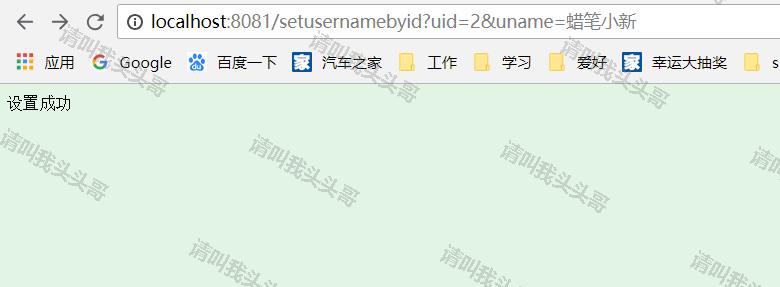
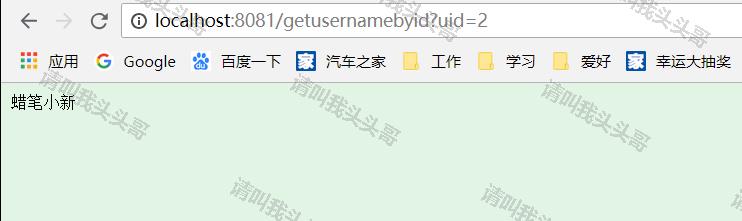
v源码地址
https://github.com/toutouge/javademosecond/tree/master/hellospringboot
作 者:请叫我头头哥
出 处:http://www.cnblogs.com/toutou/
关于作者:专注于基础平台的项目开发。如有问题或建议,请多多赐教!
版权声明:本文版权归作者和博客园共有,欢迎转载,但未经作者同意必须保留此段声明,且在文章页面明显位置给出原文链接。
特此声明:所有评论和私信都会在第一时间回复。也欢迎园子的大大们指正错误,共同进步。或者直接私信我
声援博主:如果您觉得文章对您有帮助,可以点击文章右下角【推荐】一下。您的鼓励是作者坚持原创和持续写作的最大动力!
SpringBoot进阶教程(二十四)整合Redis的更多相关文章
- SpringBoot进阶教程(二十九)整合Redis 发布订阅
SUBSCRIBE, UNSUBSCRIBE 和 PUBLISH 实现了 发布/订阅消息范例,发送者 (publishers) 不用编程就可以向特定的接受者发送消息 (subscribers). Ra ...
- SpringBoot进阶教程(二十八)整合Redis事物
Redis默认情况下,事务支持被禁用,必须通过设置setEnableTransactionSupport(true)为使用中的每个redistplate显式启用.这样做会强制将当前重新连接绑定到触发m ...
- SpringBoot进阶教程(二十六)整合Redis之共享Session
集群现在越来越常见,当我们项目搭建了集群,就会产生session共享问题.因为session是保存在服务器上面的.那么解决这一问题,大致有三个方案,1.通过nginx的负载均衡其中一种ip绑定来实现( ...
- SpringBoot进阶教程(二十五)整合Redis之@Cacheable、@CachePut、@CacheEvict的应用
在上一篇文章(<SpringBoot(二十四)整合Redis>)中,已经实现了Spring Boot对Redis的整合,既然已经讲到Cache了,今天就介绍介绍缓存注解.各家互联网产品现在 ...
- SpringBoot进阶教程(七十四)整合ELK
在上一篇文章<SpringBoot进阶教程(七十三)整合elasticsearch >,已经详细介绍了关于elasticsearch的安装与使用,现在主要来看看关于ELK的定义.安装及使用 ...
- SpringBoot进阶教程(六十四)注解大全
在Spring1.x时代,还没出现注解,需要大量xml配置文件并在内部编写大量bean标签.Java5推出新特性annotation,为spring的更新奠定了基础.从Spring 2.X开始spri ...
- SpringBoot进阶教程(五十九)整合Codis
上一篇博文<详解Codis安装与部署>中,详细介绍了codis的安装与部署,这篇文章主要介绍介绍springboot整合codis.如果之前看过<SpringBoot进阶教程(五十二 ...
- SpringBoot进阶教程(二十二)集成RabbitMQ---MQ实战演练
RabbitMQ是一个在AMQP基础上完成的,可复用的企业消息系统.他遵循Mozilla Public License开源协议.RabbitMQ是流行的开源消息队列系统,用erlang语言开发.Rab ...
- SpringBoot进阶教程(二十七)整合Redis之分布式锁
在之前的一篇文章(<Java分布式锁,搞懂分布式锁实现看这篇文章就对了>),已经介绍过几种java分布式锁,今天来个Redis分布式锁的demo.redis 现在已经成为系统缓存的必备组件 ...
随机推荐
- Linux 安装 MongoDB
一.下载 Linux:CentOS 7.3 64位 MongoDB:3.6.4 安装目录:/usr/local cd /usr/local wget https://fastdl.mongodb.or ...
- 学生管理系统_排序后通过name删除列表里的字典
l = [{'name': 'wangfan', 'age': 18, 'sex': 'nan'}, {'name': 'wangerfan', 'age': 10, 'sex': 'nan'}, { ...
- Spring Boot 发送邮件
需求 最近因为业务的变更,需要对老用户进行发送邮件处理.目前市面上也有很多代发邮件的接口,可以接入.由于量不是特别大,放弃了这个途径.改用我们自己通过 smtp 发送邮件来处理. 技术选择 Java ...
- VMWare的网络
1.VMWare的网络连接方式区别 连接方式 宿主机和虚拟机 虚拟机对外网的访问 外网对虚拟机的访问 Host-Only 可以相互访问 不能直接访问 不能直接访问 NAT 虚拟机可以访问宿主机 可以( ...
- git - 简明指南
助你入门 git 的简明指南,木有高深内容 ;) 作者:罗杰·杜德勒 感谢:@tfnico, @fhd 和 Namics如有纰漏,请在 github 提报问题 安装 下载 git OSX 版 下载 g ...
- sql server 高可用日志传送
一. 日志传送概述 SQL Server使用日志传送,可以自动将主服务器的事务日志备份发送到一个或多个辅助数据库上.可选的监视服务器,记录备份和还原操作的历史记录及状态. 优点 提供灾难恢复解决方案 ...
- backbone的一些认识
body,td { font-family: 微软雅黑; font-size: 10pt } 官网:http://backbonejs.org/ 作者:Jeremy Ashkenas 杰里米·阿什肯纳 ...
- Windows上使用Thunderbird与GPG发送和解密公钥加密的电子邮件
作者:荒原之梦 原文链接:http://zhaokaifeng.com/?p=552 非对称加密的原理: 最先出现的加密方法是对称加密.在对称加密算法中是不区分公钥和私钥的,加密与解密使用的都是同一个 ...
- InnoDB基本特性
Ⅰ.double write 目的:保证数据写入的可靠性 小知识: 什么是partial write? 16k的page只写入了4k,6k,8k,12k就断掉了的情况 corrupt的page就是pa ...
- django从0到1搭建网站
曾经有人说我前端很水,那么在这一系列文章中我打算把前后端融合在一起来做一次网站的全面重构,希望可以把刚刚入行的同学带上正途 请尊重原创,转载请注明来源网站www.shareditor.com以及原 ...