
Nginx+rtmp+ffmpeg 搭建推流服务器
1. 安装nginx服务器
1.1 clone
$ brew tap denji/homebrew-nginx
1.2 安装
$ brew install nginx-full --with-rtmp-module
安装过程过程中可能会报错
➜  ~ brew install nginx-full --with-rtmp-module

==> Installing nginx-full from denji/nginx

Error: Xcode alone is not sufficient on High Sierra.

Install the Command Line Tools:

  xcode-select --install
$ xcode-select --install
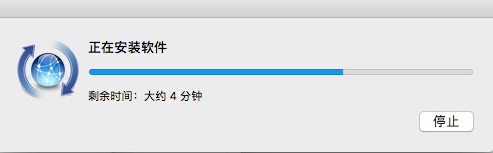
另一个报错信息,重新执行命令 brew install nginx-full --with-rtmp-module吧
curl: (56) LibreSSL SSL_read: SSL_ERROR_SYSCALL, errno 60

Error: An exception occurred within a child process:

  DownloadError: Failed to download resource "rtmp-nginx-module--patch"

Download failed: https://github.com/sergey-dryabzhinsky/nginx-rtmp-module/compare/v1.1.7.10...504b9ee.diff
1.3 启动/停止
$ sudo nginx

$ sudo nginx -s stop
1.4 查看配置信息
$ brew info nginx-full
Docroot is: /usr/local/var/www

The default port has been set in /usr/local/etc/nginx/nginx.conf to 8080 so that

nginx can run without sudo.

nginx will load all files in /usr/local/etc/nginx/servers/.

- Tips -

Run port 80:

 $ sudo chown root:wheel /usr/local/opt/nginx-full/bin/nginx

 $ sudo chmod u+s /usr/local/opt/nginx-full/bin/nginx

Reload config:

 $ nginx -s reload

Reopen Logfile:

 $ nginx -s reopen

Stop process:

 $ nginx -s stop

Waiting on exit process

 $ nginx -s quit

To have launchd start denji/nginx/nginx-full now and restart at login:

  brew services start denji/nginx/nginx-full

Or, if you don't want/need a background service you can just run:

  nginx
2. rtsp
2.1 对nginx添加对rtmp的支持 编辑文档
$ sudo vim /usr/local/etc/nginx/nginx.conf
在文旦最后面加入对rtsp的支持
# 在http节点后面加上rtmp配置:

rtmp {

    server {

        listen 1557;

        application gllive {

            live on;

            record off;

        }

    }

}
保存之后重启服务
$ sudo nginx -s reload
2.2 使用ffmpeg进行推流
$ ffmpeg -re -i 560.mp4 -vcodec libx264 -acodec aac -strict -2 -f flv rtmp://localhost:1557/gllive/room
Nginx+rtmp+ffmpeg 搭建推流服务器的更多相关文章
- centos7+nginx+rtmp+ffmpeg搭建流媒体服务器(保存流目录与http目录不要随意配置,否则有权限问题)
搭建nginx-http-flv-module升级代替rtmp模块,详情:https://github.com/winshining/nginx-http-flv-module/blob/master ...
- (转)Nginx+rtmp+ffmpeg搭建流媒体服务器
(1)下载第三方扩展模块nginx-rtmp-module # mkdir module && cd module //创建一个存放模块的目录 # wget https://githu ...
- centos7+nginx+rtmp+ffmpeg搭建流媒体服务器
1.安装前需要的工具 #net-tool 查本地IP #wget 下载安装包 #unzip 解压zip包 #gcc gcc-c++ perl 编译软件包用 yum install -y net-too ...
- Linux-Nginx+rtmp+ffmpeg搭建流媒体服务器
Nginx+rtmp+ffmpeg搭建流媒体服务器 说明: nginx搭建流媒体服务需要用到 nginx-rtmp-module 模块 具体操作步骤: 安装nginx (1)下载第三方扩展模块ngin ...
- 使用nginx+nginx-rtmp-module+ffmpeg搭建流媒体服务器
参考: 1,使用nginx+nginx-rtmp-module+ffmpeg搭建流媒体服务器笔记(一)http://blog.csdn.net/xdwyyan/article/details/4319 ...
- nginx+nginx-rtmp-module+ffmpeg搭建流媒体服务器
参照网址: [1]http://blog.csdn.net/redstarofsleep/article/details/45092147 [2]HLS介绍:http://www.cnblogs.co ...
- 流媒体技术学习笔记之(一)nginx+nginx-rtmp-module+ffmpeg搭建流媒体服务器
参照网址: [1]http://blog.csdn.net/redstarofsleep/article/details/45092147 [2]HLS介绍:http://www.cnblogs.co ...
- Centos7 搭建Nginx+rtmp+hls直播推流服务器
1 准备工具 使用yum安装git [root~]# yum -y install git 下载nginx-rtmp-module,官方github地址 // 通过git clone 的方式下载到服务 ...
- nginx+nginx-rtmp-module+ffmpeg搭建流媒体服务器[转]
转 :http://redstarofsleep.iteye.com/blog/2123752 Nginx本身是一个非常出色的HTTP服务器,FFMPEG是非常好的音视频解决方案.这两个东西通过一个n ...
随机推荐
- Java基础系列-Collector和Collectors
原创作品,可以转载,但是请标注出处地址:https://www.cnblogs.com/V1haoge/p/10748925.html 一.概述 Collector是专门用来作为Stream的coll ...
- cocos creator主程入门教程(六)—— 消息分发
五邑隐侠,本名关健昌,10年游戏生涯,现隐居五邑.本系列文章以TypeScript为介绍语言. 本篇开始介绍游戏业务架构相关的内容.在游戏业务层,所有需要隔离的系统和模块间通信都可以通过消息分发解耦. ...
- (摘)C#生成随机数的三种方法
随机数的定义为:产生的所有数字毫无关系. 在实际应用中很多地方会用到随机数,比如需要生成唯一的订单号. 在C#中获取随机数有三种方法: 一.Random 类 Random类默认的无参构造函数可以根据当 ...
- log4j日志框架的使用
java.util.logging.Logger——java 中提供的日志类 实际开发 90% 都是使用 log4j 记录日志,而 Log4j 底层就是 java.util.logging.Logge ...
- Tkinter小技巧:如何为窗口右上角的‘x’添加一个自定义的响应函数
不废话,直接上代码 import tkinter as tk from tkinter import messagebox main_window = tk.Tk() main_window.geom ...
- 禁用事件event默认行为
在大多数情况下,为事件处理函数返回false,可以防止默认的事件行为.例如,默认情况下点击一个<a>元素,页面会跳转到该元素href属性指定的页. js中return false作用一般是 ...
- Neo4j之坑
10个月前,我开始用neo4j做cmdb. 初体验下去neo4j很美好. 但是一年中发现一些问题, 仅仅是个人的体验.经供参考 查询语言 如果接触过Neo4j,都会为Cypher的简单和易用感觉到惊叹 ...
- 如何连接别人电脑上的Oracle数据库?
需要一些前提条件: 1.对方的主机能被连接(如在同一局域网内) 2.需要知道对方数据库IP.端口号.服务名 3.需要知道对方提供的管理数据库的用户名及密码 连接方法: 1.在本地的oracle安装目录 ...
- jenkins自动化部署vue
一.nodejs配置 首先加入nodejs插件 在配置里面配置这个插件 这样我们就能在自动构建发布的配置里看到nodejs的编译选项了 二.发布配置 首先新建一个自由风格的项目 然后配置构建保留天数和 ...
- 网络流24题 P1251 餐巾计划问题 拆点
题目描述 一个餐厅在相继的 NN 天里,每天需用的餐巾数不尽相同.假设第 ii 天需要 r_iri块餐巾( i=1,2,...,N).餐厅可以购买新的餐巾,每块餐巾的费用为 pp 分;或者把旧餐巾送 ...