
Android 自定义View及其在布局文件中的使用示例(二)
 转载请注明出处

http://www.cnblogs.com/crashmaker/p/3530213.html

From crash_coder linguowu

linguowu0622@gamil.com
前言:上一篇中(Android 自定义View及其在布局文件中的使用示例)介绍了Android开发中,当系统提供的控件不满足开发者需求的时候,演示如何自定义View,本文将作为上篇的延续,先大体上介绍Android是如何画出界面的,属于前提理论基础,下一篇将重点介绍Android画界面过程中的几个重要方法,如:
1,onMeasure()

2,onLayout()

3,onDraw()
Android绘图的理论基础:
1,我们创建一个Activity来测试上一篇中自定义的View:
a)
CustomViewActivity.java
 public class CustomViewActivity extends Activity{

   @Override

   protected void onCreate(Bundle savedInstanceState) {

     // TODO Auto-generated method stub

     super.onCreate(savedInstanceState);

     setContentView(R.layout.customview_layout);

   }

 }
b)
customview_layout.xml
 <?xml version="1.0" encoding="utf-8"?>

 <LinearLayout xmlns:android="http://schemas.android.com/apk/res/android"

     xmlns:app="http://schemas.android.com/apk/res/com.project.summary"

     android:layout_width="match_parent"

     android:layout_height="match_parent"

     android:background="@color/BgColor"

     android:orientation="vertical" >

     <com.project.summary.customview.CustomView

         android:id="@+id/customView"

         android:layout_width="wrap_content"

         android:layout_height="wrap_content"

         app:colorValue="@color/textRed"

         app:textSize="20sp"

         app:textString="This the Custom View1!!!" />

 </LinearLayout>
c)运行结果:
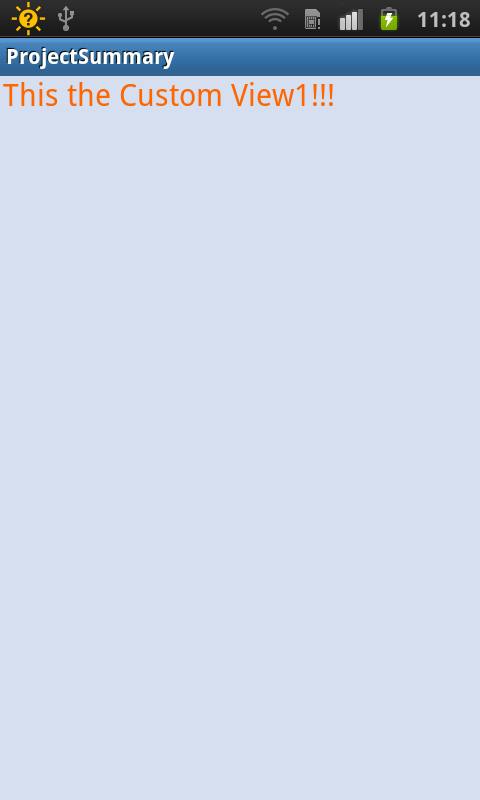
2,Android是如何实现上图的效果的呢?
a)
查看google文档,它给出了如下解释:
When an Activity receives focus, it will be requested to draw its layout. The Android framework will handle the procedure for drawing, but the Activity must provide the root node of its layout hierarchy.
结合上面的例子来说明一下:当进入CustomViewActivity这个Activity时,该Activity获得焦点,此时,该Activity就会向系统请求绘制出它的布局,这个请求通过Android framework来处理,前提是:CustomViewActivity必须提供该布局的根结点,从CustomViewActivity.java看出,该Activity提供了R.layout.customview_layout,而该布局的根结点就是我们布局文件的LinearLayout;
b)
Drawing begins with the root node of the layout. It is requested to measure and draw the layout tree. Drawing is handled by walking the tree and rendering each View that intersects the invalid region. In turn, each ViewGroup is responsible for requesting each of its children to be drawn (with the draw() method) and each View is responsible for drawing itself. Because the tree is traversed in-order, this means that parents will be drawn before (i.e., behind) their children, with siblings drawn in the order they appear in the tree.
从该段文档可以了解到,Android中View的绘制是从布局的根结点开始,开始之前需要遍历整个布局结构,如果是ViewGroup,ViewGroup(如:LinearLayout,RelativeLayout等)需要对它的所有子View进行遍历及绘制,如果只是普通的View(TextView等),那么它只负责对自身进行绘制。
c)
Drawing the layout is a two pass process: a measure pass and a layout pass. The measuring pass is implemented in measure(int, int) and is a top-down traversal of the View tree. Each View pushes dimension specifications down the tree during the recursion. At the end of the measure pass, every View has stored its measurements. The second pass happens in layout(int, int, int, int)and is also top-down. During this pass each parent is responsible for positioning all of its children using the sizes computed in the measure pass.
绘制需要两个过程,一个是measure(测量大小的)过程,一个是layout(计算绘制位置的)过程:
1)measure过程:需要在measure()方法中实现,并且是自顶向下地遍历测量View的树形结构,测量完后,各结点将它的测量规格(specifications)存放在该树形结构中;
2)layout过程:通过调用layout(int,int,int,int)方法,每一个父View负责子View的绘制位置,而子View的最终大小,则是通过measure过程计算出来的大小。
d)
When a View object's measure() method returns, its getMeasuredWidth() and getMeasuredHeight() values must be set, along with those for all of that View object's descendants. A View object's measured width and measured height values must respect the constraints imposed by the View object's parents. This guarantees that at the end of the measure pass, all parents accept all of their children's measurements. A parent View may call measure() more than once on its children. For example, the parent may measure each child once with unspecified dimensions to find out how big they want to be, then call measure() on them again with actual numbers if the sum of all the children's unconstrained sizes is too big or too small (that is, if the children don't agree among themselves as to how much space they each get, the parent will intervene and set the rules on the second pass).
当每个View对象的measure()方法返回时,每个View的测量宽度值跟测量高度值必须已经被设置,且这两个值是与该View对象的父View相互作用下得来的,并不是说每个View对象都能请求到它任意想得到的值,如果这个View对象请求的宽度或者高度不合理,那么,这个View对象的父View,将再次调用measure()方法,再次确定这个View对象的最终宽度和高度,这个将在后面的onMeasure()过程详细说明中解释;
e)
The measure pass uses two classes to communicate dimensions. The ViewGroup.LayoutParams class is used by View objects to tell their parents how they want to be measured and positioned. The base ViewGroup.LayoutParams class just describes how big the View wants to be for both width and height. For each dimension, it can specify one of:

1)an exact number:

2)MATCH_PARENT:
    which means the View wants to be as big as its parent (minus padding)

3)WRAP_CONTENT:
  which means that the View wants to be just big enough to enclose its content (plus padding).

There are subclasses of ViewGroup.LayoutParams for different subclasses of ViewGroup. For example, RelativeLayout has its own subclass of ViewGroup.LayoutParams, which includes the ability to center child View objects horizontally and vertically.

MeasureSpec objects are used to push requirements down the tree from parent to child. A MeasureSpec can be in one of three modes:

UNSPECIFIED: This is used by a parent to determine the desired dimension of a child View. For example, a LinearLayout may call measure() on its child with the height set to UNSPECIFIED and a width of EXACTLY 240 to find out how tall the child View wants to be given a width of 240 pixels.

EXACTLY: This is used by the parent to impose an exact size on the child. The child must use this size, and guarantee that all of its descendants will fit within this size.

AT MOST: This is used by the parent to impose a maximum size on the child. The child must guarantee that it and all of its descendants will fit within this size.
测量过程使用两个类与dimensions(尺寸)进行通讯,这两个类分别是ViewGroup.LayoutParams和MeasureSpec
ViewGroup.LayoutParams:
用来让View对象告诉他的父View,它需要如何被测量和放置在什么位置,然而,ViewGroup.LayoutParams只是单方面地描述它自己想要多大的宽度和高度而已,并不是最终绘制出来的宽度和高度,ViewGroup.LayoutParams可以指定为以下的值:
1)an exact number:
  具体的数值;

2)MATCH_PARENT:
    与父容器一样的大小;

3)WRAP_CONTENT:
  本身该多大就多大,根据该View的内容而定,如TextView中,如果将其宽度设置为wrap_content,那么,它将随着text的长度而改变它的宽度。
MeasureSpec:
该对象封装了父容器传递给子元素的布局要求,它有三种模式:
1)
UNSPECIFIED:父容器对子元素没有要求,子元素可以得到任意值;
2)
EXACTLY:父窗口决定子元素的大小,子元素将被限定在给定的边界里而忽略它本身大小;
3)
AT MOST:子元素至多达到父窗口指定的大小,子元素不能超过这个边界;
Android 自定义View及其在布局文件中的使用示例(二)的更多相关文章
- Android 自定义View及其在布局文件中的使用示例(三):结合Android 4.4.2_r1源码分析onMeasure过程
转载请注明出处 http://www.cnblogs.com/crashmaker/p/3549365.html From crash_coder linguowu linguowu0622@gami ...
- Android 自定义View及其在布局文件中的使用示例
前言: 尽管Android已经为我们提供了一套丰富的控件,如:Button,ImageView,TextView,EditText等众多控件,但是,有时候在项目开发过程中,还是需要开发者自定义一些需要 ...
- Android查缺补漏(View篇)--布局文件中的“@+id”和“@id”有什么区别?
Android布局文件中的"@+id"和"@id"有什么区别? +id表示为控件指定一个id(新增一个id),如: <cn.codingblock.vie ...
- android 布局文件中xmlns:android="http://schemas.android.com/apk/res/android"
http://blog.163.com/benben_long/blog/static/199458243201411394624170/ xmlns:android="http://sch ...
- Android自定义View初步
经过上一篇的介绍,大家对于自定义View一定有了一定的认识,接下来我们就以实现一个图片下显示文字的自定义View来练习一下.废话不多说,下面进入我们的正题,首先看一下我们的思路,1.我们需要通过在va ...
- android自定义view系列:认识activity结构
标签: android 自定义view activity 开发中虽然我们调用Activity的setContentView(R.layout.activity_main)方法显示View视图,但是vi ...
- Android 自定义View修炼-Android中常见的热门标签的流式布局的实现
一.概述:在日常的app使用中,我们会在android 的app中看见 热门标签等自动换行的流式布局,今天,我们就来看看如何 自定义一个类似热门标签那样的流式布局吧(源码下载在下面最后给出哈) 类似的 ...
- Android自定义View研究--View中的原点坐标和XML中布局自定义View时View触摸原点问题
这里只做个汇总~.~独一无二 文章出处:http://blog.csdn.net/djy1992/article/details/9715047 Android自定义View研究--View中的原点坐 ...
- android自定义View&&简单布局&&回调方法
一.内容描述 根据“慕课网”上的教程,实现一个自定义的View,且该View中使用自定义的属性,同时为该自定义的View定义点击事件的回调方法. 二.定义自定义的属性 在res/valus/ 文件夹下 ...
随机推荐
- java 基础题 很基础, 很有趣
都是一些非常非常基础的题,是我最近参加各大IT公司笔试后靠记忆记下来的,经过整理献给与我一样参加各大IT校园招聘的同学们,纯考Java基础功底, 老手们就不用进来了,免得笑话我们这些未出校门的孩纸们, ...
- WCF android调用
http://www.cnblogs.com/cg6811568/archive/2013/05/23/3095119.html
- [Laravel-Swagger]如何在 Laravel 项目中使用 Swagger
如何在 Laravel 项目中使用 Swagger http://swagger.io/getting-started/ 安装依赖 swagger-php composer require zirco ...
- Python札记 -- 文件压缩
在日常工作当中免不了要对文件进行压缩,Python标准库里也提供了实现压缩功能的模块. 一.简单的例子 首先了解一下压缩单个文件在Python中怎么实现.竹风建了个测试文件夹zip_text,里面有t ...
- [Xamarin] 從Xamarin中呼叫 *.jar 的 library - 呼叫篇 (转帖)
上篇文章我們建立一個很簡單的Library : com.example.blackfactory.UtilFunc 現在我們要在Xamarin 中呼叫囉! 首先我們要先成立一個橋接的專案 JARBri ...
- Java多线程9:ThreadLocal源码剖析
ThreadLocal源码剖析 ThreadLocal其实比较简单,因为类里就三个public方法:set(T value).get().remove().先剖析源码清楚地知道ThreadLocal是 ...
- Hadoop日记Day12---MapReduce学习
一.MapReduce简介 1.1MapReduce概述 MapReduce是一种分布式计算模型,由Google提出,主要用于搜索领域,解决海量数据的计算问题.MR由两个阶段组成:Map和Reduce ...
- 自定义样式的select下拉框深入探索
第一个版本: 首先实现自定义select下拉框应该具有的功能,我是选择将原来的select隐藏掉,自己在jquery代码中动态写进去<dl><dd><dt>这样的结 ...
- Android按需添加Google Play服务
以前无论使用何种Google Play服务,都是直接在gradle文件中引用一个库. compile 'com.google.android.gms:play-services:9.4.0' 这直接导 ...
- 基于Css反射形自触发事件,优化你的延时事件
昨天听w3ctech分享时候,说道orientationchange在不同OS和版本中,存在兼容问题,很多时候触发时候都没有渲染结束,开发同学一般都是基于setTimeout一段时间之后,在去执行具体 ...